2009 AUDI S8 cruise control
[x] Cancel search: cruise controlPage 150 of 408
• ..__A_ d_a...: p:,..._ ti_v _ e_ C_ ru_ is_ e_ C_ o_n_ t_ r_ o _ l ___________________________________________ _
If Adaptive Cruise Control is turned off or no speed is set, no vehicle
is shown.
@ Status
• The text OFF appears in white letters when Adaptive Cruise
Control is turned off.
• The text
AVAILABLE appears in white letters when the system is
turned on but no requested speed has been set.
• The text
OVERRIDE appears in white letters when you exceed the
requested speed by accelerating.
• The text
DISTANCE! appears in red letters when the interval to a
vehic le traveling ahead is too short and you also have to slow your
vehicle with the foot brake.
• The text messages
DISTANCE 1, DISTANCE 2, DISTANCE 3 or
DISTANCE 4
appear in green letters to indicate the time interval
(distance) you have set and ACC is active.
© Distance
A pointer (arrow) is shown in this area. When slowly approaching a
moving vehicle detected ahead in your lane of travel, this pointer
represents the distance to that vehicle . When approaching that
vehicle rapidly, it serves as early warning of an impending request
for the driver to assume ful l vehicle control. The pointer moves on a
scale from right to left.
Open road: With an open road and no moving vehicle detected up
ahead, no pointer is shown.
Driving in traffic: If a vehicle traveling up ahead in your lane of travel
is detected, the pointer moves to the center area of the scale. This
area represents the time interval (distance) set. It is shown in
green
to make it easier to see.
Driver intervention prompt: Whenever the selected time interval
(distance) to the vehicle moving up ahead in your lane of travel is
less than the time interval (distance) set, the pointer moves into the
red area of the display. When the pointer reaches the farthest posi
tion on the left, the driver intervention prompt is disp layed to indi -cate that the driver must now assume full vehicle control in order to
prevent
a collision. •
Applies to vehicles : with Adapt ive Cru ise Contro l
Messages
The text messages and symbols shown in this area of the
display are not displayed permanently.
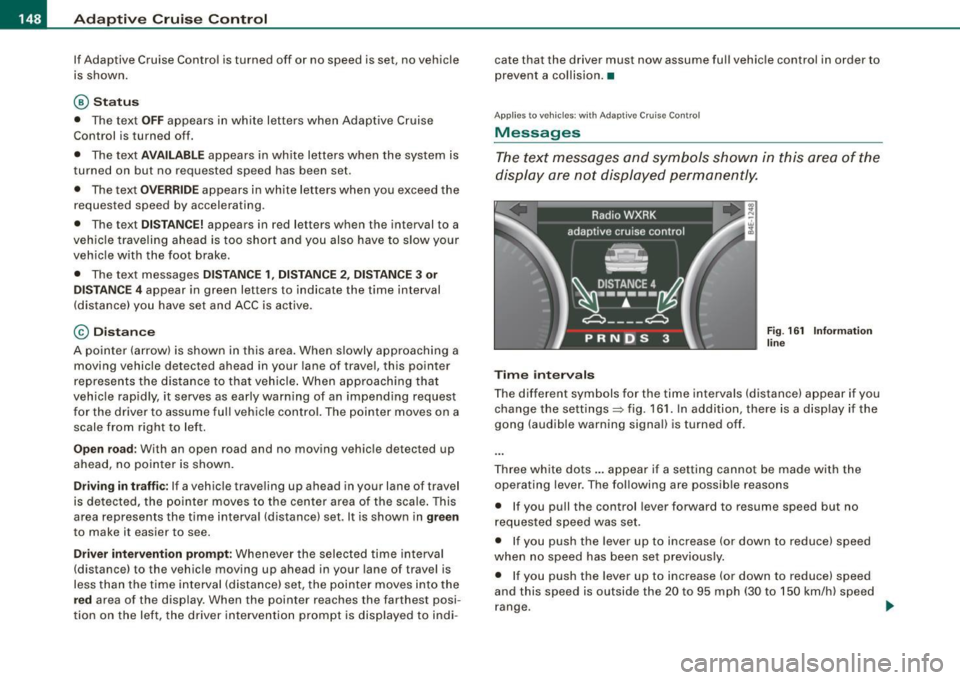
Time intervals
Fig. 161 Information
line
The different symbols for the time intervals (distance) appear if you
change the settings=> fig. 161. In addition, there is a disp lay if the
gong (audible warning signal) is turned off.
Three white dots ... appear if a setting cannot be made with the
operating lever. The following are possible reasons
• If you pull the control lever forward to resume speed but no
requested speed was set.
• If you push the lever up to increase (or down to reduce) speed
when no speed has been set previously.
• If you push the lever up to increase (or down to reduce) speed
and this speed is outside the 20 to 95 mph (30 to 150 km/h) speed
range. .,
Page 151 of 408

_____________________________________________ A_ d_a ...: pc.. t _i_ v _e_ C_ ru_ is_ e_ C_ o_n_ t_ r_ o _ l __ fflJI
A CC no t avai la bl e
The text message ACC n ot av aila bl e appears, for examp le, if the
temperature of the brakes is excessive. Adaptive Cruise Contro l is
temporari ly not available . A warning tone sounds as a reminder.
A CC no t avai lable!
The text message ACC not avai la ble! appears in the event of a
malfunction. Adaptive Cruise Control is turned off. A warning tone
sounds as a rem inder. Have the system inspected by a qua lified
dea lership.
A CC sen sor bloc ked
The text message AC C se nsor b lo cked appears when the ACC
System does not detect any objects over an extended time period .
For the time being, the distance to vehicles up ahead is not being
controlled. The ACC system is not switched off, so increased a lert
ness is required. The following may be reasons for the text message
ACC sensor blocked:
• The ACC sensor is d irty. The ACC system is not reacting, or is not
reacting correctly, to vehicles trave ling ahead .
• It is possible that you are dr iving on a road with very light traffic
without anything at the side of the road (e.g. guard rai ls, traffic
s igns, trees) . As soon as a vehicle is detected by the system aga in,
it returns to its control range and the text message disappears .
The ACC sensor is located in the area under the front license plate .
If there is a loss of operation due to heavy contamination, this area
should cleaned to restore proper operation.
A CC se nso r blo cked !
The text message ACC sen sor blocked! appears when the ACC
System can no longer accurately detect vehic les moving up ahead
in your lane of travel. Adapt ive Cruise Cont rol is tu rned off . A
warning tone a lso sounds as a reminder.
T o decide whether it is necessary to switch off the ACC (ACC sensor
b locked!) o r if it is on ly a temporary condition (ACC sensor blocked),
Controls and equip
ment
the system will also takes into consideration the outside tempera
t ure and/or the windshield wiper operation.
The ACC sensor is dirty or blocked (e.g. leaves, snow).
The ACC sensor is located in the area under the front license plate .
I f the ACC sensor is d irty or blocked, clean the area to restore system
operation .
EPB acti vation
The text message EPB a cti vation appears if emergency braking was
initiated with the Electromechan ical Parking Brake (EPB) . Adaptive
Cruise Control is turned off. A gong sounds as a reminder.
ESP activ at ion
The text message E S P activ ation appears if the Electronic Stabiliza
tion Program (ESP) has intervened to take control in a critica l driving
situation. In this case Adaptive Cruise Control is automatically
turned o ff. A gong sounds as a reminder .
Speed r ange
The text message Sp eed r ange appea rs if the current speed is too
low
to set or to hold the requested speed.
When se tting a desired speed, it must be a t leas t 20 m ph (30 km/h).
At speeds below 17 mph (25 km/h), the cruise control is turned off.
Shift le ver po sition!
The text message Shift lever po sition! appears when the shift se lect
leve r is m oved to position
N. In this position, Adaptive Cruise
Control is not avai lable .•
I • •
Page 152 of 408

• .___A_ d_a_ p:- t_iv _ e_ C_ r_u _is _ e_C_ o_ n_ t_ r_ o_ l --------------------------------------------
Ap plies to vehi cles : wi th Ad aptive Cruise Co nt rol
Settings in MMI
The time interval can be set in MM/.
Fig. 162 MMI display :
Adaptive Cruise
Control
Settings in the Adaptive Cruise Control menu are possible
only with the engine running and the vehicle stationary.
- Press the
I CAR) function button.
- Select
Systems in the CAR menu.
Select
Adaptive Cruise Control. The Adaptive Cruise
Control
menu appears.
Select
Default setting.
- Select the desired distance.
Setting Distance
In the Basic setting menu you can set the distance (time interval)
using
distance 1, distance 2 , distance 3 or distance 4 that Adaptive
Cruise Control is to maintain to a preceding vehicle when in
management mode.
Storing settings
Your individual settings are automatically stored and allocated to
the remote control key being used (remote key personalization). •
System limitations
Applies to vehicles : with Ada ptive C rui se C ont rol
General information
The radar sensor has limits that the driver must know to
be able to use ACC properly.
The Adaptive Cruise Control works within limits that are also related
to radar sensor range and sight distance . In some situations ACC
may react unusually or late from the driver's point of view. There
fore, always be attentive to what is happening around you and
always be ready to intervene, if necessary:
• when driving around curves=>
page 151.
• when vehicles up front are not in line with your vehicle
=>
page 151.
• when other vehicles are changing lanes=> page 151.
• when other vehicles are difficult to detect=> page 152.
• when vehicles up ahead are not moving or obstacles are in your
travel lane=>
page 152.
& WARNING
The radar sensor's function and range can be reduced by rain,
snow and heavy spray. Moving vehicles up ahead may not be
promptly detected or may not be detected at all.
• Always pay careful attention to the traffic situation and be
ready to intervene and be ready to take complete control when
ever necessary. •
Page 153 of 408

Adaptive Crui se Control -
---------------=-------'
Applies to vehicles: with Adaptive Cru ise Co nt rol
When driving around curves
k;;;:;::;;;;~==========; ~
o5
J
Entering a curve
Fig . 1 63 V eh ic le
enterin g a c urve
F ig . 164 Vehicle
l ea ving a curv e
When entering a curve, the Adaptive cruise control may react to a
vehicle in the next lane and apply the brakes in your vehicle
=> fig . 163 . The braking action can be overridden by depressing the
accelerator pedal.
L e avi ng a cu rve
At the end of very long curves, ACC 's predictive lane reading can
cause ACC to react to a nother vehicle in the next lane and app ly the
brakes on your vehicle=> fig. 164 . T he braking action can be over
ridden by depressing the accelera tor pedal. •
Contro ls and eq uip
ment
Ap plies to veh icles: with Adapt ive Crui se Contro l
Vehicles offset to one side
Fig . 165 V ehi cle tra v
e ling ahe ad outsid e th e
d etec tion r ange of the
ra dar se nsor
Vehic les moving up ahead but offset in the lane cannot be detected
by ACC until they are in sensor range. •
Applies to veh ic les: with Adaptive Cruise Co nt ro l
Lane changes by other vehicles
Fig . 166 A veh ic le
c han ges la ne s
Vehicles that cut into your lane a short distance in front of you
cannot be detected by ACC until they are in sensor range. •
Vehicle care I I irechnical data
Page 363 of 408

_________________________________________________ F_ u_ s_ e_s _ a_n _d_ b_ u _ lb_ s _ __._
[ i J Tip s
You are wel l advised to keep a supply of spare fuses in your vehic le.
Fuses with the proper ampere ratings are available at your Audi
dealer. •
Fuse Location , Instrument Panel left
F ig. 295 Fuse pan el
l ayout
Some of the equipment items listed are optiona l or only available on
certain model configurations.
No te t hat th e fo llow ing t able is acc urate a t the time o f goin g to
p re ss an d is s ubject to c hang e. In the e vent of di screpancies, the
lab el on the insi de of th e cover alwa ys ta kes prece dence .
The power windows and the power seats are protected by cir cui t
bre akers,
which automatically reset after a few seconds after the
over load -for example if a window is frozen -has been remedied .
N o. Equipm ent
1 Garage door opener (HomeLinkl 5
Parking assist system 5
3
Parking assist system 5
4
Headlight range control/light control device 10
No .
5
6
7
8
9
10
11
12
13
14
15
16
17
18
19
20
21
22
23
24
25
26
27
28
29
Equipm ent Amps
Instrument c luster
5
Steering column electronics system control 1 0
Diagnostic connector 5
Diagnostic connector/oil level sensor 5
ESP contro l unit/steering angle sensor 5
Instrument cluster 5
Audi lane assist 10
Brake light switch 5
Telephone/cell phone 10
Vacant
Access/start control module
5
RSE system 10
Adaptive Cruise Control 5
Heate d washer jets 5
Vacant
Tire pressure monitoring system*
5
Vacant
Brake light switch
5
Ce ll phone preparation 5
Horn 1 5
Windshield wiper system 40
Vacant
E lectronic Stabilization Program (ESP)
25
Vacant
Switch illumination
1
Vehicle care Do-it-yourself service irechnical data
Page 392 of 408

__ _!_A~ l~p~ h~ a~ b~e~ t:!:ic~a~ l _!:i n~ d~e~ x~ --------------------------------------------
A
Accessories . . . . . . . . . . . . . . . . . . . . . . . . 384
Adaptive Air Suspension .... ... .. .... 188
automatic mode ...... .... ....... 189
Description ... ... ... ..... .... ... 188
dynamic mode ................... 189
Jacking mode when changing a flat tire .
191
lift mode ...... ..... .... .... .... . 189
Setting the driving modes .. .... ... 191
Sport Chassis Controls . . . . . . . . . . . . 190
standard mode ... .... .... .... ... 189
Trailer towing mode ... .... .... ... 192
Warning/indicator lights ........ 20, 21
Adaptive Cruise Control . ... .. .... ... .
Changing speed .... .... .... .... .
Driver information .............. .
Driving in traffic .. .... .... ..... . .
Error messages ................. .
Open road ......... ............ .
Override ........ ............... .
Request for driver to assume control
Save speed ..................... .
Setting distance .. .... .... .... .. .
Setting time interval . ... .. .... ... .
Settings . ... .... .... .... ....... .
Specia l driving situations . ....... . 139
142
146
140
148
140
140
140
142
144
144
150
150
Status messages . . . . . . . . . . . . . . . . . 148
Switching on and off ... .. .... ... . 141
System limitations .... ....... ... .
Temporarily turning off ....... ... .
warning/indicator lights ... .... ... . 150
143
146 Adaptive Light
.......... .... .... .... . 72 System error message . ...... .... . 186
defective .. .... .... .... ..... .. .... 36 Towing hitch .. .... .... ...... .... 183
Adding Air conditioning
Engine coolant ... ....... .... .... .
318
See Climate controls 114
Engine oil . .... .... .... ... .... .. .
314 Airbag system .... .... .... ..... . 220, 240
Windshield washer fluid .... .... .. .
325 Advanced Airbag System ...... .... 224
Additional accessories .......... .. ... 384
Additives Engine oil . .... ...... ... .. .... ... 314
Adjustable steering col lumn .. ..... ... 128
Adjusting Front seats .... ...... .... .... .... . 86
Instrument cluster i llumination . .... . 15
Steering column . ........... .... .
128
Advanced Parking System with rear view camera
Adjusting the chimes -option 1 . ... 183
Adjusting the chimes -option 2 ... . 184
front and back with visual display and
rear -view camera . . . . . . . . . . . . . . . 173
General information ......... ..... 173
Notes on distance irnformation ... .. 182
Parking next to obstacles . . . . . . . . . . 181
Rear -view camera -parking mode 1 . 178
Rear -view camera -parking mode 2 . 179
Rear -view camera (Rear View) ...... 176
Rear -view camera coverage area . . . . 177
Rear -view camera tips . . . . . . . . . . . . 186
Special parking situations .. .... ... 181
Switching the rear-view camera on and off ............................ 185
sw itching the visual display on and off
185 Advanced Airbag System components .
..
227
Care .. .... .... .... .... ... .... ... 234
Child restraints 247
Children ... .... .... ... .......... 246
Components (front airbags) . .... ... 227
Danger of fitting a child seat on the front passenger seat ............... .. 222
Disposal ............ .. ...... .... 234
Front airbags .. ............ .. 224, 225
How do the front airbags work? . ... 229
How many airbags does my vehicle have? 227
How the Advanced Airbag System compo
nents work together . . . . . . . . . . . . . 228
Important safety instructions on the knee
airbag system .................. 238
Important things to know .......... 220
Indicator light .... ......... ...... 231
Knee airbags 236
Monitoring .. .... .... .... .... .... 231
PASSENGER AIR BAG OFF light ... .. 232
Repairs ..... .... .... .. .. . ... ... .
Safety instructions .. .... .... .... .
Side airbags . .... .... .... .... ... . 234
233
239
Side curtain airbags .... ... .... ... 242
Warning/indicator lights ........... . 19
Page 395 of 408

Alphab eti ca l ind ex I'll ____________________________ ...:.....=.!:..:....:.=.::::...::...::.:....::....:.: __ _
ECON operation . . . . . . . . . . . . . . . . . . 126
Fan .. ... ... ... .. .... ....... .... . 120
Heated seats , front .... ... ..... ... 118
in the rear .... ........... ..... ... 125
Key coded setting .... ....... .... . 114
Rear c limate controls .. ...... .... . 125
Rear seat operation . ... .. .... .... . 127
Recircu lation mode (automa tic) ... .. 126
Recommended settings ...... .... . 11 4
Residual heat . ... .... .... ...... .. 117
Setting the temperature ....... .... 117
SETUP ... ..... .. .... ....... .... . 126
Solar blower fan/solar roof .... .... . 123
Solar operation ... ... .... ....... . 127
Switching on and off .............. 117
Synchronization .. ................ 127
Using climate control economical ly . 123
W indshield defogger/defroster . .... 123
Clock ...... ... .. ........ .... .... ... . 13
Closing Power sunroo f .... ... .... .... .... . 66
Coat hooks ................ .... .... . 112
Co ld tire inflation pressure .. ...... ... 330
Compa rtments in the door trim panels . 111
Compartments in the rear doors ....... 111
Compliance ... .. .... .... ... .... .... 385
Consumer Information ....... .... 209, 382
Contacting NHTSA .................. 209
Conven ience key ... .. .... ... .... .... . 58
Driver's messages .. ...... ...... .. 133
Locking the veh icle . ...... ... .... .. 60
ST ART button .. ...... .... ... .... . 131
Starting the engine .... ...... .... . 131
Controls and equip
ment Safety first
STOP button
... .. ....... ... .... .. 1 32 Data recorder .. ..... ..... ...... ..... 2 70
Stopping the engine .............. 132
Date display ...... .... ... .... .... .... 1 3
Switching on the ignition .. .... .... 131
Daytime running lights ........... .. 69, 70
Un lock ing the vehic le .............. 59
Declaration of compliance
Convenience open feature Adaptive Cruise Control ....... .... 385
Windows ......................... 64
Audi side assist .... ... .... ....... 385
Convertib le chi ld safety seat ...... .... 251
Cell phone package ............... 385
How do I prope rly i nsta ll a conve rtib le
Convenience key ...... ..... .. .... 385
chi ld safety seat in my vehic le? ... . 251
Electronic immobilizer ............ 385
Safety instructions ................ 251
Homelink® universal remote control 385
Convertible locking retractor Remote control key .. ........ .... . 385
Activating ....................... 257
Tire pressure m onito rin g sys te m . ... 385
Deactivating . ........... ........ . 258
def
Using to secure a chi ld safety seat . 255,
What does this mean when it appears in
257 the trip odomete r disp lay? ... .. .... 1 4
Coolant Defect ive light bu lb warning .. ........ . 26
See Engine coo lant ............... 316 Defrosting/defogging the windows .... 120
Cruise control Defrosting/def oggi ng windows ....... . 122
Changing speed .................. 138
P resetting your speed . ............ 138
Switching off .................... 138
Switching on ......... ... ........ 137
Warning/indicator lights ....... ..... 21 D
etermining correct load limit ......... 336
Digita l clock .. ...... .... .... .... ..... 13
Digita l speedometer ..... ............. 25
Dimensions .. .... .... ............. . 378
See also Adaptive Cruise Control . ... 139 Dipstick
Cruising range ... ..... ... .... ....... . 38 Readi
ng the dipstick proper ly ..... . 313
Cupholder ...... ..... .. .... .... ... . 105
Cen ter c onso le .. ...... ..... .. .... 1 08 Distance control system
See Adaptive Cruise Contro
l ... ..... 139
Doors
D
Mechanica l chi ld safety lock ......... 57
Power child safety lock ............. 58
Dam ping Power side door closer ...
... .. ..... 53
See Adaptive Air Suspension ....... 188
Driver
Data ........ .... ..... ... ..... ...... 380
See Seating position ........ ...... 202
Vehicle operation Vehicle care Do-it-yourself service Technical data
Page 402 of 408

___ A---" lp_h_ a_b_ e_ t_ i_ c _ a_ l_ in_d_ e_x ______________________________________________ _
Safety guidelines
Seat adjustment . . . . . . . . . . . . . . . . . . 86
Safety instructions Engine compartment ..... .... .... 309
for a booster seat . . . . . . . . . . . . . . . . 253
for side curtain airbags .... ....... 243
for using a conver tible child safety sea t .
251
for using an infant seat .. ......... 250
for using child safety seats ........ 248
forusingsafetybe lts ... ... .... ... 214
Monitoring the Advanced Airbag System 233
Safety lock Ignition key, automatic transmission 130
Seat adjustment Adjusting the seatback ............. 89
Driver 's seat . . . . . . . . . . . . . . . . . . . . . . 86
Driver's seat memory . . . . . . . . . . . . . . 94
Fron t passenger's seat . . . . . . . . . . . . . 87
Front seats . . . . . . . . . . . . . . . . . . . . . . . 86
Head restraints ............. .. 91,205
Lumbar support .. ............... . 90
Power seat . . . . . . . . . . . . . . . . . . . . . . . 87
Safety guidelines .. ... .... ..... ... 86
Seat belts Why YOU MUST wear them ..... ... 211
Seat memory . . . . . . . . . . . . . . . . . . . . . . . . 94
Seat position Incorrect seat position . . . . . . . . . . . . 205
Seating capacity . .... .... .... ... .... 211 Seating position
Driver . ... .... ...... ...... ...... 202
Front passenger .. .... .... .... ... 203
How to adjust the front seats .. .... 203
Occupants .... .... .... ... ....... 202
Rear passengers
Seats Number of seats 204
211
Selective unlock feature .... ....... ... 52
Selector lever . . . . . . . . . . . . . . . . . . . . . . 167
Service and disposal Safety b elt pret ensioner . ... .... ... 219
Service interval display . . . . . . . . . . . . . . . 27
Service position Windshield wipers . .... .... ....... 82
Servotronic Power steering ...... ...... .... ..
2 7 5
Shift buttons . . . . . . . . . . . . . . . . . . . . . . . 171
Ship Transporting your vehicle . ........ 371
Side airbags Description .... .... .... .... .... .. 239
How they work . . . . . . . . . . . . . . . . . . . 240
Side assist Activating and deactivating ........ 156
Description .......... ...... .... .. 156
Informationa l and alert stage signals 158
Messages in instrument cluster display .. 163
MMI settings ............ .. .. .... 162
Operation . . . . . . . . . . . . . . . . . . . . . . . 158
Safety tips . . . . . . . . . . . . . . . . . . . . . . 164
Sensor detection area . . . . . . . . . . . . 158 Side curtain airbags .
... .. .... .... .. . 242
Description ..... ... .... .... .... .. 242
How they work . . . . . . . . . . . . . . . . . . . 243
Safety instructions . ... .... .... ... 243
Side marker lights .. ....... .... .... ... 69
Sk i sack . . . . . . . . . . . . . . . . . . . . . . . . . . . 102
Snow chains ....... .... ....... .. ... 344
Sockets ........................ 107, 108
Solar blower fan/solar roof . .... ..... . 123
Sound system display Driver information disp lay . .... .... . 25
Spare wheel . . . . . . . . . . . . . . . . . . . . . . . . 352
Speed control sys tem
See Adaptive Cruise Control ...... .. 139
Speed rating letter code .. .... .... ... 340
Speed warning system ........ .... .. . . 37
Speedometer .. .... .... ... ...... ..... 14
Sport Suspension
See Adaptive Air Suspension . .... .. 188
Starting off with a trailer ... ... .... ... 136
Starting the engine .... .... ... ... 129,130
What should I do if the engine does not
start? ... .... .... .... ...... ... . 130
Steering . .... .... .... .... ... .... ... 128
Adjusting s teering column .. .... ... 128
Easy entry feature . .... .... .... ... 129
Locking the steering ....... ....... 129
Malfunction .. .. .. .... .... .... .. . . 33
Steering wheel heating .... .... ... ... 119
Steps for determining correct load limit 336
Stopping the engine .... ... .... .... .. 131