2009 AUDI S6 remote start
[x] Cancel search: remote startPage 122 of 398

• .___O_ n_ t_ h_ e_ r_ o_ a_d ____________________________________________________ _
& WARNING
• Never turn off the engine until the vehicle has come to a
complete stop.
• The brake booster and servotronic only work when the engine
is running. With the ignition turned off, you have to apply more
force when steering or braking. Since you cannot steer and stop
normally, this can lead to accidents and serious injuries.
• For safety reasons, you should always park your vehicle with
the selector lever in P. Otherwise, the vehicle could inadvertently roll away.
• After the engine has been switched off, the radiator fan can
continue to run for up to 10 minutes -even with the ignition
switched off. It can also switch on again after some time if the
coolant temperature rises as the result of a heat buildup or if the
engine is hot and the engine compartment is additionally heated
by the sun's rays.
0 Note
If the engine has been under heavy load for an extended period,
heat builds up in the engine compartment after the engine is
switched off -there is a risk of damaging the engine. Allow the
engine to run at idle for about 2 minutes before switching it off. •
Applies to vehicles: w ith Conven ience key
Driver messages in the instrument cluster
display
If a function is not present, a driver message appears.
No key identified
This message appears when the [STAR T) button is pressed if there
is no master key inside the vehicle or if the system does not recog
nize it . For example, the master key cannot be recognized if it is
covered by an object (e.g. aluminum brief case) which
screens the radio signal.
.Electronic devices such as cell phones can also inter
fere with the radio signal.
Press brake pedal to start engine
This message appears if you press the [ START) button to start the
engine and do not depress the brake pedal. The engine can only be
started if the brake pedal is depressed.
Engage N or P to start engine
This message appears when the engine is started if the selector
lever for the automatic transmission is not in the P or N position.
The engine can only be started with the selector in these positions.
? Key not in vehicle
This message appears along with the symbol if the master key is
removed from the vehicle with the engine running. It is intended to
remind you (e.g. when changing drivers) not to continue the journey
without the master key.
If the master key is no longer in the vehicle, you cannot switch off
the ignition after stopping the engine and you also cannot start the engine again. Moreover, you cannot lock the vehicle from the
outside with the key.
Shift to P, otherwise vehicle can roll away. Doors do not lock if lever
is not in
P.
This message appears for safety reasons along with a warning
buzzer if the selector lever for the automatic transmission is not in
the P position when the ignition is switched off with the
[STOP)
button and the driver's door is opened. Move the selector lever to
the P position, otherwise the vehicle is not secured against rolling
away. You also cannot lock the vehicle using the locking button on
the door handle or using the remote key.
To engage steering lock, press and hold STOP button
This message appears for safety reasons if the engine and the igni
tion have been switched off by pressing the [
STOP) button once, .,,_
Page 190 of 398

• .___H_ o_ m _ e _L_i _ n _k _® ____________________________________________________ _
Homelink®
Universal remote control
Applies to vehic les: w ith Home link ® universal remote cont ro l
General information
The HomeLink® fe ature c an learn th e up to th re e r adio
fre que nc y c odes for m ost cu rrent t ransmi tters us ed for
operating gar age do ors, es tate gates , home o r out doo r
lighti ng sy stems, an d other de vice s.
Yo u must first pro gram t he Hom elink ® trans mitter b efor e you c an
use the system=>
page 189, "Pro gramm ing th e Home link® tra ns
mit ter".
In o rd er to pro gram t he Homelink® tra nsmitter fo r dev ices utiliz ing
ro lling code, a second person on a ladder who can safe ly reach the
ga rag e door o pener motor is reco m me nd ed. It is also necessa ry to
l ocate the "learn" button on yo ur garage do or opener moto r. R efer
to t he op era tin g instr uctions for the open er, as the loc ation and
co lor of th is button may vary by manufacturer .
Y o u c an still u se the o rigi na l r emo te c ontrol for th e dev ice at a ny
tim e.
& WARNING
• Never use the Homelinkl1JI transmitter with any garage door
opener that does have not the safety stop and reverse feature as
required by federal safety standards . This includes any garage
door opener model manufactured before April 1, 1982.
• A garage door opener which cannot detect an object , signaling
the door to stop and reverse does not meet current federal safety standards . Using a garage door opener without these features
increases risk of serious injury or death .
& WARNING (continued)
• For safety reasons never release the parking brake or start the
engine while anyone is standing in front of the vehicle.
• A garage door or an estate gate may sometimes be set in
motion when the Homelink ® remote control is being
programmed . If the device is repeatedly activated , this can over
strain motor and damage its electrical components -an over
heated motor is a fire hazard!
• To avoid possible injuries or property damage , please always
make absolutely certain that no persons or objects are located in
the range of motion of any equipment being operated.
[ i ] Tips
• If y ou wou ld l ik e mor e inf ormation o n Hom elink®, wh ere to
purchase the Homelink ® compatib le products, or wou ld li ke to
pu rchase th e Home link® Ho m e Lightin g Pack age, please call toll
fre e: 1 -8 0 0 -355 -3515.
• For Declara tion of Comp lia nc e to Un ited St ates FCC and Indust ry
C anada regulations=>
page 3 75. •
Page 191 of 398
___________________________________________________ H_ o_m _ e_ L_ i_ n _k_ @_R _ __.11111
Ap plies to vehic les: wit h Hom elin k® un iversal remo te contro l
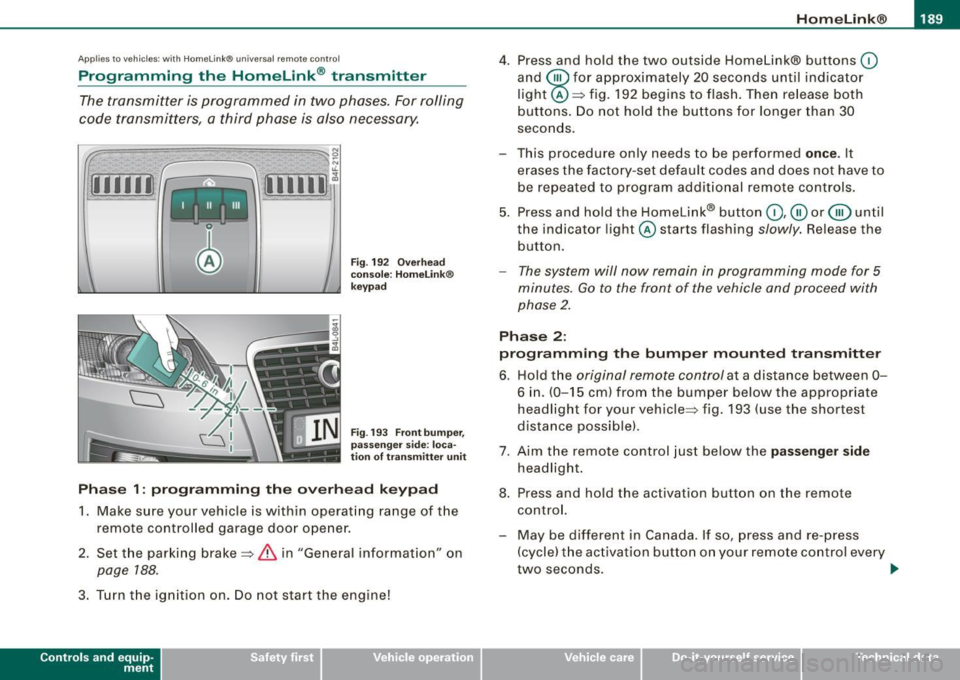
Programming the Homelink ® transmitter
The transmitter is programmed in two phases. For rolling
code transmitters, a third phase is also necessary.
[i Ii It~
Fig . 192 Overhead
console: HomeLink®
keypad
Fig . 193 Front bumper,
passenger side : loca
tion of transmitter unit
Phase 1: programming the overhead keypad
1. Make sure your vehicle is with in operating range of the
remote controlled garage door opener.
2. Set the parking brake=>
& in "General information " on
page 188 .
3. Turn the ignition on . Do not start the engine!
Con tro ls and eq uip
ment
4. Press and hold the two outside Homelink® buttons (0
and @for approximately 20 seconds until indicator
light @=> fig. 192 begins to flash. Then release both
buttons. Do not hold the buttons for longer than 30
seconds.
This procedure only needs to be performed
once. It
erases the factory-set default codes and does not have to be repeated to program additional remote controls.
5. Press and hold the Homelink® button
(0 ,@ or @ until
the indicator l ight @starts flashing
slowly. Release the
button.
- The system will now remain in programming mode for 5
minutes.
Go to the front of the vehicle and proceed with
phase 2.
Phase 2:
programming the bumper mounted transmitter
6. Hold the original remote control at a distance between 0-
6 in. (0-15 cm ) from the bumper below the appropriate
headlight for your vehicle=> fig . 193 (use the shortest
distance possible) .
7. Aim the remote control just below the
passenger side
headlight.
8. Press and hold the activation button on the remote control.
- May be different in Canada. If so, press and re-press (cycle) the activation button on your remote control every
two seconds. .,_
Vehicle care I I irechnical data
Page 271 of 398

Energy management
Starting ability is optimized
Energy management controls the distribution of electrical
energy and thus optimizes the availability of electrical
energy for starting the engine.
If a vehicle with a conventional energy system is not driven for a
long period of time, the battery is discharged by idling current
consumers (e.g. immobilizer). In certain circumstances it can resu lt
in there being insufficient energy available to start the engine .
Intelligent energy management in your vehicle handles the distribu
tion of electrical energy . Starting ability is markedly improved and
the life of the battery is extended.
Basical ly, energy management consists of
battery di agn osis, idling
current mana gement
and dynami c en ergy management .
Batter y diagn osis
Battery diagnosis continuously deter min es the state of the battery.
Sensors determine battery vo ltage, battery current and battery
temperature . This determines the cu rrent state of charge and the
power of the battery .
Idling c urrent man ag em en t
Idling current management reduces energy consumption while the
vehicle is standing. With the ign it ion switched off, it controls the
energy supply to the various electrical components. Data from
battery diagnos is is considered .
Depending on the battery's state of charge, individual consumers
are gradually turned off to prevent excessive discharge of the
battery and thus maintain starting capability.
Dynamic energ y managem ent
While the vehic le is being driven, dynamic energy management
distributes the energy gene rated acco rding to the needs of the indi -
Controls and equip
ment Safety first Vehicle operation
In
te llig ent tec hn olo gy
vidual components . It regulates consumption, so that more e lec
trical energy is not being used than is being ge nerated and ensures
an optimal state of charge for the battery.
[ i ] Tips
• But even energy management cannot negate the limits of
physics. Consider that the power and life of a battery are limited .
• I f starting ability is threatened, you are informed by a warning
=> page 270, "Drive r notifica tion i n the instrument cluster
display" .•
What you should know
The highes t pri ority is given to main tain ing starting capa
bility.
The battery is severe ly taxed in short-distance driving, in city traffic
and during the co ld time of year. Abundant electrical energy is
required, but only a little is generated. It is also critical if the engine
is not running and elect rica l components are turned on. In this
instance energy is being consumed but none is being generated .
I t is in precisely these situations that you will notice energy manage
ment active ly regula ting the distr ibut ion of energy.
Vehicle stands fo r an extended period
If you do not drive your vehicle over a period of several days or
weeks, electrical components are gradually cut back or switched off.
This reduces energy consumption and maintains starting capability
over a longer period.
Take into considerat ion that when you un lock your veh icle, some
convenience functions, such as the remote key or power seat
adjustment, may not be availab le . T he conven ience functions will be
available again when you turn on the ignition and start the engine.
Vehicle care Do-it-yourself service Technical data
Page 314 of 398

-Checking
and filling
---=---------------
checked by a service facility . The electrolyte level should also be
checked each time the battery is charged
~ page 314.
Have the battery checked when you take your vehicle in for service.
You are well advised to replace a battery that is older than 5 years.
With certain types of airbag deployment, the battery is discon nected from the vehicle electrical system for safety reasons~
& in
"Repair, care and disposal of the airbags" on
page 229.
Disconnecting the battery terminals
Some vehicle functions (power window regulators, for example) are
lost if the battery terminals are disconnected . These functions have
to be relearned after the battery terminals are connected again . To
prevent this, the battery should only be disconnected from the
vehicle electrical system when absolutely necessary for repairs.
Vehicles not driven for long periods
If you do not drive your vehicle over a period of several days or
weeks, electrical components are gradually cut back or switched off.
This reduces energy consumption and maintains starting capability
over a longer period
~ page 269.
Take into consideration that when you unlock your vehicle, some
convenience functions , such as the master key remote function or
power seat adjustment, may not be available. The convenience
functions will be available again when you turn on the ignition and
start the engine.
Winter operation
During the winter months, battery capacity tends to decrease as
temperatures drop . This is because more power is also consumed
while starting, and the headlights, rear window defogger, etc., are
used more often.
Avoid unnecessary power consumption, particularly in city traffic or
when traveling only short distances. Let your authorized Audi dealer
check the capacity of the vehicle battery before winter sets in
~ page 314. A well charged battery will not only prevent starting
problems when the weather is cold , but will also last longer .
[ i] Tips
If your vehicle is left standing for several weeks at extremely low
temperatures, the vehicle battery should be removed and stored
where it will not freeze. This will prevent it from being damaged and
having to be replaced. •
Working on the battery
Be especially careful when working on or near the battery.
Fig. 244 Luggage
compartment : Battery
The battery is located in the luggage compartment under
the floor. Before you check anything in the luggage
compartment,
read and heed all WARNINGS=>& .
Lift the floor by the plastic handle.
Hook the handle into the luggage compartment weather
strip.
Always heed the safety warnings, when working on the vehicle
battery or the vehicle electrical system to prevent injury.
Page 377 of 398
Consumer Information -
----------------
& WARNIN G (continu ed )
ment zone s. Do ing so will in creas e the risk of injur y if airb ags are
trig ger ed in an accident!
• Before you che ck anyth ing in the engine comp artme nt, a lwa ys
re ad and heed all WARN IN GS
=> page 293.
0 Note
• If items other than ge nuine Audi spare parts, add -on equ ipment
and accessory items are used or if repair work is not performed
according to specified methods, this can resu lt in severe damage to
your vehicle's engine and body (such as corrosion) and adverse ly
affect your vehicle's war ranty.
• If emergency repairs must be performed elsewhere, have the
vehic le examined by an authorized Audi dea lership as soon as
possible.
• The manufacturer cannot be held liable for damage which occurs
due to failure to comply with these stipu lations. •
Technical Modifications
Our guidelines must be complied with when technical
modifications ore made.
A lways consult an authorized Audi dealer before starting work on
any modifications.
T his will he lp ensure that vehicle function, performance and safety
are not impaired =>& .
Attempting to work on electronic components and the software used with them can cause malfunctions . Because of the way elec
tronic components are interconnected with each other, such malfunctions can also have an adverse affect on other systems that
are not direct ly involved. This means that you risk both a substantial
reduction in the operational safety of your vehicle and an increased
wear of vehicle parts=>& .
Controls and equip
ment Safety first Vehicle operation
Authorized Audi dealers wi
ll perform this work in a professional and
competent manner or, in special cases, refer you to a pro fessio nal
company that specializes in such modifications .
& WARNING
Improper repair s and modifi cations c an change the way vehicle
s y stem s wo rk and cau se seriou s per sonal injury.
0 Note
If emergency repairs must be performed e lsewhere, have the
vehic le examined by an authorized Audi dea lership as soon as
possible. •
Declaration of Compliance,
Telecommunications and Electronic
Systems
Radio Frequency Devices and Radiocommunication
Equipment User Manual No tic e.
The manufacturer is not responsible for any rad io or TV in terference
caused by unauthorized modifications to this equipment.
De vice s
The following devices each comp ly with FCC Part 15. 19, FCC Pa rt
15.21 and RSS -Gen Issue 1 :
• Adaptive Cruise Contro l
• Convenience key
• Audi side assist
• Cell phone package
• Electronic immobi li z er
• Homelink® universal remote contro l
Vehicle care Do-it-yourself service Tec hn ica l da ta
Page 386 of 398

___ A_l.:,. p _h_ a_ b_e _t _ic _ a_l _in _ d_e _x ____________________________________________ _
Doors
Power child safety lock .... .... .... . 51
Power side door closer . . . . . . . . . . . . . 48
Driver information system .... .... .... . 23
Digital speedometer .. ............ . 25
Driver information messages .. .... . 28
Open door or rear lid warning ... .... 25
Outside temperature disp lay .. . .... . 24
Sound system display . .... ...... .. 24
Driver seat
See Seating position . . . . . . . . . . . . . . 196
Driver's seat . . . . . . . . . . . . . . . . . . . . . . . . 81
Driver's seat memory . . . . . . . . . . . . . . . . . 84
Activating remote control key .. ... .. 85
Recalling a seat position .. .... .... . 84
Storing a seat position ..... ... .... . 84
Driving messages .... .... .... ... .... . 28
Driving safely .. .............. ...... 194
Driving time ........ .... ... ........ .. 38
Duplicate key ........................ 41
DVD player for navigation system . . . . . . 91
Dynamic shift program ... .... ... .... 165
E
Easy entry feature 116
Electric seat adjustment
See Power seat . . . . . . . . . . . . . . . . . . . 81
Electromechanica l parking brake
Emergency braking .... ....... .... 123
Malfunction ...... .... .... ...... . 123
Operation . . . . . . . . . . . . . . . . . . . . . . . 121
Parking . . . . . . . . . . . . . . . . . . . . . . . . . 122 Releasing and app
lying ... .. .. .... 121
Starting off with a trailer .. ........ 123
Warning/indicator lights ... .... .... 21
Electronic differential lock (EDU How the system works . .... ....... 263
Warning/indicator lights ....... .... 21
Electronic immobilizer .......... ... 14, 44
Electronic power control (EPC) warning/indicator light ... .... . 18
Electronic speed limiter ..... ....... ... 27
Electronic stabi lization program (ESP)
How the system works ............ 262
Warning/indicator lights ....... .... 18
Emergency braking . . . . . . . . . . . . . . . . . 123
Emergency closing Power sunroof . ... ..... ... .... . 60, 61
Emergency flasher . . . . . . . . . . . . . . . . . . . 67
Warning/indicator lights ........... 19
Emergency locking of doors .. ........ . 50
Emergency starting ........ .... ... .. 357
Emergency towing ... .... .... .... ... 360
Energy management . ....... ... .. ... 269
Battery power . . . . . . . . . . . . . . . . . . . 270
Driver notification 270
Engine Compartment . .... .... .... .... .. 302
Coolant ....... .... ... .... ....... 307
Hood ..... .... .... .... ........ .. 300
Starting .. .... ... .... .... ... 116,117
Starting with jumper cables ... .... 357
Stopping .. .... .... .... .... ...... 118 Engine compartment
Safety instructions . ....... .... ... 301
Working the engine compartment .. 301
Engine coolant system .. ...... ....... 307
Adding coolant .... ....... ....... 309
Checking coo lant level . .... .... ... 308
Checking the engine coo lant level .. 308
Malfunction .. .. .. .. .. .... .... .. . . 31
Radiator fan . .... .... .... .... .... 310
Engine coolant temperature
Temperature gauge ....... .... .... 12
Engine data ...... .... .... ...... .... 369
Engine hood Closing .... .. ... ..... ....... .... 301
How to release the hood . . . . . . . . . . 300
Engine oi l .......................... 303
Adding ... .... .... .... .... ...... 306
Additives .. .... .... .... ... .... ... 306
Changing .. .... .... ... ........ .. 306
Checking the engine oil level ....... 305
Indications and conditions requiring extra
checking .. ...... .... ...... .... 305
Oil consumption . ...... .... .... .. 304
Oil grades .. .... .... ... .... ...... 303
Recommended oil check intervals .. 305
Specification and viscosity .. ..... .. 303
Engine oi l leve l ... .... .... .... ...... . 35
Engine oil pressure
Malfunction ....... ....... ........ 32
Engine oil sensor defective .... .... ... . 35
Engine speed limitation ... .... .... .... 36
Page 388 of 398

llffl __ A_l.:,. p _h_ a_ b_e _t _ic _ a_l _in _ d_e _x ____________________________________________ _
Glove compartment -emergency unlocking .
100
Gross Vehic le Weight Rating (GVWRl ... 367
H
Head restraints . . . . . . . . . . . . . . . . . . . . . 199
Adjusting . .... .... ....... ...... . 199
Front seats . . . . . . . . . . . . . . . . . . . . . . . 86
Insta llation and remova l .... ....... 87
Rear seats . . . . . . . . . . . . . . . . . . . . . . . 87
Headlight washer reservoir ........... 316
Headlights . . . . . . . . . . . . . . . . . . . . . . . . . . 63
Adaptive Light .... .... .... ...... .. 66
Defective . . . . . . . . . . . . . . . . . . . . . . . . 25
Front fog lights . . . . . . . . . . . . . . . . . . . 65
Headlight range control defective .. . 35
Switching off ..................... 63
Switching on . .................. .. 63
Washer system . . . . . . . . . . . . . . . . . . . 73
Xenon headlights . ...... ... .. .... . 63
Heat ed outside mirrors . . . . . . . . . . . . . . . 76
Heated seats
Front ............. .... ........ .. 110
Rear ..................... ...... 110
Heated steering wheel . . . . . . . . . . . . . . . 111
Heat ed washer jets
Wiper and washer system . . . . . . . . . . 71
Heavy clothing and safety belts .. .... . 208
High beam . . . . . . . . . . . . . . . . . . . . . . . 63, 67
Warning/indicator lights ........... 20
High voltage warning label . ........ .. 366
Homelink® universal remote control .. 188 Hood
Opening 300 Interior
lights ..... ... . .... .. . .. .. .... 68
Rear .. ..... ....... .... ... .... . 68, 69
Release lever .. ...... .... ..... ... 300 Intermittent wiping
Horn .. ...... ............ ....... .... 11
How many a irbags does my vehicle have? ..
222
How often should I check my tire pressures?
324
How safety belt pretensioners work .... 213
Hydroplaning .... .... .... .... ...... 328
I
Ignition key ........................ 116
Ignition lock .. .... .... .... .... .... .. 116
Malfunction .. .... ...... .... ... 33, 36
Ignition lock posit ions .......... ..... 116
Immobilizer ......................... 14
Important things to do before driving .. 195
Improperly worn safety be lts ......... 213
Indicator lights ...... ....... ....... .. 16
Airbag system ............... 226, 227
PASSENGER AIR BAG OFF ......... 227
Infant seats .......... .... ....... ... 243
How do I properly install an infant seat in my veh icle? ........ .... ... .. ... 243
Safety instructions ............... 243
Inside rear view mirror . ............. .. 75
Installing child safety seats
Safety belts . . . . . . . . . . . . . . . . . . . . . 248
Instrument cluster illumination . ... .... 16
Instruments and controls . . . . . . . . . . . . . 12
General illustration ................ 11 Rain sensor
... .... .... ...... .... . 71
J
Jack 342
Jumper cables ...................... 358
Jump-starting 357
K
Key ................................ 41
Battery replacement ............... 43
Coded settings ................... 102
Convenience opening and closing of windows .. ........ ......... .... 57
Emergency key ............ .... .... 41
Key replacement . . . . . . . . . . . . . . . . . . 41
Mast er key ................. ...... 41
Valet key .. ............ ...... ... .. 41
Key coded settings
Climate controls . . . . . . . . . . . . . . . . . 102
Key less entry remote control ... ........ 42
Kick -down
multitronic® ... .... .... ... .... ... 165
tiptronic® ............ ........ ... 158
L
Lane assist
Activating and deactivating 143
Description . . . . . . . . . . . . . . . . . . . . . . 143