2009 AUDI Q7 warning
[x] Cancel search: warningPage 152 of 426

• .___O_ n_ t_ h_ e_ r_ o_ a_d ____________________________________________________ _
& WARNING (continued)
• Never use the cruise control when driving off-road or on
unpaved roads. The Cruise control is intended for use only when
the vehicle is being operated on paved roads , and is not suitable
for use off -road or on unpaved roads .
[ i J Tips
The cruise control cannot maintain a constant speed when driving
downhill. The vehicle will accelerate under its own weight. Down
shift to a lower gear or use the brakes to slow down. •
Changing speed
-Press lever in the 0 or O direction ~ page 149, fig. 157
to increase or decrease your speed.
- Release the lever to save that speed.
Change speed in increments of 1 mph (1 km/h) by lightly pressing
the lever . If you keep the lever pressed down, you will alter your
speed in 5 mph (10 km/h) increments.
You can also press the accelerator pedal down to increase your
speed, e.g. if you want to pass someone. The speed you saved
earlier will resume as soon as you release the accelerator pedal.
If, however, you exceed your saved speed by 5 mph (10 km/h) for
longer than 5 minutes, the cruise control will turn off temporarily.
The symbol will go out but the saved speed will be retained. •
Presetting your speed
You can preset your desired speed while the vehicle is not
moving.
- Turn on the ignition.
- Pull lever into position
G) ~ page 149, fig. 157.
- Press the lever in the
0 or O direction to increase or
decrease your speed.
- Release the lever to save that speed.
This function makes it possible, for example, to save the speed you
want before driving on the highway. Once on the highway, activate
the cruise control by pulling the lever toward
G). •
Swit ching th e syst em off
Temporary deactivation
- Press the brake pedal, or
- Press the lever into posit ion
0 (not clicked into place)
~ page 149, fig. 157, or
- Drive for longer than 5 minutes at more than 5 mph
(10 km/h) above the stored speed .
Switching off completely
- Press lever into position
0 (clicked into place), or
- Switch the ignition off.
The system retains the saved speed if you deactivate the cruise
control temporarily . To resume the saved speed, release the brake
pedal and pull the lever to position
G).
Switching the ignition off erases the saved speed.
Page 153 of 426
On the road -
----------------
& WARNING
You should only return to the saved speed if it is not too fast for
the current traffic conditions -risk of an accident! •
Controls and equip
ment
I • •
Page 154 of 426

-L----=.A....:..:: d:..:a::.! p~ ti:..v :.. e::.._ C=-:_ ru.:.;.:.: is=- e-=-- C-=--= o...:n.:.. t.:.: r...: o :.. I:...._ __________________________________________ _
Adaptive Cruise Control
Speed and distance control system
Applies to vehicles: with Adaptive Cruise Control
Description
The Adaptive Cr uise Contr ol driver assi stance program is
a combined speed and distance control system .
Fig . 159 Fron t
bu mper : Po siti on of
r a d ar sen sor (n ot
vi sibl e from out side)
Adaptive Cruise Contro l can help make driving more relaxed and
less tiring, particularly during long trips on interstates or other
highways that are generally straight . T he system can also assist in
stop and go traffic.
The Adaptive Cruise Control works within a speed range between 0 and 95 mph (150 km/h). Set ACC to maintain a constant, legal travel
speed between 20 and 95 mph (30 -150 km/h) that is appropriate for
prevailing traffic conditions. Se lect a following distance to the
vehic le ahead and ACC will adjust your speed to maintain that
d istance down to a stop . At a speed below 20 mph (30 km/h), the
m ini mum speed setti ng of 20 mph (30 km/h) will be selected auto
matically.
Adaptive Cruise Contro l has technical limitations that you must
know, so please read this section carefully, understand how the
system works and use it proper ly at all times. H
ow doe s it work ?
You can operate the Adaptive Cruise Control using the lever on the steering whee l column =:>
page 156, "How is the speed st ored?" and
=:>
page 158, "How is the distance (time interval) set? ".
Driver information
I mportant informa tion is brought up in the speedometer and in the
instrument clus ter d isplay as the vehic le is being driven
=:>
page 160, "Driver information".
What is import ant for you to know
T he Adaptive Cruise Contro l is set with system -specified limits; that
is, as a drive r, you will have to adjust the speed and distance to the
vehic le ahead in some instances=:>
page 164, "Driver intervention
prompt" and ~
page 165, "Sys tem li mita tions" .
& WARNING
Improper u se of the Adaptive Cruise Control can cause collisions ,
other a ccidents and serious personal injury .
• Alway s re member that the Adaptive Crui se Control has limit s -
it will not slow the vehicle down or maintain the set distance
whe n you driv e to wards an ob stacle or something on or ne ar the
road that is not moving , such as vehi cle s stopped in a tr affic j am ,
a stalled or disabled vehicle.
• Alway s rem ember that the Adaptive Cruise Control cannot
detect a veh icle that i s dri ving towards you in your traffic lane and
that it cannot detect narrow v eh icles su ch a s motorcycles and
bicycle s.
• Never driv e at speed s that are too fa st for tr affic , road and
weather condition s.
• Never follow a vehicle so closely th at you cannot stop your
vehicle safel y. The Adaptive Cruise Control cannot slow or br ake _.,
Page 156 of 426

• .___A_ d_a_ p:- t_i v_ e_ C_ r_u _is _ e_C_ o_ n_ t_ r_ o_ l --------------------------------------------
Ap plies to vehi cles : wi th Ad aptive Cruise Co nt rol
How does Adaptive Cruise Control work?
Vehicles traveling ahead are detected with the aid of a
radar sens or.
Fig. 160 Bas ic p rin
ci pl e diagra m: R adar
s en sor measur eme nt
ra nge
Adaptive Cruise Contro l uses a radar sensor in the fron t of the
vehic le=> fig. 160. The system has limitations=>
page 165. Things
t hat are not moving in your lane and in your direction of travel will
not be detected. The sensor measures the distance to reflective
surfaces that must have a certain size. The system responds only
after the distance measurement has been made. If a measurement
is not possible, the system cannot respond and wil l not react to a
vehic le or something else up ahead.
Op en ro ad
When the road is clear, the Adaptive Cruise Contro l works like cruise
control. It maintains a constant target speed specified by the driver.
D rivi ng in t raffi c
If a slower vehicle driving ahead is detected, the Adaptive Cruise
Control dece lerates (within the limits of the system)=>
page 164,
"Driver intervention prompt" and=> page 165, "System l imitations"
to its speed and after adjusting, tries to maintain the set distance
from the vehicle ahead. The vehicle may temporarily drive slower
than the set speed wh ile adjusting=>
& in "Description" on
page 752 .
If the vehicle in front acce lerates, Adaptive Cruise Control a lso accel
era tes up to the speed that you have set .
If the vehicle ahead s lows to a stop, ACC wi ll slow your vehicle down
and to a complete stop if this is possible within the system's limits
and capabil ities . ACC will not make an emergency stop. The text
message
ACC off : manu al c ontro l! appears in the instrument c luster
display . Once the veh ic le stops, you must depress the brake peda l
to prevent the vehicle from moving forward or "creeping" .
Depressing the brake pedal turns off ACC. When the veh ic le ahead
acce lerates you can reactivate ACC =>
page 157, as soon as your
vehic le has reached a speed of 1 mph (2 km/h).
S ituati ons re quir in g dri ver int erve ntion
In some situations you will have to use the footbrake to slow the
vehic le down in order to keep a safe distance from vehic le in front
of you or to avoid a rear-end collision. In this situation, a symbol
appears and a warning tone sounds=>
page 164.
Passing anoth er v ehicl e
If you move into the passing lane and no vehicle is detected ahead,
the Adap tive Cruise Contro l accelerates to the speed you have set
and maintains it.
Ov erriding A CC
You can increase your speed at any time by stepping on the acceler
ator pedal. After you re lease the accelerator peda l, the system
adjusts back down to the speed you previously set.
Redu cin g stopping di stan ce
If the radar sensor detects that the distance to the vehicle ahead is
less than defined minimum d istance, the brakes are automat ically
prepared for emergency braking by the driver. The brake pads are
moved very c lose to the brake discs without actually braking the
vehic le. This brake assis tant feature reacts more quickly to the
driver's braking, and also works when Adap tive Cruise Contro l is off.
The stopping distance is reduced as a result of this advance brake .,_
Page 157 of 426

Adaptive Cruise Control -
---------------=-------'
preparation. This function does not perform any emergency braking
m aneuv ers by i tse lf ; t he driver m ust alw ays app ly the b rake s.
& WARNING
If ACC initiates a braking maneuver, the brake pedal will be
retracted . Interference with the brake pedal can prevent ACC from
slowing the vehicle down and cause a crash and serious personal
injury .
• Never put anything in the driver 's footwell or let anything fall
into it . An object in the driver 's footwell can interfere with the
pedals and prevent the accelerator from being used to override
ACC or prevent ACC from being swit ched off when the brake pedal
is depressed and also prevent the vehicle from being slowed down
or stopped .
• Only u se floor mats that keep the area around the pedals free
and that can be securely fastened to the footwell.
• Never drive with your foot underneath the brake pedal.
• Always read and heed the information and WARNINGS=>
& in
" Description " on
page 152.
& WARNING
• Never rely on the distance control feature of ACC alone to
prevent rear -end collisions. Always be prepared to brake and take
evasive action to avoid collisions and other accident situations .
• Never allow the closing speed between you and other vehicles
to be so high that the Adapt ive Cruise Control may not be able to
slow your vehicle safely .
If closing speed is too high , you must
apply the brakes yourself to reduce the risk of a rear -end cra sh.
[ i ] Tips
Please note that the amount of acceleration the Adaptive Cruise
Control uses depends on the Distance setting selected. DISTA NCE 1
gives you accel erati on that is dy na mi c a nd sporty. DISTA NCE
4, on
Con tro ls and eq uip
ment
the other hand , gives more moderate acceleration . For more infor
m ati on about th e tim e in te rvals =>
page 758, "How i s the d istance
(time interval) set?" .
• Please not e th at if th e Ada ptive Cru ise Control has begun bra king
the vehicle and the driver chooses to brake th e vehicle additionally,
t he brakes may fe e l "har d". Th is is simply due t o th e pr essu re build
up of the initial braking .
• Adap tiv e Crui se Co ntrol is switc hed off aft er pr essing th e foot
brake. The speed saved up this point can be resumed . T o resume the
saved spee d, rel ease the brake pedal a nd pull t he control le ve r
toward you=>
page 757, " Turning Adaptive Cru ise Contro l off
t empo ra rily" .•
A pplies to veh ic les: with Adaptive C ru ise Contro l
Switching the system on and off
Fig. 161 Control lever:
S w itc hing on and off
Switching the system on
- Pull t he leve r to p ositi on G) => fig . 1 61.
Switching the system off
- Press the lev er to posi tion 0 (la tc h ed). •
Vehicle care I I irechnical data
Page 159 of 426
_____________________________________________ A_ d..:.a....! p..:. t _i_ v _ e_;_ C.:...._ ru.:...._ is..:.e_;_ C.:...: o..:.n..:.. t:.; r..:. o ..:. I_---J_
- Press the lever downwards Q and hold it. As long as you
hold the control switch down, the light diode display in
the speedometer LED display moves backward and the speed is reduced.
After releasing the control switch, the system regulates the speed to
the value just set .
After each adjustment, the newly -set speed is shown for a short
time in the Information line=> page
163.
& WARNING
Improper use of the Adaptive Cruise Control features and inatten
tion can lead to an accident causing serious personal injury.
• It is dangerous to use the "RESUME" feature when the previ
ously set speed is too high for existing road, traffic or weather
conditions.
• Always read and heed the information and WARNINGS =>
& in
"Description" on
page 152.
[ i] Tips
You can increase your speed at any time by stepping on the acceler
ator pedal. After you release the accelerator pedal, the system
adjusts back down to the speed you previously set . A new desired
speed can be stored at any time by pressing the [SET ] button
=> page
756 , fig. 162. •
Con tro ls and eq uip
ment
A pp lies to veh icles: with Ad aptive Crui se Co ntro l
Turning Adaptive Cruise Control off
temporarily
In some situations it makes sense to turn Adaptive Cruise
Control off temporarily.
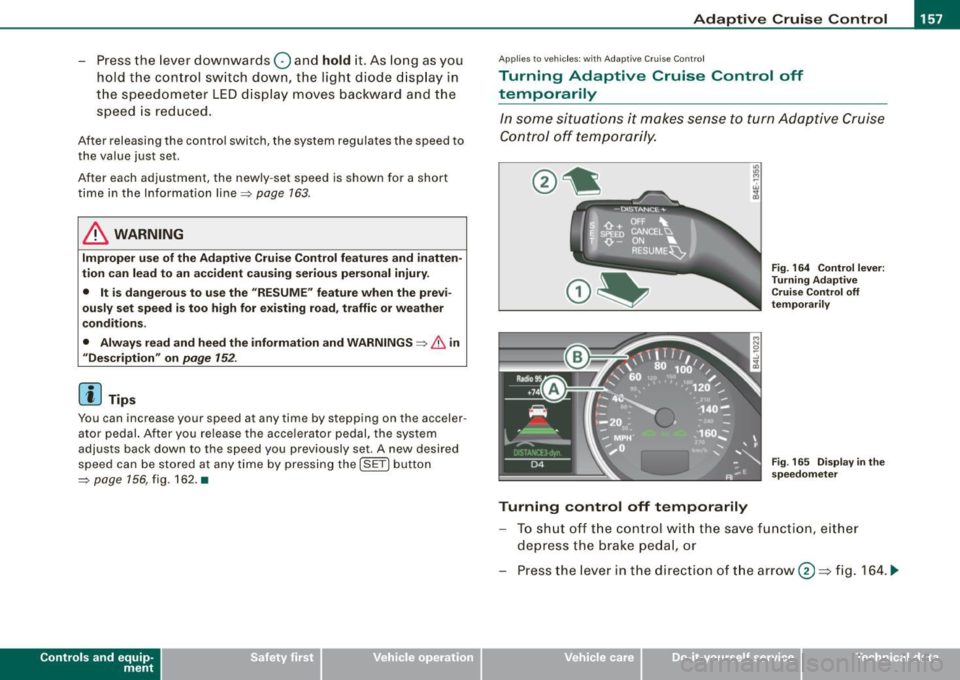
Turning control off temporarily
Fig. 164 Control lever:
Turning Adaptive
Cruise Control off
temporarily
Fig . 165 Display in the
speedometer
To shut off the control with the save function, either
depress the brake pedal, or
Press the lever in the direction of the arrow@=> fig. 164 . ._
Vehicle care I I irechnical data
Page 160 of 426

• ..__A_ d_a"'"' p:,..._ ti_v_ e_ C_ ru_ is_ e_ C_ o_n_ t_ r_ o_ l ___________________________________________ _
Reactivating control
-To resume the speed and distance control, release the
brake pedal and press the lever in the direction of the
arrow (D.
Display in the speedometer
© Current vehicle speed => page 7 57, fig. 165
@ Saved speed
As long as a speed is saved the set desired speed will be displayed in the LED display in the speedometer by one or two illuminated red
light diodes. When the control function is resumed the Adaptive
App lies to vehicles: with Adaptive Cruise Cont rol
How is the distance (time interval) set?
Distance can be set in four stages.
Fig . 166 Control lever:
Setting distance
Increasing distance
-Push the slider switch once to the right 0 ~ fig. 166. The
distance currently set is shown for 3 seconds in the instrument cluster display.
Cruise Control accelerates to reach the desired speed if no slower
vehicle ahead is detected.
& WARNING
Improper use of the Adaptive Cruise Control can cause collisions,
other accidents and serious personal injuries.
• Never resume the stored speed if the speed is too high for
prevailing road, traffic or weather conditions.
[ i ] Tips
When the system is turned off temporarily, the speed set at that
time is stored. •
- Push the slider switch again to the right 0 to increase
the distance by one step.
Reducing distance
Push the slider switch once to the left Q. The distance
currently set is shown for 3 seconds in the instrument
cluster display.
- Push the slider switch
again to the left Oto decrease the
distance by one step .
The distance at which the Adaptive Cruise Control follows a vehicle
in front is determined by
time intervals. A time interval to a vehicle
in front is established and maintained . This produces a speed
dependent interval. The higher the speed, the greater the safety
interval in feet (meters)
=> &- _,.
Page 162 of 426

• ..__A_ d_ a-:.. p_t _iv _ e_ C_r_ u_ i _s _ e_ C_ o_n_ t_ r_ o_ l _____________________________________________ _
& WARNING
Following other vehicles too closely increases the risk of a crash
and serious personal injury .
• Following other vehi cles too closely , particularly at h igher
speeds increases the risk of colli sions and serious personal injury.
• Setting short distances to the traffic ahead reduces the time
and distance available to bring your vehicle to a safe stop and
makes it even more necessary to pay close attention to traffic .
• Always select a speed and distance to traffic ahead that is safe
and appropriate under the prevailing traffic , road , weather and
lighting conditions .
• Never rely on the distan ce control feature of ACC alone to
prevent rear-end collisions. Always be prepared to brake and take
evasive action to avoid collisions and other acc ident situations .
• Never allow the closing speed between you and other vehicles
to be so h igh that the Adaptive Cruise Control may not be able to
slow your vehicle safely. If closing speed is too high , you must
apply the brakes yourself to reduce the risk of a rear-end crash .
• Always select a greater following distance to the vehicle ahead
on wet roads than on dry roads .
• Always re ad and heed the informat ion and WARNINGS ::::>
& in
"Description" on
page 152.
[ i J Tips
The distance setting i s re set to the factory default DISTANCE 3 the
next time the i gnition is turned on. •
Driver information
Applies to veh icles : w ith Adapt ive Cru ise Cont rol
Displays in the instrument cluster
Depen din g o n the driving si tuati on, driver inf ormation is
dis played in the ins trumen t clus ter.
@ Spe ed om eter and indicator lig ht displ ay
@ Display in the instru ment clu ster
Fig . 16 7 Overview
in strument clu ste r
© Speedometer and ind icator light display
Im por tan t in fo rm ati on co ncerni ng veh icle ope ration w ith Ada ptiv e
Cruise Control is shown in display area@. T he desired speed you
s et is in dica te d in the spee dome ter (LED l igh ts aro un d t he edg e).
T he indicator lights show whether the system has detected a v ehic le
trave ling ahead .
© Display in the instrument cluster
In di sp lay area @ informati on fr om the navigati on syste m* a nd t he
trip computer is disp layed in addition to information about Adaptive
Cru ise Control.
You can s ele ct amo ng th e di ffer ent i nformati on by repeat ed br ief
taps on the [R ESET] button on the windshield wiper lever
=> p ag e 41 , "O peration". ~