Page 94 of 648

�Î�Î
�Î
CONT INUED
If you try to enter the customizing
mode while the vehicle is moving,
you will see a ‘‘MUST STOP AND
SHIFTTOPARKTOCHANGE
SETTINGS’’ message and you
cannot change the settings.
You can customize some vehicle
control settings f or ‘‘DRIVER 1’’ and
‘‘DRIVER 2’’ separately.
To have the driver’s ID detected,
make sure the driver’s door is
unlocked with a corresponding
remote transmitter/keyless access
remote.
You can customize some vehicle
control settings. To change the
settings, the ignition switch must be
in the ON (II) position, and the
vehicle must be stopped with the
transmission in Park.
If you turn the ignition switch to the
ACCESSORY (I) or the LOCK (0)
position, or move the shif t lever out
of Park, the display will change to
the normal screen.
Models equipped with the
keyless access system have an
engine start/stop button instead
of an ignition switch. VEHICLE
OFF (LOCK) Mode is the
equivalent of LOCK (0),
ACCESSORY Mode is the
equivalent of ACCESSORY (I),
and ON Mode is the equivalent
of ON (II). For more
information, see pages and. If you use the key to unlock the
driver’s door, the system cannot
recognize either ‘‘DRIVER 1’’ or
‘‘DRIVER 2.’’
:
180 178On models without keyless access
system
Multi-Inf ormation Display
K eyless Memory Settings
Inst rument s and Cont rols
91
TM
�\f���—�
���—�����y�
�������������y���
�)� �����\f�\f�y�\f�\f�����y
2009 TL
Page 147 of 648

If the system repeatedly does not
recognize the coding of your key or
keyless access remote, contact your
dealer.
Do not attempt to alter this system
or add other devices to it. Electrical
problems could result that may make
your vehicle inoperable.
If you have lost your key or keyless
access remote and you cannot start
the engine, contact your dealer.As required by the FCC:This device complies with Part 15 of theFCC rules. Operation is subject to thef ollowing two conditions: (1) This devicemay not cause harmf ul interf erence, and(2) this device must accept anyinterf erence received, includinginterf erence that may cause undesiredoperation.
Changes or modif ications not expresslyapproved by the party responsible f orcompliance could void the user’sauthority to operate the equipment.
This device complies with IndustryCanada Standard RSS-210.Operation is subject to the f ollowing twoconditions: (1) this device may not causeinterf erence, and (2) this device mustaccept any interf erence that may causeundesired operation of the device.
Immobilizer System
144
Always take the ignition key or the
keyless access remote with the built-in
key with you whenever you leave the
vehicle alone.
�\f���—�\f���—�����y�
�����������
�y���
�)� �����\f�\f�y�\f�
�����y
2009 TL
Page 156 of 648

�µ
Remove the old battery and note
the polarity. Make sure the
polarity of the new battery is the
same ( side f acing up), then
insert it in the keypad.
Place a cloth on the edge of the
keypad, and remove the upper half
by caref ully prying on the edge
with a small f lat-tip screwdriver or
coin. An improperly disposed of battery
can hurt the environment.
Always conf irm local regulations f or
battery disposal.
Snap the two halves of the keypad,
then install the parts in reverse
order.
4.
5.
3.
As required by the FCC: This device complies with Part 15 of theFCC rules. Operation is subject to thef ollowing two conditions: (1) This devicemay not cause harmf ul interf erence, and(2) this device must accept anyinterf erence received, includinginterf erence that may cause undesiredoperation.
Changes or modif ications not expresslyapproved by the party responsible f orcompliance could void the user’sauthority to operate the equipment.
This device complies with IndustryCanada Standard RSS-210.Operation is subject to the f ollowing twoconditions: (1) this device may not causeinterf erence, and (2) this device mustaccept any interf erence that may causeundesired operation of the device.
Remote Transmitter
Inst rument s and Cont rols
153
BATTERY
�\f���—�\f���—�����y�
���������
�
�y���
�)� �����\f�\f�y�\f�
�����y
2009 TL
Page 172 of 648

Theremotemaynotworkif:It is too close to the vehicle.
It is above or below the vehicle,
even when it is within its operating
range.
The handle of each f ront door has a
sensor. That sensor works with the
remote so you can automatically
unlock the door(s).
By def ault, only the driver’s door
unlocks when you grab its handle.
Each f ront door has a LOCK/
UNLOCK f eature.
To change the ‘‘DOOR UNLOCK
MODE’’ setting, see page .
To unlock the remaining doors and
thetrunk,presstheremoteorthe
rear of the master door lock switch
on the driver’s door. All the doors unlock when you grab
the handle of the f ront passenger’s
door.
When you unlock the door(s), some
exterior lights blink twice and the
system beeps twice.
To change the ‘‘KEYLESS ACCESS
LIGHT FLASH’’ setting, see page
.
To change the ‘‘KEYLESS ACCESS
BEEP’’ setting, see page .
If you wear a glove while grabbing a
f ront door handle, the door sensor
maybeslowtorespondormaynot
respond by unlocking the doors. 111
112 113
CONT INUED
K eyless A ccess System
Unlocking the Door(s)
Inst rument s and Cont rols
169
�\f���—�\f���—�����y�
�������������y���
�)� �����\f�\f�y�\f�
�����y
2009 TL
Page 173 of 648
Bef ore locking the doors, make sure
theremoteisnotinsidethevehicle.
When you press the door lock button
on the f ront door, all the doors and
the trunk will lock.
If you do not open any of the doors
within 30 seconds, they will
automatically relock.
Theremoteisnotwithinthe
operating range.
The remote is too close to the
vehicle.
When the doors are unlocked.
The vehicle battery is dead.
Theremotebatteryisdead.
Each unlock sensor does not operate
when:
If a remote is within operating range
while you wash your vehicle or when
it is raining heavily, the door sensors
may respond by unlocking the doors.
K eyless A ccess System
L ocking the Doors
170
DOOR LOCK BUTTON
�\f���—�
���—�����y�
����\f��������y���
�)� �����\f�\f�y�\f�
�����y
2009 TL
Page 178 of 648

�´
As required by the FCC:This device complies with Part 15 of theFCC rules. Operation is subject to thef ollowing two conditions: (1) This devicemay not cause harmf ul interf erence, and(2) this device must accept anyinterf erence received, includinginterf erence that may cause undesiredoperation.
Changes or modif ications not expresslyapproved by the party responsible f orcompliance could void the user’sauthority to operate the equipment.
This device complies with IndustryCanada Standard RSS-210.Operation is subject to the f ollowing twoconditions: (1) this device may not causeinterf erence, and (2) this device mustaccept any interf erence that may causeundesired operation of the device.
An improperly disposed of battery
can hurt the environment.
Always conf irm local regulations f or
battery disposal.
Battery type: CR2032
Replace the battery if necessary.
To replace the battery:
Replace the old battery with new
battery. Place the battery so the
side is f acing up. Snap the two
halvesof theremotecaseback
together.
Remove the built-in key (see page
).
Remove the upper half by
caref ully prying on the edge with a
coin.
1.
2. 3.
192
Replacing the Remote Battery
K eyless A ccess System
Inst rument s and Cont rols
175
�\f���—�\f���—�����y�
�������������y���
�)� �����\f�\f�y�\f�
���\f�y
2009 TL
Page 219 of 648

On models with navigation system
The climate control system can also
be operated by voice control. See the
Navigation section in your quick
start guide f or an overview of this
system, and the navigation system
manual f or complete details.The automatic climate control
system in your vehicle picks the
proper combination of air
conditioning, heating, and ventilation
to maintain the interior temperature
you select, and to remove moisture
from the air and make the interior
dry. The system also adjusts the f an
speed and airf low levels. The system automatically selects
the proper mix of conditioned
and/or heated air that will, as
quickly as possible, raise or lower
the interior temperature to your
pref erence. The system also
dehumidif y the interior.
The driver’s side temperature and
the passenger’s side temperature can
be set separately. Push up the switch
of the appropriate temperature
control to increase the temperature
of airflow. Push down the switch to
decrease it. Each set temperature is
showninthedisplay(inthecenter
display on models with navigation
system).
Set the desired temperature with
the temperature control switch.
You can set the driver’s side
temperature and the passenger’s
side temperature separately.
Press the Driver’s or Passenger’s
AUTO button. You will see AUTO
and the selected temperature on
the appropriate side of the display
(in the center display on models
with navigation system).
When you unlock the doors with
your remote transmitter (keyless
access remote on models with
navigation system), the driver’s ID
(Driver 1 or Driver 2) is detected,
and the climate control settings are
turned to the respective mode
automatically with the ignition
switch in the ON (II) position, or the
power mode ON. 1.
2.
Using A utomatic Climate Control
Voice Control System
Personalization Setting
Climate Control System
T emperat ure Cont rol
216
�\f���—�\f���—�\f���y�
���������\f���y���
�)� �����\f�\f�y�\f�����
�y
2009 TL
Page 227 of 648
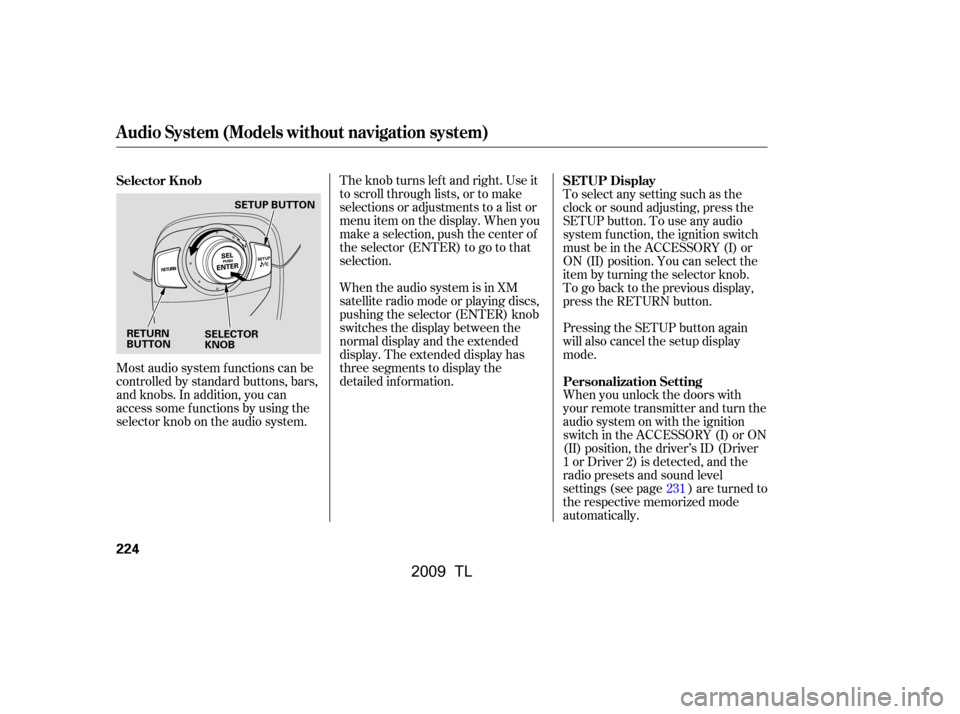
Most audio system f unctions can be
controlled by standard buttons, bars,
and knobs. In addition, you can
access some f unctions by using the
selector knob on the audio system.The knob turns lef t and right. Use it
to scroll through lists, or to make
selections or adjustments to a list or
menu item on the display. When you
make a selection, push the center of
the selector (ENTER) to go to that
selection.
When the audio system is in XM
satellite radio mode or playing discs,
pushing the selector (ENTER) knob
switches the display between the
normal display and the extended
display. The extended display has
three segments to display the
detailed inf ormation.
To select any setting such as the
clock or sound adjusting, press the
SETUP button. To use any audio
system f unction, the ignition switch
must be in the ACCESSORY (I) or
ON (II) position. You can select the
item by turning the selector knob.
To go back to the previous display,
press the RETURN button.
Pressing the SETUP button again
will also cancel the setup display
mode.
When you unlock the doors with
your remote transmitter and turn the
audio system on with the ignition
switch in the ACCESSORY (I) or ON
(II) position, the driver’s ID (Driver
1orDriver2)isdetected,andthe
radio presets and sound level
settings (see page ) are turned to
the respective memorized mode
automatically.
231
Selector K nob
SET UP Display
Personalization Setting
Audio System (Models without navigation system)
224
RETURN
BUTTON SELECTOR
KNOBSETUP BUTTON
�\f���—�\f���—�\f���y�
�������������y���
�)� �����\f�\f�y�\f�������y
2009 TL
