Page 211 of 274

marks. For capacities and recommended fluid grade, see page 279.
WARNING
If a problem should occur in the power steering system or if the vehicle has no electrical current and must be towed,
it is still possible to steer the vehicle. However, keep in mind that greater effort will be required to turn the steering
wheel.
CAUTION
Keep the area around the power steering fluid reservoir clean when checking.
228 06 Maintenance and specifications
Replacing bulbs
Introduction
All bulb specifications are listed on page 234
. The following bulbs should only be replaced by a trained and qualified
Volvo service technician:
Dome lighting
Reading lights
Glove compartment lighting
Turn signals in the door mirror
Approach lighting in the door mirror
Brake/fog/taillights
Rear side parking lights
Active Bi -Xenon® and LED bulbs
WARNING
Active Bi -Xenon® headlights (option) - due to the high voltage used by these headlights, these bulbs should only
be replaced by a trained and qualified Volvo service technician.
Turn off the lights and remove the remote key from the ignition before changing any bulbs.
Headlight housing
ProCarManuals.com
Page 212 of 274

The entire headlight housing must be lifted out when replacing all front bulbs (except for the fog lights).
CAUTION
Never touch the glass of bulbs with your fingers. Grease and oils from your fingers vaporize in the heat and will
leave a deposit on the reflector, which will damage it.
NOTE
Always switch off the ignition before starting to replace a bulb.
The optional Bi -Xenon® headlight bulbs contain trace amounts of mercury. These bulbs should always be
disposed of by a trained and qualified Volvo service technician.
Removing the headlight housing
1. Switch off the ignition by pressing quickly on the START/STOP ENGINE button and remove the remote key from
the ignition slot
1.
2. (Upper illustration)
Withdraw the headlight housing's locking pins.
Pull the headlight housing straight out.
3. (Lower illustration)
Unplug the wiring connector by holding down the clip with your thumb.
Pull out the connector with the other hand.
CAUTION
Pull the connector, not the wiring.
1Does not apply to vehicles with the optional keyless drive.
229 06 Maintenance and specifications
Replacing bulbs
ProCarManuals.com
Page 213 of 274

4. Lift out the housing and place it on a soft surface to avoid scratching the lens.
5. Replace the defective bulb(s), see page 234
.
Reinserting the headlight housing
1. Plug in the connector until it clicks into place.
2. Reinstall the headlight housing and locking pins. Check that they are correctly inserted. The headlight housing must
be properly inserted and secured in place before the lighting is switched on or the remote key is inserted into the
ignition slot.
3. Check that the lights function properly.
Removing the cover to access the headlights and parking lights
NOTE
Before starting to replace a bulb, see page 228
.
1. Open the retaining clamp by pressing it to the side.
2. Press down the clips on the upper edge of the cover and remove it.
Reinstall the cover in the reverse order.
Low beam, halogen
1. Remove the headlight housing from the vehicle (see the instructions on page 228.
2. Remove the cover over the bulbs.
3. Detach the bulb by pressing the upper section of the retaining spring downward and to the side.
ProCarManuals.com
Page 221 of 274
235 06 Maintenance and specifications
Wiper blades and washer fluid
Wiper blades
The windshield wiper blades are different lengths. The blade on the driver's side is longer than the blade on the
passenger side.
Service position
The windshield wiper blades must be in the service (vertical) position for replacement or washing.
1. Switch off the ignition (ignition mode 0, see page 80
) and keep the remote key in the ignition slot1.
2. Move the right steering wheel lever up and hold it for at least 1 second. The wipers will then move to the vertical
position on the windshield.
The wipers will return to the normal position when the vehicle is started.
1Does not apply to vehicles with the optional keyless drive.
ProCarManuals.com
Page 226 of 274

WARNING
Connect and disconnect the positive and negative cables in the correct sequence.
239 06 Maintenance and specifications
Battery
Removal
Switch off the ignition and wait at least 5 minutes before disconnecting the battery so that all information in the
vehicle's electrical system can be stored in the control modules.
Open the clips on the front cover and remove the cover.
Release the rubber moulding so that the rear cover is free.
Remove the rear cover by pulling it away.
Detach the black negative cable
Detach the red positive cable
Detach the ventilation hose
Loosen the screw holding the battery clamp.
Move the battery to the side and lift it up.
WARNING
PROPOSITION 65 WARNING!
Battery posts, terminals, and related accessories contain lead and lead compounds, chemicals known to the state of
California to cause cancer and reproductive harm. Wash hands after handling.
Installation
1. Lower the battery into the battery box.
2. Move the battery inward and to the side until it reaches the rear edge of the box.
3. Screw in the battery with the screw in the clamp.
ProCarManuals.com
Page 240 of 274

Incorrect inflation pressure could lead to tire failure, resulting in a loss of control of the vehicle.
Changing wheels with TPMS
Please note the following when changing or replacing the factory installed TPMS wheels/tires on the vehicle:
Only the factory-mounted wheels are equipped with TPMS sensors in the valves.
If the vehicle is equipped with a temporary spare tire, this tire does not have a TPMS sensor.
If wheels without TPMS sensors are mounted on the vehicle, TIRE PRESS SYST SERVICE REQUIRED will be
displayed each time the vehicle is driven above 25 mph (40 km/h) for 10 minutes or more.
Once TPMS sensors are properly installed, the warning message should not reappear. If the message is still
displayed, drive the vehicle for several minutes at a speed of 20 mph (30 km/h) or faster to erase the message.
Volvo recommends that TPMS sensors be fitted on all wheels used on the vehicle. Volvo does not recommend
moving sensors back and forth between sets of wheels.
NOTE
If you change to tires with a different recommended inflation pressure, the TPMS system must be recalibrated to
these tires. This must be done by a trained and qualified Volvo service technician.
If a tire is changed, or if the TPMS sensor is moved to another wheel, the sensor's seal, nut, and valve core should
be replaced.
When installing TPMS sensors, the vehicle must be parked for at least 15 minutes with the ignition off. if the
vehicle is driven within 15 minutes, a TPMS error message will be displayed.
CAUTION
When inflating tires with TPMS valves, press the pump's mouthpiece straight onto the valve to help avoid bending or
otherwise damaging the valve.
254 06 Maintenance and specifications
Wheels and tires
Tire designations
Federal law mandates that tire manufacturers place standardized information on the sidewall of all tires (see the
illustration).
The following information is listed on the tire sidewall:
The tire designation (the following figures are examples of a tire designation):
ProCarManuals.com
Page 267 of 274
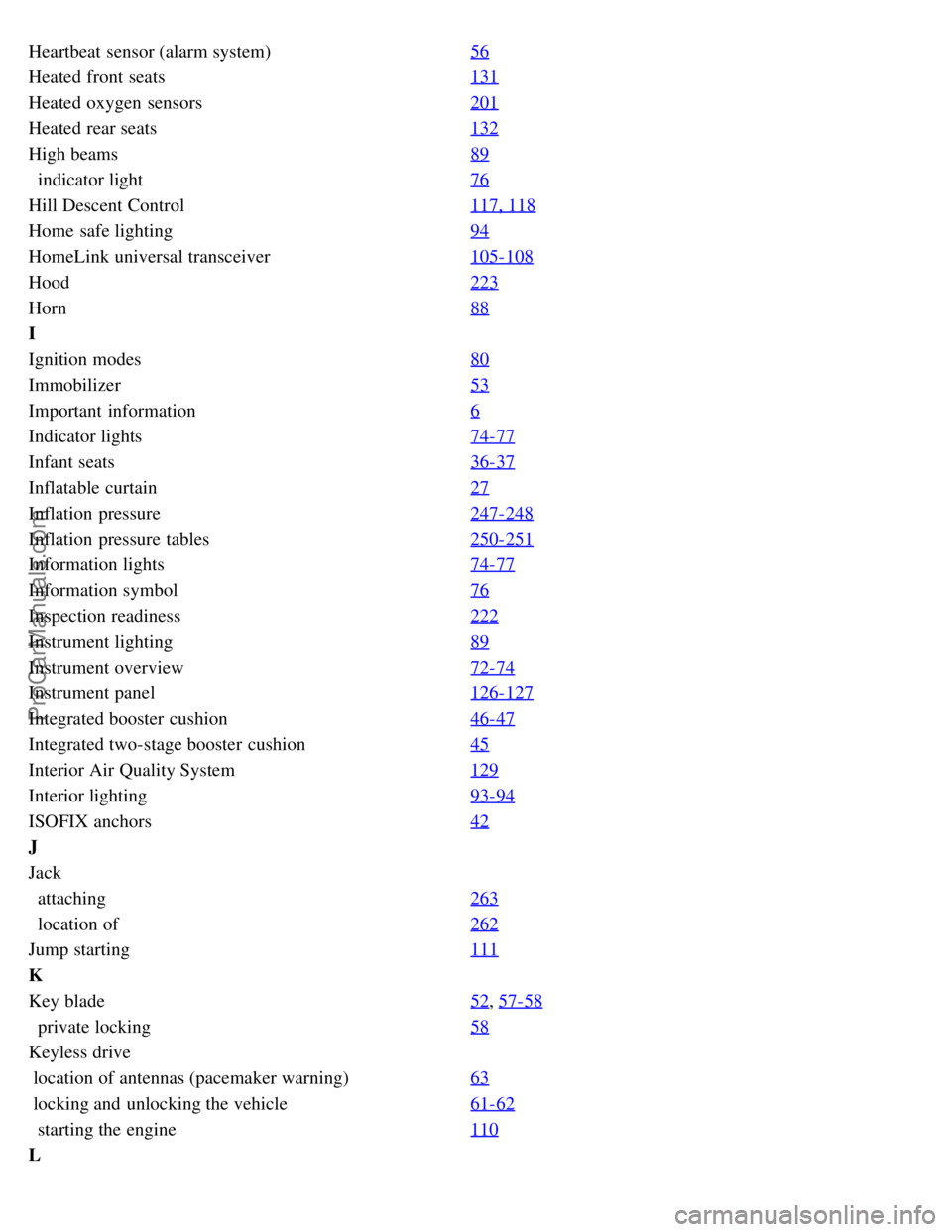
Heartbeat sensor (alarm system)56
Heated front seats131
Heated oxygen sensors201
Heated rear seats132
High beams89
indicator light76
Hill Descent Control 117, 118
Home safe lighting94
HomeLink universal transceiver105-108
Hood223
Horn88
I
Ignition modes80
Immobilizer53
Important information6
Indicator lights74-77
Infant seats36-37
Inflatable curtain27
Inflation pressure247-248
Inflation pressure tables250-251
Information lights74-77
Information symbol76
Inspection readiness222
Instrument lighting89
Instrument overview72-74
Instrument panel126-127
Integrated booster cushion46-47
Integrated two-stage booster cushion45
Interior Air Quality System129
Interior lighting93-94
ISOFIX anchors42
J
Jack
attaching 263
location of262
Jump starting 111
K
Key blade52
, 57-58
private locking58
Keyless drive
location of antennas (pacemaker warning) 63
locking and unlocking the vehicle61- 62
starting the engine110
L
ProCarManuals.com