Page 220 of 274
Before starting to replace a bulb, see page 228.
1. Insert a screwdriver and gently turn so that the bulb housing comes loose.
2. Replace the bulb.
3. Check that the bulb illuminates and press it back into the bulb housing.
234 06 Maintenance and specifications
Replacing bulbs
Vanity mirror lighting
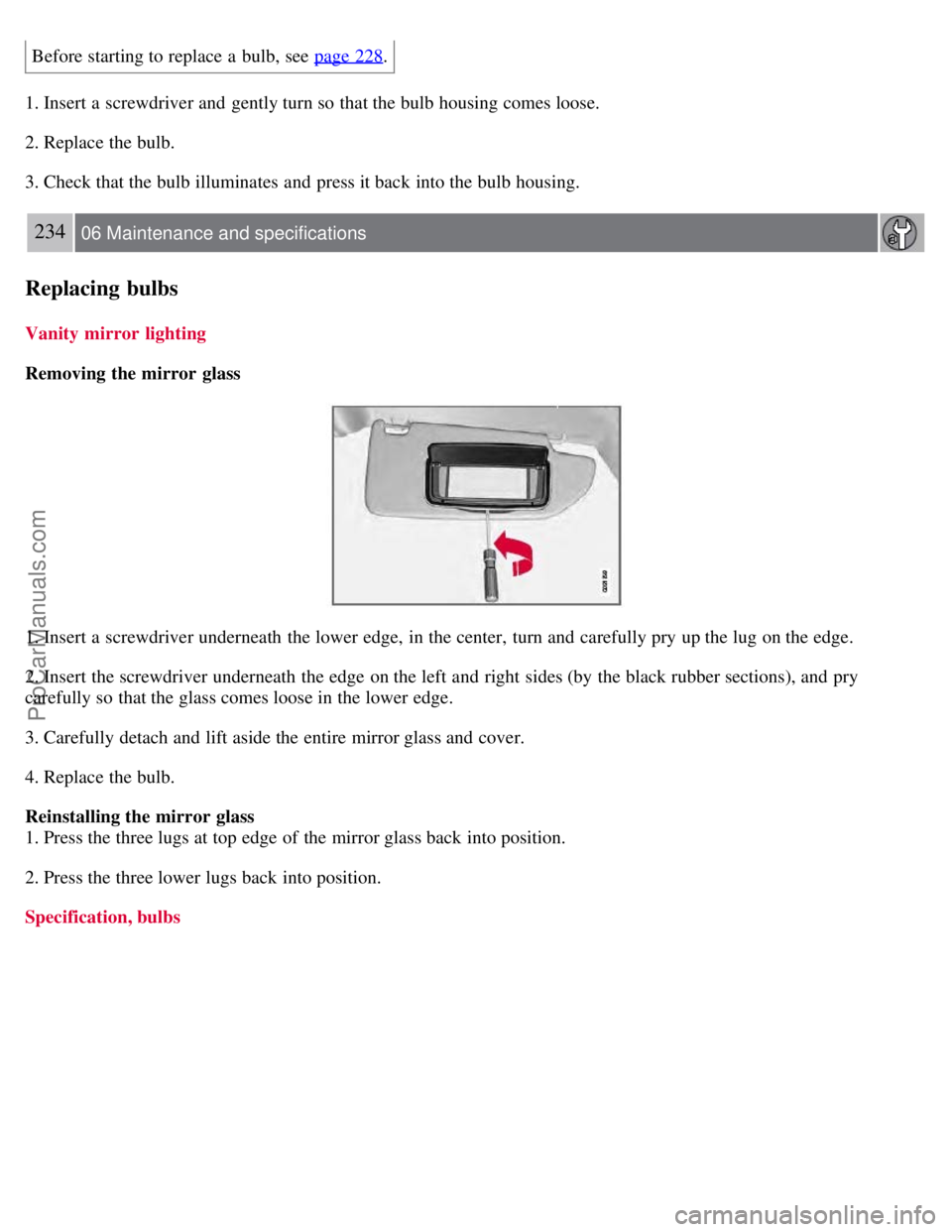
Removing the mirror glass
1. Insert a screwdriver underneath the lower edge, in the center, turn and carefully pry up the lug on the edge.
2. Insert the screwdriver underneath the edge on the left and right sides (by the black rubber sections), and pry
carefully so that the glass comes loose in the lower edge.
3. Carefully detach and lift aside the entire mirror glass and cover.
4. Replace the bulb.
Reinstalling the mirror glass
1. Press the three lugs at top edge of the mirror glass back into position.
2. Press the three lower lugs back into position.
Specification, bulbs
ProCarManuals.com
Page 221 of 274
235 06 Maintenance and specifications
Wiper blades and washer fluid
Wiper blades
The windshield wiper blades are different lengths. The blade on the driver's side is longer than the blade on the
passenger side.
Service position
The windshield wiper blades must be in the service (vertical) position for replacement or washing.
1. Switch off the ignition (ignition mode 0, see page 80
) and keep the remote key in the ignition slot1.
2. Move the right steering wheel lever up and hold it for at least 1 second. The wipers will then move to the vertical
position on the windshield.
The wipers will return to the normal position when the vehicle is started.
1Does not apply to vehicles with the optional keyless drive.
ProCarManuals.com
Page 222 of 274
Replacing the windshield wiper blades
With the wipers in the service position, fold out the wiper arm from the windshield. Press the button on the wiper
blade attachment and pull the wiper blade straight out, parallel with the wiper arm.
Slide in the new wiper blade until it clicks into place.
Check that the blade is securely in place.
Cleaning
Keeping the windshield and wiper blades clean helps improve visibility and prolongs the service life of the wiper
blades. Clean the wiper blades with a stiff-bristle brush and lukewarm soap solution or car washing detergent.
236 06 Maintenance and specifications
Wiper blades and washer fluid
Replacing the tailgate wiper blade
ProCarManuals.com
Page 223 of 274
1. Fold the wiper arm outward.
2. Grasp the inner section of wiper blade (at the arrow).
3. Pull out the blade to release it from the wiper arm.
4. Press the new wiper blade into place and check that it seats securely.
5. Fold the wiper arm back toward the tailgate window.
Filling washer fluid
The windshield and headlight washers share a common reservoir.
The washer fluid reservoir is located on the driver's side of the engine compartment. During cold weather, the reservoir
should be filled with windshield washer solvent containing antifreeze. For capacities, see page 279
.
237 06 Maintenance and specifications
Battery
Warning symbols on the battery
ProCarManuals.com
Page 224 of 274

NOTE
A used battery should be disposed of in an environmentally responsible manner. Consult your Volvo retailer or take
the battery to a recycling station.
Handling
Check that the battery cables are correctly connected and tightened.
Never disconnect the battery when the engine is running (for example, when replacing the battery).
The service life and function of the battery is influenced by factors such as the number of starts, discharging, driving
style, driving conditions, climatic conditions etc.
Never use a quick charger to charge the battery.
WARNING
Never expose the battery to open flame or electric spark.
Do not smoke near the battery.
Battery fluid contains sulfuric acid. Do not allow battery fluid to contact eyes, skin, fabrics or painted surfaces. If
contact occurs, flush the affected area immediately with water. Obtain medical help immediately if eyes are affected.
NOTE
The life of the battery is shortened if it becomes discharged repeatedly.
238 06 Maintenance and specifications
Battery
ProCarManuals.com
Page 225 of 274
Maintenance
Regularly check that the electrolyte level is correct and never fill above the level mark.
Check all cells. Use a large screwdriver or a coin to remove the cell caps. Each cell has its own maximum and
minimum level mark.
If necessary, top up with distilled water to the battery's maximum mark.
Tighten the cell caps thoroughly.
CAUTION
Always use distilled or deionized water (battery water).
Never fill above the level mark in the cell.
Changing
ProCarManuals.com
Page 226 of 274

WARNING
Connect and disconnect the positive and negative cables in the correct sequence.
239 06 Maintenance and specifications
Battery
Removal
Switch off the ignition and wait at least 5 minutes before disconnecting the battery so that all information in the
vehicle's electrical system can be stored in the control modules.
Open the clips on the front cover and remove the cover.
Release the rubber moulding so that the rear cover is free.
Remove the rear cover by pulling it away.
Detach the black negative cable
Detach the red positive cable
Detach the ventilation hose
Loosen the screw holding the battery clamp.
Move the battery to the side and lift it up.
WARNING
PROPOSITION 65 WARNING!
Battery posts, terminals, and related accessories contain lead and lead compounds, chemicals known to the state of
California to cause cancer and reproductive harm. Wash hands after handling.
Installation
1. Lower the battery into the battery box.
2. Move the battery inward and to the side until it reaches the rear edge of the box.
3. Screw in the battery with the screw in the clamp.
ProCarManuals.com
Page 227 of 274

4. Connect the ventilation hose.
5. Connect the red positive cable.
6. Connect the black negative cable.
7. Press in the rear cover. (See Removal).
8. Reinstall the cold section moulding. (See Removal).
9. Reinstall the front cover and secure it with the clips. (See Removal).
240 06 Maintenance and specifications
Fuses
Replacing fuses
There are relay/fuse boxes located in the engine compartment, the passenger compartment, and the cargo area.
If an electrical component fails to function, this may be due to a blown fuse. The easiest way to see if a fuse is blown
is to remove it.
To do so:
1. Pull the fuse straight out. If a fuse is difficult to remove, special fuse removal tools are located on the inside of the
fuse box covers.
2. From the side, examine the curved metal wire in the fuse to see if it is intact.
If the wire is broken, insert a new fuse of the same color and amperage (written on the fuse).
If fuses burn out repeatedly, have the electrical system inspected by a trained and qualified Volvo service technician.
WARNING
Never use metal objects or fuses with higher amperage than those stated on the following pages. Doing so could
seriously damage or overload the vehicle's electrical system.
Location of the fuse boxes
Under the glove compartment
ProCarManuals.com