2008 VOLVO V70 service
[x] Cancel search: servicePage 24 of 274

WARNING
Any contact between the front seat backrests and the folded rear seat or a rear-facing child seat could impede the
function of the WHIPS system. If the rear seat is folded down, the occupied front seats must be adjusted forward so
that they do not touch the folded rear seat.
30 01 Safety
Crash mode
Driving after a collision
If the vehicle has been involved in a collision, the text SAFETY MODE SEE MANUAL may appear in the
information display. This indicates that the vehicle's functionality has been reduced.
NOTE
This text can only be shown if the display is undamaged and the vehicle's electrical system is intact.
Safety mode is a feature that is triggered if one or more of the safety systems (e.g. front or side airbags, an inflatable
curtain, or one or more of the seat belt pretensioners) has deployed. The collision may have damaged an important
function in the vehicle, such as the fuel lines, sensors for one of the safety systems, the brake system, etc.
WARNING
Never attempt to repair the vehicle yourself or to reset the electrical system after the vehicle has displayed
SAFETY MODE SEE MANUAL. This could result in injury or improper system function.
Restoring the vehicle to normal operating status should only be done by a trained and qualified Volvo service
technician.
After SAFETY MODE SEE MANUAL has been displayed, if you detect the odor of fuel vapor, or see any signs
of fuel leakage, do not attempt to start the vehicle. Leave the vehicle immediately.
ProCarManuals.com
Page 25 of 274

Attempting to start the vehicle
If damage to the vehicle is minor and there is no fuel leakage, you may attempt to start the vehicle. To do so:
1. Remove the remote control from the ignition slot.
2. Reinsert the remote in the ignition slot. The vehicle will then attempt to reset Safety mode to normal status.
3. Try to start the vehicle.
Moving the vehicle
If the electrical system is able to reset system status to normal (SAFETY MODE SEE MANUAL will no longer be
shown in the display), the vehicle may be moved carefully from its present position, if for example, it is blocking
traffic. It should, however, not be moved farther than is absolutely necessary.
WARNING
Even if the vehicle appears to be drivable after Safety mode has been set, it should not be driven or towed (pulled by
another vehicle). There may be concealed damage that could make it difficult or impossible to control. The vehicle
should be transported on a flatbed tow truck to a trained and qualified Volvo service technician for inspection/repairs.
31 01 Safety
Child safety
Children should be seated safely
Volvo recommends the proper use of restraint systems for all occupants including children. Remember that, regardless
of age and size, a child should always be properly restrained in a vehicle.
Your vehicle is also equipped with ISOFIX/LATCH attachments, which make it more convenient to install child seats.
Some restraint systems for children are designed to be secured in the vehicle by lap belts or the lap portion of a lap-
shoulder belt. Such child restraint systems can help protect children in vehicles in the event of an accident only if they
are used properly. However, children could be endangered in a crash if the child restraints are not properly secured in
the vehicle. Failure to follow the installation instructions for your child restraint can result in your child striking the
vehicle's interior in a sudden stop.
Holding a child in your arms is NOT a suitable substitute for a child restraint system. In an accident, a child held in a
person's arms can be crushed between the vehicle's interior and an unrestrained person. The child could also be injured
by striking the interior, or by being ejected from the vehicle during a sudden maneuver or impact. The same can also
happen if the infant or child rides unrestrained on the seat. Other occupants should also be properly restrained to help
reduce the chance of injuring or increasing the injury of a child.
All states and provinces have legislation governing how and where children should be carried in a vehicle. Find out
the regulations existing in your state or province. Recent accident statistics have shown that children are safer in rear
seating positions than front seating positions when properly restrained. A child restraint system can help protect a child
in a vehicle. Here's what to look for when selecting a child restraint system:
It should have a label certifying that it meets applicable Federal Motor Vehicle Safety Standards (FMVSS 213) - or in
Canada, CMVSS 213.
Make sure the child restraint system is approved for the child's height, weight and development - the label required by
ProCarManuals.com
Page 40 of 274
NOTE
The booster cushion cannot be moved from the stage 2 (upper) position to the stage 1 (lower) position. It must first
be folded down completely to the stowed position, and then adjusted to stage 1.
Pull the handle forward to release the booster cushion.
Press down on the center of the booster cushion to return it to the stowed position.
NOTE
The booster cushion must be in the stowed position before the rear seat backrests are folded down.
CAUTION
Be sure there are no loose objects under the booster cushion before it is stowed.
WARNING
DEATH or SERIOUS INJURY can occur
Follow all instructions on the booster cushion and in the vehicle's owner's manual.
MAKE SURE THE BOOSTER CUSHION IS SECURELY LOCKED BEFORE THE CHILD IS SEATED.
Use this booster cushion only with children whose height and weight are within the permitted limits shown in the
table on page 45
.
In the event of a collision while the integrated booster cushion was occupied, the entire booster cushion and seat
belt must be replaced. The booster cushion should also be replaced if it is badly worn or damaged in any way. This
work should be performed by a trained and qualified Volvo service technician only
48 01 Safety
Child safety locks
Child safety locks
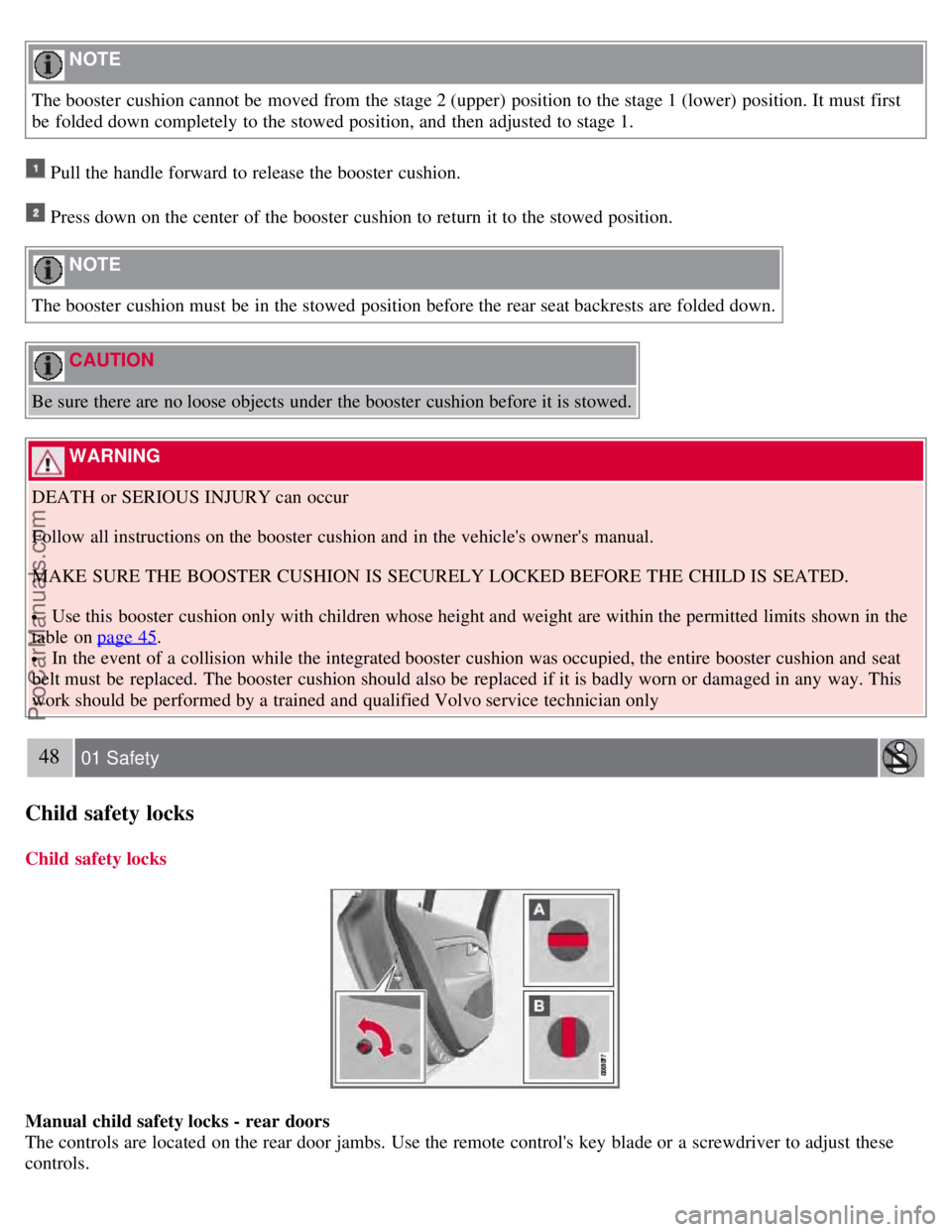
Manual child safety locks - rear doors
The controls are located on the rear door jambs. Use the remote control's key blade or a screwdriver to adjust these
controls.
ProCarManuals.com
Page 43 of 274

blade and page 58 for information on the private locking function. The key blades have a unique code, which is used if
new ones need to be produced. This code is available at an authorized Volvo retailer.
Loss of a remote key
If a remote key is lost, the other one must be taken with the vehicle to a trained and qualified Volvo service
technician. As an anti-theft measure, the code of the lost remote must be erased from the system.
The number of registered keys for the vehicle can be found in the vehicle's menu. under Car settings
Car key
memory
Number of keys . See page 125 for a description of the menu system.
USA -5WK49264
FCC ID:KR55WK49264 + Siemens VDO
5WK49236
FCC ID:KR55WK49236, 5WK49266 FCC
ID:KR55WK49266 + Siemens VDO
5WK49233
FCC ID:KR55WK49233
This device complies with part 15 of the FCC rules and RSS-210. Operation is subject to the following conditions:
(1) This device may not cause harmful interference, and (2) this device must accept any interference received,
including interference that may cause undesired operation.
Canada-5WK49264 IC:267T-5WK49264
+ Siemens VDO 5WK49236
IC:267T-5WK49236, 5WK49266
IC:267T-5WK49266 + Siemens VDO
5WK49233 IC:267T-5WK49233
Operation is subject to the following conditions: (1) this device may not cause interference, and (2) this device must
accept any interference, including interference that may cause undesired operation of the device.
53 02 Locks and alarm
Remote key and key blade
Key memory - door mirrors and driver's seat
The position of the side door mirrors and optional power driver's seat are stored in the remote keys when the vehicle is
locked. The next time the driver's door is unlocked with the same remote key and the door is opened within 2 minutes,
the power driver's seat and side door mirrors will automatically move to the position that they were in when the doors
were most recently locked with the same remote key. See page 83
for more information.
This feature can be activated or deactivated in the vehicle's menu under Car settings
Car key memory Seat &
mirror positions . See page 125
for a description of the menu system.
See also page 61
for information regarding vehicles with the optional keyless drive.
Confirmation when locking/unlocking the vehicle
When the vehicle is locked with a remote key, the turn signals will flash once to confirm that this has been completed
correctly.
When the vehicle is locked, confirmation will only be given if all of the locks are locked after the doors have been
ProCarManuals.com
Page 44 of 274

closed.
NOTE
If you do not receive confirmation when locking the vehicle, check whether a door or the tailgate is ajar, or if this
feature has been turned off in the menu.
This function can be activated or deactivated under Car settings
Light settings Lock confirmation, light , or Car
settings
Light settings Unlock confirmation, light . See page 125 for a description of the menu system.
Immobilizer (start inhibitor)
Each of the keys supplied with your vehicle contains a coded transponder. The code in the key is transmitted to an
antenna in the ignition slot where it is compared to the code stored in the start inhibitor module. The vehicle will start
only with a properly coded key. If you misplace a key, take the other keys to a trained and qualified Volvo service
technician for reprogramming as an antitheft measure.
CAUTION
Never use force when inserting the remote key in the ignition slot. The vehicle cannot be started if the transponder is
damaged.
USA -FCC ID: LTQWFS 125VO
This device complies with part 15 of the FCC rules. Operation is subject to the following condition: (1) This device
may not cause harmful interference, and (2) this device must accept any interference received, including interference
that may cause undesired operation.
54 02 Locks and alarm
Remote key and key blade
Canada-IC: 3659A-WFS125VO
Operation is subject to the following conditions: (1) this device may not cause interference, and (2) this device must
accept any interference, including interference that may cause undesired operation of the device.
See page 109
for information on starting the vehicle.
ProCarManuals.com
Page 47 of 274

Pressing the information button provides certain information about the vehicle with the help of the indicator lights
.
Using the information button
1. Press the information button
.
2. All of the indicator lights
will flash sequentially for approximately 7 seconds to indicate that the PCC is receiving
information from the vehicle. If any of the buttons are pressed during this 7-second period, transmission of
56 02 Locks and alarm
Remote key and key blade
information to the PCC will be interrupted.
NOTE
If none of the indicator lights flash when the information button has been pressed several times from different places
in relation to the vehicle, contact an authorized Volvo service technician.
The indicator lights
provide information according to the illustration below.
Steady green light: the vehicle is correctly locked.
Steady yellow light: the vehicle is not locked.
Steady red light: the alarm has been triggered.
Flashing red lights (Heartbeat sensor): if the two heartbeat sensor lights flash, this indicates that someone may be
inside the vehicle. These lights are only activated if the alarm has been triggered.
Range
The PCC's lock and unlock functions have a range of approximately 60 ft. (20 m) from the vehicle.
NOTE
The approach lighting, panic alarm, and the functions controlled by the information button have a range of
approximately 300 ft (100 m) from the vehicle.
Buildings or other obstacles may interfere with the function of the PCC.
ProCarManuals.com
Page 50 of 274

vehicle is brought to the retailer for service.
With the private locking function activated:
The vehicle's doors can be locked or unlocked with the remote
The engine can be started
The glove compartment cannot be unlocked
The tailgate cannot be unlocked or opened with the remote
The rear floor hatch cannot be opened
Activating the private locking function
1. Remove the key blade from the remote control.
2. Turn the key blade 180° clockwise in the glove compartment lock to lock the glove compartment and disconnect the
tailgate lock from the central locking system. Valet lock activated will appear in the information display.
Deactivating the private locking function
Turn the key blade 180° counterclockwise in the glove compartment lock to deactivate private locking.
59 02 Locks and alarm
Remote key and key blade
See page 65 for information on locking the glove compartment normally, without activating the private locking
function.
60 02 Locks and alarm
Remote key and key blade
Replacing the battery in the remote key
ProCarManuals.com
Page 58 of 274

The alarm system
The alarm is automatically armed whenever the vehicle is locked with the remote key or optional Personal Car
Communicator.
When armed, the alarm continuously monitors a number of points on the vehicle. The following conditions will trigger
the alarm:
The hood is forced open.
The tailgate is forced open.
A door is forced open.
The ignition slot is tampered with
An attempt is made to start the vehicle with a non-approved key (a key not coded to the car's ignition).
If there is movement in the passenger compartment (if the vehicle is equipped with the accessory movement sensor).
The vehicle is lifted or towed (if the vehicle is equipped with the accessory inclination sensor)
The battery is disconnected (while the alarm is armed).
The siren is disconnected when the alarm is disarmed.
A message will appear in the information display if a fault should occur in the alarm system. Contact an authorized
Volvo service technician.
NOTE
Do not attempt to repair any of the components in the alarm system yourself. This could affect the insurance policy
on the vehicle.
The alarm indicator light
The status of the alarm system is indicated by the indicator light on the dashboard (see illustration):
Indicator light off - the alarm is not armed
The indicator light flashes at one -second intervals - the alarm is armed
The indicator light flashes rapidly before the remote key is inserted in the ignition slot - the alarm has been
triggered.
Arming the alarm
Press the Lock button on the remote key. One long flash of the turn signals will confirm that the alarm is armed.
Alarm confirmation settings can be changed under Car settings
Lock settings Keyless entry . See page 125 for a
description of the menu system.
USA FCC ID: MAYDA 5823(3)
ProCarManuals.com