2008 VOLVO S80 buttons
[x] Cancel search: buttonsPage 128 of 275
Turn the control clockwise to increase or counterclockwise to decrease the blower speed. Pressing the AUTO switch
will automatically regulate blower speed and override manual adjustment.
NOTE
If the blower is turned off completely, the air conditioning is disengaged, which may result in fogging on the
windows.
Heated front seats (option)
Press the button once for the highest heat level - three indicator lights come on.
Press the button twice for a lower heat level - two indicator lights come on.
Press the button three times for the lowest heat level - one indicator light comes on.
Press the button four times to switch off the heat - no indicator lights come on.
130 04 Comfort and driving pleasure
Climate system
Heated rear seats (option)
Heat control for the outboard seating positions takes place in the same way as for the front seat.
Air distribution
The figure consists of three buttons. When the buttons are pressed, an indicator light in front of the respective part of
the figure illuminates and shows which air distribution is selected, see page 133
.
Auto
Page 137 of 275
Playing a CD (CD changer)
If a CD position with a music CD is already selected when CD is pressed, it will be played automatically. Otherwise
select a disc with the number buttons 1-6 or
/on the navigation button.
Insert a CD (CD changer)
1. Select an empty position with the number buttons 1-6 or
/ on the navigation button.
An empty position is marked on the display. The text Insert disc shows that a new disc can be inserted. The CD
changer can hold up to six CDs.
2. Insert a CD in the CD changer slot.
Disc eject
For reasons of traffic safety, an ejected CD must be removed within 12 seconds or it will be automatically drawn back
into the slot and the CD player will enter pause mode. Press the CD button to restart the disc.
Eject individual discs by pressing the eject button.
139 04 Comfort and driving pleasure
Audio system
Eject all discs with a long press on the eject button. The entire magazine is emptied disc by disc.
NOTE
The Eject all function can only be used while the vehicle is at a standstill and will be cancelled if the vehicle begins
to move.
Pause
When the audio system volume is turned off completely, the CD player will pause and will resume playing when the
volume is turned up again.
Sound files
In addition to playing normal music CDs, the CD player/changer can also play discs containing files in mp3 or wma
format.
NOTE
Some copy protected sound files may not be read by the player.
When a CD containing sound files is inserted into the player the disc's directory structure is scanned before the CD
begins playing. The length of time that this takes depends on the quality of the disc.
Navigating the disc and playing tracks
If a disc containing sound files is inside the CD player, press ENTER to display the disc's directory structure. The
directory structure is navigated in the same way as the audio system's menu structure. Sound files have the
symbol
and directories have the
symbol. Press ENTER to play a selected folder or a file.
When the music file has been played, the player will continue to play the rest of the files in the current folder. When
all of the files in the folder have been played, the player will automatically go to the next folder and play the files in it.
Page 139 of 275
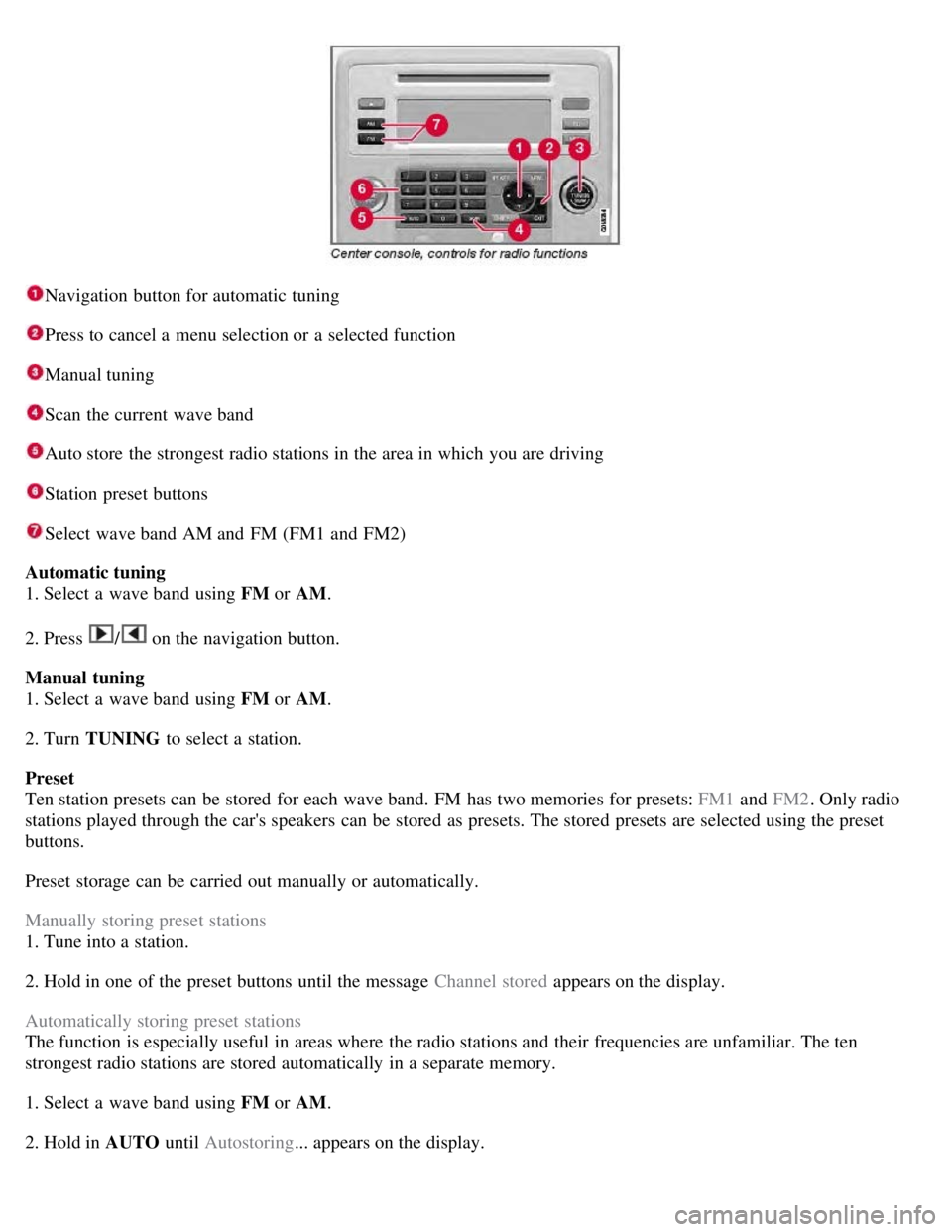
Navigation button for automatic tuning
Press to cancel a menu selection or a selected function
Manual tuning
Scan the current wave band
Auto store the strongest radio stations in the area in which you are driving
Station preset buttons
Select wave band AM and FM (FM1 and FM2)
Automatic tuning
1. Select a wave band using FM or AM.
2. Press
/ on the navigation button.
Manual tuning
1. Select a wave band using FM or AM.
2. Turn TUNING to select a station.
Preset
Ten station presets can be stored for each wave band. FM has two memories for presets: FM1 and FM2. Only radio
stations played through the car's speakers can be stored as presets. The stored presets are selected using the preset
buttons.
Preset storage can be carried out manually or automatically.
Manually storing preset stations
1. Tune into a station.
2. Hold in one of the preset buttons until the message Channel stored appears on the display.
Automatically storing preset stations
The function is especially useful in areas where the radio stations and their frequencies are unfamiliar. The ten
strongest radio stations are stored automatically in a separate memory.
1. Select a wave band using FM or AM.
2. Hold in AUTO until Autostoring... appears on the display.
Page 140 of 275
Once Autostoring... disappears from the display, the stations are stored. The radio continues in Auto mode and Auto
appears on the display. The automatically stored presets can now be selected using the preset buttons. Automatic
preset storage can be cancelled using EXIT .
Auto mode is cancelled by pressing for example AUTO or FM.
Returning to Auto mode provides access to the autostored presets:
1. Press AUTO .
Auto appears on the display.
2. Press a preset button.
Scan
The function automatically searches the current wave band for strong stations. When a station is found, it is played for
approx. eight seconds before scanning is resumed. While the station is playing it can be stored as a preset as usual.
1. Select a wave band using AM or FM.
2. Press SCAN .
SCAN appears on the display. Close using SCAN or EXIT.
142 04 Comfort and driving pleasure
Audio system
Radio text
Some stations transmit information on program content, artists, etc. This information can be shown on the display.
Activate/deactivate in FM mode under Radio text.
143 04 Comfort and driving pleasure
Audio system
Sirius satellite radio (option)
Listening to satellite radio
The Sirius satellite system consists of a number of high elevation satellites in geosynchronous orbit.
NOTE
The digital signals from the Sirius satellites are line-of-sight, which means that physical obstructions such as
bridges, tunnels, etc, may temporarily interfere with signal reception.
Avoid any obstructions, such as metallic objects transported on roof racks or in a ski box, or other antennas that
may impede signals from the SIRIUS satellites.
Selecting Sirius radio mode
1. Press Power to switch on the audio system (see pages 137
and 141 for information on the standard audio and radio
functions).
Page 150 of 275
Active chassis system-Four C
Active chassis (Four C)-option
Active chassis, Four-C (Continuously Controlled Chassis Concept), regulates the characteristics of the shock absorbers
so that the car's driving characteristics can be adjusted. There are three settings: Comfort, Sport and Advanced.
Comfort
Comfort mode offers a somewhat softer ride and the transmission shifts gears at lower rpm. This mode is particularly
suitable for long-distance highway driving. The indicator light in the button will be on when this mode is selected.
Sport
In this mode, the vehicle's body sway is reduced during cornering and steering response is more immediate. The
transmission shifts up at higher rpm for sportier driving. The indicator light in the button will be on to indicate that
Sport mode has been selected.
Advanced
In this mode, body sway in curves is minimal and steering response is very direct. Gear shifting is done at high rpm in
each gear for dynamic and active driving.
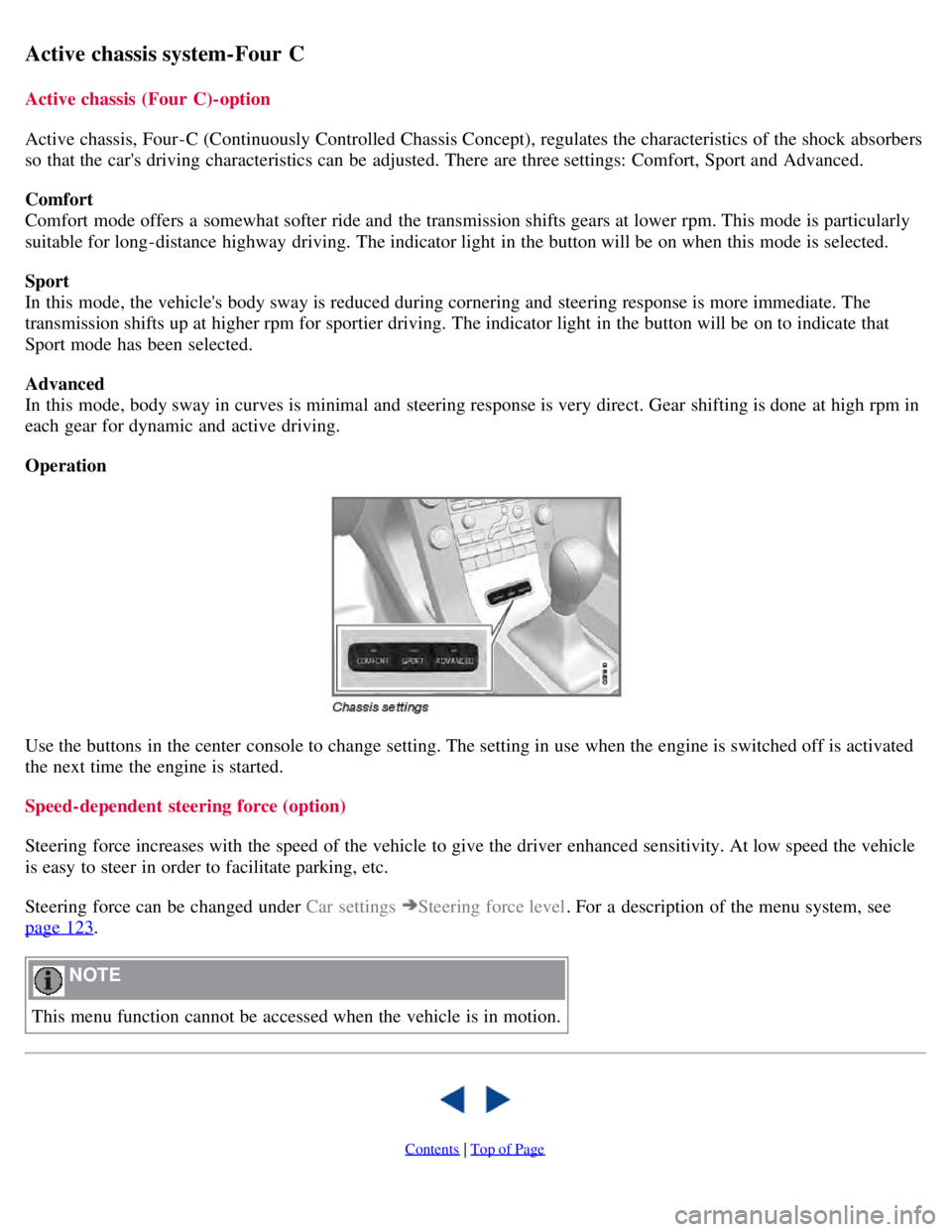
Operation
Use the buttons in the center console to change setting. The setting in use when the engine is switched off is activated
the next time the engine is started.
Speed-dependent steering force (option)
Steering force increases with the speed of the vehicle to give the driver enhanced sensitivity. At low speed the vehicle
is easy to steer in order to facilitate parking, etc.
Steering force can be changed under Car settings
Steering force level. For a description of the menu system, see
page 123
.
NOTE
This menu function cannot be accessed when the vehicle is in motion.
Contents | Top of Page
Page 151 of 275
2 0 0 8
VOLVO S80
154 04 Comfort and driving pleasure
Cruise control
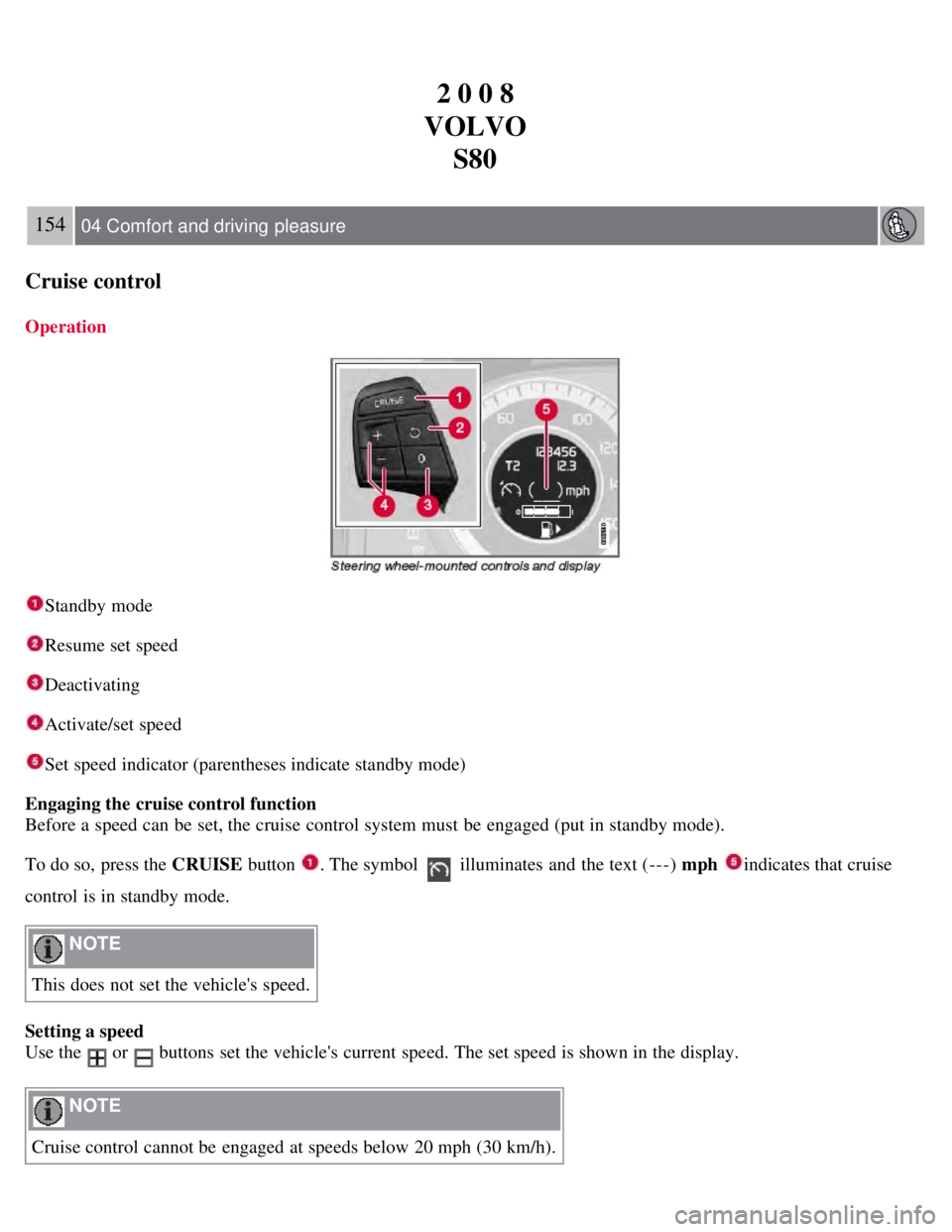
Operation
Standby mode
Resume set speed
Deactivating
Activate/set speed
Set speed indicator (parentheses indicate standby mode)
Engaging the cruise control function
Before a speed can be set, the cruise control system must be engaged (put in standby mode).
To do so, press the CRUISE button
. The symbol illuminates and the text (---) mph indicates that cruise
control is in standby mode.
NOTE
This does not set the vehicle's speed.
Setting a speed
Use the
or buttons set the vehicle's current speed. The set speed is shown in the display.
NOTE
Cruise control cannot be engaged at speeds below 20 mph (30 km/h).
Page 152 of 275
Adjusting the set speed
After a speed has been set, it can be increased or decreased by using the
or buttons.
Press and hold down or until the vehicle reaches the desired speed. This will become the set speed when the
button is released.
Press or for approximately a half second and release the button to increase or decrease vehicle speed by
approximately 1 mph (1.6 km/h).
NOTE
A temporary increase in speed by pressing the accelerator pedal, for less than 1 minute (e.g. when passing another
car), does not affect the current cruise control setting. The vehicle will automatically return to the previously set
speed when the accelerator pedal is released.
If one of the cruise control buttons is kept depressed for more than approx. 1 minute cruise control is disengaged.
The engine must then be switched off in order to reset cruise control.
Automatic deactivation
Cruise control is automatically deactivated temporarily if one of the following occurs:
If the speed drops below approximately 20 mph (30 km/h).
When the brake pedal is depressed.
If the gear selector is moved to position N.
During wheel spin or wheel lock-up.
If the vehicle's speed is increased by using the accelerator pedal for more than 1 minute.
The currently set speed will be saved in the system's memory.
155 04 Comfort and driving pleasure
Cruise control
Temporary deactivation
The driver can temporarily deactivate cruise control by pressing 0. The saved speed is shown in brackets in the
information display.
Resume set speed
If cruise control has been deactivated temporarily, it can be reactivated by pressing
. The vehicle's speed returns to
the most recently set speed.
WARNING
There may be a significant increase in speed after the
button has been pressed.
Deactivation
Cruise control is disengaged with CRUISE , by putting the gear selector in Neutral, or by switching off the engine. The
set speed is cleared.
WARNING
Cruise control should not be used in heavy traffic or when driving on wet or slippery roads. Cruise control may not
Page 155 of 275

Strong sunlight, reflections, extreme light contrasts, the use of sunglasses, or if the driver is not looking straight
ahead may make the visual warning signal in the windshield difficult to see.
WARNING
Cruise control only warns of vehicles detected by the radar sensor, see page 160
. In some cases there may be no
warning or the warning may be delayed. The driver should always apply the brakes when necessary.
158 04 Comfort and driving pleasure
Adaptive Cruise Control-ACC
Operation
Activate and resume settings, increase speed
Standby mode, On/Off
Set a time interval
Activate and set a speed
Set speed (parentheses indicate standby mode)
Time interval while it is being set
Time interval after it has been set
Engaging the cruise control function
Before ACC can be used, it must first be put in standby mode.
To do so, press
. The symbol illuminates in the display and (---) indicate that ACC is in standby mode.
Setting a speed
Use the
or buttons to store (set) the vehicle's current speed. The set speed, for example 55 mph , is shown in
the display.
NOTE
Adaptive cruise control cannot be engaged at speeds below 20 mph (30 km/h).