2008 VOLVO S80 trunk
[x] Cancel search: trunkPage 58 of 275
Insert the first new battery with the + side upward.
Insert the plastic spacer over the battery.
Insert the second new battery on top of the plastic spacer, with the + side downward.
Re-assembling the remote key
1. Press the remote key's cover into place.
2. Hold the remote control with the slot for the key blade up.
3. Carefully slide the key blade into its groove.
4. Gently press the key blade in the groove until it clicks into place.
Old batteries should be properly recycled.
60 02 Locks and alarm
Keyless drive
Keyless drive (models with Personal Car Communicator only)
Keyless locking and unlocking
This system makes it possible to unlock and lock the vehicle without having to press any buttons on the Personal Car
Communicators (PCC). It is only necessary to have a keyless drive remote control in your possession to operate the
central locking system.
NOTE
The buttons on the keyless drive remote control can also be used to lock and unlock the vehicle. See page 54
for
more information.
Both of the PCCs provided with the vehicle have the keyless function, and additional ones can be ordered. The system
can accommodate up to six PCCs.
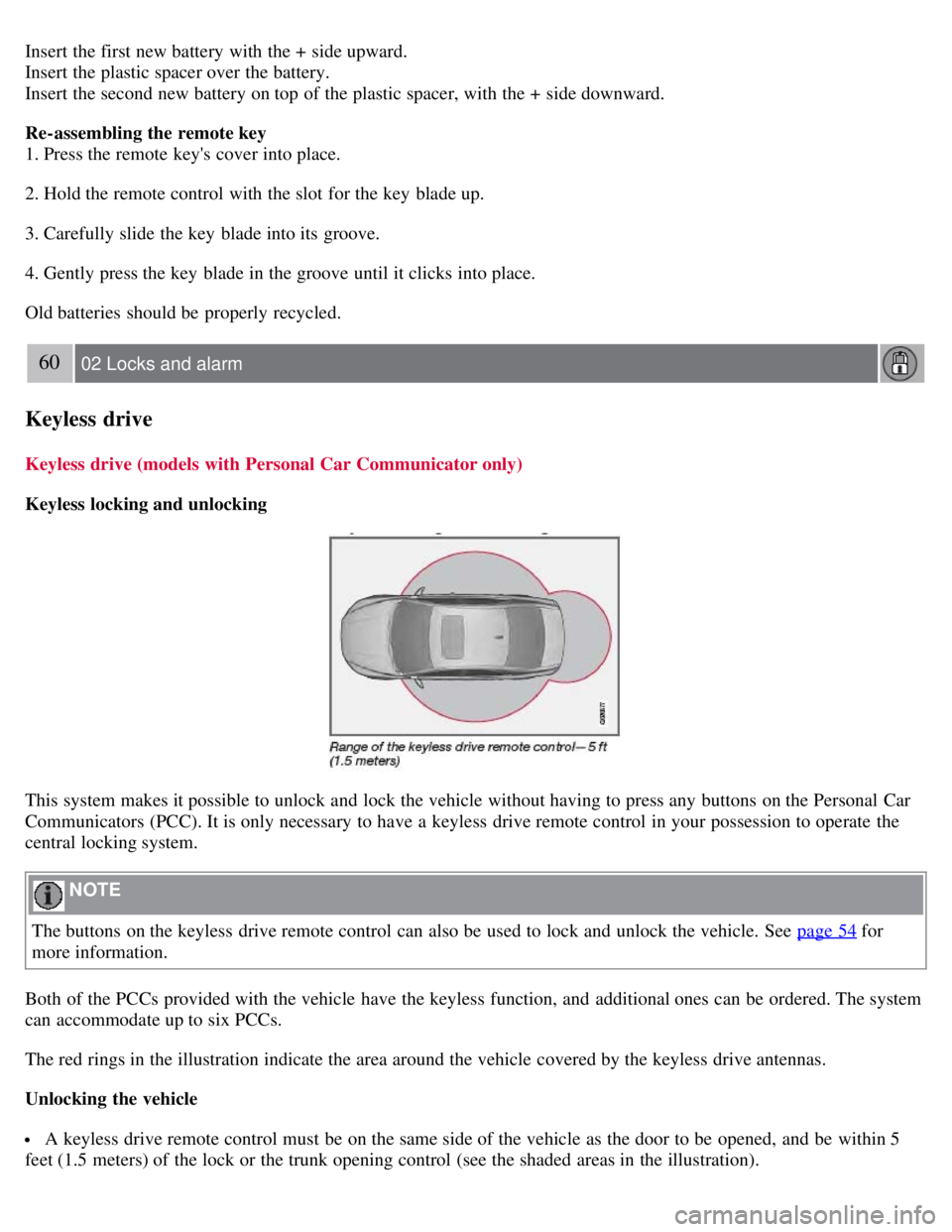
The red rings in the illustration indicate the area around the vehicle covered by the keyless drive antennas.
Unlocking the vehicle
A keyless drive remote control must be on the same side of the vehicle as the door to be opened, and be within 5
feet (1.5 meters) of the lock or the trunk opening control (see the shaded areas in the illustration).
Page 59 of 275

Pull a door handle to unlock and open the door or press the trunk opening control on the trunk lid.
The number of doors that are unlocked at the same time can be set in the vehicle's menu system, under Car settings
Lock settings Keyless entry. See page 123 for a description of the menu system.
NOTE
If the PCC does not function normally (weak battery, etc.), the vehicle can be unlocked with the detachable key
blade. See page 57
.
Locking the vehicle
The doors and the trunk can be locked by pressing the lock button in any of the outside door handles.
NOTE
On keyless drive vehicles, the gear selector must be in the Park ( P) position and the ignition must be switched off
before the doors/trunk can be locked.
Keyless drive remote control and driver's seat/door mirror memory
When you leave the vehicle with a PCC in your possession and lock any door, the position of the driver's seat will
be stored in the seat's memory.
The next time a door is opened by a person with the same PCC in his/her possession, the driver's seat and door
mirrors will automatically move to the position that they were in when the door was most recently locked.
NOTE
If several people carrying PCCs approach the vehicle at the same time, the driver's seat and door mirrors will assume
the positions they were in for the person who opens the driver's door.
61 02 Locks and alarm
Keyless drive
See also page 83 for information on adjusting and storing the seat's position in the seat memory.
Keyless drive information messages
If anyone leaves the vehicle with the only keyless drive remote control in his or her possession while the ignition is
switched on, a message will be shown in the information display and an audible signal will sound.
NOTE
This message will only be displayed if the start control is in mode I or II.
The message will be erased from the display and the audible signal will stop when the PCC has been returned to the
vehicle and one of the following has occurred:
A door has been opened and closed
The PCC has been inserted in the ignition slot
The READ button (see page 124 for the location of this button) has been pressed.
Page 61 of 275
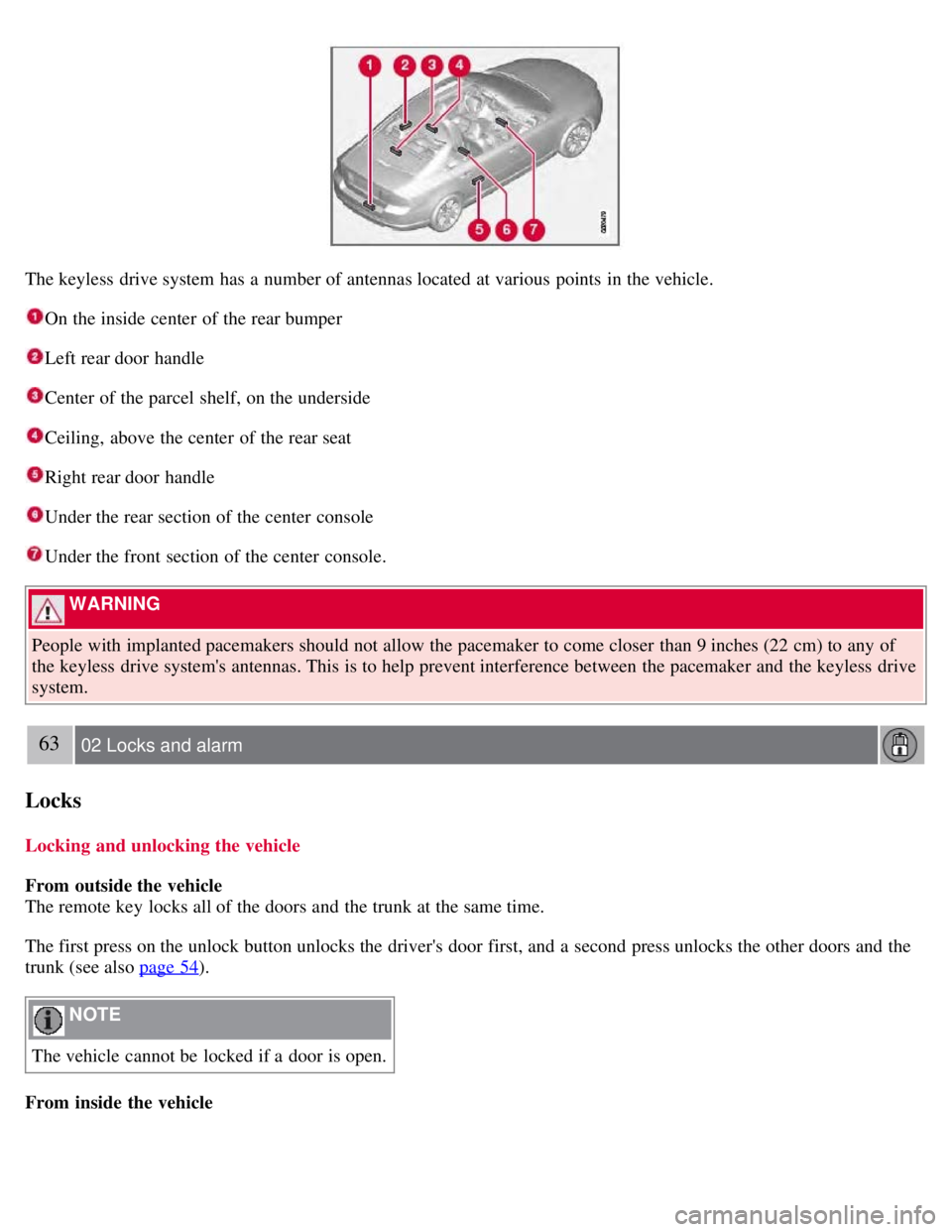
The keyless drive system has a number of antennas located at various points in the vehicle.
On the inside center of the rear bumper
Left rear door handle
Center of the parcel shelf, on the underside
Ceiling, above the center of the rear seat
Right rear door handle
Under the rear section of the center console
Under the front section of the center console.
WARNING
People with implanted pacemakers should not allow the pacemaker to come closer than 9 inches (22 cm) to any of
the keyless drive system's antennas. This is to help prevent interference between the pacemaker and the keyless drive
system.
63 02 Locks and alarm
Locks
Locking and unlocking the vehicle
From outside the vehicle
The remote key locks all of the doors and the trunk at the same time.
The first press on the unlock button unlocks the driver's door first, and a second press unlocks the other doors and the
trunk (see also page 54
).
NOTE
The vehicle cannot be locked if a door is open.
From inside the vehicle
Page 62 of 275
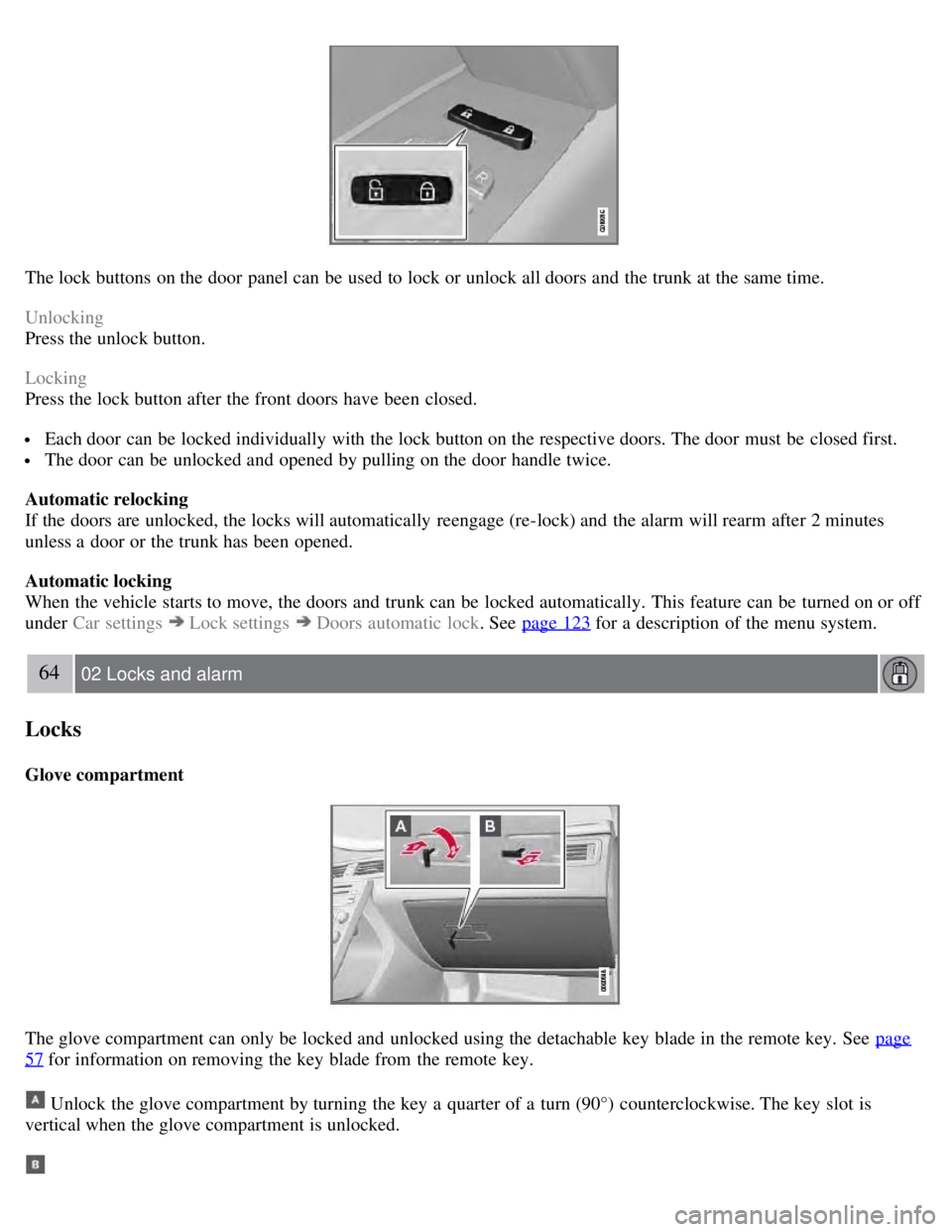
The lock buttons on the door panel can be used to lock or unlock all doors and the trunk at the same time.
Unlocking
Press the unlock button.
Locking
Press the lock button after the front doors have been closed.
Each door can be locked individually with the lock button on the respective doors. The door must be closed first.
The door can be unlocked and opened by pulling on the door handle twice.
Automatic relocking
If the doors are unlocked, the locks will automatically reengage (re-lock) and the alarm will rearm after 2 minutes
unless a door or the trunk has been opened.
Automatic locking
When the vehicle starts to move, the doors and trunk can be locked automatically. This feature can be turned on or off
under Car settings
Lock settings Doors automatic lock . See page 123 for a description of the menu system.
64 02 Locks and alarm
Locks
Glove compartment
The glove compartment can only be locked and unlocked using the detachable key blade in the remote key. See page
57 for information on removing the key blade from the remote key.
Unlock the glove compartment by turning the key a quarter of a turn (90°) counterclockwise. The key slot is
vertical when the glove compartment is unlocked.
Page 63 of 275

Lock the glove compartment by turning the key a quarter of a turn (90°) clockwise. The key slot is horizontal when
the glove compartment is locked.
Locking/unlocking the trunk
Unlocking and opening the trunk with the remote key
Press the trunk unlock button on the remote.
Press once: This unlocks but does not open the trunk. The trunk can then be opened by pressing the rubber plate near
the trunk lock (see illustration 1 on page 65
). If the trunk is not opened within two minutes it will automatically relock
and the alarm will be rearmed.
Press twice: This both unlocks the trunk and pops it open several inches.
NOTE
Any excess weight (snow, etc.) on the trunk lid may prevent it from opening.
See also page 55
.
The alarm indicator light on the dashboard will go out to indicate that the alarm is not monitoring the entire vehicle.
The accessory movement and inclination sensors will be automatically disconnected.
When the trunk is closed again, it will relock, and all alarm functions will be reactivated.
Locking the trunk with the remote key
Press the lock button on the remote. See also page 54
.
NOTE
If the doors are locked while the trunk is open, the trunk will remain unlocked until the vehicle is relocked by
pressing the Lock button on the remote control.
65 02 Locks and alarm
Locks
Opening the trunk from the passenger compartment
Page 64 of 275
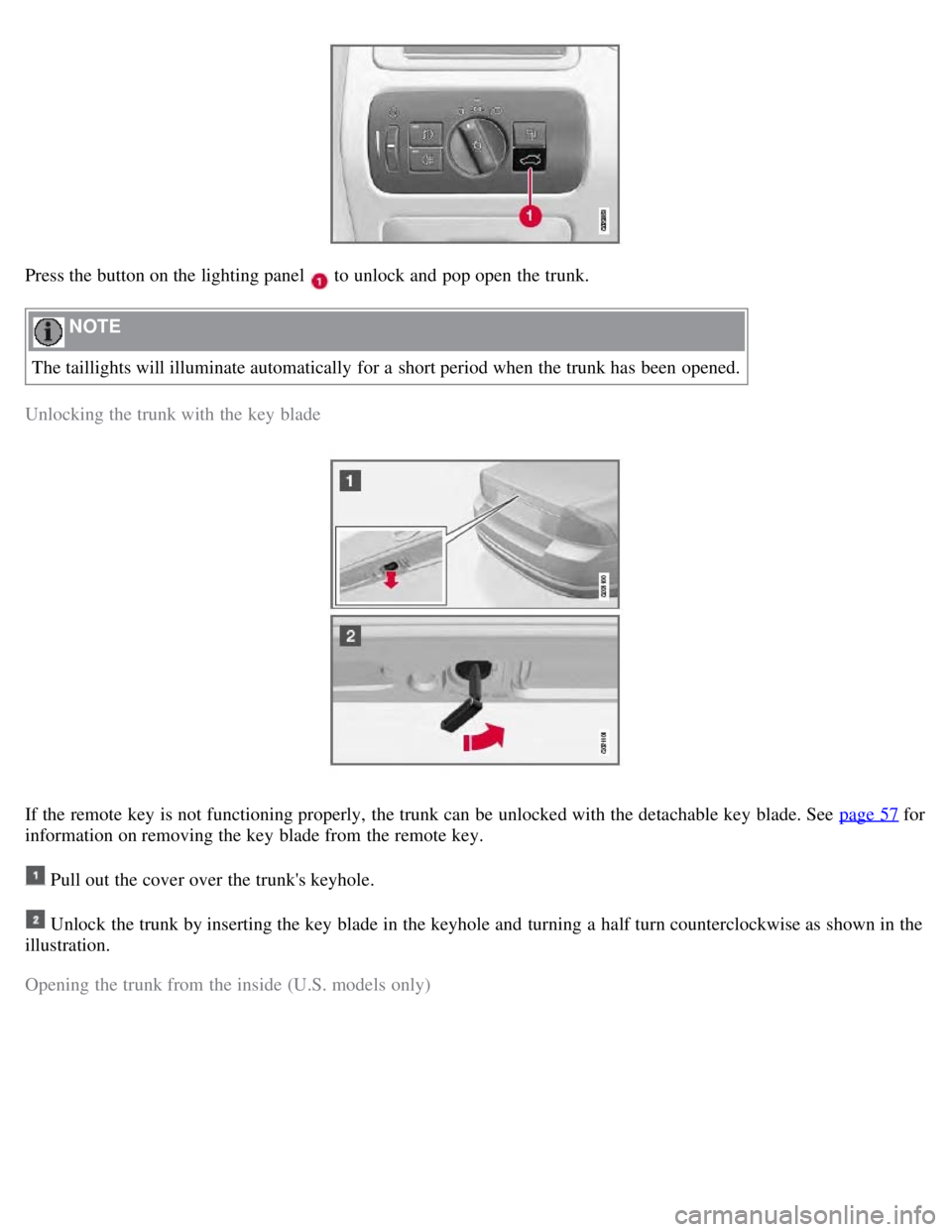
Press the button on the lighting panel to unlock and pop open the trunk.
NOTE
The taillights will illuminate automatically for a short period when the trunk has been opened.
Unlocking the trunk with the key blade
If the remote key is not functioning properly, the trunk can be unlocked with the detachable key blade. See page 57 for
information on removing the key blade from the remote key.
Pull out the cover over the trunk's keyhole.
Unlock the trunk by inserting the key blade in the keyhole and turning a half turn counterclockwise as shown in the
illustration.
Opening the trunk from the inside (U.S. models only)
Page 65 of 275

The S80 is equipped with a florescent handle on the inside of the trunk lid, which can be used in an emergency
situation to open the trunk from the inside. Pull the handle down to release the trunk lid. After use, the handle must be
pushed back into its original position before the trunk can be closed.
This handle is not intended to be used to anchor the trunk lid when long loads are being transported.
66 02 Locks and alarm
Locks
WARNING
Keep vehicle doors and trunk locked and keep keys out of a child's reach. Unsupervised children could lock
themselves in an open trunk and risk injury. Children should be taught not to play in vehicles.
On hot days, the temperature in the trunk or vehicle interior can rise very quickly. Exposure of people to these
high temperatures for even a short period of time can cause heat-related injury or death. Small children are
particularly at risk.
67 02 Locks and alarm
Alarm
The alarm system
The alarm is automatically armed whenever the vehicle is locked with the remote key or optional Personal Car
Communicator.
When armed, the alarm continuously monitors a number of points on the vehicle. The following conditions will trigger
the alarm:
The hood is forced open.
The trunk is forced open.
A door is forced open.
The ignition slot is tampered with
An attempt is made to start the vehicle with a non-approved key (a key not coded to the car's ignition).
If there is movement in the passenger compartment (if the vehicle is equipped with the accessory movement sensor).
The vehicle is lifted or towed (if the vehicle is equipped with the accessory inclination sensor)
The battery is disconnected (while the alarm is armed).
The siren is disconnected when the alarm is disarmed.
A message will appear in the information display if a fault should occur in the alarm system. Contact an authorized
Page 67 of 275

Press the Unlock button on the remote key. Two short flashes from the car's direction indicators confirm that the alarm
has been deactivated and that all doors are unlocked.
Turning off (stopping) the alarm
If the alarm is sounding, it can be stopped by pressing the Unlock button on the remote control or by inserting the
remote key in the ignition slot. Two short flashes from the car's direction indicators confirm that the alarm has been
turned off.
Other alarm-related functions
Automatic re-arming
If the doors are unlocked, the locks will automatically reengage (re-lock) and the alarm will re-arm after 2 minutes
unless a door or the trunk has been opened.
Audible/visual alarm signal
An audible alarm signal is given by a battery powered siren. The alarm cycle lasts for 30 seconds.
The visual alarm signal is given by flashing all turn signals for approximately 5 minutes or until the alarm is turned
off.
Remote key not functioning
If the remote key is not functioning properly, the alarm can be turned off and the vehicle can be started as follows:
1. Open the driver's door with the key blade. This will trigger the alarm.
2. Insert the remote key into the ignition slot. This will turn off the alarm.
69 02 Locks and alarm
Alarm
Reduced alarm function
Turning off the accessory alarm sensor(s)
In certain situations it may be desirable to turn off the accessory inclination and movement alarm sensors if, for
example, you drive your vehicle onto a ferry where the rocking of the boat could trigger the alarm or if a pet is left in
the vehicle with the doors locked.
Press the button shown in the illustration above (within 1 minute after the ignition has been switched off).
A message will be displayed for 10 seconds or until the vehicle is locked, indicating that the sensors are disconnected.