2008 VOLVO S80 remote control
[x] Cancel search: remote controlPage 55 of 275
quarter turn to unlock the driver's door only.
NOTE
After unlocking the driver's door with the key blade, opening the door will trigger the alarm.
To disable the alarm:
Insert the remote key in the ignition slot.
Locking the doors with the detached key blade
1. Lock the rear doors and the front passenger's door by pressing the lock button on each door.
2. Turn the key blade one -quarter turn counter-clockwise to lock the driver's door.
NOTE
This does not arm the alarm or lock the trunk. The trunk has a separate lock that can be locked with the key blade,
see page 65
.
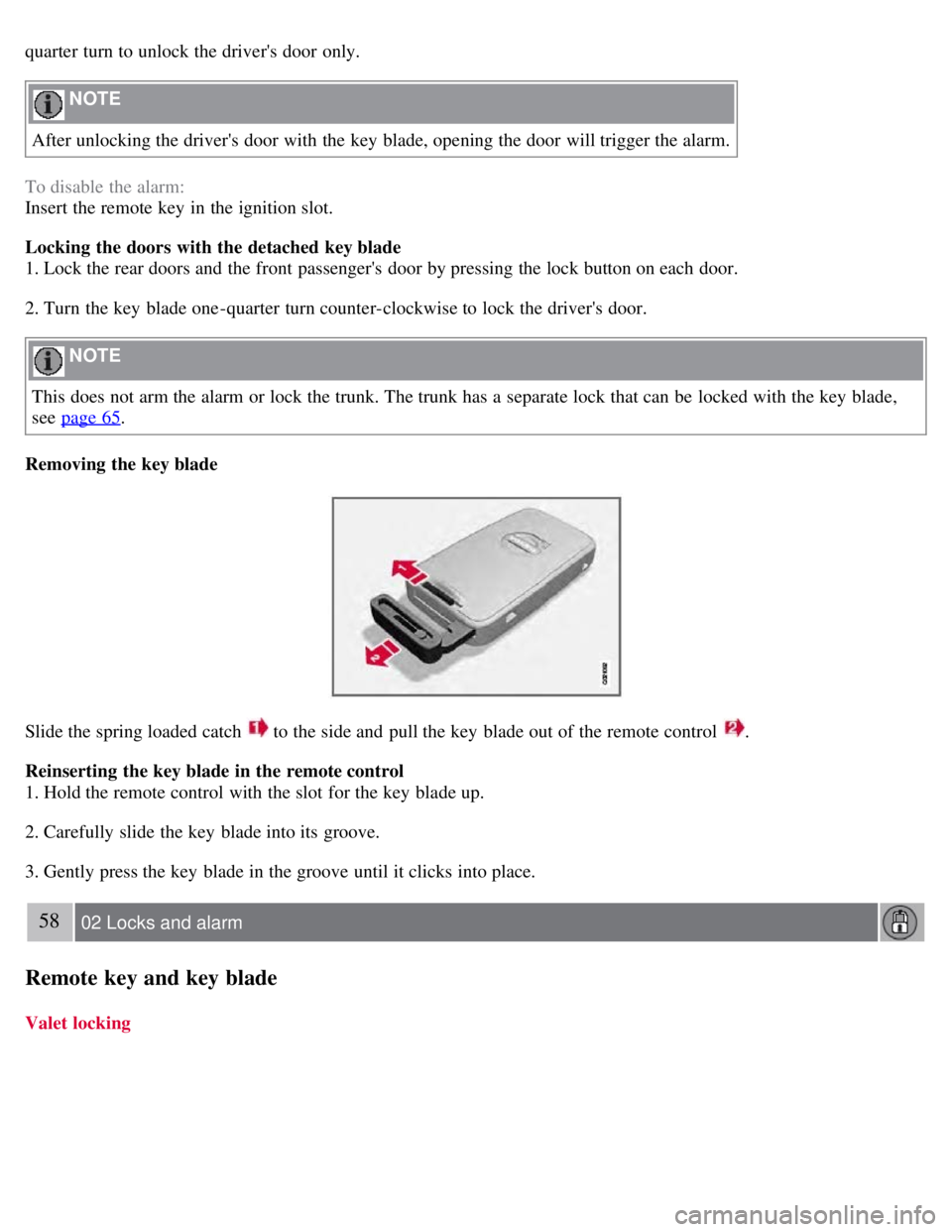
Removing the key blade
Slide the spring loaded catch to the side and pull the key blade out of the remote control .
Reinserting the key blade in the remote control
1. Hold the remote control with the slot for the key blade up.
2. Carefully slide the key blade into its groove.
3. Gently press the key blade in the groove until it clicks into place.
58 02 Locks and alarm
Remote key and key blade
Valet locking
Page 56 of 275

By utilizing the remote key with the key blade removed, the valet locking feature enables you to block access to the
trunk and glove compartment for e.g., valet parking or when the vehicle is brought to the retailer for service.
With the valet locking function activated:
The vehicle's doors can be locked or unlocked with the remote
The engine can be started
The glove compartment cannot be unlocked
Access to the trunk is blocked (the trunk lid cannot be unlocked or opened with the remote, and the rear seat
backrests cannot be lowered
Activating the valet locking function
1. Remove the key blade from the remote control.
2. Turn the key blade 180° clockwise in the glove compartment lock to lock the glove compartment and disconnect the
trunk lock from the central locking system. Valet lock activated will appear in the information display.
Deactivating the valet locking function
Turn the key blade 180° counterclockwise in the glove compartment lock to deactivate valet locking.
See page 64
for information on locking the glove compartment normally, without activating the valet parking function.
59 02 Locks and alarm
Remote key and key blade
Replacing the battery in the remote key
Page 57 of 275
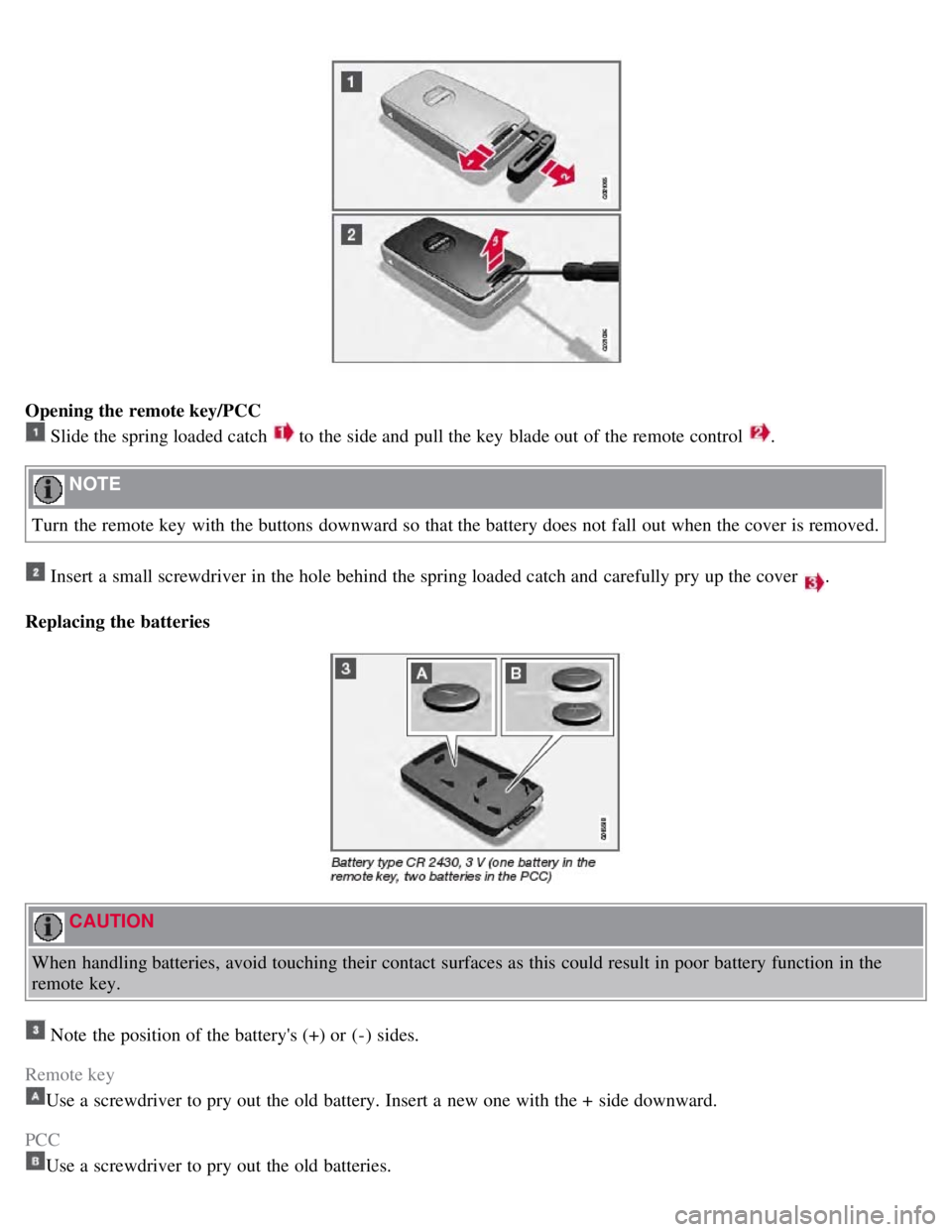
Opening the remote key/PCC
Slide the spring loaded catch to the side and pull the key blade out of the remote control .
NOTE
Turn the remote key with the buttons downward so that the battery does not fall out when the cover is removed.
Insert a small screwdriver in the hole behind the spring loaded catch and carefully pry up the cover .
Replacing the batteries
CAUTION
When handling batteries, avoid touching their contact surfaces as this could result in poor battery function in the
remote key.
Note the position of the battery's (+) or (-) sides.
Remote key
Use a screwdriver to pry out the old battery. Insert a new one with the + side downward.
PCC
Use a screwdriver to pry out the old batteries.
Page 58 of 275
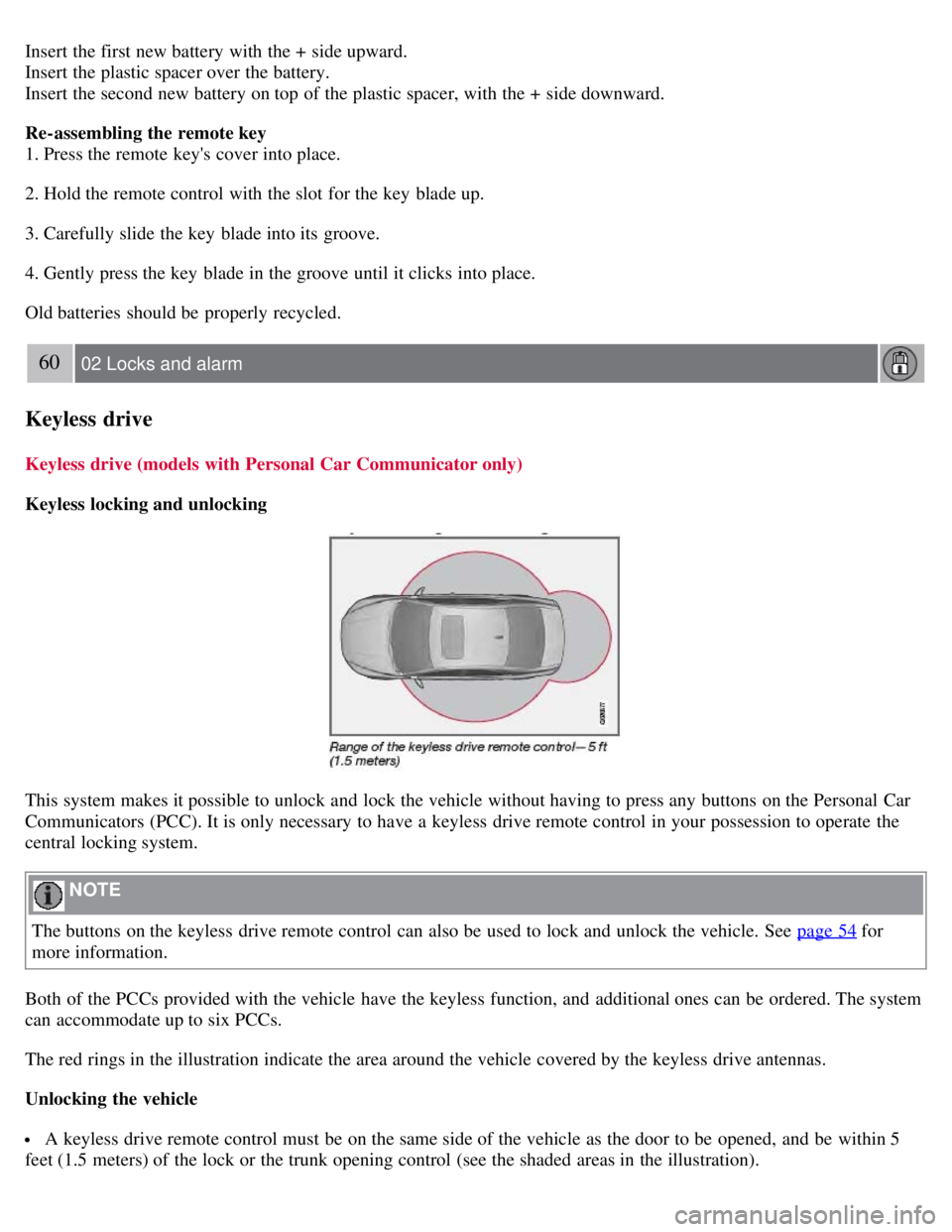
Insert the first new battery with the + side upward.
Insert the plastic spacer over the battery.
Insert the second new battery on top of the plastic spacer, with the + side downward.
Re-assembling the remote key
1. Press the remote key's cover into place.
2. Hold the remote control with the slot for the key blade up.
3. Carefully slide the key blade into its groove.
4. Gently press the key blade in the groove until it clicks into place.
Old batteries should be properly recycled.
60 02 Locks and alarm
Keyless drive
Keyless drive (models with Personal Car Communicator only)
Keyless locking and unlocking
This system makes it possible to unlock and lock the vehicle without having to press any buttons on the Personal Car
Communicators (PCC). It is only necessary to have a keyless drive remote control in your possession to operate the
central locking system.
NOTE
The buttons on the keyless drive remote control can also be used to lock and unlock the vehicle. See page 54
for
more information.
Both of the PCCs provided with the vehicle have the keyless function, and additional ones can be ordered. The system
can accommodate up to six PCCs.
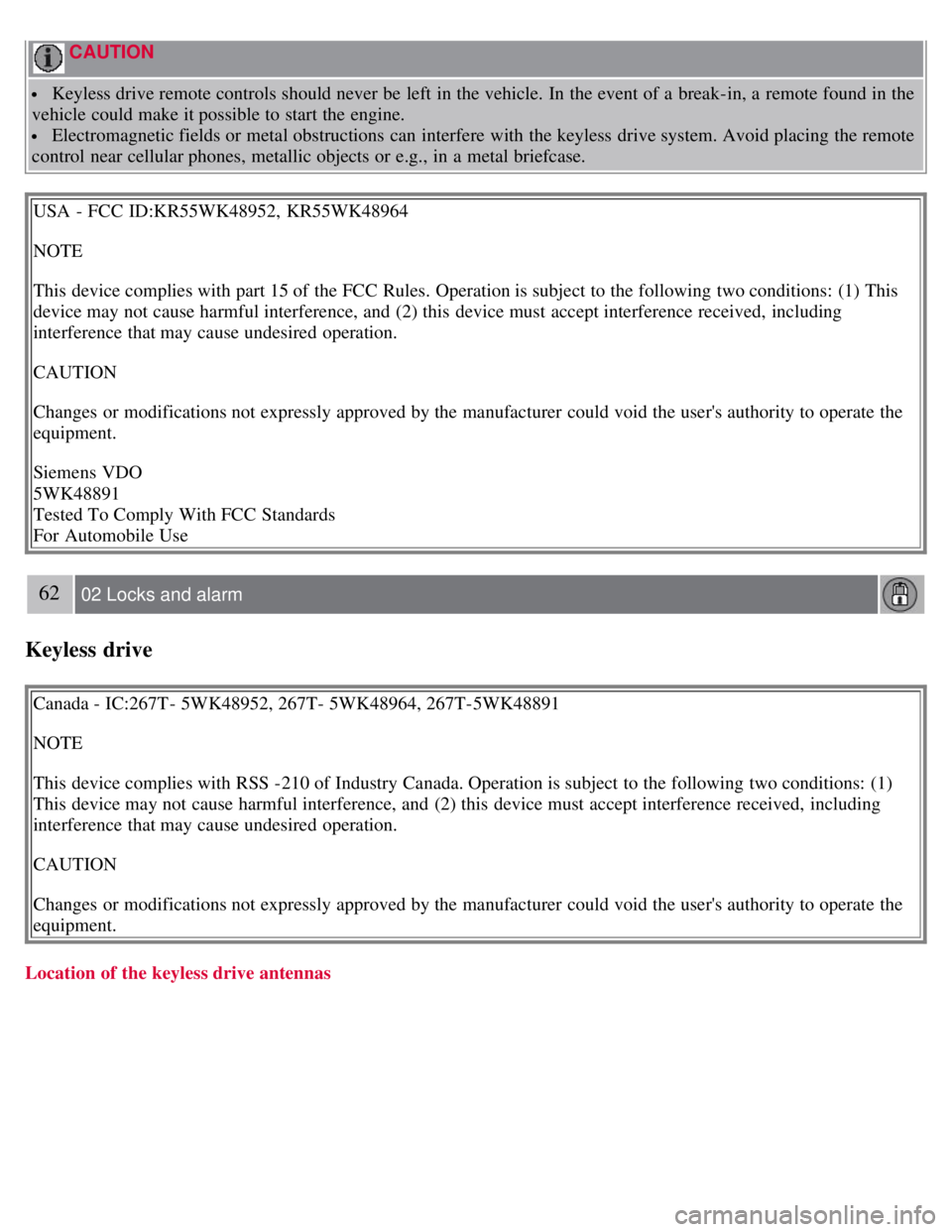
The red rings in the illustration indicate the area around the vehicle covered by the keyless drive antennas.
Unlocking the vehicle
A keyless drive remote control must be on the same side of the vehicle as the door to be opened, and be within 5
feet (1.5 meters) of the lock or the trunk opening control (see the shaded areas in the illustration).
Page 59 of 275

Pull a door handle to unlock and open the door or press the trunk opening control on the trunk lid.
The number of doors that are unlocked at the same time can be set in the vehicle's menu system, under Car settings
Lock settings Keyless entry. See page 123 for a description of the menu system.
NOTE
If the PCC does not function normally (weak battery, etc.), the vehicle can be unlocked with the detachable key
blade. See page 57
.
Locking the vehicle
The doors and the trunk can be locked by pressing the lock button in any of the outside door handles.
NOTE
On keyless drive vehicles, the gear selector must be in the Park ( P) position and the ignition must be switched off
before the doors/trunk can be locked.
Keyless drive remote control and driver's seat/door mirror memory
When you leave the vehicle with a PCC in your possession and lock any door, the position of the driver's seat will
be stored in the seat's memory.
The next time a door is opened by a person with the same PCC in his/her possession, the driver's seat and door
mirrors will automatically move to the position that they were in when the door was most recently locked.
NOTE
If several people carrying PCCs approach the vehicle at the same time, the driver's seat and door mirrors will assume
the positions they were in for the person who opens the driver's door.
61 02 Locks and alarm
Keyless drive
See also page 83 for information on adjusting and storing the seat's position in the seat memory.
Keyless drive information messages
If anyone leaves the vehicle with the only keyless drive remote control in his or her possession while the ignition is
switched on, a message will be shown in the information display and an audible signal will sound.
NOTE
This message will only be displayed if the start control is in mode I or II.
The message will be erased from the display and the audible signal will stop when the PCC has been returned to the
vehicle and one of the following has occurred:
A door has been opened and closed
The PCC has been inserted in the ignition slot
The READ button (see page 124 for the location of this button) has been pressed.
Page 60 of 275
CAUTION
Keyless drive remote controls should never be left in the vehicle. In the event of a break-in, a remote found in the
vehicle could make it possible to start the engine.
Electromagnetic fields or metal obstructions can interfere with the keyless drive system. Avoid placing the remote
control near cellular phones, metallic objects or e.g., in a metal briefcase.
USA - FCC ID:KR55WK48952, KR55WK48964
NOTE
This device complies with part 15 of the FCC Rules. Operation is subject to the following two conditions: (1) This
device may not cause harmful interference, and (2) this device must accept interference received, including
interference that may cause undesired operation.
CAUTION
Changes or modifications not expressly approved by the manufacturer could void the user's authority to operate the
equipment.
Siemens VDO
5WK48891
Tested To Comply With FCC Standards
For Automobile Use
62 02 Locks and alarm
Keyless drive
Canada - IC:267T- 5WK48952, 267T- 5WK48964, 267T-5WK48891
NOTE
This device complies with RSS -210 of Industry Canada. Operation is subject to the following two conditions: (1)
This device may not cause harmful interference, and (2) this device must accept interference received, including
interference that may cause undesired operation.
CAUTION
Changes or modifications not expressly approved by the manufacturer could void the user's authority to operate the
equipment.
Location of the keyless drive antennas
Page 63 of 275

Lock the glove compartment by turning the key a quarter of a turn (90°) clockwise. The key slot is horizontal when
the glove compartment is locked.
Locking/unlocking the trunk
Unlocking and opening the trunk with the remote key
Press the trunk unlock button on the remote.
Press once: This unlocks but does not open the trunk. The trunk can then be opened by pressing the rubber plate near
the trunk lock (see illustration 1 on page 65
). If the trunk is not opened within two minutes it will automatically relock
and the alarm will be rearmed.
Press twice: This both unlocks the trunk and pops it open several inches.
NOTE
Any excess weight (snow, etc.) on the trunk lid may prevent it from opening.
See also page 55
.
The alarm indicator light on the dashboard will go out to indicate that the alarm is not monitoring the entire vehicle.
The accessory movement and inclination sensors will be automatically disconnected.
When the trunk is closed again, it will relock, and all alarm functions will be reactivated.
Locking the trunk with the remote key
Press the lock button on the remote. See also page 54
.
NOTE
If the doors are locked while the trunk is open, the trunk will remain unlocked until the vehicle is relocked by
pressing the Lock button on the remote control.
65 02 Locks and alarm
Locks
Opening the trunk from the passenger compartment
Page 67 of 275

Press the Unlock button on the remote key. Two short flashes from the car's direction indicators confirm that the alarm
has been deactivated and that all doors are unlocked.
Turning off (stopping) the alarm
If the alarm is sounding, it can be stopped by pressing the Unlock button on the remote control or by inserting the
remote key in the ignition slot. Two short flashes from the car's direction indicators confirm that the alarm has been
turned off.
Other alarm-related functions
Automatic re-arming
If the doors are unlocked, the locks will automatically reengage (re-lock) and the alarm will re-arm after 2 minutes
unless a door or the trunk has been opened.
Audible/visual alarm signal
An audible alarm signal is given by a battery powered siren. The alarm cycle lasts for 30 seconds.
The visual alarm signal is given by flashing all turn signals for approximately 5 minutes or until the alarm is turned
off.
Remote key not functioning
If the remote key is not functioning properly, the alarm can be turned off and the vehicle can be started as follows:
1. Open the driver's door with the key blade. This will trigger the alarm.
2. Insert the remote key into the ignition slot. This will turn off the alarm.
69 02 Locks and alarm
Alarm
Reduced alarm function
Turning off the accessory alarm sensor(s)
In certain situations it may be desirable to turn off the accessory inclination and movement alarm sensors if, for
example, you drive your vehicle onto a ferry where the rocking of the boat could trigger the alarm or if a pet is left in
the vehicle with the doors locked.
Press the button shown in the illustration above (within 1 minute after the ignition has been switched off).
A message will be displayed for 10 seconds or until the vehicle is locked, indicating that the sensors are disconnected.