2008 VOLVO S60 lock
[x] Cancel search: lockPage 38 of 230

5. Press the convertible seat firmly in place, let the seat belt retract and pull it taut. A sound from the seat belt retractor's
automatic locking function will be audible at this time and is normal. The seat belt should now be locked in place.
NOTE
The locking retractor will automatically release when the seat belt is unbuckled and allowed to retract fully.
6. Push and pull the convertible seat to ensure that it is held securely in place by the seat belt.
WARNING
It should not be possible to move the child restraint more than 1 in. (2.5 cm) in any direction.
The convertible seat can be removed by unbuckling the seat belt and letting it retract completely.
38 01 Safety
Convertible seats
WARNING
A child seat should never be used in the front passenger seat of any vehicle with a front passenger airbag - not even if
the "Passenger airbag off" symbol near the rear-view mirror is illuminated (on vehicles equipped with Occupant
Weight Sensor). If the severity of an accident were to cause the airbag to inflate, this could lead to serious injury or
ProCarManuals.com
Page 39 of 230
death to a child seated in this position.
39 01 Safety
Booster cushions
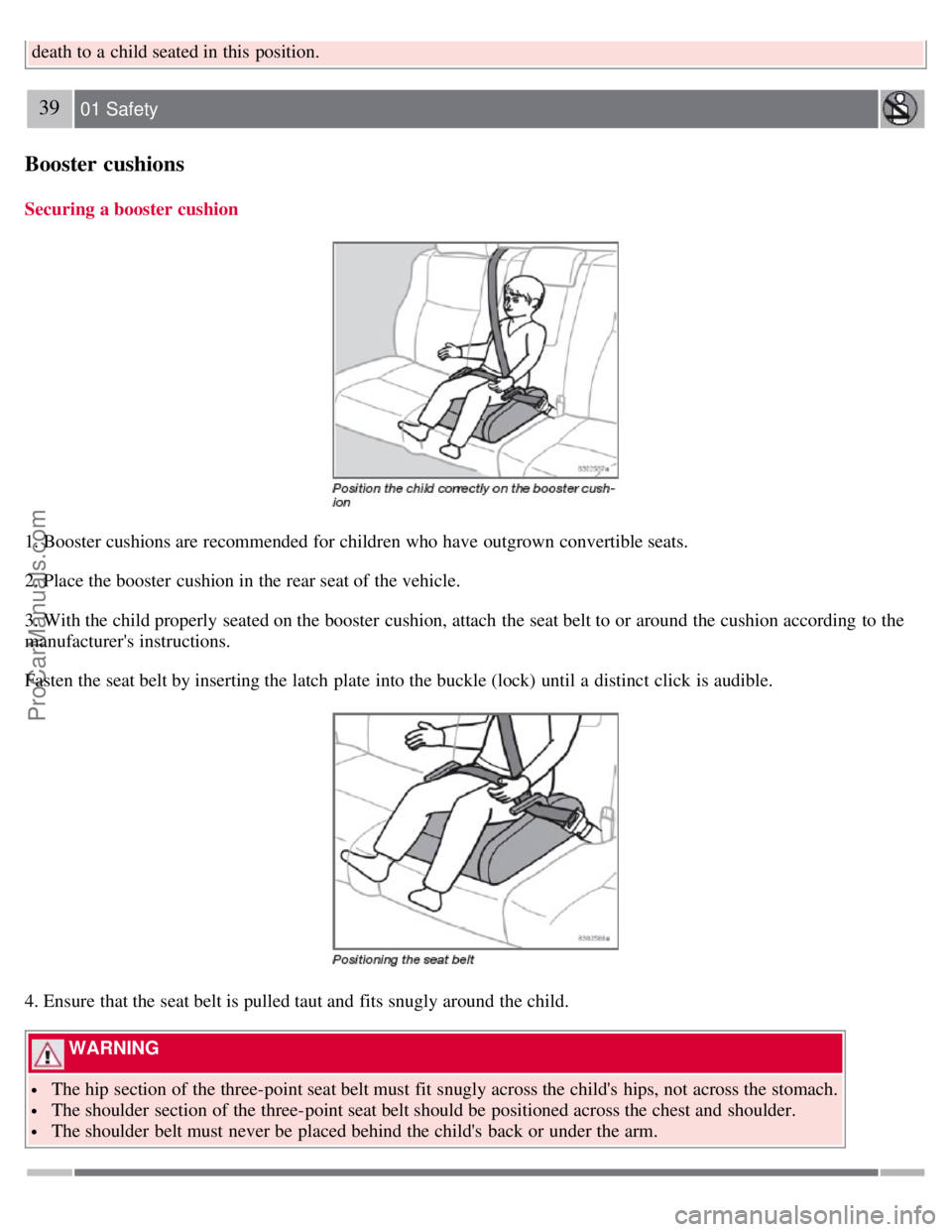
Securing a booster cushion
1. Booster cushions are recommended for children who have outgrown convertible seats.
2. Place the booster cushion in the rear seat of the vehicle.
3. With the child properly seated on the booster cushion, attach the seat belt to or around the cushion according to the
manufacturer's instructions.
Fasten the seat belt by inserting the latch plate into the buckle (lock) until a distinct click is audible.
4. Ensure that the seat belt is pulled taut and fits snugly around the child.
WARNING
The hip section of the three-point seat belt must fit snugly across the child's hips, not across the stomach.
The shoulder section of the three-point seat belt should be positioned across the chest and shoulder.
The shoulder belt must never be placed behind the child's back or under the arm.
ProCarManuals.com
Page 44 of 230

2 0 0 8
VOLVO S60
44 02 Instruments and controls
Instrument overview 46
Instrument panel48
Instrument and warning symbols49
Buttons in the center console54
Steering wheel adjustment56
Lighting panel57
Fuel filler door-unlocking manually59
Left-side steering wheel lever60
Right-side steering wheel lever61
Hazard warning flashers, door mirror defroster63
Trip computer64
Cruise control66
Parking brake68
12-volt sockets69
Power windows70
Mirrors72
Power moonroof (option)76
Home Link® Universal Transceiver (option)78
45 02 Instruments and controls
46 02 Instruments and controls
Instrument overview
ProCarManuals.com
Page 45 of 230

47 02 Instruments and controls
Instrument overview
1 Front fog lights57
2 Headlights/Parking lights/switch for unlocking fuel filler door57
3 Rear fog light57
4 Turn signals/High/low beams60
5 Cruise control66
6 Horn-
7 Instrument panel 48
8 Audio controls in steering wheel229
9 Windshield wipers61
10 Parking brake (hand brake)68
11 Center console buttons54
12 Climate control84
13 Audio system222
14 12-V socket55, 69
15 Hazard warning flashers63
16 Glove compartment102
17 Panel vents85
18 Text display48
19 Temperature gauge48
20 Odometer/Trip odometer/Cruise control indicator48
21 Speedometer48
22 Turn signal indicators48
23 Tachometer48
24 Ambient temperature/Clock/Selected gear indicator48
ProCarManuals.com
Page 46 of 230

25 Fuel gauge48
26 Indicator and warning symbols49
27 Panel vents85
28 Instrument lighting58
29 Not in use
30 Lighting panel57
31 Reading lights97
32 Interior lighting97
33 Moonroof control76
34 Seat belt reminder14
35 Rearview mirror72
36 Lock button, for all doors115
37 Cut -out button for rear seat power windows71
38 Controls, power windows70
39 Controls, door mirrors74
48 02 Instruments and controls
Instrument panel
Instrument panel
1. Turn signal indicators - right/left
2. Text window
The text window displays information and warning messages.
3. Temperature gauge
The pointer should be approximately midway on the gauge when driving. Do not drive the vehicle if the warning light
is on. The text window will provide you with additional information.
If the engine temperature remains high, check coolant level - see page 195
.
4. Trip odometer
The trip odometers are used for measuring shorter distances. The right-hand digit gives tenth of a mile/kilometer. Press
the button for more than 2 seconds to reset. Change between trip odometers 1 and 2 using one short press on the button.
5. Odometer
ProCarManuals.com
Page 47 of 230

6. Speedometer
7. Warning symbol
8. High beam indicator
9. Tachometer
Indicates engine speed in thousands of revolutions per minute (rpm). Do not drive for long with the needle in the red
section. The engine has an built-in function preventing excessively high engine speeds. When this function operates, you
may discern some pulsation, which in that case is quite normal.
10. Gear and driving mode indicator
The currently selected driving mode is displayed here. If you use the optional Geartronic function on the automatic
transmission, the currently selected gear will be displayed.
11. Ambient temperature gauge
This display indicates the air temperature outside your vehicle. A "snowflake" symbol in the text window is displayed
when the temperature is in the range of 23 - 36 °F (-5 - +2 °C).
Please note that this symbol does not indicate a fault with your vehicle.
At low speeds or when the vehicle is not moving, the temperature readings may be slightly higher than the actual
ambient temperature.
12. Clock/set button
Turn the button to set the clock.
13. Fuel gauge
See page 246
for fuel tank volume. When the warning light in the gauge comes on, there are approximately 1.8 US gal.
(8 liters) of fuel remaining in the tank. For more information on fuel level and consumption, see "Trip computer" on page
64.
14. Indicator and warning symbols
49 02 Instruments and controls
Instrument and warning symbols
The indicator and warning symbols1 light up when you turn the ignition key to the driving position (position II) before
starting. This shows that the symbols are functioning. When the engine starts, all symbols go out. If the engine is not
started within 5 seconds, all symbols except CHECK ENGINE and
go out. Certain symbols may not have their
functions illustrated, depending on the vehicle's equipment. The symbol for the parking brake goes out when the parking
brake is released.
ProCarManuals.com
Page 48 of 230

1On certain engines, the symbol for low oil pressure is not used. Instead, a text warning is provided in the information display, see also page 52.
Warning symbol in the center of the instrument panel
This symbol shines as a red or yellow light depending on the severity of the discovered fault.
Red symbol - Stop the vehicle as soon as possible in a suitable location and read the message shown in the text window.
The symbol and accompanying text will remain on until the fault has been corrected.
Yellow symbol - Follow the instructions shown in the text window. The text can be erased by pressing the READ button
(see page 52
), or will disappear automatically after two minutes.
When the message "TIME FOR REGULAR SERVICE" is displayed, the text can be erased and the yellow symbol light
can be turned off by pressing the READ button. The text will disappear and the symbol light will go out automatically
after two minutes.
Symbols in the instrument panel
Seat belt reminder
This symbol lights up to indicate that the driver has not fastened his/her seat belt.
Supplemental Restraint System SRS
If this light comes on while the vehicle is being driven, or remains on for longer than approximately 10 seconds after the
vehicle has been started, the SRS system's diagnostic functions have detected a fault in a seat belt lock or pretensioner, a
front airbag, side impact airbag, and/or an inflatable curtain. Have the system(s) inspected by a trained and qualified
Volvo service technician as soon as possible.
BRAKE - Brake failure warning light
If the light comes on while driving or braking, stop immediately, open the hood and check the brake fluid level in the
reservoir. See page 196
.
Canadian models are equipped with this warning light.
50 02 Instruments and controls
Instrument and warning symbols
If the BRAKE and ABS warning lights come on at the same time, this could indicate a fault in the brake system.
1. Stop the vehicle in a suitable place and switch off the engine.
2. Restart the engine.
3. If both warning lights go off, no further action is required.
4. If both lights are still on after the engine has been restarted, switch off the engine again and check the brake fluid level
(see page 196
for the location of the brake fluid reservoir).
5. If the brake fluid level is above the MIN mark, drive carefully to a trained and qualified Volvo service technician and
have the brake system inspected.
ProCarManuals.com
Page 49 of 230

WARNING
If the fluid level is below the MIN mark in the reservoir or if a "Brake failure - Service urgent" message is displayed in
the text window: DO NOT DRIVE. Have the vehicle towed to a trained and qualified Volvo service technician and
have the brake system inspected.
PARK BRAKE - Parking brake applied
This light will be on when the parking brake (hand brake) is applied. The parking brake lever is situated between the
front seats. See also page 68
for additional information.
Canadian models are equipped with this symbol.
Oil pressure warning light1 If the light comes on while driving, stop the vehicle and then stop the engine
immediately and check the engine oil level. See page 193
. If the light stays on after restart, have the vehicle towed to
the nearest trained and qualified Volvo service technician. After hard driving, the light may come on occasionally when
the engine is idling. This is normal, provided it goes off when the engine speed is increased.
Generator warning light
If the light comes on while the engine is running, have the charging system checked.
Rear fog light
This light indicates that the fog light is on.
1On certain engines, the symbol for low oil pressure is not used. Instead, a text warning is provided in the information display, see also page 52.
CHECK ENGINE - Malfunction indicator light
On-Board Diagnostics II (OBDII): As you drive, a computer called "OBDII" monitors your vehicle's engine,
transmission, electrical and emission systems. The CHECK ENGINE light will light up if the computer senses a
condition that potentially may need correcting. When this happens, please have your vehicle checked by a trained and
qualified Volvo service technician as soon as possible.
A CHECK ENGINE light may have many causes. Sometimes, you may not notice a change in your vehicle's behavior.
Even so, an uncorrected condition could hurt fuel economy, emission cleanliness, and driveability. Extended driving
without correcting the cause could even damage other components in your vehicle.
Canadian models are equipped with this warning light.
Anti-lock brake system ABS
If the warning light comes on, there is a malfunction of the ABS system (the standard braking system will still function).
The vehicle should be driven to a trained and qualified Volvo service technician for inspection. See page 137
for
additional information.
51 02 Instruments and controls
Instrument and warning symbols
Dynamic Stability Traction Control (DSTC) system
ProCarManuals.com