Page 206 of 230
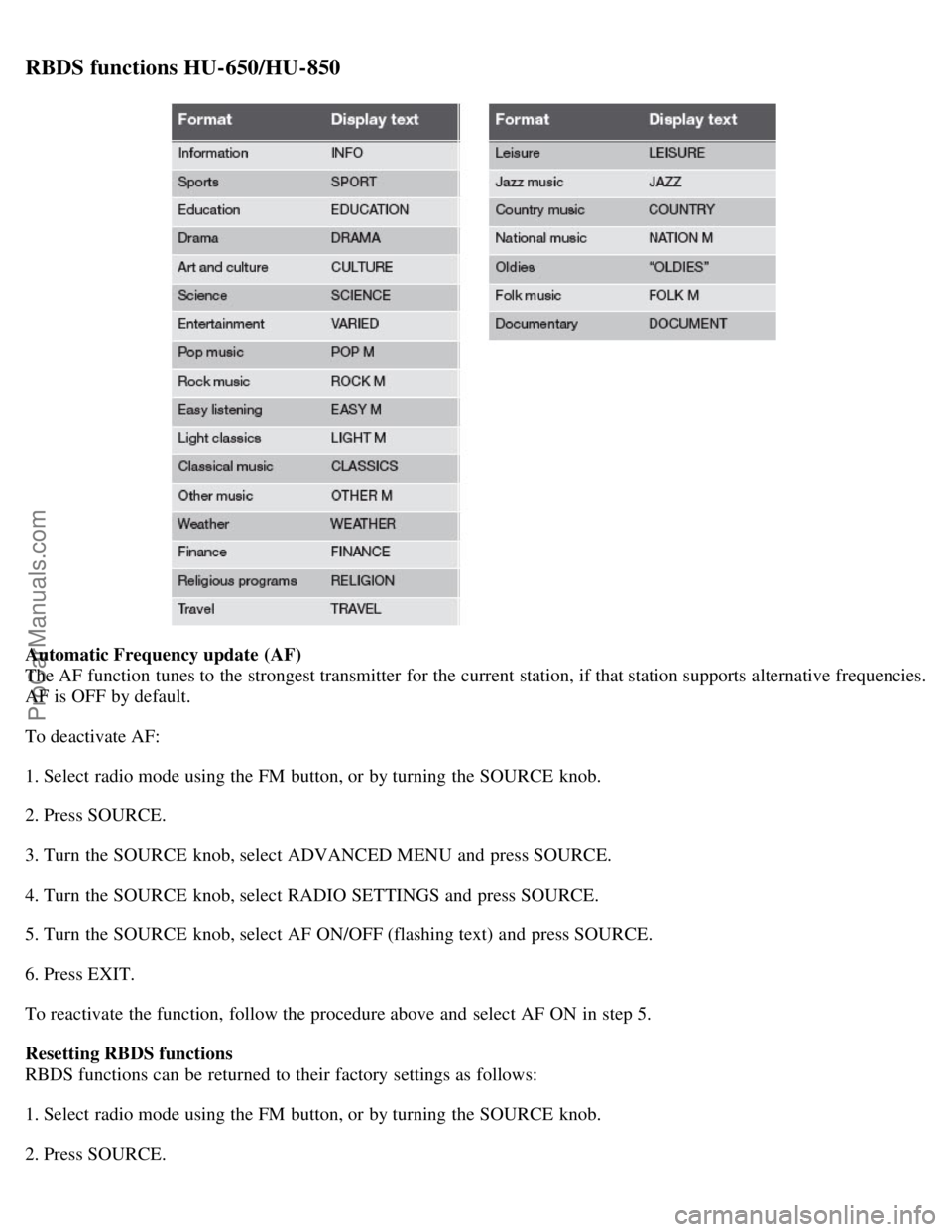
RBDS functions HU-650/HU-850
Automatic Frequency update (AF)
The AF function tunes to the strongest transmitter for the current station, if that station supports alternative frequencies.
AF is OFF by default.
To deactivate AF:
1. Select radio mode using the FM button, or by turning the SOURCE knob.
2. Press SOURCE.
3. Turn the SOURCE knob, select ADVANCED MENU and press SOURCE.
4. Turn the SOURCE knob, select RADIO SETTINGS and press SOURCE.
5. Turn the SOURCE knob, select AF ON/OFF (flashing text) and press SOURCE.
6. Press EXIT.
To reactivate the function, follow the procedure above and select AF ON in step 5.
Resetting RBDS functions
RBDS functions can be returned to their factory settings as follows:
1. Select radio mode using the FM button, or by turning the SOURCE knob.
2. Press SOURCE.
ProCarManuals.com
Page 207 of 230

3. Turn the SOURCE knob, select ADVANCED MENU and press SOURCE.
233 10 Audio
RBDS functions HU-650/HU-850
4. Turn the SOURCE knob, select RESET TO DEFAULT and press SOURCE.
5. Press EXIT.
ASC - speed compensated volume
The audio system's volume is adjusted automatically according to the speed of the vehicle. There are three settings
available: low, medium, or high.
To activate ASC:
1. Select radio mode using the FM button, or by turning the SOURCE knob.
2. Press SOURCE.
3. Turn the SOURCE knob, select ADVANCED MENU and press SOURCE.
4. Turn the SOURCE knob, select AUDIO SETTINGS and press SOURCE.
5. Turn the SOURCE knob, select ASC LEVEL (flashing text) and press SOURCE.
6. Turn the SOURCE knob to select LOW, MEDIUM, HIGH, or OFF and press SOURCE.
7. Press EXIT.
NOTE
Please be aware that there are certain RBDS menu selections, for example EON, TP search, News, etc, that may not
be available in North America.
234 10 Audio
HU-650 - CD player
Starting the CD player
Please refer to the illustration on page 223
for the location of the buttons referred to on this page.
1. Insert a disc into the player.
2. Press the CD button or turn the SOURCE knob to CD.
Changing tracks
Briefly press the
keys (or the corresponding keys on the optional steering wheel keypad) to skip to the
previous or next track. The track number is shown in the display.
Fast forward/back
ProCarManuals.com
Page 208 of 230

Press and hold down the keys to search within a track or the entire disc. The search continues for as long as
the buttons are held in.
NOTE
The corresponding keys on the optional steering wheel keypad cannot be used for fast forward/back.
Random play
This function plays the tracks on a CD in random order (shuffle).
1. Select CD mode and press the RND button. RND is shown in the display as long as the function is activated.
2. Press RND again to stop random play.
Scan
This function plays the first 10 seconds of each track on the CD.
1. Press SCAN to start the function.
2. Press SCAN again or EXIT to stop the scan function and listen to an entire track.
CD eject
Press the button (no. 6 in the illustration on page 223
) to eject the disc.
NOTE
For reasons of traffic safety, the ejected CD must be removed within 12 seconds or it will be automatically drawn
back into the slot and the CD player will resume playing the most recently selected track.
See page 222 for information on caring for compact discs.
235 10 Audio
HU-850 - internal CD changer
Starting the CD changer
The HU -850 is equipped with an internal, 6-disc CD changer.
Please refer to the illustration on page 224
for the location of the buttons referred to on this page.
To load discs into the changer:
1. Press the CD button or turn the SOURCE knob to CD.
2. Select an empty position by pressing one of the preset buttons. The display shows which positions are empty.
LOAD DISC must be displayed before a disc is inserted into the player.
3. Insert a disc.
If there are discs in the player when CD mode is selected, the changer will resume playing the disc and track that were
most recently played.
Selecting a disc position (number)
Use the station setting buttons 1-6 to select the disc to be played. The number of the disc and the track being played
ProCarManuals.com
Page 224 of 230
Backrest, rear seat, folding103
Battery189
maintenance198
replacing199
specifications249
Belt check190
Black Box (Vehicle Event Data)186
Blower (fan)87
Brake circuit137
Brake fluid196
Brake system49, 137
Bulbs
list of248
replacing201
C
Capacities, fluids246
Capacity weight166
Catalytic converter, three-way250
CD changer235
CD changer (external)236
CD player234
Central locking system - remote control112
Changing a wheel172
Changing coolant190
Charge air cooler247
Check Engine warning light50
Child restraints
recalls and registration43
Child safety30
child restraints32
Child safety lock117
Climate system84
Clock reset button48
Coat hanger102
Cold weather precautions149
Coolant195
changing190, 195
checking level of190
Courtesy light97
Cruise control66
Cup holders
center console101
rear seat100
Curb weight166
ProCarManuals.com