2008 VOLVO S40 lock
[x] Cancel search: lockPage 41 of 239

21. Seat belt reminder and Occupant Weight Sensor indicator54
22. Rear-view mirror73
23. Display for climate control, personal settings,and audio system77/230
24. Audio system 230
25. Controls for personal settings and audio system77/230
26. Controls for climate system 89/92
27. Gear selector, manual 139 -140
Gear selector, automatic141
28. Hazard warning flashers69
29. Door open handle, and locking button122
30. Glove compartment104/123
31. Parking brake 70
32. 12-volt socket58
33. Not in use
34. Not in use
48 02 Instruments and controls
Instrument overview
Control panel in driver's door
1. Lockout switch for rear windows71
2. Power windows71
3. Door mirror button, driver's side74
4. Door mirror adjustment control74
5. Door mirror button, passenger's side74
49 02 Instruments and controls
Instrument panel
Instrument panel
ProCarManuals.com
Page 42 of 239

1. Speedometer
2. Turn signal, left
3. Warning symbol - See the following pages for additional information.
4. Information display - The display presents information and warning messages, the ambient temperature, and the
clock, etc. When the ambient temperature is between 23° and 36°F (-5° and +2°C), a snowflake symbol is shown in
the display. This symbol serves as a warning for possible slippery road surfaces. Please note that this symbol does not
indicate a fault with your car. At low speeds, or when the car is not moving, the temperature readings may be slightly
higher than the actual ambient temperature.
5. Information symbol - See the following pages for additional information.
6. Turn signal, right
7. Tachometer - Shows engine speed in thousands of revolutions per minute (rpm). Do not drive continuously with the
needle in the red area of the dial, which indicates maximum allowable engine rpm range. Instead, shift to a higher gear
or slow the vehicle down. The engine management system will automatically prevent excessively high engines speeds.
This will be noticeable as a pronounced unevenness in engine speed.
8. Indicator and warning symbols
9. Fuel gauge (see page 252
for fuel tank volume). When a warning light in the gauge comes on, there are
approximately 2.1 US gallons (8 liters) of fuel remaining in the tank. For more information on fuel level and
consumption, see "Trip computer" on page 63
.
50 02 Instruments and controls
Instrument panel
10. Trip odometer reset button - The trip odometers are used to measure short distances. Press the button briefly to
switch between the odometer for the car's total mileage and the two trip odometers, T1 and T2. A long press (more
than 2 seconds) resets the currently selected trip odometer.
11. Function display - This window displays information on functions such as the odometer, trip odometers, optional
rain sensor, and cruise control.
12. High beam indicator
13. Temperature gauge - The gauge indicates the temperature of the engine cooling system. If the temperature is
abnormally high and the needle enters the red zone, a message is shown in the display. Bear in mind that auxiliary
lamps in front of the air intake reduce the cooling capacity at high outside temperatures and high engine loads.
ProCarManuals.com
Page 45 of 239

without correcting the cause could even damage other components in your car.
NOTE
Canadian models are equipped with the second symbol.
2. Anti-lock Brake system (ABS)
If the warning light comes on, there is a malfunction of the ABS system (the standard braking system will still
function).
The vehicle should be driven to a trained and qualified Volvo service technician for inspection. See page 147
for
additional information.
NOTE
Canadian models are equipped with the second symbol.
3. Rear fog light
This symbol indicates that the rear fog light (located in the driver's side taillight cluster) is on.
4. Stability system STC or DSTC
This indicator symbol flashes when the STC (Stability and Traction control system) or the DSTC (Dynamic Stability
and Traction control system) is actively working to stabilize the car. See page 149
for more detailed information.
5. Not in use
6. Fuel level warning light
When this light comes on, there are approximately 2.1 US gallons (8 liters) of fuel remaining in the tank.
54 02 Instruments and controls
Symbols - instrument panel
Symbols - right side
ProCarManuals.com
Page 46 of 239

1. Turn signal indicator for trailer (certain models)
If you are towing a trailer, this light will flash simultaneously with the turn signals on the trailer. If the light does not
flash when signaling, one of the turn signals on the trailer or on the car are not functioning properly.
2. Parking brake applied
This light is on when the parking brake (hand brake) is applied. The parking brake lever is situated between the front
seats. See page 70
for more information.
NOTE
Canadian models are equipped with the second symbol.
3. SRS system warning light
If this light comes on while the car is being driven, or remains on for longer than approximately 10 seconds after the
car has been started, the SRS system's diagnostic functions have detected a fault in a seat belt lock or pretensioner, a
front airbag, side impact airbag, and/or an inflatable curtain. Have the system(s) inspected by a trained and qualified
Volvo service technician as soon as possible.
4. Oil pressure warning light1
If the light comes on while driving, the car, stop the engine immediately, and check the engine oil level. If the oil level
is normal and the light stays on after restart, have the car towed to the nearest trained and qualified Volvo service
technician. After hard driving, the light may come on occasionally when the engine is idling. This is normal, provided
it goes off when the engine speed is increased.
5. Seat belt reminder
This symbol (and the seat belt reminder light above the rear view mirror) will light up if either front seat occupant has
not buckled his/her seat belt. If the car is not moving, the symbols will go out after approximately 6 seconds.
ProCarManuals.com
Page 51 of 239
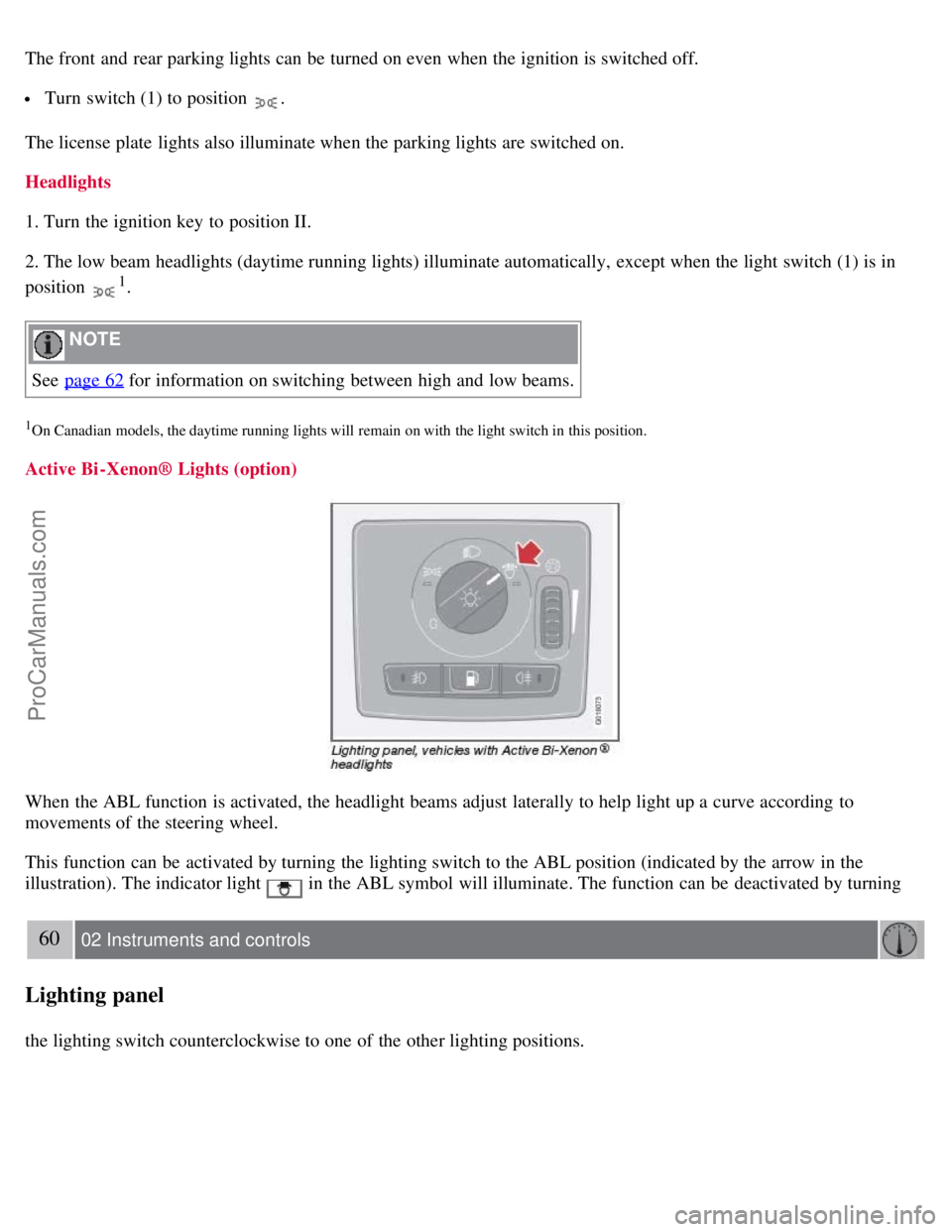
The front and rear parking lights can be turned on even when the ignition is switched off.
Turn switch (1) to position .
The license plate lights also illuminate when the parking lights are switched on.
Headlights
1. Turn the ignition key to position II.
2. The low beam headlights (daytime running lights) illuminate automatically, except when the light switch (1) is in
position
1.
NOTE
See page 62
for information on switching between high and low beams.
1On Canadian models, the daytime running lights will remain on with the light switch in this position.
Active Bi -Xenon® Lights (option)
When the ABL function is activated, the headlight beams adjust laterally to help light up a curve according to
movements of the steering wheel.
This function can be activated by turning the lighting switch to the ABL position (indicated by the arrow in the
illustration). The indicator light
in the ABL symbol will illuminate. The function can be deactivated by turning
60 02 Instruments and controls
Lighting panel
the lighting switch counterclockwise to one of the other lighting positions.
ProCarManuals.com
Page 53 of 239
NOTE
To make it easier to read the odometer, trip odometer, clock, and ambient temperature, these gauges illuminate when
the vehicle is unlocked and when the key has been removed from the ignition switch. The lighting will go out when
the vehicle is locked.
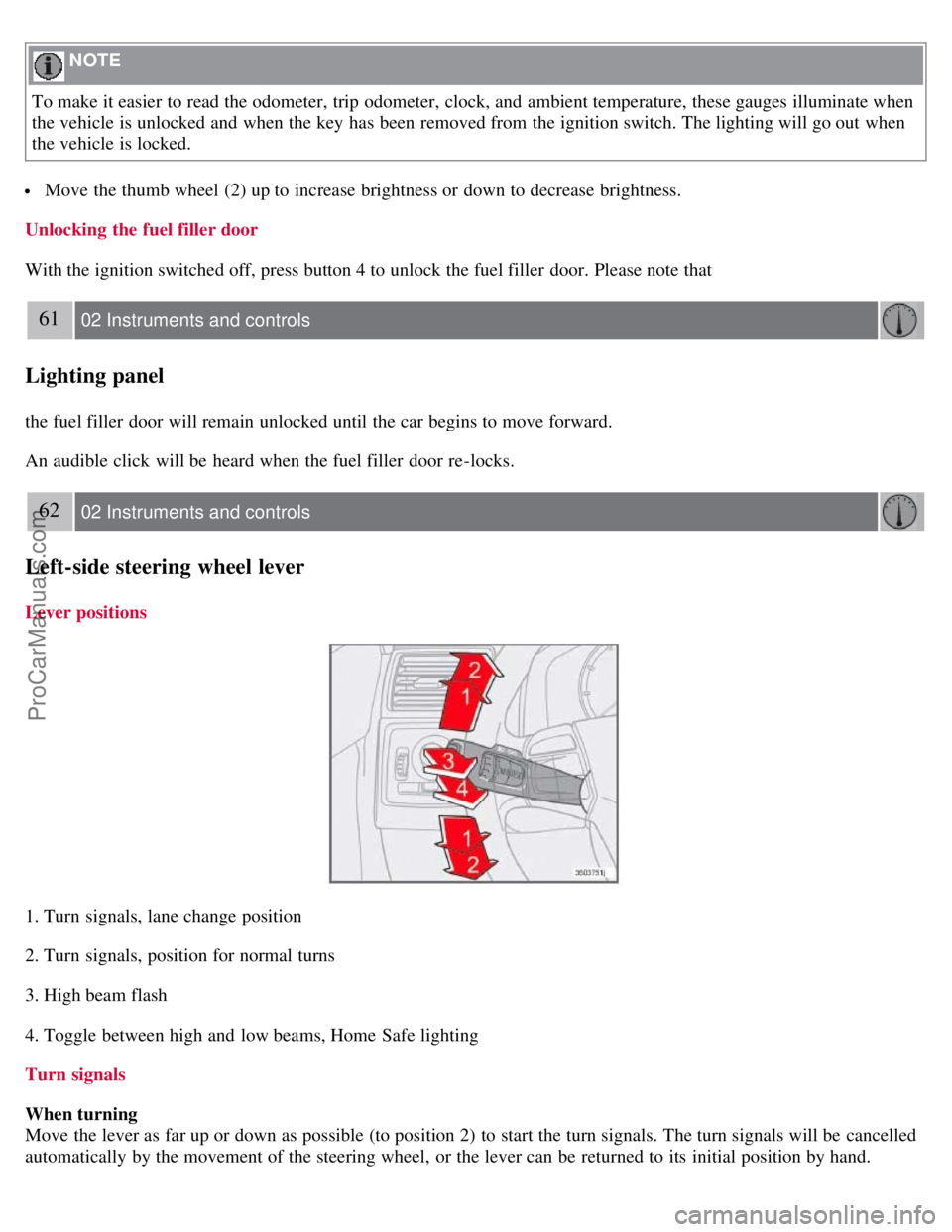
Move the thumb wheel (2) up to increase brightness or down to decrease brightness.
Unlocking the fuel filler door
With the ignition switched off, press button 4 to unlock the fuel filler door. Please note that
61 02 Instruments and controls
Lighting panel
the fuel filler door will remain unlocked until the car begins to move forward.
An audible click will be heard when the fuel filler door re-locks.
62 02 Instruments and controls
Left-side steering wheel lever
Lever positions
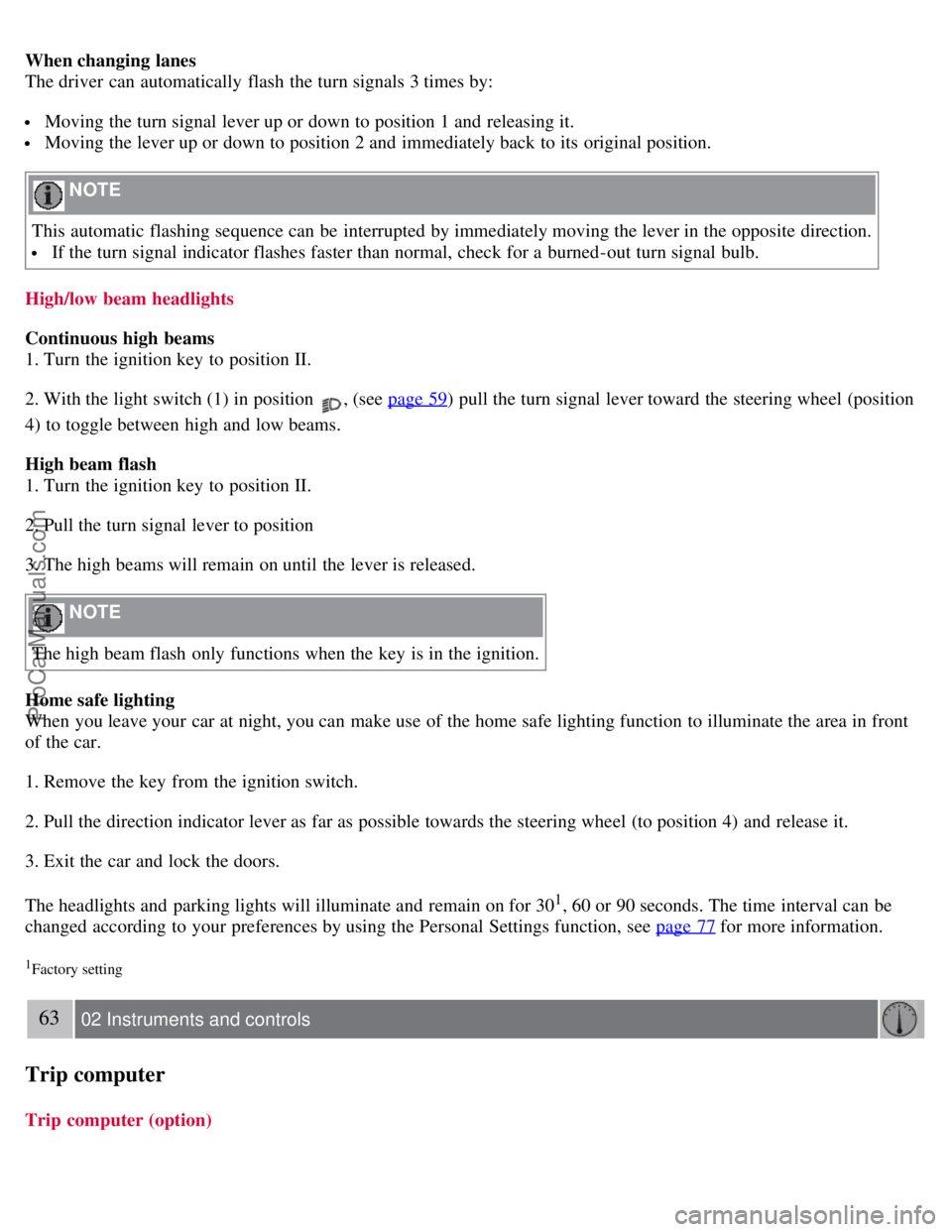
1. Turn signals, lane change position
2. Turn signals, position for normal turns
3. High beam flash
4. Toggle between high and low beams, Home Safe lighting
Turn signals
When turning
Move the lever as far up or down as possible (to position 2) to start the turn signals. The turn signals will be cancelled
automatically by the movement of the steering wheel, or the lever can be returned to its initial position by hand.
ProCarManuals.com
Page 54 of 239
When changing lanes
The driver can automatically flash the turn signals 3 times by:
Moving the turn signal lever up or down to position 1 and releasing it.
Moving the lever up or down to position 2 and immediately back to its original position.
NOTE
This automatic flashing sequence can be interrupted by immediately moving the lever in the opposite direction.
If the turn signal indicator flashes faster than normal, check for a burned-out turn signal bulb.
High/low beam headlights
Continuous high beams
1. Turn the ignition key to position II.
2. With the light switch (1) in position
, (see page 59) pull the turn signal lever toward the steering wheel (position
4) to toggle between high and low beams.
High beam flash
1. Turn the ignition key to position II.
2. Pull the turn signal lever to position
3. The high beams will remain on until the lever is released.
NOTE
The high beam flash only functions when the key is in the ignition.
Home safe lighting
When you leave your car at night, you can make use of the home safe lighting function to illuminate the area in front
of the car.
1. Remove the key from the ignition switch.
2. Pull the direction indicator lever as far as possible towards the steering wheel (to position 4) and release it.
3. Exit the car and lock the doors.
The headlights and parking lights will illuminate and remain on for 30
1, 60 or 90 seconds. The time interval can be
changed according to your preferences by using the Personal Settings function, see page 77
for more information.
1Factory setting
63 02 Instruments and controls
Trip computer
Trip computer (option)
ProCarManuals.com
Page 57 of 239

2. Press + or - to set the current speed. CRUISE ON will be displayed.
Increasing or decreasing speed
Use + or - in the following ways to increase or decrease the vehicle's speed:
1. Press and hold down + or - until the vehicle reaches the desired speed. This will become the set speed when the
button is released.
2. Press + or - for approximately a half second and release the button to increase or decrease vehicle speed by
approximately 1 mph (1.6 km/h).
NOTE
Cruise control will not function at speeds below 20 mph. (30 km/h).
Momentary acceleration, for less than 1 minute (e.g. when passing another car), does not affect cruise control
operation. The car will automatically return to the previously set speed when the accelerator pedal is released.
Temporarily disengaging the cruise control
Press 0 to temporarily disengage cruise control.
CRUISE will appear in the function display. The currently set speed is stored in the system's memory.
Cruise control is also automatically disengaged:
If the speed drops below approximately 20 mph (30 km/h) when driving uphill.
When the brake or clutch pedal is depressed.
If the gear selector is moved to the Neutral ( N) position.
During wheel spin or wheel lock-up.
If the vehicle's speed is increased by using the accelerator pedal for more than 1 minute.
Returning to the set speed
Press the button to resume the previously set speed.
66 02 Instruments and controls
Cruise control
Disengaging cruise control
Cruise control can also be disengaged by:
Pressing the CRUISE button (CRUISE ON will no longer be shown in the function display).
Putting the gear selector in Neutral ( N).
WARNING
Cruise control should not be used in heavy traffic or when driving on wet or slippery roads. Cruise control may not
maintain set speed on steep downgrades.
ProCarManuals.com