2008 VOLVO C30 warning light
[x] Cancel search: warning lightPage 62 of 234

3. Release the brake pedal and ensure that the vehicle is at a standstill.
4. If the vehicle rolls, the parking brake lever must be pulled more firmly.
5. When parking a vehicle always put the gear selector in first gear (for manual transmission) or P (for automatic
transmission).
Parking on a hill
If the vehicle is pointing uphill, turn the front wheels so that they point away from the curb.
If the vehicle is pointing downhill, turn the front wheels so that they point toward the curb.
Releasing the parking brake
1. Press firmly on the brake pedal.
2. Pull the lever up slightly, press the button at the end of the lever and lower the lever completely.
WARNING
Pull up the parking brake lever up firmly to its full extent.
70 02 Instruments and controls
12-volt sockets
12-volt socket (front seat)
The 12-volt socket can be used to plug in certain accessories such as cellular telephones, etc. The maximum current is
10A. The key must be in position I (or higher) for the auxiliary socket to function.
Ashtrays/cigarette lighter
The auxiliary socket can also be used for a cigarette lighter
1, and ashtrays1 are also available. Please contact your Volvo
retailer.
1 Accessory.
NOTE
The cover should be kept on when the auxiliary socket is not in use.
Page 64 of 234

Lightly press down the front edge of either of the buttons (A) to the first detent ("stop") to open a window to the
position of your choice.
WARNING
Always remove the ignition key or do not leave the optional keyless drive remote controls in the vehicle when the
vehicle is unattended.
Never leave children unattended in the vehicle.
Make sure that the windows are completely unobstructed before they are operated.
Press down the front part of one or both buttons A as far as possible and release to automatically open the front
window(s) completely.
To stop the window at any time, pull the button up.
Closing a window
Lightly pull up the front edge of either of the buttons (A) to the first detent ("stop") to close a window to the position
of your choice.
Pull up the front part of one or both buttons A as far as possible and release to automatically close the front window(s)
completely.
Passenger's side
The control on the passenger's door open that window only.
72 02 Instruments and controls
Mirrors
Rearview mirror
Page 67 of 234

The mirror control switches are located on the driver's door armrest.
To adjust the mirrors:
Driver's door mirror:
Press the L button (a light in the switch will go on) to activate the adjustment control. Use this control to adjust the
driver's door mirror.
Passenger's door mirror:
Press the R switch (a light in the switch will go on) to activate the adjustment control. Use this control to adjust the
passenger's door mirror.
After you have adjusted the mirror(s), press the L or R switch again (the LED will go out) to deactivate the adjustment
control.
WARNING
The mirrors should always be adjusted prior to driving. Objects seen in the passenger's side wide -angle door mirror are
closer than they appear to be.
Blind Spot Information System (BLIS) - option
The Blind Spot Information System (BLIS) is an information system that indicates the presence of another vehicle in the
side-view mirror's "blind area." See page 156
for detailed information.
75 02 Instruments and controls
Power moonroof (option)
Operating the moonroof
Page 74 of 234
WARNING
If you use HomeLink to open a garage door or gate, be sure no one is near the gate or door while it is in motion.
Do not use the HomeLink Universal Transceiver with any garage door opener that lacks safety "stop" and "reverse"
features as required by federal safety standards. (This includes any garage door opener model manufactured before April
1, 1982). A garage door opener that cannot "detect" an object, signalling the door to "stop" and "reverse" does not meet
current federal safety standards. Using a garage door opener without these features increases the risk of serious injury or
death. For more information on this matter, call toll-free 1-800-355-3515. (Internet: www.HomeLink.com
).
Programming the transceiver for the first time (U.S. residents)
1. For first time training, press and hold the two outer HomeLink buttons, releasing only when the HomeLink indicator
light begins to flash after 20 seconds. (Do not perform this step when training the additional HomeLink buttons.)
2. Position the hand -held transmitter 1-3 inches away from the HomeLink surface
81 02 Instruments and controls
Home Link® Universal Transceiver (option)
(located on your sun visor), keeping the HomeLink indicator light in view.
3. Using both hands, simultaneously press and hold both the desired HomeLink button and hand held transmitter button.
DO NOT release until the HomeLink indicator light flashes slowly and then rapidly. When the indicator light flashes
rapidly, both buttons may be released. (The rapid flashing indicates successful training.)
NOTE
Some garage door openers may require you to replace step 3 with the "cycling" procedure noted in the "Programming
the transceiver for the first time (Canadian residents)" section.
4. Press and hold the trained HomeLink button and observe the indicator light.
If the indicator light is solid/continuous, training is complete and your device should activate when the HomeLink
button is pressed and released.
If the indicator light blinks rapidly for 2 seconds and then turns a solid/continuous light, proceed with the following
training instructions for a rolling code device. A second person may make the following steps quicker and easier. Please
use a ladder or other device. Do not stand on your vehicle to perform the next steps.
5. At the garage door opener receiver (motorhead unit) in the garage, locate the "learn" or "smart" button (usually near
where the hanging antenna wire is attached to the unit). If there is difficulty locating the training button, reference the
garage door opener's manual or contact us toll-free 1-800-355-3515 (Internet: www.HomeLink.com
).
6. Press and release the "learn" or "smart" button (the name and color of the button may vary by manufacturer)
NOTE
Once the button is pressed, there are 30 seconds in which to initiate the next step.
7. Return to the vehicle and firmly press and hold the trained HomeLink button for two seconds and release. Repeat the
"press/hold/release" sequence up to 3 times to complete the training process.
To train additional HomeLink buttons, begin with step two.
Page 92 of 234

1. Adjust the seat to the desired position.
2. When you leave the car, lock it using the remote control.
3. The next time the driver's door is unlocked with the same remote control and that door is opened within 2 minutes,
the driver's seat and side door mirrors will automatically move to the position that they were in when the doors were
most recently locked with the same remote control.
NOTE
The memory function in the remote control operates independently of the memory function in the seat.
WARNING
Because the driver's seat can be adjusted with the ignition off, children should never be left unattended in the car.
Movement of the seat can be STOPPED at any time by pressing any button on the power seat control panel.
Do not adjust the seat while driving. The seat should be adjusted so that the brake pedal can be depressed fully. In
addition, position the seat as far rearward as comfort and control allow.
The seat rails on the floor must not be obstructed in any way when the seat is in motion.
102 04 Interior
Interior lighting
Interior lighting
1. Front driver's side reading light, on/off
2. Courtesy lighting
3. Front passenger's side reading light, on/off
The front and rear reading lights can be activated when the ignition key is position I or II, or when the engine is
running. The front reading lights are switched on and off by pressing buttons 1 or 3.
The courtesy lighting (2) can be set to three positions:
Press the left side of the button: the interior courtesy lighting turns on.
Neutral position: the interior courtesy lighting comes on when a door is opened, and is switched off 10 seconds after
the door is closed.
Page 95 of 234

5. Storage compartment for e.g., CDs and cup holders
6. Compartment in rear side panels, with space for up to three beverage cans
7. Compartment on rear side of front seat backrests
WARNING
Anchor any heavy objects to prevent them from moving during sudden stops.
Packages on the rear parcel shelf can obscure vision and may become dangerous projectiles in the event of a
sudden stop or an accident.
Glove compartment
The owners manual and maps can be stored here. There are also holders for coins, pens and fuel cards. The glove
compartment can only be locked and unlocked using the detachable key blade from the central locking system's remote
control. See page 120
for information on removing the key blade from the remote control, and page 127 for
information on locking the glove compartment.
Jacket hanger
The jacket hanger is located on the inboard side of the front passenger's seat head restraint. It is only intended for
hanging light garments.
106 04 Interior
Storage compartments
Storage under the front, center armrest
Page 99 of 234
Hard cargo area cover (option)
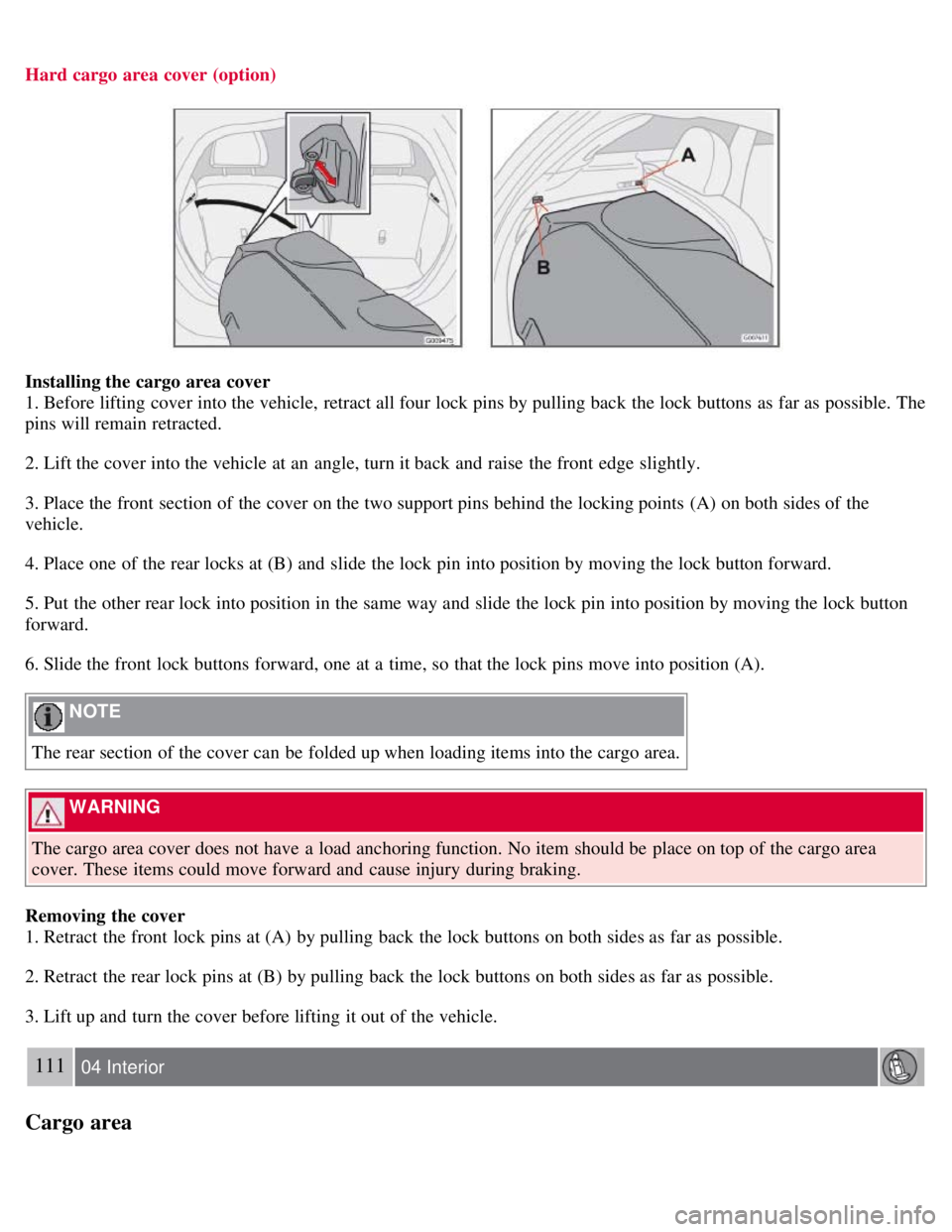
Installing the cargo area cover
1. Before lifting cover into the vehicle, retract all four lock pins by pulling back the lock buttons as far as possible. The
pins will remain retracted.
2. Lift the cover into the vehicle at an angle, turn it back and raise the front edge slightly.
3. Place the front section of the cover on the two support pins behind the locking points (A) on both sides of the
vehicle.
4. Place one of the rear locks at (B) and slide the lock pin into position by moving the lock button forward.
5. Put the other rear lock into position in the same way and slide the lock pin into position by moving the lock button
forward.
6. Slide the front lock buttons forward, one at a time, so that the lock pins move into position (A).
NOTE
The rear section of the cover can be folded up when loading items into the cargo area.
WARNING
The cargo area cover does not have a load anchoring function. No item should be place on top of the cargo area
cover. These items could move forward and cause injury during braking.
Removing the cover
1. Retract the front lock pins at (A) by pulling back the lock buttons on both sides as far as possible.
2. Retract the rear lock pins at (B) by pulling back the lock buttons on both sides as far as possible.
3. Lift up and turn the cover before lifting it out of the vehicle.
111 04 Interior
Cargo area
Page 118 of 234

Bring the engine to normal operating temperature as soon as possible by driving with a light foot on the accelerator
pedal for the first few minutes of operation. A cold engine uses more fuel and is subject to increased wear.
Whenever possible, avoid using the vehicle for driving short distances. This does not allow the engine to reach
normal operating temperature.
Drive carefully and avoid rapid acceleration and hard braking.
Use the transmission's (D)rive position as often as possible and avoid using kickdown.
Do not exceed posted speed limits.
Avoid carrying unnecessary items (extra load) in the vehicle.
Maintain correct tire pressure. Check tire pressure regularly (when tires are cold).
Remove snow tires when threat of snow or ice has ended.
Note that roof racks, ski racks, etc., increase air resistance and also fuel consumption.
At highway driving speeds, fuel consumption will be lower with the air conditioning on and the windows closed
than with the air conditioning off and the windows open.
Using the onboard trip computer's fuel consumption modes can help you learn how to drive more economically.
Other factors that decrease gas mileage are:
Dirty air cleaner
Dirty engine oil and clogged oil filter
Dragging brakes
Incorrect front end alignment
Some of the above mentioned items and others are checked at the standard maintenance intervals.
WARNING
Driving with the rear liftgate open : Driving with the rear liftgate open could lead to poisonous exhaust gases
entering the passenger compartment. If the rear liftgate must be kept open for any reason, proceed as follows:
Close the windows
Set the ventilation system control to air flow to floor, windshield and side windows and the blower control to its
highest setting.
Weight distribution affects handling
At the specified curb weight your vehicle has a tendency to understeer, which means that the steering wheel has to be
turned more than might seem appropriate for the curvature of a bend. This ensures good stability and reduces the risk
of rear wheel skid. Remember that these properties can alter with the vehicle load. The heavier the load in the cargo
area, the less the tendency to understeer.
Handling, roadholding
Vehicle load, tire design and inflation pressure all affect vehicle handling. Therefore, check that the tires are inflated to
the recommended pressure according to the vehicle load. See the "Tire pressure" section. Loads should be distributed
so that capacity weight
133 06 Starting and driving
General information
or maximum permissible axle loads are not exceeded.
Driving through water