2008 VOLVO C30 headlights
[x] Cancel search: headlightsPage 9 of 234

Safety is Volvo's cornerstone. Our concern dates back to 1927 when the first Volvo rolled off the production line.
Three-point seat belts (a Volvo invention), safety cages, and energy-absorbing impact zones were designed into Volvo
cars long before it was fashionable or required by government regulation.
We will not compromise our commitment to safety. We continue to seek out new safety features and to refine those
already in our cars. You can help. We would appreciate hearing your suggestions about improving automobile safety.
We also want to know if you ever have a safety concern with your car. Call us in the U.S. at: 1-800-458-1552 or in
Canada at: 1-800-663-8255.
Occupant safety reminders
How safely you drive doesn't depend on how old you are but rather on:
How well you see.
Your ability to concentrate.
How quickly you make decisions under stress to avoid an accident.
The following suggestions are intended to help you cope with the ever changing trafficenvironment.
Never drink and drive.
If you are taking any medication, consult your physician about its potential effects on your driving abilities.
Take a driver-retraining course.
Have your eyes checked regularly.
Keep your windshield and headlights clean.
Replace wiper blades when they start to leave streaks.
Take into account the traffic, road, and weather conditions, particularly with regard to stopping distance.
13 01 Safety
Reporting safety defects
Reporting safety defects in the U.S.
If you believe that your vehicle has a defect which could cause a crash or could cause injury or death, you should
immediately inform the National Highway Traffic Safety Administration (NHTSA) in addition to notifying Volvo Cars
of North America, LLC. If NHTSA receives similar complaints, it may open an investigation, and if it finds that a
safety defect exists in a group of vehicles, it may order a recall and remedy campaign. However, NHTSA cannot
become involved in individual problems between you, your retailer, or Volvo Cars of North America, LLC.
To contact NHTSA, you may either call the Auto Safety Hotline toll-free at 1-888-327-4236
(TTY: 1-800-424-9153) or write to: NHTSA, U.S. Department of Transportation, Washington D.C. 20590.
You can also obtain other information about motor vehicle safety from:
http://www.safercar.gov
Volvo strongly recommends that if your vehicle is covered under a service campaign, safety or emission recall or
similar action, it should be completed as soon as possible. Please check with your local retailer or Volvo Cars of North
America, LLC if your vehicle is covered under these conditions.
NHTSA can be reached at:
Internet:
Page 51 of 234

Parking lights
The front and rear parking lights can be turned on even when the ignition is switched off.
Turn switch (1) to position .
The license plate lights also illuminate when the parking lights are switched on.
Headlights
1. Turn the ignition key or optional keyless drive start control to position II.
2. The low beam headlights (daytime running lights) illuminate automatically, except when the light switch (1) is in
position
1.
NOTE
See page 60
for information on switching between high and low beams.
1On Canadian models, the daytime running lights will remain on with the light switch in this position.
Brake lights
The brake lights come on automatically when the brakes are applied.
Fog lights
Front fog lights (option)
The front fog lights can be used in combination with either the headlights or the parking lights.
1. Turn the ignition to position II.
2. Press button 3 to turn on the front fog lights.
An indicator light in the button illuminates when the front fog lights are on.
Rear fog light
The single rear fog light is located in the driver's side taillight cluster.
The rear fog light will only function in combination with the high/low beam headlights or the optional front fog lights.
Page 53 of 234

1. Turn signals, lane change position
2. Turn signals, position for normal turns
3. High beam flash
4. Toggle between high and low beams, Home Safe lighting
Turn signals
When turning
Move the lever as far up or down as possible (to position 2) to start the turn signals.
The turn signals will be cancelled automatically by the movement of the steering wheel, or the lever can be returned to its
initial position by hand.
When changing lanes
The driver can automatically flash the turn signals 3 times by:
Moving the turn signal lever up or down to position 1 and releasing it.
Moving the lever up or down to position 2 and immediately back to its original position.
NOTE
This automatic flashing sequence can be interrupted by immediately moving the lever in the opposite direction.
If the turn signal indicator flashes faster than normal, check for a burned-out turn signal bulb.
High/low beam headlights
Continuous high beams
1. Turn the ignition key or optional keyless drive start control to position II.
2. With the light switch (1) in position
, (see page 59) pull the turn signal lever toward the steering wheel (position 4)
to toggle between high and low beams.
High beam flash
1. Turn the ignition key or optional keyless drive start control to position II.
2. Pull the turn signal lever to position 3. The high beams will remain on until the lever is released.
Home safe lighting
When you leave your vehicle at night, you can make use of the home safe lighting function to illuminate the area in front
Page 54 of 234

of the car.
1. Remove the key from the ignition switch.
2. Pull the direction indicator lever as far as possible towards the steering wheel (to position 4) and release it.
3. Exit the vehicle and lock the doors.
The headlights and parking lights will illuminate and remain on for 30
1, 60 or 90 seconds. The time interval can be
changed according to your preferences by using the Personal Settings function, see page 78
for more information.
1Factory setting
61 02 Instruments and controls
Trip computer (option)
The trip computer stores information gathered from several systems in your vehicle and has five menus (six on Canadian
models) that can be shown in the information display.
MILES TO EMPTY TANK
AVERAGE (average fuel consumption)
INSTANTANEOUS (current fuel consumption)
AVERAGE SPEED
ACTUAL SPEED (current speed in m.p.h., Canadian models only)
DSTC (see page 150)
NOTE
Warning messages from the car's monitoring systems will override the trip computer function.
If a warning message is shown in the information display while you are using the trip computer:
1. Acknowledge the message by pressing the READ button (A).
2. Press button A again to return to the trip computer function.
Controls
The trip computer functions can be accessed by twisting INFO (B) one step at a time in either direction. Twisting a final
time returns you to the original function.
Page 57 of 234
When the lever has been pulled, high pressure jets mounted in the bumper will spray the headlights.
The following applies to conserve washer fluid (see page 58
for information on the light switch positions):
Low/high beam headlights on
The headlights will be washed the first time the windshield is washed. Thereafter, the headlights will only be washed once
for every five times the windshield is washed within a 10-minute period.
64 02 Instruments and controls
Right-side steering wheel lever
Parking lights on
Optional Bi -Xenon® headlights will be washed once for every five times the windshield is washed.
Normal halogen headlights will not be washed.
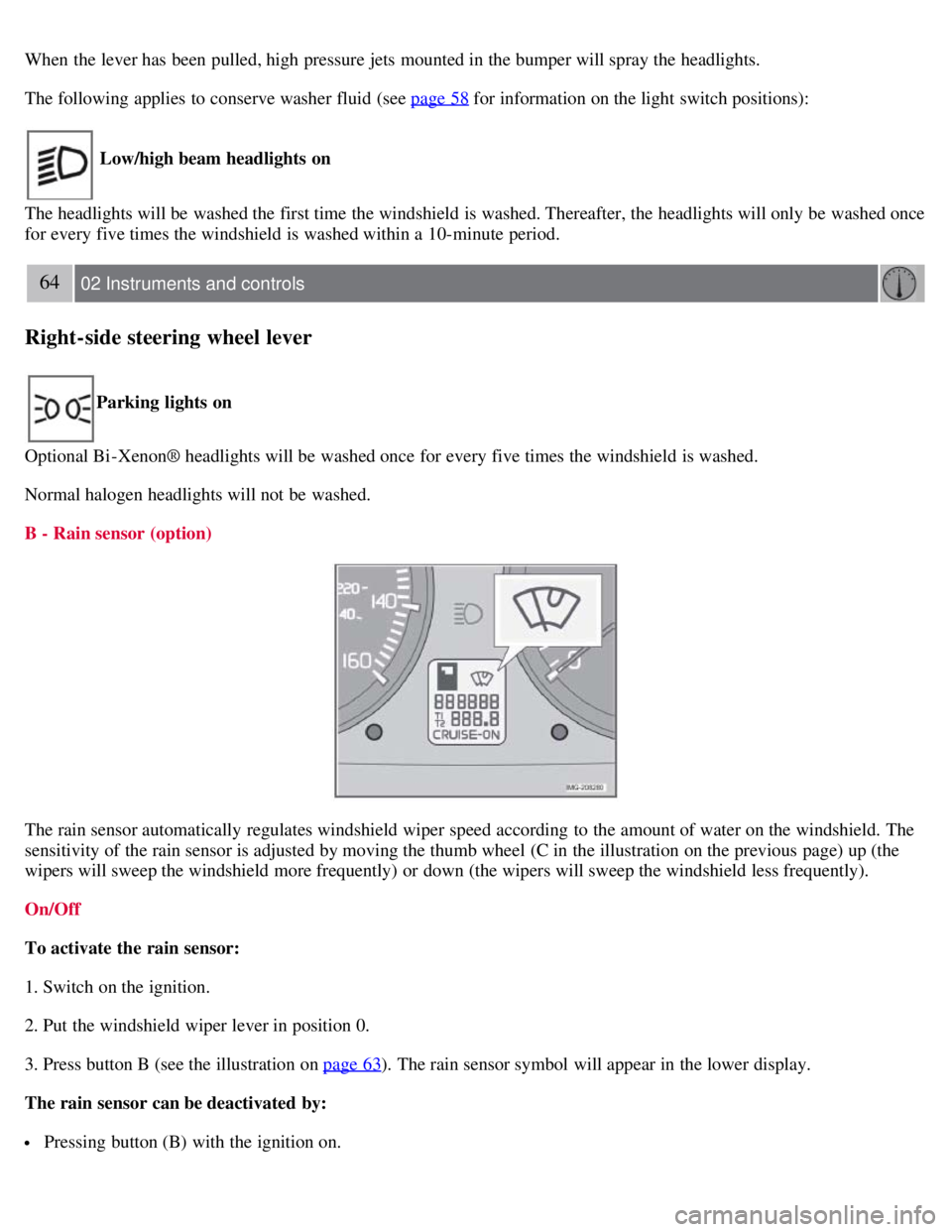
B - Rain sensor (option)
The rain sensor automatically regulates windshield wiper speed according to the amount of water on the windshield. The
sensitivity of the rain sensor is adjusted by moving the thumb wheel (C in the illustration on the previous page) up (the
wipers will sweep the windshield more frequently) or down (the wipers will sweep the windshield less frequently).
On/Off
To activate the rain sensor:
1. Switch on the ignition.
2. Put the windshield wiper lever in position 0.
3. Press button B (see the illustration on page 63
). The rain sensor symbol will appear in the lower display.
The rain sensor can be deactivated by:
Pressing button (B) with the ignition on.
Page 65 of 234

Night position
To reduce glare from the headlights of following vehicles, use control (1) to switch between the normal and night-driving
positions.
2. Normal position
3. Night position, reduces glare from following traffic
Auto-dim function (option)
An optional integrated sensor reacts to headlights from following traffic and automatically reduces glare.
Rearview mirror with compass (option)
The upper right-hand corner of the rearview mirror has an integrated display that shows the compass direction toward
which the vehicle is pointing. Eight different directions can be displayed: N, NE, E, SE, S, SW, W and NW. The display
shows your car's orientation with respect to true north.
Calibrating the compass
Page 143 of 234

lanes.
How BLIS functions in daylight and darkness
Daylight
BLIS reacts to the shape of surrounding vehicles. The system is designed to help detect motor vehicles such as cars,
trucks, buses, motorcycles, etc.
Darkness
BLIS reacts to the headlights of surrounding vehicles. In order to be detected by BLIS, a vehicle in the blind area
must have its headlights on. This means, for example, that the system will not detect a trailer without headlights that is
being towed behind a car or truck.
WARNING
BLIS does not react to cyclists or mopeds.
BLIS does not react to vehicles that are standing still.
The function of the BLIS cameras may be affected by intense light, or when driving at night in areas where there
are no external sources of light (e.g., street lights, other vehicles, etc.). In such cases, the system may react as if the
cameras were obscured.
In both of the above mentioned conditions, a message will appear in the information display.
When driving in such conditions, the system's function will be limited or it may be temporarily switched off. See
page 159
for instructions.
When the message is no longer displayed, BLIS will return to normal function.
The BLIS cameras have the same limitation as the human eye. In other words, their "vision is impaired" by
adverse weather conditions such as heavy snowfall, dense fog, etc.
158 06 Starting and driving
Blind Spot Information System (BLIS)-option
Limitations
In certain situations, the BLIS indicator light(s) may illuminate even when there are no other vehicles in the area
monitored by the system.
NOTE
In certain situations, the BLIS indicator light(s) may illuminate even when there are no other vehicles in the area
monitored by the system.
In the event of a fault, Blind spot syst. service required will be displayed.
The following are several examples of situations in which the BLIS indicator light(s) may illuminate even when there
are no other vehicles in the area monitored by the system.
Page 146 of 234

The system is activated automatically when the vehicle is started. The indicator light in the button in the center console
illuminates.
The front park assist system is active from the time the engine is started until the vehicle exceeds a speed of
approximately 10 mph (15 km/h). It is also active when the vehicle is backing up.
Rear park assist is active when the engine is running and reverse gear has been selected.
Rear park assist
The distance monitored behind the vehicle is approximately 5 ft (1.5 m). The signal comes from the rear speakers.
The system must be deactivated when towing a trailer, carrying bicycles in a rear-mounted carrier, etc, which could
trigger the rear park assist system's sensors.
NOTE
Rear park assist is deactivated automatically when towing a trailer if Volvo genuine trailer wiring is used.
Front park assist
The distance monitored in front of the vehicle is approximately 2.5 ft (0.8 m). The audible signal comes from the audio
system's front speakers.
It may not be possible to combine auxiliary headlights and front park assist since these lights could trigger the system's
sensors.
161 06 Starting and driving
Park assist (Option/accessory)
Activating/deactivating park assist
The system is activated automatically when the vehicle is started.
If the vehicle is equipped with both front and rear park assist , press the park assist button on the center console
(see the illustration) to temporarily turn off (deactivate) the systems. The indicator light in the button will go out when
the system has been switched off.
If the vehicle is equipped with rear park assist only, a message will be displayed when reverse gear is selected
showing if the system is on or off. Press EXIT to turn rear park assist off, or ENTER to turn the system on.
Park assist will be automatically reactivated the next time the engine is started, or if the button is pressed (the
indicator light in the button will illuminate).