Page 384 of 621

374
2008 TUNDRA from Apr. ’08 Prod. (OM 34477U)
Store
1. Turn the “AUDIO/CONTROL” knob until the dial number that you want to regis-
ter is displayed and push the knob.
2. Push the talk switch and say “Store”, or turn the “AUDIO/CONTROL” knob
until “Store” is displayed and push the
knob.
“Store. Push the talk switch and say
confirm. Otherwise, say go back.” is
heard. 3. Follow voice guidance instructions, or turn the “AUDIO/CONTROL” knob until
“Confirm” is displayed and push the
knob.
Next, input a voice tag.
For further details, see page 366.
The system may not function in the follow-
ing cases:
�If there is no outgoing history.
�If the phone book is locked.
INFORMATION
� Up to five outgoing calls can be
stored in the system.
� When five outgoing calls are stored
in memory, the oldest outgoing call
is deleted to make room in memory
for new calls.
� Only the latest outgoing call is
stored when the same telephone
number is dialed.
� A shortcut to “Redial” is available.
Push the offhook switch twice.
The following can be performed:
�Dial
�Delete
�Store
To enter the callback 1. Push the off −hook switch to turn the
hands −free system on.
2. Follow voice guidance instructions, or turn the “AUDIO/CONTROL” knob until
“Callback” is displayed and push the
knob.
“Callback. Most recent incoming call was
XXXX” is heard and incoming history is
displayed.
“Please push the off −hook switch to dial.
Otherwise, push the talk switch and say
dial, previous, go back, store, or delete.”
is heard.
—Callback
Page 385 of 621

375
2008 TUNDRA from Apr. ’08 Prod. (OM 34477U)
Dial
Turn the “AUDIO/CONTROL” knob until
the number that you want to dial is dis-
played and push the knob. After that, do
the one of the following:
�Push the off−hook switch.
�Push the talk switch and say “Dial”.
�Turn the “AUDIO/CONTROL” knob until
“Dial” is displayed and push the knob.
Delete
1. Turn the “AUDIO/CONTROL” knob until the dial number that you want to delete
is displayed and push the knob.
2. Push the talk switch and say “Delete”, or turn the “AUDIO/CONTROL” knob
until “Delete” is displayed and push the
knob.
“Delete. Push the talk switch and say
confirm. Otherwise, say go back” is heard. 3. Follow voice guidance instructions, or turn the “AUDIO/CONTROL” knob until
“Confirm” is displayed and push the
knob.
“Deleted.” is heard. Store
1. Turn the “AUDIO/CONTROL” knob until the dial number that you want to regis-
ter is displayed and push the knob.
2. Push the talk switch and say “Store”, or turn the “AUDIO/CONTROL” knob
until “Store” is displayed and push the
knob.
“Store. Push the talk switch and say
confirm. Otherwise, say go back.” is
heard. 3. Follow voice guidance instructions, or turn the “AUDIO/CONTROL” knob until
“Confirm” is displayed and push the
knob.
Next, input a voice tag.
For further details, see page 366.
The system may not function in the follow-
ing cases:
�If there is no incoming history.
�If the phone book is locked.
INFORMATION
� Up to five incoming calls can be
stored in the system.
� When five incoming calls are stored
in memory, the oldest incoming call
is deleted to make room in memory
for new calls.
Page 395 of 621
385
2008 TUNDRA from Apr. ’08 Prod. (OM 34477U)
If the ambient temperature drops, the air
intake mode will automatically change
from RECIRCULATE to FRESH after a few
minutes. This automatic change control
mode can be cancelled by pushing and
holding the button for longer than 2 sec-
onds. The automatic change control mode
will be reactivated if the engine switch is
turned to the “LOCK” or “ACC” position.
“A/C” button
To turn on the air conditioning, press the
“A/C” button. The “A/C” button indicator
will come on. To turn the air conditioning
off, press the button again.
If the “A/C” button indicator flashes, there
is a problem in the air conditioning system
and the air conditioning automatically
shuts off. If this happens, take your ve-
hicle to a Toyota dealer for service.
Page 396 of 621
386
2008 TUNDRA from Apr. ’08 Prod. (OM 34477U)
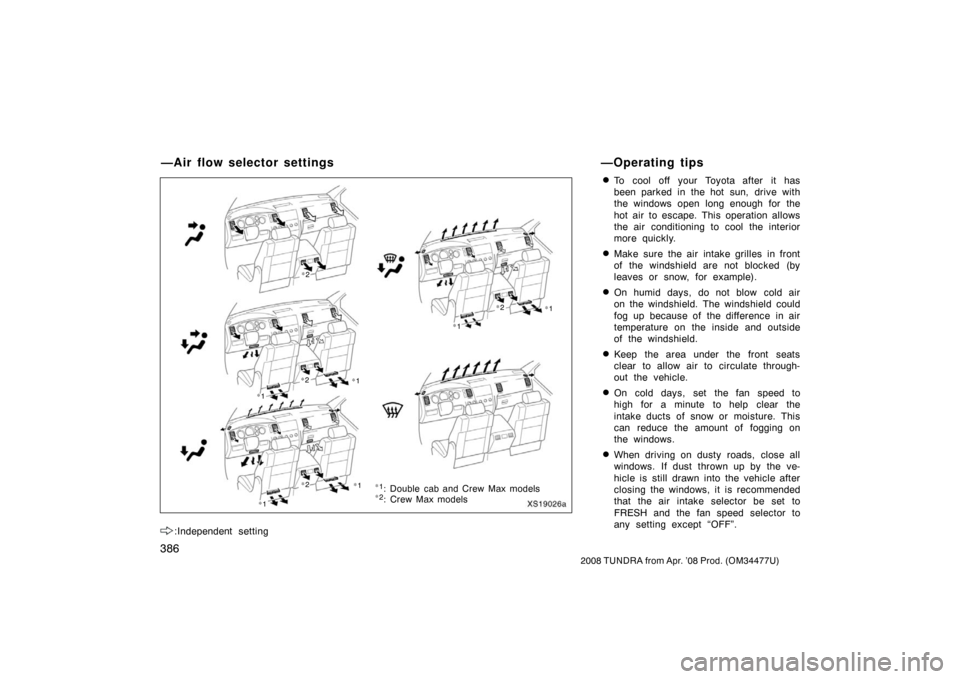
:Independent setting
�To cool off your Toyota after it has
been parked in the hot sun, drive with
the windows open long enough for the
hot air to escape. This operation allows
the air conditioning to cool the interior
more quickly.
�Make sure the air intake grilles in front
of the windshield are not blocked (by
leaves or snow, for example).
�On humid days, do not blow cold air
on the windshield. The windshield could
fog up because of the difference in air
temperature on the inside and outside
of the windshield.
�Keep the area under the front seats
clear to allow air to circulate through-
out the vehicle.
�On cold days, set the fan speed to
high for a minute to help clear the
intake ducts of snow or moisture. This
can reduce the amount of fogging on
the windows.
�When driving on dusty roads, close all
windows. If dust thrown up by the ve-
hicle is still drawn into the vehicle after
closing the windows, it is recommended
that the air intake selector be set to
FRESH and the fan speed selector to
any setting except “OFF”.
—Air flow selector settings —Operating tips
XS19026a
∗
1
∗1
: Double cab and Crew Max models
∗1
∗ 1
∗2
: Crew Max models
∗1
∗2
∗2
∗ 2
∗ 2
∗1
∗1
Page 404 of 621
394
2008 TUNDRA from Apr. ’08 Prod. (OM 34477U)
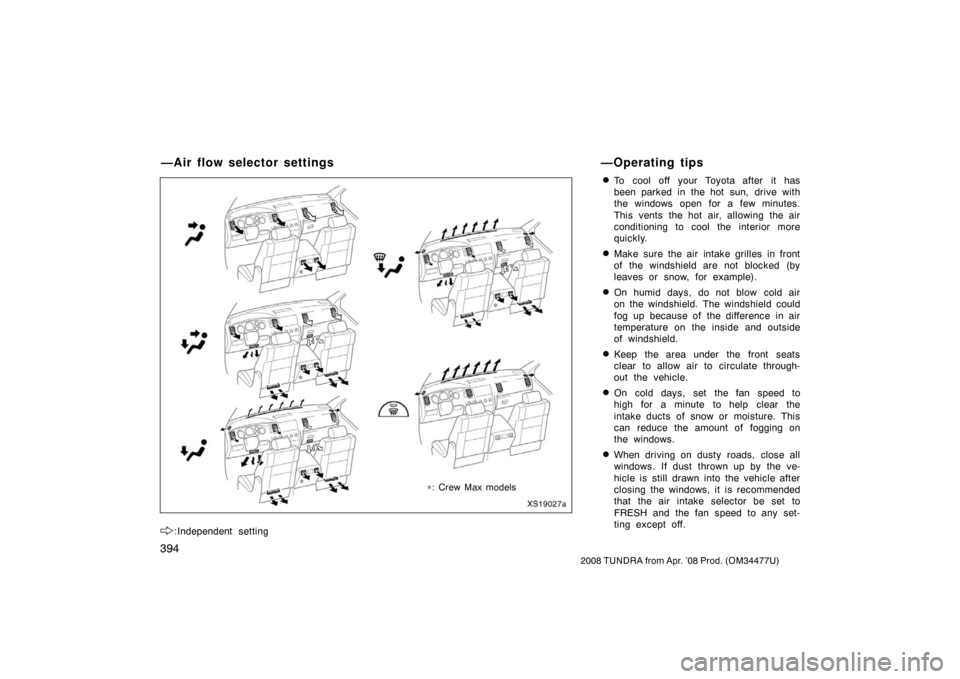
:Independent setting
�To cool off your Toyota after it has
been parked in the hot sun, drive with
the windows open for a few minutes.
This vents the hot air, allowing the air
conditioning to cool the interior more
quickly.
�Make sure the air intake grilles in front
of the windshield are not blocked (by
leaves or snow, for example).
�On humid days, do not blow cold air
on the windshield. The windshield could
fog up because of the difference in air
temperature on the inside and outside
of windshield.
�Keep the area under the front seats
clear to allow air to circulate through-
out the vehicle.
�On cold days, set the fan speed to
high for a minute to help clear the
intake ducts of snow or moisture. This
can reduce the amount of fogging on
the windows.
�When driving on dusty roads, close all
windows. If dust thrown up by the ve-
hicle is still drawn into the vehicle after
closing the windows, it is recommended
that the air intake selector be set to
FRESH and the fan speed to any set-
ting except off.
—Air flow selector settings —Operating tips
XS19027a
∗
∗
∗: Crew Max models
∗ ∗
Page 412 of 621
402
2008 TUNDRA from Apr. ’08 Prod. (OM 34477U)
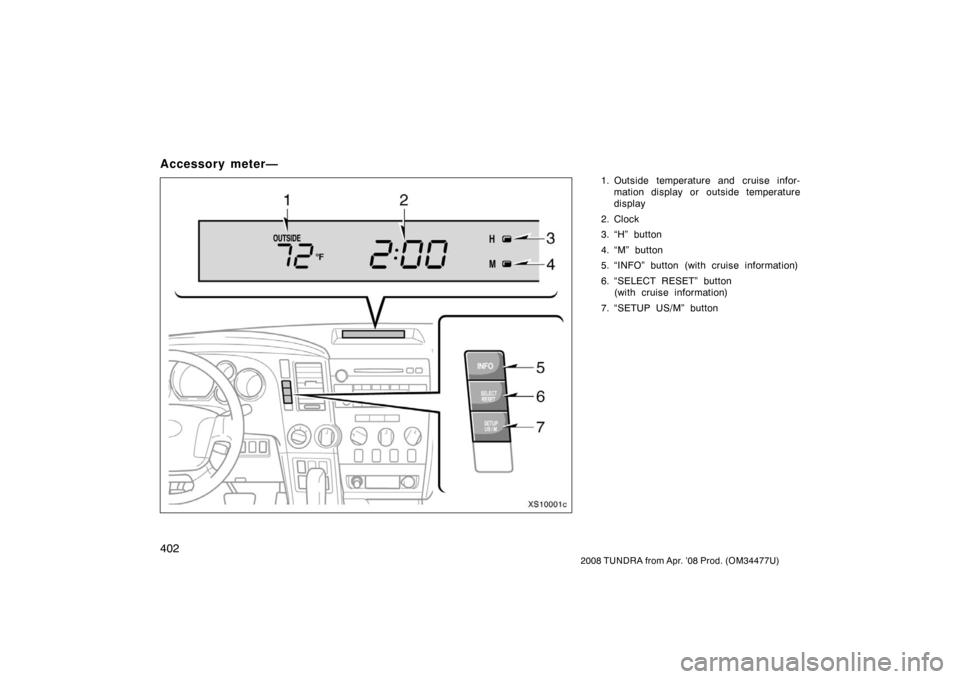
Accessory meter—
1. Outside temperature and cruise infor-
mation display or outside temperature
display
2. Clock
3. “H” button
4. “M” button
5. “INFO” button (with cruise information)
6. “SELECT RESET” button (with cruise information)
7. “SETUP US/M” button
XS10001c
Page 415 of 621
405
2008 TUNDRA from Apr. ’08 Prod. (OM 34477U)
3. Instantaneous fuel consumption
(“INST MPG” or “INST L/100 km”)
The instantaneous fuel consumption is
calculated and displayed based on dis-
tance and fuel consumption at 20 revo-
lutions of the engine.
The displayed value is updated for a short
time.
An accurate figure may not be shown if
the vehicle is driving down a long slope,
and engine brake is applied. (The display
will indicate the extremely low fuel con-
sumption.)
When the vehicle is stopped with the en-
gine running, “ −−, −MPG” will be shown
on the display.
The calculation is reset when the engine
switch is turned off. 4. Driving range (“RANGE MI” or
“RANGE km”)
The distance the vehicle can travel with
the remaining fuel is calculated and
displayed based on the quantity of re-
maining fuel and past fuel consumption.
The driving range display indicates the
approximate distance that you can drive
until the fuel gauge reaches “E”. It is
different from the actual distance traveled.
The displayed value is updated every time
the fuel equivalent for 1 mile or 1 km is
consumed.
Every time you refuel the vehicle, the cal-
culation is reset.
The actual driving range varies with driv-
ing habits and road conditions. If fuel effi-
ciency is good, the driving range will be
longer than indicated. If fuel efficiency is
poor, the driving range will be shorter than
indicated.
If the low fuel level warning light comes
on, refuel the vehicle even if the display
indicates that the vehicle can be driven
further.
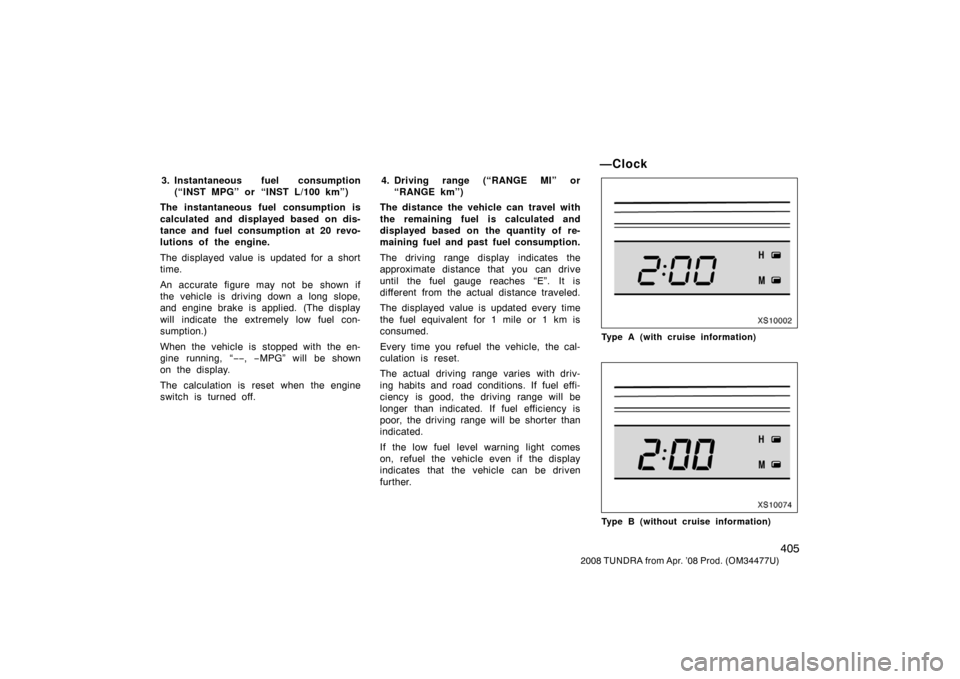
—Clock
XS10002
Type A (with cruise information)
XS10074
Type B (without cruise information)
Page 416 of 621
406
2008 TUNDRA from Apr. ’08 Prod. (OM 34477U)
To reset the hour: Push the “H” button.
To reset the minutes: Push the “M” button.
Vehicles with cruise information only—
For quicker adjustment of the clock, hold
down “M” or “H” button continuously. This
allows faster advancement of the minutes
and hours while setting.
The engine switch must be in the “ACC”
or “ON” position.
If the electrical power source has been
disconnected from the clock, the time dis-
play will automatically be set to 1:00 (one
o’clock).
When the instrument panel lights are
turned on, the brightness of the time indi-
cation will be reduced.
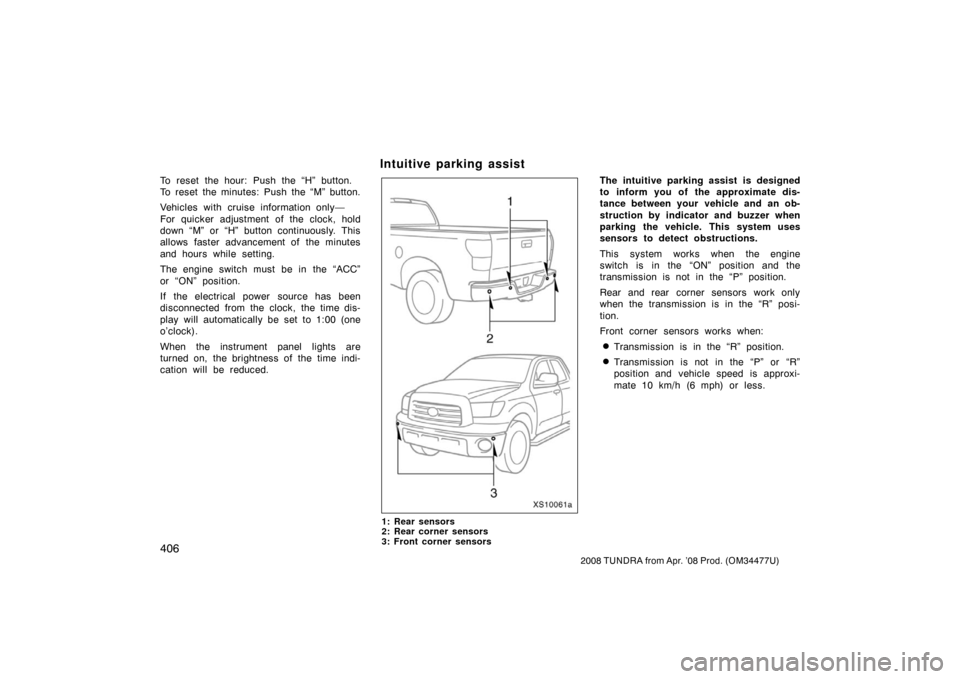
Intuitive parking assist
XS10061a
1: Rear sensors
2: Rear corner sensors
3: Front corner sensors
The intuitive parking assist is designed
to inform you of the approximate dis-
tance between your vehicle and an ob-
struction by indicator and buzzer when
parking the vehicle. This system uses
sensors to detect obstructions.
This system works when the engine
switch is in the “ON” position and the
transmission is not in the “P” position.
Rear and rear corner sensors work only
when the transmission is in the “R” posi-
tion.
Front corner sensors works when:
�Transmission is in the “R” position.
�Transmission is not in the “P” or “R”
position and vehicle speed is approxi-
mate 10 km/h (6 mph) or less.