Page 153 of 238
OTHER FUNCTIONS
1692008 TUNDRA Navigation from Oct.07 Prod.(OM34469U) The screen turns off when “Screen Off” is
touched. To turn the screen back on, push
any button such as “INFO”, etc. The selected
screen appears.
INFORMATION
When you do not touch any touch
screen button on the screen for 20 sec-
onds the “Display” screen goes off.
5U5009bG
Depending on the position of the headlight
switch, the screen changes to either day
mode or night mode.
To display the screen in the day mode even
with the headlight switch on, touch “Day
Mode” on the adjustment screen for bright-
ness and contrast control.
If the screen is set in the day mode with the
headlight switch turned on, this condition is
memorized in the system even with the en-
gine turned off.
Screen setting
XS00203
1. Push the “INFO” button to display the
“Information” screen.
5U5112G
2. Touch “Screen Setting”.
Page 156 of 238
OTHER FUNCTIONS
1722008 TUNDRA Navigation from Oct.07 Prod.(OM34469U)
Beep setting
You can set a beep sound off.
XS00203
1. Push the “INFO” button.
RS02030
2. Touch “Beep Off”.
“Beep Off” is highlighted.
To set the beep sound on, touch “Beep Off”
again.
Select language
The language of the touchscreen but-
tons, popup messages and the voice
guidance can be changed.
XS00203
1. Push the “INFO” button.
RS02031
2. Touch “Language”.
Page 163 of 238
AUDIO/VIDEO SYSTEM
1792008 TUNDRA Navigation from Oct.07 Prod.(OM34469U)
XS00211
Push “AM·SAT”, “FM1·2” or “DISC·AUX”
button to turn on the desired mode. The
selected mode turns on immediately.
Push these buttons if you want to switch from
one mode to another.
If the disc is not set, the CD changer does not
turn on.
You can turn off the CD changer by ejecting
all the discs. If the audio system was pre-
viously off, then the entire audio system will
be turned off when you eject all the discs. If
the other function was previously playing, it
will come on again.
6U5013G
6U5014G
6U5052G
6U5020G
RS02020a
The touchscreen buttons for radio, CD
changer and DVD player operation are dis-
played on the function touchscreen but-
ton display screen when the audio control
mode is selected. Touch them lightly and
directly on the screen.
The selected switch is highlighted.
Page 167 of 238
AUDIO/VIDEO SYSTEM
1832008 TUNDRA Navigation from Oct.07 Prod.(OM34469U)
XS00213
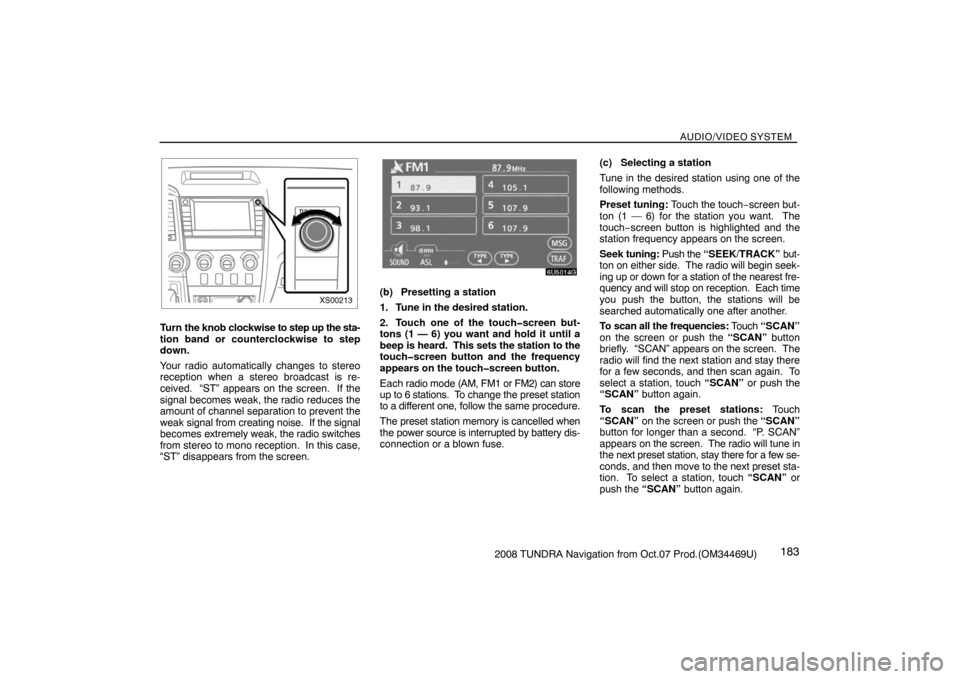
Turn the knob clockwise to step up the sta-
tion band or counterclockwise to step
down.
Your radio automatically changes to stereo
reception when a stereo broadcast is re-
ceived. “ST” appears on the screen. If the
signal becomes weak, the radio reduces the
amount of channel separation to prevent the
weak signal from creating noise. If the signal
becomes extremely weak, the radio switches
from stereo to mono reception. In this case,
“ST” disappears from the screen.
6U5014G
(b) Presetting a station
1. Tune in the desired station.
2. Touch one of the touchscreen but-
tons (1 — 6) you want and hold it until a
beep is heard. This sets the station to the
touchscreen button and the frequency
appears on the touchscreen button.
Each radio mode (AM, FM1 or FM2) can store
up to 6 stations. To change the preset station
to a different one, follow the same procedure.
The preset station memory is cancelled when
the power source is interrupted by battery dis-
connection or a blown fuse.(c) Selecting a station
Tune in the desired station using one of the
following methods.
Preset tuning: Touch the touch−screen but-
ton (1 — 6) for the station you want. The
touch−screen button is highlighted and the
station frequency appears on the screen.
Seek tuning: Push the “SEEK/TRACK” but-
ton on either side. The radio will begin seek-
ing up or down for a station of the nearest fre-
quency and will stop on reception. Each time
you push the button, the stations will be
searched automatically one after another.
To scan all the frequencies: Touch “SCAN”
on the screen or push the “SCAN” button
briefly. “SCAN” appears on the screen. The
radio will find the next station and stay there
for a few seconds, and then scan again. To
select a station, touch “SCAN” or push the
“SCAN” button again.
To scan the preset stations: Touch
“SCAN” on the screen or push the “SCAN”
button for longer than a second. “P. SCAN”
appears on the screen. The radio will tune in
the next preset station, stay there for a few se-
conds, and then move to the next preset sta-
tion. To select a station, touch “SCAN” or
push the “SCAN” button again.
Page 172 of 238
AUDIO/VIDEO SYSTEM
1882008 TUNDRA Navigation from Oct.07 Prod.(OM34469U) (f) Selecting a channel
Tune in the desired channel using one of the
following methods.
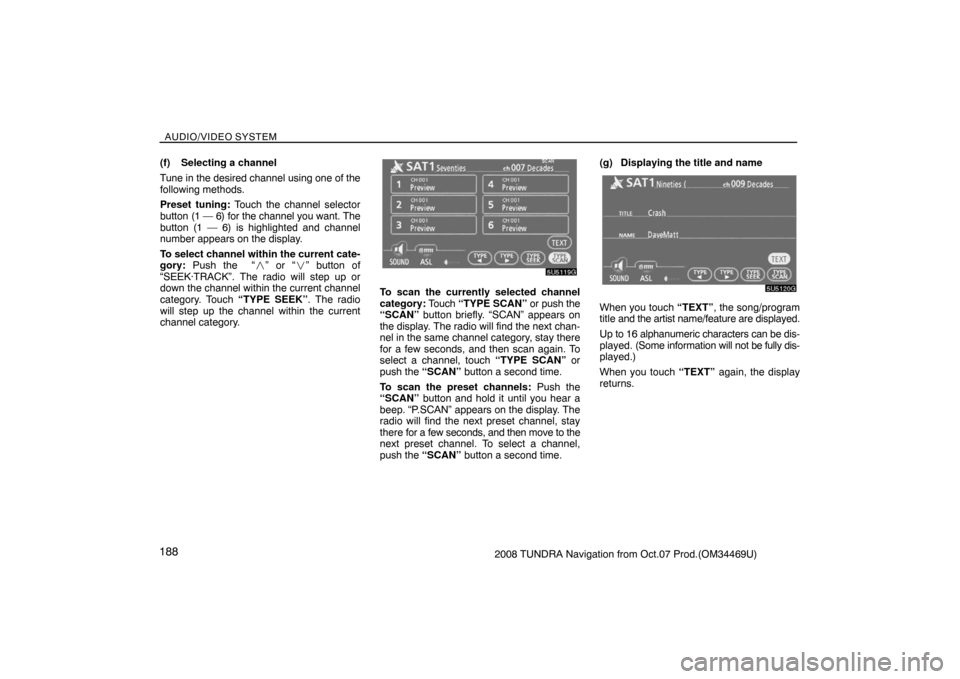
Preset tuning: Touch the channel selector
button (1 — 6) for the channel you want. The
button (1 — 6) is highlighted and channel
number appears on the display.
To select channel within the current cate-
gory: Push the “�” or “�” button of
“SEEK·TRACK”. The radio will step up or
down the channel within the current channel
category. Touch “TYPE SEEK”. The radio
will step up the channel within the current
channel category.
5U5119G
To scan the currently selected channel
category: Touch “TYPE SCAN” or push the
“SCAN” button briefly. “SCAN” appears on
the display. The radio will find the next chan-
nel in the same channel category, stay there
for a few seconds, and then scan again. To
select a channel, touch “TYPE SCAN” or
push the “SCAN” button a second time.
To scan the preset channels: Push the
“SCAN” button and hold it until you hear a
beep. “P.SCAN” appears on the display. The
radio will find the next preset channel, stay
there for a few seconds, and then move to the
next preset channel. To select a channel,
push the “SCAN” button a second time.(g) Displaying the title and name
5U5120G
When you touch “TEXT”, the song/program
title and the artist name/feature are displayed.
Up to 16 alphanumeric characters can be dis-
played. (Some information will not be fully dis-
played.)
When you touch “TEXT” again, the display
returns.
Page 178 of 238
AUDIO/VIDEO SYSTEM
1942008 TUNDRA Navigation from Oct.07 Prod.(OM34469U)
6U5020G
(d) Selecting a desired disc
Touch the desired disc number on the
screen.
The selected disc number is highlighted.
The changer will start playing the selected
disc from the first track.
6U5020G
(e) Playing an audio disc
Push the “AUDIO” button to display this
screen.
XS00218
SELECTING A DESIRED TRACK
“SEEK/TRACK” button: Use for a direct ac-
cess to a desired track.
Push either side of the “SEEK/TRACK” but-
ton and repeat it until the desired track num-
ber appears on the screen. As you release
the button, the changer will start playing the
selected track from the beginning.
“TRACK LIST”: The desired track can be se-
lected from a list. This function is available
only when the vehicle is not moving.
Touch “TRACK LIST”. The track list is dis-
played.
Page 185 of 238

AUDIO/VIDEO SYSTEM
2012008 TUNDRA Navigation from Oct.07 Prod.(OM34469U)
— DVD player operation
The DVD player can play DVD video, audio
CD, video CD, CD text, dtsCD or MP3 disc
only when a disc is loaded in the DVD play-
er. A WMA and DVD audio disc cannot be
played.
Refer to “Rear seat entertainment system” for
details.
For appropriate discs for this player, see
“Audio/video system operating hints” on page
221.
(a) Inserting the disc
XS00219
Insert the disc into the slot with the label
side up.
An adapter must be used for 8 cm (3 in.) discs
which are loaded in the same manner as for
12 cm (4.7 in.) discs.
XS00220
The indicator light turns on while the disc is
loaded.
If the label faces forward, the disc cannot be
played. In this case, “Disc Check” appears on
the screen.
If a disc which is not playable is inserted, “Disc
Check” will also appear on the screen. For
appropriate discs for this player, see “Audio/
video system operating hints” on page 221.
NOTICE
Never try to disassemble or oil any part
of the DVD player. Do not insert any-
thing other than a disc into the slot.
XS00221
(b) Ejecting a disc
Push the button.
Page 187 of 238

AUDIO/VIDEO SYSTEM
2032008 TUNDRA Navigation from Oct.07 Prod.(OM34469U)
6U5193G
Touch the desired track number. The player
will start playing the selected track from the
beginning.
: By touching this touch−screen button,
the list moves up by 6 track groups. If this
touch−screen button is touched when the top
page of the list is displayed, the last page is
displayed.
: By touching this touch−screen button,
the list moves down by 6 track groups. If this
touch−screen button is touched when the last
page of the list is displayed, the top page is
displayed.Fast forward: Touch “�” side of “SEEK/
TRACK” button and hold it to fast forward the
disc. When you release the button, the player
will resume playing from that position.
Reverse: Touch “�” side of the “SEEK/
TRACK” button and hold it to reverse the
disc. When you release the button, the player
will resume playing.
6U5029G
SEARCHING FOR A DESIRED TRACK
Touch “SCAN” on the screen or push the
“SCAN” button.
“SCAN” will be highlighted on the screen. The
player will play the next track for 10 seconds,
then scan again. To select a track, touch
“SCAN” on the screen or push the “SCAN”
button a second time. If the player reaches
the end of the disc, it will continue scanning at
track 1.
After all the tracks are scanned in one pass,
normal play resumes.


