Page 170 of 596
170 2-2. Instrument cluster
Press the SELECT RESET button to customize the items.
*: Default setting
ItemsScreen textSelect in this order
To select Unit A or
Unit B
(P. 174)
UNITS
Door lock/unlock
warning functionKEYLESS
ENTRY
FEEDBACK
Time for automatic
door lock functionKEYLESS
ENTRY
RELOCK
TIMER
Double switch opera-
tion to unlock all the
doorsKEYLESS
ENTRY ALL
DOORS
UNLOCK
Automatic door lock-
ing functionDOOR
AUTO
LOCKING
Automatic door
unlocking functionDOOR
AUTO
UNLOCKING
Time period before
lights turn off (if a door
is opened and closed,
and engine switch is
in ACC or LOCK)
HEAD-
LAMPS
AUTO OFF
TIMER
Time period before
lights turn offCOURTESY
LAMPS OFF
TIMER
Reset to default set-
tingDEFAULT
SETTING
Unit B
Unit A
LAMPS + TONE*LAMPS
TONE
OFF
60 SECONDS*120 SECONDS
30 SECONDS OFF
2 PRESSES*1 PRESS
SHIFT OUT
OF PARKABOVE 12 MPH*
(20 km/h)
OFF
SHIFT TO PARK*DRIVER DOOR
OPEN
OFF
30 SECONDS*60 SECONDS
90 SECONDS
0 SECONDS
15 SECONDS*30 SECONDS
8 SECONDS
Page 172 of 596
172
2-2. Instrument cluster
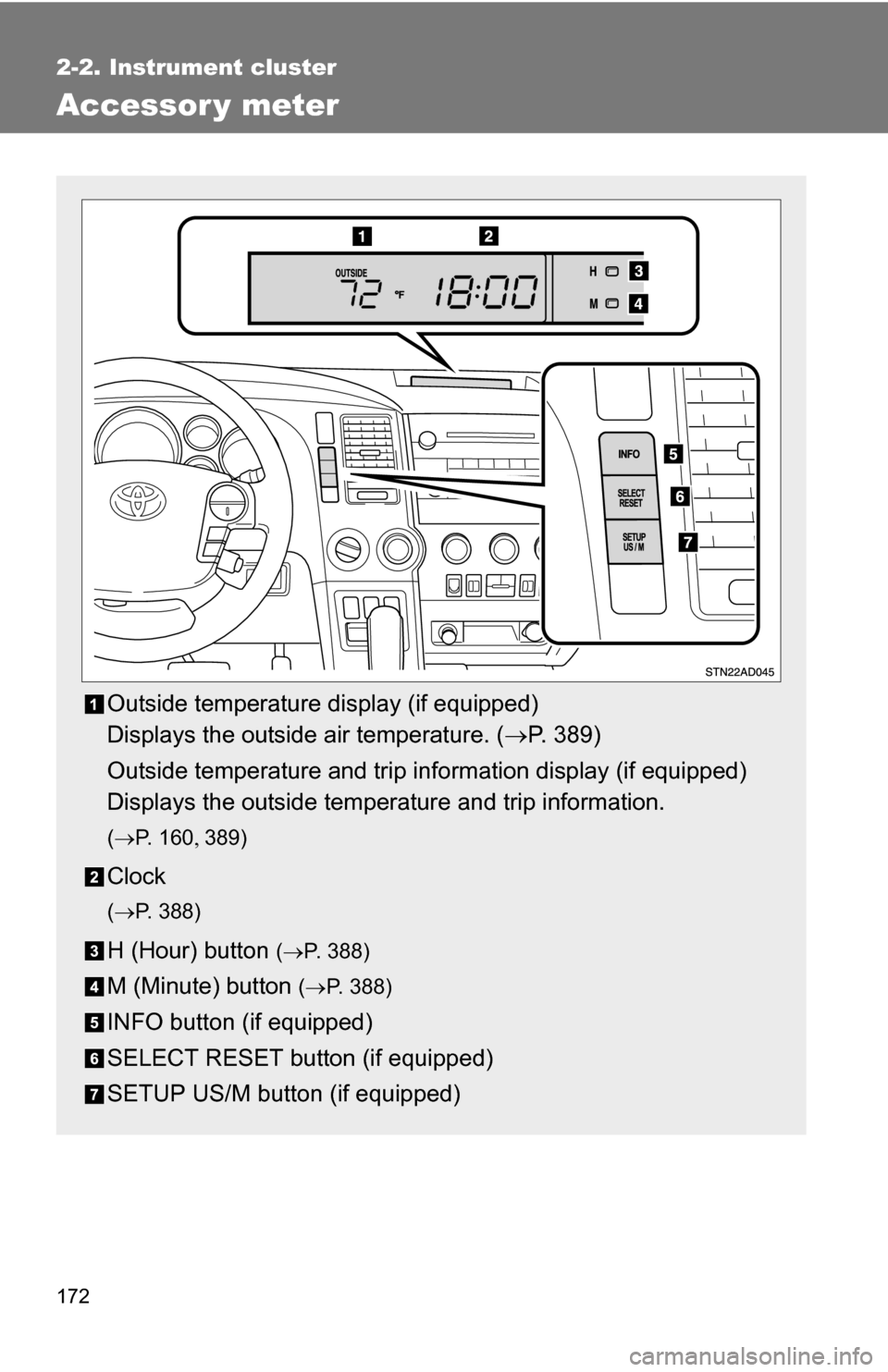
Accessor y meter
Outside temperature display (if equipped)
Displays the outside air temperature. (P. 389)
Outside temperature and trip information display (if equipped)
Displays the outside temperature and trip information.
( P. 1 6 0 389)
Clock
(P. 388)
H (Hour) button (P. 388)
M (Minute) button ( P. 388)
INFO button (if equipped)
SELECT RESET button (if equipped)
SETUP US/M button (if equipped)
Page 174 of 596
174 2-2. Instrument cluster
■To select the unit A (English/U.S. customary system) or unit B (metric
unit)
Vehicles without multi-information display
Press the SETUP US/M button to change the units. Vehicles with multi-information display
Press the SETUP US/M button to display UNITS on the multi-information
display. And then press the SELECT RESET button to change the units.
CAUTION
■ Caution while driving
Do not adjust the display.
Doing so may cause the driver to mishandle the vehicle and an accident,
resulting in death or serious injury.
Information Unit AUnit B
Average fuel consumption and
current fuel consumption MPG
L/100 Km
Driving range MILESKm
Outside temperature °F°C
Page 184 of 596

184 2-4. Using other driving systems
■Cruise control can be set when
●The shift lever is in D or the shift range position must be in 4 or 5 in S
mode (5-speed models).
● The shift lever is in D or the shift range position must be in between 4 and
6 in S mode (6-speed models).
● Vehicle speed is more than approximately 25 mph (40 km/h).
■ Accelerating
The vehicle can be accelerated normally.
■ Automatic cruise control cancelation
The set speed is automatically cancelled in any of the following situations.
●Actual vehicle speed falls more than 10 mph (16 km/h) below the preset
vehicle speed.
At this time, the memorized set speed is not retained.
● Actual vehicle speed is below 25 mph (40 km/h).
● VSC is activated.
● The operation cannot be switched for 5 seconds or more after operating
the front wheel drive control switch or the center differential lock switch.
■ Canceling and resuming regular acceleration
Cancel
Pull the lever towards you to
cancel cruise control.
The speed setting is also can-
celed when the brakes are
applied.
Resume
To resume cruise control and
return to the set speed, push
the lever up.
Page 186 of 596
186
2-4. Using other driving systems
Dynamic laser cruise control (if equipped)
Dynamic laser cruise control supplements conventional cruise con-
trol with a vehicle-to-vehicle dist ance control. In the vehicle-to-vehi-
cle distance control mode, the vehicle automatically accelerates or
decelerates in order to maintain a set following distance from vehi-
cles ahead.
■ Select cruise mode
Selecting vehicle-to-vehicle
distance control mode
Press the ON-OFF button to
turn the cruise control on.
Push the button once more to
deactivate the cruise control.
Selecting conventional con-
stant speed control modePress the ON-OFF button to
turn the cruise control on.
Push the button once more to
deactivate the cruise control.
Vehicle-to-vehicle distance
control mode is always reset
when the engine switch is
turned to the ON position.
Switch to constant speed
control mode.
(push the cruise main
switch forward and hold for
approximately one second)
Page 191 of 596

191
2-4. Using other
driving systems
2
When driving
■Automatically canceling vehicle-to-vehicle distance control
Vehicle-to-vehicle distance control driving is automatically canceled in the
following situations.
●Vehicle speed falls below 25 mph (40 km/h)
● VSC is activated
● The sensor cannot operate correctly because it is covered in some way.
*
●The windshield wipers are operating at high or low speed.*
●The operation cannot be switched for 5 seconds or more after operating
the front wheel drive control switch or the center differential lock switch.
*: Vehicle-to-vehicle distance control driving must be reset by pressing the
ON-OFF button again.
If vehicle-to-vehicle distance control driving is automatically canceled for any
other reason, there may be a malfunction in the system. Contact your Toyota
dealer.
■ Automatically cancelling constant speed control
The set speed is automatically canceled in the following situations.
●Actual vehicle speed is more than 10 mph (16 km/h) below the preset
vehicle speed
At this time, the memorized set speed is not retained.
● Vehicle speed falls below 25 mph (40 km/h)
● VSC is activated
● The operation cannot be switched for 5 seconds or more after operating
the front wheel drive control switch or the center differential lock switch.
■ Vehicle-to-vehicle distance settings
Select a distance from the table below. Note that the distances shown corre-
spond to a vehicle speed of 55 mph (90 km/h). Vehicle-to-vehicle distance
increases/decreases in accordance with vehicle speed.
Distance optionsVehicle-to-vehicle distance
Long Approximately 245 ft. (75 m)
Medium Approximately 165 ft. (50 m) Short Approximately 100 ft. (30 m)
Page 269 of 596
269
3-2. Using the audio system
3
Interior features
Using the radio
Setting station presets (excluding XM® Satellite Radio)
Search for desired stations by turning or pressing
“
”or “ ” on .
Press and hold the button (from or
to or
) that the station is to be set to until you hear a beep.
Vol u m e Station selector
Frequency
seek
Frequency adjust
(AM, FM mode) or
channel (SAT mode) AM·SAT/FM
mode buttonsPower
Station scanText message display
(SAT mode)
Page 270 of 596
270 3-2. Using the audio system
Scanning radio stations (excluding XM® Satellite Radio)
■ Scanning the preset radio stations
Press and hold until you hear a beep.
Preset stations will be played for 5 seconds each.
When the desired station is reached, press the button once
again to stop scanning.
■ Scanning all radio stations within range
Press .
All stations with reception will be played for 5 seconds each.
When the desired station is reached, press the button once
again to stop scanning.
XM® Satellite Radio (type B and C)
■ Receiving XM
® Satellite Radio
Press and select the XM
® band.
The display changes as follows each time is pressed.
AM SAT1 SAT2 SAT3
Turn to select the desired channel in all categories
or press “
”or “ ” on to select the desired channel in
the current category.