Page 300 of 512
300 3-4. Using the hands-free system
PRIUS_U_(L/O_0802)■
“Show Bluetooth
* connection status at startup” settings
Press .
Touch on the “Inf ormation” screen.
Touch on the “Telephone” screen.
Touch on the “Settings” screen.
Touch / in the “Show Bluetooth
* connection sta-
tus at startup” section of the “Screen Settings” screen.
*:Bluetooth is a registered trademark of Bluetooth SIG. Inc.
■ To set the screen settings to default
Touch , then .
STEP1
STEP2
STEP3
STEP4
STEP5
Page 314 of 512
314 3-4. Using the hands-free system
PRIUS_U_(L/O_0802)
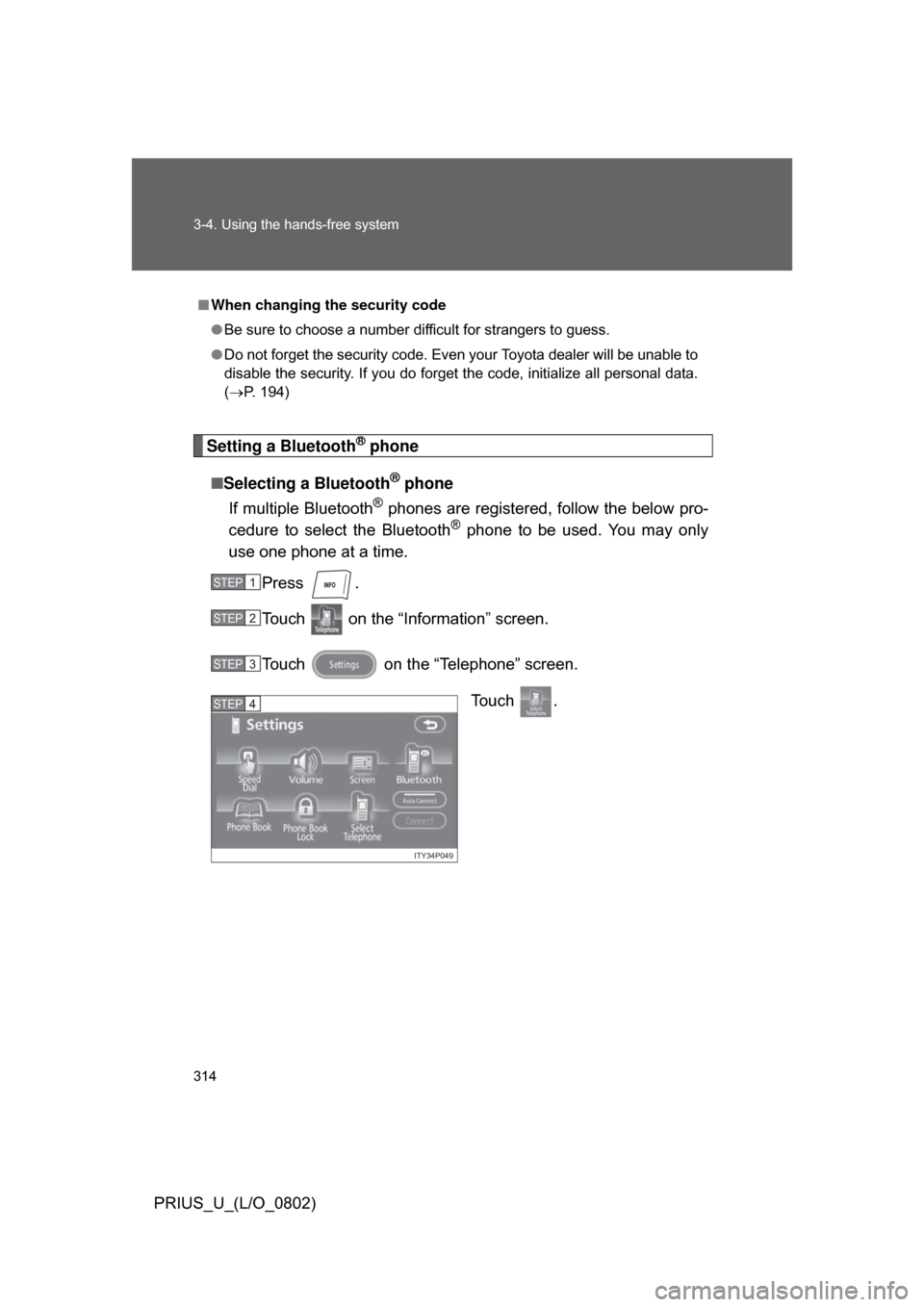
Setting a Bluetooth® phone
■ Selecting a Bluetooth
® phone
If multiple Bluetooth
® phones are registered, follow the below pro-
cedure to select the Bluetooth® phone to be used. You may only
use one phone at a time.
Press .
Touch on the “Inf ormation” screen.
Touch on the “Telephone” screen. To u c h .
■When changing the security code
● Be sure to choose a number difficult for strangers to guess.
● Do not forget the security code. Even your Toyota dealer will be unable to
disable the security. If you do forget the code, initialize all personal data.
(P. 194)
STEP1
STEP2
STEP3
ITY34P049
STEP4
Page 315 of 512
315
3-4. Using the hands-free system
3
Interior features
PRIUS_U_(L/O_0802)
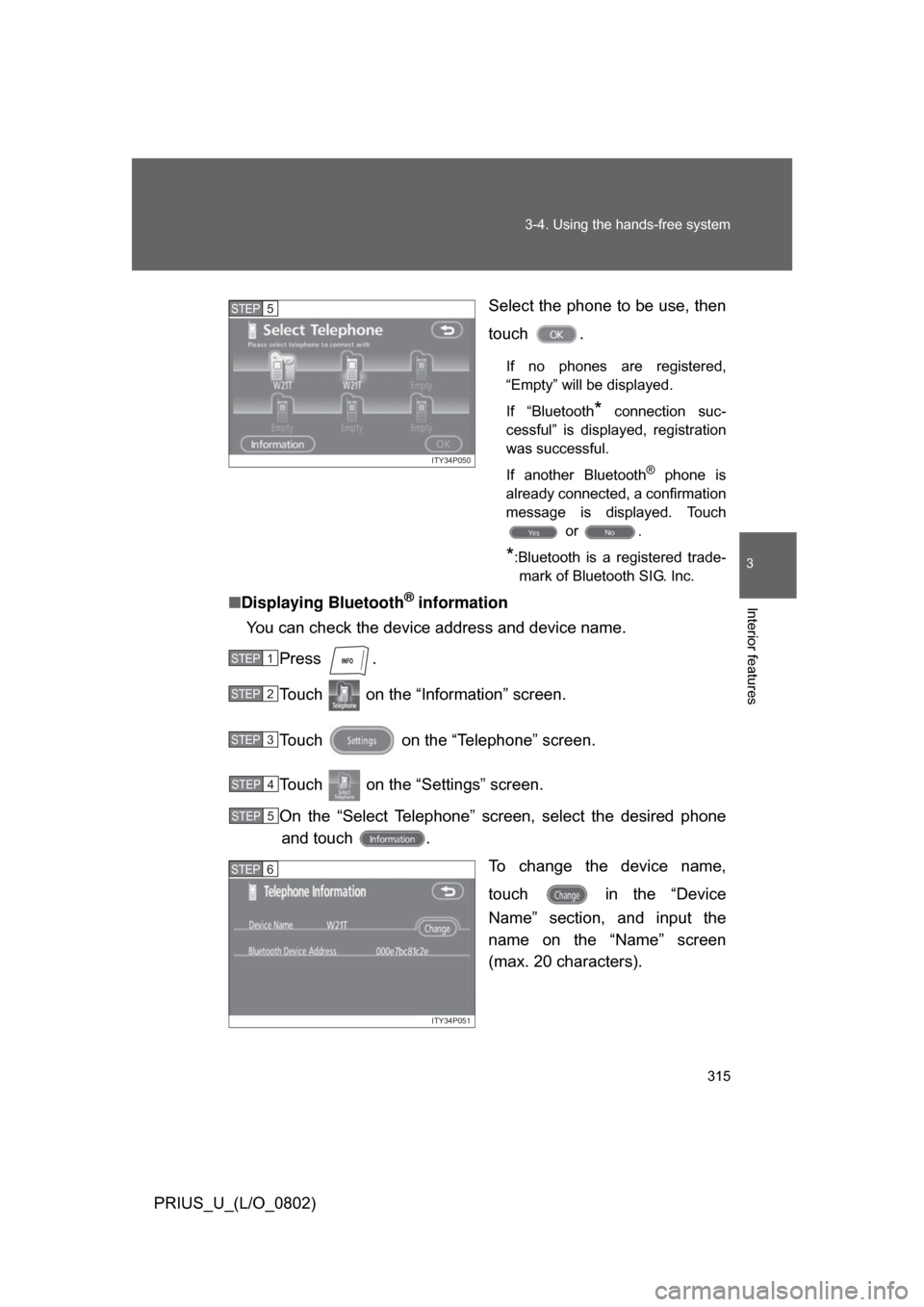
Select the phone to be use, then
touch .
If no phones are registered,
“Empty” will be displayed.
If “Bluetooth
* connection suc-
cessful” is displayed, registration
was successful.
If another Bluetooth
® phone is
already connected, a confirmation
message is displayed. Touch or .
*:Bluetooth is a registered trade-mark of Bluetooth SIG. Inc.
■ Displaying Bluetooth® information
You can check the device address and device name.
Press .
Touch on the “Information” screen.
Touch on the “Telephone” screen.
Touch on the “Settings” screen.
On the “Select Telephone” screen, select the desired phoneand touch .
To change the device name,
touch in the “Device
Name” section, and input the
name on the “Name” screen
(max. 20 characters).
ITY34P050
STEP5
STEP1
STEP2
STEP3
STEP4
STEP5
ITY34P051
STEP6
Page 316 of 512
316 3-4. Using the hands-free system
PRIUS_U_(L/O_0802)■
To change the Bluetooth
® settings
You can change the device name and passkey.
Press .
Touch on the “Inf ormation” screen.
Touch on the “Telephone” screen.
Touch on the “Settings” screen. To change the device name,
touch in the “Device
Name” section, and input the
name on the “Name” screen
(max. 20 characters).
To change the passkey, touch in the “Passkey” section,
and input 4 - 8 digits on the
“Passkey” screen.
■ Setting the Bluetooth® settings to default
Press .
Touch on the “Inf ormation” screen.
Touch on the “Telephone” screen.
Touch on the “Settings” screen.
Touch on the “Bluetooth
* Settings” screen.
A confirmation message is displa yed. If everything is correct,
touch .
*:Bluetooth is a registered trademark of Bluetooth SIG. Inc.
STEP1
STEP2
STEP3
STEP4
ITY34P052
STEP5
STEP1
STEP2
STEP3
STEP4
STEP5
STEP6
Page 317 of 512
317
3-4. Using the hands-free system
3
Interior features
PRIUS_U_(L/O_0802)
■
To delete the Bluetooth
® settings
Press .
Touch on the “Information” screen.
Touch on the “Telephone” screen.
Touch on the “Settings” screen.
Touch in the “Bluetooth
* Telephone” section of the
“Bluetooth
* Settings” screen.
On the “Delete Telephone” scre en, select the phone to delete.
To check the device address, touch .
If you touch , a confirmation message is displayed. If
everything is correct, touch .
*:Bluetooth is a registered trademark of Bluetooth SIG. Inc.
STEP1
STEP2
STEP3
STEP4
STEP5
STEP6
STEP7
Page 500 of 512

500
PRIUS_U_(L/O_0802)
Alphabetical index
Alphabetical index
A/C .............................................201
ABS ...........................................170
Air conditioning systemAir conditioning filter ..............394
Automatic air conditioning system ................................201
Steering wheel climate remote control switches ......215
Airbags Airbag operating conditions.....92
Airbag precautions for your child ...................................... 96
Airbag warning light............... 427
Curtain shield airbag precautions ...........................96
Front passenger occupant classification system ...........101
General airbag precautions .....96
Locations of airbags ................89
Modification and disposal of airbags ................................100
Side airbag precautions .......... 96
Side and curtain shield airbags operating conditions..............92
SRS airbags ............................ 89
Alarm ........................................... 84
Antenna.....................................231
Armrest .....................................334
Audio input ............................... 268
Audio system Antenna .................................231
CD player/changer ................239
MP3/WMA disc......................254
Optimal use ...........................262
Portable music player............268
Radio .....................................225
Steering switches .................. 269
Automatic headlight leveling system .................................... 150
Automatic light control system .................................... 150
AUX adapter ............................. 268
Auxiliary boxes ........................327 Back-up lights
Wattage................................. 471
Back door ................................... 54 Back door ................................ 54
Wireless remote control .......... 49
Smart key system .. ................. 36
Battery Checking ............................... 375
Hybrid battery
(traction battery) ................... 26
If the vehicle 12 volt battery is discharged .......................... 451
Preparing and checking before winter ....................... 177
Bluetooth
®................................ 272
Brake Fluid ...................................... 373
Parking brake ........................ 142
Brake assist.............................. 170
Break-in tips ............................. 121
Care Exterior.................................. 346
Interior ................................... 348
Seat belts .............................. 349
Cargo capacity ......................... 173
Cargo hooks ............................. 336
CD player/changer ................... 239
Chains ....................................... 179
Child-protectors ......................... 52
Child restraint system Definition ............................... 107
Installation ............................. 110
Installing CRS with lower anchorages ......................... 114
Installing CRS with seatbelts ............................. 111
Installing CRS with top
straps .................................. 115
AB
C
Page:
< prev 1-8 9-16 17-24