Page 145 of 512
145
2-2. Instrument cluster
2
When driving
PRIUS_U_(L/O_0802)
NOTICE
■
To prevent damage to the hybr id system and its components
The hybrid system may be overheating if the high coolant temperature warn-
ing light is displayed on the touch screen. In this case, immediately stop the
vehicle in a safe place. Check the hybrid system after it has cooled com-
pletely. ( P. 456)
Page 167 of 512
167
2-4. Using other driving systems
2
When driving
PRIUS_U_(L/O_0802)
Rear view monitor system
■Displayed area
Corner of bumper
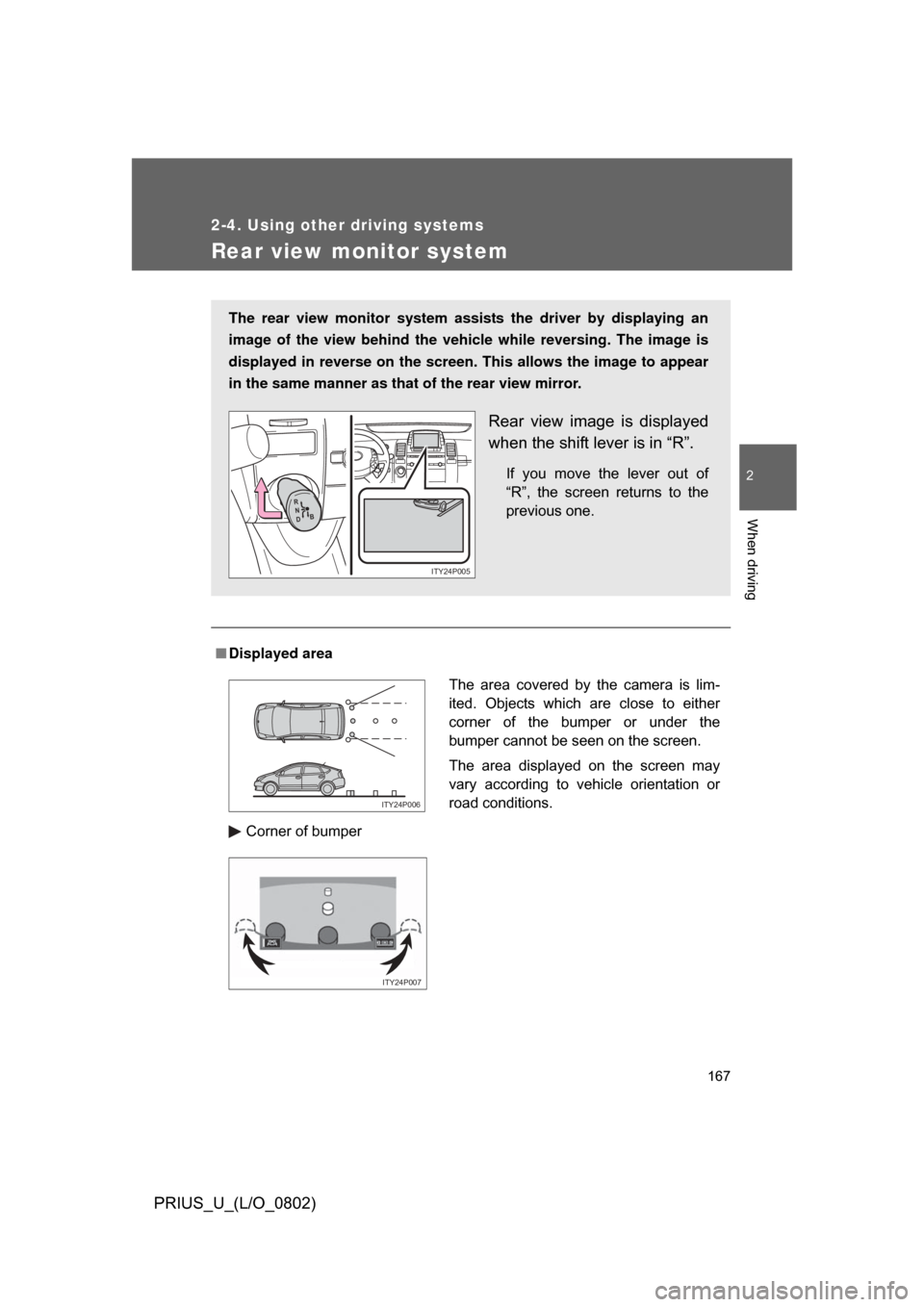
The rear view monitor system assists the driver by displaying an
image of the view behind the vehicle while reversing. The image is
displayed in reverse on the screen . This allows the image to appear
in the same manner as that of the rear view mirror.
Rear view image is displayed
when the shift lever is in “R”.
If you move the lever out of
“R”, the screen returns to the
previous one.
R
N
D B
ITY24P005
The area covered by the camera is lim-
ited. Objects which are close to either
corner of the bumper or under the
bumper cannot be seen on the screen.
The area displayed on the screen may
vary according to vehicle orientation or
road conditions.
ITY24P006
ITY24P007
Page 169 of 512
169
2-4. Using other
driving systems
2
When driving
PRIUS_U_(L/O_0802)
CAUTION
■When using the rear view moni tor system, observe these precautions
to avoid an accident that could r esult in death or serious injuries.
● Never depend solely on the monitor system when reversing.
● Always check visually and with the mirrors to confirm your intended path is
clear.
● Depicted distances between objects and flat surfaces differ from actual
distances.
● Do not use the system if the back door is open.
■ Conditions which may affect the rear view monitor system
● If the back of the vehicle is hit, the camera’s position and mounting angle
may change. Contact your Toyota dealer.
● Rapid temperature changes, such as when hot water is poured on the
vehicle in cold weather, may cause the system to function abnormally.
● If the camera lens is dirty, it cannot transmit a clear image. Rinse with
water and wipe with a soft cloth. If extremely dirty, wash with a mild
cleanser and rinse.
● The displayed image may be darker and moving images may be slightly
distorted when the system is cold.
Page 186 of 512
186
PRIUS_U_(L/O_0802)
v3-1.Using the touch screen
Touch screen
By touching the screen with your finger, you can control the audio
system and air-conditioning, adjust the screen display etc.
Vehicles with navigation system
Vehicles without navigation system (Type A)
Page 187 of 512
187
3-1. Using the touch screen
3
Interior features
PRIUS_U_(L/O_0802)
Vehicles without navigation system (Type B)
The “Information” screen shown in t
he above illustration is displayed when
the is pressed.
SwitchesPage
“CLIMATE”P. 201, 208
“AUDIO”P. 219, 222
“INFO” (Displaying the “Informa-
tion” screen)P. 186
“DISP” (Adjusting the display)P. 192, 197
Trip Information. (Displaying the
“Trip Information” screen)P. 2 7
MaintenanceNavigation System Owner’s Man-
ual
TelephoneP. 277
CalendarNavigation System Owner’s Man-
ual
LanguageP. 191, 196
Screen SettingP. 194, 199
Page 189 of 512
189
3-1. Using the touch screen
3
Interior features
PRIUS_U_(L/O_0802)
Outside temperature display
The outside temperature is show n ranging from -22 °F (-30 °C) up
to 122 °F (50 °C) at the upper right of the energy consumption or
energy monitor screen or the upper left/right of the air conditioner
screen.
Vehicles with navigat ion system and vehicl es without navigation
system (Type A)
Vehicles without navigation system (Type B)
MPG
MPG
,7<��3���
Page 190 of 512
190 3-1. Using the touch screen
PRIUS_U_(L/O_0802)
■To avoid damaging the touch screen
● Touch the screen lightly with your finger. If there is no response, remove
your finger from the screen and try again.
● Remove any dirt on the screen by wiping with a soft cloth. Do not use
detergent.
■ When using the touch screen
● If the screen is cold, the display may be dark, or the system may seem to
be operating slightly slower than normal.
● The screen may seem dark and hard to see when viewed through sun-
glasses. Change your angle of viewing, adjust the display on he “Display”
screen or remove your sunglasses.
■ When the outside temperature drops below 37 °F (3 °C).
Also except the screen where outside temperature is displayed, outside tem-
perature and
* are displayed in the upper portion of the screen for a
few seconds.
*: may not be displayed depending on the display type.
Page 192 of 512
192 3-1. Using the touch screen
PRIUS_U_(L/O_0802)To u c h .
Adjusting the display
Press .
Adjust the display as desired using and
If you do not touch the screen for 20 seconds, the system will return
to the previous screen.
STEP2
STEP1
STEP2
Contrast WeakerStronger
Brightness DarkerBrighter