Page 315 of 512
315
3-4. Using the hands-free system
3
Interior features
PRIUS_U_(L/O_0802)
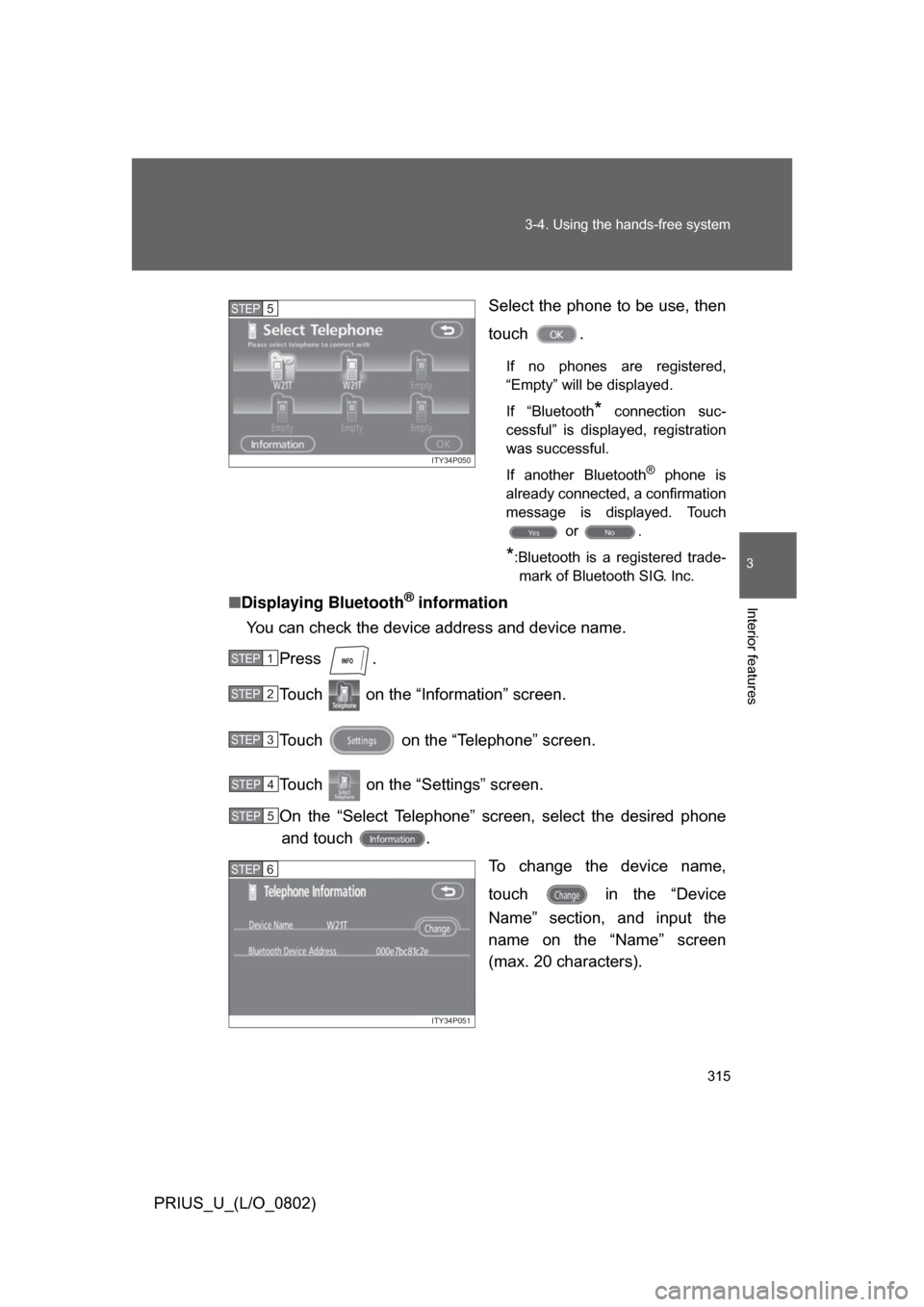
Select the phone to be use, then
touch .
If no phones are registered,
“Empty” will be displayed.
If “Bluetooth
* connection suc-
cessful” is displayed, registration
was successful.
If another Bluetooth
® phone is
already connected, a confirmation
message is displayed. Touch or .
*:Bluetooth is a registered trade-mark of Bluetooth SIG. Inc.
■ Displaying Bluetooth® information
You can check the device address and device name.
Press .
Touch on the “Information” screen.
Touch on the “Telephone” screen.
Touch on the “Settings” screen.
On the “Select Telephone” screen, select the desired phoneand touch .
To change the device name,
touch in the “Device
Name” section, and input the
name on the “Name” screen
(max. 20 characters).
ITY34P050
STEP5
STEP1
STEP2
STEP3
STEP4
STEP5
ITY34P051
STEP6
Page 359 of 512
359
4-3. Do-it-yourself maintenance
4
Maintenance and care
PRIUS_U_(L/O_0802)
CAUTION
The engine compartment contains many mechanisms and fluids that may
move suddenly, become hot, or become electrically energized. To avoid death
or serious injury.
■
When working on the engine compartment:
● Keep hands, clothing, and tools away from the moving fan and engine
drive belt.
● Be careful not to touch the engine, inverter, radiator, exhaust manifold, etc.
right after driving as they may be hot. Oil and other fluids may also be hot.
● Do not leave anything that may burn easily, such as paper or rags, in the
engine compartment.
● Do not smoke, cause sparks or expose an open flame to fuel or the 12 volt
battery. Fuel and 12 volt battery fumes are flammable.
● Be extremely cautious when working on the 12 volt battery. It contains poi-
sonous and corrosive sulfuric acid.
● Never touch, disassemble, remove or replace the high voltage parts,
cables and their connectors. It can cause severe burns or electric shock
that may result in death or serious injury.
● When the hybrid system is operating with the “READY” light on, the engine
may suddenly start in some cases. When you inspect the engine compart-
ment, be sure to turn off the hybrid system.
■ When working near the electric cooling fan or radiator grille
Be sure the “POWER” switch is OFF.
With the “POWER” switch in ON mode, the electric cooling fan may automat-
ically start to run if the air conditioning is on and/or the coolant temperature
is high. ( P. 373)
■ Safety glasses
Wear safety glasses to prevent flying or falling material, fluid spray, etc. from
getting in the eyes.
Page 367 of 512
367
4-3. Do-it-yourself maintenance
4
Maintenance and care
PRIUS_U_(L/O_0802)
■
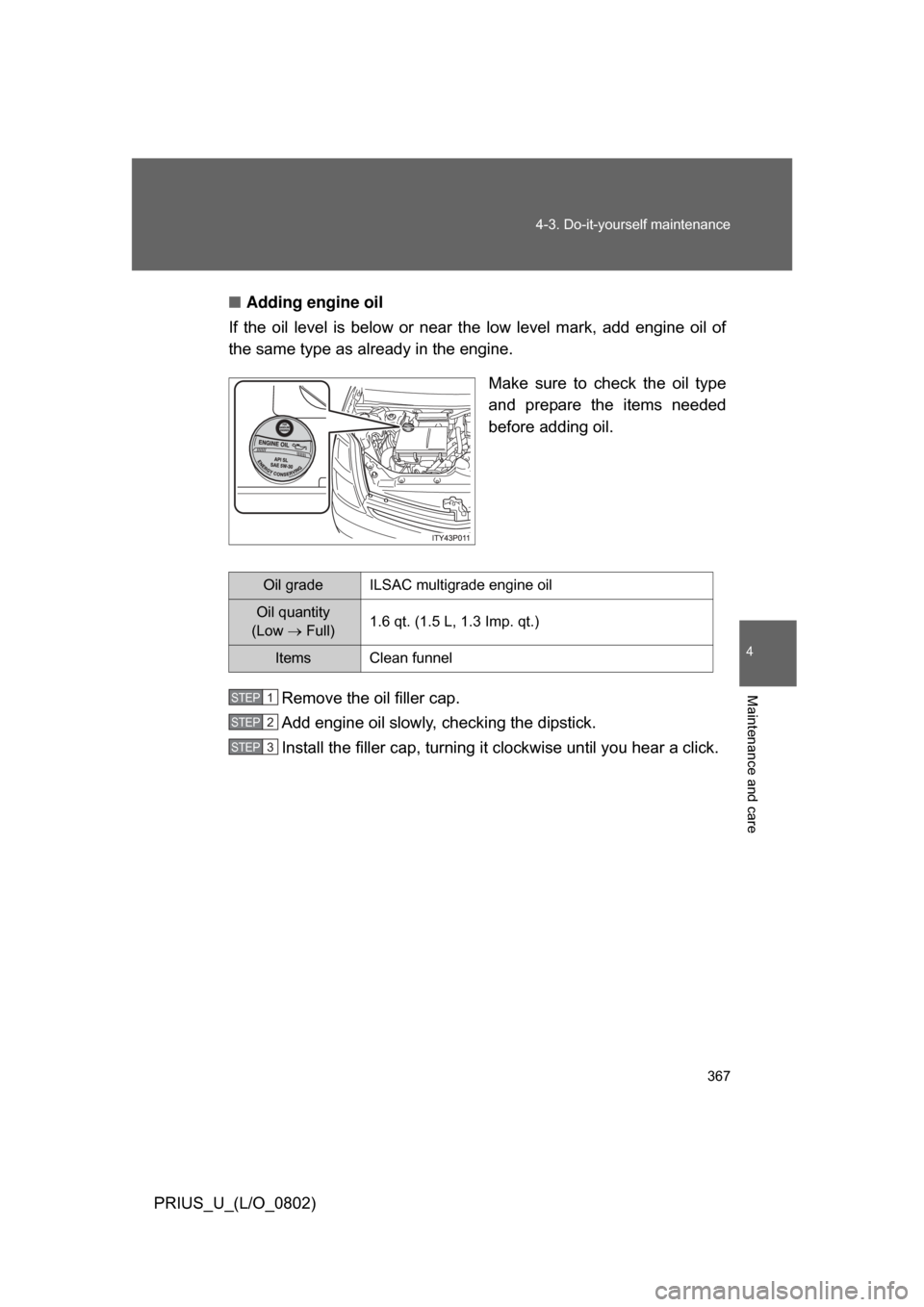
Adding engine oil
If the oil level is below or near the low level mark, add engine oil of
the same type as already in the engine.
Make sure to check the oil type
and prepare the items needed
before adding oil.
Remove the oil filler cap.
Add engine oil slowly, checking the dipstick.
Install the filler cap, turning it clockwise until you hear a click.
Oil gradeILSAC multigrade engine oil
Oil quantity
(Low Full) 1.6 qt. (1.5 L, 1.3 Imp. qt.)
Items Clean funnel
STEP1
STEP2
STEP3
Page 430 of 512
430 5-2. Steps to take in an emergency
PRIUS_U_(L/O_0802)
*1:This warning light is displayed on the touch screen.
*2:Open door warning buzzer:
(U.S.A.)
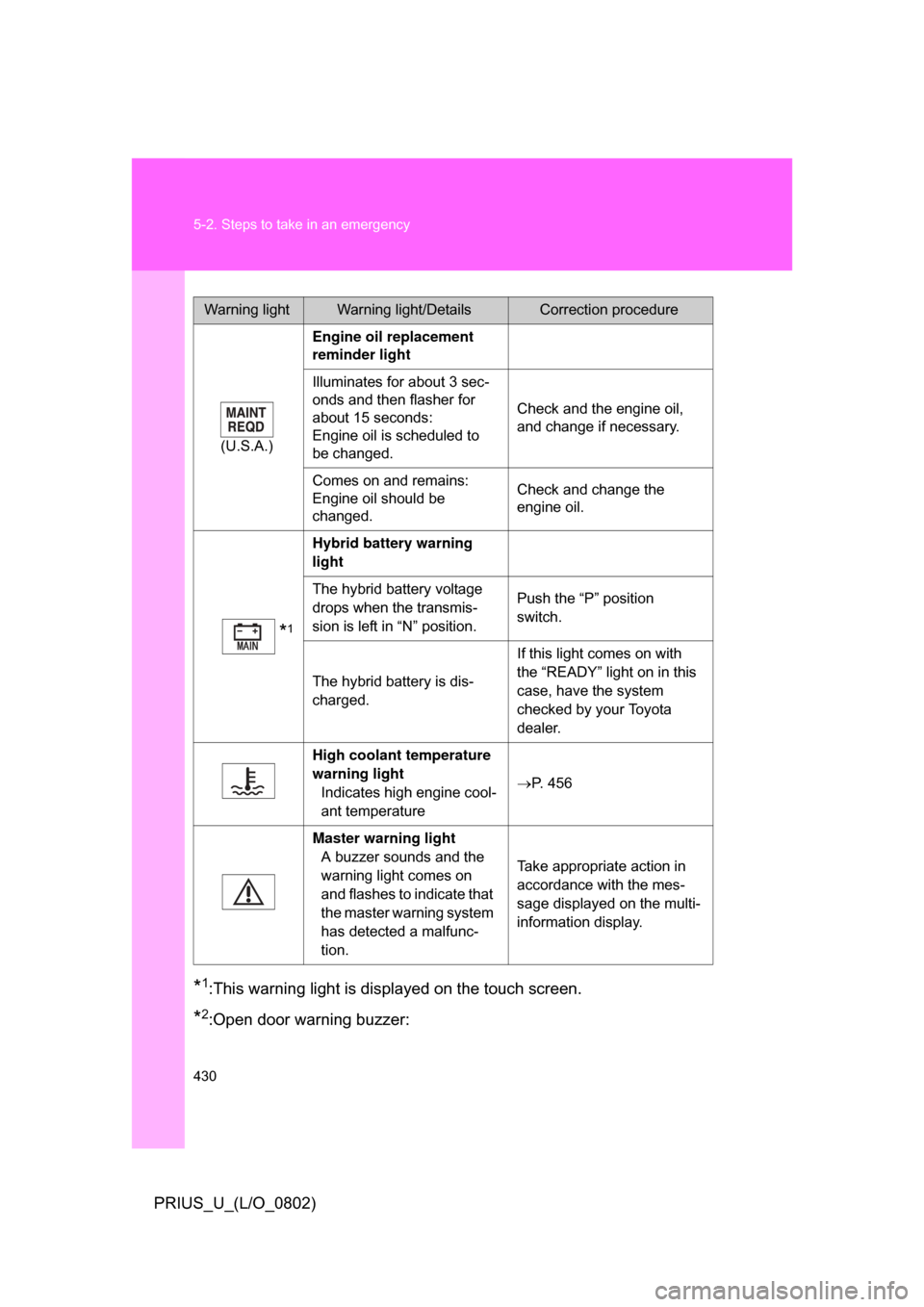
Engine oil replacement
reminder light
Illuminates for about 3 sec-
onds and then flasher for
about 15 seconds:
Engine oil is scheduled to
be changed. Check and the engine oil,
and change if necessary.
Comes on and remains:
Engine oil should be
changed. Check and change the
engine oil.
*1
Hybrid battery warning
light
The hybrid battery voltage
drops when the transmis-
sion is left in “N” position. Push the “P” position
switch.
The hybrid battery is dis-
charged. If this light comes on with
the “READY” light on in this
case, have the system
checked by your Toyota
dealer.
High coolant temperature
warning light Indicates high engine cool-
ant temperature P. 456
Master warning light A buzzer sounds and the
warning light comes on
and flashes to indicate that
the master warning system
has detected a malfunc-
tion. Take appropriate action in
accordance with the mes-
sage displayed on the multi-
information display.
Warning lightWarning light/DetailsCorrection procedure
Page 453 of 512
5
When trouble arises
453
5-2. Steps to take in an emergency
PRIUS_U_(L/O_0802)
■
Starting the hybrid system when the battery is discharged
The hybrid system cannot be started by push-starting.
■ Avoiding a discharged 12 volt battery
● Turn off the headlights and the audio system while the hybrid system is
turned off.
● Turn off any unnecessary electrical components when the vehicle is run-
ning at a low speed for an extended period, such as in heavy traffic, etc.
Start the engine of the second vehicle. Increase the engine
speed slightly and maintain at that level for approximately
five minutes to recharge the 12 volt battery of your vehicle.
Open and close any of the doors with the “POWER” switch
OFF.
Maintain the engine speed on the second vehicle and turn
the “POWER” switch to the ON mode, then start the vehi-
cle’s engine.
Make sure the “READY” light comes on. If the “READY”
light will not come on and the hybrid system will not start
after you recharge the battery, do the following procedure.
Turn the hybrid system off. Open and close the driver’s
door. Then push the “POWER” switch briefly and firmly. If
the light does not come on, contact your Toyota dealer.
Once the vehicle’s engine has started, remove the jumper
cables in the exact reverse order in which they were con-
nected.
Once the engine starts, have the vehicle checked at your Toyota
dealer as soon as possible.STEP4
STEP5
STEP6
STEP7
STEP8