Page 316 of 512
316 3-4. Using the hands-free system
PRIUS_U_(L/O_0802)■
To change the Bluetooth
® settings
You can change the device name and passkey.
Press .
Touch on the “Inf ormation” screen.
Touch on the “Telephone” screen.
Touch on the “Settings” screen. To change the device name,
touch in the “Device
Name” section, and input the
name on the “Name” screen
(max. 20 characters).
To change the passkey, touch in the “Passkey” section,
and input 4 - 8 digits on the
“Passkey” screen.
■ Setting the Bluetooth® settings to default
Press .
Touch on the “Inf ormation” screen.
Touch on the “Telephone” screen.
Touch on the “Settings” screen.
Touch on the “Bluetooth
* Settings” screen.
A confirmation message is displa yed. If everything is correct,
touch .
*:Bluetooth is a registered trademark of Bluetooth SIG. Inc.
STEP1
STEP2
STEP3
STEP4
ITY34P052
STEP5
STEP1
STEP2
STEP3
STEP4
STEP5
STEP6
Page 317 of 512
317
3-4. Using the hands-free system
3
Interior features
PRIUS_U_(L/O_0802)
■
To delete the Bluetooth
® settings
Press .
Touch on the “Information” screen.
Touch on the “Telephone” screen.
Touch on the “Settings” screen.
Touch in the “Bluetooth
* Telephone” section of the
“Bluetooth
* Settings” screen.
On the “Delete Telephone” scre en, select the phone to delete.
To check the device address, touch .
If you touch , a confirmation message is displayed. If
everything is correct, touch .
*:Bluetooth is a registered trademark of Bluetooth SIG. Inc.
STEP1
STEP2
STEP3
STEP4
STEP5
STEP6
STEP7
Page 401 of 512
401
4-3. Do-it-yourself maintenance
4
Maintenance and care
PRIUS_U_(L/O_0802)
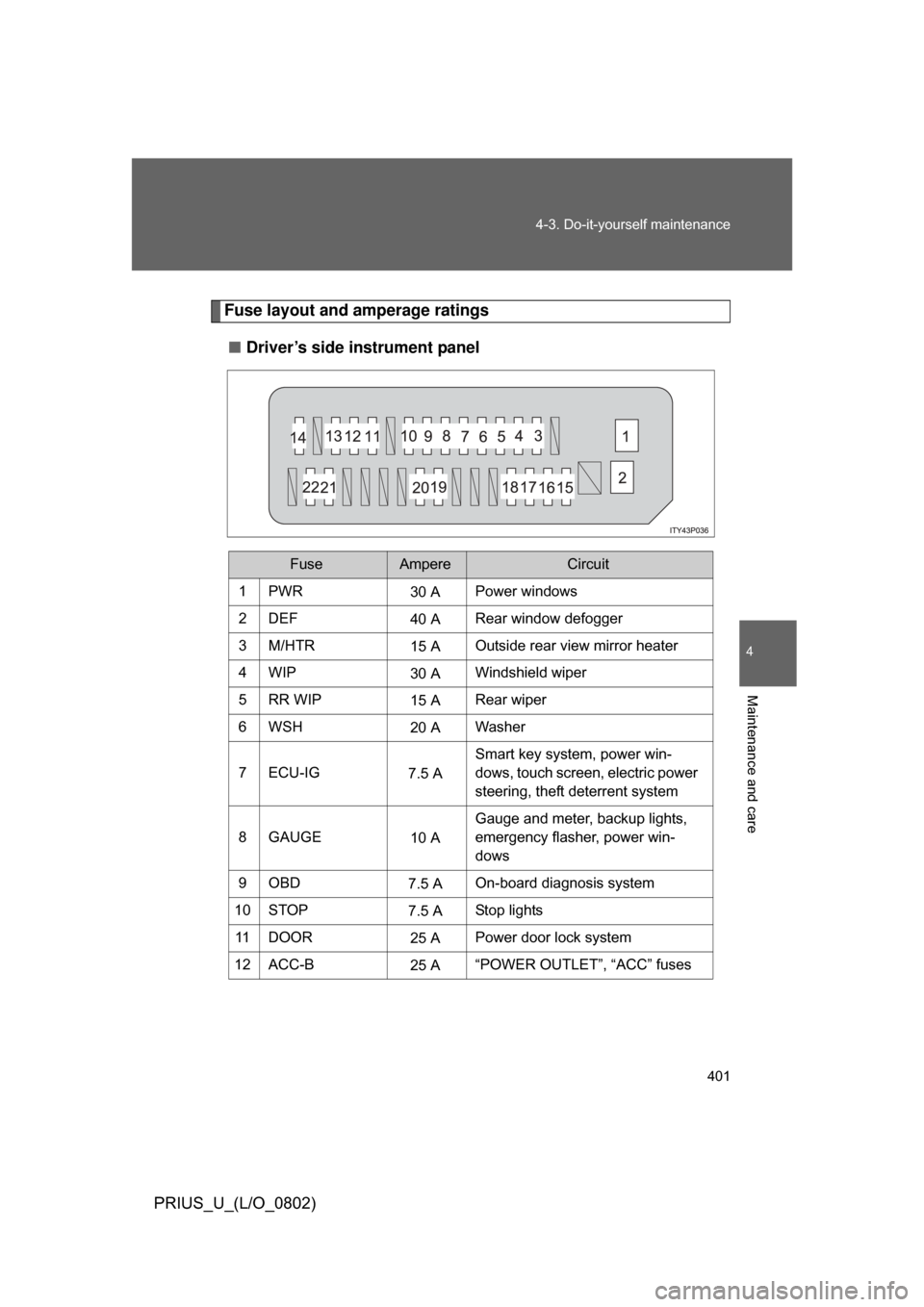
Fuse layout and amperage ratings
■ Driver’s side instrument panel
FuseAmpereCircuit
1PWR30 APower windows
2DEF 40 ARear window defogger
3M/HTR 15 AOutside rear view mirror heater
4WIP 30 AWindshield wiper
5RR WIP 15 ARear wiper
6WSH 20 AWasher
7 ECU-IG 7.5 ASmart key system, power win-
dows, touch screen, electric power
steering, theft deterrent system
8GAUGE 10 AGauge and meter, backup lights,
emergency flasher, power win-
dows
9OBD 7.5 AOn-board diagnosis system
10 STOP 7.5 AStop lights
11 D O O R 25 APower door lock system
12 ACC-B 25 A“POWER OUTLET”, “ACC” fuses
Page 402 of 512
402 4-3. Do-it-yourself maintenance
PRIUS_U_(L/O_0802)
13 ECU-B15 ATouch screen, power windows, air
conditioning system
14 AM1 7.5 AHybrid system
15 TAIL 10 ATail lights, license plates light,
parking lights
16 PANEL 7.5 ATouch screen, clock, audio sys-
tem, instrument panel lights
17 A/C (HTR) 10 AAir conditioning system
18 FR DOOR 20 APower windows
19 PWR OUTLET 15 APower outlet
20 ACC 7.5 AAudio system, touch screen, clock
21 PWR OUTLET
FR
15 A
Power outlet
22 IGN 7.5 AHybrid system, hybrid vehicle
immobilizer system, SRS airbags
FuseAmpereCircuit
Page 430 of 512
430 5-2. Steps to take in an emergency
PRIUS_U_(L/O_0802)
*1:This warning light is displayed on the touch screen.
*2:Open door warning buzzer:
(U.S.A.)
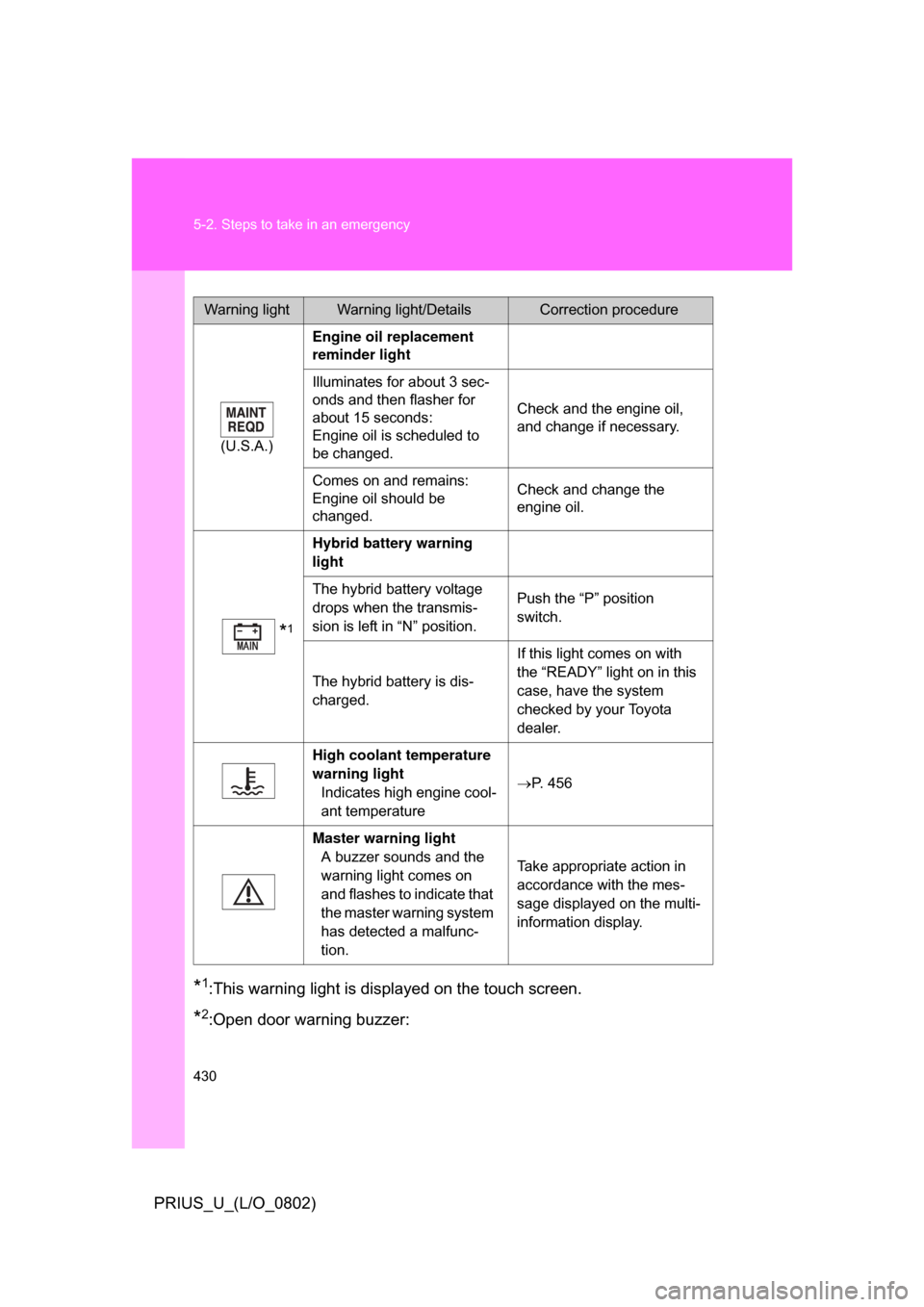
Engine oil replacement
reminder light
Illuminates for about 3 sec-
onds and then flasher for
about 15 seconds:
Engine oil is scheduled to
be changed. Check and the engine oil,
and change if necessary.
Comes on and remains:
Engine oil should be
changed. Check and change the
engine oil.
*1
Hybrid battery warning
light
The hybrid battery voltage
drops when the transmis-
sion is left in “N” position. Push the “P” position
switch.
The hybrid battery is dis-
charged. If this light comes on with
the “READY” light on in this
case, have the system
checked by your Toyota
dealer.
High coolant temperature
warning light Indicates high engine cool-
ant temperature P. 456
Master warning light A buzzer sounds and the
warning light comes on
and flashes to indicate that
the master warning system
has detected a malfunc-
tion. Take appropriate action in
accordance with the mes-
sage displayed on the multi-
information display.
Warning lightWarning light/DetailsCorrection procedure
Page 457 of 512
5
When trouble arises
457
5-2. Steps to take in an emergency
PRIUS_U_(L/O_0802)
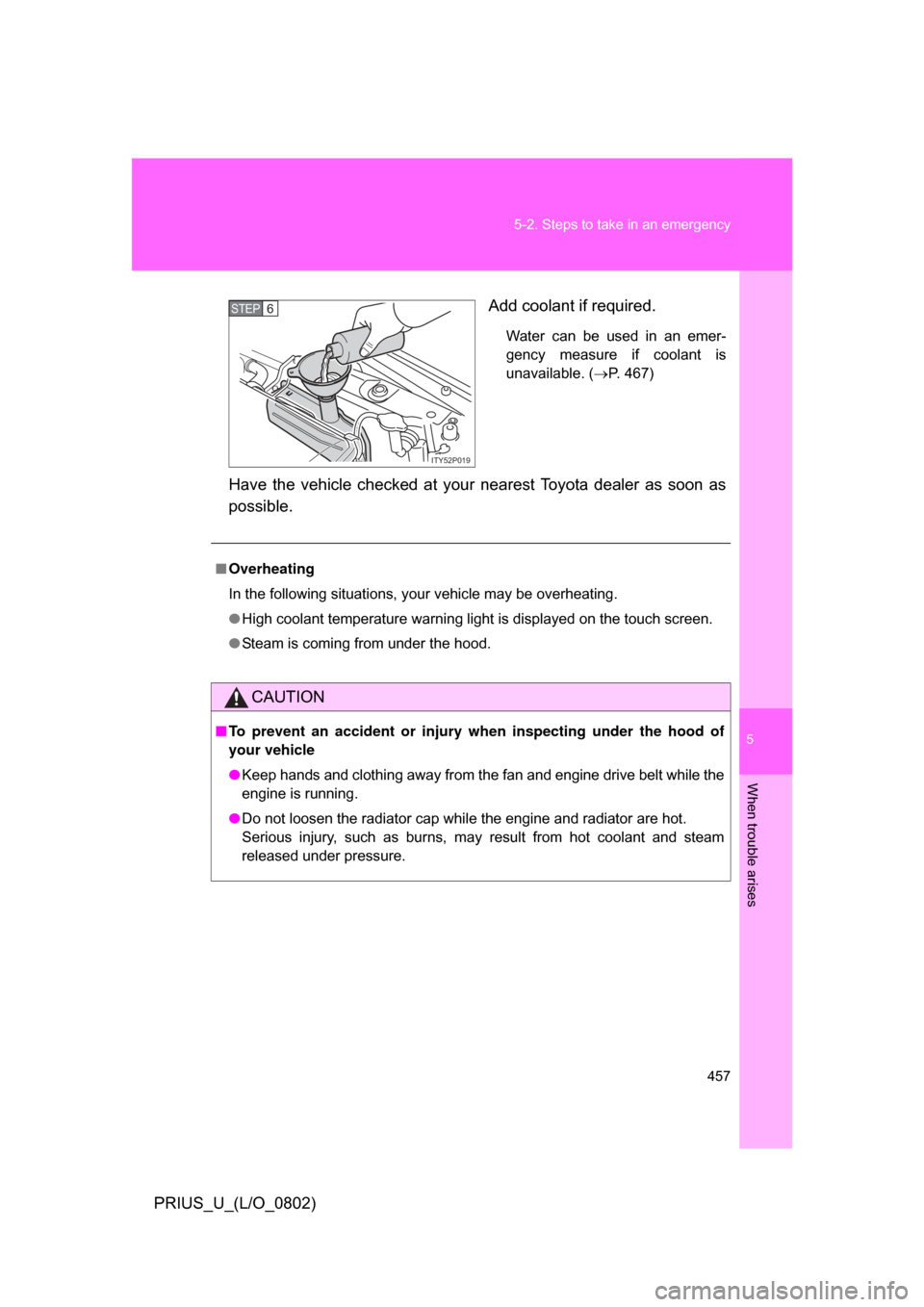
Add coolant if required.
Water can be used in an emer-
gency measure if coolant is
unavailable. (
P. 467)
Have the vehicle checked at your nearest Toyota dealer as soon as
possible.
ITY52P019
STEP6
■Overheating
In the following situations, your vehicle may be overheating.
● High coolant temperature warning light is displayed on the touch screen.
● Steam is coming from under the hood.
CAUTION
■To prevent an accident or injury when inspecting under the hood of
your vehicle
● Keep hands and clothing away from the fan and engine drive belt while the
engine is running.
● Do not loosen the radiator cap while the engine and radiator are hot.
Serious injury, such as burns, may result from hot coolant and steam
released under pressure.
Page 497 of 512
Index
497
PRIUS_U_(L/O_0802)
Abbreviation list ..................... 498
Alphabetical index .................. 500
What to do if... ......................... 506
For details of equipment related to the navigation sys-
tem and touch screen, such as the air conditioning and
audio systems, refer to the “Navigation System
Owner’s Manual”.
Page 501 of 512

501
Alphabetical index
PRIUS_U_(L/O_0802)
Child safety
Airbag precautions ................. 96
Child restraint system ........... 107
Child-protectors ...................... 52
How your child should wear the seatbelt .......................... 67
Installing child restraints ....... 110
Power window lock switch ...... 75
Power window precautions..... 77
Removed electronic key battery precautions ........................ 397
Seat belt precautions.............. 68
Back door ............................... 56
Cleaning Exterior ................................. 346
Interior .................................. 348
Seat belts ............................. 349
Clock ........................................ 331
Condenser ............................... 373
Console box............................. 323
Cooling system Hybrid system overheating ... 456
Cruise control Cruise control ....................... 164
Cup holders ............................. 325
Curtain shield airbags .............. 89
Customizable features ............ 488
Daytime running light system ................................... 151
Defogger Rear window......................... 217
Side mirror ............................ 217
Dimension ................................ 462
Dinghy towing ......................... 182
Display Touch screen........................ 186
Trip information ...................... 27
Do-it-yourself maintenance .... 357
Door courtesy lights ............... 318
Door pocket ............................. 326 Doors
Door lock .....................36, 49, 51
Rear door child protector.........52
Driver’s seat belt reminder light .........................................429
Driving
break-in tips...........................121
Correct posture .......................87
Procedures ............................120
Winter driving tips..................177
Electronic key Replacing battery ..................396
When the electronic key battery is discharged.......................450
Electric Power Steering ...........170
Emergency, in case of
If a warning light turns on ......426
If the electronic key does not operate properly..................450
If the hybrid system will not
start .....................................448
If the 12 volt battery is discharged .........................451
If you have a flat tire .............438
If you lose your keys .............449
If you think something is wrong ..................................423
If your vehicle becomes stuck ...................................459
If your vehicle needs to be towed ..................................416
If your vehicle overheats .......456
Engine Compartment ........................364
Hood......................................361
How to start the hybrid system ................................130
If the hybrid system will
not start ...............................448
Overheating...........................456
“POWER” switch ...................130
D
E