Page 145 of 452
145
2-3. Operating the lights and windshield wipers
2
When driving
AVALON_U_(L/O_0802)
Fog light switch (if equipped)
The fog lights improve visibility in difficult driving conditions, such
as in rain or fog. They can be turned on only when the headlights are
on low beam.
OFF
ON
Page 146 of 452
146
2-3. Operating the lights and windshield wipers
AVALON_U_(L/O_0802)
Windshield wipers and washer
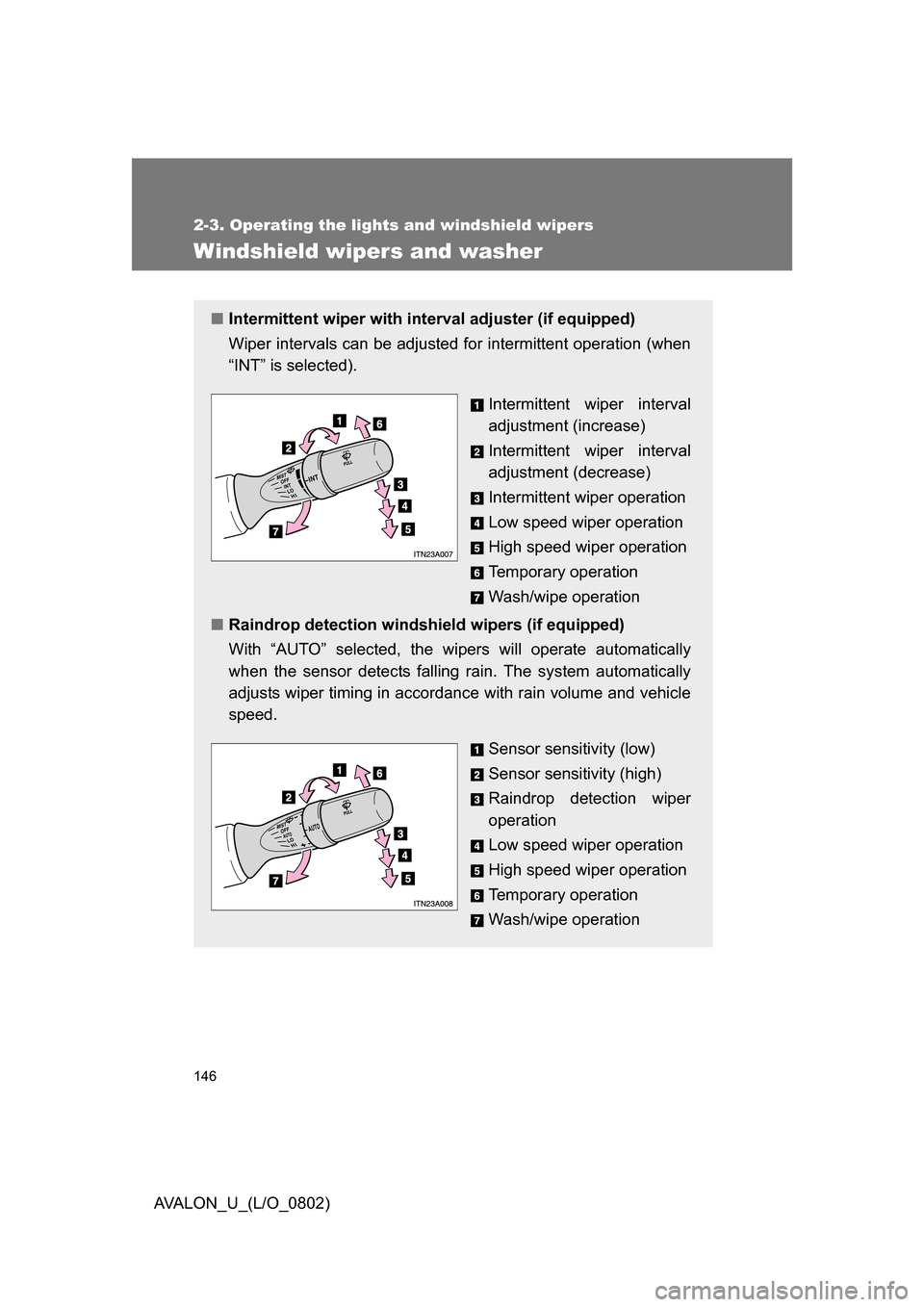
■Intermittent wiper with inte rval adjuster (if equipped)
Wiper intervals can be adjusted for intermittent operation (when
“INT” is selected).
Intermittent wiper interval
adjustment (increase)
Intermittent wiper interval
adjustment (decrease)
Intermittent wiper operation
Low speed wiper operation
High speed wiper operation
Temporary operation
Wash/wipe operation
■ Raindrop detection windshield wipers (if equipped)
With “AUTO” selected, the wi pers will operate automatically
when the sensor detects falling rain. The system automatically
adjusts wiper timing in accordance with rain volume and vehicle
speed.
Sensor sensitivity (low)
Sensor sensitivity (high)
Raindrop detection wiper
operation
Low speed wiper operation
High speed wiper operation
Temporary operation
Wash/wipe operation
Page 147 of 452

147
2-3. Operating the lights and windshield wipers
2
When driving
AVALON_U_(L/O_0802)
■
The windshield wiper and washer can be operated when
The “ENGINE START STOP” switch or the engine switch is in ON mode.
■ Dripping prevention wiper sweep
After washing and wiping operation several times, the wipers operate one
more time after a short delay to prevent dripping.
However, the last sweep will not happen if the vehicle is traveling above 106
mph (170 km/h).
■ Effects of vehicle speed on wiper operation
Vehicle speed affects the following even when the wipers are not in “AUTO”
mode.
● Intermittent wiper interval (“INT” mode)
● Wiper operation when the washer is being used (delay until drip preven-
tion wiper sweep occurs)
With “LO” selected, wiper operation will be switched from low speed to inter-
mittent wiper operation only when the vehicle is stationary.
■ Rain drop sensor (vehicles equipped with the raindrop detection wind-
shield wipers)
■ If no windshield washer fluid sprays
Check that the washer nozzles are not blocked if there is washer fluid in the
windshield washer fluid reservoir.
The sensor judges the amount of rain-
drops.
Page 148 of 452
148 2-3. Operating the lights and windshield wipers
AVALON_U_(L/O_0802)
■In extremely hot or cold weather
The system will turn off if the windshield gets extremely hot (at more than
176°F [80°C]) or cold (at less than 14°F [-10°C]).
■ Customization that can be co nfigured at Toyota dealer
Settings (e.g. drip prevention function) can be changed.
(Customizable features P. 432)
CAUTION
■Caution regarding the use of windshield wipers in “AUTO” mode
The windshield wipers may operate unexpect edly if the sensor is touched or
the windshield is subject to vibration in “AUTO” mode. Take care that your
fingers or anything else do not become caught in the windshield wipers.
NOTICE
■ When the windshield is dry
Do not use the wipers, as they may damage the windshield.
■ When there is no washer fluid spray from the nozzle
Damage to the washer fluid pump may be caused if the lever is pulled
toward you and held continually.
Page 149 of 452
149
2
When driving
AVALON_U_(L/O_0802)
2-4. Using other driving systems
Cruise control
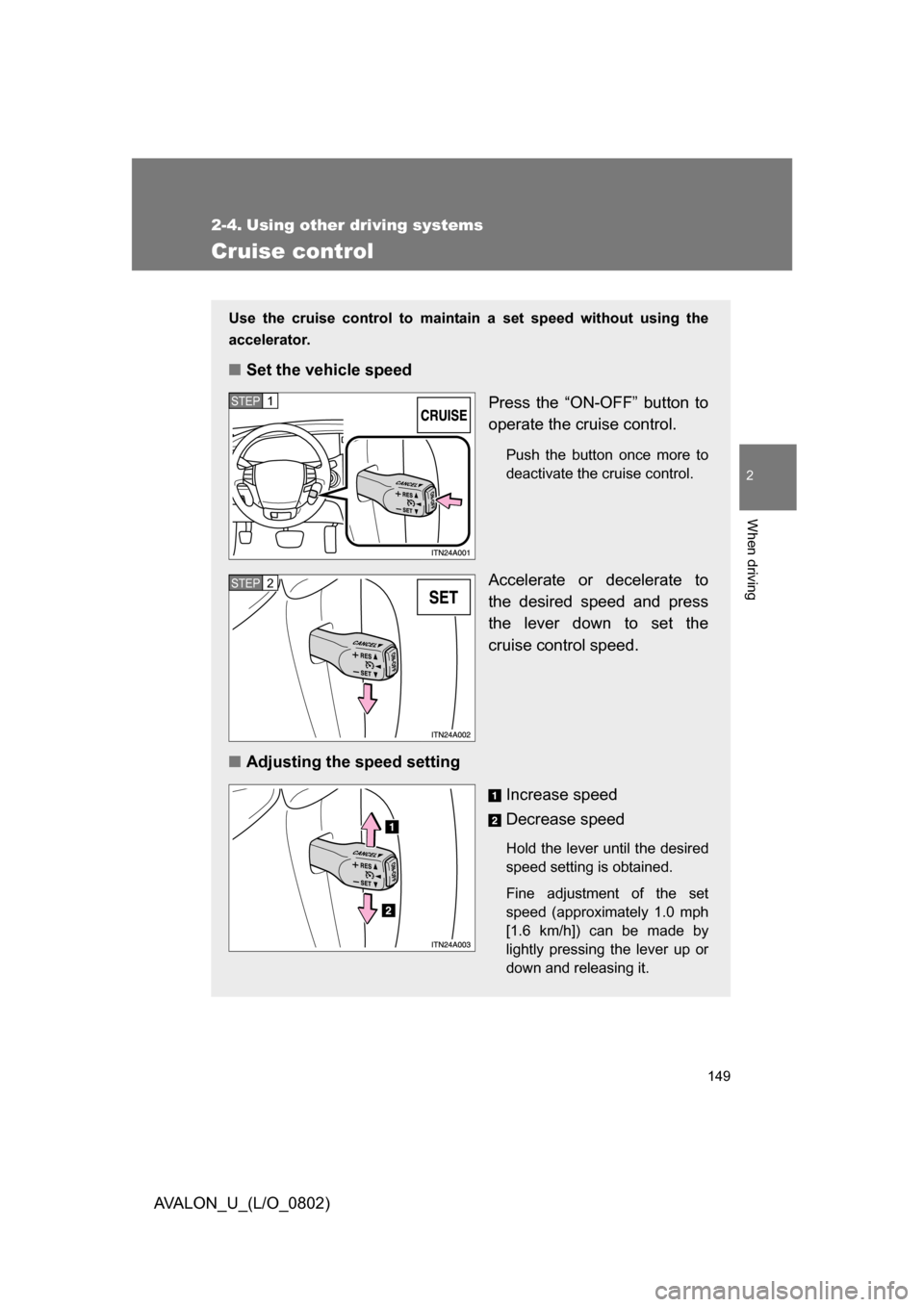
Use the cruise control to maintain a set speed without using the
accelerator.
■ Set the vehicle speed
Press the “ON-OFF” button to
operate the cruise control.
Push the button once more to
deactivate the cruise control.
Accelerate or decelerate to
the desired speed and press
the lever down to set the
cruise control speed.
■ Adjusting the speed setting
Increase speed
Decrease speed
Hold the lever until the desired
speed setting is obtained.
Fine adjustment of the set
speed (approximately 1.0 mph
[1.6 km/h]) can be made by
lightly pressing the lever up or
down and releasing it.
STEP1
STEP2
Page 150 of 452
150 2-4. Using other driving systems
AVALON_U_(L/O_0802)
■Cruise control can be set when
● The shift lever is in the “D” or “4”, “5”, or “6” range of “S” mode.
● Vehicle speed is between approximately 25 mph (40 km/h) and 125 mph
(200 km/h).
■ Accelerating
The vehicle can be accelerated normally. After acceleration, the set speed
resumes.
■ Automatic cruise control cancelation
The set speed is automatically canceled in any of the following situations.
● Actual vehicle speed falls more than 10 mph (16 km/h) below the preset
vehicle speed
At this time, the memorized set speed is not retained.
● Actual vehicle speed is below 25 mph (40 km/h)
● VSC is activated
■ If the cruise control indicator light flashes
Turn the “ON-OFF” button off once, and then reactivate the system.
If the cruise control speed cannot be set or if the cruise control cancels
immediately after being activated, there may be a malfunction in the cruise
control system. Have the vehicle inspected by your Toyota dealer.
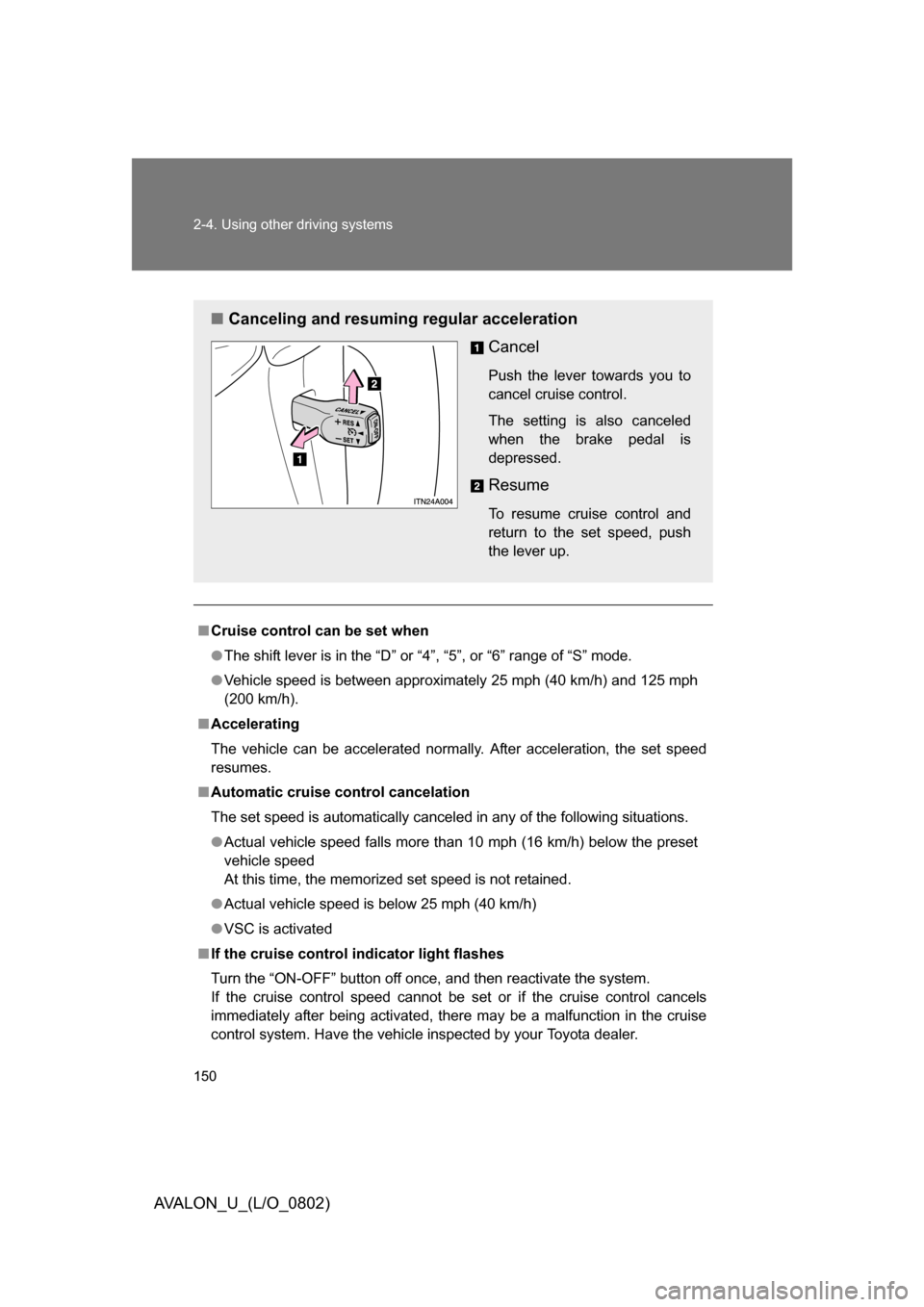
■ Canceling and resuming regular acceleration
Cancel
Push the lever towards you to
cancel cruise control.
The setting is also canceled
when the brake pedal is
depressed.
Resume
To resume cruise control and
return to the set speed, push
the lever up.
Page 153 of 452
153
2-4. Using other
driving systems
2
When driving
AVALON_U_(L/O_0802)
■Selecting conventional constant speed control mode
Press the “ON-OFF” button
to operate the cruise con-
trol.
Switch to constant speed
control mode.
(Push and hold for approxi-
mately 1 second.)
Push the button once more to
deactivate.
Vehicle-to-vehicle distance
control mode is always reset
when the “ENGINE START
STOP” switch or the engine
switch is switched to ON
mode.
■ Adjusting the speed setting
Increase speed
Decrease speed
Hold the lever until the desired
speed setting is displayed.
In the constant speed control
mode, fine adjustment of the
set speed (approximately 1.0
mph [1.6 km/h]) can be made
by lightly pressing the lever up
or down and releasing it.
Page 157 of 452

157
2-4. Using other
driving systems
2
When driving
AVALON_U_(L/O_0802)
■Dynamic laser cruise control warning lights, display and buzzers
Warning lights, display and buzzers are used to indicate a system malfunc-
tion or to alert you to the need for caution while driving.
The warning codes indicate the following.
If the same code appears again after implementing the correction procedure,
or if the cruise control cannot be set, contact your Toyota dealer.
■ Switching modes
The mode cannot be switched to constant speed control mode if vehicle-to-
vehicle distance control mode has been used. The mode also cannot be
switched from constant speed control to vehicle-to-vehicle control mode.
Turn the system off by pressing the “ON-OFF” button, and turn it on again.
“CRUISE” indicator light
Master warning light
Warning code
Warning codeDetailsCorrection procedures
C1 Indicates that the laser
radar sensor is dirty or
covered with ice. Clean the sensor.
C2 Indicates that the system
is unable to judge the vehi-
cle-to-vehicle distance. • Stop the wiper or switch
the wiper to variable inter-
mittent operation.
• Avoid direct sunlight.
• Wait until the weather becomes clear.
E3 (Flashing) Indicates that a system
malfunction has been
detected. Turn off and restart the
“ENGINE START STOP”
switch or the engine
switch.

![TOYOTA AVALON 2008 XX30 / 3.G Owners Manual 148 2-3. Operating the lights and windshield wipers
AVALON_U_(L/O_0802)
■In extremely hot or cold weather
The system will turn off if the windshield gets extremely hot (at more than
176°F [80°C])](/manual-img/14/6155/w960_6155-147.png "TOYOTA AVALON 2008 XX30 / 3.G Owners Manual 148 2-3. Operating the lights and windshield wipers
AVALON_U_(L/O_0802)
■In extremely hot or cold weather
The system will turn off if the windshield gets extremely hot (at more than
176°F [80°C])")