Page 247 of 496

235
SCAN
Radio
You can either scan all the frequencies on
a band or scan only the preset stations
for that band.
To scan the preset stations:
Push and hold the �SCAN" button until
you hear a beep. The radio will tune in
the next preset station up the band, stay
there for 5 seconds, and then move to the
next preset station. To stop scanning,
push this button again.
To scan all the frequencies:
Quickly push and release the �SCAN" but-
ton. The radio will find the next station up
the station band, stay there for 5 seconds,
and then scan again to the next station.
To stop scanning, push this button again.XM� Satellite Radio∗�
You can either scan the currently selected
channel category or scan only the preset
channels for that band.
To scan the preset channels:
Push and hold the �SCAN" button until
you hear a beep. �SCAN" appears on the
display. The radio will tune in the next
preset channel up the band, stay there for
5 seconds, and then move to the next
preset channel. To stop scanning, push
this button again.
To scan the currently selected channel
category:
Quickly push and release the �SCAN" but-
ton. �SCAN" appears on the display. The
radio will find the next channel in the
same channel category up the band, stay
there for 5 seconds, and then scan again.
To stop scanning, push this button again.
∗: Use of satellite radio r equires XM�
tuner and service. Contact your Toyota
dealer for details. Compact disc player
There are two scan features�you can ei-
ther scan the tracks on a specific disc or
scan the first tracks of all the discs in the
magazine.
Scanning the tracks on a disc:
Quickly push and release the �SCAN" but-
ton. �SCAN" will appear on the display
and the player will scan all the tracks on
the disc you are listening to. To stop
scanning, push this button again. If the
player scanned all the tracks on the disc,
it will stop scanning.
Scanning the first tracks of all the discs
in the magazine:
Push the �SCAN" button until you hear a
beep. �
" will appear on the dis-
play and the player will scan the first
track on the next disc. To stop scanning,
push this button again. If the player has
scanned all the di scs, it will stop scan-
ning.
Page 250 of 496
238
TUNE·FILE (Tuning and File up/down)
Radio
Turn the knob clockwise to step up the
frequency. Turn the knob counterclockwise
to step down the frequency.
XM
� Satellite Radio∗�
Turn the �TUNE·FILE" knob clockwise to
step up the channel. Turn the knob coun-
terclockwise to step down the channel.
∗: Use of satellite radio r equires XM�
tuner and service. Contact your Toyota
dealer for details.
MP3/WMA player
Turn the knob clockwise to file up. Turn
the knob counterclockwise to file down.
TYPE
XM
� Satellite Radio∗�
When you push the �� " or ��" side of
the �TYPE" button while receiving a XM
�
channel, the current channel category ap-
pears on the display.
When the channel category appears, push
either � �" or � �" side of the �TYPE" but-
ton to switch to the next or previous cate-
gory.
∗: Use of satellite radio r equires XM�
tuner and service. Contact your Toyota
dealer for details.
CY17029
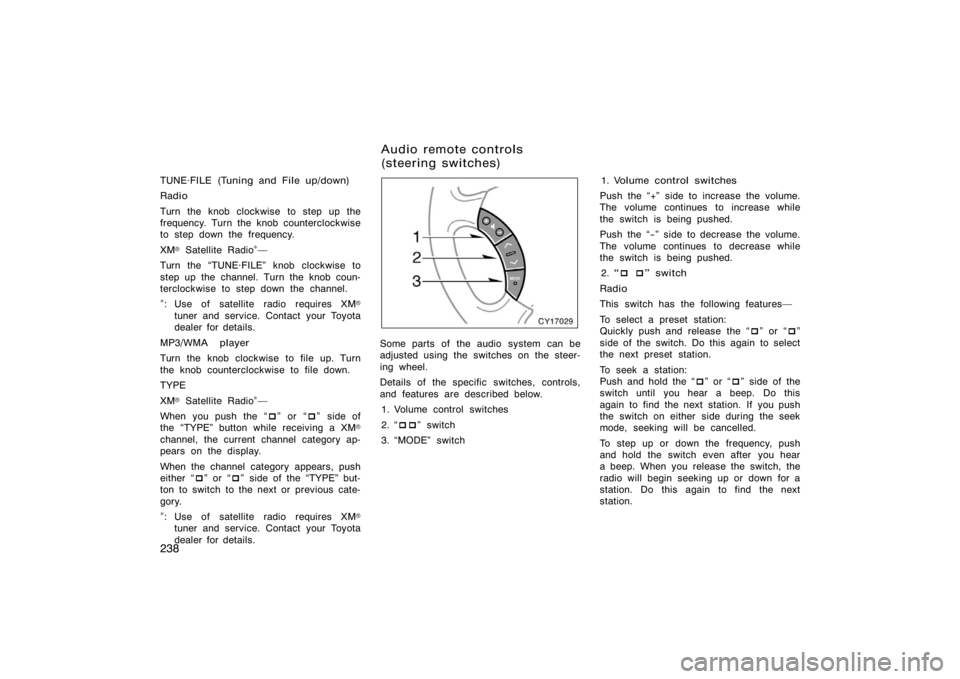
Some parts of the audio system can be
adjusted using the switches on the steer-
ing wheel.
Details of the specific switches, controls,
and features are described below.
1. Volume control switches
2. � ��" switch
3. �MODE" switch 1. Volume control switches
Push the �+" side to increase the volume.
The volume continues to increase while
the switch is being pushed.
Push the �−" side to decrease the volume.
The volume continues to decrease while
the switch is being pushed. 2. � � � " switch
Radio
This switch has the following features�
To select a preset station:
Quickly push and release the � �" or � �"
side of the switch. Do this again to select
the next preset station.
To seek a station:
Push and hold the � �" or � �" side of the
switch until you hear a beep. Do this
again to find the next station. If you push
the switch on either side during the seek
mode, seeking will be cancelled.
To step up or down the frequency, push
and hold the switch even after you hear
a beep. When you release the switch, the
radio will begin seeking up or down for a
station. Do this again to find the next
station.
Audio remote controls
(steering switches)
Page 251 of 496
239
XM� Satellite Radio∗�
To select a preset channel, push the � �"
or � �" side of the switch. Repeat until a
desired channel is found.
∗: Use of satellite radio r equires XM�
tuner and service. Contact your Toyota
dealer for details.
Compact disc player
Use this switch to skip up or down to a
different track in either direction.
Quickly push and release the � �" or � �"
side of the switch until the track you want
to listen to is set. If you want to return
to the beginning of the current track, push
the � �" side of the switch once, quickly.
Vehicles with rear seat entertainment sys-
tem�
While the DVD player is in operation, the
chapter or track can be changed by push-
ing the � �" or � �" side of the switch.
With compact disc changer only�
Push and hold the � �" or � �" side of the
switch until the disc you want to listen to
is set. MP3/WMA player
Use this switch to select a desired file or
disc.
To select a desired file:
Quickly push and release the �
�" or � �"
side of the switch until the file you want
to listen to is set. If you want to return
to the beginning of the current file, push
the � �" side of the switch once, quickly.
To select a desired disc:
Push and hold the � �" or � �" side of the
switch until the disc you want to listen to
is set.
Vehicles with rear seat entertainment sys-
tem�
While the DVD player is in operation, the
chapter or track can be changed by push-
ing the � �" or � �" side of the switch.
3. �MODE" switch
Push the �MODE" switch to select an au-
dio mode. Each push changes the mode
sequentially if the desired mode is ready
to use.
To turn the audio system on, push the
�MODE" switch.
To turn the audio system off, push and
hold the �MODE" switch until the system
turns off.CY17076
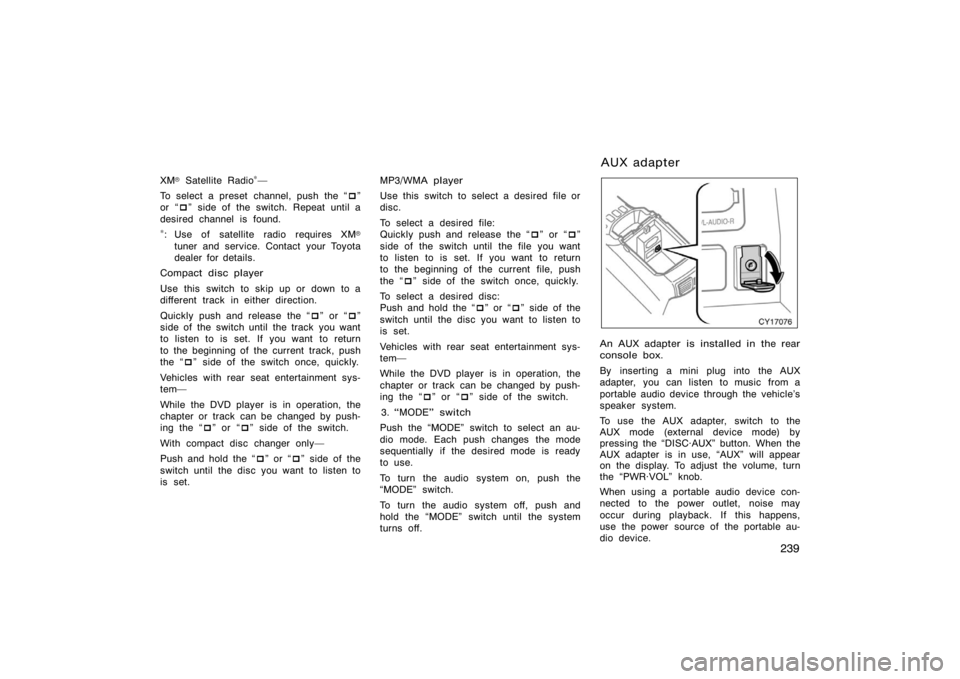
An AUX adapter is installed in the rear
console box.
By inserting a mini plug into the AUX
adapter, you can listen to music from a
portable audio device through the vehicle’s
speaker system.
To use the AUX adapter, switch to the
AUX mode (external device mode) by
pressing the �DISC·AUX" button. When the
AUX adapter is in use, �AUX" will appear
on the display. To adjust the volume, turn
the �PWR·VOL" knob.
When using a portable audio device con-
nected to the power outlet, noise may
occur during playback. If this happens,
use the power source of the portable au-
dio device.
A U X ad ap t er