2008 SUZUKI RENO wheel
[x] Cancel search: wheelPage 83 of 226

3-9INSTRUMENT PANEL
85Z14-03E
The DRL system will turn off under the fol-
lowing conditions:
The ignition is off, or
the parking brakes are on, or
the high-beam headlamps are on, or
the low-beam headlamps are on, or
flash-to-pass is used.
As with any vehicle, you should turn on the
regular headlamp system when you need
it.
Fog Lamps
If your vehicle has this feature, use your
fog lamps for better visibility in foggy or
misty conditions.
The control for your front fog lamps is
located on the middle of the turn signal/
multifunction lever. To turn on front fog
lamps, turn the fog lamp band to ON. To
turn off the front fog lamps, turn the fog
lamp band to OFF.An indicator light on the secondary infor-
mation center will come on when the fog
lamps are on. See “Fog Lamp Light” in this
section.
When using fog lamps, the ignition must be
on as well as the parking lamps or low-
beam headlamps.
The fog lamps will turn off whenever the
high-beam headlamps are turned on.
When the high beams are turned off, the
fog lamps will come on again.
Interior LampsInstrument Panel Brightness
This feature controls the brightness of the
instrument panel lights.
The thumbwheel for this feature is located
on the instrument panel to the left of the
steering wheel.
Turn the thumbwheel up to brighten the
instrument panel lights or down to dim
them.
Instrument Panel Overview:
Page 91 of 226

3-17INSTRUMENT PANEL
85Z14-03E
Outlet AdjustmentUse the lever located in the center of each
outlet to change the direction of the airflow.
Use the thumbwheel located next to the
outlets to turn them on and off.
Operation Tips
Clear away any ice, snow or leaves from
the air inlets at the base of the vehicle
that may block the flow of air into your
vehicle.
Use of non-SUZUKI approved hood
deflectors may adversely affect the per-
formance of the system.
Keep the path under the front seats clear
of objects to help circulate the air inside
of your vehicle more effectively.
Passenger Compartment Air FilterYour vehicle may be equipped with a pas-
senger compartment air filter. It is located
on the passenger side under the glove box.
The filter traps most of the pollen from air
entering the module. Like your engine’s air
cleaner/filter, it may need to be changed
periodically.
To change the passenger compartment air
filter, use the following steps:
1) Remove the four screws from the filter
cover located below the glove box.
2) Remove the filter cover.3) Remove the old passenger compart-
ment air filter.
4) Then reverse the steps to install the
new air filter.
Ensure that the new filter is inserted in
the proper orientation.
N4U3033BS
Climate Controls:
Warning Lights, Gauges and Indicators:
Page 102 of 226

3-28
INSTRUMENT PANEL
85Z14-03E
Your vehicle has also been equipped with
a TPMS malfunction indictor to indicate
when the system is not operating properly.
The TPMS malfunction indicator is com-
bined with the low tire pressure telltale.
When the system detects a malfunction,
the telltale will flash for approximately one
minute and then remain continuously illu-
minated. This sequence will continue upon
subsequent vehicle start-ups as long as
the malfunction exists.In this situation, please have the system
inspected by an authorized service facility.
If you replace one or more tires and the
TPMS warning light goes off during driv-
ing, there is no problem. However, if the
warning light does not go off, or if it flashes
again when the vehicle is driven, have the
vehicle inspected by an authorized service
facility.
WARNING
(Continued)
If the tire pressure monitoring system
warning light does not illuminate
when the ignition key is turned to the
“ON” position, have the system
inspected by an authorized service
facility. If the warning light flashes
while driving, check to see whether
the warning light goes off after a few
minutes of driving.
WARNING
When the malfunction indicator is
illuminated, the system may not be
able to detect or signal low tire pres-
sure as intended. TPMS malfunctions
may occur for a variety of reasons,
including the installation of replace-
ment or alternate tires or wheels on
the vehicle that prevent the TPMS
from functioning properly. Always
check the TPMS malfunction telltale
after replacing one or more tires or
wheels on your vehicle to ensure that
the replacement or alternate tires and
wheels allow the TPMS to continue to
function properly.
WARNING
If the tire pressure warning light does
not come on when the ignition is
turned to the “ON” position, or
comes on and blinks for approxi-
mately one minute and then illumi-
nate continuously, while driving there
may be a problem with the tire pres-
sure monitoring system. Have your
vehicle inspected by an authorized
dealer.
WARNING
If the tire pressure warning light
comes on and stays on, reduce your
speed and avoid abrupt steering and
braking. Stop in a safe place as soon
as possible and check your tires.
If you have a flat tire, replace it with
a spare tire. Refer to “Changing a
Flat Tire” in section 5.
If one or more of your tires is
under-inflated, adjust the inflation
pressure in all of your tires to the
recommended inflation pressure as
soon as possible.
Be aware that driving on a signifi-
cantly under-inflated tire can cause
the tire to overheat and can lead to
tire failure, and may affect steering
control and brake effectiveness. This
could lead to an accident, resulting in
severe injury or death.
Audio System:
Page 111 of 226
3-37INSTRUMENT PANEL
85Z14-03E
the portable player. You may need to make
additional volume adjustments from the
portable device if the volume does not go
loud or soft enough.
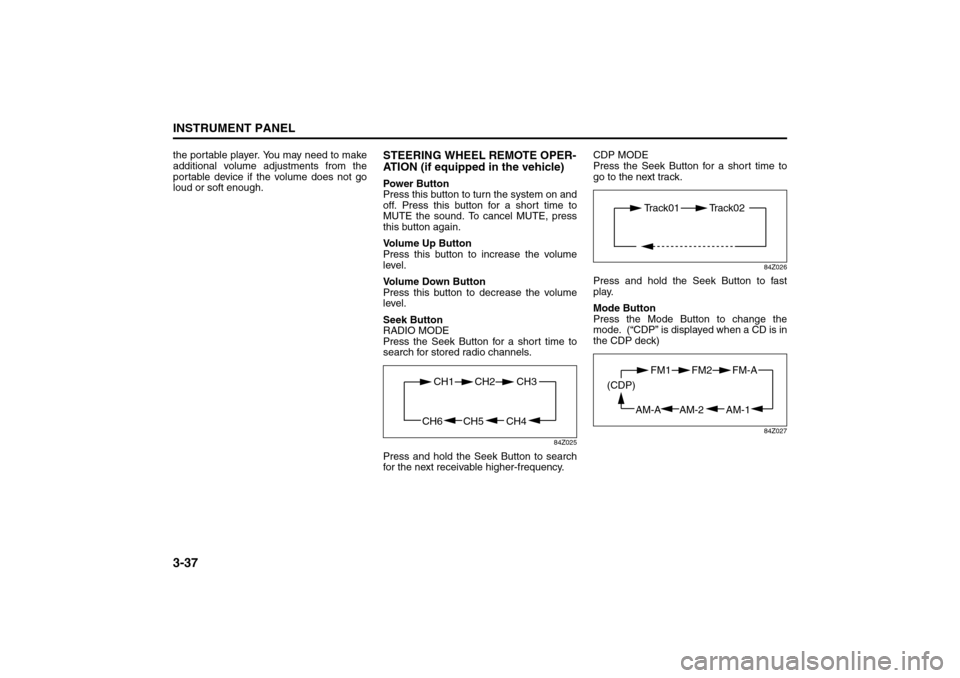
STEERING WHEEL REMOTE OPER-
ATION (if equipped in the vehicle)Power Button
Press this button to turn the system on and
off. Press this button for a short time to
MUTE the sound. To cancel MUTE, press
this button again.
Volume Up Button
Press this button to increase the volume
level.
Volume Down Button
Press this button to decrease the volume
level.
Seek Button
RADIO MODE
Press the Seek Button for a short time to
search for stored radio channels.
84Z025
Press and hold the Seek Button to search
for the next receivable higher-frequency.CDP MODE
Press the Seek Button for a short time to
go to the next track.
84Z026
Press and hold the Seek Button to fast
play.
Mode Button
Press the Mode Button to change the
mode. (“CDP” is displayed when a CD is in
the CDP deck)
84Z027
CH4 CH5
CH1 CH2
CH6
CH3
Track01 Track02
AM-1 AM-2
FM1 FM2
AM-A (CDP)
FM-A
Page 118 of 226

3-44
INSTRUMENT PANEL
85Z14-03E
the portable player. You may need to make
additional volume adjustments from the
portable device if the volume does not go
loud or soft enough.
STEERING WHEEL REMOTE OPER-
ATION (if equipped in the vehicle)Power Button
Press this button to turn the system on and
off. Press this button for a short time to
MUTE the sound. To cancel MUTE, press
this button again.
Volume Up Button
Press this button to increase the volume
level.
Volume Down Button
Press this button to decrease the volume
level.
Seek Button
RADIO MODE
Press the Seek Button for a short time to
search for stored radio channels.
84Z025
Press and hold the Seek Button to search
for the next receivable higher-frequency.CDP MODE
Press the Seek Button for a short time to
go to the next track.
84Z026
Press and hold the Seek Button for fast
play.
Mode Button
Press the Mode Button to change the
mode. (“CDP” is displayed when a CD is in
the CDP deck)
84Z027
CH4 CH5
CH1 CH2
CH6
CH3
Track01 Track02
AM-1 AM-2
FM1 FM2
AM-A (CDP)
FM-A
Page 128 of 226

4-4
DRIVING YOUR VEHICLE
85Z14-03E
Let’s say the road is wet and you’re driving
safely. Suddenly, an animal jumps out in
front of you. You slam on the brakes and
continue braking. Here’s what happens
with ABS:
A computer senses that wheels are slow-
ing down. If one of the wheels is about to
stop rolling, the computer will separately
work the brakes at each front wheel and at
both rear wheels.
The anti-lock system can change the brake
pressure faster than any driver could. The
computer is programmed to make the most
of available tire and road conditions. This
can help you steer around the obstacle
while braking hard.As you brake, your computer keeps receiv-
ing updates on wheel speed and controls
braking pressure accordingly.
Remember: Anti-lock doesn’t change the
time you need to get your foot up to the
brake pedal or always decrease stopping
distance. If you get too close to the vehicle
in front of you, you won’t have time to apply
your brakes if that vehicle suddenly slows
or stops. Always leave enough room up
ahead to stop, even though you have anti-
lock brakes.
Using Anti-Lock
Don’t pump the brakes. Just hold the brake
pedal down firmly and let anti-lock work for
you. You may hear the anti-lock pump or
motor operate, and feel the brake pedal
pulsate, but this is normal.Braking in Emergencies
At some time, nearly every driver gets into
a situation that requires hard braking.
If you have anti-lock, you can steer and
brake at the same time. However, if you
don’t have anti-lock, your first reaction – to
hit the brake pedal hard and hold it down –
may be the wrong thing to do. Your wheels
can stop rolling. Once they do, the vehicle
can’t respond to your steering. Momentum
will carry it in whatever direction it was
headed when the wheels stopped rolling.
That could be off the road, into the very
thing you were trying to avoid, or into traf-
fic.
If you don’t have anti-lock, use a “squeeze”
braking technique. This will give you maxi-
mum braking while maintaining steering
control. You can do this by pushing on the
brake pedal with steadily increasing pres-
sure. In an emergency, you will probably
want to squeeze the brakes hard without
locking the wheels. If you hear or feel the
wheels sliding, ease off the brake pedal.
This will help you retain steering control. If
you do have anti-lock, it’s different. See
“Anti-Lock Brake System” in this section.
In many emergencies, steering can help
you more than even the very best braking.
Your Driving, the Road, and Your Vehicle:
Page 129 of 226

4-5DRIVING YOUR VEHICLE
85Z14-03E
SteeringPower Steering
If you lose power steering assist because
the engine stops or the system is not func-
tioning, you can steer but it will take much
more effort.
Speed Sensitive Power Steering
System
This system continuously adjusts the effort
you feel when steering at all vehicle
speeds. It provides ease when parking, yet
a firm, solid feel at highway speeds.
If your vehicle has this system, it varies the
amount of effort required to steer the vehi-
cle in relation to the speed of the vehicle.
The amount of steering effort required is
less at slower speeds to make the vehicle
more maneuverable and easier to park. At
faster speeds, the steering effort increases
to provide a sport-like feel to the steering.
This provides maximum control and stabil-
ity.
This warning light will stay on, or come on
while you are driving, if there’s a problem
with the SSPS system.When this warning light is on, your vehicle
will seem harder to steer than normal
when parking or driving slowly. You will still
have power steering, but steering will be
stiffer than normal at slow speeds. See
your SUZUKI dealer for service.
Steering Tips
Driving on Curves
It’s important to take curves at a reason-
able speed.
A lot of the “driver lost control” accidents
mentioned on the news happen on curves.
Here’s why:
Experienced driver or beginner, each of us
is subject to the same laws of physics
when driving on curves. The traction of the
tires against the road surface makes it pos-
sible for the vehicle to change its path
when you turn the front wheels. If there’s
no traction, inertia will keep the vehicle
going in the same direction. If you’ve ever
tried to steer a vehicle on wet ice, you’ll
understand this.
The traction you can get in a curve
depends on the condition of your tires and
the road surface, the angle at which the
curve is banked, and your speed. While
you’re in a curve, speed is the one factor
you can control.
Suppose you’re steering through a sharp
curve. Then you suddenly apply the
brakes. Both control systems – steeringand braking – have to do their work where
the tires meet the road. Unless you have
four-wheel anti-lock brakes, adding the
hard braking can demand too much of
those places. You can lose control.
The same thing can happen if you’re steer-
ing through a sharp curve and you sud-
denly accelerate. Those two control
systems – steering and acceleration – can
overwhelm those places where the tires
meet the road and make you lose control.
What should you do if this ever happens?
Ease up on the brake or accelerator pedal,
steer the vehicle the way you want it to go,
and slow down.
Speed limit signs near curves warn that
you should adjust your speed. Of course,
the posted speeds are based on good
weather and road conditions. Under less
favorable conditions you’ll want to go
slower.
If you need to reduce your speed as you
approach a curve, do it before you enter
the curve, while your front wheels are
straight ahead.
Try to adjust your speed so you can “drive”
through the curve. Maintain a reasonable,
steady speed. Wait to accelerate until you
are out of the curve, and then accelerate
gently into the straightaway.
L5U3004A
Your Driving, the Road, and Your Vehicle:
Page 130 of 226

4-6
DRIVING YOUR VEHICLE
85Z14-03E
Steering in Emergencies
There are times when steering can be
more effective than braking. For example,
you come over a hill and find a truck
stopped in your lane, or a car suddenly
pulls out from nowhere, or a child darts out
from between parked cars and stops right
in front of you. You can avoid these prob-
lems by braking – if you can stop in time.
But sometimes you can’t; there isn’t room.
That’s the time for evasive action – steer-
ing around the problem.
Your vehicle can perform very well in emer-
gencies like these. First apply your brakes
but, unless you have anti-lock, not enough
to lock your wheels.
See “Braking” in this section. It is better to
remove as much speed as you can from a
possible collision. Then steer around the
problem, to the left or right depending on
the space available.An emergency like this requires close
attention and a quick decision. If you are
holding the steering wheel at the recom-
mended 9 and 3 o’clock positions, you can
turn it a full 180 degrees very quickly with-
out removing either hand. But you have to
act fast, steer quickly, and just as quickly
straighten the wheel once you have
avoided the object.
The fact that such emergency situations
are always possible is a good reason to
practice defensive driving at all times and
wear safety belts properly.
Off-Road RecoveryYou may find that your right wheels have
dropped off the edge of a road onto the
shoulder while you’re driving.If the level of the shoulder is only slightly
below the pavement, recovery should be
fairly easy. Ease off the accelerator and
then, if there is nothing in the way, steer so
that your vehicle straddles the edge of the
pavement. You can turn the steering wheel
up to one-quarter turn until the right front
tire contacts the pavement edge. Then turn
your steering wheel to go straight down the
roadway.
Passing
The driver of a vehicle about to pass
another on a two-lane highway waits for
just the right moment, accelerates, moves
around the vehicle ahead, then goes back
into the right lane again. A simple maneu-
ver?
Not necessarily! Passing another vehicle
on a two-lane highway is a potentially dan-
Your Driving, the Road, and Your Vehicle: