2008 SUZUKI GRAND VITARA lock
[x] Cancel search: lockPage 134 of 290

5-3OTHER CONTROLS AND EQUIPMENT
66J22-03E
Your vehicle is equipped with either a
manual transmission or automatic trans-
mission. The gearshift lever for each trans-
mission type is shown in the illustrations.
For details on how to use the transmission,
refer to the “Using the Transmission” in
“OPERATING YOUR VEHICLE” section.
Fuel Filler Cap
64J085
64J253
The fuel filler cap is located on the right
rear side of the vehicle. The fuel filler door
can be unlocked by pulling up on the
opener lever located on the outboard sideof the driver’s seat and can be locked by
simply closing the door.
60G069
To remove the fuel filler cap:
1) Open the fuel filler door.
2) Remove the cap by turning it counter-
clockwise.
To reinstall the fuel filler cap:
1) Turn the cap clockwise until you hear
several clicks.
2) Close the fuel filler door.
EXAMPLE
WARNING
Remove the fuel filler cap slowly. The
fuel may be under pressure and may
spray out, causing injury.Open Close
Gearshift Lever: 10
Fuel Filler Cap: 5
Page 136 of 290
5-5OTHER CONTROLS AND EQUIPMENT
66J22-03E
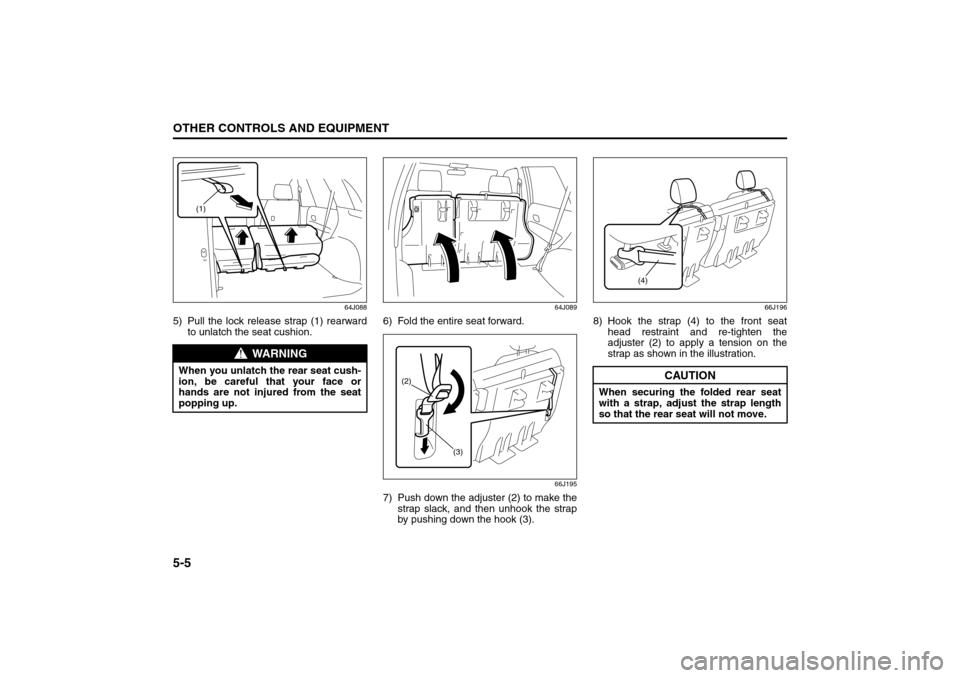
64J088
5) Pull the lock release strap (1) rearward
to unlatch the seat cushion.
64J089
6) Fold the entire seat forward.
66J195
7) Push down the adjuster (2) to make the
strap slack, and then unhook the strap
by pushing down the hook (3).
66J196
8) Hook the strap (4) to the front seat
head restraint and re-tighten the
adjuster (2) to apply a tension on the
strap as shown in the illustration.
WARNING
When you unlatch the rear seat cush-
ion, be careful that your face or
hands are not injured from the seat
popping up.
(1)
(2)
(3)
CAUTION
When securing the folded rear seat
with a strap, adjust the strap length
so that the rear seat will not move.
(4)
Folding Seats: 14
Page 137 of 290

5-6
OTHER CONTROLS AND EQUIPMENT
66J22-03E
To return the seat to the normal position,
follow the procedure below.
64J175
1) Unhook the strap from the head
restraint and stow the strap to the back
of the seat cushion.
64J091
2) Pull down the seat cushion until it locks
into place.
64J092
3) Raise the seatback until it locks into
place.
After returning the seat, try moving the
seat and seatback to make sure they are
securely latched.
WARNING
Luggage or other cargo should be
stowed in the luggage compartment
with the rear seat in an upright posi-
tion, whenever possible. If you need
to carry cargo in the passenger com-
partment with the rear seat back
folded forward, be sure to secure the
cargo or it may be thrown about,
causing injury. Never pile cargo
higher than the seatbacks.
WARNING
When returning the rear seat cushion
to the normal position, be careful that
your finger is not caught between the
lock and the floor.
CAUTION
When returning the rear seat cush-
ion to the normal position, make
sure that there is nothing around
the striker. This prevents the seat
cushion from being locked
securely.
When returning the rear seat cush-
ion to the normal position, make
sure that there is nothing under the
seat cushion. This prevents dam-
age to the seat cushion.
Folding Seats: 14
Page 138 of 290

5-7OTHER CONTROLS AND EQUIPMENT
66J22-03E
ArmrestCenter Console Armrest
64J263
Sun Visor
79J161
The sun visors can be pulled down to block
glare coming through the windshield, or
they can be unhooked and turned to the
side to block glare coming through the side
window.
Interior Light SwitchCenter
64J104
Rear
64J211
This light switch has three positions which
function as described below:
CAUTION
To avoid damage to the armrest, do
not lean on it or allow a child to sit on
it.
CAUTION
When unhooking and hooking a sun
visor, be sure to handle it by the hard
plastic parts or the sun visor can be
damaged.
(1)
(2)
(3)
EXAMPLE
(3)
(2)
(1)
Armrest: 14
Sun Visor: 5
Interior Light Switch: 7
Page 144 of 290

5-13OTHER CONTROLS AND EQUIPMENT
66J22-03E
65D612
Be sure to close the sunroof when you
leave the vehicle unattended.
Periodically inspect the guide rail for dirt
and clean it if any dirt has accumulated.
Engine Hood
64J110
To open the engine hood:
1) Pull the hood release handle located on
the outboard side of the driver’s side of
the instrument panel. This will disen-
gage the engine hood lock halfway.
WARNING
Never allow any part of your body
such as hands or head to get out of
the sunroof opening while the vehi-
cle is moving.
Be sure there are no hands or other
obstructions in the path of the sun-
roof when you close the sunroof.
Always remove the ignition key
when leaving the vehicle even if for
a short time. Also do not leave chil-
dren alone in a parked vehicle.
Unattended children could use the
sunroof switches and get trapped
by the sunroof.
CAUTION
Do not put your body weight on the
roof around the sunroof such as by
sitting on it.
Sunroof: 5, 8
Page 149 of 290

5-18
OTHER CONTROLS AND EQUIPMENT
66J22-03E
Frame hooks are provided at the front and
rear of the vehicle.
To access the front hook, unhook the
lower part of the cover (1) and then
remove the cover (1).
Tire Changing Tool
64J124
The jack, wheel brace and jack handle are
stowed in the rear left corner of the lug-
gage compartment. Remove the cover to
access the tools.
To remove the jack, turn its shaft counter-
clockwise and pull the jack out of the stor-
age bracket. To stow the jack, place it in
the storage bracket and turn the shaft
clockwise until the jack is securely held in
place.
WARNING
Do not use the frame hooks to tow
another vehicle or to have your vehi-
cle towed on the road or highway.
The hooks are designed for use in
emergency situations only, such as if
your vehicle or another vehicle gets
stuck in deep mud or snow.
WARNING
The jack should be used only to
change wheels. It is important to read
the jacking instructions in the
“EMERGENCY SERVICE” section of
this manual before attempting to use
the jack.
WARNING
After using the jack, extension rod
and lug wrench, be sure to stow them
securely, or they could be thrown
about in an accident, causing injury.
Frame Hooks: 5, 6
Tire Changing Tools: 3, 5
Page 155 of 290

5-24
OTHER CONTROLS AND EQUIPMENT
66J22-03E
You can use the roof rails or the roof rack
anchors to attach the optional roof rack
which is available at your SUZUKI dealer.
If you use a roof rack, observe the instruc-
tions and precautions in this section and
provided with the roof rack.
(For vehicles with roof rack anchors)
To remove the cap, slide the cap in the
direction of the arrow (1) and then lift the
edge of the cap up as shown in the illustra-
tion. To install the cap, put in the front part
of the cap, slide the cap in the opposite
direction of the arrow (1) and then push
down the rear part of the cap.
Make sure the roof rack is securely
installed.
To mount various types of cargo (such
as skis, bicycles, etc.) properly, use suit-
able attachments which are available
from your SUZUKI dealer. Be sure to
install the attachments properly and
securely according to the instructions
provided. Do not mount cargo directly on
the roof panel. The cargo can damage
the roof panel.
The gross weight of the roof rack plus
cargo must not exceed the loading
capacity (75 kg (165 lbs)). Also, do not
let the gross vehicle weight (fully loaded
vehicle including driver, passengers,
cargo, roof load and trailer tongue
weight) exceed the Gross Vehicle
Weight Rating (GVWR) listed on the
driver’s door lock pillar. Mount and secure the cargo onto the
roof rack properly according to the
instructions provided. Be sure to stow
the heaviest items at the bottom and dis-
tribute the cargo as evenly as possible.
Do not carry items so large that they
hang over the bumpers or the sides of
the vehicle, or block your view.
Secure the front and rear ends of long
items – such as wood panels, surfboards
and so forth – to both the front and rear
of the vehicle. You should protect the
painted surfaces of the vehicle from
scuffing caused by tie-down ropes.
Check periodically to make sure the roof
rack is securely installed and free from
damage.
For vehicles with roof rack anchors,
make sure the anchors are covered with
the caps when not in use.
WARNING
Abrupt maneuvers or failure to
properly secure cargo can allow
the cargo to fly off the vehicle and
hit others, causing personal injury
or property damage.
Mount cargo securely and avoid
abrupt maneuvers such as “jack-
rabbit” starts, sharp turns, fast cor-
nering and sudden braking. Check
periodically to make sure that
cargo is securely fastened.
Large, bulky, long, or flat items can
affect vehicle aerodynamics or be
caught by the wind, and can reduce
vehicle control resulting in an acci-
dent and personal injury. Drive
cautiously at reduced speed when
carrying this type of cargo.
HomeLink:
Page 156 of 290

5-25OTHER CONTROLS AND EQUIPMENT
66J22-03E
HomeLink
® (if equipped)
66J092
HomeLink
® and the HomeLink
® house are
registered trademarks of Johnson
Controls, Inc.
The HomeLink
® Wireless Control System
provides a convenient way to replace up to
three hand-held radio-frequency (RF)
transmitters used to activate devices such
as gate operators, garage door openers,
entry door locks, security systems, even
home lighting. Additional HomeLink
® infor-
mation can be found on the Internet at
www.homelink.com
or by calling 1-800-
355-3515.
Before programming HomeLink
® to a
garage door opener or gate operator,
make sure that people and objects are out
of the way of the device to prevent poten-
tial harm or damage. When programming a
garage door opener, it is advised to park
outside of the garage. Do not use
HomeLink
® with any garage door opener
that lacks safety stop and reverse features
as required by U.S. federal safety stan-dards (this includes any garage door
opener model manufactured before April 1,
1982). A garage door that cannot detect an
object – signaling the door to stop and
reverse – does not meet current U.S. fed-
eral safety standards. For more informa-
tion, contact HomeLink
® at
www.homelink.com
or by calling 1-800-
355-3515.
Retain the original transmitter of the RF
device you are programming for use in
other vehicles as well as for future
HomeLink
® programming. It is also sug-
gested that upon the sale of the vehicle,
the programmed HomeLink
® buttons be
erased for security purposes. Refer to
“Programming HomeLink
®” (step 1) only)
or, for assistance, contact HomeLink
® at
www.homelink.com
or by calling 1-800-
355-3515.
Programming HomeLink
®
NOTE:
Some vehicles may require the ignition
switch to be turned to the second (or
“accessories”) position or the “on” position
for programming and/or operation of
HomeLink
®. It is also recommended that a
new battery be placed in the hand-held
transmitter of the device being pro-
grammed to HomeLink
® for quicker train-
ing and accurate transmission of the radio-
frequency signal. Do not repeat “Program-
ming HomeLink
®” – step 1) to train addi-
tional devices to a second or thirdHomeLink
® button. Begin with “Program-
ming HomeLink
®” – step 2).
66J050
1) Press and hold the two outer
HomeLink
® buttons (buttons one and
three) – releasing only when the indica-
tor light begins to flash (after 20 sec-
onds). Do not hold the buttons for
longer than 30 seconds and do not
repeat step 1) to program a second
and/or third hand-held transmitter to the
remaining two HomeLink
® buttons.
2) Position the end of your hand-held
transmitter 5–14 cm (1–3 inches) away
from the HomeLink
® button you wish to
program while keeping the indicator
light in view.
3) Simultaneously press and hold both the
chosen HomeLink® and hand-held
transmitter buttons. Do not release the
buttons until step 4) has been com-
pleted.
HomeLink: