2008 SUBARU TRIBECA roof
[x] Cancel search: roofPage 109 of 409
Alarm systemThe alarm system helps to protect your
vehicle and valuables from theft. The horn
sounds and the turn signal lights flash if
someone attempts to break into your
vehicle.
The system can be armed and disarmed
with the remote transmitter.
The system does not operate when the
key is inserted into the ignition switch.
Your vehicle’s alarm system has been set
for activation at the time of shipment from
the factory. You can set the system for
deactivation yourself or have it done by
your SUBARU dealer.& System operationThe alarm system will give the following
alarms when triggered:
. The vehicle’ s horn will sound and the
turn signal lights will flash for 30 seconds.
. If any door (or the rear gate) remains
open after the 30-second period, the horn
will continue to sound for a maximum of 3
minutes. If the door (or the rear gate) is
closed while the horn is sounding, the
horn will stop sounding with a delay of up
to 30 seconds.
The alarm is triggered by: .
Opening a door or the rear gate
. Physical impact to the vehicle, such as
forced entry (only vehicles with shock
sensors (dealer option))
& Activating and deactivating
the alarm systemTo change the setting of your vehicle’ s
alarm system for activation or deactiva-
tion, do the following.
1. Disarm the alarm system (refer to
“Disarming the system ”in this section).
2. Sit in the driver ’s seat and shut all
doors (and the rear gate).
3. Turn the ignition switch to the “ON”
position.
4. Hold down the UNLOCK side of the
driver ’s power door locking switch, open
the driver ’s door within the following 1
second, and wait 10 seconds without
releasing the switch. The setting will then
be changed as follows:
If the system was previously activated:
The odometer/trip meter screen displays
“ AL oF ”and the horn sounds twice,
indicating that the system is now deacti-
vated.
If the system was previously deacti-
vated:
The odometer/trip meter screen displays “
AL on” and the horn sounds once,
indicating that the system is now acti-
vated.
NOTEYou may have the above setting
change done by your SUBARU dealer.& If you have accidentally trig-
gered the alarm system! To stop the alarm
Do any of the following operations:
. Press any button on the remote trans-
mitter.
. Turn the ignition switch to the “ON”
position.& Arming the system! To arm the system using remote
transmitter
1. Close all windows and the moonroof.
2. Remove the key from the ignition
switch.
3. Open the doors and get out of the
vehicle.
4. Make sure that the engine hood is
locked.
5. Close all doors (and the rear gate).
Keys and doors
2-15
– CONTINUED –
ProCarManuals.com
Page 110 of 409
2-16
Keys and doors
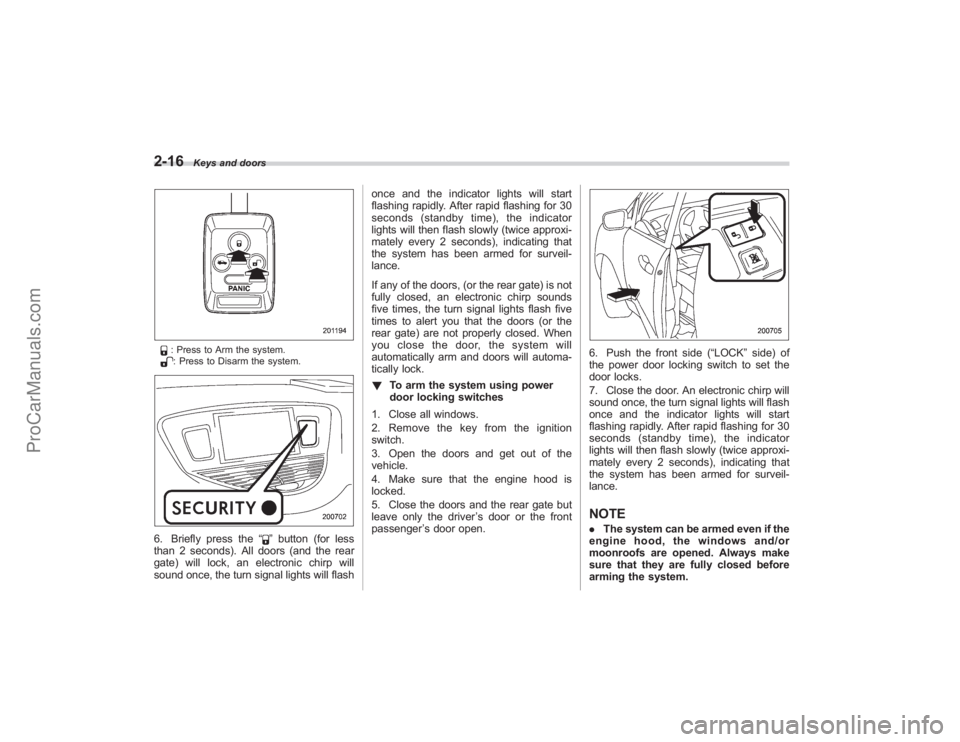
: Press to Arm the system.: Press to Disarm the system.
6. Briefly press the“
”button (for less
than 2 seconds). All doors (and the rear
gate) will lock, an electronic chirp will
sound once, the turn signal lights will flash once and the indicator lights will start
flashing rapidly. After rapid flashing for 30
seconds (standby time), the indicator
lights will then flash slowly (twice approxi-
mately every 2 seconds), indicating that
the system has been armed for surveil-
lance.
If any of the doors, (or the rear gate) is not
fully closed, an electronic chirp sounds
five times, the turn signal lights flash five
times to alert you that the doors (or the
rear gate) are not properly closed. When
you close the door, the system will
automatically arm and doors will automa-
tically lock.
!
To arm the system using power
door locking switches
1. Close all windows.
2. Remove the key from the ignition
switch.
3. Open the doors and get out of the
vehicle.
4. Make sure that the engine hood is
locked.
5. Close the doors and the rear gate but
leave only the driver ’s door or the front
passenger ’s door open.
6. Push the front side (“LOCK” side) of
the power door locking switch to set the
door locks.
7. Close the door. An electronic chirp will
sound once, the turn signal lights will flash
once and the indicator lights will start
flashing rapidly. After rapid flashing for 30
seconds (standby time), the indicator
lights will then flash slowly (twice approxi-
mately every 2 seconds), indicating that
the system has been armed for surveil-
lance.NOTE. The system can be armed even if the
engine hood, the windows and/or
moonroofs are opened. Always make
sure that they are fully closed before
arming the system.
ProCarManuals.com
Page 117 of 409
CAUTION
.Do not jam a plastic bag in or
place cellophane tape on the rear
gate stays or scratch the stays
while loading or unloading cargo.
That could cause leakage of gas
from the stays, which may result
in their inability to hold the rear
gate open.
. Be careful not to hit your head or
face on the rear gate when open-
ing or closing the rear gate and
when loading or unloading car-
go.NOTEShould the rear gate be unable to be
unlocked due to a discharged battery, a
fault in the door locking/unlocking
system or other causes, you can
unlock it by manually operating the
rear gate lock release lever.
For the procedure, refer to “Rear gate –
if the rear gate cannot be unlocked ”
section in chapter 9.
Moonroof (if equipped)
WARNING
. Never let anyone ’s hands, arms,
head or any objects protrude
from the moonroof. A person
could be seriously injured if the
vehicle stops suddenly or turns
sharply or if the vehicle is in-
volved in an accident.
To avoid serious personal injury
caused by entrapment, you must
do the following.
. Before closing the moonroof,
make sure that no one ’s hands,
arms, head or other objects will
be accidentally caught in the
moonroof.
. Before leaving the vehicle, al-
ways remove the key from the
ignition switch for safety and
never allow an unattended child
to remain in the vehicle. Failure
to follow this procedure could
result in injury to a child operat-
ing the moonroof. .
Never try to check the anti-en-
trapment function by deliberately
placing part of your body in the
moonroof.
CAUTION
. Do not sit on the edge of the open
moonroof.
. Do not operate the moonroof if
falling snow or extremely cold
conditions have caused it to
freeze shut.
. The anti-entrapment function
does not operate when the moon-
roof is being tilted down. Be sure
to confirm that it is safe to do so
before tilting the moonroof down.
The moonroof has both tilting and sliding
functions.
The moonroof operates only when the
ignition switch is in the “ON”position.
Keys and doors
2-23
– CONTINUED –
ProCarManuals.com
Page 118 of 409
2-24
Keys and doors
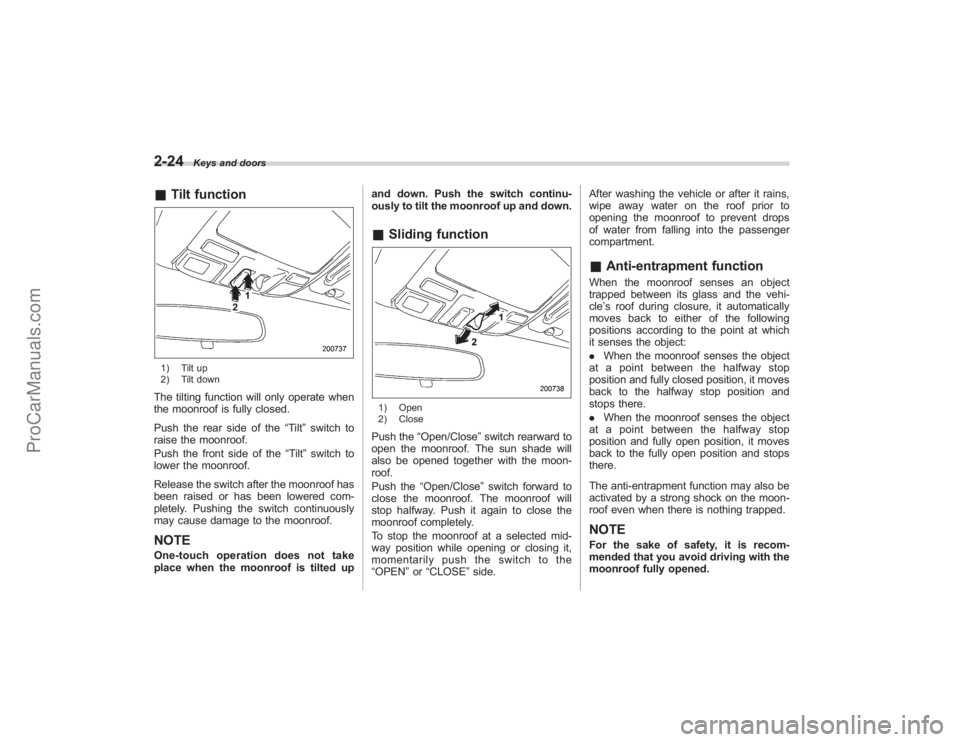
&Tilt function1) Tilt up
2) Tilt downThe tilting function will only operate when
the moonroof is fully closed.
Push the rear side of the “Tilt”switch to
raise the moonroof.
Push the front side of the “Tilt”switch to
lower the moonroof.
Release the switch after the moonroof has
been raised or has been lowered com-
pletely. Pushing the switch continuously
may cause damage to the moonroof.NOTEOne-touch operation does not take
place when the moonroof is tilted up and down. Push the switch continu-
ously to tilt the moonroof up and down.
&
Sliding function1) Open
2) ClosePush the “Open/Close ”switch rearward to
open the moonroof. The sun shade will
also be opened together with the moon-
roof.
Push the “Open/Close ”switch forward to
close the moonroof. The moonroof will
stop halfway. Push it again to close the
moonroof completely.
To stop the moonroof at a selected mid-
way position while opening or closing it,
momentarily push the switch to the
“OPEN” or“CLOSE ”side. After washing the vehicle or after it rains,
wipe away water on the roof prior to
opening the moonroof to prevent drops
of water from falling into the passenger
compartment.
&
Anti-entrapment functionWhen the moonroof senses an object
trapped between its glass and the vehi-
cle’s roof during closure, it automatically
moves back to either of the following
positions according to the point at which
it senses the object:
. When the moonroof senses the object
at a point between the halfway stop
position and fully closed position, it moves
back to the halfway stop position and
stops there.
. When the moonroof senses the object
at a point between the halfway stop
position and fully open position, it moves
back to the fully open position and stops
there.
The anti-entrapment function may also be
activated by a strong shock on the moon-
roof even when there is nothing trapped.NOTEFor the sake of safety, it is recom-
mended that you avoid driving with the
moonroof fully opened.
ProCarManuals.com
Page 119 of 409
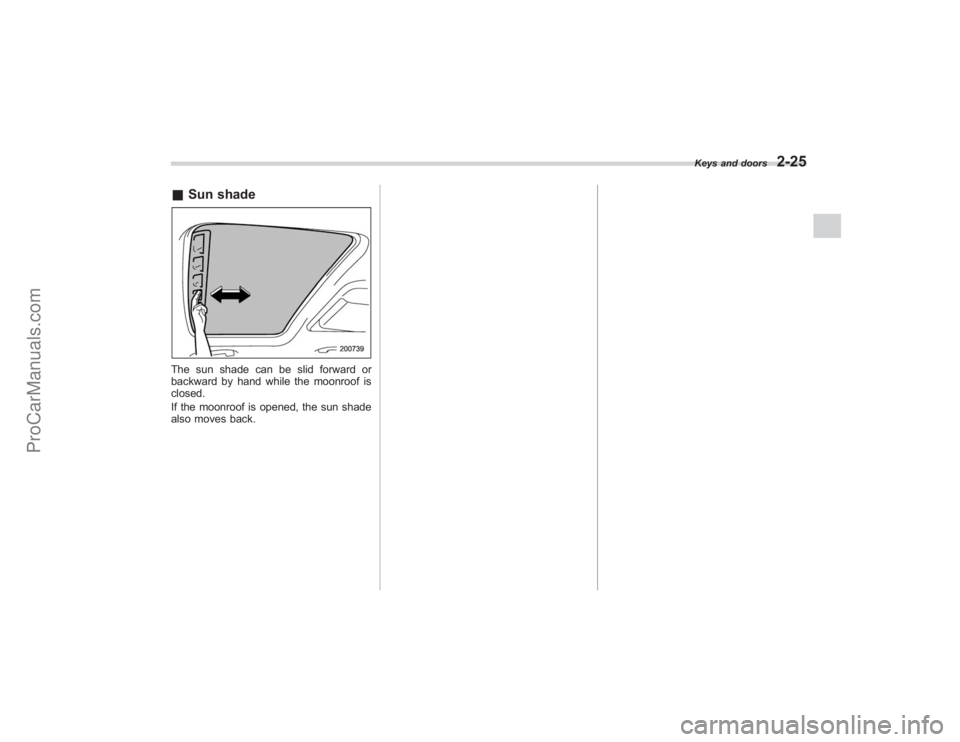
&Sun shadeThe sun shade can be slid forward or
backward by hand while the moonroof is
closed.
If the moonroof is opened, the sun shade
also moves back.
Keys and doors
2-25
ProCarManuals.com
Page 123 of 409
Ignition switch
WARNING
.Never turn the ignition switch to
“ LOCK” while the vehicle is
being driven or towed because
that will lock the steering wheel,
preventing steering control. And
when the engine is turned off, it
takes a much greater effort than
usual to steer.
. Before leaving the vehicle, al-
ways remove the key from the
ignition switch for safety and
never allow an unattended child
to remain in the vehicle. Failure
to follow this procedure could
result in injury to a child or
others. Children could operate
the power windows, the moon-
roof or other controls or even
make the vehicle move.
CAUTION
Do not attach a large key holder or
key case to either key. If it banged
against your knees or hands while
you were driving, it could turn the
ignition switch from the “ON ”posi- tion to the
“Acc ”or “LOCK ”posi-
tion, thereby stopping the engine.
Also, if the key is attached to a
keyholder or to a large bunch of
other keys, centrifugal force may act
on it as the vehicle moves, resulting
in unwanted turning of the ignition
switch.
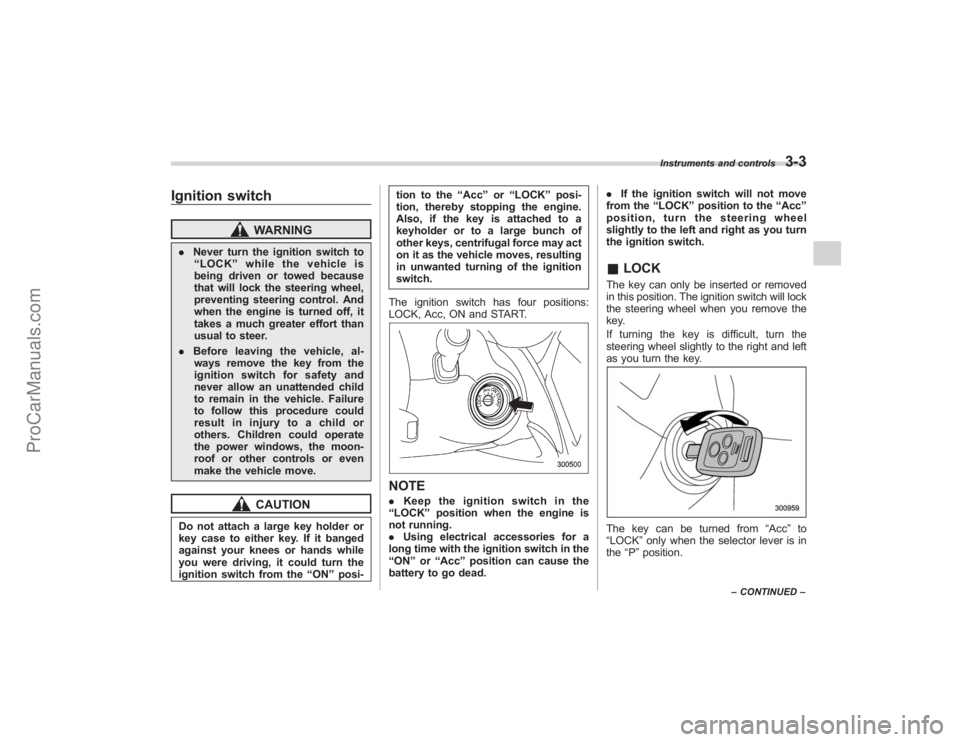
The ignition switch has four positions:
LOCK, Acc, ON and START.
NOTE. Keep the ignition switch in the
“ LOCK ”position when the engine is
not running.
. Using electrical accessories for a
long time with the ignition switch in the
“ ON ”or “Acc ”position can cause the
battery to go dead. .
If the ignition switch will not move
from the “LOCK ”position to the “Acc ”
position, turn the steering wheel
slightly to the left and right as you turn
the ignition switch.
& LOCKThe key can only be inserted or removed
in this position. The ignition switch will lock
the steering wheel when you remove the
key.
If turning the key is difficult, turn the
steering wheel slightly to the right and left
as you turn the key.The key can be turned from “Acc”to
“LOCK ”only when the selector lever is in
the “P ”position.
Instruments and controls
3-3
– CONTINUED –
ProCarManuals.com
Page 223 of 409
Convenient tie-down hooks
CAUTION
The convenient tie-down hooks are
designed only for securing light
cargo. Never try to secure cargo
that exceeds the capacity of the
hooks. The maximum load capacity
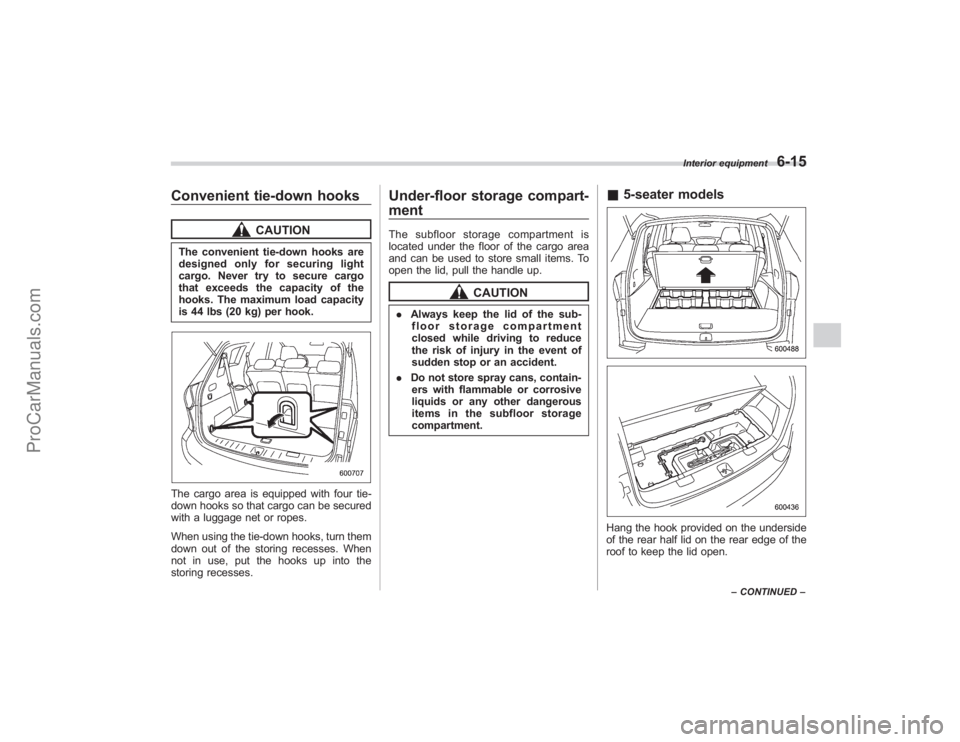
is 44 lbs (20 kg) per hook.The cargo area is equipped with four tie-
down hooks so that cargo can be secured
with a luggage net or ropes.
When using the tie-down hooks, turn them
down out of the storing recesses. When
not in use, put the hooks up into the
storing recesses.
Under-floor storage compart-
mentThe subfloor storage compartment is
located under the floor of the cargo area
and can be used to store small items. To
open the lid, pull the handle up.
CAUTION
.Always keep the lid of the sub-
floor storage compartment
closed while driving to reduce
the risk of injury in the event of
sudden stop or an accident.
. Do not store spray cans, contain-
ers with flammable or corrosive
liquids or any other dangerous
items in the subfloor storage
compartment.
& 5-seater modelsHang the hook provided on the underside
of the rear half lid on the rear edge of the
roof to keep the lid open.
Interior equipment
6-15
–CONTINUED –
ProCarManuals.com
Page 224 of 409
6-16
Interior equipment
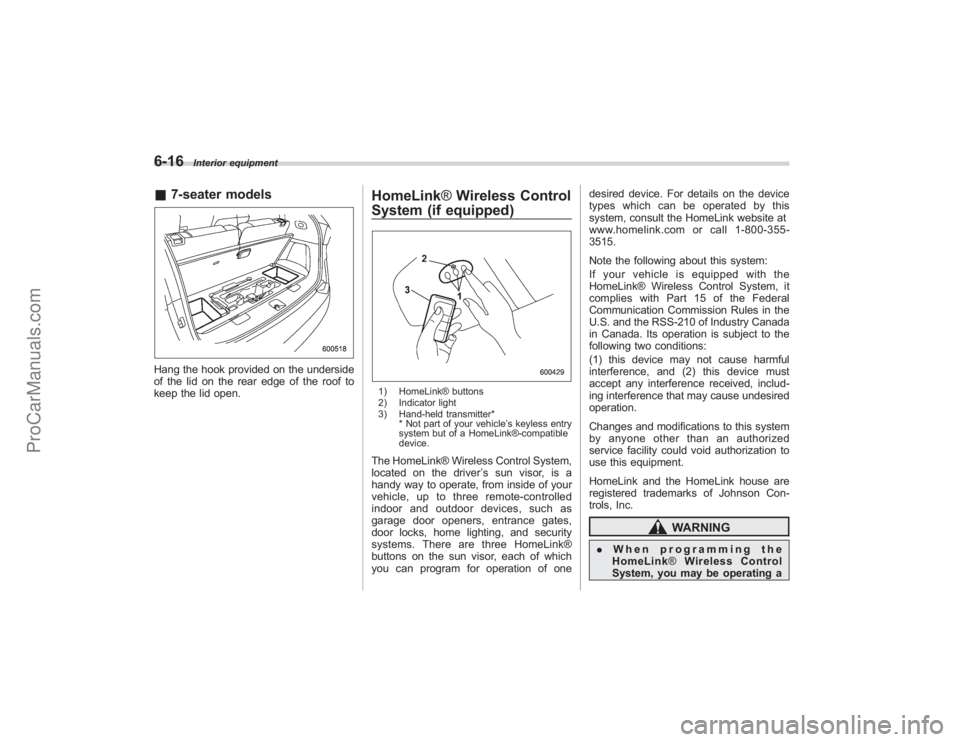
&7-seater modelsHang the hook provided on the underside
of the lid on the rear edge of the roof to
keep the lid open.
HomeLink ®Wireless Control
System (if equipped)1) HomeLink® buttons
2) Indicator light
3) Hand-held transmitter*
* Not part of your vehicle ’s keyless entry
system but of a HomeLink®-compatible
device.The HomeLink® Wireless Control System,
located on the driver ’s sun visor, is a
handy way to operate, from inside of your
vehicle, up to three remote-controlled
indoor and outdoor devices, such as
garage door openers, entrance gates,
door locks, home lighting, and security
systems. There are three HomeLink®
buttons on the sun visor, each of which
you can program for operation of one desired device. For details on the device
types which can be operated by this
system, consult the HomeLink website at
www.homelink.com or call 1-800-355-
3515.
Note the following about this system:
If your vehicle is equipped with the
HomeLink® Wireless Control System, it
complies with Part 15 of the Federal
Communication Commission Rules in the
U.S. and the RSS-210 of Industry Canada
in Canada. Its operation is subject to the
following two conditions:
(1) this device may not cause harmful
interference, and (2) this device must
accept any interference received, includ-
ing interference that may cause undesired
operation.
Changes and modifications to this system
by anyone other than an authorized
service facility could void authorization to
use this equipment.
HomeLink and the HomeLink house are
registered trademarks of Johnson Con-
trols, Inc.
WARNING
.
When programming the
HomeLink ®Wireless Control
System, you may be operating a
ProCarManuals.com