2008 SKODA OCTAVIA factory
[x] Cancel search: factoryPage 11 of 304

Cockpit
10
•Vehicles with factory-fitted radio, mobile phone, navigation system, CD player
etc. are supplied with separate instru ctions for operating such equipment.
•The arrangement of the controls and switches and the location of some items
on right-hand drive models may differ from that shown in ⇒page 8, fig. 1 . The
symbols on the controls and switches are the same as for left-hand drive models.
20A5Facelift.book Page 10 Saturday, September 6, 2008 2:13 PM
Page 31 of 304

Instruments and Indicator/Warning Lights
30
Set-up
You can change certain settings by means of the information display. The current
setting is shown on the information displa y in the respective menu at the top below
the line ⇒fig. 35 .
You can select the following information (d epending on the equipment installed on
the vehicle):
•MFD Data (MFA DATA)
•Convenience
•Lights & Vision (Lights & Vision)
•Time
•Winter tyres
•Language
•Units
•Assistant (Assistant)
•Alternative speed displayed (Second speed)
•Automatic light (Automat. Lights)
•Service Interval (Service)
•Factory Setting
•Back After selecting the menu point
Back you will reach one level higher in the menu.
Displays of the MFA
Here you can switch off or on certain di splays of the multi-functional indicator.
Comfort*
You can set the following functions (depen ding on the equipment installed on the
vehicle):
Fig. 35 Setting the clock
Rain closing
On vehicles with rain sensor you can switch on or off the
function for automatic closing of the windows and the
sliding/tilting roof in case of rain and locked vehicle. If it
is not raining and the function is set, the windows
including the sliding/tilting roof are closed automatically
after approx. 12 hours.
Door openHere you can switch on or of f the functions for opening
a single door and automatic closing.
ATA confirmHere you can set if a signal tone should sound addition-
ally when activating or deactivating the anti-theft alarm
system .
Window op.Here you can set the convenience mode only for the
driver window or for all the windows.
Mirror downHere you can switch on or off the function for mirror
adjustment on the front passe nger side when engaging
the reverse gear
a).
a)This function is only available on vehicles with an electrically adjustable driver seat.
Mirror adjust.Here you can switch on or off the function for left and
right exterior mirror adjustment simultaneously.
Fa c t o r y s e t t i n g
After selecting this menu the convenience setting is
reset to factory setting. The following is displayed in the
information display:
Factory setting for convenience is set
20A5Facelift.book Page 30 Saturday, September 6, 2008 2:13 PM
Page 32 of 304

Instruments and Indicator/Warning Lights31
Using the systemSafetyDriving TipsGeneral MaintenanceBreakdown assistanceTechnical Data
Lights and Visibility
Here you can set how long the light should
stay on for the function Coming/Leaving
Home and the intensity of the footwell li ghting. Furthermore you can here switch
on or off the function daylight drivin g lights and convenience turn signal.
After selecting the menu point Fac to r y s e tt ing the factory setting is established
again.
Time
Here you can set the time, the time format (12 or 24 hour indicator) and the time
change summer/winter time.
Winter tyres
Here you can set at which speed a warning signal should sound. This function is
used for e.g winter tyres with the permissible maximum speed less than the
maximum speed of the vehicle.
When exceeding the speed, the following is displayed on the information display*:
Snow tyres max. speed ... km/h (Winter tyres maximum ... km/h)
Language
Here you can set in which language the warning and information texts should be
displayed.
Measures
Here you can set the units for temperat ure, consumption and distance driven.
Assistant
Here you can adjust the tones of the acoustic signals of the parking aid*.
Second speed
Here you can switch on the display of the second speed in mph or in km/h
3).
Service
Here you can have the kilomete rs still to be driven and the days until the following
service interval shown and the Service Interval Display reset. Factory Setting
After selecting the menu point
Factory Setting the factory setting of the informa-
tion display is established again.
3)Valid for countries where the values are indicated in British measuring units.
20A5Facelift.book Page 31 Saturday, September 6, 2008 2:13 PM
Page 64 of 304

Lights and Visibility63
Using the systemSafetyDriving TipsGeneral MaintenanceBreakdown assistanceTechnical Data
The rear fog light warning light
⇒ page 32 lights up in the instrument cluster
when the fog light is switched off.
Fog lights with the function “Corner”*
The fog lights with the function “Corner” improve the illumination of
areas close to the vehicle when turning, parking etc.
The fog lights with the function “Corner” are regulated according to the steering
angle or after switching on the turn signal light8) in the following circumstances:
•the vehicle is stationary an d the engine is running or it moves with a speed of
maximum 40 km/h;
•the daylight driving lights are not switched on;
•the low beam is switched on or th e light switch is in the position and the
intensity of the ambient light causes the low beam to be switched on;
•the fog lights are not switched on;
•no reverse gear is engaged.
Note
If you engage the reverse gear during the active function “Corner”, both fog lights
illuminate.
Rear fog light
Switching on the rear fog light
– First of all turn the light switch into position
or ⇒ page 62,
fig. 58 .
– Pull the switch into position .
The rear fog light warning light ⇒ page 32 lights up in the instrument cluster
when the fog light is switched off.
Only the rear fog light of the trailer ligh ts up automatically when you are towing a
trailer using a factory-fitted towing device which is fitted with the rear fog light.
The rear fog light is located in the rear light array on the driver's side.
Caution
The rear fog light should only be switched on if visibility is particularly poor
(conform with any varying legal provisions) to avoid dazzling vehicles behind your
vehicle.
Instrument lighting*
You can adjust the brightness of the instrument lighting.
Instrument lighting
– Switch on the light.
– Turn the control dial ⇒fig. 59 to the desired intensity of the instru-
ment lighting
9).
8)If both switch on versions are conflicting, for example if the steering wheel is turned to the
left and the right turn signal light is switched on, the turn signal light has the higher priority.
A2
9)For the information display* ⇒page 26 the intensity of the lighting is automatically set. The
setting using the control dial ⇒ fig. 59 is only possible when driving in the dark.
Fig. 59 Dash panel: Instru-
ment lighting
20A5Facelift.book Page 63 Saturday, September 6, 2008 2:13 PM
Page 117 of 304
Heating and air conditioning system
116
WARNING
•For your own safety and that of other road users, ensure that all the
windows are free of ice, snow and mistin g. Please familiarize yourself about
how to correctly operate th e heating and ventilation systems, how to demist
and defrost the windows, as well as with the cooling mode.
•You should not leave recirculated air mode on over a longer period of
time, as “stale” air may result in fatigue in the driver and occupants, divert
your attention and also cause the windows to mist up. The risk of having an
accident increases. Switch recirculated air mode off as soon as the windows
begin misting up.
Note
•If the cooling system has not been switched on for a lengthy period, odours may
be produced at the evaporator because of deposits. Switch the cooling system on
at least once a month for approximately 5 mi nutes at the highest blower stage - also
during the cold season of the year - in order to remove such odours. Also open a
window for a short time.
•We recommend that you do not smoke in the vehicle when the recirculating air
mode is operating since the smoke which is drawn at the evaporator from the inte-
rior of the vehicle forms deposits in the evaporator of the air conditioning system.
This produces a permanent odour when the air conditioning system is operating
which can only be eliminated through co nsiderable effort and expense (replace-
ment of compressor).
•The used air streams out through the air removal openings in the luggage
compartment.
•On vehicles equipped with a factory-fitted radio* or navigation*, the informa-
tion of the Climatronic is also shown on the display. You can switch off this function
for the Radio* - see operating instructions for radio. This function cannot be
switched off during Navigation*.
•Using the cooling economically ⇒page 114.
•Operational problems ⇒page 115.
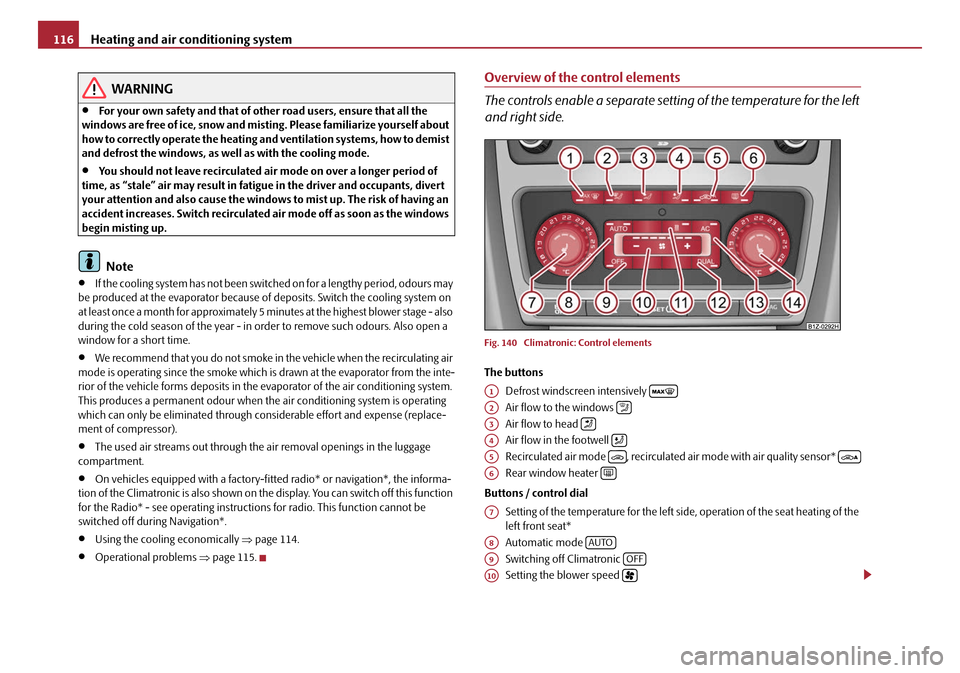
Overview of the control elements
The controls enable a separate setting of the temperature for the left
and right side.
Fig. 140 Climatronic: Control elements
The buttons
Defrost windscreen intensively
Air flow to the windows
Air flow to head
Air flow in the footwell
Recirculated air mode , recirculated air mode with air quality sensor*
Rear window heater
Buttons / control dial Setting of the temperature for the left side, operation of the seat heating of the
left front seat*
Automatic mode
Switching off Climatronic
Setting the blower speed
A1
A2
A3
A4
A5
A6
A7
A8AUTO
A9OFF
A10
20A5Facelift.book Page 116 Saturday, September 6, 2008 2:13 PM
Page 122 of 304

Heating and air conditioning system121
Using the systemSafetyDriving TipsGeneral MaintenanceBreakdown assistanceTechnical Data
– Return to a higher level by selecting the menu point Back, i. e. in the
menu Aux. Heating (auxiliary heating) .
– In the menu Aux. Heating (auxiliary heating) select the menu point
Running time and set the desired operating period in steps of
1 minute. The operating period can be 5 to 60 minutes.
– By selecting the menu point Back, you will reach in the menu
Aux. Heating (auxiliary heating) .
– In the menu Aux. heating (auxiliary heating) select the menu point
Mode .
– In the menu Mode select the desired mode Heating or Ventilation .
Programming
For the programming of the auxiliary heating (auxiliary heating and ventilation) in
the menu Aux. heating (Aux. heating) there are three pre-set times:
•Pre-set time 1
•Pre-set time 2
•Pre-set time 3
In each pre-set time, the day (if necessary each day = daily) and the time (hour and
minute) can be set for the operating period of the auxiliary heating and/or ventila-
tion.
If you leave the pre-set menu by selecting the menu Back or do not operate the
display for longer than 10°seconds, the set values are stored, but the pre-set time is
not active.
Both other pre-set times can be prog rammed and stored in the same way.
If you select the menu Activate after setting the desired values, appears on the
display Pre-set time (weekday, hours, minute) activated! and the set pre-set
time is active.
Only one programmed pre-set time can be active.
The last programmed pre-set time remains active. Changing the active pre-set time is carried out after selecting the menu point
Activate
in the menu Aux. heating (auxiliary heating) by selecting a pre-set time.
The prerequisite for the correct switching on of the auxiliary heating (auxiliary
heating and ventilation) according to th e programmed pre-set time is the correct
setting of the current time and the weekday ⇒ page 120.
If the system is running, a warning light in the button for direct switching on/off of
the auxiliary heating lights up.
The running system deactivates after expiration of the operating period or is deac-
tivated earlier by pres sing the button for direct switching on/off of the auxiliary
heating ⇒page 123.
The random pre-set time can be deactivated by selecting the menu point Deactive
in the menu Activate.
After selecting the menu point Fa c t o r y s e t t i n g in the menu Aux. heating
(auxiliary heating) , it is possible to change to the factory setting.
Radio remote control
The auxiliary heating (auxiliary heating and ventilation) can be
switched on or off with the remote control.
– For switching on, press the button .
– For switching off, press the button .
Fig. 142 Auxiliary heating:
Radio remote control
ON
OFF
20A5Facelift.book Page 121 Saturday, September 6, 2008 2:13 PM
Page 130 of 304

Starting-off and Driving129
Using the systemSafetyDriving TipsGeneral MaintenanceBreakdown assistanceTechnical Data
Rear parking aid*
The parking aid provides a warning of obstacles behind the vehicle.
The audible parking aid determines the distance between the rear bumper and an
obstacle located behind the vehicle with the aid of ultrasound sensors. The tones
of the parking aid can be adapted in the menu of the information display*
⇒ page 30. The sensors are integrated in the rear bumper.
Range of sensors
The clearance warning begins at a distance of about 160 cm from the obstacle (area
⇒ fig. 149 ). The interval between the warning signals becomes shorter as the
clearance is reduced.
A continuous tone sounds from a clearanc e of just 30 cm (Bereich ) - danger
area. You should not reverse any further after this signal sounds! If the vehicle
is equipped with a factory-fi tted towing device*, the border of the danger area
starts - continuous tone - 5 cm further behind the vehicle. The vehicle can be
extended through an installe d detachable towing device.
On vehicles equipped with a factory-fitted radio* or navigation*, the distance to the
obstruction is shown graphically on the disp lay. On vehicles with a factory-fitted
towing device, the sensors are deactivated when towing a trailer. The driver is also
informed of the radio* or the navigation* by a graphic display (vehicle towing a
trailer) on the display. The radio* or navi gation*, which is factory-fitted, can be set
so that the play function volume decrea ses when activating the parking aid, see Owner's Manual radio* or navigation*. This improves the audibility of the parking
aid.
Activating
The parking aid is activated automatically when
reverse gear is engaged and the
ignition is turned on. This is conf irmed by a brief acknowledgement signal.
Deactivating
The parking aid is deactivated by removing the reverse gear.
WARNING
•The parking aid is not a substitute for the driver paying proper attention
and it is always the driver's responsibility to take care when parking the
vehicle or carrying ou t similar manoeuvres.
•You should therefore satisfy yourself, before reversing, that there is no
small obstacle, such as a rock, thin po st, trailer drawbar etc., behind your
vehicle. Such an obstacle might not be within the range detected by the
sensors.
•Under certain circumstances, surfaces of certain objects and types of
clothing cannot reflect the signal of the parking aid. Thus, these objects or
people who wear such clothing are not recognised by the sensors of the
parking aid.
Note
•The parking aid does not operate if you are towing a trailer (applies to models
which feature a factory-fi tted towing device*).
•If a warning signal sounds for about 3 seconds after switching the ignition on
and engaging reverse gear, and there is no obstacle close to your car, this indicates
a system fault. Have the fault rectified by a specialist workshop.
•The sensors must be kept clean and free of ice to enable the parking aid to
operate properly.
Fig. 149 Parking aid: Detec-
tion range of rear sensors
AA
AB
20A5Facelift.book Page 129 Saturday, September 6, 2008 2:13 PM
Page 131 of 304

Starting-off and Driving
130
Front and rear parking aid*
The parking aid provides a warning of obstacles in front and behind
the vehicle.
The audible parking aid determines the distance between the front or rear bumper
and an obstacle with the aid of ultrasound sensors. The sensors are integrated in the
front and rear bumper. The signal tones for the front parking aid sound higher as
standard than for the rear parking aid. The tones of the parking aid can be adapted
in the menu of the information display* ⇒page 30.
Range of sensors
The distance warning begins at a distance of about 120°cm from the obstacle in
front of the vehicle (area ⇒fig. 151 ) and about 160 cm from the obstacle behind the vehicle (area ). The interv
al between the warning signals becomes
shorter as the clearance is reduced.
A continuous tone sounds from a clearanc e of just 30 cm (Bereich ) - danger
area. From this moment on do not continue driving! If the vehicle is equipped
with a factory-fitted towing device*, the bo rder of the danger area starts - contin-
uous tone - 5 cm further behind the vehicle. The vehicle can be extended through
an installed detachable towing device.
On vehicles equipped with a fa ctory-fitted radio* or navigation*, the distance to the
obstruction is shown graphically on the di splay. On vehicles with a factory-fitted
towing device, the rear sensors are deactivated when towing a trailer. The driver is
also informed of the radio* or the navigation* by a graphic display (vehicle towing
a trailer) on the display. The radio* or navi gation*, which is factory-fitted, can be set
so that the play function volume decreases when activating the parking aid, see
Owner's Manual radio* or navigation*. Th is improves the audibility of the parking
aid.
Activating
The parking aid is activated when the reverse gear is engaged and the ignition is
turned on or by pressing the button ⇒fig. 150 - the symbol lights up in the
button. The activation is confirmed by a brief acknowledgement signal.
Deactivating
The parking aid is deactivated after pressing the button° ⇒fig. 150 or at a speed
of more than 10 km/h - the symbol
in the button is no longer illuminated.
WARNING
•The parking aid is not a substitute fo r the driver paying proper attention
and it is always the driver's responsibility to take care when reversing the
vehicle or carrying out similar manoeuvres.
•You should therefore satisfy yourself, before reversing, that there is no
small obstacle, such as a rock, thin po st, trailer drawbar etc., in front or
behind your vehicle. Such an obstacle might not be within the range
detected by the sensors.
•Under certain circumstances, surfaces of certain objects and types of
clothing cannot reflect the signal of the parking aid. Thus, these objects or
Fig. 150 Activating the
parking aid
Fig. 151 Parking aid: Detec-
tion range of the front
sensors
AA
AA
AB
20A5Facelift.book Page 130 Saturday, September 6, 2008 2:13 PM