2008 SKODA FABIA steering
[x] Cancel search: steeringPage 80 of 252

Seats and Stowage79
Using the systemSafetyDriving TipsGeneral MaintenanceBreakdown assistanceTechnical Data
Storage compartment on the driver's side
Unlockable compartment below the steering wheel on the left.
Stowage compartment for spectacles*
– Press on the lid of the stowage compartment, the stowage compart-
ment opens downwards ⇒fig. 96.
WARNING
The storage compartment must always be closed when driving for safety reasons - risk of head injury.
Stowage compartment in centre console
Unlocable compartment in the centre console.
Storage compartment in the front seat*
Fig. 95 Dash panel: Storage compartment on the driver's side
Fig. 96 Detail of the head-liner: Stowage compartment for spectacles
Fig. 97 Centre console: Storage compartment
Fig. 98 Front seat: Storage compartment
NKO A05F 20.book Page 79 Wednesday, April 2, 2008 1:02 PM
Page 95 of 252

Starting-off and Driving94
Starting-off and Driving
Setting steering wheel position*
You can set the height and the forward/back position of the steering
wheel to the desired position.
– Adjust the driver seat ⇒page 56.
– Pull the lever below the steering column ⇒fig. 111 down ⇒.
– Set the steering wheel to the desired position (concerning height and
forward/back position).
– Then push the lever up against the steering column until it locks into
place.
WARNING
•You must not adjust the steering wheel when the vehicle is moving!
•The driver must maintain a distance of at least 25 cm to the steering wheel ⇒fig. 112. Not maintaining this minimum distance will mean that the airbag system will not be able to properly protect you - hazard!
•For s afe ty re a so ns t he le ve r m ust al wa y s b e fi rm ly pus he d up to a voi d the steering wheel altering its position unintentionally when driving - risk of accident!
•If you adjust the steering wheel further towards the head, you will reduce the protection offered by the driver airbag in the event of an accident. Check that the steering wheel is aligned to the chest.
•When driving, hold the steering wheel with both hands firmly on the outer edge in the 9 o'clock and 3 o'clock position. Never hold the steering wheel firmly in the 12 o'clock position or in another way (e.g. in the middle of the steering wheel or at the inner steering wheel edge). In such cases, injuries to the arms, the hands and the head can occur when the driver airbag is deployed.
Fig. 111 Adjustable steering wheel: Lever below steering column
Fig. 112 Safe distance to steering wheel
NKO A05F 20.book Page 94 Wednesday, April 2, 2008 1:02 PM
Page 96 of 252
Starting-off and Driving95
Using the systemSafetyDriving TipsGeneral MaintenanceBreakdown assistanceTechnical Data
Ignition lock
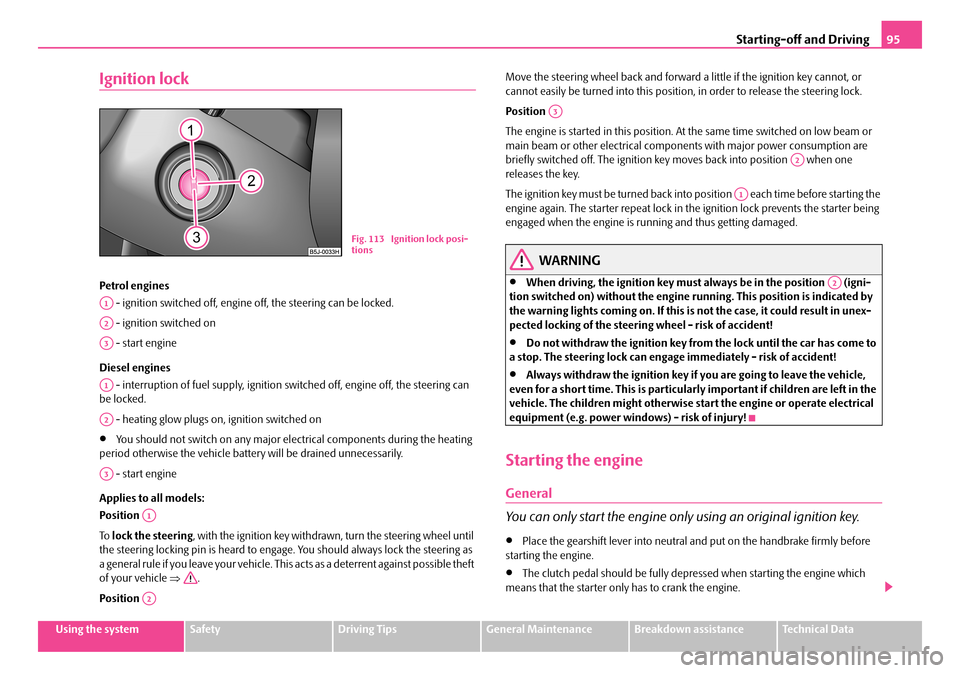
Petrol engines
- ignition switched off, engine off, the steering can be locked.
- ignition switched on
- start engine
Diesel engines
- interruption of fuel supply, ignition switched off, engine off, the steering can be locked.
- heating glow plugs on, ignition switched on
•You should not switch on any major electrical components during the heating period otherwise the vehicle battery will be drained unnecessarily.
- start engine
Applies to all models:
Position
To lock the steering, with the ignition key withdrawn, turn the steering wheel until the steering locking pin is heard to engage. You should always lock the steering as a general rule if you leave your vehicle. This acts as a deterrent against possible theft of your vehicle ⇒.
Position
Move the steering wheel back and forward a little if the ignition key cannot, or cannot easily be turned into this position, in order to release the steering lock.
Position
The engine is started in this position. At the same time switched on low beam or main beam or other electrical components with major power consumption are briefly switched off. The ignition key moves back into position when one releases the key.
The ignition key must be turned back into position each time before starting the engine again. The starter repeat lock in the ignition lock prevents the starter being engaged when the engine is running and thus getting damaged.
WARNING
•When driving, the ignition key must always be in the position (igni-tion switched on) without the engine running. This position is indicated by the warning lights coming on. If this is not the case, it could result in unex-pected locking of the steering wheel - risk of accident!
•Do not withdraw the ignition key from the lock until the car has come to a stop. The steering lock can engage immediately - risk of accident!
•Always withdraw the ignition key if you are going to leave the vehicle, even for a short time. This is particularly important if children are left in the vehicle. The children might otherwise start the engine or operate electrical equipment (e.g. power windows) - risk of injury!
Starting the engine
General
You can only start the engine only using an original ignition key.
•Place the gearshift lever into neutral and put on the handbrake firmly before starting the engine.
•The clutch pedal should be fully depressed when starting the engine which means that the starter only has to crank the engine.
Fig. 113 Ignition lock posi-tions
A1
A2
A3
A1
A2
A3
A1
A2
A3
A2
A1
A2
NKO A05F 20.book Page 95 Wednesday, April 2, 2008 1:02 PM
Page 108 of 252
Communication107
Using the systemSafetyDriving TipsGeneral MaintenanceBreakdown assistanceTechnical Data
Communication
Operating the radio
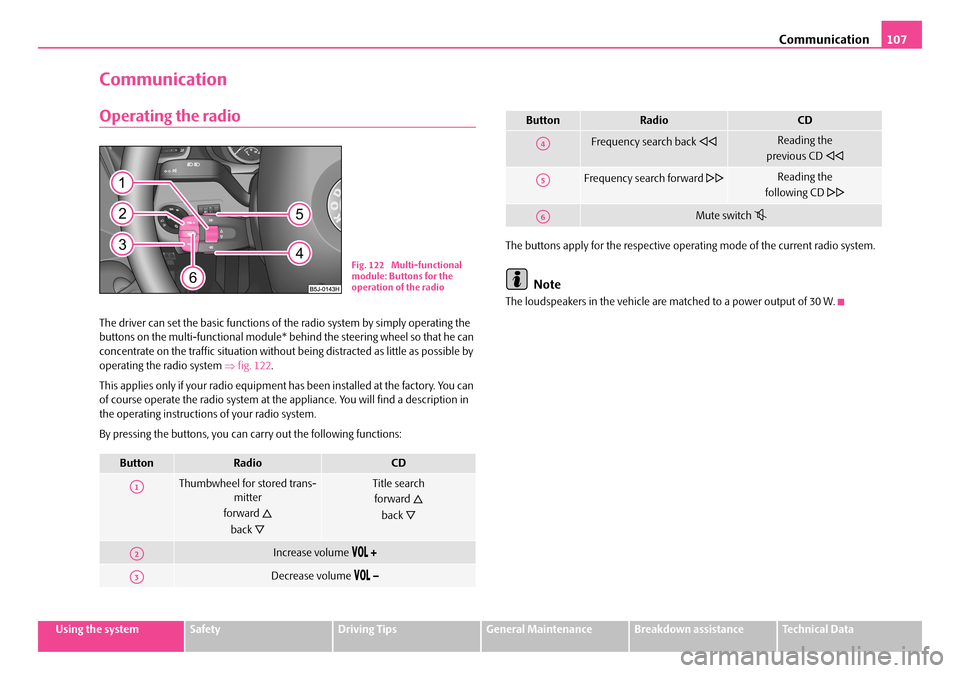
The driver can set the basic functions of the radio system by simply operating the buttons on the multi-functional module* behind the steering wheel so that he can concentrate on the traffic situation without being distracted as little as possible by operating the radio system ⇒fig. 122.
This applies only if your radio equipment has been installed at the factory. You can of course operate the radio system at the appliance. You will find a description in the operating instructions of your radio system.
By pressing the buttons, you can carry out the following functions:
The buttons apply for the respective operating mode of the current radio system.
Note
The loudspeakers in the vehicle are matched to a power output of 30 W.
ButtonRadioCD
Thumbwheel for stored trans-mitter
forward
back
Title search
forward
back
Increase volume
Decrease volume
Fig. 122 Multi-functional module: Buttons for the operation of the radio
A1
A2
A3
Frequency search back Reading the
previous CD
Frequency search forward Reading the
following CD
Mute switch
ButtonRadioCD
A4
A5
A6
NKO A05F 20.book Page 107 Wednesday, April 2, 2008 1:02 PM
Page 109 of 252

Communication108
Radio and mobile phone operation
The driver can set the basic functions of the radio and telephone system by simply operating the buttons on the multi-functional module* behind the steering wheel so that he can concentrate on the traffic situation without being distracted as little as possible by operating the radio system ⇒fig. 123.
This applies only if your radio and mobile phone equipment has been installed at the factory. You can of course operate the radio and mobile system at the appliance. You will find a description in the operating instructions of your radio system.
By pressing the buttons, you can carry out the following functions:
The buttons apply for the respective operating mode of the current radio system.Note
The operation of the mobile phone fitted with multi-functional module* is only possible on certain models of mobile phone. More detailed information is available from your Škoda Service Partner.
Fig. 123 Multi-functional module: Buttons for the radio and mobile phone operation
ButtonRadioCDPhone
Thumbwheel for stored transmitter
forward
back
Title search
forward
back
Scroll through with the aid of the thumbwheel
Increase volume
Decrease volume
Switching over between radio system and mobile phone
without functionReceive, accept a call, call up menu telephone,
confirm menu selection / /
without functionActivation/deactivation button for voice control
(button PTT)
A1
A2
A3
A4
A5
A6
NKO A05F 20.book Page 108 Wednesday, April 2, 2008 1:02 PM
Page 110 of 252

Communication109
Using the systemSafetyDriving TipsGeneral MaintenanceBreakdown assistanceTechnical Data
Universal telephone preinstallation with voice
control*
The voice control is activated according to equipment installed on the vehicle by pressing the button PTT (push to talk) on the adapter ⇒fig. 124 or the button on the multi-functional module* ⇒page 108.
A phone phonebook is part of the mobile phone preinstallation with voice control. In the phone phonebook there are 1500 free memory locations available. This phone phonebook can be used in line with the mobile telephone.
For vehicles fitted with multi-functional module*, the operation is performed via the function buttons on the module ⇒page 108.
Furthermore the volume can be changed individually at any time with the button for setting the radio or on vehicles fitted with multi-functional module* with func-tion buttons on the steering wheel.
If the system answers with the voice response “Telephone is not ready”, please check the operating state of the telephone as follows:
•Is the telephone switched on?
•Is the PIN code entered?
Dialogue
The period, in which the telephone system is ready to receive voice commands and carry out the voice commands, is called DIALOGUE. The system gives audible feed-
back and guides you if necessary through the relevant functions. You can start or end the dialogue at any time by pressing the PTT button. You can also end the dialogue with the voice command CANCEL.
The dialogue is always automatically ended after carrying out an operation, e.g. after erasing the name from the phonebook.
The dialogue of the incoming call is immediately interrupted and you can accept the call by pressing the button .
If a voice command is not detected, the system answers with “Sorry?” and a new entry can be performed. After the 3rd error the answer “Cancel” is given and the dialogue is ended.
Optimum understanding of the voice commands depends on the following factors:
•Speak with a normal tone of voice without intonation and excessive voice pauses.
•Avoid insufficient articulation.
•Close the doors, windows and sliding roof, in order to reduce or stop disturbing exterior noise.
•It is recommended to speak louder at higher speeds, so that the tone of your voice is louder than the increased surrounding noise.
•During the dialogue avoid additional noise in the vehicle, e.g. simultaneously talking occupants.
•Do not speak, if the system makes an announcement.
•The microphone for voice control is directed to the driver and front passenger. Therefore the driver and the front passenger can operate the equipment.
WARNING
Pay attention primarily to the traffic situation! As the driver you are fully responsible for road safety. Use the telephone system only to such an extent, so that you are in full control of your vehicle at any time.
Fig. 124 Button for switching on the voice control
NKO A05F 20.book Page 109 Wednesday, April 2, 2008 1:02 PM
Page 122 of 252

Passive Safety121
Using the systemSafetyDriving TipsGeneral MaintenanceBreakdown assistanceTechnical Data
Safety
Passive Safety
Basic information
Driving the safe way
Passive safety measures reduce the risk of injury in accident situa-
tions.
In this section you will find important information, tips and notes on the subject of passive safety in your vehicle. We have combined everything here which you should be familiar with, for example, regarding seat belts, airbags, child seats and safety of children. It is therefore important, in particular, to comply with the notes and warnings in this section for your own interest and in the interest of those trav-elling with you.
WARNING
•This chapter contains important information on how to use the vehicle for the driver and his occupants. You will find further information on safety, which concerns you and those travelling with you, in the following chapters of this Owner's Manual.
•The complete on-board literature should always be in the vehicle. This applies in particular, if you rent out or sell the vehicle.
Safety equipment
The safety equipment is part of the occupant protection and it can
reduce the risk of injuries in accident situations.
“Do not put at risk” your safety and the safety of those travelling with you . In the event of an accident, the safety equipment can reduce the risk of injuries. The following list contains part of the safety equipment in your vehicle:
•Three-point seat belts for all the seats,
•belt force limiter for front seats,
•belt tensioner for front seats,
•seat belt height adjuster for front seats,
•front airbag for the driver and the front seat passenger*
•Side airbags*,
•head airbags*,
•anchoring points for child seat using the “ISOFIX” system,
•anchoring points for child seat using the “Top Tether” system,
•head restraint adjustable for height,
•adjustable steering column.
The specified safety equipment works together, in order to optimally protect you and those travelling with you in accident situations. The safety equipment does not protect you or the people travelling with you, if you or your occupants adopt an incorrect seated position or the equipment is not correctly adjusted or used.
Fo r t h i s re a s o n y o u w i l l b e p ro v i d e d w i th i n fo rm a ti o n o n w hy t h i s e q u i p m e nt i s v e r y important, how it protects you and the occupants, what should be observed when using the equipment and how you and the people travelling with you can make full use of the existing safety equipment. This Owner's Manual contains important warning notes, which you and those travelling with you should pay attention to in order to reduce a risk of injury.
Safety concerns everybody!
NKO A05F 20.book Page 121 Wednesday, April 2, 2008 1:02 PM
Page 123 of 252

Passive Safety122
Before setting off
The driver is always fully responsible for his occupants and for the
operating safety of the vehicle.
For your own safety and the safety of the people travelling with you, please pay attention to the following points before setting off.
•Ensure that the lighting and the turn signal system are functioning properly.
•Inspect the tyre inflation pressure.
•Ensure that all the windows offer a good visibility to the outside.
•Safely attach the items of luggage ⇒page 61, “Loading the luggage compart-ment”.
•Ensure that no objects can obstruct the pedal.
•Adjust the mirror, the front seat and the head restraint to match your body size.
•Point out to your occupants that the head restraints must be adjusted to match their body size.
•Protect the children in suitable child seats with correctly fastened seat belts ⇒page 142, “Transporting children safely”.
•Adopt the correct seated position. Also inform your occupants to adopt the correct seated position.
•Fasten the seat belt correctly. Also inform your occupants to properly fasten the seat belts ⇒page 128, “How are seat belts correctly fastened?”.
What influences the driving safety?
The driving safety is primarily determined by the style of driving and
the personal behaviour of all the occupants.
The driver is fully responsible for himself and his occupants. If your driving safety is effected, you place yourself and the oncoming traffic at risk. Please refer to the following guidelines.
•Do not get distracted from concentrating on the traffic situation, e.g. by your occupants or mobile phone calls.
•Never drive when your driving ability is impaired, e.g. through medication, alcohol, drugs.
•Keep to the traffic regulations and the permissible speed limit.
•Adjust the driving speed at all times to the road condition as well as to the traffic and weather conditions.
•Take regular breaks on long journeys - at the latest every two hours.
Correct seated position
Correct seated position for the driver
Correct seated position for the driver is important for safe and
relaxed driving.
Fig. 128 The correct distance of the driver from the steering wheel
NKO A05F 20.book Page 122 Wednesday, April 2, 2008 1:02 PM