2008 SKODA FABIA Radio
[x] Cancel search: RadioPage 32 of 252

Unlocking and locking31
Using the systemSafetyDriving TipsGeneral MaintenanceBreakdown assistanceTechnical Data
Changing the key battery
Each radio-operated key contains a battery which is housed in the cover
of the transmitter housing ⇒fig. 18. We recommend that you have
the batteries of the key replaced by a Škoda Service Partner. You should,
however, proceed as follows if you wish to replace the battery yourself:
– Fold open the key.
– Use a screwdriver to carefully lever off the front part of the key
⇒fig. 18 from the transmitter housing .
– Take off the cover of the transmitter housing ⇒fig. 19 in direction of
arrow.
– Take the used battery out of the housing cover.
– Insert the new battery. Ensure that the “+” symbol on the battery is
facing downwards. The correct polarity is also shown on the cover of
the transmitter housing.
– Insert cover with battery in place at the rear of the transmitter housing
and press both parts together.
– Insert the transmitter housing into the front part of the key so that the
two parts lock into each other.
For the sake of the environment
Dispose of an old battery in accordance with environmental regulations.
Note
•The replacement battery must have the same specification as the original battery.
•If it is still not be possible to unlock or lock the vehicle with the remote control even after replacing the battery this means that the system has to be synchronised ⇒page 39.
Electronic immobiliser
The electronic immobiliser prevents the vehicle being operated by an
unauthorised person.
An electronic chip is integrated in the head of the key. The immobiliser is deacti-vated with the aid of this chip when the key is inserted in the ignition lock. The elec-tronic immobiliser is automatically activated when you withdraw the ignition key from the lock.
Note
It is only possible to start the engine of your car with a Genuine Škoda key with the matching code ⇒page 24.
Fig. 18 Disconnect key with radio remote control
Fig. 19 Cover of the trans-mitter housing
AB
AA
AB
NKO A05F 20.book Page 31 Wednesday, April 2, 2008 1:02 PM
Page 35 of 252

Unlocking and locking34
Safe securing
The central locking system is equipped with a safe securing system. Locking the vehicle from the outside causes the door locks to be automatically blocked. The indicator light in the driver's door flashes. It is not possible to open the doors with the door handle either from the inside or from the outside. This acts as an effective deterrent for attempts to break into your vehicle.
You can deactivate the safe securing system. This is done by locking the vehicle with the key or radio-operated key twice within 2 seconds.
The safe securing system is again activated the next time the vehicle is unlocked and locked again.
The doors can be opened from the inside if the vehicle is locked and the safe securing system is deactivated:
•The door is unlocked by actuating the door-opening lever.
•The door opens upon actuating the door-opening lever again.
WARNING
If the vehicle is locked from the outside and the safe securing system is acti-vated, there must not be any person and animals in the vehicle as it is then not possible to open either a door or a window from the inside. The locked doors make it more difficult for rescuers to get into the vehicle in an emer-gency - hazard!
Unlocking the vehicle using the key
– Turn the key in the lock of the driver's door to the left into the opening
position ⇒fig. 21.
– Pull on the door handle and open the door.
•All the doors are unlocked.
•The boot lid is then unlocked.
•The switched on interior lights come on over the door contact.
•The safe securing system is deactivated.
•The windows are opened provided the key is held in the opening position.
•The indicator light in the driver's door stops flashing if the vehicle is not fitted with an anti-theft alarm system* ⇒page 39.
Note
If the vehicle is equipped with an anti-theft alarm system*, you must unlock the vehicle by inserting the key into the driver door you then have to insert the key into the ignition lock and switch the ignition on within 15 seconds after unlocking the door. The alarm will be triggered if you do not switch on the ignition within 15 seconds.
Fig. 21 Turning the key for unlocking and locking the vehicle
AA
NKO A05F 20.book Page 34 Wednesday, April 2, 2008 1:02 PM
Page 39 of 252

Unlocking and locking38
Unlocking and locking car
The radio-operated key differs according to the equipment installed on
the vehicle.
Unlocking the vehicle
– Press button for about 1 second.
Locking the vehicle
– Press button for about 1 second.
Deactivating safe securing system
– Press button twice in 2 seconds. Further information ⇒page 33.
Boot lid remote release
– Press button for about 1 second ⇒fig. 26.
Folding out of the key
– Press button .
Folding up of the key
– Press button and collapse the key bit in the housing.
The turn signal lights flash twice as confirmation that the vehicle has been unlocked. The vehicle will lock again automatically if you unlock the vehicle using button but do not open a door or the boot lid within the next 30 seconds. This function is intended to prevent the car being unlocked unintentionally.
The safe securing system along with the anti-theft alarm system* are, however, deactivated during these 30 seconds.
When the vehicle is unlocked or locked, the interior lights in the door contact are automatically switched on or off.
The turn signal lights flash once to confirm that the vehicle has been correctly locked.
If the turn signal lights do not flash, check the doors, bonnet and boot lid again to ensure that they are closed. If the doors, the bonnet or the boot lid remain open when the anti-theft alarm system* is activated, the turn signal lights do not flash until after they have been closed.
WARNING
If the vehicle is locked from the outside and the safe securing system is acti-vated, there must not be any person in the vehicle as it is then not possible to open either a door or a window from the inside. The locked doors make it more difficult for rescuers to get into the vehicle in an emergency - hazard!
Note
•Operate the radio remote control only when the doors and boot lid are closed and you have visual contact with the vehicle.
•Once in the car, you must not press the lock button of the master key before inserting the key into the ignition lock in order to avoid the car being inadvertently locked and, in addition, the anti-theft alarm system* being switched on. Should this happen, press the unlock button of the master key.
Fig. 26 Radio-operated key
A1
A2
A2
A4
A3
A3
A1
NKO A05F 20.book Page 38 Wednesday, April 2, 2008 1:02 PM
Page 40 of 252

Unlocking and locking39
Using the systemSafetyDriving TipsGeneral MaintenanceBreakdown assistanceTechnical Data
Synchonisation of the remote control
If the vehicle cannot be unlocked by actuating the remote control system then it is possible that the code in the key and the control unit in the vehicle are no longer synchronised. This can occur when the buttons on the radio-operated key are actu-ated a number of times outside of the operative range of the equipment or the battery on the remote control was replaced.
This means it is necessary to synchronise the code as follows:
•Press any button on the remote control.
•pressing of the button means that the door will unlock with the key within 1 minute.
Anti-theft alarm system*
The anti-theft alarm system increases the level of protection against people seeking to break into the vehicle. The system triggers audible and visual warning signals if an attempt is made to break into the vehicle.
How is the alarm system switched on?
The anti-theft alarm system is activated automatically when the vehicle is locked with the key on the closed driver's door or by using the remote control. It is acti-vated 30 seconds after closing the door.
How is the alarm system switched off?
The anti-theft alarm system is switched off if the vehicle is unlocked by only using the remote control. The vehicle is automatically locked again if the vehicle is not opened within 30 seconds after reactivating the anti-theft alarm system.
Once you unlock the vehicle by inserting the key into the driver door you then have to insert the key into the ignition lock and switch the ignition on within 15 seconds after unlocking the door in order to deactivate the anti-theft alarm system. The alarm will be triggered if you do not switch on the ignition within 15 seconds.
When is the alarm triggered?
The following security areas of the locked vehicle are monitored:
•Bonnet,
•Boot lid,
•Doors,
•Ignition lock,
•Vehicle interior* ⇒page 40,
•Angle of the vehicle*,
•A drop in voltage of the on-board power supply.
An alarm is immediately triggered if either of the two battery terminals is discon-nected while the anti-theft alarm system is activated.
How is the alarm switched off?
You switch the alarm off if you unlock the car with the radio remote control in the key or if you switch the ignition on.
Note
•The working life of the alarm siren is 5 years. More detailed information is avail-able from your Škoda Service Partner.
•Before leaving the car, check that all the doors, windows and the electric sliding/tilting roof* are properly closed in order to ensure that the anti-theft alarm system is fully operational.
•Coding of the radio remote control and the receptor part precludes the use of the radio remote control from other vehicles.
NKO A05F 20.book Page 39 Wednesday, April 2, 2008 1:02 PM
Page 108 of 252
Communication107
Using the systemSafetyDriving TipsGeneral MaintenanceBreakdown assistanceTechnical Data
Communication
Operating the radio
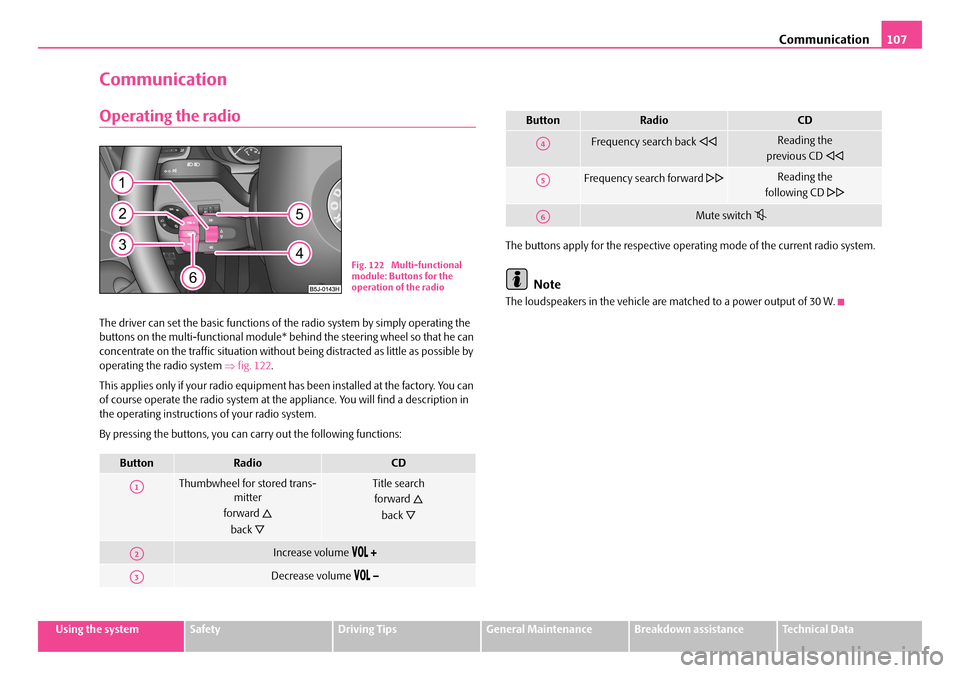
The driver can set the basic functions of the radio system by simply operating the buttons on the multi-functional module* behind the steering wheel so that he can concentrate on the traffic situation without being distracted as little as possible by operating the radio system ⇒fig. 122.
This applies only if your radio equipment has been installed at the factory. You can of course operate the radio system at the appliance. You will find a description in the operating instructions of your radio system.
By pressing the buttons, you can carry out the following functions:
The buttons apply for the respective operating mode of the current radio system.
Note
The loudspeakers in the vehicle are matched to a power output of 30 W.
ButtonRadioCD
Thumbwheel for stored trans-mitter
forward
back
Title search
forward
back
Increase volume
Decrease volume
Fig. 122 Multi-functional module: Buttons for the operation of the radio
A1
A2
A3
Frequency search back Reading the
previous CD
Frequency search forward Reading the
following CD
Mute switch
ButtonRadioCD
A4
A5
A6
NKO A05F 20.book Page 107 Wednesday, April 2, 2008 1:02 PM
Page 109 of 252

Communication108
Radio and mobile phone operation
The driver can set the basic functions of the radio and telephone system by simply operating the buttons on the multi-functional module* behind the steering wheel so that he can concentrate on the traffic situation without being distracted as little as possible by operating the radio system ⇒fig. 123.
This applies only if your radio and mobile phone equipment has been installed at the factory. You can of course operate the radio and mobile system at the appliance. You will find a description in the operating instructions of your radio system.
By pressing the buttons, you can carry out the following functions:
The buttons apply for the respective operating mode of the current radio system.Note
The operation of the mobile phone fitted with multi-functional module* is only possible on certain models of mobile phone. More detailed information is available from your Škoda Service Partner.
Fig. 123 Multi-functional module: Buttons for the radio and mobile phone operation
ButtonRadioCDPhone
Thumbwheel for stored transmitter
forward
back
Title search
forward
back
Scroll through with the aid of the thumbwheel
Increase volume
Decrease volume
Switching over between radio system and mobile phone
without functionReceive, accept a call, call up menu telephone,
confirm menu selection / /
without functionActivation/deactivation button for voice control
(button PTT)
A1
A2
A3
A4
A5
A6
NKO A05F 20.book Page 108 Wednesday, April 2, 2008 1:02 PM
Page 110 of 252

Communication109
Using the systemSafetyDriving TipsGeneral MaintenanceBreakdown assistanceTechnical Data
Universal telephone preinstallation with voice
control*
The voice control is activated according to equipment installed on the vehicle by pressing the button PTT (push to talk) on the adapter ⇒fig. 124 or the button on the multi-functional module* ⇒page 108.
A phone phonebook is part of the mobile phone preinstallation with voice control. In the phone phonebook there are 1500 free memory locations available. This phone phonebook can be used in line with the mobile telephone.
For vehicles fitted with multi-functional module*, the operation is performed via the function buttons on the module ⇒page 108.
Furthermore the volume can be changed individually at any time with the button for setting the radio or on vehicles fitted with multi-functional module* with func-tion buttons on the steering wheel.
If the system answers with the voice response “Telephone is not ready”, please check the operating state of the telephone as follows:
•Is the telephone switched on?
•Is the PIN code entered?
Dialogue
The period, in which the telephone system is ready to receive voice commands and carry out the voice commands, is called DIALOGUE. The system gives audible feed-
back and guides you if necessary through the relevant functions. You can start or end the dialogue at any time by pressing the PTT button. You can also end the dialogue with the voice command CANCEL.
The dialogue is always automatically ended after carrying out an operation, e.g. after erasing the name from the phonebook.
The dialogue of the incoming call is immediately interrupted and you can accept the call by pressing the button .
If a voice command is not detected, the system answers with “Sorry?” and a new entry can be performed. After the 3rd error the answer “Cancel” is given and the dialogue is ended.
Optimum understanding of the voice commands depends on the following factors:
•Speak with a normal tone of voice without intonation and excessive voice pauses.
•Avoid insufficient articulation.
•Close the doors, windows and sliding roof, in order to reduce or stop disturbing exterior noise.
•It is recommended to speak louder at higher speeds, so that the tone of your voice is louder than the increased surrounding noise.
•During the dialogue avoid additional noise in the vehicle, e.g. simultaneously talking occupants.
•Do not speak, if the system makes an announcement.
•The microphone for voice control is directed to the driver and front passenger. Therefore the driver and the front passenger can operate the equipment.
WARNING
Pay attention primarily to the traffic situation! As the driver you are fully responsible for road safety. Use the telephone system only to such an extent, so that you are in full control of your vehicle at any time.
Fig. 124 Button for switching on the voice control
NKO A05F 20.book Page 109 Wednesday, April 2, 2008 1:02 PM
Page 111 of 252

Communication110
Caution
Taking the mobile phone out of the adapter during the call can lead to interruption of the connection. When taking out the mobile phone, the connection to the factory-fitted antenna is interrupted, this reduces the quality of the transmitting and receiving signal. This might result additionally in harmful radiation from the mobile phone in the interior of the vehicle and the charging of the telephone battery is interrupted.
Note
•Please also refer to the additional instructions ⇒page 117, “Mobile phones and two-way radio systems”.
•Please contact your Škoda Service Partner if there are any points which are not clear.
•The voice control of the telephone is only possible for adapters with PTT button. Suitable adapters are available at a Škoda Service Partner.
Inserting the mobile phone and adapter
Only one telephone mount is factory-fitted. An adapter for the mobile
phone can be purchased from Škoda original accessories.
Inserting the mobile phone and adapter
– First of all push the adapter in the direction of arrow ⇒fig. 125 up to
the stop into the mount. Press the adapter slightly downwards, until it
locks securely into position.
– Insert the mobile phone into the adapter (as specified in manufac-
turer's instructions).
Removing the mobile phone and adapter
– Press simultaneouly the side locks of the mount and remove the
mobile phone and adapter ⇒fig. 125.
This enables you to make full use of the advantages of a normal carphone (“hands-free system” using a microphone integrated in the vehicle, optimal transmission of signals using an external aerial etc.). The battery of the mobile phone is also constantly charged.
Mobile phone operation
If you select the menu PHONE in the information display and the phone is not in the adapter, INSERT PHONE is shown on the display.
After inserting the phone in the adapter, the system begins to load the phone book from the phone and the SIM card into the information display.
Fig. 125 Universal prepara-tion for the mobile phone
Fig. 126 Multi-functional module: control buttons
NKO A05F 20.book Page 110 Wednesday, April 2, 2008 1:02 PM