2008 Seat Exeo fuel pressure
[x] Cancel search: fuel pressurePage 73 of 303

Cockpit71
Safety First
Operating instructions
Practical tips
Te c h n i c a l D a t a
Driver information systemGeneral notes
The driver information system in the instrument panel shows
the status of various on-board systems at a glance.The display for the driver information system is in the centre of the instrument
panel.
The system runs a check on certain components and functions when the igni-
tion is switched on and while the vehi cle is moving. The DIS system gives an
audible warning if a fault should occur or if servicing is required, and a red or
yellow warning symbol (in some cases with a corresponding driver message)
appears in the dashboard display.
The driver is informed on the audio system.
The driver information system includes the following functions:
Note
•
If a fault should occur, the display will show a red or yellow warning
symbol. A red warning symbol indicates a serious malfunction ⇒page 76. A
yellow warning symbol indicates a less serious malfunction ⇒ page 78.
Fig. 47 Cockpit: Digital
display in the instrument
panel
CD and radio display
⇒page 72
Ambient temperature display
⇒page 72
Distance to empty (the distance you can travel with the
remaining fuel)
⇒page 73
Door catch/tailgate warning
⇒page 73
Service interval display
⇒page 74
auto-check control
⇒page 75
Driving tips
⇒page 75
Handbrake warning
⇒page 76
Bulb monitor*
⇒page 81
On-board computer*
⇒page 84
Tyre pressure monitoring*
⇒page 88
Navigation information*
Separate operat-
ing instructions
Exeo_EN.book Seite 71 Freitag, 17. Oktober 2008 11:24 11
Page 80 of 303

Cockpit
78If the alternator warning lamp lights up as well ⇒page 69, it is possible that
the drive belt has broken.
Caution
Do not drive on if the symbol
has come on to indicate a fault in the cooling
system, otherwise there is a risk of engine damage.
Engine oil pressure too low
If the engine oil pressure is too low the fault must be rectified
immediately.If the
symbol flashes in the display, the oil pressure is too low.
The following message will appear in the display together with the
symbol:
Switch off engine, check oil level
–Stop the vehicle.
– Switch the engine off.
– Check the engine oil level ⇒page 215.
– Obtain professional assistance if necessary.
Engine oil level too low
If the engine oil level is too low, add more oil ⇒page 216.
Engine oil level correct
If the
symbol flashes and the engine oil level is correct, obtain profes-
sional assistance. Do not drive on. Do not continue to run the engine, even at
idle speed .
Note
The oil pressure warning lamp
is not an indicator for the oil level. The oil
level should therefore be checked regularl y, preferably every time you fill the
tank.
Yellow symbols
A yellow symbol indicates a warning.
Fuel level low
⇒ page 79
Diesel particulate filter* obstructed
⇒page 79
Light sensor/ rain sensor faulty
⇒page 79
F i g . 5 4 D i s p l a y : F u e l l e v e l
low
Exeo_EN.book Seite 78 Freitag, 17. Oktober 2008 11:24 11
Page 81 of 303

Cockpit79
Safety First
Operating instructions
Practical tips
Te c h n i c a l D a t a
Yellow symbols are used to indicate a Priority 2 fault (warning).
Yellow symbols are accompanied by
one warning chime. The function indi-
cated should be checked as soon as possible. If several Priority 2 faults are
detected at the same time, the symbols are displayed one after the other for
about 2 seconds at a time.
Fuel level low
When this symbol
comes on for the first time, there are about 8 to 10 litres
of fuel left in the tank. You should fill up as soon as possible ⇒page 208.
Diesel particulate filter obstructed
If the symbol
lights up, you may be able to contribute towards automatic
filter cleaning by driving in the right manner. You should drive at a speed of
at least 60 km/h for about 15 minutes in 4th or 5th gear, at an engine speed
of around 2000 rpm. The increase in temperature will burn off any soot in the
filter. When cleaning is successful, the symbol switches off.
If the light on symbol
does not go off, take the vehicle to a specialist
garage to repair the fault.
For further information on the diesel particulate filter, see ⇒page 183.
WARNING
It is essential that you adjust your sp eed to suit the weather, road, terrain
and traffic conditions. The recommended driving speed must never lead to
the driver disregarding the traffic regulations.Light sensor/ rain sensor faulty
Automatic headlights / automatic wipers faulty
If the symbol appears, this means that the light sensor / rain sensor is not
working. For safety reasons, the dipp ed beam headlights will then be
switched on permanently when the light switch is set to the AUTO position.
However, you can still switch the lights on and off in the normal way with the
Brake pad worn
⇒ page 80
Speed warning 1
⇒page 80
Dynamic headlight range control*
faulty
⇒page 80
Self-directing headlights* faulty
⇒page 80
Washer fluid level low*
⇒page 80
Speed warning 2*
⇒page 80
Battery voltage too high or too low*
⇒page 80
Bulb monitor*
⇒page 81
Tyre pressure monitoring system*
Loss of pressure
⇒page 88
TPMS
Tyre pressure monitoring system*
System not available
⇒page 66
Exeo_EN.book Seite 79 Freitag, 17. Oktober 2008 11:24 11
Page 89 of 303

Cockpit87
Safety First
Operating instructions
Practical tips
Te c h n i c a l D a t a
Some of the functions in your vehicle can be adjusted, activated and
controlled via
menus (e.g. tyre pressure*). With the aid of the menus you can
then also select the information you wish to see displayed on the DIS display.
This is only possible when the ignition is on. The menu is enabled using the
button on the windscreen wiper lever ⇒page 86, fig. 60 .
The main menu lists the different display types (or basic commands):
Programming
Check
Menu off
Help
The main menu options have the following submenus:
Controlling the menu
The menu display is called up via the button and the
rocker switch on the windscreen wiper lever. Use these
controls to make checks and adjust the settings.Functions of the ⇒fig. 62 and the rocker switch :
Enabling the menu
– Press the button until the menu display ⇒page 86,
fig. 61 appears.
Selecting and setting
– Press the rocker switch to select one of the menus. Press "up" or "down" on the switch to select the options accordingly.
Entering and confirming
– Press the button.
Programming
Clock
⇒ page 87
Computer
⇒page 87
Speed warning
⇒page 81
Radio info (on/off)Units: for measuring dis-
tance, fuel consumption and
temperature
⇒page 87
Language: you can select
one of 6 languages.
⇒page 87
Check
Service
⇒page 74
Menu off
When the menu is switched off, the display shows the
same information as on vehicles without the menu func-
tion.
Help
This function helps you select the options you require.
Reset
Reset
Fig. 62 Windscreen wiper
lever: Reset button and
rocker switch
Reset
AB
AA
ResetReset
Exeo_EN.book Seite 87 Freitag, 17. Oktober 2008 11:24 11
Page 90 of 303

Cockpit
88Use the rocker switch to select the menus and adjust various values. The
selected values are highlighted on a red background.
By pressing the button, you can conf irm the option you have selected
or the value you have set. Selected functions are marked with a tick.
The following symbols are used:Tyre pressure monitoringIntroduction
The tyre pressure monitoring system constantly checks the
pressure of the tyres.The system warns the driver in the event of a loss of pressure by means of
symbols and messages in the instrument panel display. The system works
with the help of the ABS sensors in the wheels.
Please bear in mind that the tyre inflation pressure is also influenced by the
temperature of the tyre. Tyre pressure increases about 0.1 bar for each 10°C
in tyre temperature increase. The tyre heats up while the vehicle is being driven and the tyre pressure will rise accordingly. Therefore, you should only
adjust the tyre pressures when they are
cold (i.e. approximately at ambient
temperature).
To ensure that the tyre pressure monitoring system works reliably, you should
check and, if necessary, adjust the tyre pressures at regular intervals and
store the correct pressures (reference values) in the system.
A tyre pressure information label is attached to the inside of the fuel tank flap.
WARNING
•
Never adjust tyre pressure when the tyres are hot. This may damage or
even burst the tyres. Risk of accident!
•
An insufficiently inflated tyre flexes a lot more at high speeds and
causes significant heating of the ty re. Under these conditions, the tyre
bead may be released or the tyre may burst. Risk of accident!For the sake of the environment
Under-inflated tyres lead to increased fuel consumption and tyre wear.
Note
•
Responsibility for ensuring that the tyres are correctly inflated remains
with the driver; the system can only provide assistance.
•
Pressure can only be adjusted when the tyres are at ambient
temperature.
Cursor
Function selected
Red background (active
function)
Tick
Selected
Box
Not selected
Triangle pointing upwards
Previous page
Triangle pointing down-
wards
Next page
Reset
Exeo_EN.book Seite 88 Freitag, 17. Oktober 2008 11:24 11
Page 141 of 303

Seats and stowage139
Safety First
Operating instructions
Practical tips
Te c h n i c a l D a t a
Please note that the armrest can restrict the driver's movements when it is
lowered. The armrest should therefore be raised when driving in city traffic.
Luggage compartmentLoading the luggage compartment
Loads in the luggage compartment should be safely secured.To maintain safe handling on the road, please observe the following
points:
– Distribute the load evenly.
– Position heavy items as far forward as possible ⇒
fig. 114.– Secure the load with the stretch net* or with non-elastic straps
secured to the fastening rings ⇒page 140.
WARNING
•
Unsecured objects in the luggage compartment can suddenly shift and
cause changes in the ha ndling of the vehicle.
•
In an accident or a sudden manoeuvre, loose objects in the passenger
compartment can be flung forward and might injure vehicle occupants.
•
Always keep all objects in the luggage compartment and use appro-
priate grips to secure them, particularly in the case of heavy objects.
•
When you transport heavy objects, always bear in mind that a change
of the centre of gravity can also cause changes in vehicle handling.
•
Please refer to the notes in ⇒page 7.Note
The tyre pressure must be adjusted according to the load. Consult the label
containing the pressure values inside the fuel tank flap where required
⇒ page 208, fig. 160 .
Fig. 114 Position heavy
items as far forward as
possible.
Exeo_EN.book Seite 139 Freitag, 17. Oktober 2008 11:24 11
Page 163 of 303
Heating, Ventilation and Air conditioning 161
Safety First
Operating instructions
Practical tips
Te c h n i c a l D a t a
Solar-powered blower/solar roof*
If the vehicle is parked in su fficiently strong sunlight, the
blower will operate in solar-powered mode when the ignition
is switched off.After the ignition is switched off, the blower is supplied with electrical power
from the solar roof. Please ensure that outlets 3 and 4 are open ⇒page 159,
fig. 135 to ensure the best possible ventilation.
The blower only works when the sun roof is closed or tilted open at the rear.
If the air recirculation mode is on when you switch off the engine, the climate
control will automatically switch to fresh air ventilation.Supplementary heating*Diesel vehicles are fitted with supplementary heating
2) to raise the tempera-
ture of the interior as quickly as possible. At outdoor temperatures below
+5°C and with the engine running, the supplementary heating will switch on
and off automatically depending on the temperature of the coolant.
In order to save fuel, the supplementary heating can be can be switched off
by briefly pressing the button on the climate control.
Seat heating*
The surface and backrest of the front seats can be electrically
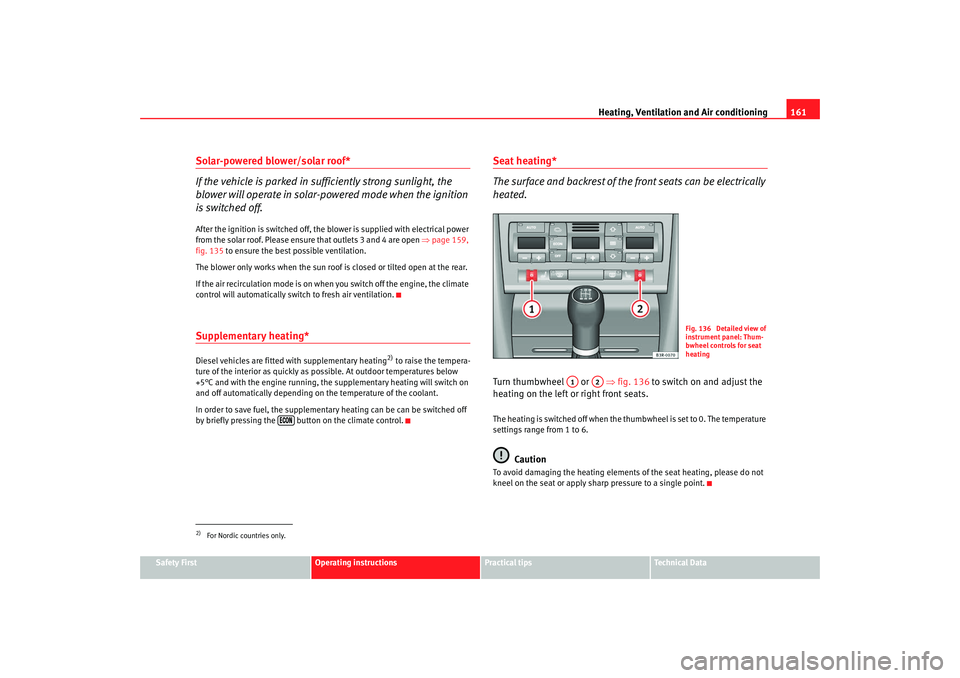
heated.Turn thumbwheel or ⇒fig. 136 to switch on and adjust the
heating on the left or right front seats.The heating is switched off when the thumbwheel is set to 0. The temperature
settings range from 1 to 6.
Caution
To avoid damaging the heating elements of the seat heating, please do not
kneel on the seat or apply sharp pressure to a single point.
2)For Nordic countries only.
Fig. 136 Detailed view of
instrument panel: Thum-
bwheel controls for seat
heating
A1
A2
Exeo_EN.book Seite 161 Freitag, 17. Oktober 2008 11:24 11
Page 167 of 303

Driving165
Safety First
Operating instructions
Practical tips
Te c h n i c a l D a t a
Vehicles with a diesel engine:
–Use the foot brake.
– Manual gearbox: Push the clutch pedal all the way down.
– Move the gear lever into the neutral position ⇒.
– Turn the ignition key to position . The pre-heating indicator light
comes on while the glow plugs are preheating.
– When the indicator light
goes out, turn the ignition key to
position . Do not press the accelerator.
– Release the ignition key as soon as the engine starts (the starter motor must not be allowed to run on with the engine).
When starting a very cold engine, it may be a little noisy for the first few
seconds until oil pressure has built up in the hydraulic valve compensators.
This is quite normal, and no cause for concern.
If the engine fails to start straight-away, switch off the starter after about 10
seconds and try again after about half a minute.
Glow plug system*
To assist starting at low temperatures, diesel engines are equipped with a
glow plug preheating system. The pr eheating time depends on the coolant
temperature and the outside temperature. Start the engine as soon as the
glow plug indicator light
goes out.
When the engine is warm or at outside temperatures above +8°C, the glow
plug indicator light will only come on for about one second. This means that
the engine can be started immediately .
If the engine will not start...
•
⇒ page 271
•
⇒page 274
•
⇒page 208, “Refuelling”
WARNING
Never run the engine in confined spaces, as the exhaust gases are
poisonous.
Caution
Avoid high engine speeds, full throttle and extreme load conditions until the
engine has reached its normal operating temperature, otherwise this can
damage the engine.
For the sake of the environment
Do not warm up the engine by running the engine with the vehicle stationary.
Start immediately. This will help avoid unnecessary exhaust emissions.Stopping the engine– Turn the ignition key to position ⇒page 164, fig. 140 .
WARNING
•
Never switch the engine off until the vehicle is stationary.
•
The brake servo and the power steering system work only when the
engine is running. You need more stre ngth to steer and brake the vehicle
when the engine is switched off. Given that you will be unable to steer and
brake as usual, this could lead to a risk of accidents and injuries.
A1
A2
A0
Exeo_EN.book Seite 165 Freitag, 17. Oktober 2008 11:24 11