Page 270 of 388
4. Open the hood on the other vehicle and locate the
positive (+) and negative (−) terminal locations on
that vehicle.
You will not see the battery of your vehicle under
the hood. It is located in the trunk. You will not need
to access your battery for jump starting. Your
vehicle has a remote positive (+) and a remote
negative (−) jump starting terminal.
The remote positive
terminal is located under a
red tethered cap on the
engine compartment
fuse block. Lift the cap to
access the terminal.The remote negative (−)
ground terminal, marked
GND (−), is located behind
the engine coolant
surge tank.
SeeEngine Compartment Overview on page 5-12
for more information on the location of the
positive (+) and negative (−) terminals on your
vehicle.
{CAUTION:
An electric fan can start up even when the
engine is not running and can injure you.
Keep hands, clothing and tools away from any
underhood electric fan.
5-36
Page 278 of 388
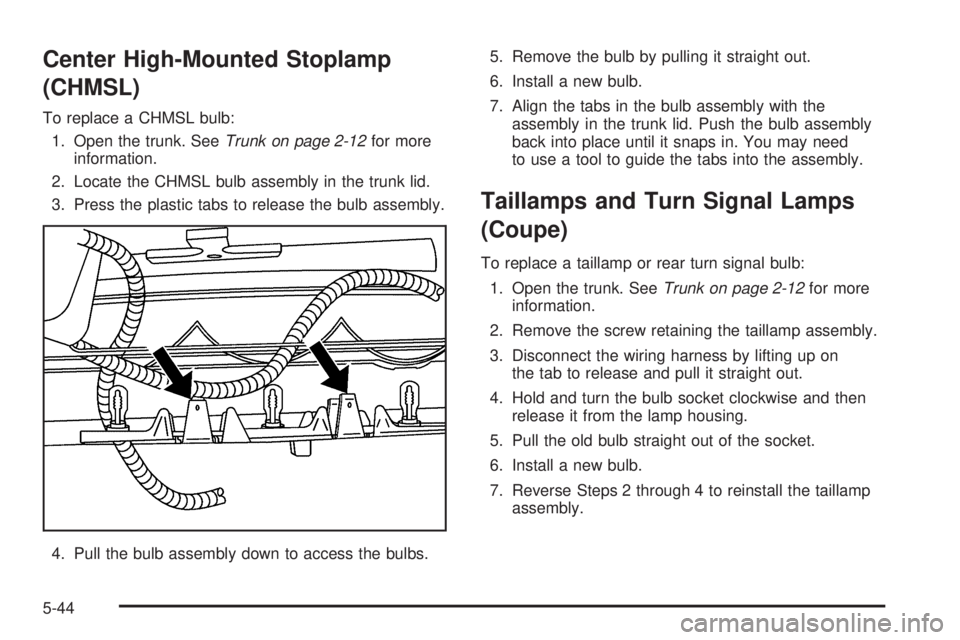
Center High-Mounted Stoplamp
(CHMSL)
To replace a CHMSL bulb:
1. Open the trunk. SeeTrunk on page 2-12for more
information.
2. Locate the CHMSL bulb assembly in the trunk lid.
3. Press the plastic tabs to release the bulb assembly.
4. Pull the bulb assembly down to access the bulbs.5. Remove the bulb by pulling it straight out.
6. Install a new bulb.
7. Align the tabs in the bulb assembly with the
assembly in the trunk lid. Push the bulb assembly
back into place until it snaps in. You may need
to use a tool to guide the tabs into the assembly.
Taillamps and Turn Signal Lamps
(Coupe)
To replace a taillamp or rear turn signal bulb:
1. Open the trunk. SeeTrunk on page 2-12for more
information.
2. Remove the screw retaining the taillamp assembly.
3. Disconnect the wiring harness by lifting up on
the tab to release and pull it straight out.
4. Hold and turn the bulb socket clockwise and then
release it from the lamp housing.
5. Pull the old bulb straight out of the socket.
6. Install a new bulb.
7. Reverse Steps 2 through 4 to reinstall the taillamp
assembly.
5-44
Page 279 of 388
Taillamps, Turn Signal, Stoplamps
and Back-up Lamps (Sedan)
To replace one of these bulbs:
1. Open the trunk. SeeTrunk on page 2-12for more
information.
2. Remove the fastener which holds down the trunk
trim. Once you have removed the trim, there will
be one more fastener to remove.
3. Remove the outer two screws from the taillamp
assembly.
4. Disconnect the wiring harness by lifting up on the
tab to release and pull it straight out.
5. Remove the taillamp from the quarter panel.A. Sidemarker
B. Stoplamp/Turn Signal/Taillamp
C. Back-up
6. Locate the bulb to change.
7. Remove the taillamp bulb socket from the assembly
by turning it counterclockwise.
8. Pull the old bulb out of the socket.
9. Install a new bulb.
10. Reverse Steps 1 through 6 to reinstall the taillamp
assembly.
5-45
Page 307 of 388
When you have a at tire, use the following example a
a guide to assist you in the placement of wheel blocks.
The following information tells you how to use the jack
and change a tire.Removing the Spare Tire and Tools
The equipment you will need is located in the trunk.
Base Models
1. Open the trunk. SeeTrunk on page 2-12for more
information.
2. Lift the trunk liner to access the spare tire and tools.
5-73
Page 309 of 388
3. Remove the retainer (B) that holds down the spare
tire. SeeCompact Spare Tire on page 5-85for
more information.
4. Remove the spare tire (C) by gently pulling it up
and out of the trunk.
5. Remove the wing nut (D) that holds the jack and
remove the jack and wheel wrench (E).Uplevel Models
1. Open the trunk. SeeTrunk on page 2-12for
more information.
2. Lift the trunk liner to access the spare tire and tools.
5-75
Page 311 of 388
3. Remove the retainer (A) that holds down the jack,
wheel wrench (B) and spare tire (C).
4. Remove the spare tire by gently pulling it up and
out of the trunk.
The tools you will be using include the jack (A) and
wheel wrench (B).You will need to turn the plastic wheel nut
counterclockwise to loosen the wheel wrench from
the jack.
5-77
Page 313 of 388
3. Using the at end of the wheel wrench, pry along
the edge of the wheel cover until it comes off.
Store the wheel cover in the trunk until you have
the at tire repaired or replaced.
4. Use the wheel wrench to loosen all the wheel nuts.
Do not remove them yet.
5. It is recommended that you do a safety check
before preceding. SeeChanging a Flat Tire on
page 5-72for more information.
Notice:Make sure that the jack lift head is in the
correct position or you may damage your vehicle.
The repairs would not be covered by your warranty.
6. Position the jack lift head at the jack location
nearest the at tire. The front location is about
8 inches (20 cm) behind the front wheel opening.
The rear location is about 4 inches (10 cm) in front
of the rear wheel opening.
5-79
Page 329 of 388
Vehicle Identication
Vehicle Identication Number (VIN)
This is the legal identier for your vehicle. It appears
on a plate in the front corner of the instrument panel,
on the driver side. You can see it if you look through the
windshield from outside your vehicle. The VIN also
appears on the Vehicle Certication and Service Parts
labels and the certicates of title and registration.
Engine Identication
The eighth character in the VIN is the engine code.
This code helps you identify your vehicle’s engine,
specications, and replacement parts. SeeCapacities
and Specifications on page 5-102for your vehicle’s
engine code.
Service Parts Identication Label
This label is in the trunk, on the driver side, near
the spare tire cover. It is very helpful if you ever need to
order parts. The label has the following information:
Vehicle Identication Number (VIN)
Model designation
Paint information
Production options and special equipment
Do not remove this label from the vehicle.
5-95


