2008 PEUGEOT 308 CC DAG light
[x] Cancel search: lightPage 49 of 221

3
!
!
i
51
COMFORT
Manual operation
If you wish, you can make a different
choice from that offered by the system
by changing a setting. The other func-
tions will still be controlled automati-
cally.
Pressing the "AUTO" button returns
the system to completely automatic
operation.
Press this button to switch
off the air conditioning. 6. Air distribution adjustment
Press one or more buttons to
direct the air fl ow towards:
7. Air fl ow adjustment
Turn this control to the left
to decrease the air fl ow or
to the right to increase the
air fl ow.
8. Air intake/Air recirculation Switching the system off
Turn the air fl ow control to the left
until all of the indicator lights switch
off.
This action switches off all of the functions
of the system.
Temperature related comfort is no longer
guaranteed but a slight fl ow of air, due
to the movement of the vehicle, can still
be felt.
Turn the air fl ow dial to the right or
press the "AUTO" button to reacti-
vate the system with the values set
before it was switched off.
Press this button for recir-
culation of the interior air.
The indicator light on the
button comes on.
5. Air conditioning On/Off
Avoid driving for prolonged periods
with the system off.
Avoid prolonged recirculation of
interior air (risk of condensation and
deterioration of the air quality).
- the windscreen and side windows
(de-icing or demisting),
- the windscreen, the side windows and the vents,
- the windscreen, the side windows, the vents and the footwells,
- the vents and the footwells,
- the vents,
- the footwells,
- the windscreen, the side windows and the footwells.
The air fl ow indicator lights, between
the two fans, come on progressively in
relation to the value requested.
As soon as possible, press this button
again to permit the intake of outside
air and prevent condensation. The
indicator light on the button switches
off.
For maximum cooling or heating
of the passenger compartment, it
is possible to exceed the minimum
value 14 or the maximum value 28.
Turn control 2 or 3 to the left
until "LO" is displayed or to the
right until "HI" is displayed. 9. Mono zone/Dual zone
Press this button to equa-
lise the comfort value on
the passenger side with that
on the driver's side (mono
zone). The indicator light on
the button comes on.
Air recirculation enables the passenger
compartment to be isolated from exte-
rior odours and smoke.
Switching the system off could result in
discomfort (humidity, condensation).
Press this button again to return to
automatic operation of the air con-
ditioning. The indicator light on the
"A/C" button comes on.
Page 62 of 221
3
!
i
62
COMFORT
STEERING WHEEL ADJUSTMENT
The height and depth of the steering
wheel can be adjusted to adapt the
driving position to the size of the driver.
Adjustment
When stationary , pull the control to
unlock the steering wheel.
Adjust the height and depth.
Push the control to lock the steering
wheel.
As a safety precaution, it is impera-
tive that these operations are carried
out while the vehicle is stationary.
In order to guarantee optimum visi-
bility during your manoeuvres, the
mirror lightens automatically when
reverse gear is engaged.
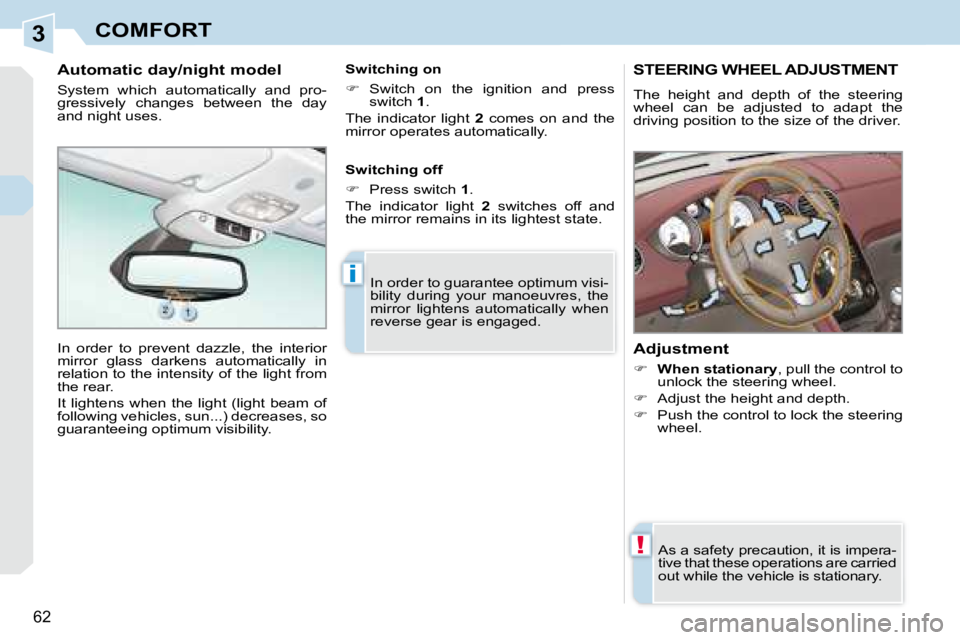
Automatic day/night model
System which automatically and pro-
gressively changes between the day
and night uses.
In order to prevent dazzle, the interior
mirror glass darkens automatically in
relation to the intensity of the light from
the rear.
It lightens when the light (light beam of
following vehicles, sun...) decreases, so
guaranteeing optimum visibility. Switching on
Switch on the ignition and press
switch 1 .
The indicator light 2 comes on and the
mirror operates automatically.
Switching off
Press switch 1 .
The indicator light 2 switches off and
the mirror remains in its lightest state.
Page 63 of 221
3
!
i
62
COMFORT
STEERING WHEEL ADJUSTMENT
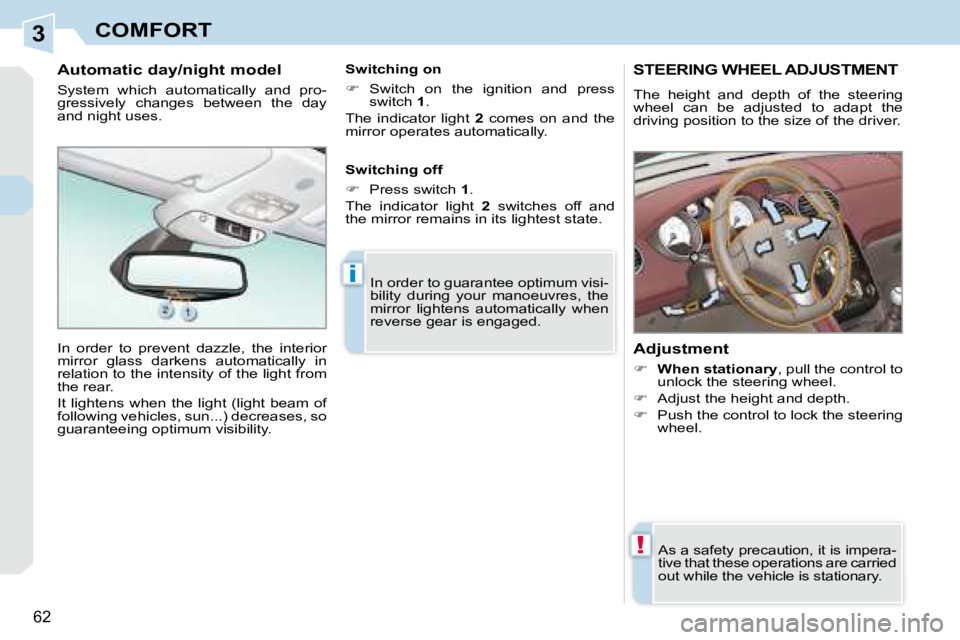
The height and depth of the steering
wheel can be adjusted to adapt the
driving position to the size of the driver.
Adjustment
When stationary , pull the control to
unlock the steering wheel.
Adjust the height and depth.
Push the control to lock the steering
wheel.
As a safety precaution, it is impera-
tive that these operations are carried
out while the vehicle is stationary.
In order to guarantee optimum visi-
bility during your manoeuvres, the
mirror lightens automatically when
reverse gear is engaged.
Automatic day/night model
System which automatically and pro-
gressively changes between the day
and night uses.
In order to prevent dazzle, the interior
mirror glass darkens automatically in
relation to the intensity of the light from
the rear.
It lightens when the light (light beam of
following vehicles, sun...) decreases, so
guaranteeing optimum visibility. Switching on
Switch on the ignition and press
switch 1 .
The indicator light 2 comes on and the
mirror operates automatically.
Switching off
Press switch 1 .
The indicator light 2 switches off and
the mirror remains in its lightest state.
Page 64 of 221
4
63
ACCESS
Unlocking and partial opening of the
boot
Press this button for more
than two seconds to unlock
the boot. The boot opens
slightly.
This action unlocks the vehicle fi rst.
Press the open padlock
once to unlock the driver's
door only.
Selective unlocking using the
remote control Each unlocking is confi rmed by rapid
fl ashing of the direction indicators for
approximately two seconds.
According to version, the exterior
mirrors unfold at the same time as the
fi rst unlocking action.
Selective unlocking using the key
Turn the key to the left in the driver's
door lock once to unlock the driver's
door only.
Turn the key to the left in the driver's
door lock again to unlock the
passenger's door and the boot. The complete or selective
unlocking parameter is set
via the multifunction display
confi guration menu.
System which permits central unlocking
and locking of the vehicle using the lock
or from a distance, as well as of the
interior storage compartments (glove
box and front armrest). It is also used to
locate and start the vehicle, as well as
providing protection against theft.
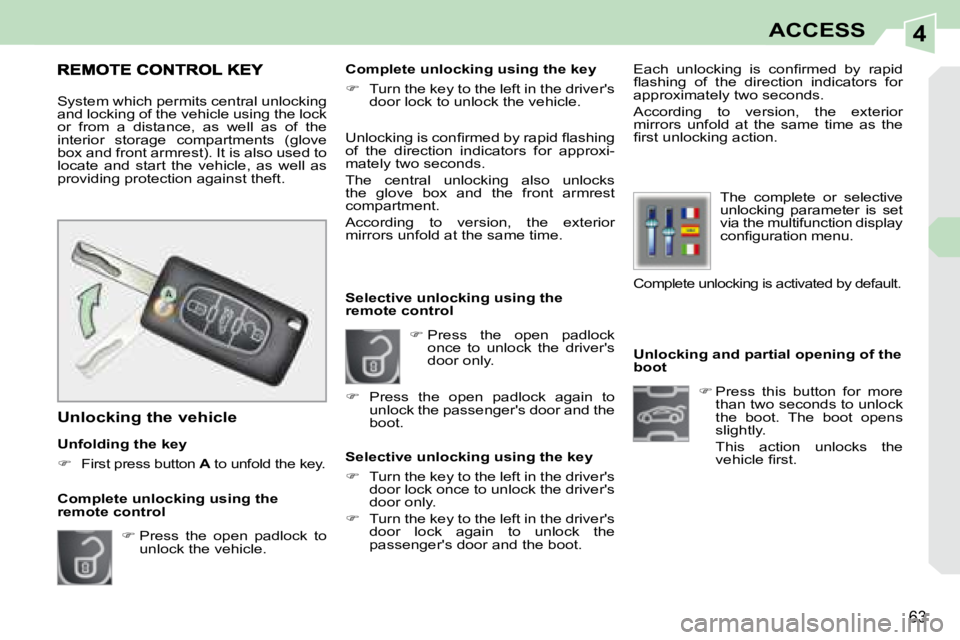
Unfolding the key
First press button A to unfold the key.
Unlocking the vehicle Unlocking is confi rmed by rapid fl ashing
of the direction indicators for approxi-
mately two seconds.
The central unlocking also unlocks
the glove box and the front armrest
compartment.
According to version, the exterior
mirrors unfold at the same time.
Press the open padlock to
unlock the vehicle. Complete unlocking using the key
Turn the key to the left in the driver's
door lock to unlock the vehicle.
Complete unlocking using the
remote control
Press the open padlock again to
unlock the passenger's door and the
boot.
Complete unlocking is activated by default.
Page 65 of 221
4
!
i
i
64
ACCESS
Deadlocking renders the exte-
rior and interior door controls
inoperative.
It also deactivates the manual central
control button.
Therefore, never leave anyone inside
the vehicle when it is deadlocked.
If one of the doors or the boot is still
open, the central locking does not
take place.
After unlocking the vehicle, if none
of the accesses - door or boot - are
opened within thirty seconds, the
vehicle will re-lock automatically.
Deadlocking using the remote
control Deadlocking using the key
The folding and unfolding of the
exterior mirrors using the remote
control can be deactivated by a
PEUGEOT dealer.
Press the closed padlock to
lock the vehicle completely.
Press the closed padlock
again within fi ve seconds to
deadlock the vehicle.
Locking the vehicle
Press the closed padlock to
lock the vehicle completely.
Normal locking using the key
Turn the key to the right in the
driver's door lock to lock the vehicle
completely.
Normal locking using the remote
control
Deadlocking is confi rmed by fi xed
lighting of the direction indicators for
approximately two seconds.
According to version, the exterior mirrors
fold at the same time.
Locking is confi rmed by fi xed lighting of
the direction indicators for approximately
two seconds.
The central locking also locks the
glove box and the front armrest
compartment.
According to version, the exterior mir-
rors fold at the same time.
Turn the key to the right in the driver's
door lock to lock the vehicle completely.
Turn the key to the right again within
fi ve seconds to deadlock the vehicle.
Page 66 of 221
4
65
ACCESS
Locating your vehicle
Press the closed padlock to locate
your locked vehicle in a car park.
This is indicated by lighting of the cour-
tesy lights, the lateral lights and the
dipped headlamps and fl ashing of the
direction indicators for a few seconds. Electronic engine immobiliser
The key contains an electronic chip
which has a special code. When the
ignition is switched on, this code must
be recognised in order for starting to be
possible.
This electronic engine immobiliser locks
the engine management system a few
minutes after the ignition is switched off
and prevents starting of the engine by
anyone who does not have the key.
Anti-theft protection
In the event of a malfunction,
you are informed by lighting of
this warning light, an audible
signal and a message on the
multifunction display.
In this case, your vehicle does not start;
contact a PEUGEOT dealer as soon as
possible.
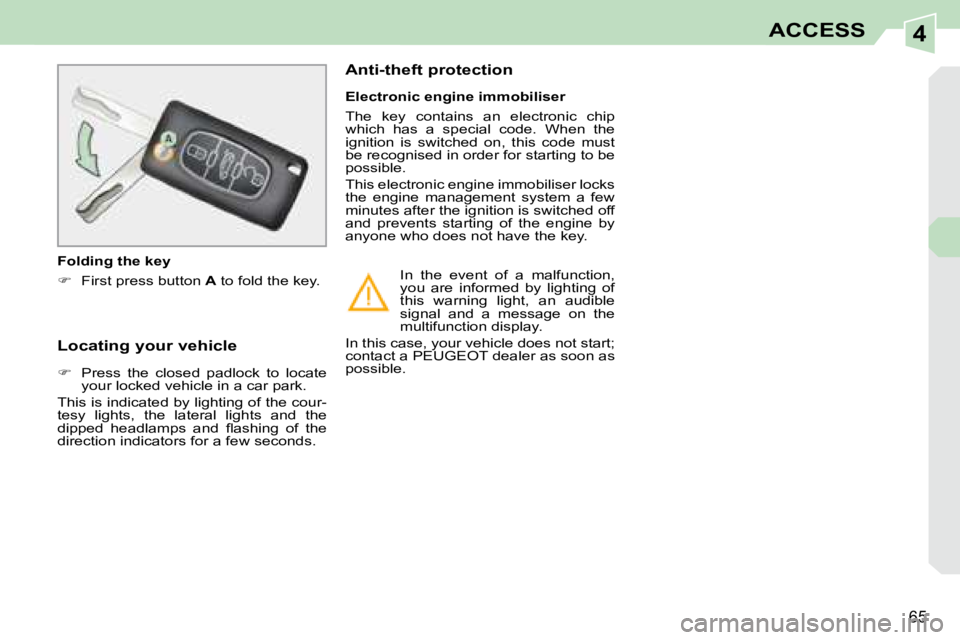
Folding the key
First press button A to fold the key.
Page 68 of 221
4
65
ACCESS
Locating your vehicle
Press the closed padlock to locate
your locked vehicle in a car park.
This is indicated by lighting of the cour-
tesy lights, the lateral lights and the
dipped headlamps and fl ashing of the
direction indicators for a few seconds. Electronic engine immobiliser
The key contains an electronic chip
which has a special code. When the
ignition is switched on, this code must
be recognised in order for starting to be
possible.
This electronic engine immobiliser locks
the engine management system a few
minutes after the ignition is switched off
and prevents starting of the engine by
anyone who does not have the key.
Anti-theft protection
In the event of a malfunction,
you are informed by lighting of
this warning light, an audible
signal and a message on the
multifunction display.
In this case, your vehicle does not start;
contact a PEUGEOT dealer as soon as
possible.
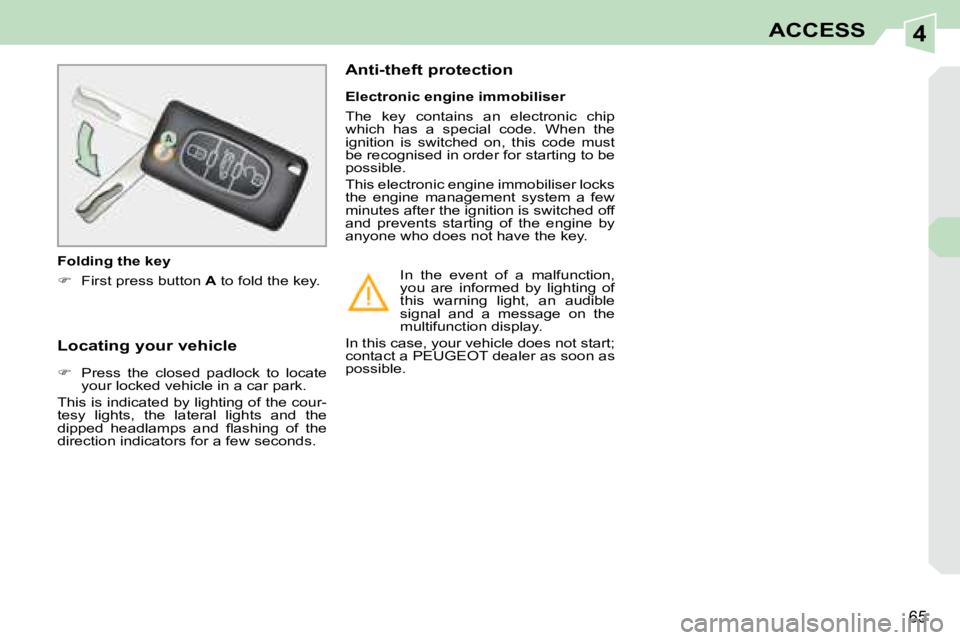
Folding the key
First press button A to fold the key.
Page 70 of 221
4
i
66
ACCESS
Key reminder
If the key is left in the ignition switch,
an audible signal sounds when the
driver's door is opened.
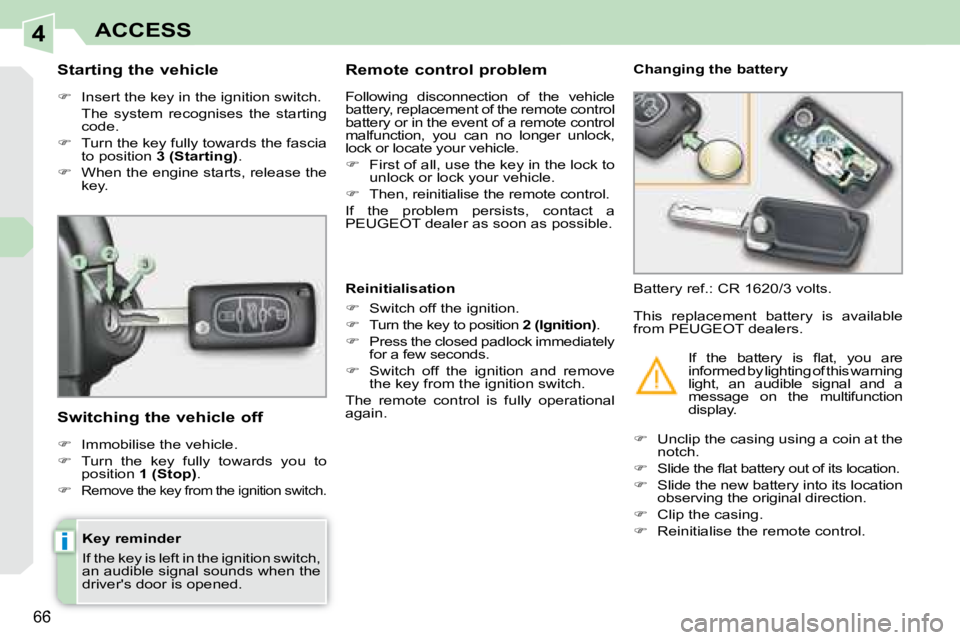
Starting the vehicle
Insert the key in the ignition switch.
The system recognises the starting code.
Turn the key fully towards the fascia
to position 3 (Starting) .
When the engine starts, release the
key.
Switching the vehicle off
Immobilise the vehicle.
Turn the key fully towards you to
position 1 (Stop) .
Remove the key from the ignition switch.
Remote control problem
Following disconnection of the vehicle
battery, replacement of the remote control
battery or in the event of a remote control
malfunction, you can no longer unlock,
lock or locate your vehicle.
First of all, use the key in the lock to
unlock or lock your vehicle.
Then, reinitialise the remote control.
If the problem persists, contact a
PEUGEOT dealer as soon as possible. Changing the battery
Battery ref.: CR 1620/3 volts.
Reinitialisation
Switch off the ignition.
Turn the key to position 2 (Ignition) .
Press the closed padlock immediately
for a few seconds.
Switch off the ignition and remove
the key from the ignition switch.
The remote control is fully operational
again.
Unclip the casing using a coin at the
notch.
Slide the fl at battery out of its location.
Slide the new battery into its location
observing the original direction.
Clip the casing.
Reinitialise the remote control.
This replacement battery is available
from PEUGEOT dealers.
If the battery is fl at, you are
informed by lighting of this warning
light, an audible signal and a
message on the multifunction
display.