2008 NISSAN MURANO Key port
[x] Cancel search: Key portPage 11 of 444
Black plate (8,1)
Model "Z51-D" EDITED: 2008/ 6/ 26
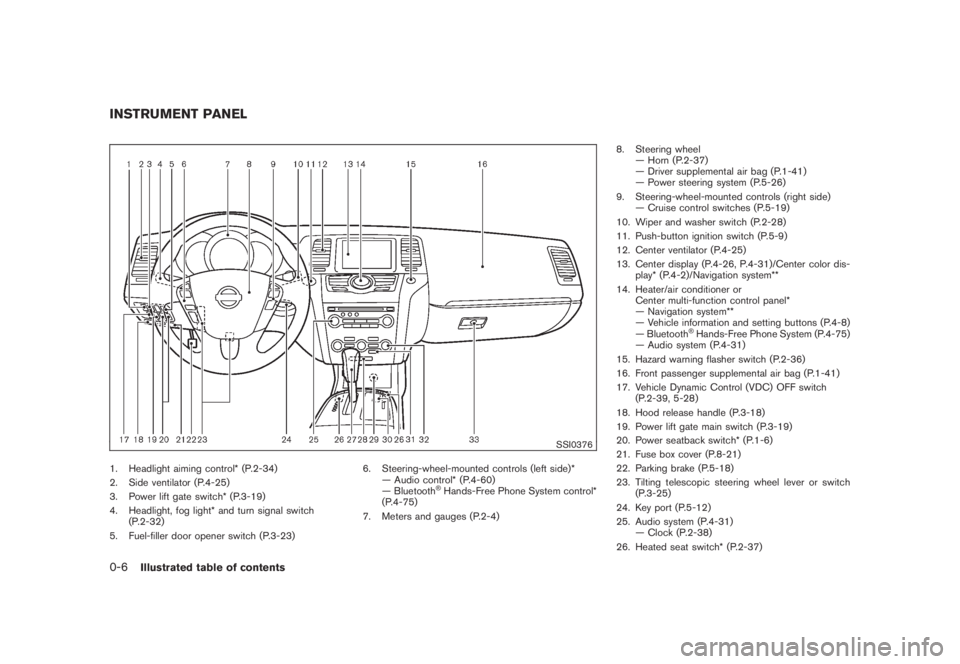
SSI0376
1. Headlight aiming control* (P.2-34)
2. Side ventilator (P.4-25)
3. Power lift gate switch* (P.3-19)
4. Headlight, fog light* and turn signal switch
(P.2-32)
5. Fuel-filler door opener switch (P.3-23)6. Steering-wheel-mounted controls (left side)*
— Audio control* (P.4-60)
— Bluetooth
®Hands-Free Phone System control*
(P.4-75)
7. Meters and gauges (P.2-4)8. Steering wheel
— Horn (P.2-37)
— Driver supplemental air bag (P.1-41)
— Power steering system (P.5-26)
9. Steering-wheel-mounted controls (right side)
— Cruise control switches (P.5-19)
10. Wiper and washer switch (P.2-28)
11. Push-button ignition switch (P.5-9)
12. Center ventilator (P.4-25)
13. Center display (P.4-26, P.4-31)/Center color dis-
play* (P.4-2)/Navigation system**
14. Heater/air conditioner or
Center multi-function control panel*
— Navigation system**
— Vehicle information and setting buttons (P.4-8)
— Bluetooth
®Hands-Free Phone System (P.4-75)
— Audio system (P.4-31)
15. Hazard warning flasher switch (P.2-36)
16. Front passenger supplemental air bag (P.1-41)
17. Vehicle Dynamic Control (VDC) OFF switch
(P.2-39, 5-28)
18. Hood release handle (P.3-18)
19. Power lift gate main switch (P.3-19)
20. Power seatback switch* (P.1-6)
21. Fuse box cover (P.8-21)
22. Parking brake (P.5-18)
23. Tilting telescopic steering wheel lever or switch
(P.3-25)
24. Key port (P.5-12)
25. Audio system (P.4-31)
— Clock (P.2-38)
26. Heated seat switch* (P.2-37)
INSTRUMENT PANEL0-6
Illustrated table of contents
Page 74 of 444

Black plate (70,1)
Model "Z51-D" EDITED: 2008/ 6/ 26
SSI0376
1. Headlight aiming control*
2. Side ventilator
3. Power lift gate switch*
4. Headlight, fog light* and turn signal switch
5. Fuel-filler door opener switch6. Steering-wheel-mounted controls (left side)*
— Audio control*
— Bluetooth
®Hands-Free Phone System control*
7. Meters and gauges8. Steering wheel
— Horn
— Driver supplemental air bag
— Power steering system
9. Steering-wheel-mounted controls (right side)
— Cruise control switches
10. Wiper and washer switch
11. Push-button ignition switch
12. Center ventilator
13. Center display/Center color display*/Navigation
system**
14. Heater/air conditioner or
Center multi-function control panel*
— Navigation system**
— Vehicle information and setting buttons
— Bluetooth
®Hands-Free Phone System
— Audio system
15. Hazard warning flasher switch
16. Front passenger supplemental air bag
17. Vehicle Dynamic Control (VDC) OFF switch
18. Hood release handle
19. Power lift gate main switch
20. Power seatback switch
21. Fuse box cover
22. Parking brake
23. Tilting telescopic steering wheel lever or switch
24. Key port
25. Audio system
— Clock
26. Heated seat switch*
27. Selector lever
28. Front passenger air bag status light
INSTRUMENT PANEL2-2
Instruments and controls
Page 89 of 444
Black plate (85,1)
Model "Z51-D" EDITED: 2008/ 6/ 26
AUDIBLE REMINDERS
Key reminder chimeA chime will sound if the driver side door is
opened while the ignition switch is pushed to
the ACC position or pushed to the OFF or
LOCK position with the key left in the key port.
Make sure the ignition switch is pushed to the
OFF position, and take the Intelligent Key with
you when leaving the vehicle.Light reminder chimeA chime will sound when the driver side door is
opened with the light switch in the
or
position and the ignition switch in the ACC
or OFF position.
Turn the light switch off when you leave the
vehicle.
Parking brake reminder chimeThe chime will sound if the vehicle is driven with
the parking brake applied. Stop the vehicle and
release the parking brake.Seat belt warning chimeThe chime will sound for about 6 seconds
unless the driver’s seat belt is securely fastened.Brake pad wear warningThe disc brake pads have audible wear warn-
ings. When a brake pad requires replacement, it
will make a high pitched scraping sound whenthe vehicle is in motion whether or not the brake
pedal is depressed. Have the brakes checked as
soon as possible if the warning sound is heard.
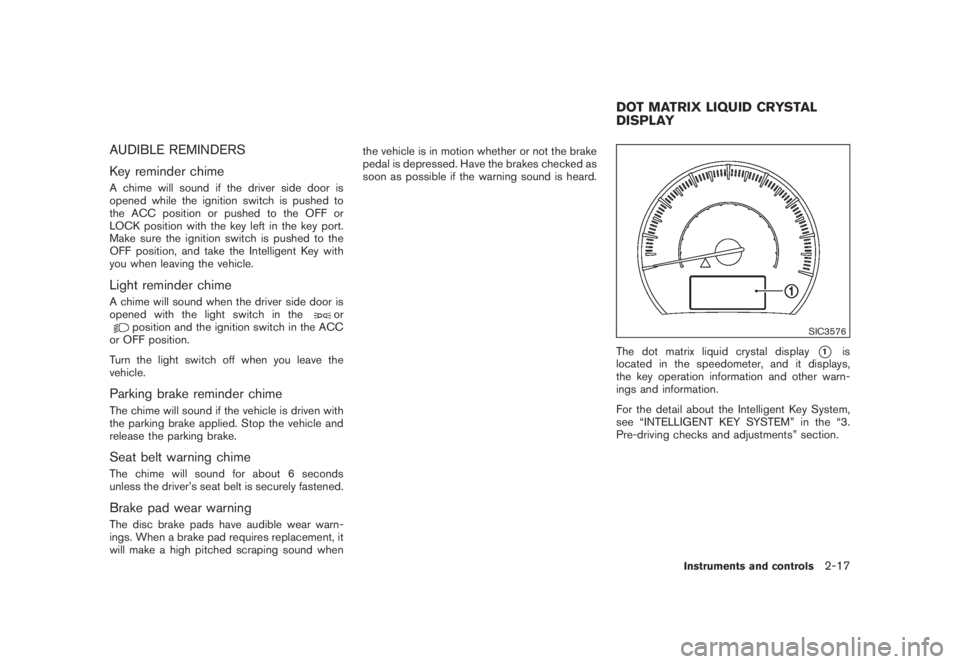
SIC3576
The dot matrix liquid crystal display
*1
is
located in the speedometer, and it displays,
the key operation information and other warn-
ings and information.
For the detail about the Intelligent Key System,
see “INTELLIGENT KEY SYSTEM” in the “3.
Pre-driving checks and adjustments” section.
DOT MATRIX LIQUID CRYSTAL
DISPLAY
Instruments and controls
2-17
Page 90 of 444
Black plate (86,1)
Model "Z51-D" EDITED: 2008/ 6/ 26
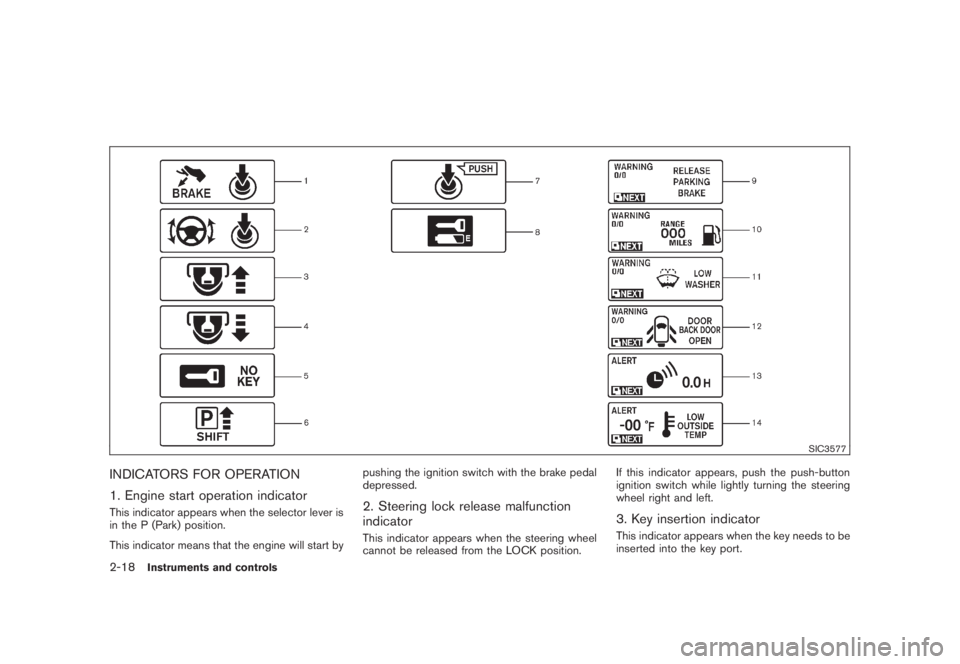
SIC3577
INDICATORS FOR OPERATION
1. Engine start operation indicatorThis indicator appears when the selector lever is
in the P (Park) position.
This indicator means that the engine will start bypushing the ignition switch with the brake pedal
depressed.
2. Steering lock release malfunction
indicatorThis indicator appears when the steering wheel
cannot be released from the LOCK position.If this indicator appears, push the push-button
ignition switch while lightly turning the steering
wheel right and left.
3. Key insertion indicatorThis indicator appears when the key needs to be
inserted into the key port.
2-18
Instruments and controls
Page 91 of 444
Black plate (87,1)
Model "Z51-D" EDITED: 2008/ 6/ 26
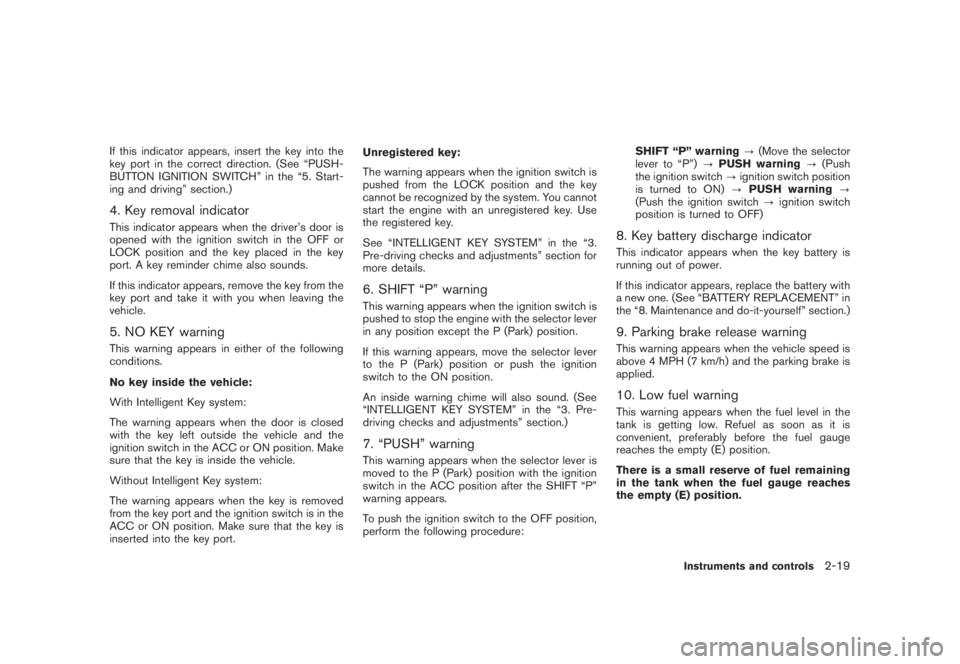
If this indicator appears, insert the key into the
key port in the correct direction. (See “PUSH-
BUTTON IGNITION SWITCH” in the “5. Start-
ing and driving” section.)4. Key removal indicatorThis indicator appears when the driver’s door is
opened with the ignition switch in the OFF or
LOCK position and the key placed in the key
port. A key reminder chime also sounds.
If this indicator appears, remove the key from the
key port and take it with you when leaving the
vehicle.5. NO KEY warningThis warning appears in either of the following
conditions.
No key inside the vehicle:
With Intelligent Key system:
The warning appears when the door is closed
with the key left outside the vehicle and the
ignition switch in the ACC or ON position. Make
sure that the key is inside the vehicle.
Without Intelligent Key system:
The warning appears when the key is removed
from the key port and the ignition switch is in the
ACC or ON position. Make sure that the key is
inserted into the key port.Unregistered key:
The warning appears when the ignition switch is
pushed from the LOCK position and the key
cannot be recognized by the system. You cannot
start the engine with an unregistered key. Use
the registered key.
See “INTELLIGENT KEY SYSTEM” in the “3.
Pre-driving checks and adjustments” section for
more details.
6. SHIFT “P” warningThis warning appears when the ignition switch is
pushed to stop the engine with the selector lever
in any position except the P (Park) position.
If this warning appears, move the selector lever
to the P (Park) position or push the ignition
switch to the ON position.
An inside warning chime will also sound. (See
“INTELLIGENT KEY SYSTEM” in the “3. Pre-
driving checks and adjustments” section.)7. “PUSH” warningThis warning appears when the selector lever is
moved to the P (Park) position with the ignition
switch in the ACC position after the SHIFT “P”
warning appears.
To push the ignition switch to the OFF position,
perform the following procedure:SHIFT “P” warning?(Move the selector
lever to “P”)?PUSH warning?(Push
the ignition switch?ignition switch position
is turned to ON)?PUSH warning?
(Push the ignition switch?ignition switch
position is turned to OFF)
8. Key battery discharge indicatorThis indicator appears when the key battery is
running out of power.
If this indicator appears, replace the battery with
a new one. (See “BATTERY REPLACEMENT” in
the “8. Maintenance and do-it-yourself” section.)9. Parking brake release warningThis warning appears when the vehicle speed is
above 4 MPH (7 km/h) and the parking brake is
applied.10. Low fuel warningThis warning appears when the fuel level in the
tank is getting low. Refuel as soon as it is
convenient, preferably before the fuel gauge
reaches the empty (E) position.
There is a small reserve of fuel remaining
in the tank when the fuel gauge reaches
the empty (E) position.
Instruments and controls
2-19
Page 134 of 444
Black plate (132,1)
Model "Z51-D" EDITED: 2008/ 6/ 26
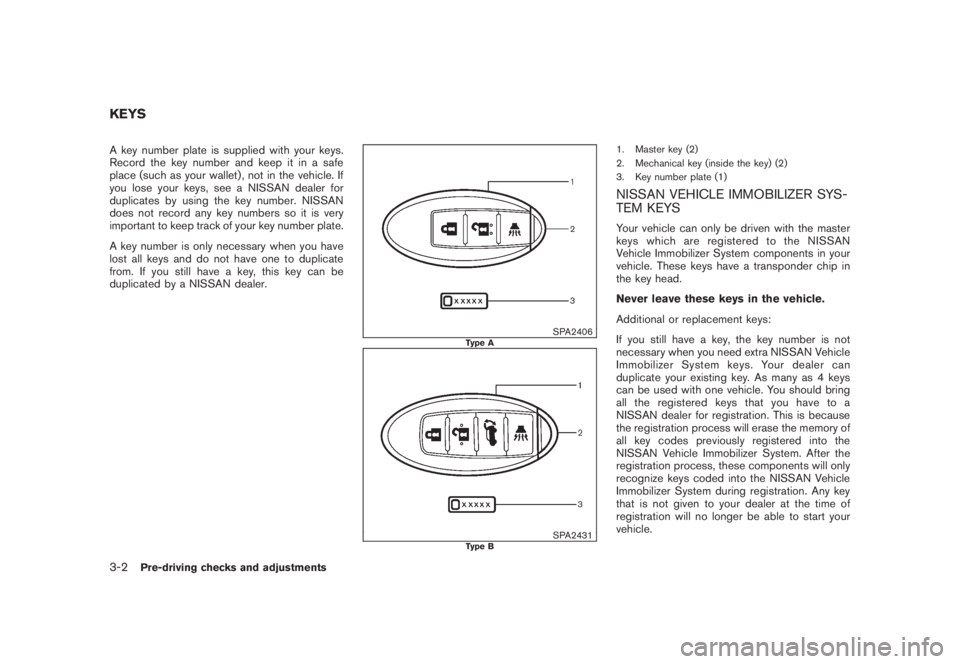
A key number plate is supplied with your keys.
Record the key number and keep it in a safe
place (such as your wallet) , not in the vehicle. If
you lose your keys, see a NISSAN dealer for
duplicates by using the key number. NISSAN
does not record any key numbers so it is very
important to keep track of your key number plate.
A key number is only necessary when you have
lost all keys and do not have one to duplicate
from. If you still have a key, this key can be
duplicated by a NISSAN dealer.
SPA2406
Type A
SPA2431
Type B
1. Master key (2)
2. Mechanical key (inside the key) (2)
3. Key number plate (1)NISSAN VEHICLE IMMOBILIZER SYS-
TEM KEYSYour vehicle can only be driven with the master
keys which are registered to the NISSAN
Vehicle Immobilizer System components in your
vehicle. These keys have a transponder chip in
the key head.
Never leave these keys in the vehicle.
Additional or replacement keys:
If you still have a key, the key number is not
necessary when you need extra NISSAN Vehicle
Immobilizer System keys. Your dealer can
duplicate your existing key. As many as 4 keys
can be used with one vehicle. You should bring
all the registered keys that you have to a
NISSAN dealer for registration. This is because
the registration process will erase the memory of
all key codes previously registered into the
NISSAN Vehicle Immobilizer System. After the
registration process, these components will only
recognize keys coded into the NISSAN Vehicle
Immobilizer System during registration. Any key
that is not given to your dealer at the time of
registration will no longer be able to start your
vehicle.
KEYS3-2
Pre-driving checks and adjustments
Page 138 of 444

Black plate (136,1)
Model "Z51-D" EDITED: 2008/ 6/ 26
SPA2300
LOCKING WITH POWER DOOR LOCK
SWITCHOperating the power door lock switch will lock
or unlock all the doors. The switches are located
on the driver’s and front passenger’s door
armrests.
To lock the doors, push the power door lock
switch to the lock position
*1
with the driver’s
or front passenger’s door open, then close the
door.
When locking the door this way, be certain
not to leave the key inside the vehicle.
To unlock the doors, push the power door lock
switch to the unlock position*2.
Lockout protectionWhen the power door lock switch (driver or front
passenger) is moved to the lock position with
the key in the port and any door open, all doors
will lock and unlock automatically. With the
Intelligent Key left in the vehicle (not in the key
port) and any door open, all doors will unlock
automatically and a chime will sound after the
door is closed.
These functions help to prevent the key from
being accidentally locked inside the vehicle.AUTOMATIC DOOR LOCKS.All doors will be locked automatically when
the vehicle speed reaches 15 MPH (24
km/h) .
.All doors will be unlocked automatically
when the ignition switch is pushed to the
OFF position.
The automatic lock and unlock functions
can be deactivated or activated indepen-
dently of each other.
To deactivate or activate the automatic lock or
unlock system, perform the following procedure:
1. Close all doors.
2. Pushtheignitionswitchtothe“ON”
position.3. Do one of the following within 20 seconds of
performing step 2:
.To change AUTO UNLOCK settings:
push and hold the power door lock
switch to the
position (UNLOCK)
for more than 5 seconds.
.To change AUTO LOCK settings: push
and hold the power door lock switch to
the
position (LOCK) for more than
5 seconds.
4. When activated, the hazard indicator will
flash twice. When deactivated, the hazard
indicator will flash once.
5. The ignition must be placed in the OFF and
ON position again between each setting
change.
3-6
Pre-driving checks and adjustments
Page 146 of 444
Black plate (144,1)
Model "Z51-D" EDITED: 2008/ 6/ 26
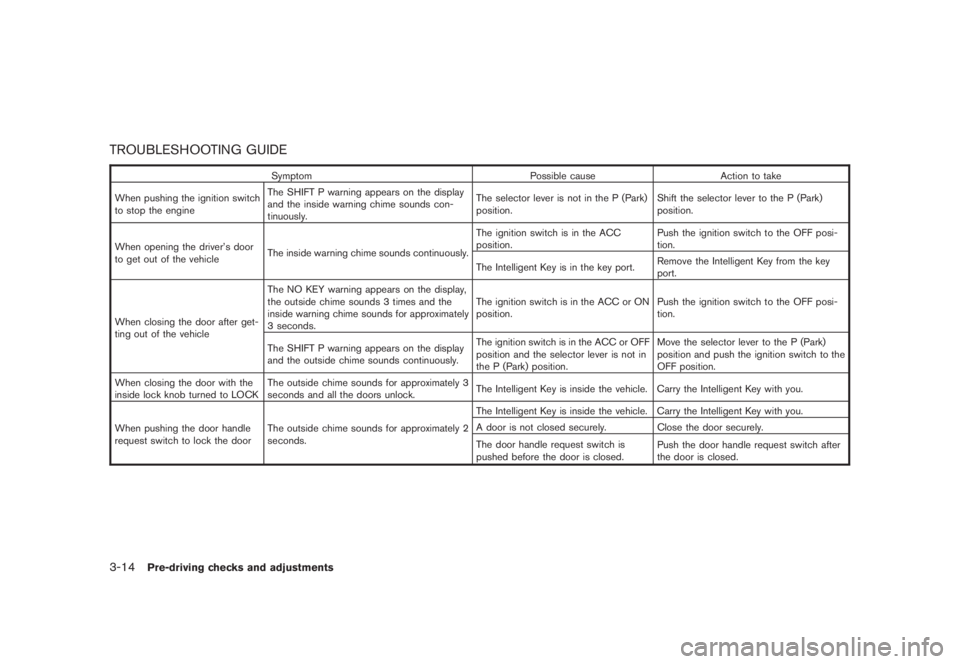
TROUBLESHOOTING GUIDE
Symptom Possible cause Action to take
When pushing the ignition switch
to stop the engineThe SHIFT P warning appears on the display
and the inside warning chime sounds con-
tinuously.The selector lever is not in the P (Park)
position.Shift the selector lever to the P (Park)
position.
When opening the driver’s door
to get out of the vehicleThe inside warning chime sounds continuously.The ignition switch is in the ACC
position.Push the ignition switch to the OFF posi-
tion.
The Intelligent Key is in the key port.Remove the Intelligent Key from the key
port.
When closing the door after get-
ting out of the vehicleThe NO KEY warning appears on the display,
the outside chime sounds 3 times and the
inside warning chime sounds for approximately
3 seconds.The ignition switch is in the ACC or ON
position.Push the ignition switch to the OFF posi-
tion.
The SHIFT P warning appears on the display
and the outside chime sounds continuously.The ignition switch is in the ACC or OFF
position and the selector lever is not in
the P (Park) position.Move the selector lever to the P (Park)
position and push the ignition switch to the
OFF position.
When closing the door with the
inside lock knob turned to LOCKThe outside chime sounds for approximately 3
seconds and all the doors unlock.The Intelligent Key is inside the vehicle. Carry the Intelligent Key with you.
When pushing the door handle
request switch to lock the doorThe outside chime sounds for approximately 2
seconds.The Intelligent Key is inside the vehicle. Carry the Intelligent Key with you.
A door is not closed securely. Close the door securely.
The door handle request switch is
pushed before the door is closed.Push the door handle request switch after
the door is closed.
3-14
Pre-driving checks and adjustments