2008 NISSAN MURANO Key port
[x] Cancel search: Key portPage 162 of 444
Black plate (160,1)
Model "Z51-D" EDITED: 2008/ 6/ 26
SIC2064
VANITY MIRRORTo use the front vanity mirror, pull down the sun
visor and pull up the cover.The automatic drive positioner system has two
features:
.Entry/exit function
.Memory storage
ENTRY/EXIT FUNCTIONThis system is designed so that the driver’s seat
and steering column will automatically move
when the selector lever is in the P (Park)
position. This allows the driver to get into and
out of the driver’s seat more easily.
The driver’s seat will slide backward and the
steering wheel will move up when the driver’s
door is opened with the ignition switch in the
LOCK position and the key not inserted in the
key port.
The driver’s seat and steering wheel will return
to the previous positions when the ignition
switch is pushed to the ACC position.
The driver’s seat will not return to the previous
positions if the seat or steering adjusting switch
is operated when the seat is at the exit position.Cancel or activate entry/exit functionThe selector lever must be in the P (Park)
position with the ignition switch in the OFF
position.
The entry/exit function can be activated orcanceled by pressing and holding the SET
switch for more than 10 seconds.
The indicator lights on the memory switches (1
and 2) will blink once when the function is
canceled, and the indicator lights will blink twice
when the function is activated. Note that the
indicator lights may illuminate after 5 seconds
while holding the SET switch. This indicates
readiness for linking the Intelligent Key to a
stored memory position. Keep the SET switch
pressed for more than 10 seconds to turn on or
off the entry/exit function.
The entry/exit function can also be activated or
canceled if the “Lift Steering Wheel on Exit” key
or “Slide Driver Seat Back on Exit” key is turned
to ON or OFF in the “Comfort & Conv.” settings.
(See “VEHICLE INFORMATION AND SET-
TINGS” in the “4. Monitor, heater, air condi-
tioner, audio, phone and voice recognition
systems” section.)
Initialize entry/exit functionIf the battery cable is disconnected, or if the fuse
opens, the entry/exit function will not work
though this function was set on before. In such
a case, after connecting the battery or replacing
with a new fuse, open and close the driver’s
door more than two times after the ignition
switch is turned from the ON position to the
LOCK position. The entry/exit function will be
activated.
AUTOMATIC DRIVE POSITIONER (if
so equipped)
3-30
Pre-driving checks and adjustments
Page 255 of 444
Black plate (251,1)
Model "Z51-D" EDITED: 2008/ 6/ 26
SAA1575
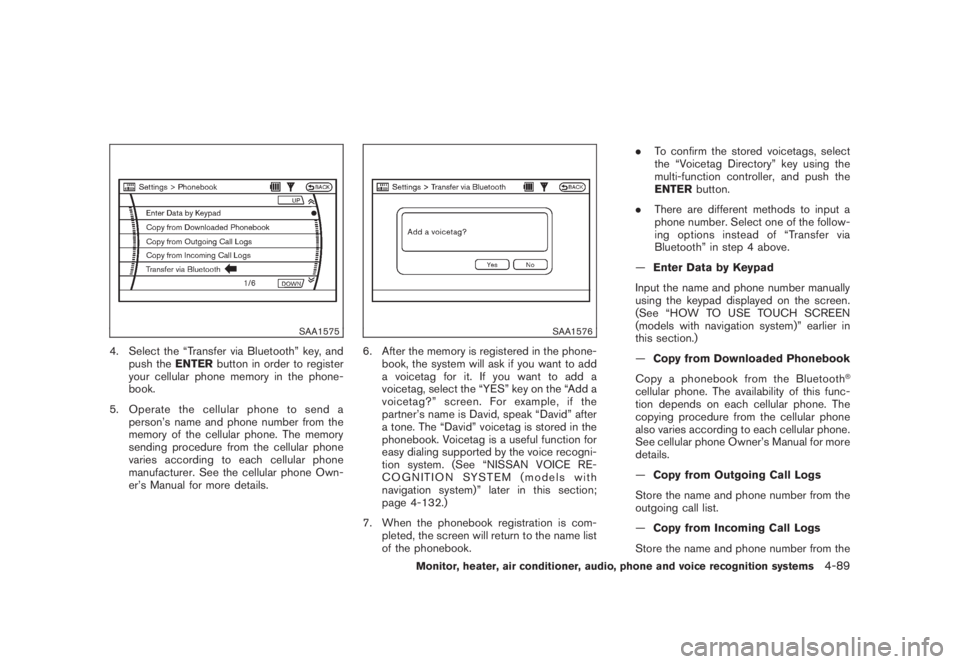
4. Select the “Transfer via Bluetooth” key, and
push theENTERbutton in order to register
your cellular phone memory in the phone-
book.
5. Operate the cellular phone to send a
person’s name and phone number from the
memory of the cellular phone. The memory
sending procedure from the cellular phone
varies according to each cellular phone
manufacturer. See the cellular phone Own-
er’s Manual for more details.
SAA1576
6. After the memory is registered in the phone-
book, the system will ask if you want to add
a voicetag for it. If you want to add a
voicetag, select the “YES” key on the “Add a
voicetag?” screen. For example, if the
partner’s name is David, speak “David” after
a tone. The “David” voicetag is stored in the
phonebook. Voicetag is a useful function for
easy dialing supported by the voice recogni-
tion system. (See “NISSAN VOICE RE-
COGNITION SYSTEM (models with
navigation system)” later in this section;
page 4-132.)
7. When the phonebook registration is com-
pleted, the screen will return to the name list
of the phonebook..To confirm the stored voicetags, select
the “Voicetag Directory” key using the
multi-function controller, and push the
ENTERbutton.
.There are different methods to input a
phone number. Select one of the follow-
ing options instead of “Transfer via
Bluetooth” in step 4 above.
—Enter Data by Keypad
Input the name and phone number manually
using the keypad displayed on the screen.
(See “HOW TO USE TOUCH SCREEN
(models with navigation system)” earlier in
this section.)
—Copy from Downloaded Phonebook
Copy a phonebook from the Bluetooth
®
cellular phone. The availability of this func-
tion depends on each cellular phone. The
copying procedure from the cellular phone
also varies according to each cellular phone.
See cellular phone Owner’s Manual for more
details.
—Copy from Outgoing Call Logs
Store the name and phone number from the
outgoing call list.
—Copy from Incoming Call Logs
Store the name and phone number from the
Monitor, heater, air conditioner, audio, phone and voice recognition systems
4-89
Page 315 of 444
Black plate (16,1)
5 Starting and driving
Model "Z51-D" EDITED: 2008/ 6/ 23
Precautions when starting and driving..................... 5-2
Exhaust gas (carbon monoxide)......................... 5-2
Three-way catalyst.......................................... 5-2
Tire Pressure Monitoring System (TPMS)............. 5-3
Avoiding collision and rollover........................... 5-5
On-pavement and off-road driving precautions...... 5-5
Off-road recovery........................................... 5-6
Rapid air pressure loss.................................... 5-6
Drinking alcohol/drugs and driving...................... 5-7
Driving safety precautions................................ 5-7
Push-button ignition switch.................................. 5-9
Intelligent Key system (if so equipped)................ 5-9
Push-button ignition switch operation................ 5-11
Push-button ignition switch positions................ 5-11
Key port..................................................... 5-12
Before starting the engine.................................. 5-13
Starting the engine........................................... 5-13
Driving the vehicle............................................ 5-14
Continuously Variable Transmission (CVT).......... 5-14
Parking brake.................................................. 5-18
Cruise control................................................. 5-19
Precautions on cruise control.......................... 5-19Cruise control operations............................... 5-19
Break-in schedule............................................ 5-21
Increasing fuel economy.................................... 5-21
All-Wheel Drive (AWD) (if so equipped)................ 5-22
All-Wheel Drive (AWD) lock switch operations.... 5-22
AWD warning light....................................... 5-23
Parking/parking on hills...................................... 5-25
Power steering................................................ 5-26
Brake system.................................................. 5-26
Braking precautions...................................... 5-26
Parking brake break-in................................... 5-26
Anti-lock Braking System (ABS)...................... 5-27
Vehicle Dynamic Control (VDC) system................. 5-28
Cold weather driving......................................... 5-29
Freeing a frozen door lock.............................. 5-29
Anti-freeze.................................................. 5-29
Battery...................................................... 5-29
Draining of coolant water............................... 5-29
Tire equipment............................................ 5-30
Special winter equipment............................... 5-30
Driving on SNOW or ice................................ 5-30
Engine block heater (if so equipped)................. 5-30
Page 323 of 444
Black plate (321,1)
Model "Z51-D" EDITED: 2008/ 6/ 26
section for wet brakes.
.Avoid parking your vehicle on steep
hills. If you get out of the vehicle
and it rolls forward, backward or
sideways, you could be injured.
.Whenever you drive off-road
through sand, mud or water as deep
as the wheel hub, more frequent
maintenance may be required. See
the maintenance information in the
“NISSAN Service and Maintenance
Guide”.
.Spinning the front wheels on slip-
pery surfaces may cause the AWD
warning light to flash and the AWD
system to automatically switch from
the AWD mode to the 2WD mode.
This could reduce traction. Be espe-
cially careful when towing a trailer.
(AWD models)
WARNING
Do not operate the push-button ignition
switch while driving the vehicle except
in an emergency. (The engine will stop
when the ignition switch is pushed 3
consecutive times or the ignition switch
is pushed and held for more than 2
seconds.) If the engine stops while the
vehicle is being driven, this could lead
to a crash and serious injury.
SSD0689
Without Intelligent Key system
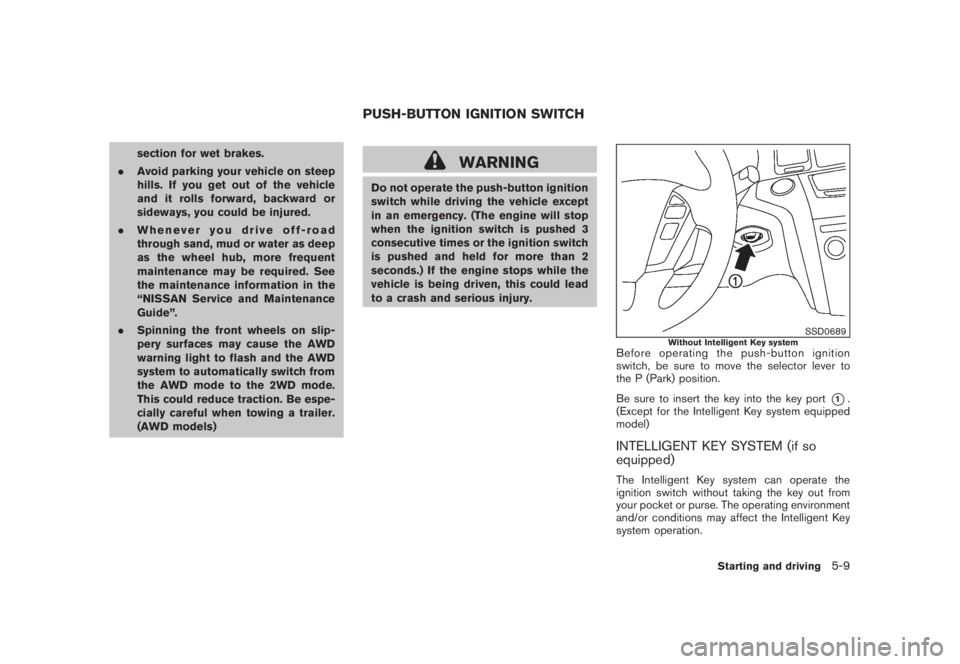
Before operating the push-button ignition
switch, be sure to move the selector lever to
the P (Park) position.
Be sure to insert the key into the key port
*1.
(Except for the Intelligent Key system equipped
model)
INTELLIGENT KEY SYSTEM (if so
equipped)The Intelligent Key system can operate the
ignition switch without taking the key out from
your pocket or purse. The operating environment
and/or conditions may affect the Intelligent Key
system operation.
PUSH-BUTTON IGNITION SWITCH
Starting and driving
5-9
Page 325 of 444

Black plate (323,1)
Model "Z51-D" EDITED: 2008/ 6/ 26
SSD0688
PUSH-BUTTON IGNITION SWITCH
OPERATIONWhen the ignition switch is pushed without
depressing the brake pedal, the ignition switch
position will change as follows:
.Push center once to change to ACC.
.Push center two times to change to ON.
.Push center three times to change to OFF.
(No position illuminates.)
.Push center four times to return to ACC.
.Open or close any door to return to LOCK
during the OFF position.The ignition switch is equipped with an anti-theft
steering lock device.
The ignition lock is designed so that the ignition
switch position cannot be switched to LOCK
until the selector lever is moved to the P (Park)
position.
When the ignition switch cannot be pushed
toward the LOCK position, proceed as follows:
1. Move the selector lever into the P (Park)
position.
2. Push the ignition switch to the OFF position.
3. Open the door. The ignition switch will
change to the LOCK position.
The selector lever can be moved from the P
(Park) position if the ignition switch is in
the ON position and the brake pedal is
depressed.
In order for the steering wheel to be locked, it
must be turned about 1/8 of a right or left turn
from the straight up position.
To lock the steering wheel, push the
ignition switch to the OFF position. To
unlock the steering wheel, push the igni-
tion switch. If the steering lock release
malfunction indicator appears on the dot
matrix liquid crystal display, push the
push-button ignition switch again whilelightly turning the steering wheel right and
left. (See “DOT MATRIX LIQUID CRYSTAL
DISPLAY” in the “2. Instruments and con-
trols” section.)
If the battery of the vehicle is discharged,
the push-button ignition switch cannot be
turned from the LOCK position.
Some indicators and warnings for operation are
displayed on the dot matrix liquid crystal display
between the speedometer and tachometer. (See
“DOT MATRIX LIQUID CRYSTAL DISPLAY” in
the “2. Instruments and controls” section.)
PUSH-BUTTON IGNITION SWITCH
POSITIONS
LOCK (Normal parking position)The ignition switch can only be locked in this
position.
The ignition switch will be unlocked when it is
pushed to the ACC position while carrying the
Intelligent Key or with the key inserted in the
port.ACC (Accessories)This position activates electrical accessories
such as the radio, when the engine is not
running.
Starting and driving
5-11
Page 326 of 444
Black plate (324,1)
Model "Z51-D" EDITED: 2008/ 6/ 26
ON (Normal operating position)This position turns on the ignition system and
electrical accessories.OFFThe engine can be turned off without locking the
steering wheel.
The ignition lock is designed so that the ignition
switch cannot be switched to the LOCK position
until the selector lever is moved to the P (Park)
position.
CAUTION
Do not leave the vehicle with the push-
button ignition switch in ACC or ON
positions when the engine is not run-
ning for an extended period. This can
discharge the battery.
SSD0690
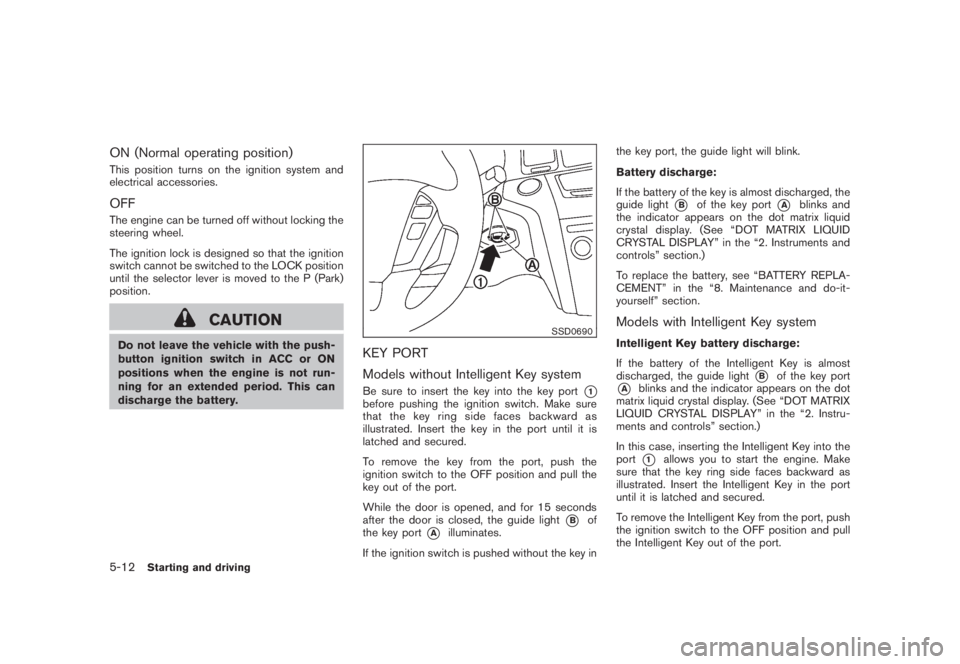
KEY PORT
Models without Intelligent Key systemBe sure to insert the key into the key port
*1
before pushing the ignition switch. Make sure
that the key ring side faces backward as
illustrated. Insert the key in the port until it is
latched and secured.
To remove the key from the port, push the
ignition switch to the OFF position and pull the
key out of the port.
While the door is opened, and for 15 seconds
after the door is closed, the guide light
*B
of
the key port
*A
illuminates.
If the ignition switch is pushed without the key inthe key port, the guide light will blink.
Battery discharge:
If the battery of the key is almost discharged, the
guide light
*B
of the key port
*A
blinks and
the indicator appears on the dot matrix liquid
crystal display. (See “DOT MATRIX LIQUID
CRYSTAL DISPLAY” in the “2. Instruments and
controls” section.)
To replace the battery, see “BATTERY REPLA-
CEMENT” in the “8. Maintenance and do-it-
yourself” section.
Models with Intelligent Key systemIntelligent Key battery discharge:
If the battery of the Intelligent Key is almost
discharged, the guide light
*B
of the key port
*A
blinks and the indicator appears on the dot
matrix liquid crystal display. (See “DOT MATRIX
LIQUID CRYSTAL DISPLAY” in the “2. Instru-
ments and controls” section.)
In this case, inserting the Intelligent Key into the
port*1
allows you to start the engine. Make
sure that the key ring side faces backward as
illustrated. Insert the Intelligent Key in the port
until it is latched and secured.
To remove the Intelligent Key from the port, push
the ignition switch to the OFF position and pull
the Intelligent Key out of the port.
5-12
Starting and driving
Page 327 of 444
Black plate (325,1)
Model "Z51-D" EDITED: 2008/ 6/ 26
NOTE:
The key port does not charge the key
battery. If you see the low battery indicator
in the dot matrix liquid crystal display,
replace the battery as soon as possible.
(See “BATTERY REPLACEMENT” in the “8.
Maintenance and do-it-yourself” section.)
CAUTION
.Never place anything except the key
in the key port. Doing so may cause
damage to the equipment.
.Make sure the key is in the correct
direction when inserting it to the
key port. The engine may not start if
it is in the incorrect direction.
.Remove the key from the key port
after the ignition switch is pushed to
the OFF position..Make sure the area around the vehicle is
clear.
.Check fluid levels such as engine oil, cool-
ant, brake fluid and window washer fluid as
frequently as possible, or at least whenever
you refuel.
.Check that all windows and lights are clean.
.Visually inspect tires for their appearance
and condition. Also check tires for proper
inflation.
.Lock all doors.
.Position seat and adjust head restraints.
.Adjust inside and outside mirrors.
.Fasten seat belts and ask all passengers to
do likewise.
.Check the operation of warning lights when
the ignition switch is pushed to the ON
position. (See “WARNING/INDICATOR
LIGHTS AND AUDIBLE REMINDERS” in
the “2. Instruments and controls” section.)1. Apply the parking brake.
2. Move the selector lever to the P (Park) or N
(Neutral) position. (P is recommended.)
The starter is designed not to operate unless
the selector lever is in either of the above
positions.
3. Insert the key into the key port. (Without the
Intelligent Key System)
Push the ignition switch to the ON position.
Depress the brake pedal and push the
ignition switch to start the engine.
To start the engine immediately, push and
release the ignition switch while depressing
the brake pedal with the ignition switch in
any position.
.If the engine is very hard to start in
extremely cold weather or when restart-
ing, depress the accelerator pedal a little
(approximately 1/3 to the floor) and
while holding, crank the engine. Release
the accelerator pedal when the engine
starts.
.If the engine is very hard to start
because it is flooded, depress the
accelerator pedal all the way to the floor
and hold it. Push the ignition switch to
the ON position to start cranking the
engine. After 5 or 6 seconds, stop
BEFORE STARTING THE ENGINE STARTING THE ENGINE
Starting and driving
5-13
Page 373 of 444
Black plate (371,1)
Model "Z51-D" EDITED: 2008/ 6/ 26
When performing any inspection or mainte-
nance work on your vehicle, always take care
to prevent serious accidental injury to yourself or
damage to the vehicle. The following are general
precautions which should be closely observed.
WARNING
.Park the vehicle on a level surface,
apply the parking brake securely
and block the wheels to prevent
the vehicle from moving. Move the
selector lever to P (Park) .
.Be sure the ignition switch is in the
OFF or LOCK position when per-
forming any parts replacement or
repairs.
.If you must work with the engine
running, keep your hands, clothing,
hair and tools away from moving
fans, belts and any other moving
parts.
.It is advisable to secure or remove
any loose clothing and remove any
jewelry, such as rings, watches, etc.
before working on your vehicle.
.Always wear eye protection when-
ever you work on your vehicle.
.If you must run the engine in anenclosed space such as a garage, be
sure there is proper ventilation for
exhaust gases to escape.
.Never get under the vehicle while it
is supported only by a jack. If it is
necessary to work under the vehicle,
support it with safety stands.
.Keep smoking materials, flame and
sparks away from fuel tank and the
battery.
.The fuel filter or fuel lines should be
serviced by a NISSAN dealer be-
cause the fuel lines are under high
pressure even when the engine is
off.
CAUTION
.Do not work under the hood while
the engine is hot. Turn the engine
off and wait until it cools down.
.Avoid direct contact with used en-
gine oil and coolant. Improperly
disposed engine oil, and engine
coolant and/or other vehicle fluids
can damage the environment. Al-
ways conform to local regulations
for disposal of vehicle fluid..Never leave the engine or the CVT
related component harnesses dis-
connected while the ignition switch
is in the ON position.
.Never connect or disconnect the
battery or any transistorized com-
ponent while the ignition switch is
in the ON position.
.Your vehicle is equipped with an
automatic engine cooling fan. It may
come on at any time without warn-
ing, even if the ignition key is in the
OFF position and the engine is not
running. To avoid injury, always
disconnect the negative battery
cable before working near the fan.
This “8. Maintenance and do-it-yourself” section
gives instructions regarding only those items
which are relatively easy for an owner to perform.
A genuine NISSAN Service Manual is also
available. (See “OWNER’S MANUAL/SERVICE
MANUAL ORDER INFORMATION” in the “9.
Technical and consumer information” section.)
Youshouldbeawarethatincompleteor
improper servicing may result in operating
difficulties or excessive emissions, and could
affect warranty coverage.If in doubt about
any servicing, we recommend that it be
MAINTENANCE PRECAUTIONS
Maintenance and do-it-yourself
8-5