2008 NISSAN MURANO window
[x] Cancel search: windowPage 121 of 444

Black plate (117,1)
Model "Z51-D" EDITED: 2008/ 6/ 26
SIC3505
COAT HOOKSThe coat hooks are equipped beside the rear
personal lights.
CAUTION
Do not place items which are more than
2 lb (1 kg) on the hook.
SIC3657
CARGO NET (if so equipped)The cargo net helps keep packages in the cargo
area from moving around while your vehicle is
driven.
To install the cargo net, attach the hooks to the
retainers
*A
.
CAUTION
Avoid keeping heavy objects in the net.
POWER WINDOWS
WARNING
.Make sure that all passengers have
their hands, etc. inside the vehicle
while it is in motion and before
closing the windows. Use the win-
dow lock switch to prevent unex-
pected use of the power windows.
.Do not leave children unattended
inside the vehicle. They could un-
knowingly activate switches or con-
trols and become trapped in the
window. Unattended children could
become involved in serious acci-
dents.
The power windows operate when the ignition
switch is in the ON position or for about 45
seconds after the ignition switch is pushed to
the OFF position. If the driver’s or front
passenger’s door is opened during this period
of about 45 seconds, power to the windows is
canceled.WINDOWS
Instruments and controls
2-49
Page 122 of 444
Black plate (118,1)
Model "Z51-D" EDITED: 2008/ 6/ 26
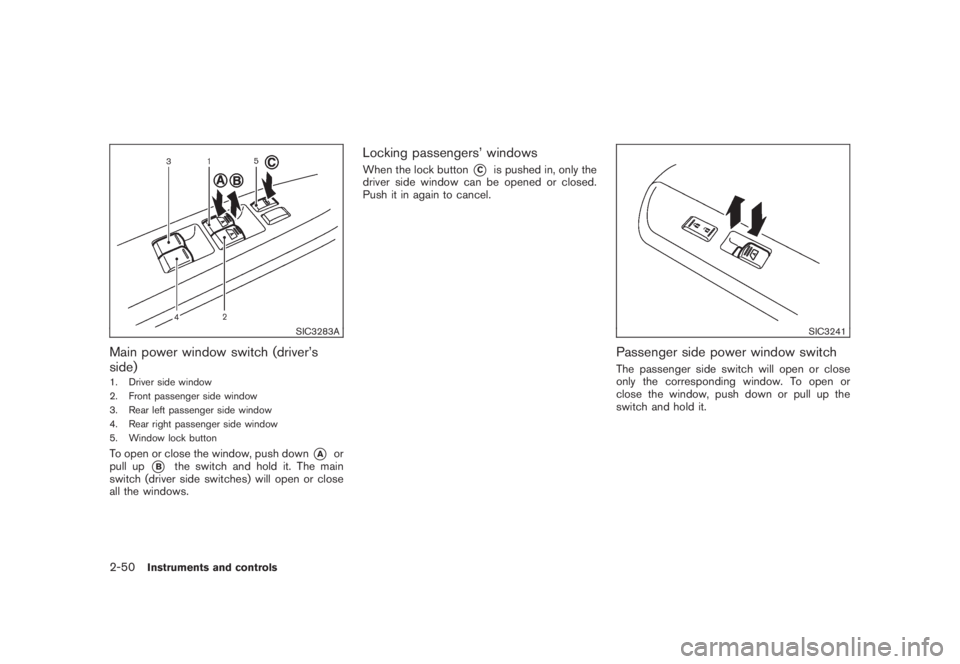
SIC3283A
Main power window switch (driver’s
side)1. Driver side window
2. Front passenger side window
3. Rear left passenger side window
4. Rear right passenger side window
5. Window lock buttonTo open or close the window, push down
*A
or
pull up
*B
the switch and hold it. The main
switch (driver side switches) will open or close
all the windows.
Locking passengers’ windowsWhen the lock button
*C
is pushed in, only the
driver side window can be opened or closed.
Push it in again to cancel.
SIC3241
Passenger side power window switchThe passenger side switch will open or close
only the corresponding window. To open or
close the window, push down or pull up the
switch and hold it.
2-50
Instruments and controls
Page 123 of 444
Black plate (119,1)
Model "Z51-D" EDITED: 2008/ 6/ 26
SIC3285
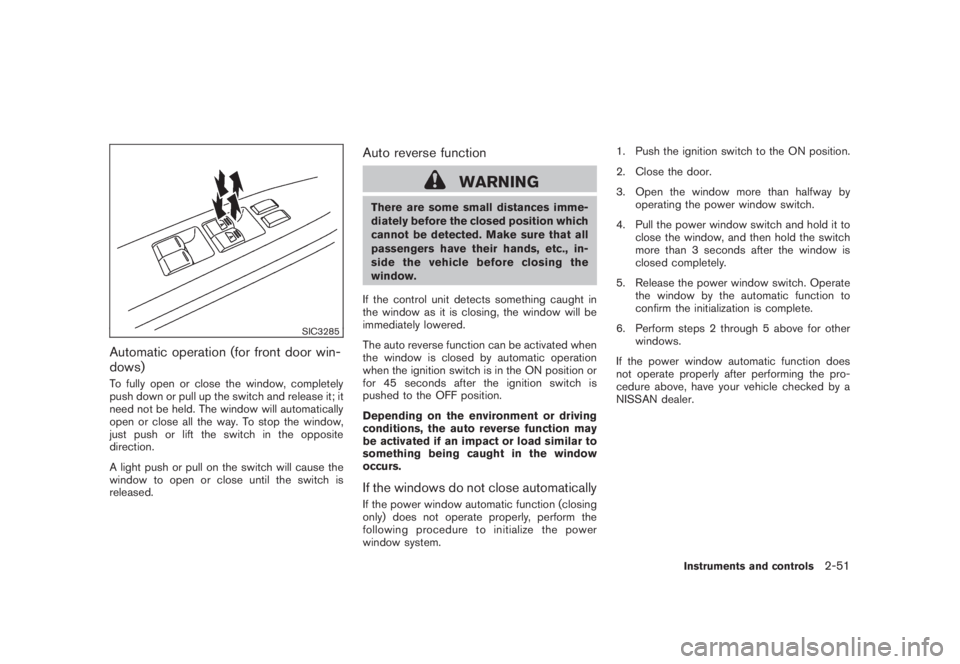
Automatic operation (for front door win-
dows)To fully open or close the window, completely
push down or pull up the switch and release it; it
need not be held. The window will automatically
open or close all the way. To stop the window,
just push or lift the switch in the opposite
direction.
A light push or pull on the switch will cause the
window to open or close until the switch is
released.
Auto reverse function
WARNING
There are some small distances imme-
diately before the closed position which
cannot be detected. Make sure that all
passengers have their hands, etc., in-
side the vehicle before closing the
window.
If the control unit detects something caught in
the window as it is closing, the window will be
immediately lowered.
The auto reverse function can be activated when
the window is closed by automatic operation
when the ignition switch is in the ON position or
for 45 seconds after the ignition switch is
pushed to the OFF position.
Depending on the environment or driving
conditions, the auto reverse function may
be activated if an impact or load similar to
something being caught in the window
occurs.If the windows do not close automaticallyIf the power window automatic function (closing
only) does not operate properly, perform the
following procedure to initialize the power
window system.1. Push the ignition switch to the ON position.
2. Close the door.
3. Open the window more than halfway by
operating the power window switch.
4. Pull the power window switch and hold it to
close the window, and then hold the switch
more than 3 seconds after the window is
closed completely.
5. Release the power window switch. Operate
the window by the automatic function to
confirm the initialization is complete.
6. Perform steps 2 through 5 above for other
windows.
If the power window automatic function does
not operate properly after performing the pro-
cedure above, have your vehicle checked by a
NISSAN dealer.
Instruments and controls
2-51
Page 128 of 444
Black plate (124,1)
Model "Z51-D" EDITED: 2008/ 6/ 26
The mood lights
*A
located in the following
positions will illuminate whenever the headlight
switch is in theor
position.
.next to the map lights
.on the rear ceiling
.under the instrument panel
.under the driver’s power window switch
The mood lights can be adjusted with the
illumination control buttons.
See “Instrument brightness control” earlier in
this section.
SIC2064
The light on the vanity mirror will turn on when
the cover on the vanity mirror is opened.
When the cover is closed, the light will turn off.
The lights will turn off after 30 minutes
when the lights remain illuminated to
prevent the battery from becoming dis-
charged.
SIC2131A
When the switch is in the ON position
*1, the
light illuminates while the lift gate is opened.
When the lift gate is closed, the light will turn off.
When the switch is in the OFF position
*2, the
light will turn off.
The lights will turn off after 30 minutes
when the light remain illuminated to pre-
vent the battery from becoming dis-
charged.
VANITY MIRROR LIGHTS CARGO LIGHTS
2-56
Instruments and controls
Page 133 of 444
Black plate (10,1)
3 Pre-driving checks and adjustments
Model "Z51-D" EDITED: 2008/ 6/ 23
Keys ............................................................... 3-2
NISSAN Vehicle Immobilizer System keys............ 3-2
Intelligent Key system (if so equipped)................ 3-3
Mechanical key.............................................. 3-4
Valet hand-off................................................ 3-4
Doors.............................................................. 3-4
Locking with mechanical key............................. 3-5
Opening and closing windows with the
mechanical key.............................................. 3-5
Locking with inside lock knob........................... 3-5
Locking with power door lock switch.................. 3-6
Automatic door locks...................................... 3-6
Child safety rear door lock............................... 3-7
Intelligent Key system (if so equipped).................... 3-7
Intelligent Key operating range.......................... 3-9
Door locks/unlocks precaution.......................... 3-9
Intelligent Key operation................................. 3-10
Battery saver system..................................... 3-13
Warning signals........................................... 3-13
Troubleshooting guide................................... 3-14
Remote keyless entry system.............................. 3-15
How to use remote keyless entry system........... 3-16Hood............................................................ 3-18
Lift gate......................................................... 3-19
Operating manual lift gate.............................. 3-19
Operating power lift gate (if so equipped).......... 3-19
Auto closure............................................... 3-22
Lift gate release........................................... 3-23
Fuel-filler door................................................. 3-23
Opening fuel-filler door.................................. 3-23
Fuel-filler cap.............................................. 3-24
Tilting telescopic steering column........................ 3-25
Manual operation......................................... 3-25
Electric operation......................................... 3-26
Sun visors...................................................... 3-26
Mirrors........................................................... 3-27
Inside mirror................................................ 3-27
Outside mirrors............................................ 3-29
Vanity mirror................................................ 3-30
Automatic drive positioner (if so equipped)............. 3-30
Entry/exit function......................................... 3-30
Memory storage........................................... 3-31
System operation......................................... 3-32
Page 137 of 444
Black plate (135,1)
Model "Z51-D" EDITED: 2008/ 6/ 26
SPA2432
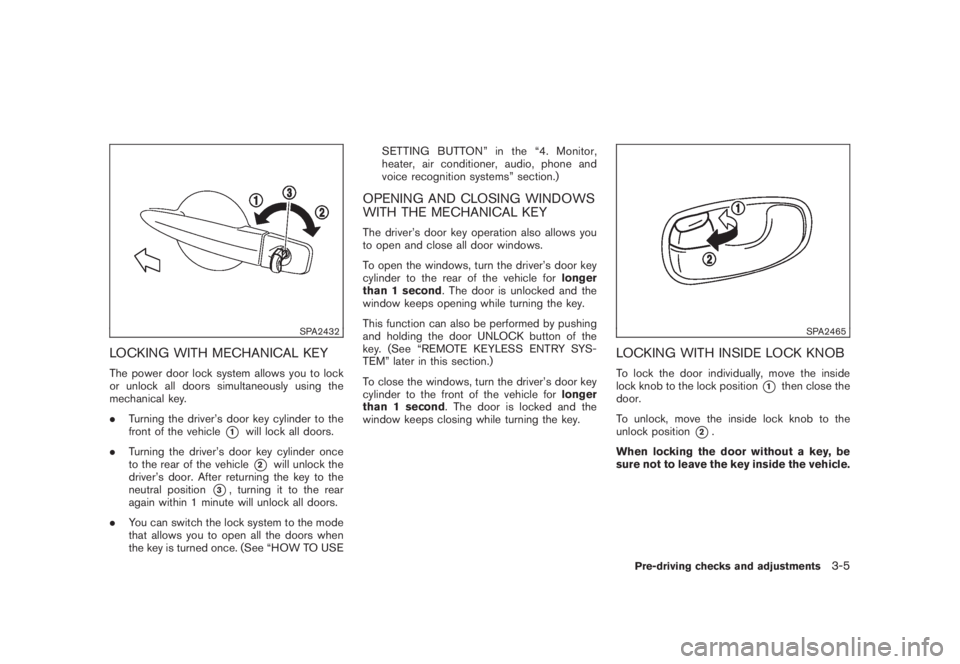
LOCKING WITH MECHANICAL KEYThe power door lock system allows you to lock
or unlock all doors simultaneously using the
mechanical key.
.Turning the driver’s door key cylinder to the
front of the vehicle
*1
will lock all doors.
.Turning the driver’s door key cylinder once
to the rear of the vehicle*2
will unlock the
driver’s door. After returning the key to the
neutral position
*3, turning it to the rear
again within 1 minute will unlock all doors.
.You can switch the lock system to the mode
that allows you to open all the doors when
the key is turned once. (See “HOW TO USESETTING BUTTON” in the “4. Monitor,
heater, air conditioner, audio, phone and
voice recognition systems” section.)
OPENING AND CLOSING WINDOWS
WITH THE MECHANICAL KEYThe driver’s door key operation also allows you
to open and close all door windows.
To open the windows, turn the driver’s door key
cylinder to the rear of the vehicle forlonger
than 1 second. The door is unlocked and the
window keeps opening while turning the key.
This function can also be performed by pushing
and holding the door UNLOCK button of the
key. (See “REMOTE KEYLESS ENTRY SYS-
TEM” later in this section.)
To close the windows, turn the driver’s door key
cylinder to the front of the vehicle forlonger
than 1 second. The door is locked and the
window keeps closing while turning the key.
SPA2465
LOCKING WITH INSIDE LOCK KNOBTo lock the door individually, move the inside
lock knob to the lock position
*1
then close the
door.
To unlock, move the inside lock knob to the
unlock position
*2.
When locking the door without a key, be
sure not to leave the key inside the vehicle.
Pre-driving checks and adjustments
3-5
Page 147 of 444

Black plate (145,1)
Model "Z51-D" EDITED: 2008/ 6/ 26
WARNING
The Intelligent Key transmits radio
waves when the buttons are pushed.
The FAA advises that radio waves may
affect aircraft navigation and commu-
nication systems. Do not operate the
Intelligent Key while on an airplane.
Make sure the buttons are not operated
unintentionally when the unit is stored
for a flight.
It is possible to lock/unlock all doors, activate
the panic alarm and open the windows and lift
gate (if so equipped) by pushing the buttons on
the key from outside the vehicle.
Before locking the doors, make sure the
key is not left in the vehicle.
The LOCK/UNLOCK button on the key can
operate at a distance of approximately 33 ft (10
m) from the vehicle. (The effective distance
depends upon the conditions around the vehi-
cle.)
The lock and unlock buttons will not operate
when:
.the distance between the key and the
vehicle is over 33 ft (10 m) .
.the key battery is completely discharged.After locking with the remote keyless entry
function, pull the door handle to make sure the
doors are securely locked.
The LOCK/UNLOCK operating range varies
depending on the environment. To securely
operate the lock and unlock buttons, approach
the vehicle to about 3 ft (1 m) from the door.
SPA2252A
Type A
SPA2436
Type B
REMOTE KEYLESS ENTRY SYSTEM
Pre-driving checks and adjustments
3-15
Page 148 of 444
Black plate (146,1)
Model "Z51-D" EDITED: 2008/ 6/ 26
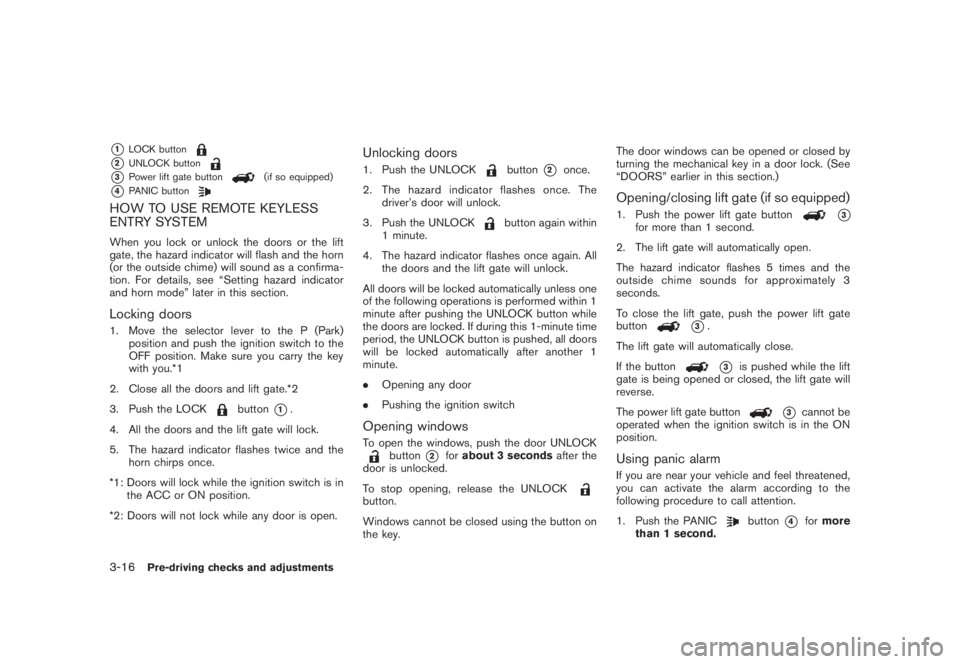
*1
LOCK button
*2
UNLOCK button
*3
Power lift gate button
(if so equipped)
*4
PANIC button
HOW TO USE REMOTE KEYLESS
ENTRY SYSTEMWhen you lock or unlock the doors or the lift
gate, the hazard indicator will flash and the horn
(or the outside chime) will sound as a confirma-
tion. For details, see “Setting hazard indicator
and horn mode” later in this section.Locking doors1. Move the selector lever to the P (Park)
position and push the ignition switch to the
OFF position. Make sure you carry the key
with you.*1
2. Close all the doors and lift gate.*2
3. Push the LOCK
button
*1.
4. All the doors and the lift gate will lock.
5. The hazard indicator flashes twice and the
horn chirps once.
*1: Doors will lock while the ignition switch is in
the ACC or ON position.
*2: Doors will not lock while any door is open.
Unlocking doors1. Push the UNLOCK
button
*2
once.
2. The hazard indicator flashes once. The
driver’s door will unlock.
3. Push the UNLOCK
button again within
1 minute.
4. The hazard indicator flashes once again. All
the doors and the lift gate will unlock.
All doors will be locked automatically unless one
of the following operations is performed within 1
minute after pushing the UNLOCK button while
the doors are locked. If during this 1-minute time
period, the UNLOCK button is pushed, all doors
will be locked automatically after another 1
minute.
.Opening any door
.Pushing the ignition switch
Opening windowsTo open the windows, push the door UNLOCK
button
*2
forabout 3 secondsafter the
door is unlocked.
To stop opening, release the UNLOCK
button.
Windows cannot be closed using the button on
the key.The door windows can be opened or closed by
turning the mechanical key in a door lock. (See
“DOORS” earlier in this section.)
Opening/closing lift gate (if so equipped)1. Push the power lift gate button
*3
for more than 1 second.
2. The lift gate will automatically open.
The hazard indicator flashes 5 times and the
outside chime sounds for approximately 3
seconds.
To close the lift gate, push the power lift gate
button
*3.
The lift gate will automatically close.
If the button*3
is pushed while the lift
gate is being opened or closed, the lift gate will
reverse.
The power lift gate button
*3
cannot be
operated when the ignition switch is in the ON
position.
Using panic alarmIf you are near your vehicle and feel threatened,
you can activate the alarm according to the
following procedure to call attention.
1. Push the PANIC
button
*4
formore
than 1 second.
3-16
Pre-driving checks and adjustments