Page 158 of 328

Display off:
Select the “Display Off” key. The indicator of the
“Display Off” turns amber and the message
above will be displayed briefly. When the audio,
HVAC (Heater and air conditioner) , or any mode
button on the control panel is operated, the dis-
play turns on for that operation. If one of the
control panel buttons is pressed, the display will
not automatically turn off until that operation is
finished. Otherwise, the screen turns off auto-
matically after 5 seconds.To turn the screen on,
cPress the SETTING button and select the
“Display” key and then select the “Display
Off” key. Then set the screen to on by press-
ing the ENTER button, or
cHold the
button for approximately 2
seconds and the message “resuming dis-
play” will appear and the “Display Off” key
will be automatically turned on (no amber
indicator) .
Lower display setting:
You can choose to display the audio or HVAC
(Heater and air conditioner) functions on the
lower part of the display. Select the “Lower Dis-
play Setting” key by using the joystick. Then se-
lect the “Audio” or “HVAC” key using the joystick
or by pressing the ENTER button.
The new settings are automatically saved when
you exit the setting screen by pressing the BACK
button or any other mode button.
LHA0642LHA0632
4-12Display screen, heater, air conditioner, audio and phone systems
ZREVIEW COPYÐ2008 Maxima(max)
Owners ManualÐUSA_English(nna)
06/08/07Ðdebbie
X
Page 159 of 328

Any time audio information is shown on the main
part of the screen, HVAC information will be
displayed on the lower part of the screen. HVAC
information will be shown even if “Audio” is se-
lected to be displayed on the lower part of the
screen.Vehicle electronic systems
Select the “Vehicle Electronic Systems” key by
using the joystick and pressing the ENTER but-
ton. The VEHICLE ELECTRONIC SYSTEMS
screen will be displayed.
You can set the following operating conditions by
selecting the desired item using the joystick, then
pressing the ENTER button. The indicator light, box
at the left of the selected item, alternately turns on
and off each time the ENTER button is pressed.
Indicator light is illuminated — ON
Indicator light is not illuminated — OFFAdjust driver seat when exiting vehicle:
With this option ON, the driver’s seat automati-
cally moves back and returns to the original po-
sition for ease of exit and entry.
Lift steering column when exiting vehicle:
With this option ON, the steering column auto-
matically tilts up and returns to the original posi-
tion for ease of exit and entry.
Selective door unlock:Select to change
which doors will unlock first during an unlocking
operation:
Only the driver’s doorÃ!All the doors
LHA0651LHA0673LHA0674
Display screen, heater, air conditioner, audio and phone systems4-13
ZREVIEW COPYÐ2008 Maxima(max)
Owners ManualÐUSA_English(nna)
06/08/07Ðdebbie
X
Page 160 of 328
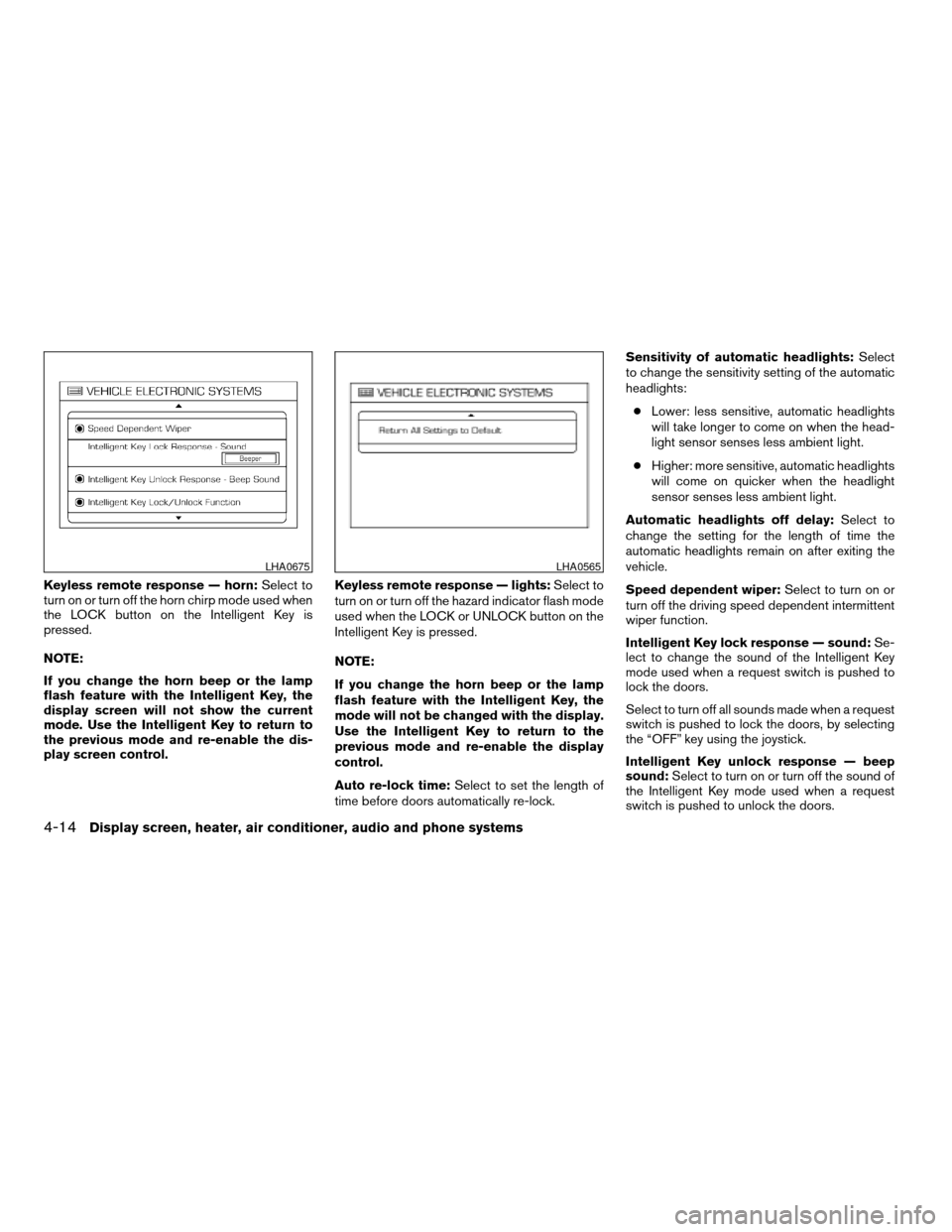
Keyless remote response — horn:Select to
turn on or turn off the horn chirp mode used when
the LOCK button on the Intelligent Key is
pressed.
NOTE:
If you change the horn beep or the lamp
flash feature with the Intelligent Key, the
display screen will not show the current
mode. Use the Intelligent Key to return to
the previous mode and re-enable the dis-
play screen control.Keyless remote response — lights:Select to
turn on or turn off the hazard indicator flash mode
used when the LOCK or UNLOCK button on the
Intelligent Key is pressed.
NOTE:
If you change the horn beep or the lamp
flash feature with the Intelligent Key, the
mode will not be changed with the display.
Use the Intelligent Key to return to the
previous mode and re-enable the display
control.
Auto re-lock time:Select to set the length of
time before doors automatically re-lock.Sensitivity of automatic headlights:Select
to change the sensitivity setting of the automatic
headlights:
cLower: less sensitive, automatic headlights
will take longer to come on when the head-
light sensor senses less ambient light.
cHigher: more sensitive, automatic headlights
will come on quicker when the headlight
sensor senses less ambient light.
Automatic headlights off delay:Select to
change the setting for the length of time the
automatic headlights remain on after exiting the
vehicle.
Speed dependent wiper:Select to turn on or
turn off the driving speed dependent intermittent
wiper function.
Intelligent Key lock response — sound:Se-
lect to change the sound of the Intelligent Key
mode used when a request switch is pushed to
lock the doors.
Select to turn off all sounds made when a request
switch is pushed to lock the doors, by selecting
the “OFF” key using the joystick.
Intelligent Key unlock response — beep
sound:Select to turn on or turn off the sound of
the Intelligent Key mode used when a request
switch is pushed to unlock the doors.
LHA0675LHA0565
4-14Display screen, heater, air conditioner, audio and phone systems
ZREVIEW COPYÐ2008 Maxima(max)
Owners ManualÐUSA_English(nna)
06/08/07Ðdebbie
X
Page 161 of 328
Intelligent Key lock/unlock function:Select
to turn on or turn off the door lock and unlock
modes used when a request switch is pushed.
Return all settings to default:Select to
change all VEHICLE ELECTRONICS SYSTEMS
to their default settings.
System settings
Select the “System Settings” key by using the
joystick and pressing the ENTER button. The
SYSTEM SETTINGS screen will be displayed.
Language/unit
The LANGUAGE/UNIT screen will appear when
selecting the “Language/Unit” key and pressing
the ENTER button.
Language: English or French
Unit: US — mile, °F, MPG
Metric — km, °C, L/100 kmYou can select the language and unit using the
joystick or pressing the ENTER button.
The settings are automatically saved when you
exit the menu by pressing the BACK button or
any other mode button.
LHA0561
Display screen, heater, air conditioner, audio and phone systems4-15
ZREVIEW COPYÐ2008 Maxima(max)
Owners ManualÐUSA_English(nna)
06/08/07Ðdebbie
X
Page 162 of 328
Clock
Adjusting the time:
Select the “Hours” or “Minutes” key and move the
joystick to the right or left to adjust the time.
The time will change step by step.
The new settings are automatically saved when
you exit the setting screen by pressing the BACK
button or any other mode button.Setting daylight savings time:
Use the “Daylight Saving Time” key to adjust the
clock to daylight savings time.
ON: Automatically adjusts for daylight savings
time.
OFF: The current time is displayed.Adjusting the time to the GPS:
Select the “Auto Adjust” key.
The time will be reset to the GPS time.
LHA0562LHA0566LHA0567
4-16Display screen, heater, air conditioner, audio and phone systems
ZREVIEW COPYÐ2008 Maxima(max)
Owners ManualÐUSA_English(nna)
06/08/07Ðdebbie
X
Page 163 of 328

Selecting the time zone:
1. Select the “Select Time Zone” key.
The TIME ZONE screen will appear.2. Select one of the following zones, depend-
ing on the current location.
cPacific zone
cMountain zone
cCentral zone
cEastern zone
cAtlantic zone
cNewfoundland zone
After selection, the CLOCK SETTINGS screen
will appear.The GPS time (manual time) corresponding to
the selected zone will be displayed. Pacific zone
has been set as the initial (default) setting.
Beep setting
With this option ON, a beep will sound if any
audio button is pressed.
Navigation settings
Refer to the separate Navigation System Own-
er’s Manual for information regarding these set-
tings.
Guidance voice settings
Refer to the separate Navigation System Own-
er’s Manual for information regarding these set-
tings.
BUTTON
To change the display brightness, press
thebutton. Pressing the button again will
change the display to “DAY” or “NIGHT” display.
Then, adjust the brightness by moving the joy-
stick right or left.
If no operation is done within 10 seconds, or if the
BACK button is pressed, the display will return to
the previous display.
LHA0568LHA0563
Display screen, heater, air conditioner, audio and phone systems4-17
ZREVIEW COPYÐ2008 Maxima(max)
Owners ManualÐUSA_English(nna)
06/08/07Ðdebbie
X
Page 164 of 328
Adjust air flow direction by moving the ventilator
slides.
Open or close the ventilators by using the dial.
Move the dial toward the
to open the ven-
tilators or toward theto close them.
Center
WHA0686
Side
WHA0687
Rear
WHA0688
VENTILATORS
4-18Display screen, heater, air conditioner, audio and phone systems
ZREVIEW COPYÐ2008 Maxima(max)
Owners ManualÐUSA_English(nna)
06/08/07Ðdebbie
X
Page 165 of 328
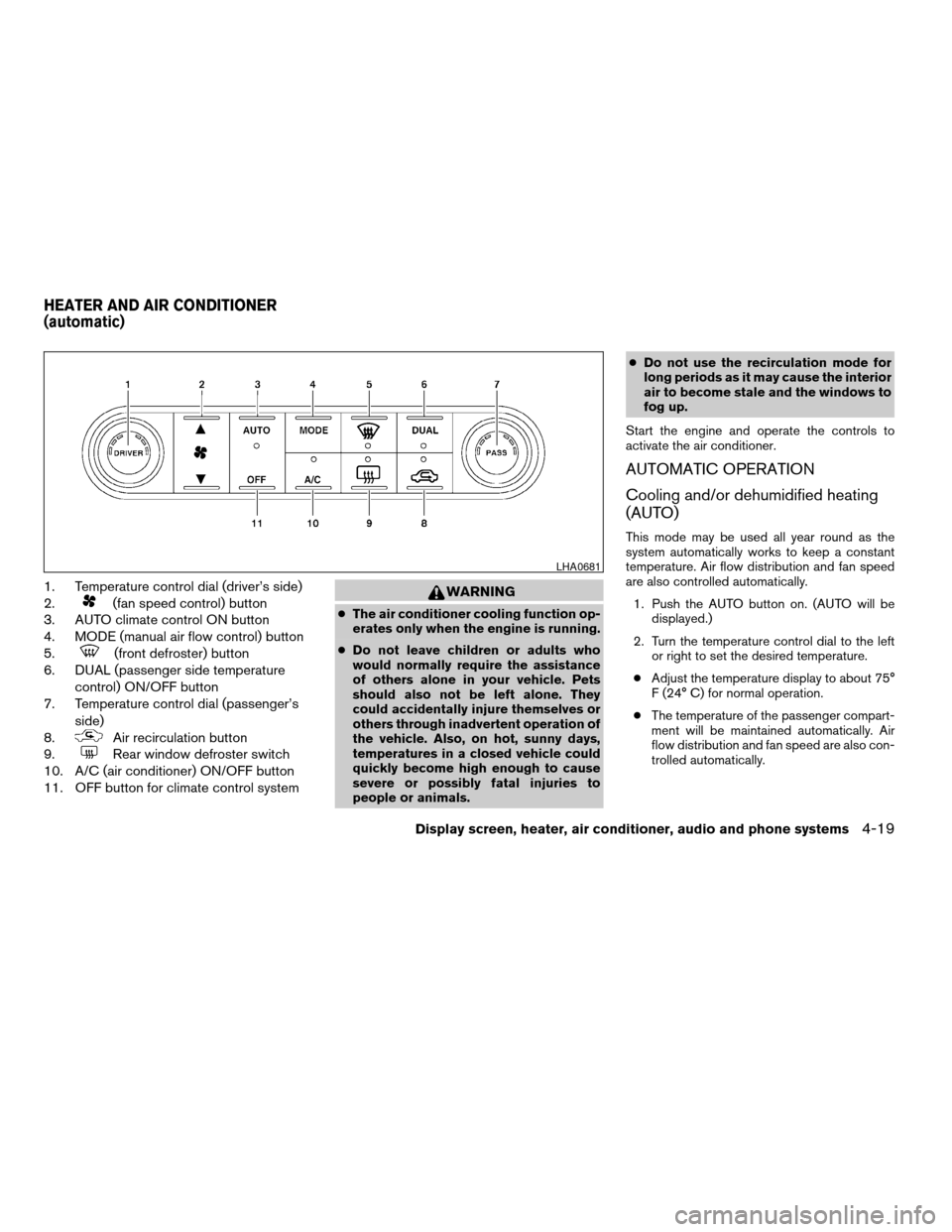
1. Temperature control dial (driver’s side)
2.
(fan speed control) button
3. AUTO climate control ON button
4. MODE (manual air flow control) button
5.
(front defroster) button
6. DUAL (passenger side temperature
control) ON/OFF button
7. Temperature control dial (passenger’s
side)
8.
Air recirculation button
9.
Rear window defroster switch
10. A/C (air conditioner) ON/OFF button
11. OFF button for climate control system
WARNING
cThe air conditioner cooling function op-
erates only when the engine is running.
cDo not leave children or adults who
would normally require the assistance
of others alone in your vehicle. Pets
should also not be left alone. They
could accidentally injure themselves or
others through inadvertent operation of
the vehicle. Also, on hot, sunny days,
temperatures in a closed vehicle could
quickly become high enough to cause
severe or possibly fatal injuries to
people or animals.cDo not use the recirculation mode for
long periods as it may cause the interior
air to become stale and the windows to
fog up.
Start the engine and operate the controls to
activate the air conditioner.
AUTOMATIC OPERATION
Cooling and/or dehumidified heating
(AUTO)
This mode may be used all year round as the
system automatically works to keep a constant
temperature. Air flow distribution and fan speed
are also controlled automatically.
1. Push the AUTO button on. (AUTO will be
displayed.)
2. Turn the temperature control dial to the left
or right to set the desired temperature.
cAdjust the temperature display to about 75°
F (24° C) for normal operation.
cThe temperature of the passenger compart-
ment will be maintained automatically. Air
flow distribution and fan speed are also con-
trolled automatically.
LHA0681
HEATER AND AIR CONDITIONER
(automatic)
Display screen, heater, air conditioner, audio and phone systems4-19
ZREVIEW COPYÐ2008 Maxima(max)
Owners ManualÐUSA_English(nna)
06/08/07Ðdebbie
X