2008 NISSAN ALTIMA clock
[x] Cancel search: clockPage 133 of 352

All doors will be locked automatically unless one
of the following operations is performed within 1
minute after pushing the request switch.
cOpening any door.
cPushing the ignition switch.
The interior light timer illuminates for 30 seconds
when a door is unlocked and the room light
switch is in the DOOR position.
The interior light can be turned off without waiting
for 30 seconds by performing one of the follow-
ing operations.
cPlacing the ignition switch in the ON posi-
tion.cLocking the doors with the remote controller.
cSwitching the room light switch to the OFF
position.Opening the trunk lid
1. Push the trunk opener request switchsAfor
more than 1 second while carrying the Intel-
ligent Key with you.
2. The trunk will unlatch. A chime will sound
four times.
3. Raise the trunk lid to open the trunk.
Lockout protection
To prevent the Intelligent Key from being acci-
dentally locked in the trunk, lockout protection is
equipped with the Intelligent Key system.
WPD0369WPD0406
Pre-driving checks and adjustments3-11
ZREVIEW COPYÐ2008 Altima(alt)
Owners ManualÐUSA_English(nna)
03/13/07Ðdebbie
X
Page 135 of 352

Unlocking doors
1. Push thebutton on the Intelligent Key.
2. The hazard warning lights flash once.
3. Push the
button again within 5 sec-
onds to unlock all doors.
All doors will be locked automatically unless one
of the following operations is performed within 1
minute after pushing the
button.
cOpening any doors.
cPushing the ignition switch.The interior light illuminates for 30 seconds when
a door is unlocked and the room light switch is in
the DOOR position.
The light can be turned off without waiting for 30
seconds by performing one of the following op-
erations.
cPlacing the ignition switch in the ON posi-
tion.
cLocking the doors with the remote controller.
cSwitching the room light switch to the OFF
position.
Opening windows (if so equipped)
The Intelligent Key allows you to open windows
equipped with automatic operation simulta-
neously.
cTo open the windows, press the
but-
ton on the keyfob forlonger than 3 sec-
ondsafter all doors are unlocked.
The door windows will open while pressing
the
button on the keyfob.
The door windows cannot be closed by
using the keyfob.
Releasing the trunk lid
Push thebutton for longer than 0.5 sec-
ond to open the trunk lid. The trunk release button
will not operate when the ignition switch is in the
ON position or when the trunk cancel switch is in
the OFF position. See “Cancel switch” in the
“Pre-driving checks and adjustments” section.
WPD0360WPD0364
Pre-driving checks and adjustments3-13
ZREVIEW COPYÐ2008 Altima(alt)
Owners ManualÐUSA_English(nna)
03/13/07Ðdebbie
X
Page 140 of 352
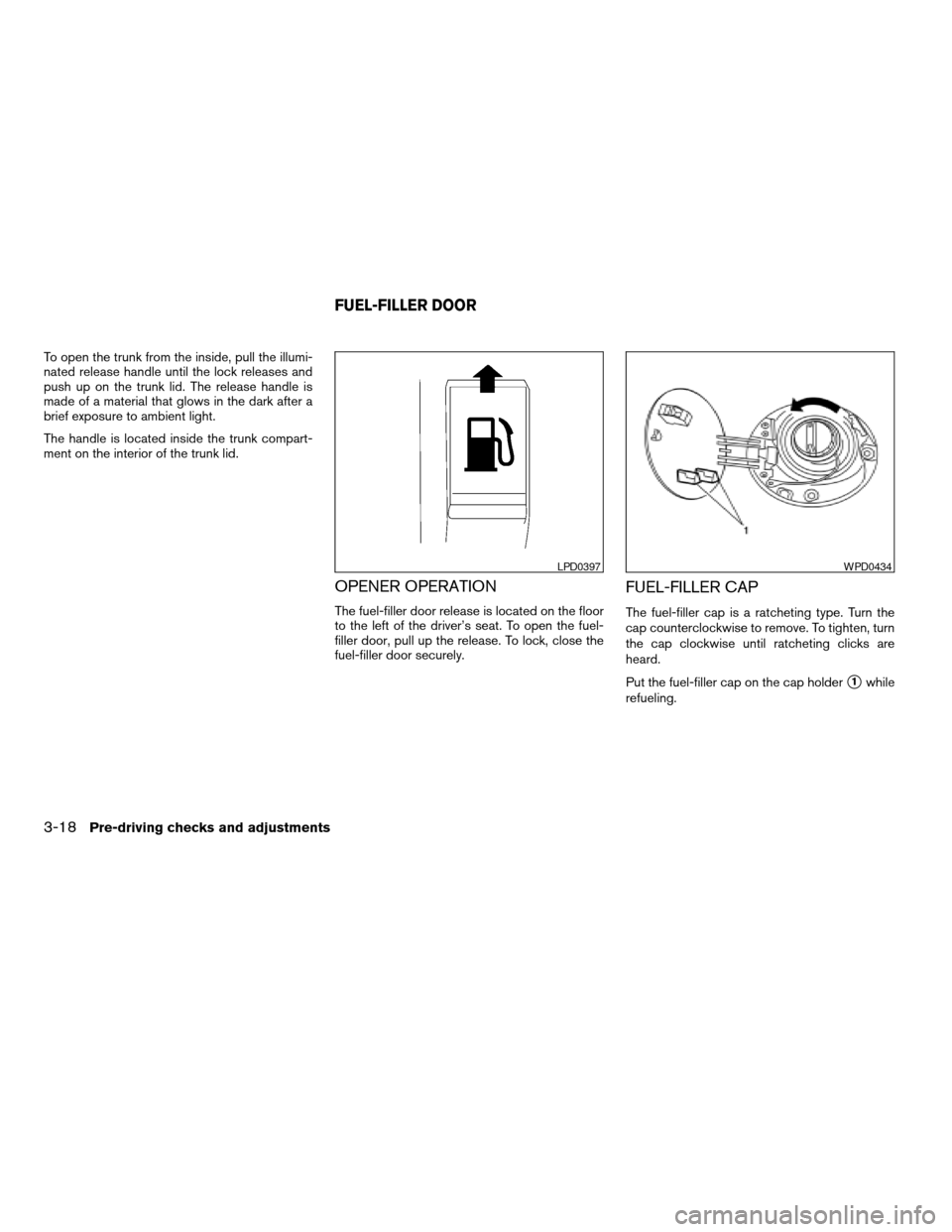
To open the trunk from the inside, pull the illumi-
nated release handle until the lock releases and
push up on the trunk lid. The release handle is
made of a material that glows in the dark after a
brief exposure to ambient light.
The handle is located inside the trunk compart-
ment on the interior of the trunk lid.
OPENER OPERATION
The fuel-filler door release is located on the floor
to the left of the driver’s seat. To open the fuel-
filler door, pull up the release. To lock, close the
fuel-filler door securely.
FUEL-FILLER CAP
The fuel-filler cap is a ratcheting type. Turn the
cap counterclockwise to remove. To tighten, turn
the cap clockwise until ratcheting clicks are
heard.
Put the fuel-filler cap on the cap holder
s1while
refueling.
LPD0397WPD0434
FUEL-FILLER DOOR
3-18Pre-driving checks and adjustments
ZREVIEW COPYÐ2008 Altima(alt)
Owners ManualÐUSA_English(nna)
03/13/07Ðdebbie
X
Page 151 of 352

Clock
Adjusting the time:
The following display will appear when pressing
the SETUP button, then touching the “Clock” key.
On-screen Clock:
When this item is turned on, a clock is always
displayed in the upper right corner of the screen.
This clock will indicate the time almost exactly
because it is always adjusted by the GPS system.
To turn off the clock in the upper right corner of
the screen touch the On-screen Clock “ON” key,
touch it again to display the clock.Clock Format:
Touch the
key or thekey to choose
either the 12-hour clock display or the 24-hour
clock display.
Offset Adjust:
Touch the “–” key or the “+” key to adjust the time
by increasing or decreasing per minute.
Daylight Saving Time:
When this item is turned on, the daylight saving
time, application is enabled. To turn off daylight
saving time, touch the Daylight Saving Time “ON”
key; touch it again to enable daylight saving.
Time Zone:
Touch the “Time Zone” key, the Time Zone screen
will appear.
Select one of the following zones, depending on
the current location. Touch the “ON” key for the
particular time zone.
cPacific zone
cMountain zone
cCentral zone
cEastern zone
cAtlantic zone
LHA0750LHA1005
Monitor, climate, audio, phone and voice recognition systems4-5
ZREVIEW COPYÐ2008 Altima(alt)
Owners ManualÐUSA_English(nna)
03/13/07Ðdebbie
X
Page 152 of 352

cNewfoundland zone
After selection, touch the “Back” key the Clock
screen will appear.
Pacific zone has been set as the initial (default)
setting.
Beep setting
Touch the “Volumes/Tones” key. Touch the But-
ton Beeps “ON” key to turn on or turn off the beep
sound. To accept the changes touch the “Back”
key.
With this option on, a beep will sound if any
button is pressed or any key is touched. The
amber indicator will be illuminated.
Language/units
The following display will appear when pressing
the SETUP button, then touching the
“Language/Units” key.
LHA1006LHA0751
4-6Monitor, climate, audio, phone and voice recognition systems
ZREVIEW COPYÐ2008 Altima(alt)
Owners ManualÐUSA_English(nna)
03/13/07Ðdebbie
X
Page 173 of 352

1. SEEK/TRACK button
2. CD insert slot
3. TUNE/FF·REW button
4.
CD eject button
5. AUDIO button (BASS, TREBLE, FADE
and BALANCE)6. CLOCK button
7. AUX IN jack
8. SCAN button
9. RDM/RPT button
10. PWR/VOL control knob
11. AUX button12. RADIO button
13. CD button
14. DISP button
15. PRESET A·B·C button
16. Station select (1 - 6) buttons
17.
pause/mute button
FM/AM RADIO WITH COMPACT
DISC (CD) PLAYER
For all operation precautions, see “Audio opera-
tion precautions” earlier in this section.
Audio main operation
PWR/VOL control knob
Place the ignition switch in the ACC or ON
position, then press the PWR/VOL control knob.
If you listen to the radio with the engine not
running, place the ignition in the ACC position.
The mode (radio or CD) that was playing imme-
diately before the system was turned off resumes
playing.
When no CD is loaded, the radio comes on.
Pressing the PWR/VOL control knob again turns
the system off.
Turn the PWR/VOL control knob to the right to
increase volume or to the left to decrease volume.
LHA0728
Monitor, climate, audio, phone and voice recognition systems4-27
ZREVIEW COPYÐ2008 Altima(alt)
Owners ManualÐUSA_English(nna)
03/13/07Ðdebbie
X
Page 174 of 352

AUDIO button (Bass, Treble, Fade and Bal-
ance)
Press the AUDIO button to change the mode as
follows:
Bass!Treble!Fade!Balance!Beep
ON/OFF!Audio or off!Bass
To adjust Bass, Treble, Fade and Balance press
the AUDIO button until the desired mode ap-
pears in the display. Press the
TUNE/FF·REW
orto adjust Bass
and Treble to the desired level. You can also use
the TUNE/FF·REW button to adjust Fade and
Balance mode. Fade adjusts the sound level be-
tween the front and rear speakers and Balance
adjusts the sound between the right and left
speaker.
To turn the Beep sound off or on, press the
AUDIO button until Beep is displayed. Press the
TUNE/FF·REW button
oruntil the
desired mode is displayed. This turns on or turns
off the beep sound when audio buttons are
pressed.
Once you have adjusted the sound quality to the
desired level, press the AUDIO button repeatedly
until the radio or CD display reappears. Other-
wise, the radio or CD display will automatically
reappear after about 10 seconds.DISP (display) button:
Pressing the DISP (display) button will show text
about CD information in the audio display.
If the text information is to long to fully be dis-
played on the screen; press and hold the DISP
button for longer than 1.5 seconds to scroll
through the rest of the text.
CD display mode
To change the text displayed while playing a CD
with text, press the DISP button. The DISP button
will allow you to scroll
through CD text as follows: Track number and
Track time!Album title!Song title.
cTrack number displays the track number se-
lected on the disc.
cTrack time displays the amount of time the
track has played.
cAlbum title displays the title of the CD being
played.
cSong title displays the title of the selected
CD track.
Clock operation
Pressing the CLOCK button displays the clock
with the radio on or off. Press the CLOCK button
again to turn off the clock display.Clock set
1. Press and hold the CLOCK button for ap-
proximately 2 seconds.
2. The display will show “H-Seek M-Tune”.
3. Press the SEEK/TRACK button
orto adjust the hours.
4. Press TUNE/FF·REW button
orto adjust the minutes.
5. Press the CLOCK button again to exit the
clock set mode.
The display will return to the regular clock display
after 10 seconds, or you may press the CLOCK
button again to return to the regular clock display.
pause/mute button:
To mute or pause the audio sound, press
the
pause/mute button. Press thebutton again to resume the audio sound.
FM/AM radio operation
FM/AM band select:
Pressing the RADIO button will change the band
as follows:
AMÃ!FM
4-28Monitor, climate, audio, phone and voice recognition systems
ZREVIEW COPYÐ2008 Altima(alt)
Owners ManualÐUSA_English(nna)
03/13/07Ðdebbie
X
Page 177 of 352

1. SEEK/TRACK button
2. CD insert slot
3. TUNE/FF·REW button
4.
CD eject button5. AUDIO button (BASS, TREBLE, FADE,
SSV, BALANCE and BEEPS)
6. CLOCK button
7. AUX IN jack
8. SCAN button9. RDM/RPT button
10. PWR/VOL control knob
11. AUX button
12. RADIO* button
13. CD button
14. DISP button
15. PRESET A·B·C button
16. Station and CD select (1 - 6) buttons
17.
CD load button
*No satellite radio reception is available
unless there is an active XMTsatellite
radio service subscription. Satellite ra-
dio is not available in Alaska, Hawaii
and Guam. If satellite radio is not opera-
tional then pressing the RADIO button
will switch between FM and AM bands.
FM/AM/SAT RADIO WITH
COMPACT DISC (CD) CHANGER (if
so equipped)
For all operation precautions, see “Audio opera-
tion precautions” earlier in this section.
No satellite radio reception is available unless
there is an active XMTsatellite radio service
subscription. Satellite radio is not available in
Alaska, Hawaii and Guam. If satellite radio is not
operational then pressing the RADIO button will
switch between FM and AM bands.
Type A
LHA0729
Monitor, climate, audio, phone and voice recognition systems4-31
ZREVIEW COPYÐ2008 Altima(alt)
Owners ManualÐUSA_English(nna)
03/13/07Ðdebbie
X