2008 NISSAN ALTIMA clock
[x] Cancel search: clockPage 178 of 352

Audio main operation
PWR/VOL control knob
Place the ignition switch in the ACC or ON
position, and then press the PWR/VOL control
knob while the system is off to call up the mode
(radio or CD) which was playing immediately
before the system was turned off.
To turn the system off, press the PWR/VOL con-
trol knob.
Turn the PWR/VOL control knob to adjust the
volume.
This vehicle may be equipped with Speed Sen-
sitive Volume (SSV) for audio. The audio volume
changes as the driving speed changes.
AUDIO button (Bass, Treble, Fade, SSV,
Balance and Beeps)
Press the AUDIO button to change the mode as
follows:
Bass!Treble!Fade!Spd Sen Vol!Bal-
ance!Beep ON/OFF!Audio or off!Bass
To adjust Bass, Treble, Fade and Balance press
the AUDIO button until the desired mode ap-
pears in the display. Press the
TUNE/FF·REW
orto adjust Bass
and Treble to the desired level. You can also use
the TUNE/FF·REW button to adjust Fade andBalance mode. Fade adjusts the sound level be-
tween the front and rear speakers and Balance
adjusts the sound between the right and left
speaker.
To turn the Beep sound off or on, press the
AUDIO button until Beep is displayed. Press the
TUNE/FF·REW button
oruntil the
desired mode is displayed. This turns on or turns
off the beep sound when audio buttons are
pressed.
To change the Speed Sensitive Volume mode to
OFF, LOW, MID or HIGH, press the
TUNE/FF·REW button.
Once you have adjusted the sound quality to the
desired level, press the AUDIO button repeatedly
until the radio or CD display reappears. Other-
wise, the radio or CD display will automatically
reappear after about 10 seconds.
Clock operation
Pressing the CLOCK button displays the clock
with the radio on or off. Press the CLOCK button
again to turn off the clock display.
Clock set
1. Press and hold the CLOCK button for ap-
proximately 2 seconds.
2. The display will show “H-Seek M-Tune”.3. Press the SEEK/TRACK button
orto adjust the hours.
4. Press TUNE/FF·REW button
orto adjust the minutes.
5. Press the CLOCK button again to exit the
clock set mode.
The display will return to the regular clock display
after 10 seconds, or you may press the CLOCK
button again to return to the regular clock display.
DISP (display) button:
Pressing the DISP (display) button will show text
information about CD, MP3 and SAT (satellite, if
so equipped) in the audio display.
If the text information is to long to fully be dis-
played on the screen; press and hold the DISP
button for longer than 1.5 seconds to scroll
through the rest of the text.
CD display mode
To change the text displayed while playing a CD
with text, press the DISP button. The DISP button
will allow you to scroll through CD text as follows:
Track number and Track timeÃ!Album title
Ã!Song title.
cTrack number displays the track number se-
lected on the disc.
4-32Monitor, climate, audio, phone and voice recognition systems
ZREVIEW COPYÐ2008 Altima(alt)
Owners ManualÐUSA_English(nna)
03/13/07Ðdebbie
X
Page 185 of 352

Clock set
For setting the clock, see “Adjusting the time”
earlier in this section.
CD display mode
While listening to a CD or an MP3/WMA CD
certain text might be displayed (when CD en-
coded with text is being used) .
Depending on how the CD or MP3/WMA CD is
encoded the following text might be displayed
during CD playback:
cDisc number displays which disc is playing
cFolder number displays the folder number on
the CD that is being played.
cTrack number displays the number of the
track that is being played.
cTrack time displays the amount of time the
current track has been playing.
cTitle displays the name of the song playing.
cArtist displays the name of the artist.
cAlbum displays the name of the album.
Satellite radio display
Some satellite stations might broadcast informa-
tion that shows up in the display.Depending on what the station decides to broad-
cast the following text might be displayed:
cChannel number displays the channel num-
ber of the selected satellite radio station.
cCategory name displays the category name
of the selected satellite radio station.
cChannel name displays the channel name of
the selected satellite radio station.
cArtist name displays the name of the artist,
host or weather condition of the selected
satellite radio station.
cSong title displays the song title, show
name, or temperature of the selected satel-
lite radio station.
FM/AM/SAT radio operation
FM/AM/SAT band select:
Pressing the RADIO button will change the band
as follows:
AMÃ!FMÃ!SAT
When the RADIO button is pressed with the
ignition switch in the ACC or ON position, the
radio will come on at the station last played.
No satellite radio reception is available unless
there is an active XMTsatellite radio service
subscription. Satellite radio is not available in
LHA1009
Monitor, climate, audio, phone and voice recognition systems4-39
ZREVIEW COPYÐ2008 Altima(alt)
Owners ManualÐUSA_English(nna)
03/13/07Ðdebbie
X
Page 228 of 352
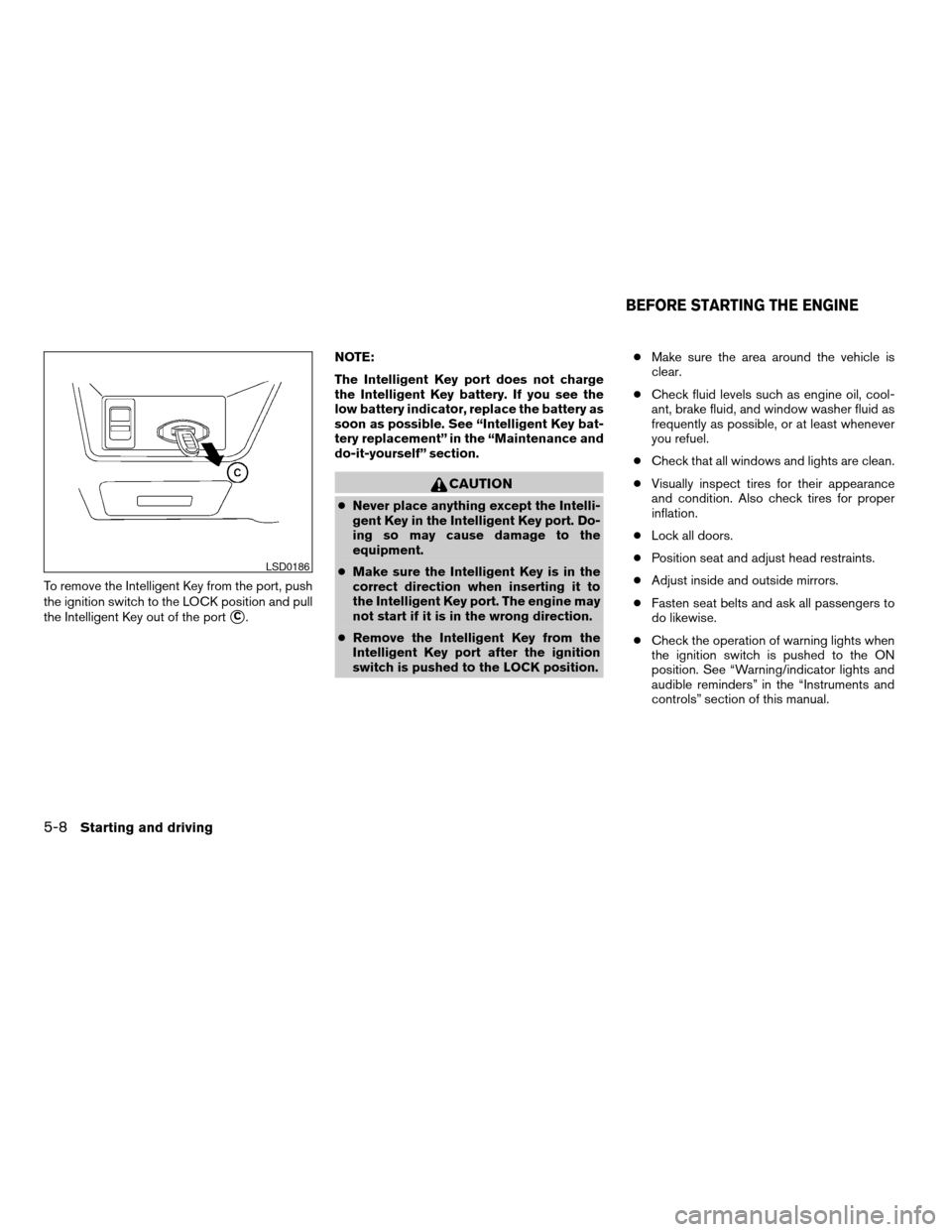
To remove the Intelligent Key from the port, push
the ignition switch to the LOCK position and pull
the Intelligent Key out of the port
sC.NOTE:
The Intelligent Key port does not charge
the Intelligent Key battery. If you see the
low battery indicator, replace the battery as
soon as possible. See “Intelligent Key bat-
tery replacement” in the “Maintenance and
do-it-yourself” section.
CAUTION
cNever place anything except the Intelli-
gent Key in the Intelligent Key port. Do-
ing so may cause damage to the
equipment.
cMake sure the Intelligent Key is in the
correct direction when inserting it to
the Intelligent Key port. The engine may
not start if it is in the wrong direction.
cRemove the Intelligent Key from the
Intelligent Key port after the ignition
switch is pushed to the LOCK position.cMake sure the area around the vehicle is
clear.
cCheck fluid levels such as engine oil, cool-
ant, brake fluid, and window washer fluid as
frequently as possible, or at least whenever
you refuel.
cCheck that all windows and lights are clean.
cVisually inspect tires for their appearance
and condition. Also check tires for proper
inflation.
cLock all doors.
cPosition seat and adjust head restraints.
cAdjust inside and outside mirrors.
cFasten seat belts and ask all passengers to
do likewise.
cCheck the operation of warning lights when
the ignition switch is pushed to the ON
position. See “Warning/indicator lights and
audible reminders” in the “Instruments and
controls” section of this manual.
LSD0186
BEFORE STARTING THE ENGINE
5-8Starting and driving
ZREVIEW COPYÐ2008 Altima(alt)
Owners ManualÐUSA_English(nna)
03/13/07Ðdebbie
X
Page 253 of 352

Always refer to the proper illustrations for the
correct placement and jack-up points for your
specific vehicle model and jack type.
Carefully read the caution label attached to
the jack body and the following instruc-
tions.
1. Loosen each wheel nut one or two turns by
turning counterclockwise with the wheel nut
wrench.Do not remove the wheel nuts
until the tire is off the ground.2. Place the jack directly under the jack-up
point as illustrated so the top of the jack
contacts the vehicle at the jack-up point.
Align the jack head between the two
notches in the front or the rear as shown.
Also fit the groove of the jack head between
the notches as shown.
The jack should be used on firm and
level ground.
3. To lift the vehicle, securely hold the jack lever
and rod with both hands. Carefully raise the
vehicle until the tire clears the ground. Re-
move the wheel nuts, and then remove the
tire.Installing the spare tire
The spare tire is designed for emergency
use. See specific instructions under the
heading “Wheels and tires” in the “Mainte-
nance and do-it-yourself” section of this
manual.
1. Clean any mud or dirt from the surface be-
tween the wheel and hub.
2. Carefully put the spare tire on and tighten
the wheel nuts finger tight.
3. With the wheel nut wrench, tighten wheel
nuts alternately and evenly as illustrated until
they are tight.
LCE0020WCE0056
In case of emergency6-5
ZREVIEW COPYÐ2008 Altima(alt)
Owners ManualÐUSA_English(nna)
03/13/07Ðdebbie
X
Page 276 of 352
CAUTION
Oil level should be checked regularly. Op-
erating the engine with an insufficient
amount of oil can damage the engine, and
such damage is not covered by warranty.CHANGING ENGINE OIL
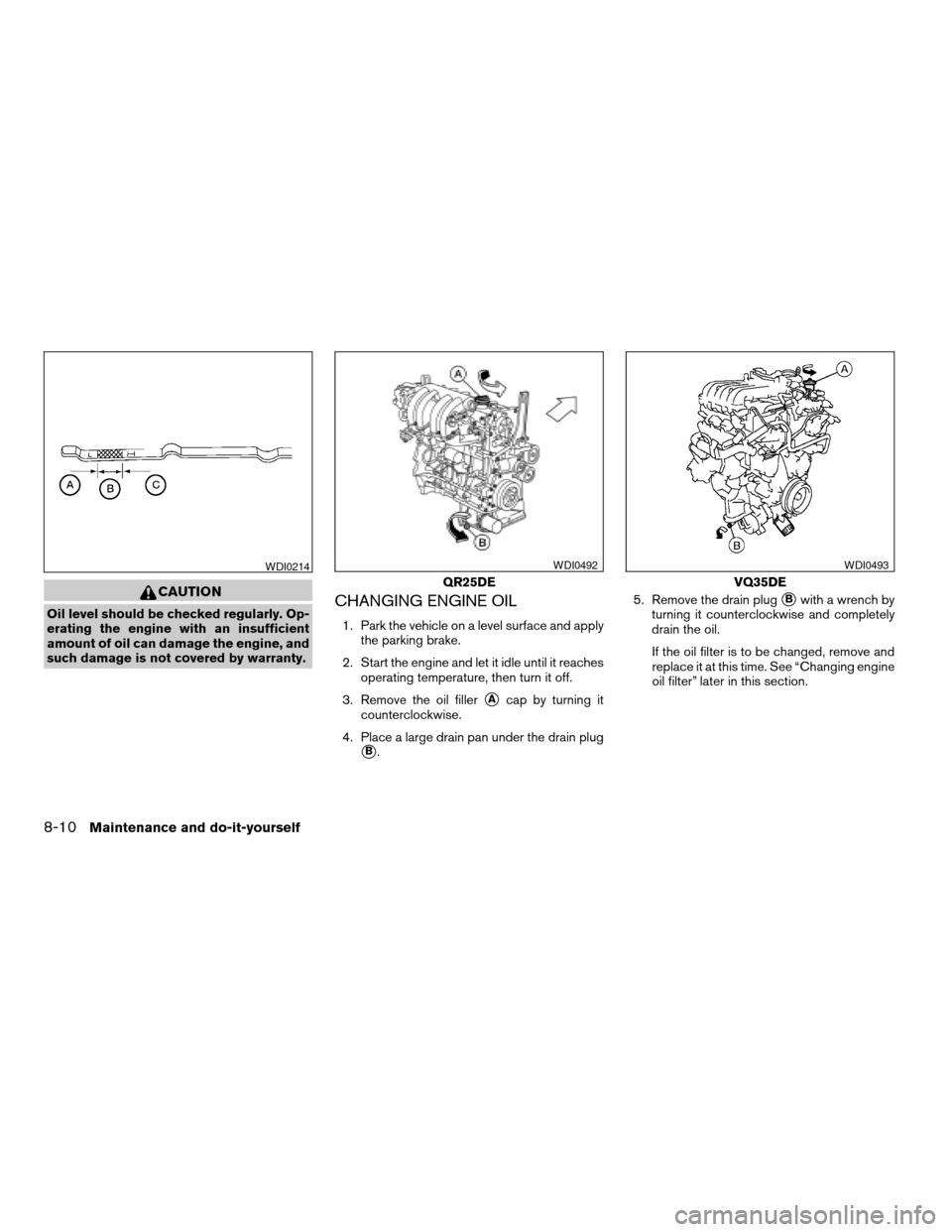
1. Park the vehicle on a level surface and apply
the parking brake.
2. Start the engine and let it idle until it reaches
operating temperature, then turn it off.
3. Remove the oil filler
sAcap by turning it
counterclockwise.
4. Place a large drain pan under the drain plug
sB.5. Remove the drain plug
sBwith a wrench by
turning it counterclockwise and completely
drain the oil.
If the oil filter is to be changed, remove and
replace it at this time. See “Changing engine
oil filter” later in this section.
WDI0214
QR25DE
WDI0492
VQ35DE
WDI0493
8-10Maintenance and do-it-yourself
ZREVIEW COPYÐ2008 Altima(alt)
Owners ManualÐUSA_English(nna)
03/13/07Ðdebbie
X
Page 277 of 352
WARNING
cProlonged and repeated contact with
used engine oil may cause skin cancer.
cTry to avoid direct skin contact with
used oil. If skin contact is made, wash
thoroughly with soap or hand cleaner
as soon as possible.
cKeep used engine oil out of reach of
children.
CAUTION
Be careful not to burn yourself. The engine
oil may be hot.
cWaste oil must be disposed of prop-
erly.
cCheck your local regulations.
6. Clean and reinstall the drain plug and a new
washer. Securely tighten the drain plug with
a wrench. Do not use excessive force.
Drain plug tightening torque:
22 - 29 ft-lb (29 - 39 N·m)
7. Refill engine with recommended oil through
the oil filler opening, then install the oil filler
cap securely.See “Capacities and recommended
fuel/lubricants” in the “Technical and con-
sumer information” section of this manual for
drain and refill capacity.
The drain and refill capacity depends on the
oil temperature and drain time. Use these
specifications for reference only. Always use
the dipstick to determine when the proper
amount of oil is in the engine.
8. Start the engine. Check for leakage around
the drain plug and oil filter. Correct as re-
quired.
9. Turn the engine off and wait more than 10
minutes. Check the oil level with the dipstick.
Add engine oil if necessary.
CHANGING ENGINE OIL FILTER
1. Park the vehicle on a level surface and apply
the parking brake.
2. Turn the engine off.
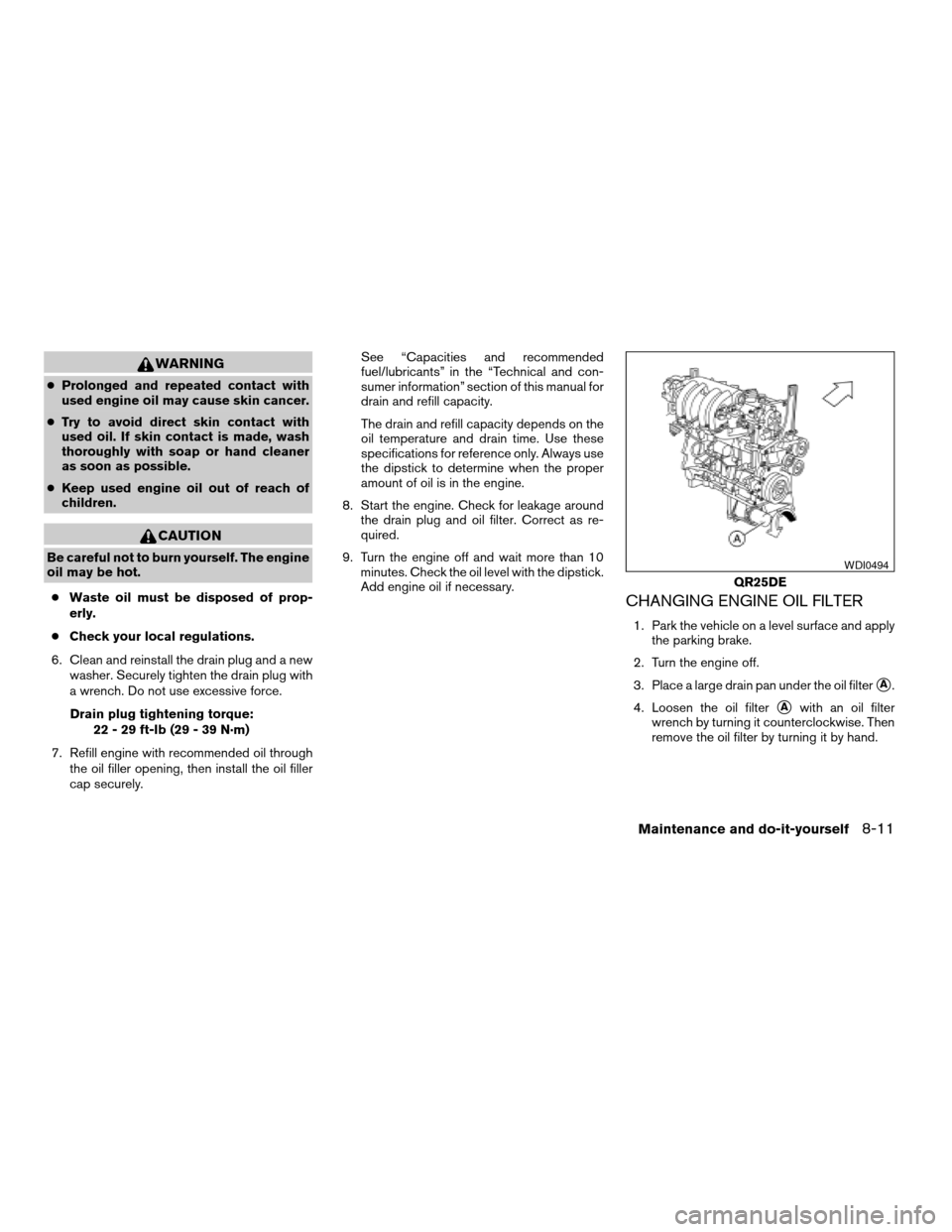
3. Place a large drain pan under the oil filter
sA.
4. Loosen the oil filter
sAwith an oil filter
wrench by turning it counterclockwise. Then
remove the oil filter by turning it by hand.
QR25DE
WDI0494
Maintenance and do-it-yourself8-11
ZREVIEW COPYÐ2008 Altima(alt)
Owners ManualÐUSA_English(nna)
03/13/07Ðdebbie
X
Page 297 of 352

Rear combination light
To access the bulbs in the rear combination light:
s1Remove the fasteners. Carefully push back
the carpet.
s2Remove the 2 nuts and pull out the rear
combination light.
s3Rotate the bulb(s) counterclockwise and
pull out to remove:
sATurn signal light
sBSidemarker light
sCTail/stop light
sDBackup lightIf you have a flat tire, see the “In case of
emergency” section of this manual.
TIRE PRESSURE
Tire Pressure Monitoring System
(TPMS)
This vehicle is equipped with the Tire
Pressure Monitoring System (TPMS) . It
monitors tire pressure of all tires except
the spare. When the low tire pressure
warning light is lit, one or more of your
tires is significantly under-inflated.
The TPMS will activate only when the
vehicle is driven at speeds above 16 MPH
(25 km/h) . Also, this system may not de-
tect a sudden drop in tire pressure (for
example a flat tire while driving) .
For more details, refer to “Low tire pres-
sure warning light” in the “Instruments and
controls” section, “Tire Pressure Monitor-
ing System (TPMS)” in the “Starting and
driving” section, and “Flat tire” in the “In
case of emergency” section.
Trunk light
WDI0343
WHEELS AND TIRES
Maintenance and do-it-yourself8-31
ZREVIEW COPYÐ2008 Altima(alt)
Owners ManualÐUSA_English(nna)
03/13/07Ðdebbie
X
Page 331 of 352
cBe certain your rearview mirrors conform to
all federal, state or local regulations. If not,
install any mirrors required for towing before
driving the vehicle.
cDetermine the overall height of the vehicle
and trailer so the required clearance is
known.
Trailer towing tips
In order to gain skill and an understanding of the
vehicle’s behavior, you should practice turning,
stopping and backing up in an area which is free
from traffic. Steering stability and braking perfor-
mance will be somewhat different than under
normal driving conditions.
cAlways secure items in the trailer to prevent
load shift while driving.
cLock the trailer hitch coupler with a pin or
lock to prevent the coupler from inadvert-
ently becoming unlatched.
cAvoid abrupt starts, acceleration or stops.
cAvoid sharp turns or lane changes.
cAlways drive your vehicle at a moderate
speed.
cWhen backing up, hold the bottom of the
steering wheel with one hand. Move your
hand in the direction in which you want thetrailer to go. Make small corrections and
back up slowly. If possible, have someone
guide you when you are backing up.
Always block the wheels on both vehicle and
trailer when parking. Parking on a slope is not
recommended; however, if you must do so:
CAUTION
If you move the shift selector lever to the P
(Park) position before blocking the
wheels and applying the parking brake,
transmission damage could occur.
1. Apply and hold the brake pedal.
2. Have someone place blocks on the downhill
side of the vehicle and trailer wheels.
3. After the wheel blocks are in place, slowly
release the brake pedal until the blocks ab-
sorb the vehicle load.
4. Apply the parking brake.
5. Shift the transmission into P (Park) .
6. Turn off the engine.
To drive away:
1. Start the vehicle.
2. Apply and hold the brake pedal.
3. Shift the transmission into gear.4. Release the parking brake.
5. Drive slowly until the vehicle and trailer are
clear from the blocks.
6. Apply and hold the brake pedal.
7. Have someone retrieve and store the blocks.
cWhen going down a hill, shift into a lower
gear and use the engine braking effect.
When going up a long grade, downshift the
transmission to a lower gear and reduce
speed to reduce chances of engine over-
loading and/or overheating. However, for
long steep grades, do not stay in 1st gear
when driving above 35 MPH (56 km/h) or
2nd gear when driving above 58 MPH (93
km/h) .
cIf the engine coolant rises to an extremely
high temperature when the air conditioner
system is on, turn off the air conditioner.
Coolant heat can be additionally vented by
opening the windows, switching the fan
control to high and setting the temperature
control to the HOT position.
cTrailer towing requires more fuel than normal
circumstances.
cAvoid towing a trailer for your vehicle’s first
500 miles (805 km) .
Technical and consumer information9-21
ZREVIEW COPYÐ2008 Altima(alt)
Owners ManualÐUSA_English(nna)
03/13/07Ðdebbie
X