2008 NISSAN ALTIMA ad blue
[x] Cancel search: ad bluePage 3 of 352

BLUETOOTHtis a
trademark owned by
Bluetooth SIG, Inc.,
U.S.A. and licensed to
Visteon and Xanavi
Informatics Corpora-
tion.
© 2007 NISSAN NORTH AMERICA, INC.
All rights reserved. No part of this Owner’s
Manual may be reproduced or stored in a retrieval
system, or transmitted in any form, or by any
means, electronic, mechanical, photocopying,
recording or otherwise, without the prior written
permission of Nissan North America, Inc.
ZREVIEW COPYÐ2008 Altima(alt)
Owners ManualÐUSA_English(nna)
03/12/07Ðdebbie
X
Page 12 of 352

1. Vents (P. 4-10)
2. Headlight/fog light (if so equipped)/turn
signal switch (P. 2-27)3. Steering wheel switch for audio control
(if so equipped)/BluetoothThands-free
phone system (if so equipped)
(P. 4-43, P. 4-46, P. 4-60)
4. Meters and gauges (P. 2-3)5. Driver supplemental air bag/horn
(P. 1-39, P. 2-33)
6. Cruise control main/set switch
(P. 5-17)
7. Windshield wiper/washer switch
(P. 2-26)
8. Push-button ignition switch (P. 5-6)
9. Hazard warning flasher switch (P. 2-32)
10. Front passenger air bag status light
(P. 1-48)
11. Front passenger supplemental air bag
(P. 1-39)
12. Glove box (P. 2-39)
13. Navigation system* (if so equipped)
(P. 4-2)
14. Heater and air conditioner (manual or
automatic) (P. 4-10, P. 4-18)
15. Shift selector lever (P. 5-10)
16. Audio system controls (P. 4-20)
17. Tilt/telescopic steering wheel controls
(P. 3-20)
18. Vehicle information display controls
(P. 2-16)
19. Hood release (P. 3-16)
WIC1258
INSTRUMENT PANEL
0-6Illustrated table of contents
ZREVIEW COPYÐ2008 Altima(alt)
Owners ManualÐUSA_English(nna)
03/12/07Ðdebbie
X
Page 16 of 352
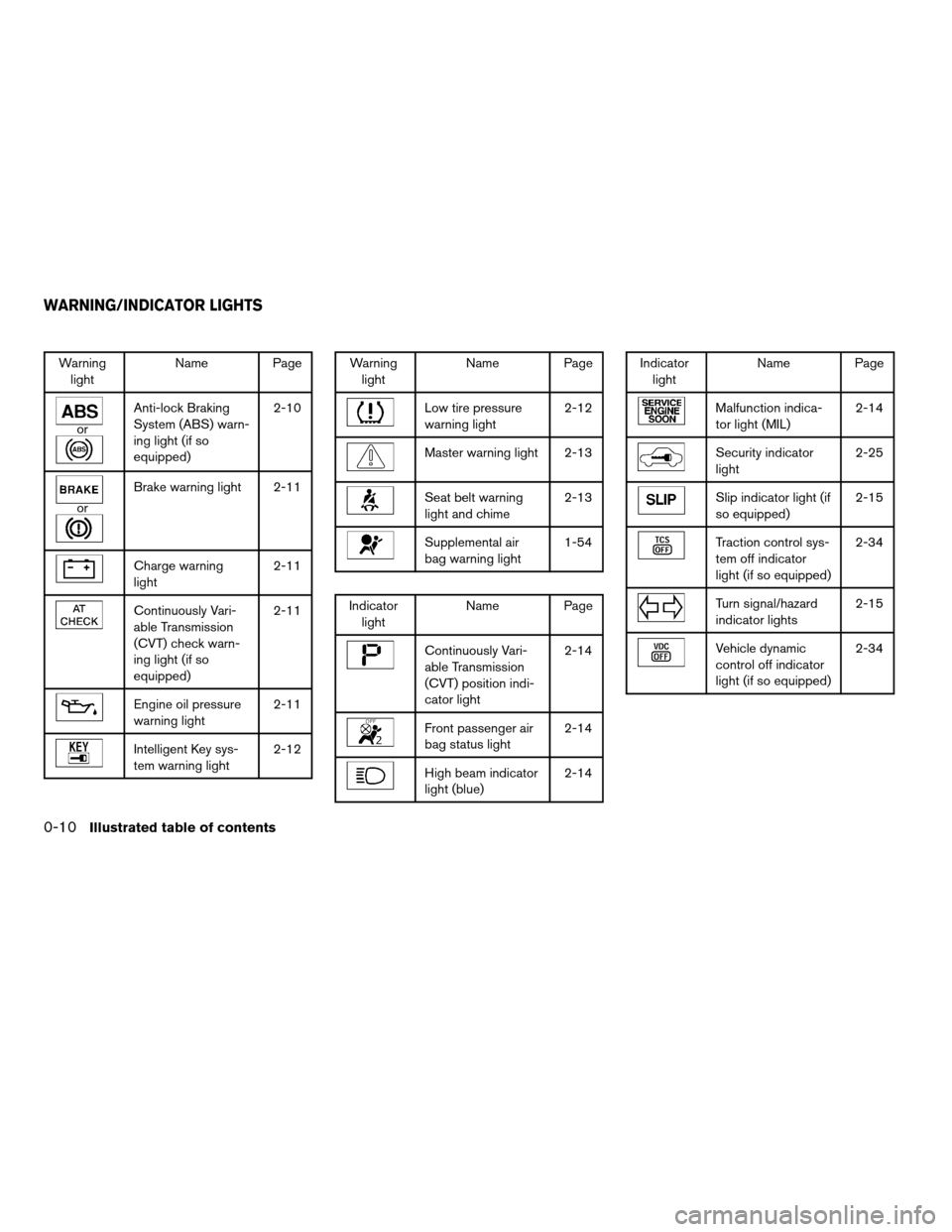
Warning
lightName Page
or
Anti-lock Braking
System (ABS) warn-
ing light (if so
equipped)2-10
or
Brake warning light 2-11
Charge warning
light2-11
Continuously Vari-
able Transmission
(CVT) check warn-
ing light (if so
equipped)2-11
Engine oil pressure
warning light2-11
Intelligent Key sys-
tem warning light2-12
Warning
lightName Page
Low tire pressure
warning light2-12
Master warning light 2-13
Seat belt warning
light and chime2-13
Supplemental air
bag warning light1-54
Indicator
lightName Page
Continuously Vari-
able Transmission
(CVT) position indi-
cator light2-14
Front passenger air
bag status light2-14
High beam indicator
light (blue)2-14
Indicator
lightName Page
Malfunction indica-
tor light (MIL)2-14
Security indicator
light2-25
Slip indicator light (if
so equipped)2-15
Traction control sys-
tem off indicator
light (if so equipped)2-34
Turn signal/hazard
indicator lights2-15
Vehicle dynamic
control off indicator
light (if so equipped)2-34
WARNING/INDICATOR LIGHTS
0-10Illustrated table of contents
ZREVIEW COPYÐ2008 Altima(alt)
Owners ManualÐUSA_English(nna)
03/12/07Ðdebbie
X
Page 74 of 352

1. Vents (P. 4-10)
2. Headlight/fog light (if so equipped)/turn
signal switch (P. 2-27)3. Steering wheel switch for audio control
(if so equipped)/BluetoothThands-free
phone system (if so equipped)
(P. 4-43, P. 4-46, P. 4-60)
4. Meters and gauges (P. 2-3)5. Driver supplemental air bag/horn
(P. 1-39, P. 2-33)
6. Cruise control main/set switch
(P. 5-17)
7. Windshield wiper/washer switch
(P. 2-26)
8. Push-button ignition switch (P. 5-6)
9. Hazard warning flasher switch (P. 2-32)
10. Front passenger air bag status light
(P. 1-48)
11. Front passenger supplemental air bag
(P. 1-39)
12. Glove box (P. 2-39)
13. Navigation system* (if so equipped)
(P. 4-2)
14. Heater and air conditioner (manual or
automatic) (P. 4-10, P. 4-18)
15. Shift selector lever (P. 5-10)
16. Audio system controls (P. 4-20)
17. Tilt/telescopic steering wheel controls
(P. 3-20)
18. Vehicle information display controls
(P. 2-16)
19. Hood release (P. 3-16)
WIC1258
INSTRUMENT PANEL
2-2Instruments and controls
ZREVIEW COPYÐ2008 Altima(alt)
Owners ManualÐUSA_English(nna)
03/12/07Ðdebbie
X
Page 82 of 352

orAnti-lock Braking System
(ABS) warning lightMaster warning lightSecurity indicator light
orBrake warning lightSeat belt warning light and chimeSlip indicator light (if so equipped)
Charge warning lightSupplemental air bag warning lightTraction control system off indicator light (if so
equipped)
Continuously Variable Transmission (CVT)
check warning light (if so equipped)Continuously Variable Transmission (CVT) po-
sition indicator light (if so equipped)Turn signal/hazard indicator lights
Engine oil pressure warning lightFront passenger air bag status lightVehicle dynamic control off indicator light (if so
equipped)
Intelligent Key system warning lightHigh beam indicator light (Blue)
Low tire pressure warning lightMalfunction indicator light (MIL)
CHECKING BULBS
With all doors closed, apply the parking brake
and push the ignition button to the ON position
without starting the engine. The following lights
will come on:
,or,,,
The following lights come on briefly and then go
off:
or,,,,,
If any light fails to come on, it may indicate
a burned-out bulb or an open circuit in the
electrical system. Have the system repaired
promptly.
WARNING LIGHTS
orAnti-lock Braking
System (ABS)
warning light
When you push the push-button ignition switch
to the ON position, the Anti-lock Braking System
(ABS) warning light illuminates and then turns off.
This indicates the ABS is operational.
WARNING/INDICATOR LIGHTS AND
AUDIBLE REMINDERS
2-10Instruments and controls
ZREVIEW COPYÐ2008 Altima(alt)
Owners ManualÐUSA_English(nna)
03/12/07Ðdebbie
X
Page 86 of 352
cThe supplemental air bag warning light does
not come on at all.
Unless checked and repaired, the supplemental
restraint system (air bag system) and/or the seat
belts with pretensioners may not function prop-
erly. For additional details see “Supplemental
restraint system” in the “Safety—Seats, seat belts
and supplemental restraint system” section of
this manual.
WARNING
If the supplemental air bag warning light
is on, it could mean that the supplemental
front air bag, front seat-mounted side-
impact supplemental air bags, roof-
mounted curtain side-impact supplemen-
tal air bags, and/or seat belts with
pretensioner systems will not operate in
an accident. To help avoid injury to your-
self or others, have your vehicle checked
by a NISSAN dealer as soon as possible.
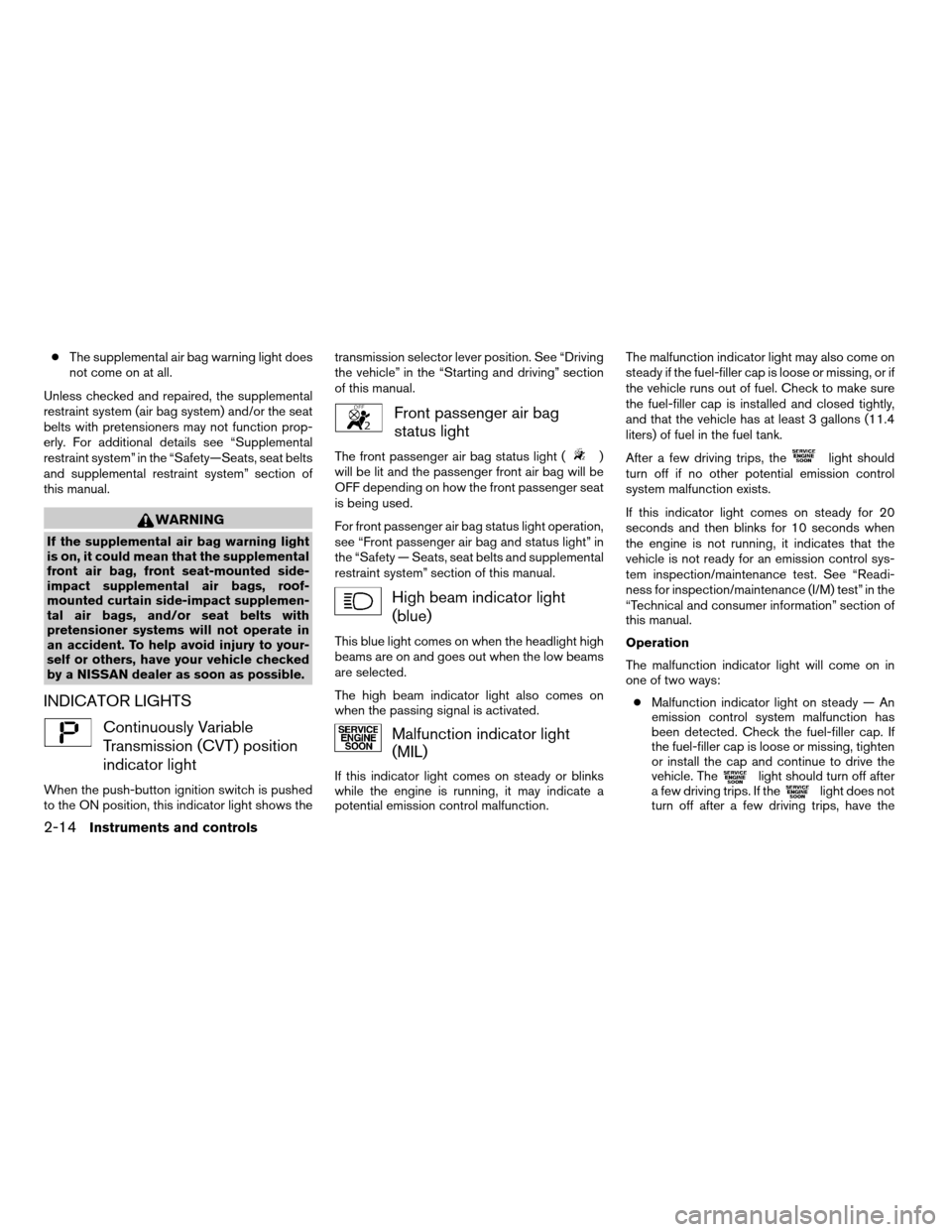
INDICATOR LIGHTS
Continuously Variable
Transmission (CVT) position
indicator light
When the push-button ignition switch is pushed
to the ON position, this indicator light shows thetransmission selector lever position. See “Driving
the vehicle” in the “Starting and driving” section
of this manual.
Front passenger air bag
status light
The front passenger air bag status light ()
will be lit and the passenger front air bag will be
OFF depending on how the front passenger seat
is being used.
For front passenger air bag status light operation,
see “Front passenger air bag and status light” in
the “Safety — Seats, seat belts and supplemental
restraint system” section of this manual.
High beam indicator light
(blue)
This blue light comes on when the headlight high
beams are on and goes out when the low beams
are selected.
The high beam indicator light also comes on
when the passing signal is activated.
Malfunction indicator light
(MIL)
If this indicator light comes on steady or blinks
while the engine is running, it may indicate a
potential emission control malfunction.The malfunction indicator light may also come on
steady if the fuel-filler cap is loose or missing, or if
the vehicle runs out of fuel. Check to make sure
the fuel-filler cap is installed and closed tightly,
and that the vehicle has at least 3 gallons (11.4
liters) of fuel in the fuel tank.
After a few driving trips, the
light should
turn off if no other potential emission control
system malfunction exists.
If this indicator light comes on steady for 20
seconds and then blinks for 10 seconds when
the engine is not running, it indicates that the
vehicle is not ready for an emission control sys-
tem inspection/maintenance test. See “Readi-
ness for inspection/maintenance (I/M) test” in the
“Technical and consumer information” section of
this manual.
Operation
The malfunction indicator light will come on in
one of two ways:
cMalfunction indicator light on steady — An
emission control system malfunction has
been detected. Check the fuel-filler cap. If
the fuel-filler cap is loose or missing, tighten
or install the cap and continue to drive the
vehicle. The
light should turn off after
a few driving trips. If thelight does not
turn off after a few driving trips, have the
2-14Instruments and controls
ZREVIEW COPYÐ2008 Altima(alt)
Owners ManualÐUSA_English(nna)
03/12/07Ðdebbie
X
Page 146 of 352

4 Monitor, climate, audio, phone and voice
recognition systems
Control panel buttons (if so equipped)...............4-2
Setting up the start-up screen...................4-3
How to use the SETUP button...................4-3
button...................................4-7
Rearview monitor (if so equipped)...................4-8
How to read the displayed lines..................4-8
Adjusting the screen............................4-9
Operating tips..................................4-9
Ventilators.......................................4-10
Heater and air conditioner (manual).................4-10
Controls......................................4-11
Heater operation..............................4-12
Air conditioner operation (if so equipped)........4-13
Air flow charts.................................4-14
Heater and air conditioner (automatic)
(if so equipped)..................................4-18
Automatic operation...........................4-18
Manual operation..............................4-19
Operating tips.................................4-19
Servicing air conditioner...........................4-20
Audio system....................................4-20
Radio........................................4-20
FM radio reception............................4-21AM radio reception............................4-21
Satellite radio reception (if so equipped).........4-21
Audio operation precautions....................4-22
FM/AM radio with compact disc (CD) player......4-27
FM/AM/SAT radio with compact disc (CD)
changer (if so equipped).......................4-31
FM/AM/SAT radio with compact disc (CD)
changer (if so equipped).......................4-38
CD care and cleaning..........................4-43
Steering wheel switch for audio control
(if so equipped)...............................4-43
Antenna......................................4-45
Car phone or CB radio............................4-45
BluetoothTHands-Free Phone System without
Navigation System (if so equipped).................4-46
Using the system..............................4-47
Control buttons...............................4-49
Getting started................................4-49
List of voice commands........................4-51
Speaker adaptation (SA) mode..................4-57
Troubleshooting guide.........................4-59
BluetoothTHands-Free Phone System with
Navigation System (if so equipped).................4-60
ZREVIEW COPYÐ2008 Altima(alt)
Owners ManualÐUSA_English(nna)
03/13/07Ðdebbie
X
Page 147 of 352

Voice commands..............................4-62
Pairing procedure.............................4-62
Phone download..............................4-63
Making a call..................................4-65
Receiving a call...............................4-66
During a call..................................4-66
Phone setting.................................4-67
Nissan Voice Recognition System (if so equipped) . . . 4-69Using the system..............................4-69
System features...............................4-70
BluetoothTHands-Free Phone System voice
commands....................................4-70
Navigation system voice commands
(if so equipped)...............................4-71
Voice recognition settings......................4-71
Troubleshooting guide.........................4-73
ZREVIEW COPYÐ2008 Altima(alt)
Owners ManualÐUSA_English(nna)
03/13/07Ðdebbie
X