2008 NISSAN ALTIMA display
[x] Cancel search: displayPage 213 of 352

Enter Digit:
Brings up a keypad, enter digits when needed.
For example, entering your PIN number for voice-
mail.
Cancel Mute:
This will appear after the “Mute” key is touched.
Mute will be cancelled.
To adjust the person’s voice to be louder or
quieter, press the volume control switch located
on the steering wheel switches or turn the volume
control knob on the instrument panel while talking
on the phone. This adjustment is also available in
the SETUP mode.
PHONE SETTING
To set up the hands-free phone system to your
preferred settings, press the SETUP button, then
touch the “Phone” key on the display.
Phonebook:
See “Phonebook download” earlier in this section.
Downloaded Phonebook:
See the following information for each item.
cDownload All:
Transfer phonebook entries from your cellu-
lar phone to the vehicle’s phonebook. For
more information, see “Phonebook down-
load” earlier in this section.cDelete Downloaded Phonebook:
Delete all of the downloaded phonebook
entries.
cDelete an Entry of Downloaded Phone-
book:
Delete a single entry from the downloaded
phonebook. Touch the corresponding letter
key, then touch on the name key you wish to
delete. Touch the “Yes” key to delete the
entry.
Delete Call Logs:
Delete all the outgoing or incoming call logs from
the list.
LHA1010WHA0788
Monitor, climate, audio, phone and voice recognition systems4-67
ZREVIEW COPYÐ2008 Altima(alt)
Owners ManualÐUSA_English(nna)
03/13/07Ðdebbie
X
Page 214 of 352

Phone Ringer Vol:
Adjust the ring volume to be quieter “–” or louder
“+”.
Phone Incoming Vol:
Adjust the phone incoming volume to be quieter
“–” or louder “+”.
Use Vehicle Ringtone:
If this item is turned on, a specific ringtone that is
different from the cellular phone’s will sound
when receiving a call.
Bluetooth Setup:
See the following information for each item.
cBluetooth Hands-Free:
If this item is turned off, the connection be-
tween the cellular phone and the in-vehicle
phone module will be canceled.
cPaired Phone List:
Up to 5 registered cellular phones are
shown on the list.
cPair Phone:
See “Pairing Procedure” in this section.cPriority Change
If multiple phones are registered to the sys-
tem, you can change the priority of the
phones on the shown list.
cRemove Paired Phone:
Delete a registered cellular phone from the
paired list.
cBluetooth Info.:
Check information about the device name,
vehicle name, device address device PIN
and connection status.
cEdit Phone Name:
If you would like to change the way your
phone’s name is displayed select this key, a
character input screen will be displayed.
LHA1011LHA1012
4-68Monitor, climate, audio, phone and voice recognition systems
ZREVIEW COPYÐ2008 Altima(alt)
Owners ManualÐUSA_English(nna)
03/13/07Ðdebbie
X
Page 215 of 352

The NISSAN Voice Recognition system allows
hands-free operation of the systems equipped on
this vehicle, such as the phone and navigation
systems.
To operate NISSAN Voice Recognition, press
the
button located on the steering wheel.
Then speak the command for the system you
wish to activate. The command given is picked up
by the microphone, and it is performed when it is
properly recognized. At this time NISSAN Voice
Recognition will provide a voice and message (in
the center display) to inform you of the command
results.
USING THE SYSTEM
Initialization
When the ignition switch is in the ON position,
NISSAN Voice Recognition is initialized, which
takes a few seconds. When completed, the sys-
tem is ready to accept voice commands. If
the
button is pressed before the initializa-
tion completes, the display will show the mes-
sage: “Phonetic data downloaded. Please wait.”
Giving voice commands
1. Press thebutton.
2. The system announces: “Please say a com-
mand”
3. After the tone sounds and the face icon of
the display changes, speak a command. For
additional information, see “List of voice
commands” later in this section.
4. Voice and message feedback will be pro-
vided when the command is accepted.
cIf the command is not recognized, the sys-
tem announces: “Please say again.” Repeat
the command in a clear voice.cIf you want to cancel the command, press
and hold the
button for 2 seconds
during feedback. The system will announce:
“Voice input is canceled”
cIf you want to adjust the volume of the voice
feedback, press the volume control buttons
(2or +) on the steering wheel while being
provided with the feedback.
Operating tips
To get the best performance out of NISSAN
Voice Recognition, observe the following:
cKeep the interior of the vehicle as quiet as
possible. Close the windows to eliminate the
surrounding noises (traffic noises, vibration
sounds, etc.) , which may prevent the system
from recognizing the voice commands cor-
rectly.
cWait until a tone sounds before speaking a
command. Otherwise, the command will not
be received properly.
cStart speaking a command within 3.5 sec-
onds after the tone sounds.
cSpeak in a natural voice without pausing
between words.
LHA0768
NISSAN VOICE RECOGNITION
SYSTEM (if so equipped)
Monitor, climate, audio, phone and voice recognition systems4-69
ZREVIEW COPYÐ2008 Altima(alt)
Owners ManualÐUSA_English(nna)
03/13/07Ðdebbie
X
Page 216 of 352

SYSTEM FEATURES
NISSAN Voice Recognition can activate the fol-
lowing systems:
cNavigation (if so equipped) - See the sepa-
rate Navigation System Owner’s Manual for
the available voice commands and opera-
tion.
cBluetoothTHands-Free Phone
For additional information on the navigation sys-
tem, see the separate Navigation System Own-
er’s Manual.
How to say numbers
NISSAN Voice Recognition requires a certain
way to speak numbers in voice commands. Refer
to the following examples.
General rule: Either “zero” or “oh” can be used for
“0”.
Phone numbers:
Speak phone numbers according to the following
examples:
c1-800-662-6200
csay “Dial” or “Phone dial” the system will
respond with “Please say the first group of
numbers”, then say:– “one eight oh oh six six two six two oh oh”,
– “one eight hundred six six two six two oh
oh”, or
– “one eight zero zero six six two six two oh
oh”.
Note 1: For the best voice recognition phone
dialing results, say phone numbers as single dig-
its.
Note 2: You cannot say 555-6000 as “five five
five six thousand”.
Personal vocabulary (voicetags)
NISSAN Voice Recognition provides the function
called “voicetags”, which can be associated with
the phone and the navigation system (if so
equipped) . Using your own voice, 70 voicetags
can be registered in the “Phonebook” (phone)
and 20 locations can be registered in the “Ad-
dress Book” (navigation system) .
For additional information, see “BluetoothT
Hands-Free Phone System” earlier in this section
and/or the separate Navigation System Owner’s
Manual (if so equipped) for the method of “voic-
etag” registration.
BLUETOOTHTHANDS-FREE
PHONE SYSTEM VOICE
COMMANDS
Depending on the commands, some different
phrases are available. Optional words are shown
in brackets [ ]. A few words, identified with a slash
/, indicate the alternate words that you can select
when speaking the command. Data items that
you need to enter, such as phone numbers, are
indicated in italics with brackets < >.
How to say commands
Example: “[PHONE] DIAL/CALL
commands.
DIAL<1 to 32 phone number digits>
CALL<1 to 32 phone number digits>
PHONE DIAL<1 to 32 phone number digits>
Help commands
c“COMMAND LIST”, “VOICE HELP” or
“HELP”
Gives spoken information about NISSAN
Voice Recognition and displays the list of
help commands.
4-70Monitor, climate, audio, phone and voice recognition systems
ZREVIEW COPYÐ2008 Altima(alt)
Owners ManualÐUSA_English(nna)
03/13/07Ðdebbie
X
Page 219 of 352

TROUBLESHOOTING GUIDE
The system should respond correctly to all voice
commands without difficulty. If problems are en-
countered, follow the solutions given in this guide
for the appropriate error.
Where the solutions are listed by number. Try
each solution in turn, starting with number one,
until the problem is resolved.
Symptom/error messageSolution
Displays “COMMAND NOT RECOG-
NIZED” or the system fails to interpret the
command correctly.1. Ensure that the command format is valid. SeeCommand listin this section.
2. Speak clearly without pausing between words and at a level appropriate to the ambient noise level.
3. Ensure that the ambient noise level is not excessive, for example, windows open or defrost on.
NOTE:
If it is too noisy to use the phone, it is likely that voice commands will not be recognized.
4. If optional words of the command have been omitted, then the command should be tried with these in place.
The system consistently selects the wrong
voicetag.1. Ensure that the voicetag requested matches what was originally stored. This can be confirmed by giving the Address Book Directory
or Phone Directory command.
2. Replace one of the voicetags being confused with a different voicetag.
Monitor, climate, audio, phone and voice recognition systems4-73
ZREVIEW COPYÐ2008 Altima(alt)
Owners ManualÐUSA_English(nna)
03/13/07Ðdebbie
X
Page 227 of 352
If the battery of the vehicle is discharged,
the push-button ignition switch cannot be
turned from the LOCK position.
Some indicators and warnings for operation are
displayed on the vehicle information display. See
“Vehicle information display” in the “Instruments
and controls” section.
PUSH-BUTTON IGNITION SWITCH
POSITIONS
LOCK (Normal parking position):
The ignition switch can only be locked in this
position.
The ignition switch will be unlocked when it is
pushed to the ACC position while carrying the
Intelligent Key or with the Intelligent Key inserted
in the port.
The ignition switch will lock when any door is
opened or closed with the ignition switched off.
OFF:
The ignition switch is in the off position when the
engine is turned off using the ignition switch. No
lights will illuminate on the ignition switch.
ACC (Accessories):
This position activates electrical accessories
such as the radio, when the engine is not running.ON (Normal operating position):
This position turns on the ignition system and
electrical accessories.
CAUTION
Do not leave the vehicle with the ignition
switch in ACC or ON positions when the
engine is not running for an extended pe-
riod. This can discharge the battery.
INTELLIGENT KEY BATTERY
DISCHARGE
If the battery of the Intelligent Key is almost dis-
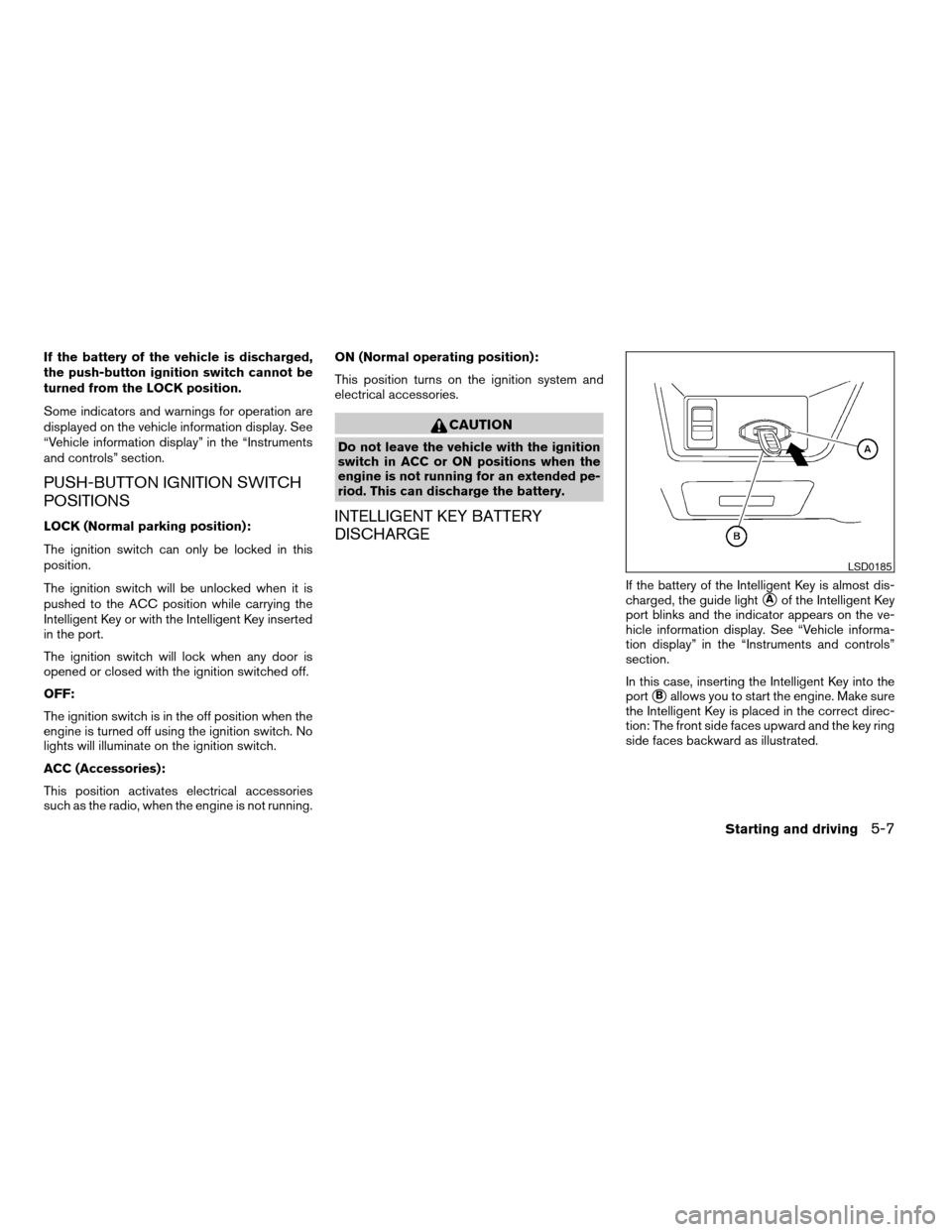
charged, the guide light
sAof the Intelligent Key
port blinks and the indicator appears on the ve-
hicle information display. See “Vehicle informa-
tion display” in the “Instruments and controls”
section.
In this case, inserting the Intelligent Key into the
port
sBallows you to start the engine. Make sure
the Intelligent Key is placed in the correct direc-
tion: The front side faces upward and the key ring
side faces backward as illustrated.
LSD0185
Starting and driving5-7
ZREVIEW COPYÐ2008 Altima(alt)
Owners ManualÐUSA_English(nna)
03/13/07Ðdebbie
X
Page 232 of 352

Manual shift mode
When the selector lever is shifted from D to the
manual shift gate with the vehicle stopped or
while driving, the transmission enters the manual
shift mode. Shift ranges can be selected manu-
ally.
In the manual shift mode, the shift range is dis-
played on the position indicator in the meter.
When shifting the shift lever to the manual shift
gate, the position indicator displays 1 (first) up to
6 (sixth) depending on vehicle speed.
Shift ranges up or down one by one as follows:
1,2,3,4,5,66 (Sixth):
Use this position for all normal forward driving at
highway speeds.
5 (Fifth):
Use this position when driving up long slopes, or
for engine braking when driving down long
slopes.
4 (Fourth) , 3 (Third) and 2 (Second):
Use for hill climbing or engine braking on downhill
grades.
M1 (First):
Use this position when climbing steep hills slowly
or driving slowly through deep snow, sand or
mud, or for maximum engine braking on steep
downhill grades.
cRemember not to drive at high speeds for
extended periods of time in lower than 4
range. This reduces fuel economy.
When shifting up:
Move the selector lever to the + (up) side. (Shifts
to higher range.)
When shifting down:
Move the selector lever to the2(down) side.
(Shifts to lower range.)cThe transmission will automatically down-
shift the gears. (For example, if you select the
3rd range, the transmission will shift down
between the 3rd and 1st gears.)
cMoving the selector lever rapidly to the same
side twice will shift the ranges in succession.
When canceling the manual shift mode:
Return the selector lever to the D (Drive) position
to return the transmission to the normal driving
mode.
cIn the manual shift mode, the transmis-
sion may not shift to the selected gear.
This helps maintain driving perfor-
mance and reduces the chance of ve-
hicle damage or loss of control.
cIn the manual shift mode, the transmis-
sion may shift up automatically to a
higher range than selected if the en-
gine speed is too high. When the ve-
hicle speed decreases, the transmis-
sion automatically shifts down and
shifts to 1st gear before the vehicle
comes to a stop.
LSD0182
5-12Starting and driving
ZREVIEW COPYÐ2008 Altima(alt)
Owners ManualÐUSA_English(nna)
03/13/07Ðdebbie
X
Page 340 of 352

C.M.V.S.S. certification label..........9-10
Cold weather driving..............5-25
Compact disc (CD) player...........4-29
Compass display.................2-6
Console box...................2-39
Continuously Variable Transmission (CVT) . .5-10
Continuously Variable Transmission (CVT)
fluid.....................8-12
Driving with Continuously Variable
Transmission (CVT).............5-10
Control panel buttons
Brightness/contrast button.........4-7
Setup button.................4-3
Startup screen................4-3
With navigation system...........4-2
Controls
Heater and air conditioner
controls................4-10, 4-18
Coolant
Capacities and recommended
fuel/lubricants.................9-2
Changing engine coolant..........8-9
Checking engine coolant level........8-8
Engine coolant temperature gauge.....2-5
Corrosion protection...............7-6
Cruise control..................5-17
Cup holders...................2-38
D
Daytime running light system
(Canada only)..................2-30
Defroster switch
Rear window and outside mirror defroster
switch....................2-27Dimensions and weights.............9-8
Dimmer switch for instrument panel......2-31
Display controls (see control panel buttons) . .4-2
Door locks....................3-3
Drive belt....................8-16
Driving
Cold weather driving............5-25
Driving with Continuously Variable
Transmission (CVT).............5-10
Driving with manual transmission.....5-14
Precautions when starting and driving . . .5-2
E
Economy - fuel.................5-19
Emission control information label.......9-11
Emission control system warranty.......9-24
Engine
Before starting the engine..........5-8
Block heater.................5-27
Capacities and recommended
fuel/lubricants.................9-2
Changing engine coolant..........8-9
Changing engine oil............8-10
Changing engine oil filter..........8-11
Checking engine coolant level........8-8
Checking engine oil level..........8-9
Engine compartment check locations. . . .8-6
Engine coolant temperature gauge.....2-5
Engine cooling system............8-8
Engine oil...................8-9
Engine oil and oil filter recommendation . .9-5
Engine oil pressure warning light.....2-11
Engine oil viscosity..............9-5
Engine serial number............9-10Engine specifications.............9-7
Starting the engine..............5-9
English/metric setting..............4-6
Event data recorders..............9-26
Exhaust gas (Carbon monoxide)........5-2
Eyeglass case..................2-37
F
Flashers
(See hazard warning flasher switch)......2-32
Flat tire......................6-2
Floor mat positioning aid.............7-5
Fluid
Brake fluid..................8-13
Capacities and recommended
fuel/lubricants.................9-2
Clutch fluid.................8-14
Continuously Variable Transmission (CVT)
fluid.....................8-12
Engine coolant................8-8
Engine oil...................8-9
Power steering fluid.............8-13
Window washer fluid............8-14
F.M.V.S.S. certification label..........9-10
Fog light switch.................2-32
Front air bag system
(See supplemental restraint system).....1-46
Front seats....................1-2
Fuel
Capacities and recommended
fuel/lubricants.................9-2
Fuel economy................5-19
Fuel gauge..................2-6
Fuel octane rating..............9-4
10-2
ZREVIEW COPYÐ2008 Altima(alt)
Owners ManualÐUSA_English(nna)
04/04/07Ðdebbie
X