2008 MITSUBISHI SHOGUN service
[x] Cancel search: servicePage 196 of 538

3-72 Instruments and controls
3
NOTE●
To protect the rubber parts of
the wipers, this operation of
the wipers does not take place
when the vehicle is station-
ary and the ambient temperature is about 0 °C or lower.
●
Do not cover the sensor by affixing a sticker or label to the windscreen. Also, do not put any water-repellent coating on the windscreen. The rain
sensor would not be able to
detect the extent of rain, and the wipers might stop work-ing normally.
●
In the following cases, the rain sensor may be malfunc- tioning.Have the vehicle inspected by a MITSUBISHI MOTORS Authorized Service Point. • When the wipers operate at
a constant interval despite
changes in the extent of rain. • When the wipers do not operate even though it is rain- ing.
●
The wipers may automatically
operate when things such
as rain, dust, mud, insects, tr
ee sap, oil or salt are affixed
to the windscreen on top of the rain sensor or when thewindscreen is frozen. (Wrong operation may also occur due to strong electromagnetic
waves, etc.) Objects affixed
to the windscreen wi
ll stop the wipers when the wipers
cannot remove them. To make the wipers operate
again, place the lever in the
“LO” or “HI” position.
●
Contact a MITSUBISHI MOTORS Authorized Service Point when replacing the winds
creen or reinforcing the
glass around the sensor.
To adjust the sensitivity of the rain sensor
E00517100038
With the lever in the “AUTO” (rain sensor) position, it is possi- ble to adjust the sensitivity of the rain sensor by turning knob (A).NOTE●
It is possible to activate the following functions. For fur- ther information, we reco
mmend you to consult a MIT-
SUBISHI MOTORS Authorized Service Point. • Automatic operation (rain droplet sensitive) can be changed to intermittent ope
ration (vehicle-speed sensi-
tive). • Automatic operation (rain droplet sensitive) can be changed to intermittent oper
ation (except vehicle-speed
sensitive).
“+”- Higher sensitivity to rain “-”- Lower sensitivity to rain
BK-BK2008E1ENUK.en-uk-Section6.fm Page
72 Wednesday, January 9, 2008 4:32 PM
Page 199 of 538
Instruments and controls
3-75
3
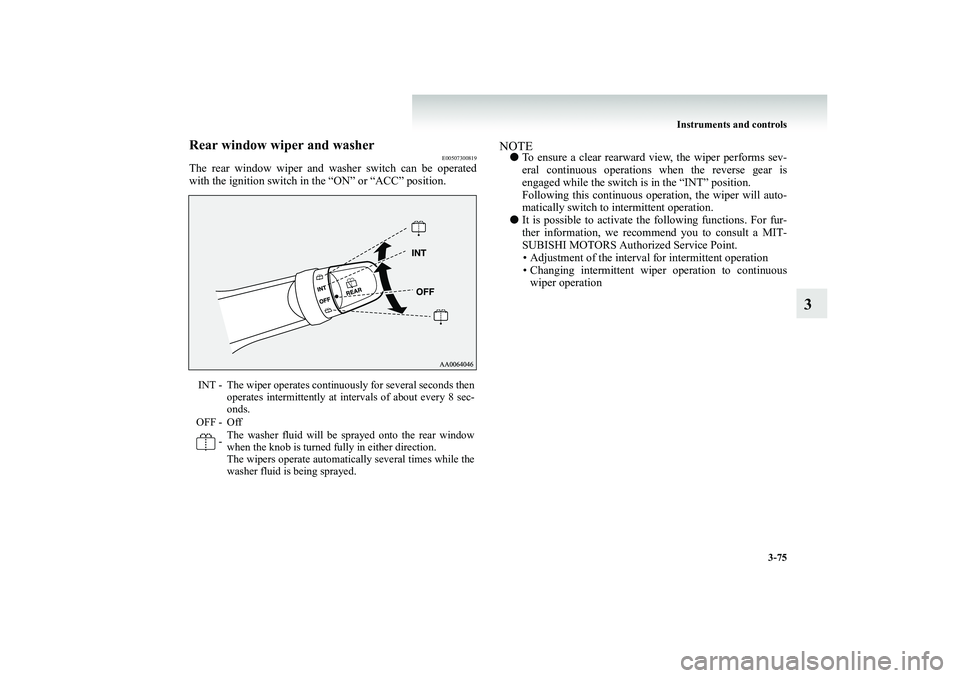
Rear window wiper and washer
E00507300819
The rear window wiper and washer switch can be operated with the ignition switch in the “ON” or “ACC” position.
NOTE●
To ensure a clear rearward view, the wiper performs sev- eral continuous operations when the reverse gear is engaged while the switch is in the “INT” position. Following this continuous operation, the wiper will auto-matically switch to intermittent operation.
●
It is possible to activate the following functions. For fur- ther information, we recommend you to consult a MIT-SUBISHI MOTORS Author
ized Service Point.
• Adjustment of the interval for intermittent operation • Changing intermittent wiper operation to continuouswiper operation
INT - The wiper operates continuously for several seconds then
operates intermittently at intervals of about every 8 sec-onds.
OFF - Off
- The washer fluid will be sprayed onto the rear window when the knob is turned fully in either direction.The wipers operate automatically several times while thewasher fluid is being sprayed.
BK-BK2008E1ENUK.en-uk-Section6.fm Page
75 Wednesday, January 9, 2008 4:32 PM
Page 204 of 538

4-2 Starting and driving
4
Economical driving
E00600100561
For economical driving, there ar
e some technical requirements
that have to be met. The prerequisite for low fuel consumption is a properly adjusted engine. In order to achieve longer life ofthe vehicle and the most econo
mical operation, we recommend
you to have the vehicle checked
at regular intervals in accord-
ance with the service standards.Fuel economy and generation of exhaust gas and noise are highly influenced by personal driving habits as well as the par- ticular operating conditions. The following points should beobserved in order to minimize w
ear of brakes, tyres and engine
as well as to reduce environmental pollution.StartingAvoid rapid acceleration and sudden starts; such operation will result in higher fuel consumption.ShiftingShift only at an appropriate
speed and engine speed. Always
use the highest gear possible. The transfer shift lever should be set to “2H” when driving on normal roads and express ways to obtain best possible fueleconomy.City trafficFrequent starting and stopping
increases the average fuel con-
sumption. Use roads with smooth
traffic flow whenever possi-
ble. When driving on congested
roads, avoid use of a low gear
at high engine speeds.
IdlingThe vehicle consumes fuel even during idling. Avoid extended idling whenever possible.SpeedAt higher vehicle speed, more fu
el is consumed. Avoid driving
at full speed. Even a slight re
lease of the accelerator pedal will
save a significant amount of fuel.Tyre inflation pressureCheck the tyre inflation pressure
s at regular intervals. Low tyre
inflation pressure increases ro
ad resistance and fuel consump-
tion. In addition, low tyre pres
sures adversely affect tyre wear
and driving stability.LoadDo not drive with unnecessary articles in the luggage compart- ment. Especially during city dr
iving where frequent starting
and stopping is necessary, the increased weight of the vehicle will greatly affect fuel consumption. Also avoid driving with unnecessary luggage or carriers,
etc., on the roof; the increased
air resistance will increase fuel consumption.Cold engine startingStarting of a cold engine consumes more fuel. Unnecessary fuel consumption
is also caused by keeping a hot
engine running. After the engine is started, commence driving as soon as possible.Air conditioningThe use of the air conditioning
will increase the fuel consump-
tion.
BK-BK2008E1ENUK.en-uk-Section7.fm Page 2 Wednesday, January 9, 2008 4:36 PM
Page 218 of 538

4-16 Starting and driving
4
NOTE●
It is possible to adjust the period of ignition switch illumi- nation (the period until the ignition switch illumination goes off). For details, we recommend you to consult a MITSUBISHI MOTORS Auth
orized Service Point.
●
If the illumination period of the room & map lamps or rear personal lamps (the period until these lamps go off) is adjusted, the period of ignition switch illumination (theperiod until the ignition switch illumination goes off) will automatically be changed at the same time. If the illumination period of the room & map lamps or rearpersonal lamps is set to zero (in other words, the illumina- tion keep-on function is deactivated), the ignition switch illumination will not come on when the ignition switch isremoved. For information, we recommend you to consult a MIT- SUBISHI MOTORS Authorized Service Point.
To remove the keyFor vehicles with a M/T, when removing the key, push the keyin at the “ACC” position and keep it depressed until it is turnedto the “LOCK” position, and remove it.Vehicles with M/T
BK-BK2008E1ENUK.en-uk-Section7.fm Page
16 Wednesday, January 9, 2008 4:36 PM
Page 225 of 538

Starting and driving
4-23
4
If the DPF warning lamp
comes on during vehicle
operationSteady illumination of the DPF warning lamp shows that the DPF has not been able to burn away all of the trapped PM and that, as a result, an excessive amount of PM has accumulatedinside it. To enable the DPF to burn away the PM, try to drive the vehicle as follows: ●
With the needle of the water temperature gauge stabilized in roughly the middle of the scale, drive for about 20 min- utes at a speed of at least 40 km/h (25 mph).
If the DPF warning lamp subsequently stays on, contact yourMITSUBISHI MOTORS Auth
orized Service Point.
If the DPF warning lamp flashes during vehicle operationFlashing of the DPF warning lamp
indicates an abnormality in
the DPF system. Have the syst
em inspected by a MITSUBISHI
MOTORS Authorized Service Point.
Manual transmission
E00602000072
The shift pattern is shown on the gearshift lever knob. Be sure to always fully depress the clutch pedal before attempting to shift the lever.
CAUTION
!●
You do not have to cont
inuously drive exactly as
indicated above. Always strive to drive safely in accordance with
road conditions.
CAUTION
!●
Continuing to drive wi
th the DPF warning lamp
flashing could result in engine trouble and DPFdamage.
CAUTION
!●
Do not move the gearshif
t lever into reverse while
the vehicle is moving forward; doing so will damage the transmission.
●
Do not rest your foot on
the clutch pedal while driv-
ing as this will cause premature clutch wear or dam- age.
BK-BK2008E1ENUK.en-uk-Section7.fm Page
23 Wednesday, January 9, 2008 4:36 PM
Page 234 of 538

4-32 Starting and driving
4
Operation of the A/T
E00604200342
Passing acceleration
E00604500156
To gain extra acceleration in
“D” (DRIVE) position, push the
accelerator to the floor. The auto
matic transmission will auto-
matically downshift.NOTE●
In “Sports mode”, downshifts
do not take place when the
accelerator is depressed all the way to the floor.
Uphill/downhill driving
E00610500089
DRIVING UPHILL The transmission may not upshift
to a higher gear if the com-
puter determines the current sp
eed cannot be maintained once a
higher gear is engaged. For smoother vehicle performance, if you release the throttlewhile climbing a steep grade, th
e transmission may not upshift.
This is normal, as the computer
is temporarily preventing shift-
ing. After reaching the top of th
e hill, normal gear shift func-
tion will resume. DRIVING DOWNHILL When travelling down steep grad
es, the computer may auto-
matically select a lower gear. Th
is function assists engine brak-
ing efforts, reducing the need
for using the service brakes.
CAUTION
!●
Before selecting a gear with the engine running and the vehicle stationary, fully depress the brake pedalto prevent the vehicle from creeping. The vehicle will begin to move as soon as the gear is engaged, especially when th
e engine speed is high, at
fast idle or with the ai
r conditioning
operating, the
brakes should only be released when you are ready to drive away.
●
Depress the brake pedal with the right foot at all times. Using the left foot co
uld cause driver movement
delay in case of an emergency.
●
Operating the accelerator
pedal while the other foot
is resting on the brake peda
l will affect braking effi-
ciency and may cause pr
emature wear of brake
pads.
●
To prevent sudden accel
eration, never race the
engine when shifting from
the “P” (PARK) or “N”
(NEUTRAL) position.
●
Do not race the engine wi
th brake pedal pressed
when the vehicle is stationary. This can damage the A/T. Also, when you depress the accelerator pedal whileholding down the brake peda
l with the selector lever
in the “P” (PARK), “N” (NEUTRAL) or “D” (DRIVE) position, the increa
se in engine revolutions
may be limited.
BK-BK2008E1ENUK.en-uk-Section7.fm Page
32 Wednesday, January 9, 2008 4:36 PM
Page 235 of 538

Starting and driving
4-33
4
Waiting
E00604600245
For short waiting periods, such as
at traffic signals, the vehicle
can be left in gear and held st
ationary with the service brake.
For longer waiting periods with the engine running, place theselector lever in the “N” (NEUTRAL) position and apply the parking brake, while holding the vehicle stationary with the service brake.
Parking
E00604700161
To park the vehicle, first bring it to a complete stop, fully engage the parking brake, and th
en move the selector lever to
the “P” (PARK) position.If you are going to leave the vehicle unattended, always switch off the engine and remove the ignition key.NOTE●
On a slope, be sure to apply the parking brake before moving the selector lever to the “P” (PARK) position. If you move the selector lever to the “P” (PARK) position before applying the parking brake, it may be difficult todisengage the selector lever
from the “P” (PARK) position
when next you drive the vehicle, requiring application of a strong force to the selector
lever to move from the “P”
(PARK) position.
CAUTION
!●
Never hold the vehicle statio
nary on a hill using the
accelerator pedal (without
using the brake pedal).
Always apply the parking brake and/or service brakes.
BK-BK2008E1ENUK.en-uk-Section7.fm Page
33 Wednesday, January 9, 2008 4:36 PM
Page 255 of 538

Starting and driving
4-53
4
Inspection and main
tenance following
rough road operation
E00606700048
After operating the vehicle in rough road conditions, be sure to perform the following inspection and maintenance procedures: ●
Check that the vehicle has not been damaged by rocks, gravel, etc.
●
Carefully wash the vehicle with water. After washing, drive the vehicle slowly while lightlydepressing the brake pedal in order to dry out the brakes. If the brakes still do not function properly, we recommend you to have the brakes checked as soon as possible.
●
Remove the insects, dried grass, etc. clogging the radiator core.
●
After crossing a stream, be sure to have the following items inspected at a MITS
UBISHI MOTORS Authorized
Service Point and take the necessary measures. • Check the brake system and,
if necessary, have it serv-
iced. • Check the engine, transmissi
on, transfer, and differential
oil or grease level and turbid
ity. If the oil or grease is
milky, it indicates water co
ntamination. Replace it with
new oil or grease. • Grease the propeller shaft.• Check the inside of the vehi
cle. If ingress of water is
found, dry the carpet etc. • Inspect the headlamps. If th
e headlamp bulb is flooded
with water, we recommend you to have it drained.
Cautions on handling
of 4-wheel drive
vehicles
E00606800401
Tyres and wheelsSince the driving torque can be
applied to the 4 wheels, the per-
formance of the vehicle when
operating in 4-wheel drive is
greatly affected by th
e condition of the tyres.
Pay close attention to the tyres. ●
Install specified tyres on all
wheels. Refer to “Tyres and
wheels” on page 9-13.
●
Be sure to fit all 4 tyres an
d wheels of the same size and
type. When replacement of any of th
e tyres or wheels is neces-
sary, replace all of them.
●
All tyres should be rotated
whenever the wear difference
between the front and rear tyres is recognizable.
BK-BK2008E1ENUK.en-uk-Section7.fm Page
53 Wednesday, January 9, 2008 4:36 PM