Page 22 of 450

2 General information
Fuel selection
E00200101274
NOTE●Petrol-powered vehicles have a knock control system,
which allows you to use unleaded petrol 90 RON as an
emergency measure if unleaded petrol 95 RON or higher
is not available. In such cases, you don’t need to adjust the
engine.
If unleaded petrol 90 RON is used, the engine perform-
ance level will be reduced. ●
Repeatedly driving short distances at low speeds can
cause deposits to form in the fuel system and engine,
resulting in poor starting and poor acceleration. If these
problems occur, you are advised to add a detergent addi-
tive to the gasoline when you re fuel the vehicle. The addi-
tive will remove the deposits, thereby returning the engine
to a normal condition. Be sure to use a genuine
MITSUBISHI FUEL SYSTEM CLEANER. Using an
unsuitable additive could cause the engine to malfunction.
For details, please contact your MITSUBISHI MOTORS
Authorized Service Point.
● Poor quality petrol can cause problems such as hard start-
ing, stalling, engine noise and hesitation. If your experi-
ence these problems, try another brand and/or grade of
petrol.
If the check engine warning lamp flashes, have the system
checked as soon as possible at a MITSUBISHI MOTORS
Authorized Service Point.
Recommended fuel Petrol-powered vehicles
Unleaded petrol octane number (EN 228)
95 RON or higher
Diesel-powered vehicles
Cetane number (EN 590)
51 or higher
CAUTION!
●
In the case of petrol-pow ered vehicles, the use of
leaded fuel can result in serious damage to the
engine and catalytic converter. Never use leaded
fuel.
● Diesel-powered vehicles are designed to use only die-
sel fuel that meets the EN 590 standard.
The use of any other type of diesel fuel will adversely
affect the engine’s performance and durability.
Page 58 of 450

2-10 Seat and seat belts
2
To recline the seatbackE00401500241
In order to recline the seatback, lean forward slightly, push the
seatback lock knob (A) down, an d then lean backward to the
desired position and release the knob. The seatback will lock in
that position.
Head restraints
E00403300966
CAUTION!
● The reclining mechanism of the seatback is spring
loaded, causing it to return to the vertical position
when the lock lever is op erated. When operating the
lever, sit close to the seat back or hold it with your
hand to control its return motion.
WARNING!
● Driving without the head restraints in place can
cause you and your passengers serious injury or
death in the event of an accident. To reduce the risk
of injury in an accident, always make sure the head
restraints are installe d and properly positioned
when the seat is occupied.
● Never place a cushion or similar device on the seat-
back. This can adversely af fect head restraint per-
formance by increasing the distance between your
head and the restraint.
Page 106 of 450

2-58 Seat and seat belts
2
Deployment of front air bagsE00407501077
The front air bags ARE DESIGNED TO DEPLOY when…
The front air bags are designed to deploy when the vehicle suf-
fers a moderate to severe frontal impact. A typical condition is
shown in the illustration.
The front air bags will deploy if the severity of the impact is
above the designed threshold level, comparable to a collision at
approximately 25 km/h (16 mph) when impacting straight into
a solid wall that does not move or deform. If the severity of the
impact is below the above threshold level, the front air bags
may not deploy. However, this threshold speed will be consid-
erably higher if the vehicle stri kes an object that absorbs the
impact by either deforming or moving (for example, another
stationary vehicle, pole or a guard rail). As frontal collisions can easily move you out of position, it is
important always to w
ear the seat belts correctly. Your seat belt
will help to keep you at a sa fe distance from the steering wheel
and instrument panel during the initial stages of air bag deploy-
ment. The initial stage of air bag inflation is the most forceful,
and may cause a serious or fatal injury. Moreover, the seat belts
in your vehicle are your primary means of protection in a colli-
sion. The SRS (Supplemental Re straint System) air bags are
designed to provide additional protection. Therefore, for your
safety and the safety of all the occupants, make sure that the
seat belts are always worn correctly.
A head-on collision with a solid wall at a speed of
approximately 25 km/h (16 mph) or higher Moderate to severe frontal impact within the shaded
area between the arrows
Page 109 of 450
Seat and seat belts2-61
2
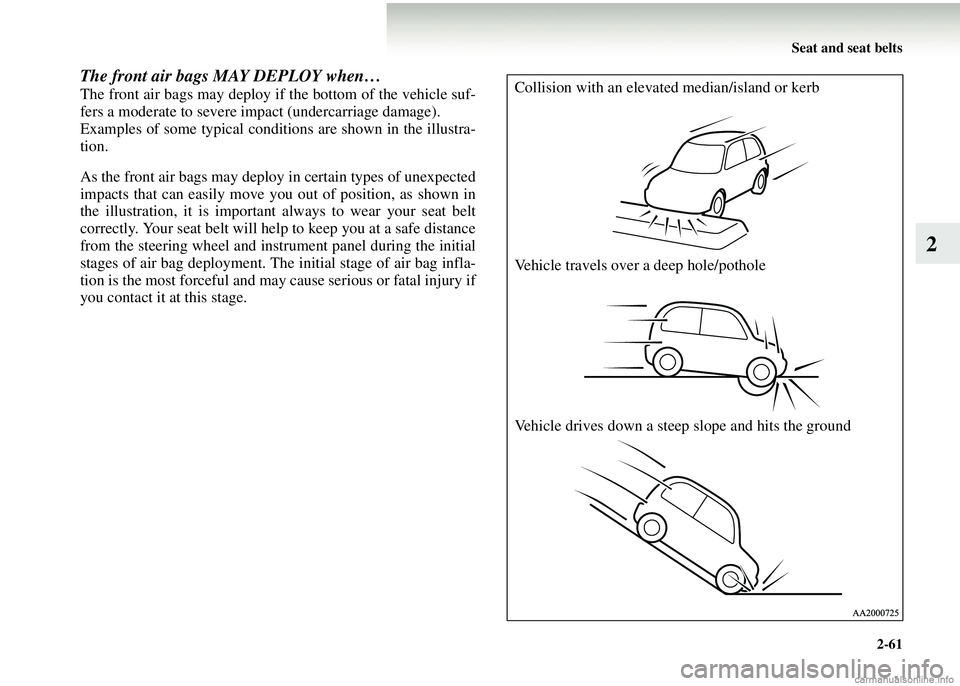
The front air bags MAY DEPLOY when…
The front air bags may deploy if the bottom of the vehicle suf-
fers a moderate to severe impact (undercarriage damage).
Examples of some typical conditions are shown in the illustra-
tion.
As the front air bags may deploy in certain types of unexpected
impacts that can easily move you out of position, as shown in
the illustration, it is important always to wear your seat belt
correctly. Your seat belt will help to keep you at a safe distance
from the steering wheel and instrument panel during the initial
stages of air bag deployment. The initial stage of air bag infla-
tion is the most forceful and may cause serious or fatal injury if
you contact it at this stage.Collision with an elevated median/island or kerb
Vehicle travels over a deep hole/pothole
Vehicle drives down a steep slope and hits the ground
Page 124 of 450
3-4 Instruments and controls
3
TachometerE00500300142
The tachometer indicates the engine speed (r/min). The
tachometer can help you obtain more economical driving and
also warns you of excessive engine speeds.
Odometer/TripmeterE00500600060
When the ignition switch is in the “ON” position, odometer
and tripmeter indications are given.
Odometer
The odometer indicates the total distance the vehicle has
travelled.
CAUTION!
● When during, watch the tachometer to make sure
that the engine speed indi cation does not rise into
the red zone (excessive engine rpm).
A- Odometer
B- Tripmeter
C- Reset button
Page 125 of 450

Instruments and controls3-5
3
Tripmeter
The tripmeter indicates the dist ance travelled during a particu-
lar trip or period.
There are two tripmeter displays: TRIP and .
TRIP can be used to measur e the distance travelled since
the current trip began. At the same time, TRIP can be used
to measure the distance from an intermediate location.
Every time the reset button (C) is pressed lightly (less than 1
second), tripmeter indications (TRIP and ) are changed. To reset the tripmeter
To return the display to “0”, press the reset button (C) for more
than 1 second. Only the currently displayed value will be reset.
If TRIP is displayed, for example, only TRIP will be
reset.
NOTE
●
Display TRIP and each have a maximum distance
of 9999.9 km or mile.
● Even when the engine has been stopped, the odometer/trip
odometer indication is given for about 30 seconds if any
of the following steps is taken.
• The ignition key is turned to the “OFF” position.
• Any door is opened.
• The odometer/trip odometer reset button is pressed.
● When disconnecting the batter y terminal for a long time,
the memory of tripmeter display TRIP and are
cleared, and the display returns to “0”.
TRIP
TRIP
Page 144 of 450
3-24 Instruments and controls
3
●Automatic reset mode
When 4 hours have passed after the ignition switch is
turned to the “OFF” or “ACC” position, the display is
automatically reset. It then shows “---”.
● Manual reset mode
If you reset the display at the time when you want to start
the measurements, average fu el consumption from that
point of time can be displayed.
Push the “DISP” button for more than 5 seconds.
NOTE● While the ignition switch is in the “ON” position, the
automatic reset mode is perm anently selected. If you wish
to make continuous measur ements, select the manual
mode.
Driving rangeE00509400045
This value shows the distance (in km or miles) that can be
driven on the fuel remaining in the fuel tank.
Page 148 of 450
3-28 Instruments and controls
3
Display unit selectionE00509700064
It is possible to change the units in which distance, fuel con-
sumption, and time are displayed.
NOTE●Except for vehicles with MITSUBISHI MOTORS genu-
ine audio, only the unit of momentary fuel consumption
can be changed to km or miles.
1. Press and hold down button (A), then press the “M” but- ton (B) within 1 second. A bu zzer will sound, and the sys-
tem will allow units to be changed. 2. Use the “H” button (C) or “M” button (B) to select the
desired speed unit, then press the “SET” button (D) to
enter the setting.
H - km
M - mile