2008 MINI COOPER CONVERTIBLE tow
[x] Cancel search: towPage 116 of 176
114
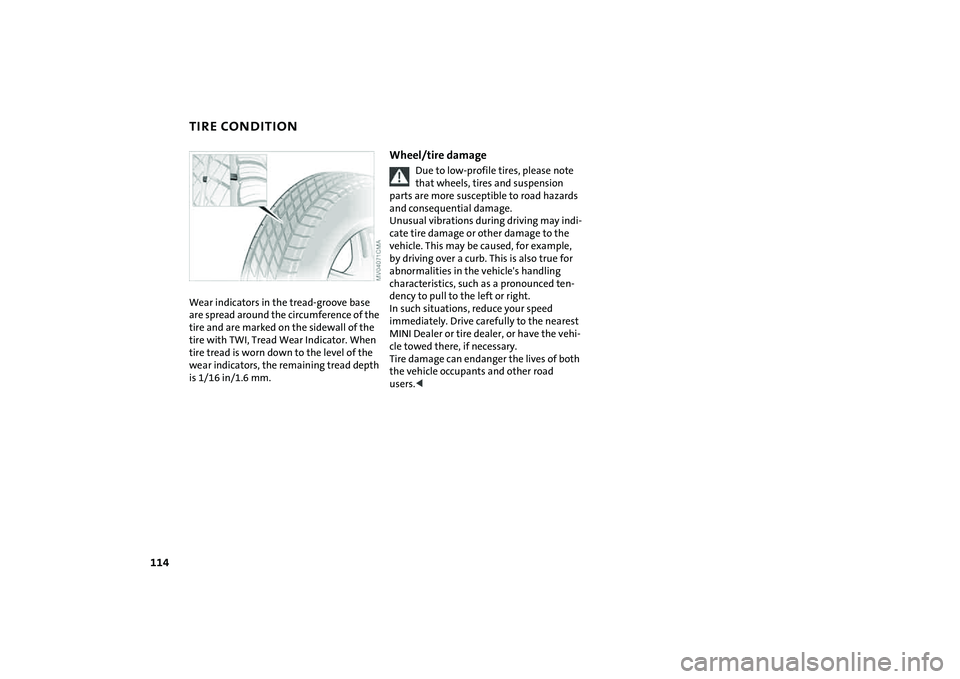
TIRE CONDITIONWear indicators in the tread-groove base
are spread around the circumference of the
tire and are marked on the sidewall of the
tire with TWI, Tread Wear Indicator. When
tire tread is worn down to the level of the
wear indicators, the remaining tread depth
is 1/16 in/1.6 mm.
Wheel/tire damage
Due to low-profile tires, please note
that wheels, tires and suspension
parts are more susceptible to road hazards
and consequential damage.
Unusual vibrations during driving may indi-
cate tire damage or other damage to the
vehicle. This may be caused, for example,
by driving over a curb. This is also true for
abnormalities in the vehicle's handling
characteristics, such as a pronounced ten-
dency to pull to the left or right.
In such situations, reduce your speed
immediately. Drive carefully to the nearest
MINI Dealer or tire dealer, or have the vehi-
cle towed there, if necessary.
Tire damage can endanger the lives of both
the vehicle occupants and other road
users.<
Page 123 of 176

121
OVERVIEW REPAIRSOPERATIONCONTROLS DATA INDEX
ENGINE OILMeasuring the oil level1. With the vehicle's engine at normal
operating temperature, i.e. after unin-
terrupted driving for at least 6 miles/
10 km, park the vehicle on a level surface
2. Switch off the engine
3. Pull the dipstick out after approx.
5 minutes and wipe it off with a lint-free
cloth, paper towel, or similar material
4. Carefully push the dipstick all the way
into the guide tube and pull it out again.
The oil level should be between the two
marks on the dipstick.
As with fuel economy, oil consumption is
directly influenced by your driving style and
vehicle operating conditions.
The oil volume between the two marks
MIN, MAX on the dipstick corresponds to
approx. 1.1 quarts/1 liter.
Do not fill beyond the upper mark on
the dipstick. Excess oil will damage
the engine.
dropped to just above the lower mark
of the dipstick. However, never allow the
level to drop below the lower mark.<
Add oil within the next 30 miles/
50 km, otherwise the engine could be
damaged.<
Always store oil, grease, etc., out of
reach of children. Comply with all
warning labels and information on lubri-
cant containers, otherwise health risks may
result.<
Oil changeHave the oil changed only by a MINI Dealer
or a workshop that has specially trained
personnel working in accordance with the
specifications of the MINI manufacturer.
Page 134 of 176
132
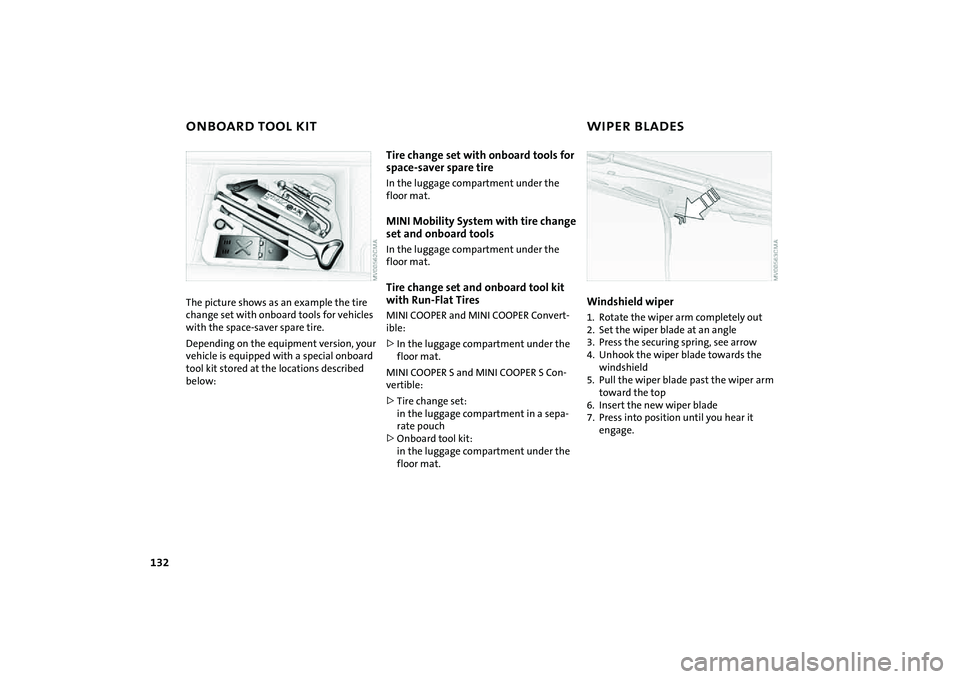
ONBOARD TOOL KIT WIPER BLADESThe picture shows as an example the tire
change set with onboard tools for vehicles
with the space-saver spare tire.
Depending on the equipment version, your
vehicle is equipped with a special onboard
tool kit stored at the locations described
below:
Tire change set with onboard tools for
space-saver spare tireIn the luggage compartment under the
floor mat.MINI Mobility System with tire change
set and onboard toolsIn the luggage compartment under the
floor mat.Tire change set and onboard tool kit
with Run-Flat TiresMINI COOPER and MINI COOPER Convert-
ible:
>In the luggage compartment under the
floor mat.
MINI COOPER S and MINI COOPER S Con-
vertible:
>Tire change set:
in the luggage compartment in a sepa-
rate pouch
>Onboard tool kit:
in the luggage compartment under the
floor mat.
Windshield wiper1. Rotate the wiper arm completely out
2. Set the wiper blade at an angle
3. Press the securing spring, see arrow
4. Unhook the wiper blade towards the
windshield
5. Pull the wiper blade past the wiper arm
toward the top
6. Insert the new wiper blade
7. Press into position until you hear it
engage.
Page 137 of 176
135
OVERVIEW REPAIRSOPERATION CONTROLS DATA INDEX
LAMPS AND BULBSSide turn signal indicators5 watt bulb
1. Slide the lamp toward the rear of the
vehicle and remove
2. Remove and replace the bulb.
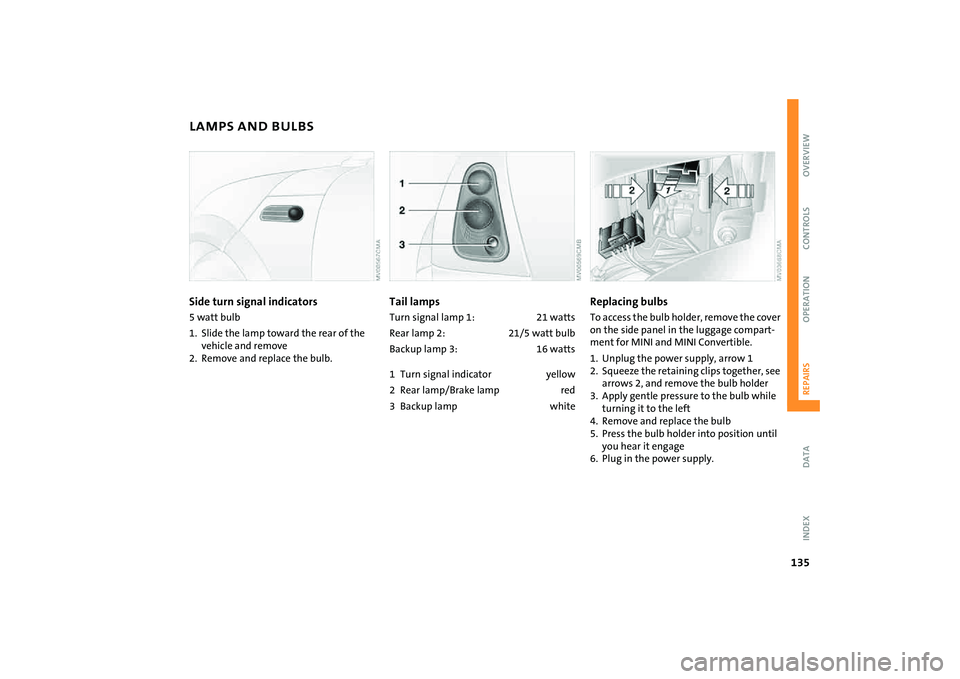
Tail lampsTurn signal lamp 1: 21 watts
Rear lamp 2: 21/5 watt bulb
Backup lamp 3: 16 watts
1 Turn signal indicator yellow
2 Rear lamp/Brake lamp red
3Backup lamp white
Replacing bulbsTo access the bulb holder, remove the cover
on the side panel in the luggage compart-
ment for MINI and MINI Convertible.
1. Unplug the power supply, arrow 1
2. Squeeze the retaining clips together, see
arrows 2, and remove the bulb holder
3. Apply gentle pressure to the bulb while
turning it to the left
4. Remove and replace the bulb
5. Press the bulb holder into position until
you hear it engage
6. Plug in the power supply.
Page 139 of 176
137
OVERVIEW REPAIRSOPERATION CONTROLS DATA INDEX
REPAIRING A FLAT TIRE SPACE-SAVER SPARE TIRE
*
Safety measures in the event of a
flat:
Park the vehicle as far away from flowing
traffic as possible, and switch on the haz-
ard warning flashers.
Turn the steering wheel to the straight-
ahead wheel position and engage the
steering lock. Engage the parking brake and
shift into 1st or reverse gear – selector lever
in P.
All passengers should be outside the vehi-
cle and well away from your immediate
working area – behind a guardrail, for
instance.
If a portable hazard warning lamp is avail-
able, set it up on the roadside at an appro-
priate distance from the rear of the vehicle.
Comply with all safety guidelines and regu-
lations.<
In the event of a flat tire, different proce-
dures should be followed depending on the
equipment included in your vehicle:
>Vehicles with Run-Flat Tires, refer to
page115
>Vehicles with a space-saver spare tire,
refer to the following section
>Vehicles with MINI Mobility System,
refer to page141.
To change a space-saver spare tire, proceed
as follows:
>Remove space-saver spare tire, refer to
the section after the next one
>Prepare for tire change, refer to page139
>Jack up the vehicle, refer to page140
>Mount the space-saver spare tire, refer
to page140
>Tighten the lug bolts, refer to page140
>Drive with space-saver spare tire, refer to
page139.
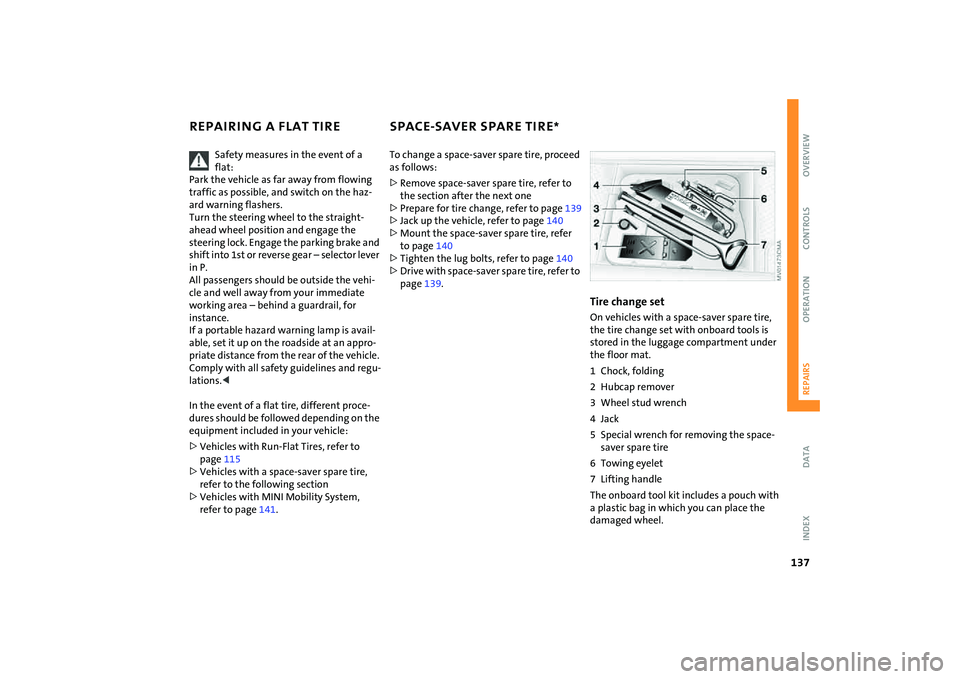
Tire change setOn vehicles with a space-saver spare tire,
the tire change set with onboard tools is
stored in the luggage compartment under
the floor mat.
1 Chock, folding
2 Hubcap remover
3 Wheel stud wrench
4Jack
5 Special wrench for removing the space-
saver spare tire
6 Towing eyelet
7 Lifting handle
The onboard tool kit includes a pouch with
a plastic bag in which you can place the
damaged wheel.
Page 141 of 176

139
OVERVIEW REPAIRSOPERATION CONTROLS DATA INDEX
SPACE-SAVER SPARE TIRE
*
CHANGING TIRES
9. Pull out the space-saver spare tire
towards the rear underneath the vehi-
cle
10. Position the space-saver spare tire with
the valve facing upwards
11. Unscrew the valve extension from the
valve of the space-saver spare tire
12. Unscrew the dust cap from the exten-
sion and place it on the valve of the
space-saver spare tire.
Due to its different dimensions, the
damaged wheel cannot be placed in
the recess for the space-saver spare tire.<
Driving with the space-saver spare tireDrive cautiously. Do not exceed a speed of
50 mph / 80 km/h.
You must expect changes in vehicle han-
dling such as lower track stability during
braking, longer braking distances and
changes in self-steering properties when
close to the handling limit. These effects
are more pronounced when driving with
winter tires.
Only one space-saver spare tire may
be mounted at one time. Reinstall a
wheel and tire of the original size as soon
as possible.<
Check the tire inflation pressure at
the earliest opportunity and correct it
if necessary. Replace the defective tire as
soon as possible and have the new wheel/
tire assembly balanced.<
Additional safety measures in the
event of a tire change:
Change tires only on a flat, solid and non-
slippery surface.
The vehicle or the jack could slip sideways
on soft or slippery support surfaces, such as
snow, ice, flagstones, etc..
Do not use a wooden block or similar object
as a support base for the jack, as this would
prevent it from extending to its full support
height and reduce its load-carrying capac-
ity.
Do not lie under the vehicle or start the
engine when the vehicle is supported by
the jack – risk of fatal injury.<
Preparing for a tire change
Observe the safety precautions
regarding flat tires on page137.<
1. For vehicles with a space-saver spare
tire:
Place the folding chock behind the front
wheel on the other side of the vehicle;
on downward inclines, place it in front of
this wheel. If the wheel is changed on a
surface with a more severe slope, take
additional precautions to secure the
vehicle from rolling
2. Loosen the lug bolts by a half turn.
Page 143 of 176
141
OVERVIEW REPAIRSOPERATION CONTROLS DATA INDEX
MINI MOBILITY SYSTEM
*
MINI Mobility System
The MINI Mobility System is provided to
help you repair a flat tire. With the help of
this system you can apply a liquid sealant
on the inside of the tire, which seals the
damaged area and enables you to continue
to drive.Preparing for tire repair
Before using the MINI Mobility Sys-
tem read the warning and danger
precautions on the equipment.<
If possible, leave objects in which have
been forced into the tire.
Take off the tag regarding speed limits and
stick it onto the steering wheel.
Using the MINI Mobility SystemIn order to repair a flat tire with the MINI
Mobility System, proceed as follows:
>Pump in liquid sealant, refer to page142
>Reinflate the tire, refer to page142
>Distribute liquid sealant, refer to
page143
>Check tire inflation pressure, refer to
page143
>Drive on, refer to page143.
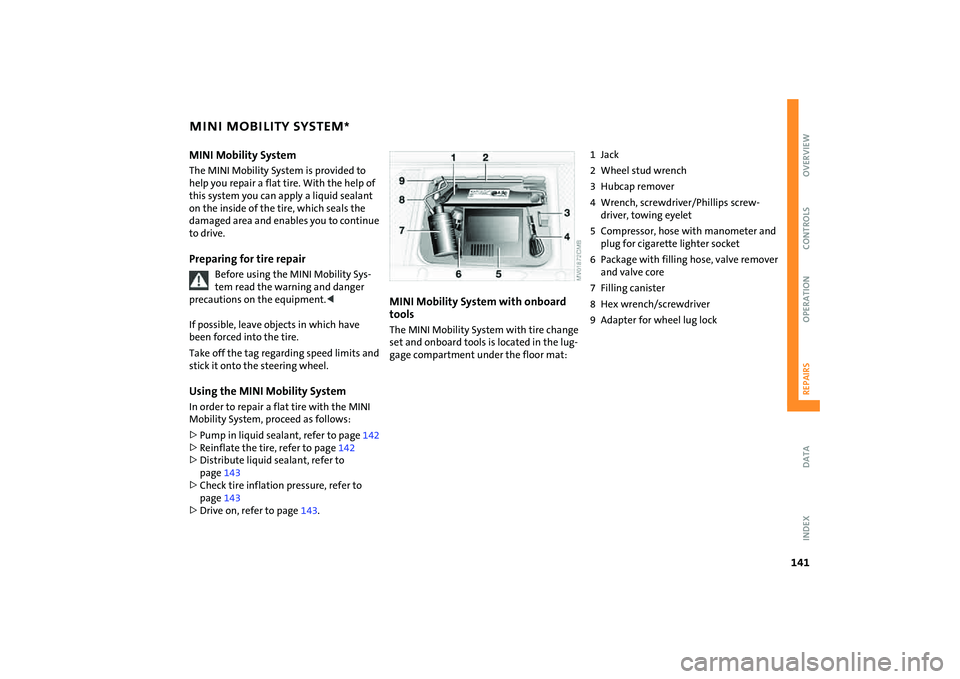
MINI Mobility System with onboard
tools The MINI Mobility System with tire change
set and onboard tools is located in the lug-
gage compartment under the floor mat:
1Jack
2 Wheel stud wrench
3 Hubcap remover
4 Wrench, screwdriver/Phillips screw-
driver, towing eyelet
5 Compressor, hose with manometer and
plug for cigarette lighter socket
6 Package with filling hose, valve remover
and valve core
7 Filling canister
8 Hex wrench/screwdriver
9 Adapter for wheel lug lock
Page 149 of 176

147
OVERVIEW REPAIRSOPERATION CONTROLS DATA INDEX
JUMP-STARTING TOWING AND TOW-STARTING
Flip open the cover of the auxiliary
jump-starting terminal, arrow 1
2. Connect one terminal clamp of the
plus/+ jumper cable to the positive bat-
tery terminal or to an auxiliary jump-
starting terminal of the support vehicle
3. Connect the other terminal clamp of the
plus/+ jumper cable to the positive bat-
tery terminal or to an auxiliary jump-
starting terminal of the vehicle to be
started
Engine or body ground in your MINI or MINI
Convertible: arrow 2.
4. Connect one terminal clamp of the
minus/– jumper cable to the negative
battery terminal or to an engine or body
ground of the support vehicle
5. Connect the second terminal clamp of
the minus/– jumper cable to the nega-
tive terminal of the battery or to the
engine or body ground of the vehicle to
be started.
Performing the jump-start1. Start the engine of the support vehicle
and allow it to run at increased idle
speed for several minutes
2. Start the engine of the other vehicle in
the usual manner.
If the first start attempt is not success-
ful, wait a few minutes before another
attempt in order to allow the discharged
battery to recharge
3. Allow the engines of both vehicles to run
for several minutes.
On the MINI or MINI Convertible:
Before disconnecting the jumper
cables, switch on the lighting, the rear
window defroster and the highest
blower speed to prevent a voltage surge
from the regulator to the electrical sys-
tems and components.<
4. Then disconnect the jumper cables in
the reverse order.
If necessary have the battery checked and
completely charged at a MINI Dealer.
Do not use spray starter fluids to start
the engine.<
Observe all applicable laws and regu-
lations for towing and tow-start-
ing.<
Do not transport any occupant other
than the driver in a vehicle that is
being towed.<
Using the towing eyelet The screw-in towing eyelet is stored in the
onboard tool kit, refer to page132; be sure
that it remains with the vehicle at all times.
It can be attached at the front or rear of
your vehicle.
Use only the towing eyelet supplied
with the vehicle and screw it in firmly
until it stops. Use the towing eyelet for
towing on paved roads only. Avoid subject-
ing the towing eyelet to lateral loads, e.g.
do not lift the vehicle using the towing eye-
let. Otherwise, the towing eyelet and the
vehicle could be damaged.<