Page 87 of 801

86 Control systemsCOMAND operating safetyWarning!
G
Any alteration of electronic components or
software can cause malfunctions.
Radio, satellite radio, amplifier, CD/DVD
changer, navigation module, telephone and
Voice Control Systems* are interconnected.
Therefore, if one of the components is not
operational, or has not been removed/ re-
placed properly, the function of other com-
ponents could be impaired.
Such conditions might seriously impair the
operating safety of your vehicle.
We recommend to have any service work on
electronic components carried out by an au-
thorized Mercedes-Benz Center.
Warning!
G
In order to avoid distraction which could
lead to an accident, the driver should enter
system settings while the vehicle is at a
standstill, and operate the system only
when permitted by road, weather and traffic
conditions.
Bear in mind that at a speed of just 30 mph
(approximately 50 km/ h), your car covers a
distance of 44 feet (approximately 14 m) ev-
ery second.
COMAND supplies you with information to
help you select your route more easily and
guide you conveniently and safely to your
destination. For safety reasons, we encour-
age the driver to stop the vehicle in a safe
place before answering or placing a call, or
consulting the COMAND screen to read nav-
igational maps, instructions, or downloaded
information.
Warning!
G
While the navigation system provides direc-
tional assistance, the driver must remain fo-
cused on safe driving behavior, especially
attention to traffic and street signs, and
should utilize the system’s audio cues while
driving.
The navigation system does not supply any
information on stop signs, yield signs, traffic
regulations or traffic safety rules. Their ob-
servance always remains in the driver’s per-
sonal responsibility. DVD maps do not cover
all areas nor all routes within an area.
Page 88 of 801

87 Control systems
COMAND introduction
�COMAND introduction
COMAND (C
ockpit M
anagement and D
ata
System) is an information and operating
center for vehicle sound and communica-
tions systems, including the radio and nav-
igation system, as well as other optional
equipment (satellite radio, telephone*,
etc.).
Availability of functions while the vehi-
cle is in motion
For safety reasons, certain COMAND func-
tions are not available while the vehicle is
in motion or they are only available to a
limited extent. You will notice this, for ex-
ample, by the fact that certain menu items
cannot be selected or that the COMAND
display shows a corresponding message.
Switching COMAND on or off�
Press the o shortcut button in the
center console (
�page 88).
COMAND calls up the menu last select-
ed.
COMAND components
In your vehicle, COMAND can be used to
operate:�
audio functions
�
the navigation system
�
the telephone* and communication
functions (SMS*)
�
external audio and video sources
�
video DVD
�
various vehicle settings
COMAND consists of the following:
�
COMAND shortcut buttons
�
COMAND display
�
telephone* keypad
�
COMAND controller
i
When you switch off COMAND, you also
switch off the currently playing audio source.
During a telephone call, you cannot switch off
COMAND.
Page 89 of 801
88 Control systemsCOMAND introductionCOMAND shortcut buttons
Use the COMAND shortcut buttons to se-
lect main functions directly.
Example:
�
Switching directly to Radio or CD
menu: Press M once or twice.COMAND display
In the COMAND display, you will find the
function currently selected and the corre-
sponding menus. The COMAND display is
divided into several areas.
1Status line
2Main functions
3Main area
4Submenus
5Climate control settings
A white bar under the main functions 2 in-
dicates the active area.
Once you have selected a main
function2, the main area 3 is active.
i
During Rear View Camera* operation
(
�page 487) it is not possible to operate the
COMAND shortcut buttons.
Function
Page
1
PFavorite button
263
2
MShortcut button for:�
CD/DVD
�
radio
124
103
3
LBack button
96
4
OSeat menu
282
5
NShortcut button for:�
telephone*
�
navigation
141
195
6
oCOMAND on/off
button
87
7
,Volume control
98
8
FMute button
98
Page 91 of 801
90 Control systemsCOMAND introductionTelephone keypad
With the help of the telephone keypad, you
can use your mobile phone if it is inserted
in the cradle.
1Telephone keypad
2Folding coverCOMAND controller
Use the COMAND controller to select
menu functions shown on the COMAND
display.
1COMAND controllerYou can operate the COMAND controller
as follows:
�
press briefly or press and hold
�
rotate to the left or right
�
slide to the left, right, up, down or
diagonally
In this way, you can move through the
menus, select menu items or exit menus.
You can move through the menus either by
rotating or sliding the controller.
Operating COMAND controller
Page 93 of 801
92 Control systemsCOMAND introductionOperating COMAND
Menu overview
The illustration below shows the structure
of the main functions and their main
menus.Each main function has a main menu. Each
menu item in the main menu in turn has
several submenu items.
Navi
Page
Audio
Page
Telephone*
Page
Commands/menusMap Display
198
FM/AM Radio
102
Telephone*
141
Mode
201
Sat Radio
108
Address Book*
167
CD
116
Telephone OFF*
143
DVD-Audio
116
MP3
116
Audio OFF
101
Audio AUX
129
Page 100 of 801
99 Control systems
COMAND introduction
Volume of navigation announcements
You can adjust the volume of the naviga-
tion announcements independently from
the volume of the respective audio source.
During a navigation announcement:�
turn thumbwheel,.
or
�
pressæ or ç on the multifunc-
tion steering wheel.
Adjusting volume for telephone calls
In hands-free mode, you can adjust the vol-
ume of a telephone call while the call is
currently active.
During a telephone call:
�
turn thumbwheel,.
or
�
pressæ or ç on the multifunc-
tion steering wheel.Selecting sound settings
You can select different sound settings for
each individual audio source. The respec-
tive sound menu can be found via the sub-
menu for which you wish to make settings.
Example:
“Audio” � “Audio” � “FM/AM Radio” �
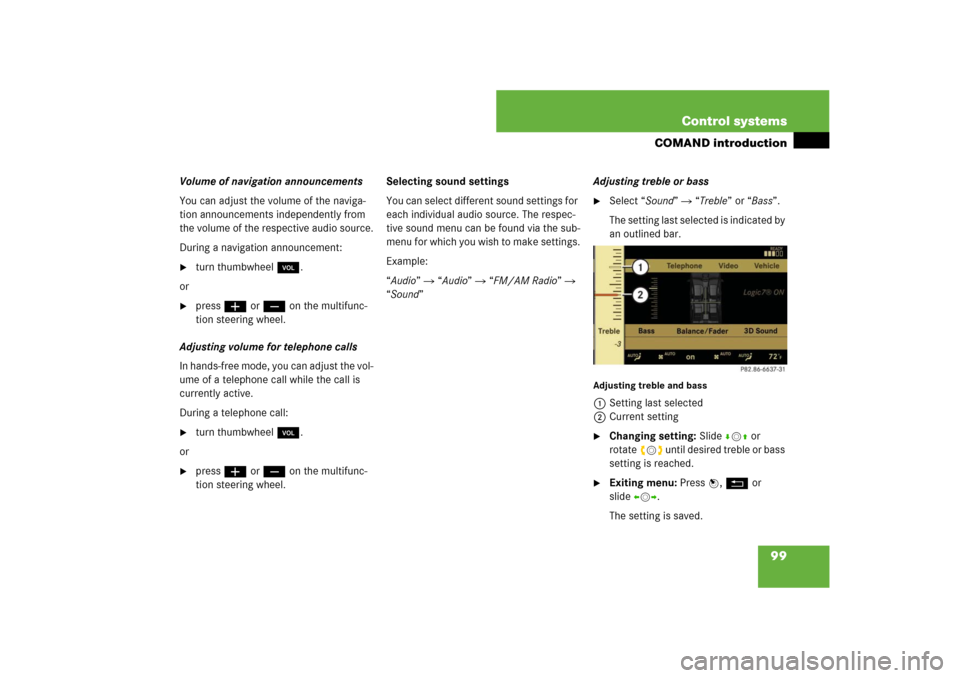
“Sound” Adjusting treble or bass
�
Select “Sound” � “Treble” or “Bass”.
The setting last selected is indicated by
an outlined bar.
Adjusting treble and bass1Setting last selected
2Current setting�
Changing setting: Slide rmq or
rotateymz until desired treble or bass
setting is reached.
�
Exiting menu: Press n, L or
slideomp.
The setting is saved.
Page 105 of 801

104 Control systemsCOMAND FM/AM radioSelecting stations using the station list�
Select “Audio”� “Audio”� “FM/AM
Radio”� “FM”.
�
Select “Radio”� “Station List”.
The station list appears. The dot R in
front of a list entry indicates the cur-
rently selected station. A number in
front of the list entry indicates the pre-
set position in the station preset mem-
ory.
�
Select a station by rotating ymz or
sliding qmr and press n.Selecting stations/channels using the
search function
�
Slide omp or rotate ymz when the
main area is selected.
Depending on the direction in which
the controller is being slid or rotated,
the system searches upward or down-
ward and stops at the next receivable
station/channel.Selecting stations using station
presets
�
Select “Audio” � “Audio” � “FM/AM
Radio” � “FM” or “AM”.
�
Select “Presets”.
or
�
Press n when the main area is select-
ed.
The preset menu appears. The dot R
in front of a preset position indicates
that the currently selected station is
saved there.
�
Select station preset by rotating ymz
or sliding qmr and press n.
or
�
Enter a position number with the tele-
phone keypad using the A- 9
buttons (
�page 90).
i
The station list is only available for the FM
waveband. It contains all the stations that can be
currently received and is sorted by station fre-
quencies.
i
This function is not available for Weather
Band.
Page 106 of 801

105 Control systems
COMAND FM/AM radio
Selecting stations by entering the fre-
quency manually�
Select “Audio”�“Audio”�“FM/AM
Radio”�“FM” or “AM”.
Entering the frequency using the
COMAND controller
�
Select “Radio”�“Frequency Entry”.
The menu for manual frequency entry
appears.
�
Exiting menu without making an en-
try: Press L back button in the cen-
ter console (
�page 88).
�
Increasing or decreasing number:
Slide qmr or rotate ymz.
�
Selecting the next number:
Slidemp.
�
Confirming frequency entry:
Pressn.
COMAND tunes in to the frequency en-
tered.
Entering the frequency using the tele-
phone keypad
�
Press> on the telephone keypad
(�page 90).
�
Enter frequency using the R- 9
buttons.
COMAND tunes in to the frequency en-
tered.Selecting channels using the channel
list
�
Select “Audio” � “Audio” � “FM/AM
Radio” � “WB” � “Channel”.
or
�
Press n when the main area is select-
ed.
The channel list appears. The dotR in
front of a list entry indicates the cur-
rently selected channel.
�
Select channel by rotating ymz or
slidingqmr and press n.
i
This function is not available for Weather
Band.
i
You can only select currently permitted
numbers.
i
If you enter a frequency in the AM waveband
which is outside the frequency range, COMAND
tunes in to the next lowest frequency.
i
This function is only available for Weather
Band.


