2008 MERCEDES-BENZ GLK SUV fuel consumption
[x] Cancel search: fuel consumptionPage 9 of 261
Central locking
Automatic door locking feature
(on-board computer, luxury multi-
function steering wheel). ................104
Key. .................................................. 58
Central locking/unlocking button ......59
Central unlocking Key. .................................................. 58
Centre console
Overview. .......................................... 30
Changing a wheel
see Flat tyre
Checklist (off-road driving)............... 159
Child-proof locks Rear doors. ....................................... 50
Children
In the vehicle. ................................... 41
Restraint systems. ............................ 41
Child seat
Automatic recognition ......................43
Automatic recognition (malfunc-
tion). ............................................... 200
Display message ............................. 182
ISOFIX............................................... 49
Recommendations. ...........................46
Suitable positions. ............................ 44
Cigarette lighter................................. 138
Cleaning the panorama sliding
sunroof................................................ 170
Cleaning the windscreen ..................169
Collapsible wheel Technical data. ............................... 253
COMAND display
Cleaning. ........................................ 170
Constant headlamp mode
see Daytime driving lights
Convenience closing ............................82
Convenience opening ........................... 82
Coolant Checking the level. .........................149
Display message (luxury multi-
function steering wheel) .................186
Display message (multi-function
steering wheel). ......................180, 186
Mixture ratio ................................... 247
Temperature gauge ...........................90
Warning lamp.................................. 202 Cornering lights
Display message ............................. 187
Cruise control..................................... 108
Display message ............................. 182
Cup holder.......................................... 131
Current fuel consumption On-board computer (multi-func-
tion steering wheel). ...................93, 96 D
Dashboard Cleaning. ........................................ 170
see Instrument cluster
Date
Setting (on-board computer,
luxury multi-function steering
wheel). ............................................ 102
Setting (on-board computer,
multi-function steering wheel) ..........93
Daytime driving lights.......................... 75
On-board computer (luxury multi-
function steering wheel) .................102
Delayed switch-off
Exterior lighting (luxury multi-
function steering wheel) .................103
Interior lighting (on-board com-
puter, luxury multi-function steer-
ing wheel). ...................................... 103
Diesel
Low outside temperatures. .............146
Diesel engine
Winter driving. ................................ 146
Digital speedometer............................ .96
Dipped-beam headlamps Display message ............................. 188
Symmetrical. .................................. 162
Display message................................ 176
Display messages Service interval display. ..................167
Symbol messages. ..........................182
Text messages. ............................... 177
Distance recorder
see Total distance recorder
see Trip meter 6 Index
X204_AKB; 1; 5, en-GB
wobuchh,
Version: 2.11.4 2008-10-15T13:20:56+02:00 - Seite 6Dateiname: 6515_0671_02_buchblock.pdf; preflight
Page 11 of 261

Engine oil
........................................... 246
Consumption ................................. 148
Display message ............................. 195
Filler neck. ...................................... 148
Topping up. ..................................... 148
ESP ®
(Electronic Stability Program)... 52
Activating/deactivating ....................53
Display message (luxury multi-
function steering wheel) .........179, 183
Display message (multi-function
steering wheel). ......................178, 179
Trailer stabilisatio n........................... 53
Warning lamp. .......................... 52, 201
ETS (Electronic Traction Support)...... .53
Exterior lighting Delayed switch-off (luxury multi-
function steering wheel). ................103
Exterior mirrors
Adjusting .......................................... 67
Anti-dazzle mode (automatic). ..........68
Folding in/out (automatically). .........68
Folding in/out (electrically). .............68
Folding in (on-board computer,
luxury multi-function steering
wheel). ............................................ 104
Malfunction..................................... 211
Parking position. ............................... 69
Resetting. ......................................... 68
Storing settings ................................ 69
Exterior view
Overview. .......................................... 22F
Fire extinguisher................................ 174
First-aid kit ......................................... 174
Flat tyre Equipment. ..................................... 222
Preparing the vehicle. .....................222
TIREFIT kit....................................... 222
Floormat............................................. .141
Foglamps Display message ............................. 193
Fording........................................ 157, 161
Frequencies Telephone. ...................................... 244
Front airbag .......................................... 38
Front-passenger airbag ........................ 38Fuel......................................................
245
Diesel. ............................................ 145
Loss. ............................................... 206
Petrol .............................................. 145
Fuel consumption................................. 95
Current (on-board computer,
multi-function steering wheel)
................................................... 93, 96
Notes..................................... .242, 246
Vehicle data. ................................... 249
see Trip computer(on-board computer)
Fuel filler flap
Emergency release. ........................215
Opening/closing ............................ 144
Fuel filter
Display message (luxury multi-
function steering wheel) .................187
Display message (multi-function
steering wheel). .............................. 180
Fuel level
Calling up the range (on-board
computer, luxury multi-function
steering wheel). ................................ 96
Calling up the range (on-board
computer, multi-function steering
wheel). .............................................. 93
Display. ....................................... 24, 26
Fuel line
Malfunction..................................... 206
Fuel tank
Defect ............................................. 206
Fuse allocation chart......................... 239
Fuse box Dashboard. ..................................... 239
Engine compartment ......................239
Luggage compartment. ...................240
Fuses................................................... 238 G
Genuine Mercedes-Benz parts.......... 242
Glove compartment ...........................130
Gradient-climbing capability (max-
imum).................................................. 1608 Index
X204_AKB; 1; 5, en-GB
wobuchh,
Version: 2.11.4 2008-10-15T13:20:56+02:00 - Seite 8Dateiname: 6515_0671_02_buchblock.pdf; preflight
Page 13 of 261
Dipped-beam headlamps.
.................75
Display messages (luxury multi-
function steering wheel) .................194
Display messages (multi-function
steering wheel). .............................. 194
Foglamps. ................................... 75, 78
Hazard warning lamps. .....................76
Headlamp flasher.............................. 76
Headlamp range. .............................. 77
Light switch. ..................................... 74
Main-beam headlamps..................... .76
Motorway mode ................................ 78
Rear foglamp. ................................... 75
Switching the daytime driving
lights on/off (on-board computer,
luxury multi-function steering
wheel). ............................................ 102
Switching the exterior lighting
delayed switch-off on/off (on-
board computer, luxury multi-
function steering wheel) .................103
Switching the Intelligent Light
System on or off (on-board com-
puter, luxury multi-function steer-
ing wheel). ...................................... 103
Switching the surround lighting
on/off (on-board computer,
luxury multi-function steering
wheel). ............................................ 103
Turn signals. ..................................... 76
LIM indicator lamp
Cruise control. ................................ 108
Variable Speedtronic. .....................111
Loading guidelines .............................129
Locking Automatic. ........................................ 59
Emergency locking .........................214
From the inside (central locking
button) .............................................. 59
Luggage compartment enlarge-
ment.................................................... 132
Luggage compartment floor opening/closing. ............................ 136
stowage well, unde r........................ 136
Luggage cover .................................... 133
Luggage net Front-passenger footwell ................131Lumbar support
.................................... 65
4-way. ............................................... 65
Luxury multi-function steering
wheel..................................................... 93
Overview. .......................................... 29 M
Main-beam headlamps Display message ............................. 192
Maintenance
Battery ............................................ 232
Manual drive program .........................88
Maximum speed................................. 249
Memory card (on-board computer,
luxury multi-function steering
wheel).................................................... 99
Memory function.................................. 69
Menu (luxury multi-function steer-
ing wheel)
Audio. ............................................... 98
Menu overview................................. .95
Navigation......................................... 97
Service............................................ 101
Telephone. ........................................ 99
Trip computer. .................................. 95
Menu (multi-function steering wheel)
Menu overview................................. .92
Range/current fuel consumption...... 93
Setting the time/dat e.......................93
Standard display. .............................. 92
Trip computer. .................................. 92
Messages
see Display messages
see Warning and indicator lamps
Minispare emergency spare wheel
Technical data. ............................... 253
Mirrors
Sun visor......................................... 138
see Exterior mirrors or Rear-view mirror
Mobile phone...................................... 140
Installation. ..................................... 243
On-board computer (luxury multi-
function steering wheel) ...................99
Modifying the programming
Key. .................................................. 5810 Index
X204_AKB; 1; 5, en-GB
wobuchh,
Version: 2.11.4 2008-10-15T13:20:56+02:00 - Seite 10Dateiname: 6515_0671_02_buchblock.pdf; preflight
Page 20 of 261
Protection of the environment
H
Environmental note
Daimler's declared policy is one of integrated
environmental protection.
The objectives are for the natural resources
which form the basis of our existence on this
planet to be used sparingly and in a manner
which takes the requirements of both nature
and humanity into account.
You too can help to protect the environment
by operating your vehicle in an environmen-
tally-responsible manner.
Fuel consumption and the rate of engine,
transmission, brake and tyre wear depend on
the following factors:
R operating conditions of your vehicle
R your personal driving style
You can influence both factors.
You should bear the following in mind:
Operating conditions
R avoid short trips as these increase fuel con-
sumption.
R make sure that the tyre pressures are
always correct.
R do not carry any unnecessary weight.
R keep an eye on the vehicle's fuel consump-
tion.
R remove roof racks once you no longer need
them.
R a regularly serviced vehicle will contribute
to environmental protection. You should
therefore adhere to the service intervals.
R always have maintenance work carried out
at a qualified specialist workshop, e.g. a
Mercedes-Benz Service Centre.
Personal driving style R
do not depress the accelerator pedal when
starting the engine.
R do not warm up the engine with the vehicle
stationary.
R drive carefully and maintain a safe distance
from the vehicle in front.
R avoid frequent, sudden acceleration.
R change gear in good time and use each gear
only up to 2
/ 3of its maximum engine speed.
R switch off the engine in stationary traffic. Returning used vehicles
Mercedes-Benz will take back your
Mercedes-Benz to dispose of it in an environ-
mentally-responsible manner, in accordance
with the European Union (EU) End of Life
Vehicles Directive.
The End of Life Vehicles Directive applies to
vehicles of up to 3.5 t gross vehicle weight, in
accordance with national regulations. For
several years, Mercedes-Benz has been
meeting all the legal requirements for a
design which allows for recycling and re-use.
There is a network of return points and dis-
assembly plants which can recycle your vehi-
cle in an environmentally-responsible man-
ner. The options for recycling vehicles and
parts are constantly being developed and
improved. This means that your Mercedes-
Benz will also continue to meet even the
increased recycling quotas in the future in
good time. You can obtain further information
from your national Mercedes-Benz homepage
or your national hotline number. Introduction
17X204_AKB; 1; 5, en-GB
wobuchh,
Version: 2.11.4 2008-10-15T13:20:56+02:00 - Seite 17 ZDateiname: 6515_0671_02_buchblock.pdf; preflight
Page 96 of 261
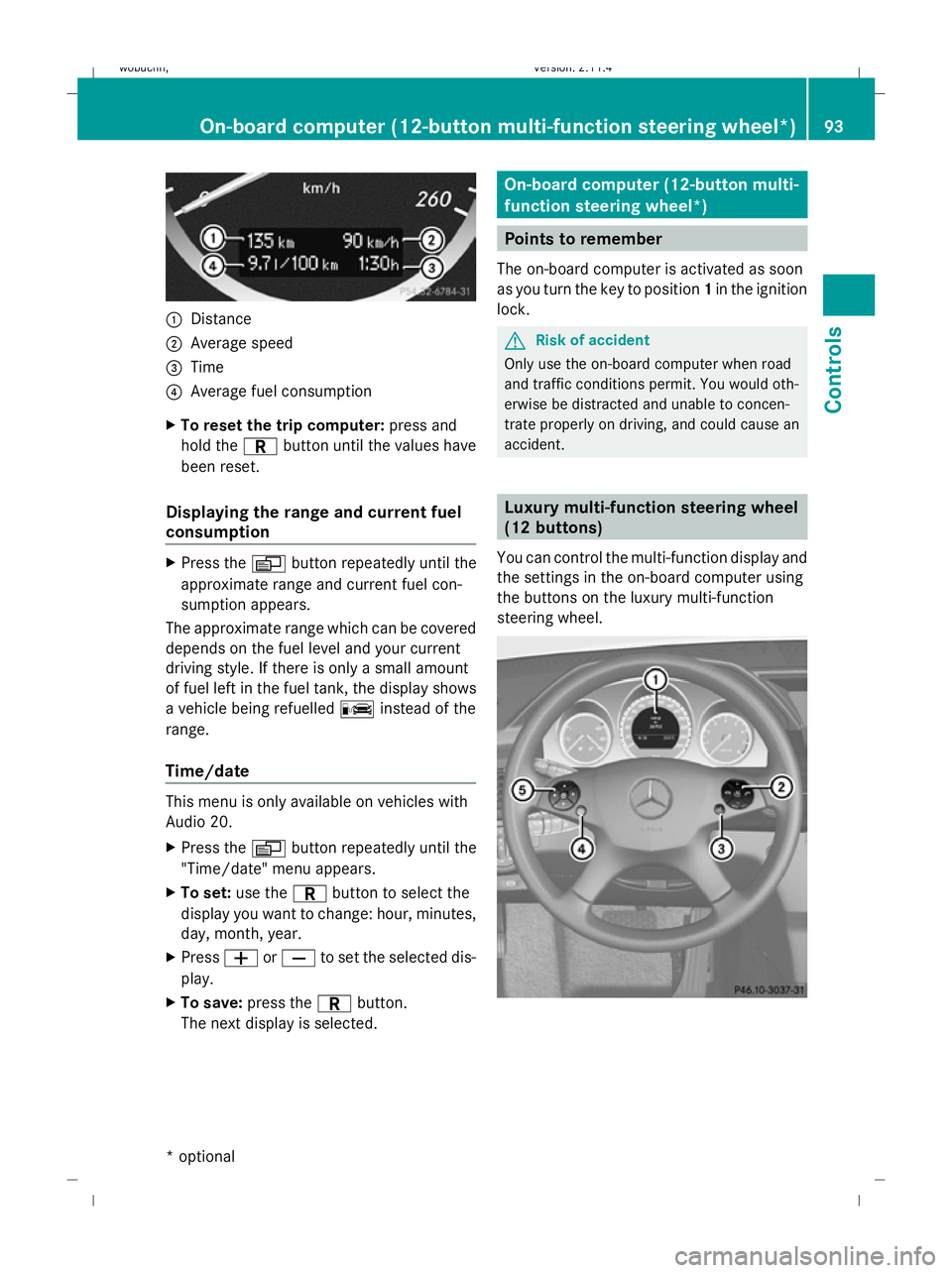
:
Distance
; Average speed
= Time
? Average fuel consumption
X To reset the trip computer: press and
hold the Cbutton until the values have
been reset.
Displaying the range and current fuel
consumption X
Press the Vbutton repeatedly until the
approximate range and current fuel con-
sumption appears.
The approximate range which can be covered
depends on the fuel level and your current
driving style. If there is only a small amount
of fuel left in the fuel tank, the display shows
a vehicle being refuelled Cinstead of the
range.
Time/date This menu is only available on vehicles with
Audio 20.
X
Press the Vbutton repeatedly until the
"Time/date" menu appears.
X To set: use the Cbutton to select the
display you want to change: hour, minutes,
day, month, year.
X Press WorX to set the selected dis-
play.
X To save: press the Cbutton.
The next display is selected. On-board computer (12-button multi-
function steering wheel*)
Points to remember
The on-board computer is activated as soon
as you turn the key to position 1in the ignition
lock. G
Risk of accident
Only use the on-board computer when road
and traffic conditions permit. You would oth-
erwise be distracted and unable to concen-
trate properly on driving, and could cause an
accident. Luxury multi-function steering wheel
(12 buttons)
You can control the multi-function display and
the settings in the on-board computer using
the buttons on the luxury multi-function
steering wheel. On-board computer (12-button multi-function steering
wheel*)93Cont
rols
* optional
X204_AKB; 1; 5, en-GB
wobuchh,
Version: 2.11.4
2008-10-15T13:20:56+02:00 - Seite 93 ZDateiname: 6515_0671_02_buchblock.pdf; preflight
Page 99 of 261
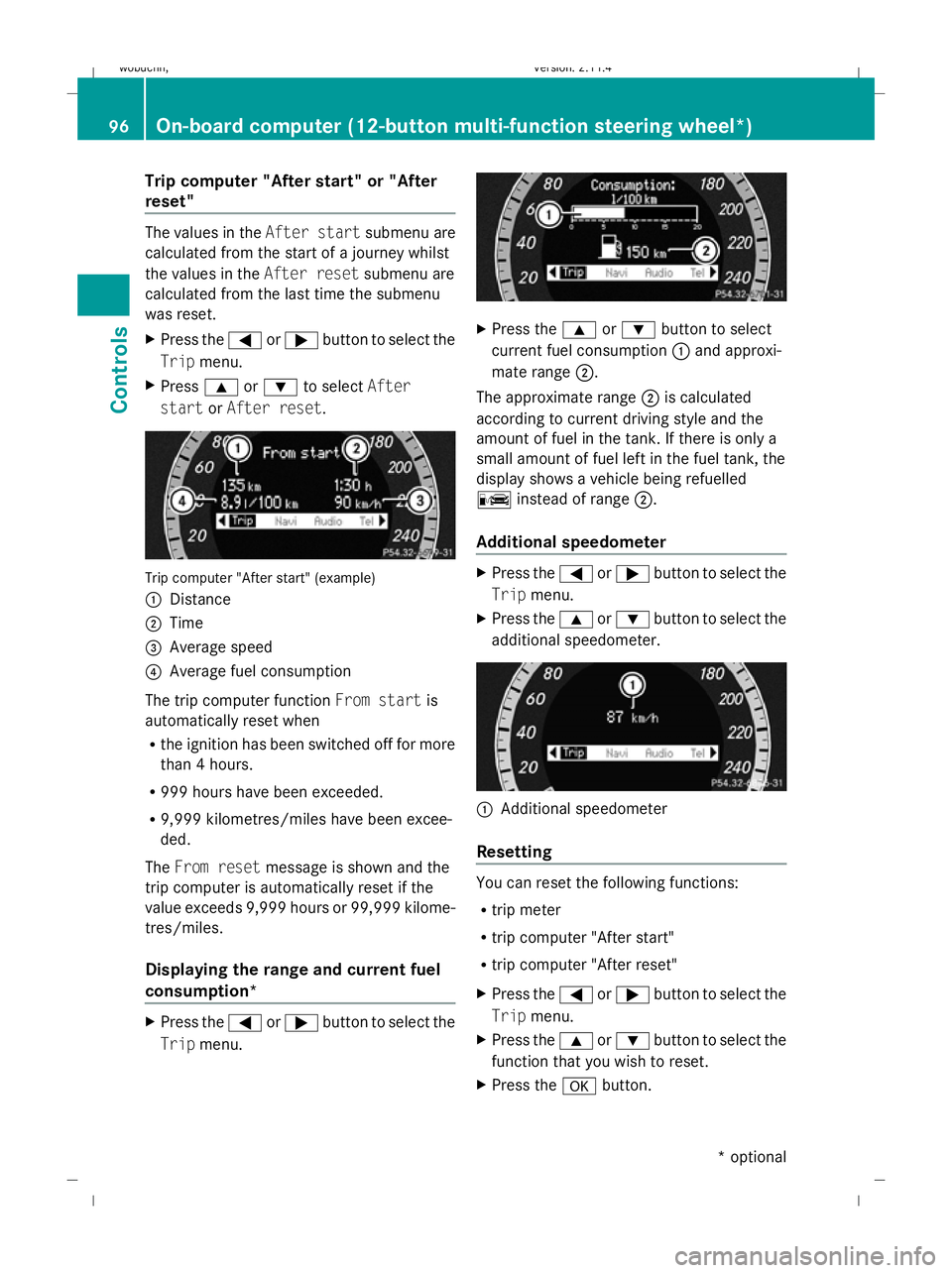
Trip computer "After start" or "After
reset" The values in the
After startsubmenu are
calculated from the start of a journey whilst
the values in the After resetsubmenu are
calculated from the last time the submenu
was reset.
X Press the =or; button to select the
Trip menu.
X Press 9or: to select After
start orAfter reset. Trip computer "After start" (example)
:
Distance
; Time
= Average speed
? Average fuel consumption
The trip computer function From startis
automatically reset when
R the ignition has been switched off for more
than 4 hours.
R 999 hours have been exceeded.
R 9,999 kilometres/miles have been excee-
ded.
The From reset message is shown and the
trip computer is automatically reset if the
value exceeds 9,999 hours or 99,999 kilome-
tres/miles.
Displaying the range and current fuel
consumption* X
Press the =or; button to select the
Trip menu. X
Press the 9or: button to select
current fuel consumption :and approxi-
mate range ;.
The approximate range ;is calculated
according to current driving style and the
amount of fuel in the tank. If there is only a
small amount of fuel left in the fuel tank, the
display shows a vehicle being refuelled
C instead of range ;.
Additional speedometer X
Press the =or; button to select the
Trip menu.
X Press the 9or: button to select the
additional speedometer. :
Additional speedometer
Resetting You can reset the following functions:
R
trip meter
R trip computer "After start"
R trip computer "After reset"
X Press the =or; button to select the
Trip menu.
X Press the 9or: button to select the
function that you wish to reset.
X Press the abutton. 96
On-board computer (12-button multi-function steering
wheel*)Controls
* optional
X204_AKB; 1; 5, en-GB
wobuchh,
Version: 2.11.4 2008-10-15T13:20:56+02:00 - Seite 96Dateiname: 6515_0671_02_buchblock.pdf; preflight
Page 153 of 261

on the left-hand side when viewed in the
direction of travel. i
Add windscreen washer concentrate to
the washer fluid all year round. G
Risk of fire
Windscreen washer fluid is highly flammable.
Fire, naked flames and smoking are prohibi-
ted when handling washer fluid concentrate.
! Only use windscreen washer fluid which
is suitable for plastic lamp lenses. Unsuit-
able windscreen washer fluid could dam-
age the plastic lamp lenses of the head-
lamps.
X Mix the windscreen washer fluid in a con-
tainer beforehand.
X At temperatures below freezing:
Fill the washer fluid reservoir with a mix of
water and windscreen washer concentrate
(e.g. MB SummerFit).
X At temperatures below freezing:
Fill the washer fluid reservoir with a mix of
water, antifreeze additive and windscreen
washer concentrate (e.g. MB WinterFit).
Adapt the mixing ratio to the outside tem-
peratures.
X To open: pull cap:upwards by the tab.
X Top up with the premixed washer fluid.
X To close: press cap :onto the filler neck
until it clicks into place. Tyres and wheels
Points to remember
! For safety reasons, Mercedes-Benz rec-
ommends that you only use tyres and
wheels which have been approved by
Mercedes-Benz specifically for your vehi-
cle. These tyres have been specially adap-
ted for use with the control systems, such
as ABS or ESP ®
, and are marked as follows:
R MO = Mercedes-Benz Original
If you use other tyres and wheels,
Mercedes-Benz cannot accept any respon-
sibility for damage that may result from
this. Further information about tyres,
wheels and approved combinations can be
obtained from any Mercedes-Benz Service
Centre.
If you use tyres other than those tested and
recommended for Mercedes-Benz vehi-
cles, characteristics such as handling, vehi-
cle noise emissions and fuel consumption
may be adversely affected. In addition, the
wheels may come into contact with the
body or axle components when heavily loa-
ded or when driving with snow chains. This
could result in damage to the tyres or the
vehicle.
! Retreaded tyres are neither tested nor
recommended by Mercedes-Benz, since
previous damage cannot always be detec-
ted on retreaded tyres. As a result,
Mercedes-Benz cannot guarantee vehicle
safety if retreaded tyres are fitted. Do not
fit used tyres if you have no information
about their previous usage. G
Risk of accident
Tyres, wheels or accessories which have not
been approved by Mercedes-Benz for your
vehicle or are not used as they should be, can
impair driving safety. As a result, you could
cause an accident. Before purchasing and
using them, enquire about their suitability, 150 Tyres and wheelsOperation
X204_AKB; 1; 5, en-GB
wobuchh,
Version: 2.11.4 2008-10-15T13:20:56+02:00 - Seite 150Dateiname: 6515_0671_02_buchblock.pdf; preflight
Page 245 of 261
Notes on the technical data
i The technical data was determined in
accordance with EU directives. All data
applies to the vehicle's standard equip-
ment. Therefore, the data may differ for
vehicles with optional equipment. You can
obtain further information from a
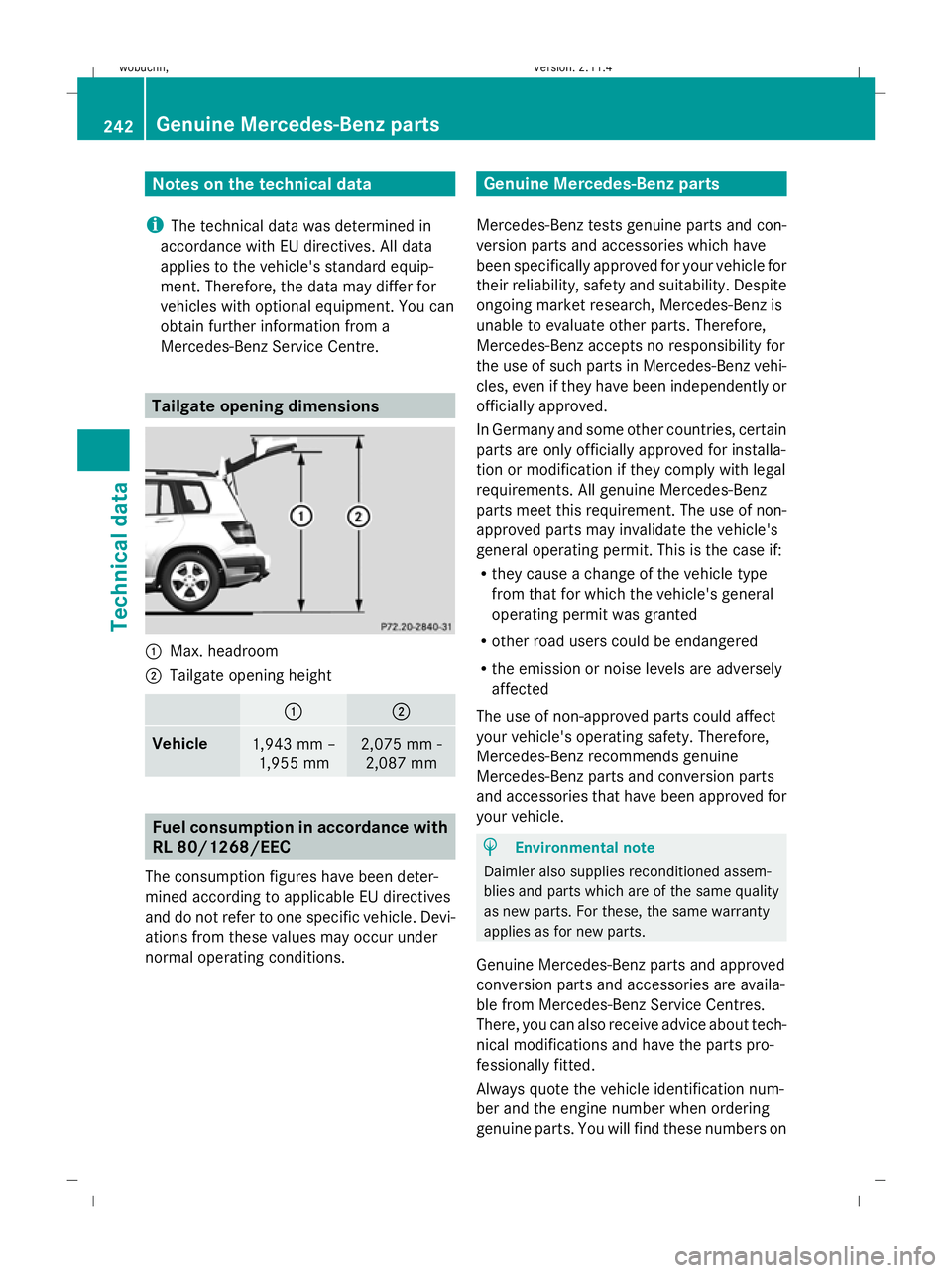
Mercedes-Benz Service Centre. Tailgate opening dimensions
:
Max. headroom
; Tailgate opening height : ;
Vehicle
1,943 mm –
1,955 mm 2,075 mm -
2,087 mm Fuel consumption in accordance with
RL 80/1268/EEC
The consumption figures have been deter-
mined according to applicable EU directives
and do not refer to one specific vehicle. Devi-
ations from these values may occur under
normal operating conditions. Genuine Mercedes-Benz parts
Mercedes-Benz tests genuine parts and con-
version parts and accessories which have
been specifically approved for your vehicle for
their reliability, safety and suitability. Despite
ongoing market research, Mercedes-Benz is
unable to evaluate other parts. Therefore,
Mercedes-Benz accepts no responsibility for
the use of such parts in Mercedes-Benz vehi-
cles, even if they have been independently or
officially approved.
In Germany and some other countries, certain
parts are only officially approved for installa-
tion or modification if they comply with legal
requirements. All genuine Mercedes-Benz
parts meet this requirement. The use of non-
approved parts may invalidate the vehicle's
general operating permit. This is the case if:
R they cause a change of the vehicle type
from that for which the vehicle's general
operating permit was granted
R other road users could be endangered
R the emission or noise levels are adversely
affected
The use of non-approved parts could affect
your vehicle's operating safety. Therefore,
Mercedes-Benz recommends genuine
Mercedes-Benz parts and conversion parts
and accessories that have been approved for
your vehicle. H
Environmental note
Daimler also supplies reconditioned assem-
blies and parts which are of the same quality
as new parts. For these, the same warranty
applies as for new parts.
Genuine Mercedes-Benz parts and approved
conversion parts and accessories are availa-
ble from Mercedes-Benz Service Centres.
There, you can also receive advice about tech-
nical modifications and have the parts pro-
fessionally fitted.
Always quote the vehicle identification num-
ber and the engine number when ordering
genuine parts. You will find these numbers on 242 Genuine Mercedes-Benz partsTechnical data
X204_AKB; 1; 5, en-GB
wobuchh
,V ersion: 2.11.4
2008-10-15T13:20:56+02:00 - Seite 242 Dateiname: 6515_0671_02_buchblock.pdf; preflight