2008 MERCEDES-BENZ B-CLASS HATCHBACK lights
[x] Cancel search: lightsPage 83 of 305

Lights
80 Cornering light function (bi-xenon
headlamps*)
Specially designed headlamps light up the
area into which you are driving when turning
corners.
If you are driving at speeds below 40 km/h,
the cornering light function is activated either
by the turn signals or when the steering wheel
is turned. At speeds between 40 km/h and
70 km/h, only a steering wheel movement
activates the cornering light function. If you
are driving at speeds above 70 km/h the cor-
nering light function is deactivated.
Activating X
Start the engine.
X Switch on the dipped-beam headlamps.
X Switch off the foglamps*.
X Switch on the turn signal.
The cornering lamp on the same side as the
turn signal comes on, even if you turn the
steering wheel in the opposite direction
after indicating.
or X
Turn the steering wheel in the desired
direction.
When in a forwards gear: the cornering
lamp on the inside of the bend comes on.
When in reverse gear: the cornering lamp
on the outside of the bend comes on.
Deactivating X
Turn the steering wheel back to the straight
ahead position.
The turn signal goes off. The cornering lamp
may remain lit for a short time.
or
X Switch off the turn signal.
The cornering lamp may remain lit for a
short time.
The cornering light will go out after a maxi-
mum of three minutes. Interior lighting
Front overhead control panel (vehicles with a
rocker switch)
1
£ To switch the rear interior lighting
on/off
2 ð To switch the front interior lighting
on
3 To switch the automatic interior lighting
control on
4 ¥ To switch the front interior lighting/
automatic interior lighting control off
5 X To switch the reading lamp on/off Controls
* optional
245_AKB; 2; 7, en-GB
wdomann
,V ersion: 2.11.4
2008-10-17T11:22:31+02:00 - Seite 80 Dateiname: 6515_1640_02_buchblock.pdf; preflight
Page 84 of 305

Lights
81Front overhead control panel (vehicles with but-
tons*)
1 £ To switch the rear interior lighting
on/off
2 ¥ To switch the automatic interior
lighting control on/off
3 X To switch the right-hand reading
lamp on/off
4 X To switch the left-hand reading lamp
on/off
5 ð To switch the front interior lighting
on/off Rear-compartment overhead control panel
1
To switch the reading lamp* off
2 To switch the reading lamp* on
Automatic interior lighting control X
To switch on (vehicles with a rocker
switch): set the rocker switch to centre
position 3.
X To switch on (vehicles with buttons*):
press the ¥button.
X To switch off (vehicles with a rocker
switch): set the rocker switch to
the ¥ position.
X To switch off (vehicles with buttons*):
press the ¥button.
The interior lighting automatically switches
on when it is dark, when you unlock the vehi- cle, open a door or remove the key from the
ignition lock.
The interior lighting switches off after a delay.
You can set the delayed switch-off using the
on-board computer (Y
page 109). If the door
is left open, the interior lighting goes out after
approximately five minutes.
Emergency accident lighting If the interior lighting is set to automatic, the
interior lighting is activated automatically if
the vehicle is involved in an accident.
X
To deactivate: press the hazard warning
lamp button (Y page 79).
or
X Lock and then unlock the vehicle using the
key. Controls
* optional
245_AKB; 2; 7, en-GB
wdomann,
Version: 2.11.4 2008-10-17T11:22:31+02:00 - Seite 81 ZDateiname: 6515_1640_02_buchblock.pdf; preflight
Page 90 of 305

Driving and pa
rking 87
AUTOTRONIC*
P
Park position with selector lever lock
R To select reverse gear
N To select neutral
D Drive position
X Before starting, make sure Pis selected.
i The engine can also be started when the
selector lever is in position N.
Further information about AUTOTRONIC
(Y page 92).
Starting the engine i
Vehicles with AUTOTRONIC*:
You can also use the touch-start function.
To do this, turn the key to position 3and release it immediately. The engine then
starts automatically.
X To start a petrol engine: turn the key to
position 3in the ignition lock (Y page 62)
and release it as soon as the engine is run-
ning.
X To start a diesel engine: turn the key to
position 2in the ignition lock (Y page 62).
The q preglow indicator lamp in the
instrument cluster lights up.
X When the qpreglow indicator lamp
goes out, turn the key to position 3and
release it as soon as the engine is running.
i You can start the engine without preglow
if the engine is warm.
X Release the parking brake (Y page 89). Automatic engine start (ECO start/
stop function*)
The ECO start/stop function automatically
switches on the engine as soon as you pre-
pare to pull away, e.g. by engaging a gear.
X Depress the clutch pedal.
The engine starts automatically.
X Shift to either first or reverse gear and pull
away.
! Do not engage a gear without depressing
the clutch as this disables the automatic
engine start function. As a result, the bat-
tery cannot be recharged and the demister
function of Thermotronic* is not available.
i When manoeuvring in and out of parking
spaces, the ECO start/stop function will
not automatically switch off the vehicle's
engine. The engine will only be switched off
automatically if the vehicle has reached a
speed of at least 15 km/h before coming
to a standstill again.
i The system can differentiate between
starting the engine with the key and the
automatic engine start via the ECO start/
stop function. Controls
* optional
245_AKB; 2; 7, en-GB
wdomann,
Version: 2.11.4 2008-10-17T11:22:31+02:00 - Seite 87 ZDateiname: 6515_1640_02_buchblock.pdf; preflight
Page 92 of 305

Driving and pa
rking 89
R
the vehicle is secured with the parking
brake.
R ESP ®
is malfunctioning. Parking
G
Risk of accident
Only remove the key from the ignition lock
when the vehicle is stationary, as you can-
not steer the vehicle with the key removed.
Never leave children unsupervised in the
vehicle. They could release the parking
brake. This could lead to a serious or fatal
accident. G
Risk of fire
Make sure that the exhaust system does
not under any circumstances come into
contact with easily ignitable material such
as dry grass or petrol. The material could
otherwise ignite and set the vehicle on fire. Parking brake 1
Parking brake
2 Release button
X To apply: pull parking brake 1up firmly.
The 3 warning lamp in the instrument
cluster lights up if the engine is running.
i On steep slopes, turn the front wheels
towards the kerb. X
To release: depress the brake pedal and
keep it depressed.
On vehicles with AUTOTRONIC*, the selec-
tor lever lock is released.
X Press release button 2on parking brake
1 and move the parking brake down to the
stop.
The 3 warning lamp in the instrument
cluster goes out. Switching off the engine
G
Risk of accident
If the engine is not running, there is no
power assistance for the steering and
brakes. Steering and braking will then
require significantly greater effort.
As a result, you might lose control of the
vehicle, cause an accident and injure your-
self and others.
Do not switch off the engine while driving.
Vehicles with manual transmission X
Shift to either first or reverse gear.
X Turn the key to position 0(Y page 62) in
the ignition lock and remove it.
The immobiliser is activated. Controls
* optional
245_AKB; 2; 7, en-GB
wdomann,
Version: 2.11.4 2008-10-17T11:22:31+02:00 - Seite 89 ZDateiname: 6515_1640_02_buchblock.pdf; preflight
Page 93 of 305

Transmission
90
Vehicles with AUTOTRONIC* X
Move the selector lever to P.
X Turn the key to position 0(Y page 62) in
the ignition lock and remove it.
The immobiliser is activated. Automatic engine switch-off (ECO
start/stop function*)
The ECO start/stop function automatically
switches off the engine as soon as you stop
the vehicle, e.g. at traffic lights.
X Brake the vehicle until it comes to a stand-
still.
The shift instruction appears in the multi-
function display. Example illustration: gearshift instruction X
Shift to neutral Nand release the clutch
pedal.
X Depress the brake pedal and keep it
depressed.
The engine is automatically switched off
and the ECO start/stop function is shown
in the multi-function display. Example illustration: ECO display Transmission
Notes on the transmission
G
Risk of accident
The movement of the pedals must not be
impaired in any way. Do not keep any
objects in the driver's footwell. Make sure
that floormats or carpets are correctly
secured and that there is sufficient clear-
ance for the pedals. G
Risk of accident
Do not change down for additional engine
braking on a slippery road surface. This
could cause the drive wheels to lose their
grip and the vehicle could skid. This could
cause you to lose control of your vehicle
and cause an accident. Controls
* optional
245_AKB; 2; 7, en-GB
wdomann,
Version: 2.11.4 2008-10-17T11:22:31+02:00 - Seite 90Dateiname: 6515_1640_02_buchblock.pdf; preflight
Page 100 of 305

Instrument cluster
97Activating the multi-function display
X Switch on the ignition. The multi-function display is also activated
when you:
R switch on the lights
R press reset button 1
R open the driver's door Adjusting the instrument cluster
lighting
X Brighter or dimmer: briefly turn reset but-
ton 1clockwise or anti-clockwise to the
stop and release.
The brightness of the instrument cluster
lighting changes by one level. There are
several possible levels. Coolant temperature gauge
The coolant temperature gauge is in the
instrument cluster on the left-hand side.
Under normal operating conditions and with
the specified coolant level, the coolant tem-
perature may rise to 120 †. The coolant tem-
perature may rise to the top end of the scale
at high outside temperatures and on long
uphill stretches. Resetting the trip meter
X Select the Standard display menu
(Y page 102).
X Press and hold the reset button on the left-
hand side of the instrument cluster until the
trip meter is reset. Rev counter
The red band in the rev counter indicates the
engine's overrevving range. The fuel supply is
interrupted to protect the engine when the
red band is reached.
! Do not drive in the overrevving range.
Doing so will damage the engine. H
Environmental note
Avoid driving at high engine speeds, as this
increases your vehicle's consumption
unnecessarily and pollutes the environ-
ment through increased emissions. Controls
245_AKB; 2; 7, en-GB
wdomann
, Version: 2.11.4 2008-10-17T11:22:31+02:00 - Seite 97 ZDateiname: 6515_1640_02_buchblock.pdf; preflight
Page 110 of 305

On-board computer
107Lighting submenu
R
Constant headlamp mode (daytime driv-
ing lights) (Y page 108)
R Surround lighting* (Y page 109)
R Exterior lighting delayed switch-off*
(Y page 109)
R Interior lighting delayed switch-off
(Y page 109) Vehicle submenu
R
Permanent Speedtronic* (Y page 119)
R Radio station selection *( Ypage 110)
R Automatic locking feature (Y page 110)Convenience submenu*
R
Fold the exterior mirrors in when locking
the vehicle* (Y page 110) Selecting the unit of measurement for
distance
The selected unit of measurement for dis-
tance applies to:
R the total distance recorder and the trip
meter
R the trip computer
R the digital speedometer 15
R the navigation instruction in the Naviga-
tion* menu
R Speedtronic*
X Press the èor· button to select the
Settings menu.
X Press the jbutton to select submenus.
X Press the æorç button to select the
Inst. cluster submenu.
X Press the jbutton to select Display
unit Speed/odom.
X Press æorç to select km(kilome-
tres) or milesas the unit of measurement
for distance.
X Press the j,èorÿ button to
select a different display. Selecting the language X
Press the èor· button to select the
Settings menu.
X Press the jbutton to select submenus.
X Press the æorç button to select the
Inst. cluster submenu.
X Press the jbutton to select Lan-
guage.
X Press the æorç button to select the
desired language.
X Press the j,èorÿ button to
select a different display.
Selecting the status line display Vehicles for the United Kingdom: this func-
tion is not available.
X
Press the èor· button to select the
Settings menu.
X Press the jbutton to select submenus.
X Press the æorç button to select the
Instr. cluster submenu.
X Press the jbutton to select Status
line display .
15 Vehicles for the United Kingdom: the digital speedometer always displays km/h. Controls
* optional
245_AKB; 2; 7, en-GB
wdomann
,V ersion: 2.11.4
2008-10-17T11:22:31+02:00 - Seite 107 ZDateiname: 6515_1640_02_buchblock.pdf; preflight
Page 111 of 305
On-board computer
108
X
Press the æorç button to select the
status line display: outside temperature
(Outside temp.) or speed ( Speed).
The selected display now appears con-
stantly in the lower multi-function display.
When you scroll through the Operation
menu (Y page 101), you will see the display
you have not selected.
X Press the j,èorÿ button to
select a different display.
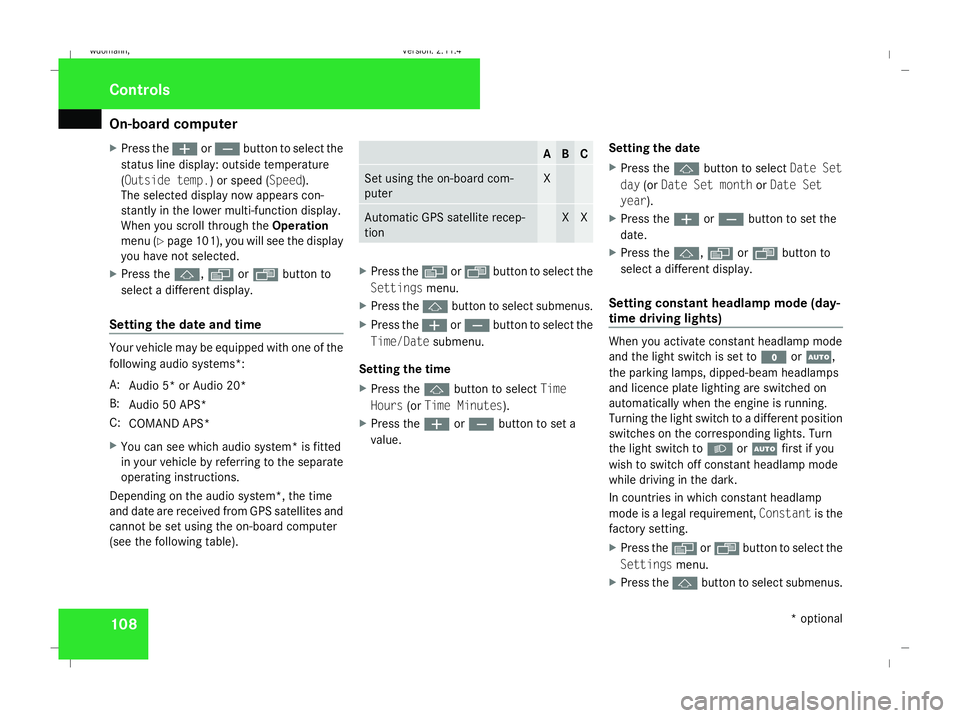
Setting the date and time Your vehicle may be equipped with one of the
following audio systems *:
A: Audio 5* or Audio 20*
B: Audio 50 APS*
C: COMAND APS*
X You can see which audio system *is fitted
in your vehicle by referring to the separate
operating instructions.
Depending on the audio system*, the time
and date are received from GPS satellites and
cannot be set using the on-board computer
(see the following table). A B C
Set using the on-board com-
puter X
Automatic GPS satellite recep-
tion X X
X
Press the èor· button to select the
Settings menu.
X Press the jbutton to select submenus.
X Press the æorç button to select the
Time/Date submenu.
Setting the time
X Press the jbutton to select Time
Hours (orTime Minutes).
X Press the æorç button to set a
value. Setting the date
X
Press the jbutton to select Date Set
day (orDate Set month orDate Set
year ).
X Press the æorç button to set the
date.
X Press the j,èorÿ button to
select a different display.
Setting constant headlamp mode (day-
time driving lights) When you activate constant headlamp mode
and the light switch is set to
MorU,
the parking lamps, dipped-beam headlamps
and licence plate lighting are switched on
automatically when the engine is running.
Turning the light switch to a different position
switches on the corresponding lights. Turn
the light switch to BorU first if you
wish to switch off constant headlamp mode
while driving in the dark.
In countries in which constant headlamp
mode is a legal requirement, Constantis the
factory setting.
X Press the èor· button to select the
Settings menu.
X Press the jbutton to select submenus. Controls
* optional
245_AKB; 2; 7, en-GB
wdomann,
Version: 2.11.4 2008-10-17T11:22:31+02:00 - Seite 108Dateiname: 6515_1640_02_buchblock.pdf; preflight