2008 MERCEDES-BENZ B-CLASS HATCHBACK ESP
[x] Cancel search: ESPPage 82 of 305

Lights
79Hazard warning lamps
The hazard warning lamps still operate if the
ignition is switched off. They switch on auto-
matically if an airbag is deployed or if you
brake sharply and bring the vehicle to a halt
from a speed of more than 70 km/h.
X To switch on: press button1.
All turn signals flash. If you now switch on
a turn signal using the combination switch
(Y page 78), only the turn signal lamp on
the corresponding side of the vehicle will
flash.
X To switch off: press button1. Adjusting the headlamp range (halo-
gen headlamps)
The headlamp range control allows you to
adjust the cone of light from the headlamps
to suit the vehicle load.
You can only adjust the headlamp range while
the engine is running. Position Load
0
Driver's seat and front-
passenger seat occupied
1
Driver's seat, front-
passenger seat and rear
seats occupied Position Load
2
Driver's seat, front passenger
seat and rear seats occupied,
luggage compartment laden
3
Not required
X
Turn headlamp range control 1to the
position which corresponds to the load in
your vehicle. Headlamp cleaning system*
The headlamps are cleaned automatically if
the "Wipe with windscreen washer fluid" func-
tion is operated five times while the lights are
on and the engine is running. When you
switch off the ignition, the automatic head-
lamp cleaning system is reset and counting is
resumed from 0. Controls
* optional
245_AKB; 2; 7, en-GB
wdomann,
Version: 2.11.4 2008-10-17T11:22:31+02:00 - Seite 79 ZDateiname: 6515_1640_02_buchblock.pdf; preflight
Page 86 of 305
Side windows
83Side windows
Opening/closing the side windows
G
Risk of injury
Make sure that nobody can become trap-
ped between the side window and the door
frame when a side window is opened. Do
not touch or lean against the side window
during the opening procedure. You could
become trapped between the side window
and the door frame as the side window
moves down. If there is a risk of becoming
trapped, release the switch or pull the
switch upwards to close the side window
again. G
Risk of injury
Make sure that nobody can become trap-
ped when closing the side windows. If there
is a risk of becoming trapped, release the
switch or push the switch again to reopen
the side window. G
Risk of injury
Children may injure themselves if they
operate the side windows.
Never leave children unsupervised in the
vehicle. Always take the key with you when leaving the vehicle, even if you are only
leaving it for a short time.
G
Risk of injury
Do not leave children unsupervised in the
vehicle, even if they are secured in a child
restraint system. The children could:
R be seriously or even fatally injured on
parts of the vehicle
R be seriously or even fatally injured by
prolonged exposure to extremely high or
extremely low temperatures
If children open a door, they could:
R seriously or even fatally injure other peo-
ple
R get out of the vehicle, thereby injuring
themselves or be seriously or even fatally
injured by a passing vehicle
Activate the child-proof locks if children are
travelling in the vehicle. They could other-
wise open doors or windows while the vehi-
cle is in motion and thereby injure them-
selves or others. i
Related topics:
R convenience opening (Y page 84)
R convenience closing (Y page 85)
R override controls in the rear compart-
ment (Y page 53)
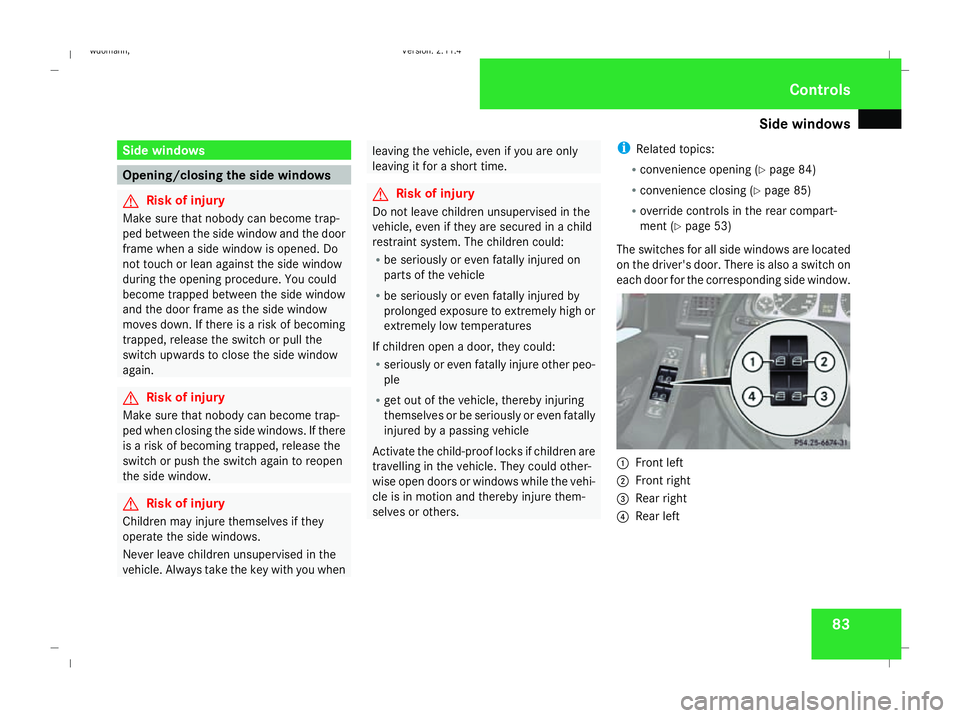
The switches for all side windows are located
on the driver's door. There is also a switch on
each door for the corresponding side window. 1
Front left
2 Front right
3 Rear right
4 Rear left Controls
245_AKB; 2; 7, en-GB
wdomann,
Version: 2.11.4
2008-10-17T11:22:31+02:00 - Seite 83 ZDateiname: 6515_1640_02_buchblock.pdf; preflight
Page 87 of 305

Side windows
84
X
Turn the key to position 2in the ignition
lock.
i You can still operate the side windows
when the key is in the 0position or when
the key has been removed. However, this
is only possible for a maximum of five
minutes afterwards, or until the driver's or
front-passenger door is opened.
X To open: press the corresponding switch.
X To close: pull the corresponding switch.
i If you operate the switch beyond its pres-
sure point, it will trigger automatic opera-
tion in the corresponding direction. You can
stop automatic operation by pressing
again.
Closing with increased force and with-
out the anti-entrapment feature G
Risk of injury
Closing the side windows with increased
force or without the anti-entrapment fea-
ture could lead to serious or even fatal
injury. Make sure that nobody can become
trapped when closing the side windows. If a side window blocks during closing and
reopens slightly:
X
Immediately after the window blocks, pull
on the corresponding switch again until the
side window has closed.
The side window is closed with increased
force.
If a side window blocks again during closing
and reopens slightly:
X Immediately after the window blocks, pull
on the corresponding switch again until the
side window has closed.
The side window is closed without the anti-
entrapment feature. Resetting the side windows
You must reset each side window if:
R the battery has been disconnected or has
become discharged.
R the side window no longer opens or closes
fully.
R the side windows open again slightly after
being closed fully. X
Turn the key to position 2in the ignition
lock.
X Pull the corresponding switch until the side
window is closed.
X Hold the switch for an additional second.
If the side window opens again slightly:
X Pull the corresponding switch again imme-
diately and hold it for approx. one second. Convenience opening*
You can ventilate the vehicle before a journey.
To do this, you can use the key to simultane-
ously:
R open the side windows
R open the panorama louvred sliding sun-
roof* or move it to the ventilation position
i The "Convenience opening" feature can
only be operated using the key. Controls
* optional
245_AKB; 2; 7, en-GB
wdomann,
Version: 2.11.4 2008-10-17T11:22:31+02:00 - Seite 84Dateiname: 6515_1640_02_buchblock.pdf; preflight
Page 92 of 305

Driving and pa
rking 89
R
the vehicle is secured with the parking
brake.
R ESP ®
is malfunctioning. Parking
G
Risk of accident
Only remove the key from the ignition lock
when the vehicle is stationary, as you can-
not steer the vehicle with the key removed.
Never leave children unsupervised in the
vehicle. They could release the parking
brake. This could lead to a serious or fatal
accident. G
Risk of fire
Make sure that the exhaust system does
not under any circumstances come into
contact with easily ignitable material such
as dry grass or petrol. The material could
otherwise ignite and set the vehicle on fire. Parking brake 1
Parking brake
2 Release button
X To apply: pull parking brake 1up firmly.
The 3 warning lamp in the instrument
cluster lights up if the engine is running.
i On steep slopes, turn the front wheels
towards the kerb. X
To release: depress the brake pedal and
keep it depressed.
On vehicles with AUTOTRONIC*, the selec-
tor lever lock is released.
X Press release button 2on parking brake
1 and move the parking brake down to the
stop.
The 3 warning lamp in the instrument
cluster goes out. Switching off the engine
G
Risk of accident
If the engine is not running, there is no
power assistance for the steering and
brakes. Steering and braking will then
require significantly greater effort.
As a result, you might lose control of the
vehicle, cause an accident and injure your-
self and others.
Do not switch off the engine while driving.
Vehicles with manual transmission X
Shift to either first or reverse gear.
X Turn the key to position 0(Y page 62) in
the ignition lock and remove it.
The immobiliser is activated. Controls
* optional
245_AKB; 2; 7, en-GB
wdomann,
Version: 2.11.4 2008-10-17T11:22:31+02:00 - Seite 89 ZDateiname: 6515_1640_02_buchblock.pdf; preflight
Page 94 of 305

Transmission
91Manual transmission
5-speed manual transmission Vehicles without ECO Start-Stop-Function* (5-
speed manual transmission)
Vehicles with ECO Start-Stop-Function* Neutral Nwith ECO Start-Stop-Func-
tion*activated
The transmission must be in neutral
Nfor the
engine to switch off when:
X the engine is running below a certain
speed.
X the brake pedal is depressed.
X the clutch pedal is not depressed.
Engaging reverse gear
! Only engage reverse gear when the vehi-
cle is stationary, otherwise the transmis-
sion could be damaged.
X Move the gear lever to the right and then
back. 6-speed manual transmission Vehicles without ECO Start-Stop-Function* (6-
speed manual transmission)
!
When shifting between 5thand 6thgear,
you should always push the gear lever all
the way to the right. Otherwise, you could
shift unintentionally into thirdorfourth
gear and damage the transmission.
Do not exceed the maximum speed for the
individual gears.
If you shift down at too high a speed (trans-
mission braking), this can cause the engine
to overrev, leading to engine damage.
! On long and steep downhill gradients,
especially when the vehicle is laden, you
must shift to a lower gear in time. This will Controls
* optional
245_AKB; 2; 7, en-GB
wdomann,
Version: 2.11.4 2008-10-17T11:22:31+02:00 - Seite 91 ZDateiname: 6515_1640_02_buchblock.pdf; preflight
Page 96 of 305

Transmission
931
Drive program (C/S)or(C/S/M)*
2 Gear indicator
If you have selected one-touch gearshifting or
selector lever position D, you can see the cur-
rently engaged gear in the multi-function dis-
play.
You can influence the AUTOTRONIC trans-
mission ratio when the selector lever is in
position Dby changing gear yourself―see
One-touch gearshifting ( Ypage 93). Selector lever positions ì
Park position
Prevents the vehicle from rolling
away when stopped. Only move the
selector lever to
Pwhen the vehicle
is stationary.
The key can only be removed when
the selector lever is in position P. If
the key is removed from the igni-
tion lock, the selector lever is
locked in position P. í
Reverse gear
Only move the selector lever to
R
when the vehicle is stationary. ë
Neutral
No power is transmitted from the
engine to the drive wheels. Releas-
ing the brakes will allow you to
move the vehicle freely, e.g. to
push it or tow it.
If ESP ®
is deactivated or faulty:
only move the selector lever to Nif
the vehicle is in danger of skidding,
e.g. on icy roads. ê
Drive
The transmission selects the opti-
mum gear ratio automatically for
forward mode.
One-touch gearshifting (manual opera-
tion)
When the selector lever is in position
D, you
can select the seven gears yourself.
Activating manual operation
X Press the selector lever lightly to the left
towards D-or to the right towards D+.
M is shown in the multi-function display.
Manual operation is activated. Controls
* optional
245_AKB; 2; 7, en-GB
wdomann,
Version: 2.11.4 2008-10-17T11:22:31+02:00 - Seite 93 ZDateiname: 6515_1640_02_buchblock.pdf; preflight
Page 101 of 305

On-board computer
98 Clock
On vehicles without an audio system or with
Audio 5*/Audio 20*, you can set the time
using the on-board computer (Y page 108).Outside temperature display
G
Risk of accident
The road surface may be icy, especially in
wooded areas or on bridges, even if tem-
peratures are just above freezing point. The
vehicle could skid if you fail to adapt your
driving style. You should therefore always
adapt your driving style and speed to suit
the weather conditions.
Changes in the outside temperature are dis-
played after a short delay. On-board computer
Points to remember
The on-board computer is activated as soon
as you turn the key to position 1in the ignition
lock. You can use the on-board computer to
call up information relating to your vehicle
and to make and adjust settings. G
Risk of accident
Only use the on-board computer when road
and traffic conditions permit. You would
otherwise be distracted and unable to con-
centrate properly on driving, and could
cause an accident. Multi-function steering wheel
You can control the multi-function display and
the settings in the on-board computer using
the buttons on the multi-function steering
wheel. 1
Multi-function display
2
æç
R
Selects submenus in the Set-
tings menu
R Changes values
R Adjusts the volume 3
st
Accepts or rejects/ends a call*Controls
* optional
245_AKB; 2; 7, en-GB
wdomann,
Version: 2.11.4 2008-10-17T11:22:31+02:00 - Seite 98Dateiname: 6515_1640_02_buchblock.pdf; preflight
Page 111 of 305
On-board computer
108
X
Press the æorç button to select the
status line display: outside temperature
(Outside temp.) or speed ( Speed).
The selected display now appears con-
stantly in the lower multi-function display.
When you scroll through the Operation
menu (Y page 101), you will see the display
you have not selected.
X Press the j,èorÿ button to
select a different display.
Setting the date and time Your vehicle may be equipped with one of the
following audio systems *:
A: Audio 5* or Audio 20*
B: Audio 50 APS*
C: COMAND APS*
X You can see which audio system *is fitted
in your vehicle by referring to the separate
operating instructions.
Depending on the audio system*, the time
and date are received from GPS satellites and
cannot be set using the on-board computer
(see the following table). A B C
Set using the on-board com-
puter X
Automatic GPS satellite recep-
tion X X
X
Press the èor· button to select the
Settings menu.
X Press the jbutton to select submenus.
X Press the æorç button to select the
Time/Date submenu.
Setting the time
X Press the jbutton to select Time
Hours (orTime Minutes).
X Press the æorç button to set a
value. Setting the date
X
Press the jbutton to select Date Set
day (orDate Set month orDate Set
year ).
X Press the æorç button to set the
date.
X Press the j,èorÿ button to
select a different display.
Setting constant headlamp mode (day-
time driving lights) When you activate constant headlamp mode
and the light switch is set to
MorU,
the parking lamps, dipped-beam headlamps
and licence plate lighting are switched on
automatically when the engine is running.
Turning the light switch to a different position
switches on the corresponding lights. Turn
the light switch to BorU first if you
wish to switch off constant headlamp mode
while driving in the dark.
In countries in which constant headlamp
mode is a legal requirement, Constantis the
factory setting.
X Press the èor· button to select the
Settings menu.
X Press the jbutton to select submenus. Controls
* optional
245_AKB; 2; 7, en-GB
wdomann,
Version: 2.11.4 2008-10-17T11:22:31+02:00 - Seite 108Dateiname: 6515_1640_02_buchblock.pdf; preflight