2008 MERCEDES-BENZ A-CLASS HATCHBACK warning lights
[x] Cancel search: warning lightsPage 93 of 305

Driving and pa
rking 90
Hill start assist Hill start assist helps you when pulling away
on uphill gradients. It holds the vehicle for a
short time after you have removed your foot
from the brake pedal. This gives you enough
time to move your foot from the brake pedal
to the accelerator pedal and depress it before
the vehicle begins to roll. G
Risk of accident
Never leave the vehicle when it is held by
hill start assist. After approximately one
second, hill start assist will no longer brake
your vehicle and it could roll away.
X Remove your foot from the brake pedal.
i Once you have taken your foot off the
brake pedal, the vehicle is held for around
one second.
X Pull away.
Hill start assist does not function if:
R you are pulling away on a level road or a
downhill gradient.
R on vehicles with AUTOTRONIC *,the selec-
tor lever is in the Nposition. R
the vehicle is secured with the parking
brake.
R ESP ®
is malfunctioning. Parking
G
Risk of accident
Only remove the key from the ignition lock
when the vehicle is stationary as you can-
not steer the vehicle with the key removed.
Never leave children unsupervised in the
vehicle. They could release the parking
brake. This could lead to a serious or fatal
accident. G
Risk of fire
Make sure that the exhaust system does
not under any circumstances come into
contact with easily ignitable material such
as dry grass or petrol. The material could
otherwise ignite and set the vehicle on fire. Parking brake 1
Parking brake
2 Release button
X To apply: pull parking brake 1up firmly.
The 3 warning lamp in the instrument
cluster lights up if the engine is running.
i On steep slopes, turn the front wheels
towards the kerb. Controls
* optional
169_AKB; 2; 4, en-GB
wdomann,
Version: 2.10.6
2008-07-16T08:52:06+02:00 - Seite 90 Dateiname: 6515_0315_02_buchblock.pdf; preflight
Page 94 of 305

Driving and pa
rking 91
X
To release: depress the brake pedal and
keep it depressed.
On vehicles with AUTOTRONIC*, the selec-
tor lever lock is released.
X Press release button 2on parking brake
1 and move the parking brake down to the
stop.
The 3 warning lamp in the instrument
cluster goes out. Switching off the engine
G
Risk of accident
If the engine is not running, there is no
power assistance for the steering and
brakes. Steering and braking then takes
much more effort.
As a result, you might lose control of the
vehicle, cause an accident and injure your-
self and others.
Do not switch off the engine while driving.
Vehicles with manual transmission X
Shift to either first or reverse gear.
X Turn the key to position 0(Y page 62) in
the ignition lock and remove it.
The immobiliser is activated. Vehicles with AUTOTRONIC* X
Move the selector lever to P.
X Turn the key to position 0(Y page 62) in
the ignition lock and remove it.
The immobiliser is activated. Automatic engine switch-off (ECO
start/stop function*)
The ECO start/stop function automatically
switches off the engine as soon as you stop
the vehicle, e.g. at traffic lights.
X Brake the vehicle until it comes to a stand-
still.
The shift instruction appears in the multi-
function display. Example illustration: gearshift instructionX
Shift to neutral Nand release the clutch
pedal.
X Depress the brake pedal and keep it
depressed.
The engine is automatically switched off
and the ECO start/stop function is shown
in the multi-function display. Example illustration: ECO display Controls
* optional
169_AKB; 2; 4, en-GB
wdomann,
Version: 2.10.6 2008-07-16T08:52:06+02:00 - Seite 91 ZDateiname: 6515_0315_02_buchblock.pdf; preflight
Page 100 of 305

Instrument cluster
97Instrument cluster
Points to remember
You will find an illustration of the instrument
cluster in the "At a glance" section
(Y page 26). G
Risk of accident
No further messages can be displayed if the
instrument cluster and/or the multi-func-
tion display fails.
This means that you will not see information
about the driving situation, such as the
speed, outside temperature, warning/indi-
cator lamps, display messages or system
failures. The vehicle's handling character-
istics may be affected. Adjust your driving
style and speed accordingly.
Immediately consult a qualified specialist
workshop which has the necessary special-
ist knowledge and tools to carry out the
work required. Mercedes-Benz recom-
mends that you use a Mercedes-Benz
Service Centre for this purpose. In particu-
lar, work relevant to safety or on safety-
related systems must be carried out at a
qualified specialist workshop. Activating the multi-function display
X Switch on the ignition. The multi-function display is also activated
when you:
R
switch on the lights
R press reset button 1
R open the driver's door Adjusting the instrument cluster
ligh
ting
X Brighter or dimmer: briefly turn reset but-
ton 1clockwise or anti-clockwise to the
stop and release.
The brightness of the instrument cluster
lighting changes by one level. There are
several possible levels. Coolant temperature gauge
The coolant temperature gauge is in the
instrument cluster on the left-hand side.
Under normal operating conditions and with
the specified coolant level, the coolant tem-
perature may rise to 120 †. The coolant tem-
perature may rise to the top end of the scale
at high outside temperatures and on long
uphill stretches. Controls
169_AKB; 2; 4, en-GB
wdomann, Version: 2.10.6 2008-07-16T08:52:06+02:00 - Seite 97 ZDateiname: 6515_0315_02_buchblock.pdf; preflight
Page 122 of 305

Driving sys
tems 119
Storing the current speed You can use the cruise control lever to limit
the speed to any speed above 30 km/h while
the engine is running.
X Briefly press the cruise control lever up
1 or down 4.
The current speed is stored. Speedtronic
rounds up or down to the nearest ten. You
will see the message "Limit"and the
stored speed in the upper multi-function
display for approximately five seconds. The
yellow LIM indicator lamp lights up in the
instrument cluster.
i On downhill gradients, the speed can be
exceeded despite Speedtronic. In this
case, you will hear a warning tone and the
Limit exceeded message will appear in
the multi-function display. If necessary,
apply the brakes yourself.
Calling up the last speed stored G
Risk of accident
Only select a stored speed if you know what
that speed is and whether it is suitable for
the current driving and traffic situation.
Otherwise, sudden braking could endanger
you or others. X
Briefly pull the cruise control lever towards
you 3.
Making adjustments in 10 km/hincre-
ments X
Briefly press the cruise control lever up
1 for a higher speed or down 4for a
lower speed.
or
X Keep the cruise control lever pressed until
the desired speed is set. Press the cruise
control lever, up 1for a higher speed or
down 4for a lower speed.
Making fine adjustments in
1 km/hincrements X
For a higher speed: briefly pull the cruise
control lever towards you 3.
or
X Keep the cruise control lever pulled
towards you 3until the desired speed is
set. Deactivating variable Speedtronic There are several ways to deactivate variable
Speedtronic:
X
Briefly press the cruise control lever for-
wards 6.
or
X Briefly press the cruise control lever in the
direction of arrow 5.
LIM indicator lamp 2in the cruise control
lever goes out. Variable Speedtronic is
deactivated.
Cruise control is selected.
Variable Speedtronic is deactivated automat-
ically when you depress the accelerator pedal
beyond the pressure point (kickdown), but
only if your current speed does not differ by
more than 20 km/h from the stored speed. G
Risk of accident
It is not possible to deactivate variable
Speedtronic by braking.
i The last speed stored is cleared when you
switch off the engine. Controls
169_AKB; 2; 4, en-GB
wdomann,
Version: 2.10.6 2008-07-16T08:52:06+02:00 - Seite 119 ZDateiname: 6515_0315_02_buchblock.pdf; preflight
Page 129 of 305

Driving sys
tems 126
i
In tight parking spaces, you will achieve
the best parking results by reversing as far
as possible. When doing so, also observe
the Parktronic messages.
X Stop as soon as Parktronic sounds the con-
tinuous warning tone, if not before.
Manoeuvring may be required in tight park-
ing spaces.
Vehicles with manual transmission: the mes-
sage Park Assist active Please shift
to a forward gear appears in the multi-
function display.
Vehicles with AUTOTRONIC*: the message
Park Assist active Please shift to
D appears in the multi-function display.
X Vehicles with manual transmission: When
the car is stationary, shift to first gear.
Vehicles with AUTOTRONIC*: When the car
is stationary, set the selector lever to posi-
tion R.
Active parking assist immediately steers in
the other direction.
On the multi-function display, the message:
Park Assist active Please acceler- ate and brake the vehicle yourself
appears.
i You will achieve the best parking results
by waiting for the steering procedure to
complete before moving forwards.
X Drive forwards and be ready to brake at all
times.
X Stop as soon as Parktronic sounds the con-
tinuous warning tone, if not before.
Vehicles with manual transmission: the mes-
sage Park Assist active Please shift
into reverse gear appears in the multi-
function display.
Vehicles with AUTOTRONIC*, the message
Park Assist active Please shift to
R appears in the multi-function display.
X Further gear changes* may be necessary.
As soon as the parking procedure is com-
plete, the message Parking assistance
finished Please take over appears.
Active parking assist is now deactivated.
Parktronic is still available.
X Manoeuvre if necessary.
X Always observe the warning messages dis-
played by Parktronic (Y page 121).Cancelling active parking assist You can cancel active parking assist at any
time.
X
Stop the movement of the multi-function
steering wheel or steer yourself.
Active parking assist will be cancelled at
once. The multi-function display shows the
message: Park Assist cancelled.
or
X Press the Parktronic button on the centre
console (Y page 122).
Parktronic is switched off and active park-
ing assist is immediately cancelled. The
multi-function display shows the message:
Park Assist cancelled.
Active parking assist is cancelled automati-
cally if:
R a gear is changed* too early
R parking using active parking assist is no
longer possible
R you are driving faster than 10 km/h
R a wheel spins, ESP ®
is activated or fails. In
such cases the vwarning lamp lights
up in the instrument cluster. Controls
* optional
169_AKB; 2; 4, en-GB
wdomann,
Version: 2.10.6
2008-07-16T08:52:06+02:00 - Seite 126 Dateiname: 6515_0315_02_buchblock.pdf; preflight
Page 159 of 305
Loading and stowing
156
X
Raise luggage compartment floor 2using
handle 1in the direction of the arrow 3
and tug it upwards sharply.
X Lower luggage compartment floor 2
again. To do this, push the luggage com-
partment floor away so that it engages in
the guide on the upper level.
Luggage compartment floor 2engages in
the higher position.
Lowering the luggage compartment floor
X Raise luggage compartment floor 2
slightly using handle 1and tug it briefly
towards you.
X Lower luggage compartment floor 2again
slowly. To do this, press the luggage com-
partment floor into the lower level.
Luggage compartment floor 2engages in
the lower position. Removing/fitting the removable
front-passenger seat*
Removing the front-passenger seat !
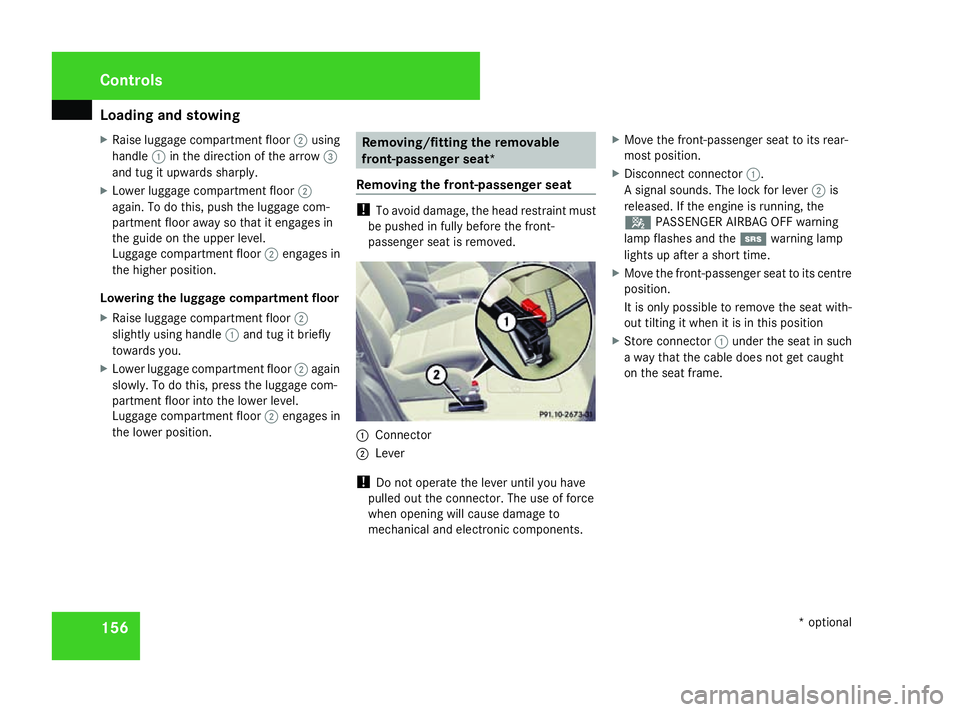
To avoid damage, the head restraint must
be pushed in fully before the front-
passenger seat is removed. 1
Connector
2 Lever
! Do not operate the lever until you have
pulled out the connector. The use of force
when opening will cause damage to
mechanical and electronic components. X
Move the front-passenger seat to its rear-
most position.
X Disconnect connector 1.
A signal sounds. The lock for lever 2is
released. If the engine is running, the
5 PASSENGER AIRBAG OFF warning
lamp flashes and the 1warning lamp
lights up after a short time.
X Move the front-passenger seat to its centre
position.
It is only possible to remove the seat with-
out tilting it when it is in this position
X Store connector 1under the seat in such
a way that the cable does not get caught
on the seat frame. Controls
* optional
169_AKB; 2; 4, en-GB
wdomann,
Version: 2.10.6
2008-07-16T08:52:06+02:00 - Seite 156 Dateiname: 6515_0315_02_buchblock.pdf; preflight
Page 160 of 305
Loading and stowing
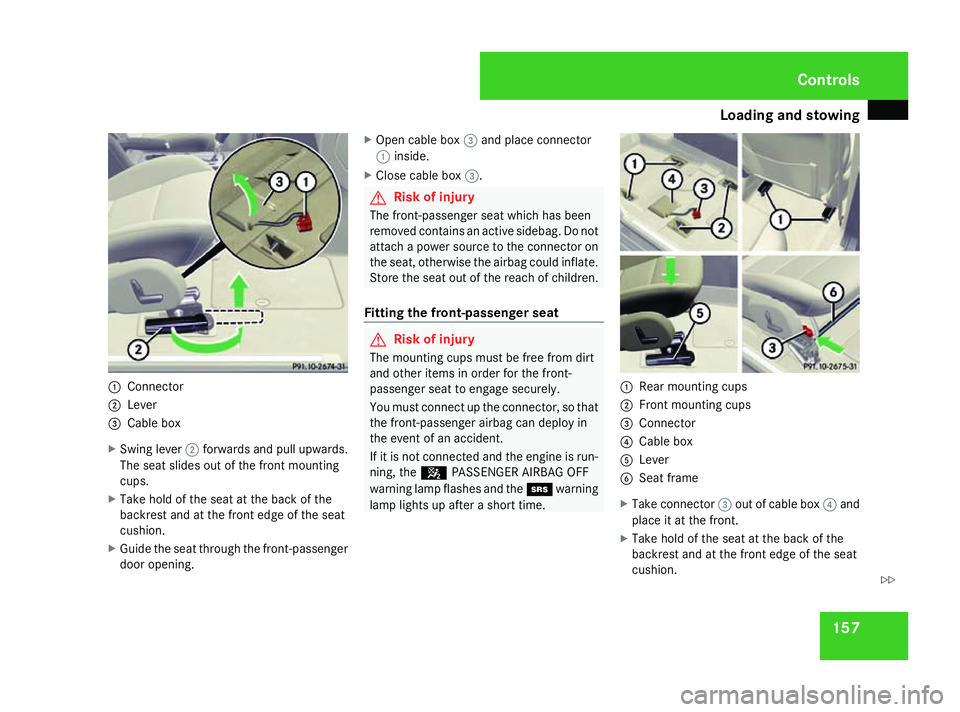
1571
Connector
2 Lever
3 Cable box
X Swing lever 2forwards and pull upwards.
The seat slides out of the front mounting
cups.
X Take hold of the seat at the back of the
backrest and at the front edge of the seat
cushion.
X Guide the seat through the front-passenger
door opening. X
Open cable box 3and place connector
1 inside.
X Close cable box 3. G
Risk of injury
The front-passenger seat which has been
removed contains an active sidebag. Do not
attach a power source to the connector on
the seat, otherwise the airbag could inflate.
Store the seat out of the reach of children.
Fitting the front-passenger seat G
Risk of injury
The mounting cups must be free from dirt
and other items in order for the front-
passenger seat to engage securely.
You must connect up the connector, so that
the front-passenger airbag can deploy in
the event of an accident.
If it is not connected and the engine is run-
ning, the 5PASSENGER AIRBAG OFF
warning lamp flashes and the 1warning
lamp lights up after a short time. 1
Rear mounting cups
2 Front mounting cups
3 Connector
4 Cable box
5 Lever
6 Seat frame
X Take connector 3out of cable box 4and
place it at the front.
X Take hold of the seat at the back of the
backrest and at the front edge of the seat
cushion. Controls
169_AKB; 2; 4, en-GB
wdomann,
Version: 2.10.6
2008-07-16T08:52:06+02:00 - Seite 157 ZDateiname: 6515_0315_02_buchblock.pdf; preflight
Page 225 of 305
Troubleshooting
222 Troubleshooting
Points to remember
G
Risk of accident and injury
If maintenance work is carried out incorrectl y this can jeopardise the operating safety of your vehicle. You risk losing control of your vehicle
and thereby causing an accident. The safety systems may also no longer be able to protect you or others as they are designed to do.
Always have maintenance work carried out at a qualified specialist workshop which has the necessary specialist knowledge and tools to
carry out the work required.
Mercedes-Benz recommends that you use a Mercedes-Benz Service Centre for this purpose.
In particular, all work relevant to safety or on safety-related systems must be carried out at a qualified specialist workshop. Warning and indicator lamps in switches and buttons
Problem Possible cause/consequence Suggested solutions
One or all of the indicator lamps
in the seat heating* button are
flashing. The seat heating* has
switched itself off automatically. The on-board voltage is too low,
because too many consumers are
switched on. X
Switch off consumers that are not required, e. g. reading lamp or
interior lighting.
Once the battery is sufficiently charged, the seat ventilation* will
switch back on automatically. The indicator lamp in the
2
button on the air-conditioning*/
Thermotronic* control panel
lights up. The cooling system can-
not be switched on. Cooling has been deactivated
due to a malfunction. X
Visit a qualified specialist workshop. Practical advice
* optional
169_AKB; 2; 4, en-GB
wdomann
,V ersion: 2.10.6
2008-07-16T08:52:06+02:00 - Seite 222 Dateiname: 6515_0315_02_buchblock.pdf; preflight