Page 171 of 487

169
2-4. Using other driving systems
2
When driving
RX400h_U
Driving assist systems
To help enhance driving safety and performance, the following systems
operate automatically in response to various driving situations. Be aware,
however, that these systems are supplementary and should not be relied
upon too heavily when operating the vehicle.
■ ABS (Anti-lock Brake System)
Helps to prevent wheel lock when the brakes are applied suddenly, or if
the brakes are applied while driving on a slippery road surface.
■Brake assist
Generates an increased level of braking force after the brake pedal is
depressed, when the system detects a panic stop situation.
■VSC (Vehicle Stability Control)
Helps the driver to control skidding when swerving suddenly or turning on
slippery road surfaces.
■Traction Control
Maintains drive power and prevents the front wheels (2WD models) or all
wheels (AWD models) from spinning wh en starting the vehicle or acceler-
ating on slippery roads.
■ EPS (Electric Power Steering)
Employs an electric motor to reduce the amount of effort needed to turn
the steering wheel.
■VDIM (Vehicle Dynamics Integrated Management)
Provides integrated control of the ABS, brake assist, VSC, traction control
and EPS systems.
Maintains vehicle stability when swerving on slippery road surfaces by
controlling the brakes, engine output, and the movement of the front
wheels.
Page 191 of 487
189
2-5. Driving information
2
When driving
RX400h_U■
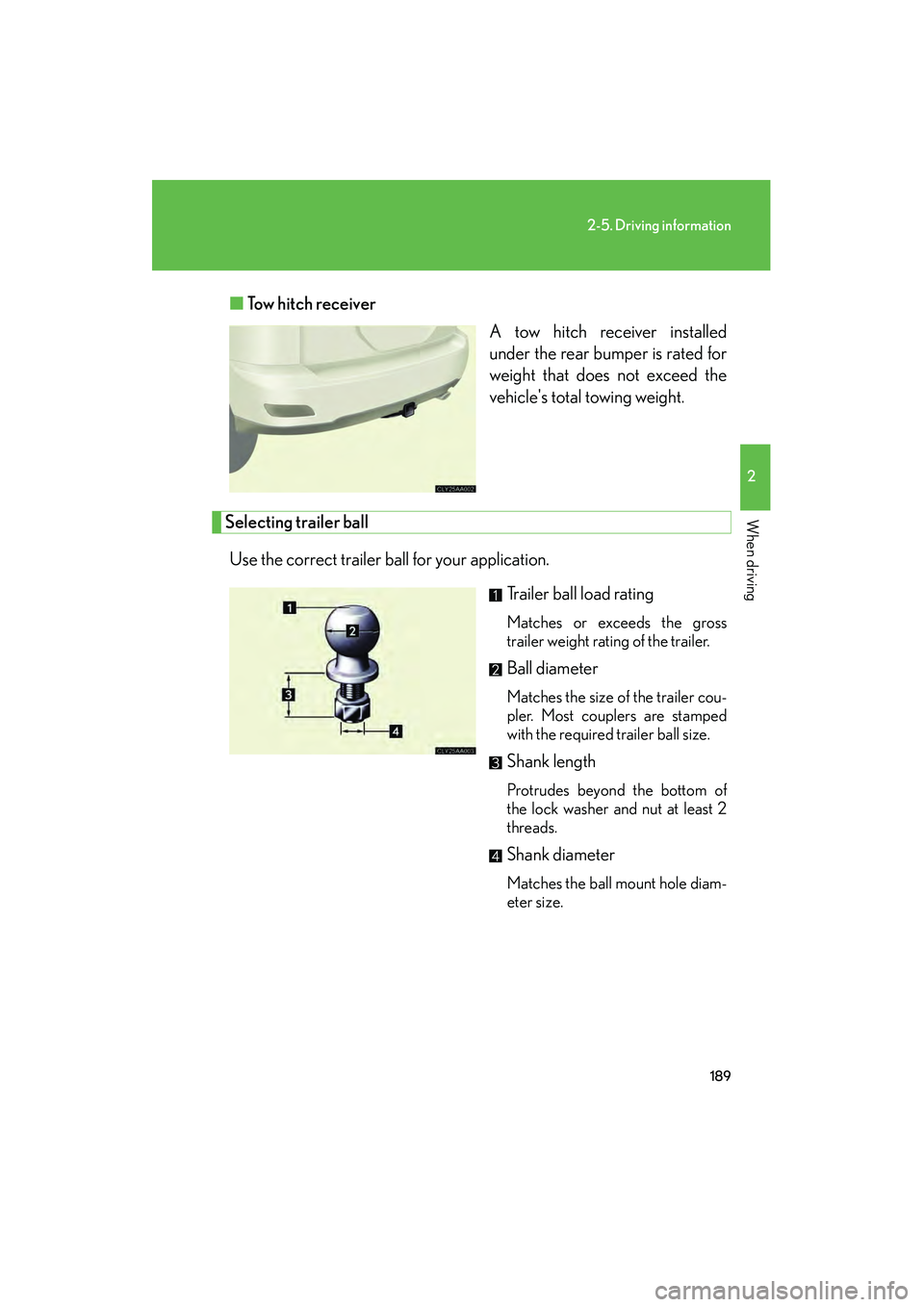
Tow hitch receiver
A tow hitch receiver installed
under the rear bumper is rated for
weight that does not exceed the
vehicle's total towing weight.
Selecting trailer ball
Use the correct trailer ball for your application. Trailer ball load rating
Matches or exceeds the gross
trailer weight rating of the trailer.
Ball diameter
Matches the size of the trailer cou-
pler. Most couplers are stamped
with the required trailer ball size.
Shank length
Protrudes beyond the bottom of
the lock washer and nut at least 2
threads.
Shank diameter
Matches the ball mount hole diam-
eter size.
Page 197 of 487

195
2-5. Driving information
2
When driving
RX400h_U●
Always place wheel blocks under both the vehicle and the trailer
wheels when parking. Apply the parking brake firmly, and put the
transmission in P. Avoid parking on a slope, but if unavoidable, do so
only after performing the following:
Apply the brakes and keep them applied.
Have someone place wheel blocks under both the vehicle and
trailer wheels.
When the wheel blocks are in place, release the brakes slowly
until the blocks absorb the load.
Apply the parking brake firmly.
Shift into P and turn off the hybrid system.
● When restarting after parking on a slope:
With the transmission in the P position, start the hybrid system. Be
sure to keep the brake pedal pressed.
Shift into D or the R position (if reversing).
Release the parking brake and brake pedal, and slowly pull or
back away from the wheel blocks. Stop and apply the brakes.
Have someone retrieve the blocks.
CAUTION
■To avoid an accident
●Do not exceed 45 mph (72 km/h) or the posted towing speed limit, whichever is
lower. As instability (swaying) of the towing vehicle-trailer combination increases
as speed increases, exceeding 45 mph (72 km/h) may cause loss of control.
●Slow down and downshift before descending steep or long downhill grades. Do
not make sudden downshifts.
●Avoid holding the brake pedal down too long or applying the brakes too fre-
quently.
This could cause the brakes to overheat and result in reduced braking efficiency.
STEP1
STEP2
STEP3
STEP4
STEP5
STEP1
STEP2
STEP3
STEP4
Page 199 of 487

Interior features3
197
RX400h_U
3-1. Using the air conditioning system and defogger ... 198
Automatic air conditioning system............. 198
Rear window and outside rear view mirror defoggers,
and windshield wiper
de-icer ................................... 204
3-2. Using the front audio system ........................... 205
Audio system type................. 205
Using the radio........................ 207
Using the CD player .............. 214
Playing back MP3 and
WMA discs........................... 220
Optimal use of the audio system .................................... 228
Using the steering wheel audio switches ....................... 231
3-3. Using the rear audio system ........................... 233
Rear seat entertainment system features ................... 233
Using the DVD player
(DVD video) .......................... 239
Using the DVD player (video CD) ............................. 246
Using the DVD player (audio CD/ CD text) .......... 248
Using the DVD player
(MP3 discs) ........................... 249
Using the video mode ............ 251 Changing the initial
setting ..................................... 253
3-4. Using the interior lights ............................. 260
Interior lights list .................... 260
• Interior lights ........................ 263
• Personal lights ..................... 264
3-5. Using the storage features ........................ 265
List of storage features......... 265
• Glove box .............................. 265
• Console boxes ..................... 266
• Coin holder........................... 268
• Overhead console.............. 269
• Cup holders .......................... 269
• Door pockets ........................ 271
3-6. Other interior features ........................ 272
Sun visors ................................. 272
Vanity mirror ........................... 273
Clock .......................................... 274
Outside temperature display...................................... 275
Multi-display light control .... 276
Power outlets ........................... 277
Seat heaters ............................ 280
Armrest .................................... 282
Floor mat .................................. 283
Luggage compartment features .................................. 284
Garage door opener ............ 287
Compass .................................. 292
Page 205 of 487
203
3-1. Using the air conditioning system and defogger
3
Interior features
RX400h_U
CAUTION
■To prevent the windshield from fogging up
Do not use during cool air operation in extremely humid weather. The differ-
ence between the temperature of the outside air and that of the windshield can
cause the outer surface of the windshield to fog up, blocking your vision.
NOTICE
■To prevent 12-volt battery discharge
Do not leave the automatic air conditioning system on longer than necessary when
the hybrid system is off.
Page 213 of 487

211
3-2. Using the front audio system
3
Interior features
RX400h_U
■When the 12-volt battery is disconnected
Station presets are erased.
■Radio antenna type
●Detachable antenna
To remove a detachable antenna, carefully turn it counterclockwise.
●Wire antenna
The radio antenna is mounted inside the rear window.
■Reception sensitivity
●Maintaining perfect radio reception at all times is difficult due to the continually
changing position of the antenna, differences in signal strength and surrounding
objects, such as trains, transmitters, etc.
●To maintain clear radio reception, do not attach metallic window tinting or other
metallic objects to the antenna wire mounted inside the rear window.
■Receiving XM® Satellite Radio
An XM
® Satellite Radio is a tuner designed exclusively to receive broadcasts pro-
vided under a separate subscription. Availability is limited to the 48 contiguous
states and 10 Canadian provinces.
●XM® subscriptions
For detailed information about XM® Satellite Radio or to subscribe:
U.S.A.
Visit on the web at www.xmradio.com
or call 1-877-515-3987.
Canada
Visit on the web at www.xmradio.ca
or call 1-877-438-9677.
●Radio ID
You will need the radio ID when activating XM
® service or reporting a problem.
Select “CH000” using , and the receiver's 8-character ID number will
appear.
●Satellite tuner
The tuner supports only Audio Services (Music and Talk) and the accompanying
Te x t I n f o r m a t i o n o f X M
® Satellite Radio.
*: Terms and services provided by XM® Satellite Radio are subject to change with-
out notice.
Page 230 of 487
228
3-2. Using the front audio system
RX400h_U
Optimal use of the audio system
Using the AUDIO CONTROL function■ Changing modes
Pressing selects the mode to be change in the following order.
BAS →MID →TRE →FA D →BAL →ASL →RSE →POS
Displays the current mode.
Changes the following set-
tings.
• Sound quality and volume balance ( →P. 229)
The sound quality and balance
setting can be changed to pro-
duce the best sound.
• Automatic Sound Levelizer
ON/OFF ( →P. 229)
• Listening position ( →P. 2 3 0 )
The sound feel setting can be
changed to produce the best
sound for each listening posi-
tion.
• Rear system lock ON/OFF
of rear seat entertainment
system
(→ P. 2 3 0 )
Page 232 of 487
230
3-2. Using the front audio system
RX400h_U■
Changing the li stening position
Turning changes the position in the following order.
■ Rear system lock ON/OFF
Turn until ON/OFF is displayed,
and press.
The rear system lock remains on,
even when the engine switch is
turned off.
DisplayListening position
DRIVERPosition best suited to the driver’s seat
FRONTPosition best suited to the driver’s and front passenger
seats
REARPosition best suited to the rear seats
ALLPosition best suited to all seats